Ultimate Trailing Stop EA

100 USD
Versione demo scaricata:
704
Pubblicato:
21 luglio 2020
Versione attuale:
2.92
Non hai trovato un robot adatto?
Ordina il tuo
su Freelance
Vai alla sezione Freelance
Ordina il tuo
su Freelance
Come acquistare un Robot di Trading o un indicatore
Esegui il tuo EA
hosting virtuale
hosting virtuale
Prova un indicatore/robot di trading prima di acquistarlo
Vuoi guadagnare nel Market?
Come presentare un prodotto per venderlo con successo

Ti stai perdendo delle opportunità di trading:
- App di trading gratuite
- Oltre 8.000 segnali per il copy trading
- Notizie economiche per esplorare i mercati finanziari
Registrazione
Accedi
Accetti la politica del sito e le condizioni d’uso
Se non hai un account, registrati
Hi Blake,
Just following up for your reply. further observing the EA when loaded to strategy tester. it looks like Trail only kicks in after 20 pips even if my threshold is set to 5 pips. I have tried all trailing mode ie pips, envelop, bolinger.
can you look at the attached set file please and let me know what wrong with it. the OLD version is way better and was doing what it should be.
Hi Vinzze,
Thanks for the question and .set file so I can check into things.
It seems the source of the confusion is that you have set the following input:
Active in profit only = Trail in profit;
When you have done so, it will not activate the 20 pip fixed trail unless it is already protecting profit.
For instance, if your GBPUSD travels 5 pips in profit (your specified threshold), then the 20 pip fixed trail would be set 15 pips below your entry; however, because you also indicated Trail in Profit mode, then that 20 pip fixed trail will not get activated because your trail SL is not protecting profit. With a 20 pip fixed trail, the trail SL will not get activated till it exceeds 20 pips in profit, which is the phenomena you were noticing.
Now, if you want to have UTS activate a 20 pip fixed trail after reaching its 5 pip threshold, regardless if the trail level is protecting profit or not, then you would simply indicate
Active in profit only = inactive;
0 00:00:11.367 Ultimate Trailing Stop EA GBPUSD,H1: Tck:40655193, lxTA:true, vesSymbPerm:
0 00:00:11.367 Ultimate Trailing Stop EA GBPUSD,H1: symb permitido 40655193
0 00:00:11.367 Ultimate Trailing Stop EA GBPUSD,H1: Tck:40643276, lxTA:true, vesSymbPerm:
0 00:00:11.367 Ultimate Trailing Stop EA GBPUSD,H1: symb permitido 40643276
...........
0 00:00:11.367 Ultimate Trailing Stop EA GBPUSD,H1: Tck:40643276, lxTA:true, vesSymbPerm:
0 00:00:11.367 Ultimate Trailing Stop EA GBPUSD,H1: symb permitido 40643276
Please check what error this is. It shows up continuously, my log file is more than 20mb.
Thank you.
0 00:00:11.367 Ultimate Trailing Stop EA GBPUSD,H1: Tck:40655193, lxTA:true, vesSymbPerm:
0 00:00:11.367 Ultimate Trailing Stop EA GBPUSD,H1: symb permitido 40655193
0 00:00:11.367 Ultimate Trailing Stop EA GBPUSD,H1: Tck:40643276, lxTA:true, vesSymbPerm:
0 00:00:11.367 Ultimate Trailing Stop EA GBPUSD,H1: symb permitido 40643276
...........
0 00:00:11.367 Ultimate Trailing Stop EA GBPUSD,H1: Tck:40643276, lxTA:true, vesSymbPerm:
0 00:00:11.367 Ultimate Trailing Stop EA GBPUSD,H1: symb permitido 40643276
Please check what error this is. It shows up continuously, my log file is more than 20mb.
Thank you.
V2.59 work fine with me now.
V2.59 work fine with me now.
I'm glad the newer versions are working fine for you now :)
I'm glad the newer versions are working fine for you now :)
Hi Pham, just to follow up, those were prints that were added to debug a problem and do not affect the EA. I removed the prints and version 2.64 now does not have them.
Hi Blake,
So I just purchased the EA, and have been playing around with it for a bit to optimize the settings. Although the EA did something funny at one point: For example, I placed a long signal for EURUSD at 1.05050 with the trailing SL at 1.05000, and a threshold of 1.05025. The SL did indeed start trailing the signal properly once it surpassed the threshold. HOWEVER, when the signal started to move short (against my signal), the SL actually moved back along with it as well, defeating the whole purpose of what a 'Trailing' stop should do (ie. only move in ONE direction). Is there something within the setting that's making it do this? Let me know when you see this, thank you!
hi blake - quick question, do I need to set a threshold for the fixed trail to also move? If so, how do i go about it because i can't seem to figure it out. Love the EA btw
Thanks for your question and compliment, and I apologize for not seeing your comment earlier.
If you don't set a threshold, the fixed trail will move immediately behind your current price. For instance, if Threshold in pips or atr multiplier or ratio=0 and Fixed Trail=20, then the stop loss will trail 20 pips below your closing price, limiting your loss to 20 pips at the onset.
However, if you indicate Threshold in pips or atr multiplier or ratio=30 and Fixed Trail=20, then the program will wait till you have achieved 30 pips in profit and then trail 20 pips below the closing price, protecting 10 pips at the onset.
Hi Blake,
So I just purchased the EA, and have been playing around with it for a bit to optimize the settings. Although the EA did something funny at one point: For example, I placed a long signal for EURUSD at 1.05050 with the trailing SL at 1.05000, and a threshold of 1.05025. The SL did indeed start trailing the signal properly once it surpassed the threshold. HOWEVER, when the signal started to move short (against my signal), the SL actually moved back along with it as well, defeating the whole purpose of what a 'Trailing' stop should do (ie. only move in ONE direction). Is there something within the setting that's making it do this? Let me know when you see this, thank you!
Can you please share with me your .set file so I can check your settings out and see why this issue happened.
HI Blake - firstly awesome EA, thanks for your work - curious to know if you have done any study on the most effective means for trailing on the NAS100 as a day trader. Thanks in advance.
I trade the SP500, which is close enough to the NAS100.
What I have found is that you probably need a threshold (in order to allow your trade to mature in profit before trailing it) and a trailing stop that is not too tight or too loose.
As for threshold, I would go with something like:
As for the trailing stop, I would go with something like a trail at 30 Percent:
=== Global Inputs
Trailing Stop Method = Percent;
=== Percent Inputs
Percent = 30;
50% trail will find you being trailed out too fast, but 30% trail will allow the trade to breath enough so that you can pick up higher profits when the trade moves more in your direction.
I have also had good success with moving average trails: 50 EMA on H1.
Can you please share with me your .set file so I can check your settings out and see why this issue happened.
HI Blake,
Appreciate the prompt reply. Attached is a screenshot of the current settings. You can also e-mail me at yasumuranao0205@gmail.com as well if you'd like. Thank you!
With version 2.70, there is now this feature:
- now when the UTS has a problem setting an SL, it will retry 5 seconds later. The SL Value on the Panel will be shown in red and if you put the mouse cursor over it, it will show the error message.
I recently purchased this EA (both MT4 & MT5) and it looks promising but it has a lot of configuration options and the blog is not very clear on few things.. My needs are fairly easy, I just want to create an order (manually or another EA) which will have the TP & SL. I want this UTS EA to then take over, add 2 more TPs. TP1 at 30% distance and 50% lot size and TP2 at 50% distance and 25% lot size of the original TP. It should move SL to BE on TP1. Finally it should remove or disable the original TP to ride the trade with trailing SL.. I believe something like this should be possible but I'm not able to find the correct settings.. would you be able to help me in this..
Thanks
Hi Blake,
Your backtest option looks very promising.
I’ve tried to configure it following your recommendations and taking a mql5 signal’s history csv file, but there’s absolutely no results appearing after I run the test.
Besides, I see the following messages at the end of the report’s journal :
- 84 bytes of leaked memory
- 1 object of type rrLstHstTrd left
- 1 undeleted objects left
Maybe I’m missing something in the settings ? Do you have a more detailed tutorial to see how it should work ?
Many thanks,
Andrei
I'm looking to buy the UTS, however I want to know if it can solve my problem.
I do trades that usually go anywhere from same day to 2 weeks to close.
Going over a single day will trigger the market close spread price widening.
My broker can increase spread up to 40 pips which will probably trigger my stop loss target at even a greater loss.
How can I combat this with UTS?
Regards,
Saeed
hi blake - quick question, do I need to set a threshold for the fixed trail to also move? If so, how do i go about it because i can't seem to figure it out. Love the EA btw
The fixed trail doesn't need a threshold. It trails x pips below the price if no threshold is indicated.
Example: If you indicate threshold=0 and fixed trail=10, then it will trail 10 pips below its current price.
Optionally ,fixed trail can work with a threshold.
Example: if you indicate threshold=20 and fixed trail=10, then it will first wait to reach 20 pips and then trail 10 pips below current price.
Hello,
I recently purchased this EA (both MT4 & MT5) and it looks promising but it has a lot of configuration options and the blog is not very clear on few things.. My needs are fairly easy, I just want to create an order (manually or another EA) which will have the TP & SL. I want this UTS EA to then take over, add 2 more TPs. TP1 at 30% distance and 50% lot size and TP2 at 50% distance and 25% lot size of the original TP. It should move SL to BE on TP1. Finally it should remove or disable the original TP to ride the trade with trailing SL.. I believe something like this should be possible but I'm not able to find the correct settings.. would you be able to help me in this..
Thanks
Ok, since you will not work with the trailing mechanism, you need to de-activate that by putting threshold=1000 (or auto-active trail on open=false AND auto-activate trail on new=false).
Your next input values will go into the the Virtual TPs:
Size Type=Percent;
TP1 Size=30;
TP1 Close Percent=50;
TP2 Size=50;
TP1 Threshold for trail=false;
TP2 Size=50
TP2 Close Percent=50; // because it works on remaining, and you want it to work on initial, 50% of remaining in this case would be 25% of initial, like you want it
Use TP as TP1 = true;
Hi Blake,
Your backtest option looks very promising.
I’ve tried to configure it following your recommendations and taking a mql5 signal’s history csv file, but there’s absolutely no results appearing after I run the test.
Besides, I see the following messages at the end of the report’s journal :
- 84 bytes of leaked memory
- 1 object of type rrLstHstTrd left
- 1 undeleted objects left
Maybe I’m missing something in the settings ? Do you have a more detailed tutorial to see how it should work ?
Many thanks,
Andrei
Hi Andrei,
When backtesting, make sure that the signal history's csv file is saved in the correct format. By default, the signal history gets saved in CSV UTF-B (Comma delimited) format when it should be in CSV (Comma delimited) format to read correctly.

I end up having to open the signal history in Microsoft Excel, and then save as CSV without the UTF-B:
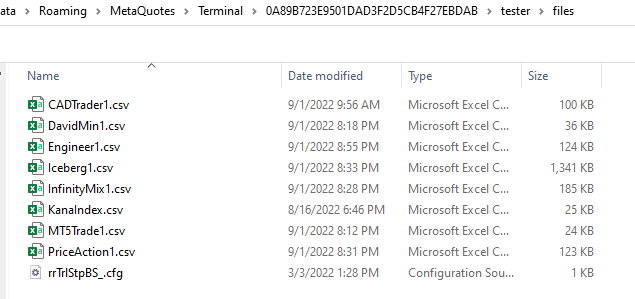
I then copy and paste that newly saved file into my tester > files folder
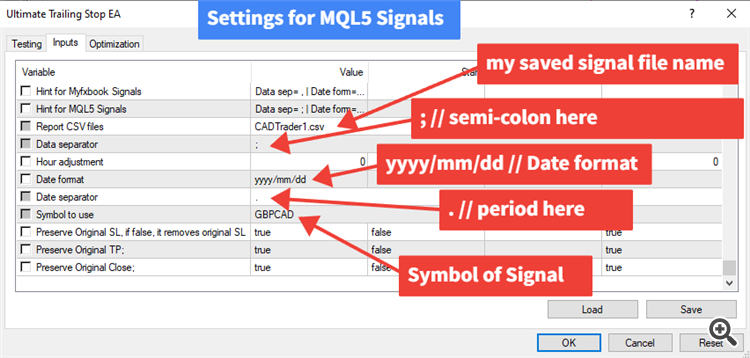
When I have UTS loaded up in the strategy tester on the signal symbol I am tested with, I put in the following settings:
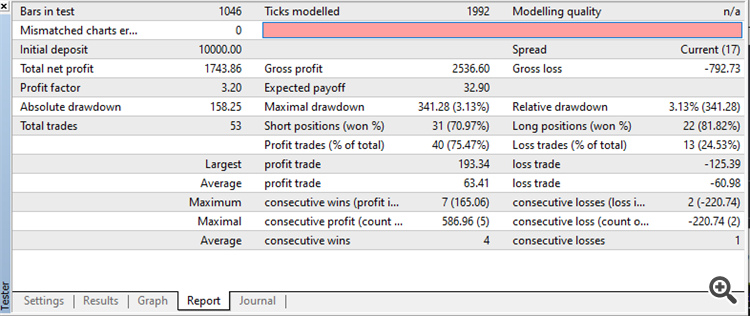
I can then run the strategy tester as is, and see if it matches the signal performance, more or less:
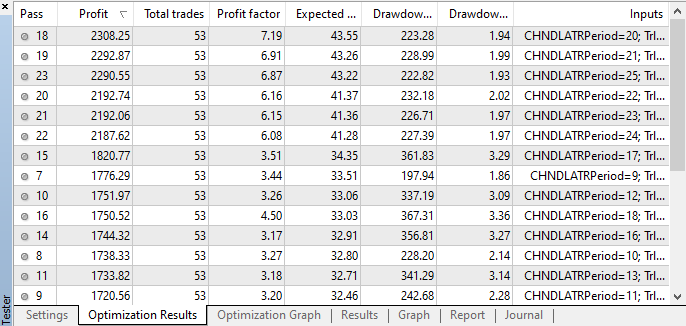
I then experiment with optimization with various trailing stops of UTS to see if I can get bettter results: