HarmoniPredict
- Indicatori
- Versione: 1.1
- Attivazioni: 5

HarmoniPredict finds harmonic price patterns, draws each one with its Price Reversal Zone (PRZ), and follows it from the first sighting to the trade's outcome. Every step has a written rule, failed setups stay on the chart, and a statistics table shows how each pattern type has behaved on your own symbols and timeframes.
Patterns
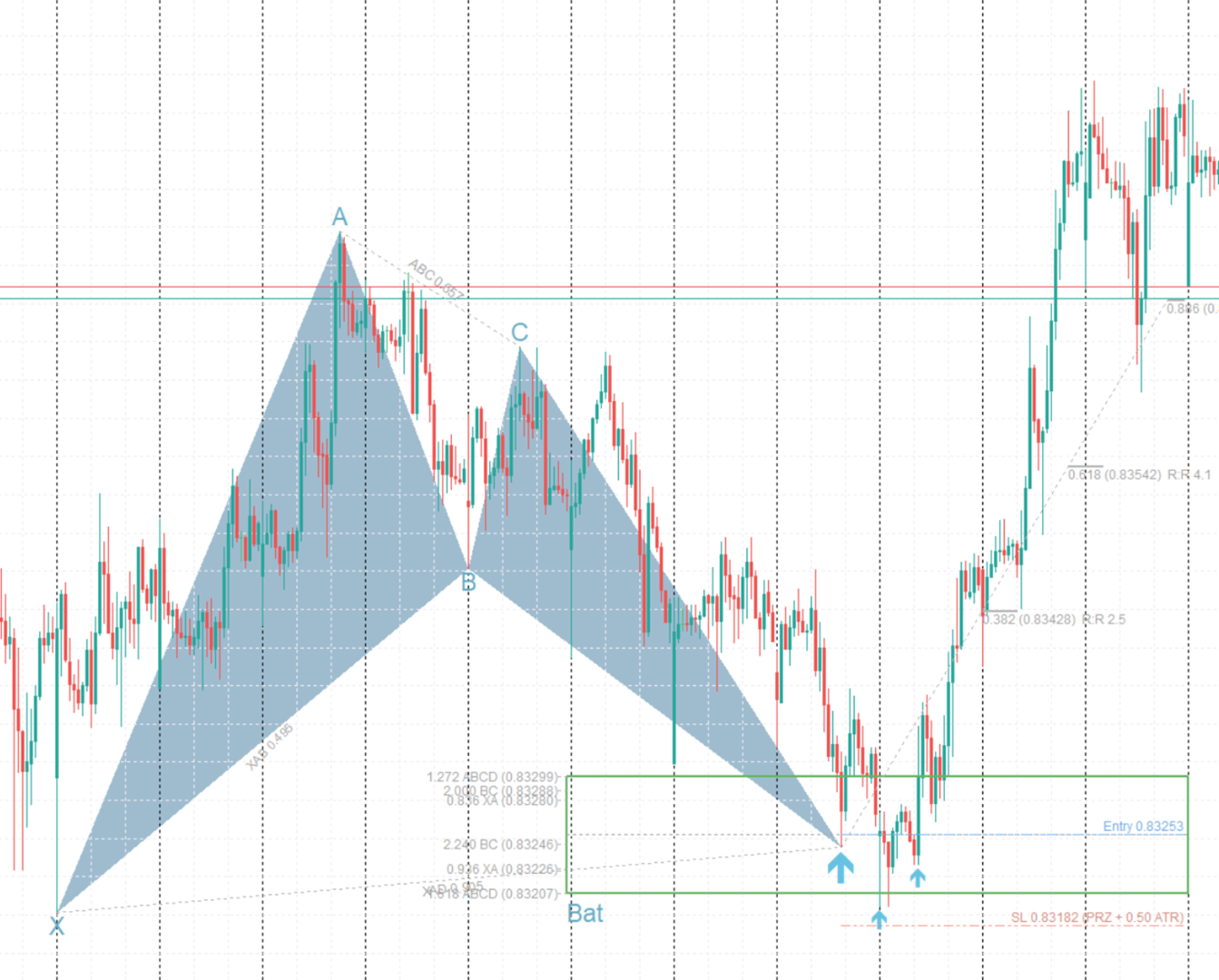
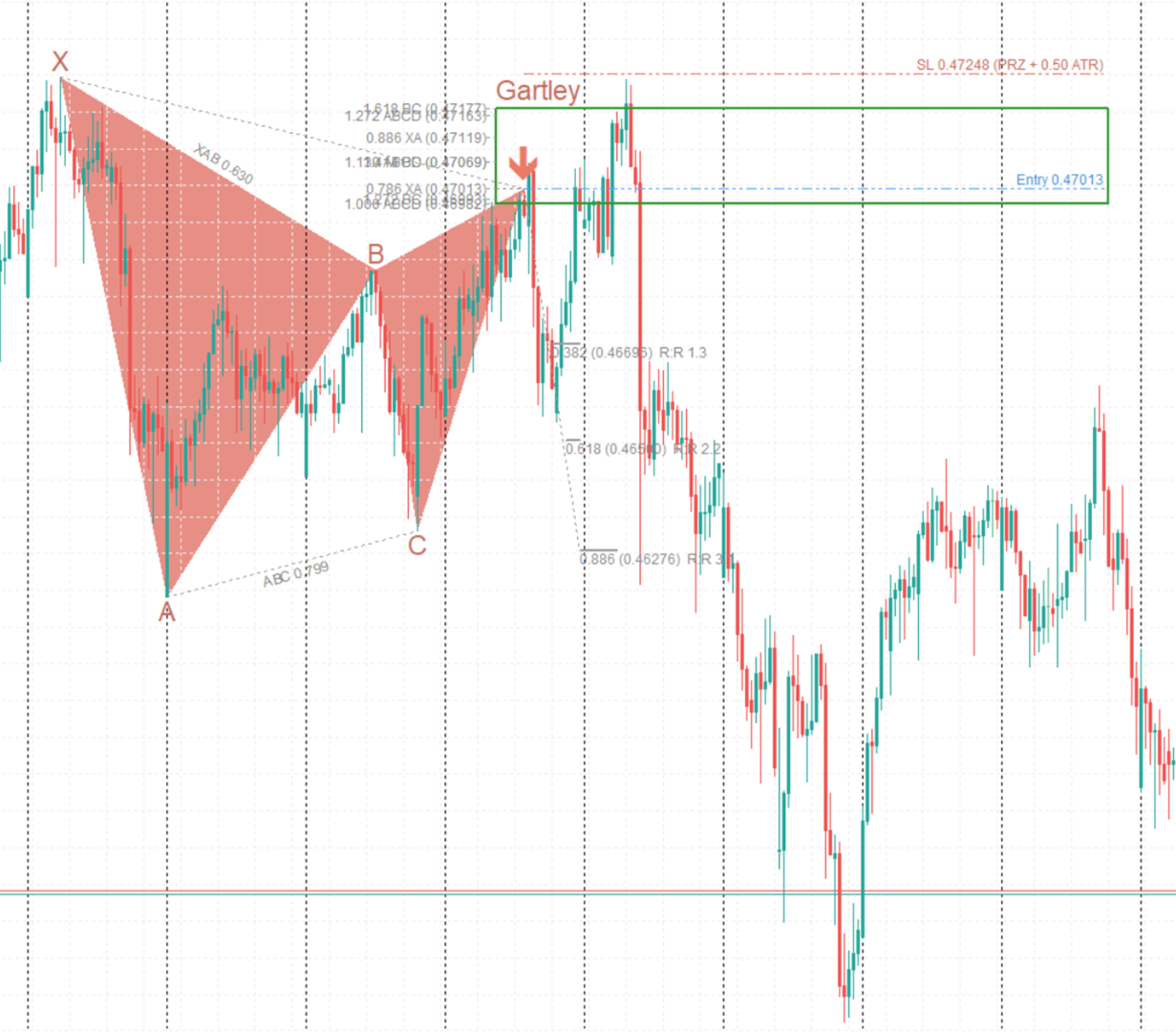
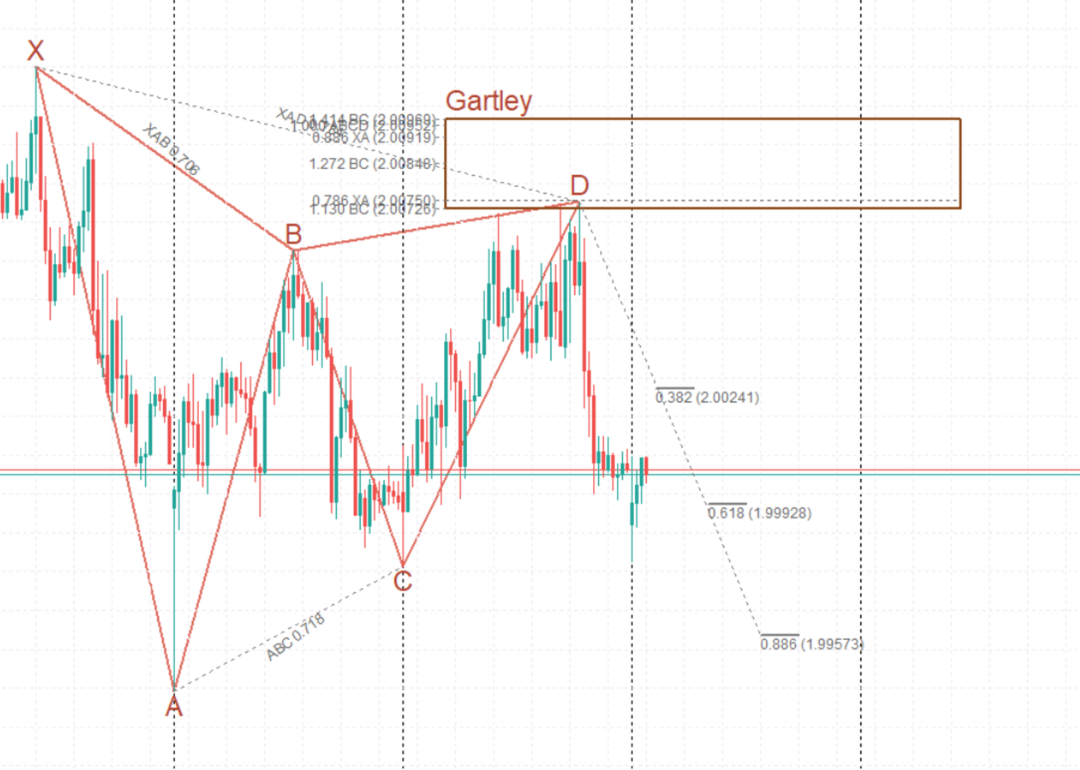
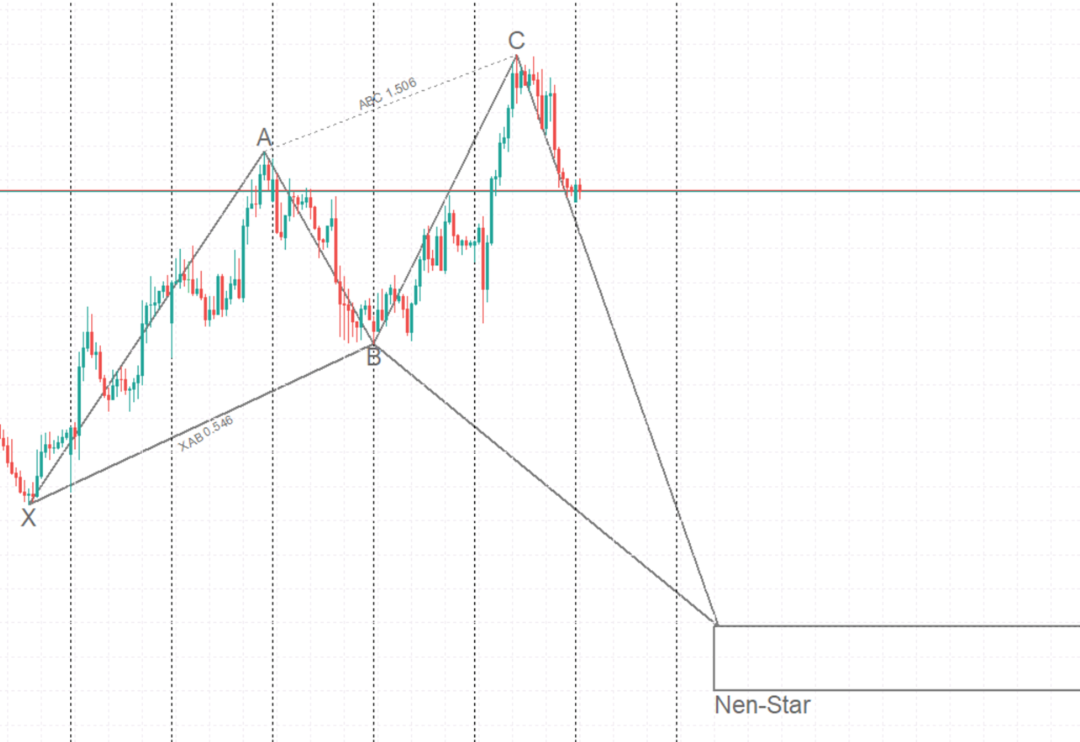
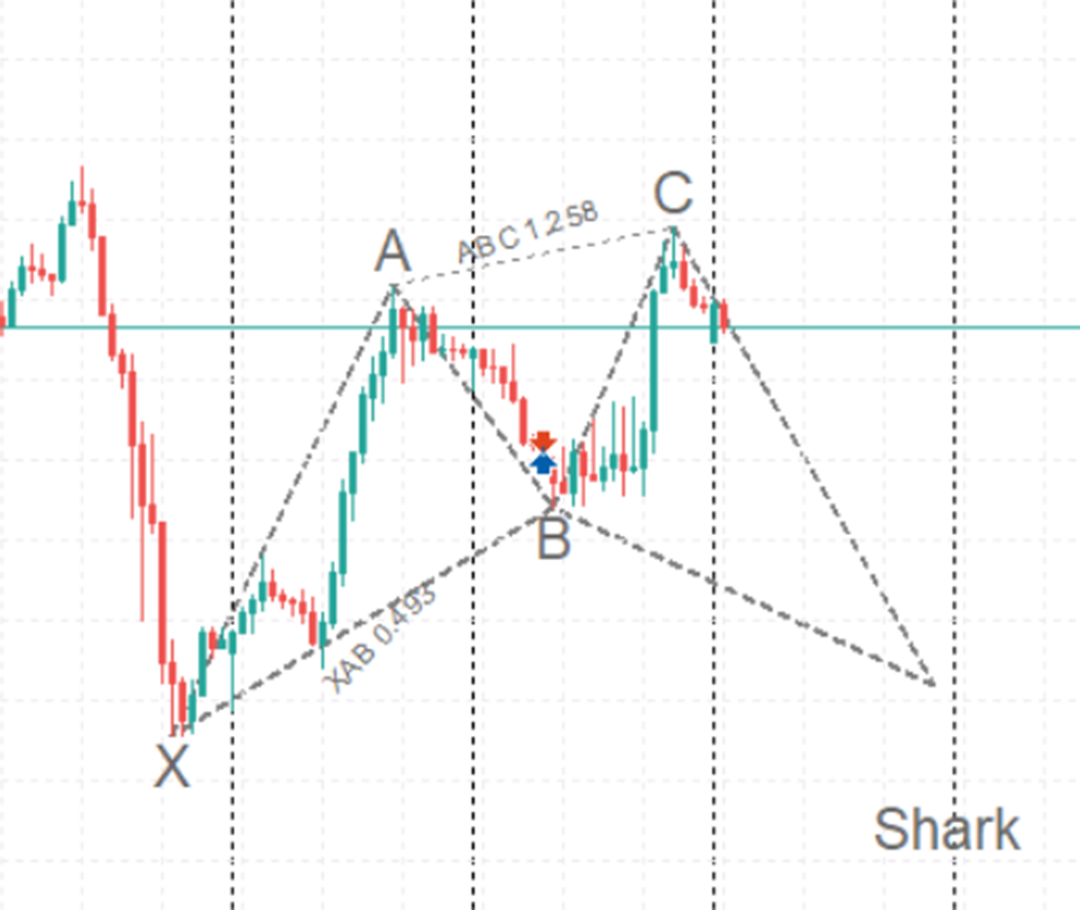
Gartley, Bat, Alt Bat, Butterfly, Crab, Deep Crab, Shark, Cypher and Nen-Star, bullish and bearish. Each pattern has its own on/off switch. Swing points come from a ZigZag run at several depths (default 8, 13, 21, 34), so both small and large structures are found. Patterns still forming are drawn at their projected D, so you see the zone before price gets there.
Price Reversal Zone in price and time
The PRZ is built from the pattern's XA level plus the AB=CD and BC projections that agree with it. It also has a time window, based on the pattern's own leg lengths, that says how long price has to react. A pattern whose zone is never reached in time is dropped.
A lifecycle with clear rules
Each pattern moves through named states:
- Possible: X, A, B and C are in place and D is projected.
- Probable: price has moved past the midpoint of BC towards D.
- Confirmed: price has reached the PRZ inside its time window.
- Active: an entry signal has appeared. By default this is a reversal candle (pinbar, engulfing or morning/evening star) that closes inside the PRZ and has a minimum size relative to ATR. Touching the XA level is an alternative.
- Complete or Failed: the trade reached its targets or the PRZ window ended, or price hit the stop.
Patterns that break before they reach the PRZ are removed. Patterns that fail after confirmation stay on the chart in grey, so the chart shows losers as well as winners.
What changes and what does not
Possible and Probable patterns are projections. They can move as new swings form and disappear if they break. Once a pattern is Active, its entry arrow, entry price, stop and D are fixed and are not redrawn. Entry signals are taken only on closed bars.
Trade levels
When a pattern activates, HarmoniPredict draws the entry, a stop loss (the far edge of the PRZ plus an ATR buffer) and three profit targets (default 0.382, 0.618 and 0.886 of AD), each with its reward-to-risk ratio. Later reversal candles inside the zone are marked as re-entry arrows.
Quality score
Every pattern gets a score from 0 to 100, built from three visible parts: how closely its ratios fit, how many PRZ levels agree, and where D sits in the zone. You can set the weights, and a minimum score to hide weaker setups.
Scanner and panel
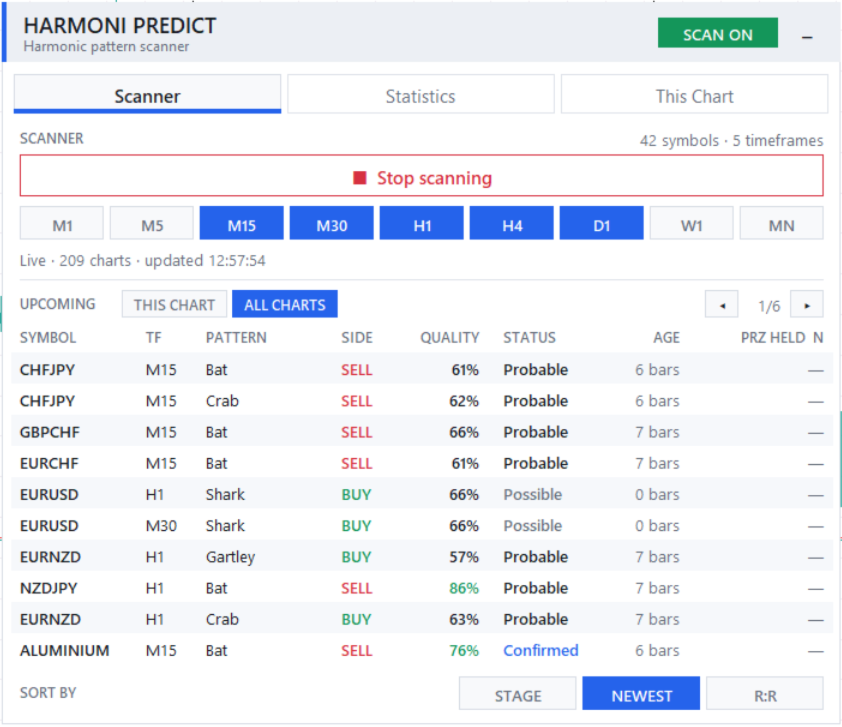
Scan the Market Watch or your own symbol list (with broker prefix and suffix) on any timeframes from M1 to MN. The panel has three tabs:
- Scanner: upcoming setups and live trades, with symbol, timeframe, pattern, side, quality, status and age. Sort by stage, newest or reward-to-risk, and click a row to open its chart.
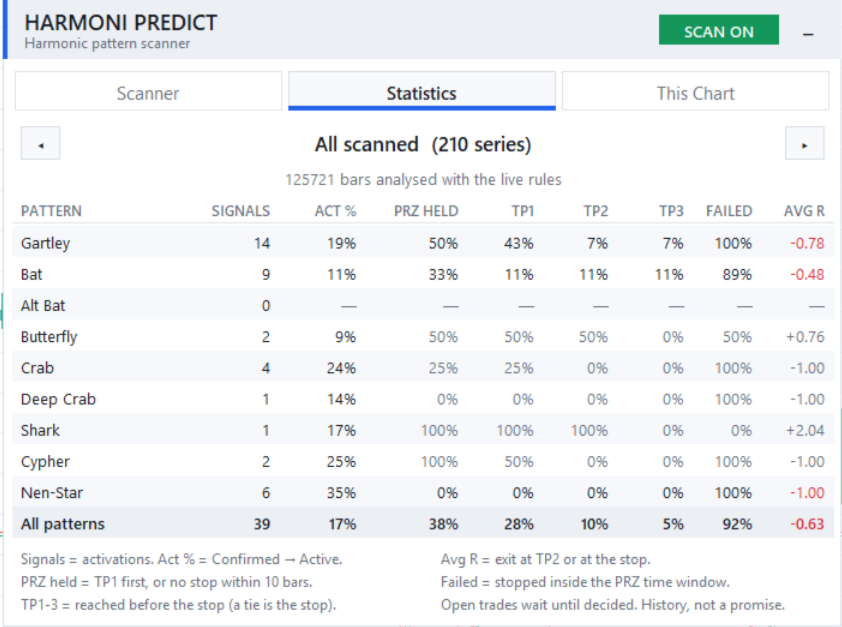
- Statistics: per pattern type, the number of signals, activation rate, how often the PRZ held, TP1 to TP3 hit rates, failures and average R.
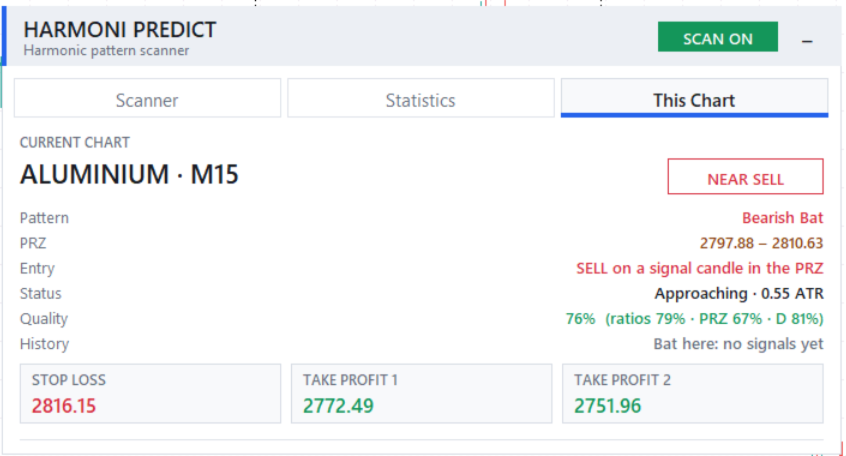
- This Chart: the nearest setup or live trade on the current chart, with its levels, quality score and history.
The statistics describe how patterns behaved over the loaded history. They are a diagnostic, not a forecast.
Alerts
Popup, sound, email and push notifications for every lifecycle step, PRZ entry, each profit target and re-entries. Each event has its own switch, alerts can wait for the bar to close, and setups that several pattern types share are merged into one message. Message templates accept placeholders such as {symbol}, {pattern}, {entry}, {sl} and {tp1}.
Keeping the chart readable
Show all patterns, only the latest, or the best N per chart. Old patterns fade into the background after their window ends, and colours adjust to stay readable on light and dark charts.
For Expert Advisor developers
Set the first input, Signals Only, to true to load a copy with iCustom that draws nothing. It writes entry, stop loss, TP1 to TP3, pattern type and quality score into buffers on each signal bar. Values are written on closed bars and never repainted. The buffer list is in the comments section.
Getting started
- Attach HarmoniPredict to one chart. One copy scans every symbol and timeframe you choose and draws on their open charts.
- At least 100 bars of history are needed. The default analysis window is 600 bars.
- To try it first, run the free demo in the Strategy Tester in visual mode. Multi-symbol scanning, email and push are not available in the tester.
Harmonic patterns do not predict price. Use the levels as part of your own analysis and risk management.
Input parameters
| Group | Input | Default | What it does |
|---|---|---|---|
| — | Signals Only | false | For EAs: no drawing, scanning, panel or alerts; only the signal buffers |
| General | Enable Logging | false | Writes warnings and errors to the Experts journal |
| Scanner | Scan Symbols From | Market Watch | Market Watch, a custom list, or this chart only |
| Scanner | Custom Symbol List | EURUSD, GBPUSD, USDJPY, AUDUSD, USDCAD, USDCHF, NZDUSD | Used when scanning a custom list |
| Scanner | Symbol Prefix / Suffix | empty | Added to each custom-list symbol for your broker |
| Scanner | Scan Timeframes | M15, H1, H4 | Starting timeframes; change them later with the panel buttons |
| Scanner | Show Panel / Panel Corner / Font Size | true / upper left / 8 | Panel display |
| Scanner | Setups per Page | 10 | Rows in the Scanner tab |
| Scanner | "Near" Within (x ATR of the PRZ) | 1.0 | How close a setup must be to count as near on the This Chart tab |
| Scanner | PRZ Held = TP1 First, or No Stop Within N Bars | 10 | Definition used by the PRZ HELD statistic |
| Scanner | Scan Other Symbols Every (seconds) | 2 | Scan interval for other symbols |
| Indicator | Amplitudes | 8, 13, 21, 34 | ZigZag depths used to find swing points |
| Indicator | Max Number of Bars to Analyze | 600 | History window (minimum 100) |
| Indicator | Show PRZ / Possible / Probable / Confirmed | true | Which states are drawn |
| Indicator | Keep Failed Patterns as Greyed History | true | Leaves failed trades on the chart in grey |
| Indicator | Hide Patterns Inside Patterns | true | Skips patterns nested inside a larger one |
| Indicator | Patterns Drawn per Chart / N for Best N | All / 3 | All, latest only, or best N |
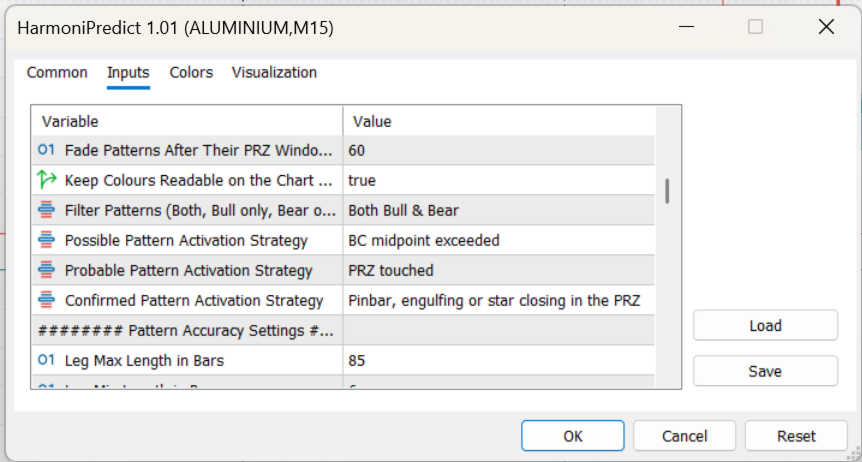
| Indicator | Fade Patterns After Their PRZ Window | 60% | How far old patterns fade (0 = off) |
| Indicator | Keep Colours Readable | true | Adjusts colours for light and dark charts |
| Indicator | Filter Patterns | Both | Both, bullish only or bearish only |
| Indicator | Possible / Probable / Confirmed Pattern Activation Strategy | BC midpoint / PRZ touched / Candle reversal | The rule that moves a pattern to its next state |
| Accuracy | Leg Min / Max Length in Bars | 6 / 85 | Rejects legs outside this range |
| Accuracy | Use Time Symmetry / Ratio | false / 0.25 | Optional time-symmetry filter |
| Accuracy | Use CD Minimum Size / Multiple of ATR | false / 3.0 | Optional minimum CD size |
| Accuracy | ATR Period | 14 | ATR used for buffers and filters |
| Accuracy | Min Quality Score | 0 | Hides patterns scoring below it (0 = off) |
| Accuracy | Quality Weights: Ratio Fit / PRZ Confluence / D Position | 40 / 30 / 30 | Weights of the score's parts |
| PRZ | PRZ Start / End ratio | 0.618 / 1.618 | Length of the PRZ time window |
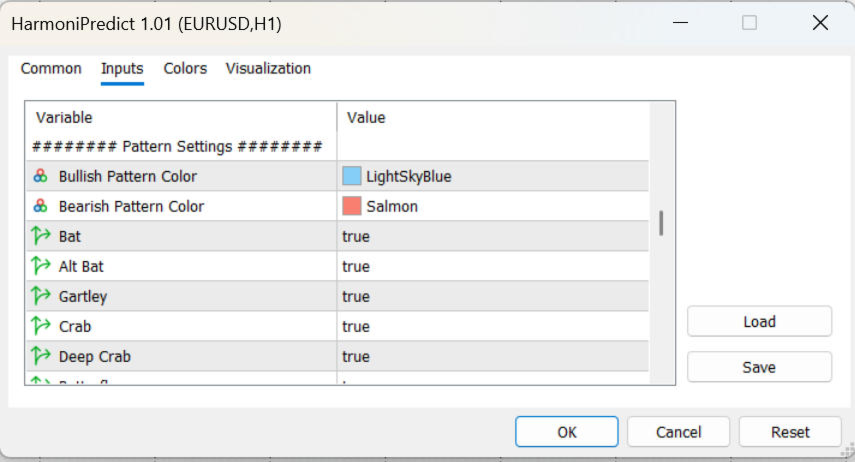
| Patterns | Bullish / Bearish Pattern Color | light sky blue / salmon | Pattern colours |
| Patterns | Bat, Alt Bat, Gartley, Crab, Deep Crab, Butterfly, Cypher, Nen-Star, Shark | true | Turn each pattern on or off |
| Profit targets | Show Profit Targets / Ratios To Plot | true / 0.382, 0.618, 0.886 | Targets as fractions of AD |
| Profit targets | Line and label style, colour, length, font size | — | Appearance |
| Risk | Show Entry, Stop Loss and R:R | true | Trade levels after activation |
| Risk | Stop Loss Buffer (multiple of ATR) | 0.5 | Distance beyond the PRZ edge |
| Risk | Stop Loss / Entry Color | tomato / dodger blue | Colours |
| Labels, Ratios, Projections | Show switches, colours, sizes, line styles | — | Point labels, ratio lines and projection lines |
| Activation | Activation enabled / arrow colours / arrow size | true | Entry arrows |
| Activation | Signal: Pinbar / Engulfing / Morning-Evening Star | true | Candle types accepted as entry signals |
| Activation | Pinbar Min Reversal Wick | 0.667 | Wick as a fraction of the bar range |
| Activation | Min Signal Candle Range (x ATR) | 0.75 | Minimum signal candle size (0 = off) |
| Activation | Raise Min Candle Range Below H1 | 0.15 | Stricter candle size on lower timeframes |
| Activation | Show Re-entry Arrows | true | Marks later reversal candles in the PRZ |
| Alerts | Enable Alerts | false | Master switch |
| Alerts | Alert Only On Closed Bars | true | Sends alerts when the bar closes |
| Alerts | Alert: Found / Probable / Confirmed / PRZ entry / Active / TP hit / Failed / Complete / Re-entry | true | One switch per event |
| Alerts | One Alert Per Setup | true | Merges pattern types on the same swings |
| Alerts | Alert caption / message / entry message | see inputs | Message templates with placeholders |
| Alerts | Alert Options | None | Popup, email, push or popup and email |
| Alerts | Use Sound Alerts / Wav files | false / alert.wav | Sound per direction |
The default Alert caption is "HarmoniPredict", which matches the product name.