Chronos Eclipse
- Experts
- Versione: 1.500
- Aggiornato: 27 ottobre 2026
- Attivazioni: 10

🔥 NEW PRODUCT LAUNCH SALE — LIMITED TIME OFFER!
🚀 CHRONOS ECLIPSE
38% OFF — ONLY $249 (Regular Price: $399)
🎉 SPECIAL LAUNCH OFFER — 2 WEEKS ONLY!
Get Chronos Eclipse for just $249 instead of $399 during this exclusive two-week launch promotion.
Don't miss this limited-time opportunity to experience the power of Chronos Eclipse at a special introductory price!
CHRONOS ECLIPSE5-in-1 AI Multi-Strategy Trading System for MetaTrader 5
YOU DO NOTHING. LET AI DO THE TRADING.
More Strategies. More Markets. More Opportunities.
CHRONOS ECLIPSE is an advanced multi-strategy Expert Advisor for MetaTrader 5, integrating five trading engines, AI-powered entry filtering, multi-asset trading, and configurable risk management into one automated trading system.
Instead of relying on a single trading approach or a single market, CHRONOS ECLIPSE combines trend scalping, price action, mean reversion, and dedicated market engines for Gold, Crypto, Oil, and Forex.
Its integrated architecture is designed to evaluate trading opportunities according to predefined rules, filter potential entries, and automate trade execution and position management.
You focus on your life. Let CHRONOS ECLIPSE handle the trading process.
Automated trading does not eliminate market risk or the need to monitor your account. CHRONOS ECLIPSE is designed to reduce the burden of manual chart monitoring while keeping risk settings and trading decisions configurable.
1. Five Integrated Trading Engines
1. Trend Scalping
Designed to identify short-term trading opportunities using trend direction and momentum.
The strategy uses indicators such as EMA and RSI to evaluate market direction and potential entry conditions. It focuses on short-term price movements rather than relying exclusively on long-term trends.
2. Price Action
Evaluates candlestick patterns and price formations to identify potential trading opportunities.
This approach provides a different perspective from indicator-driven trend strategies by focusing on how price behaves and forms patterns.
3. Mean Reversion
Looks for potential opportunities when prices move away from their usual range.
Indicators such as Stochastic and Bollinger Bands are used to evaluate price conditions and possible reversals. Mean reversion has a different trading philosophy from trend-following strategies and may behave differently in strongly trending markets.
4. Dedicated Gold Engine
Designed specifically for XAUUSD, this engine applies dedicated trading logic and AI-based evaluation to the Gold market.
Gold can exhibit substantial volatility and may respond sharply to economic news, liquidity changes, and market sentiment. The dedicated engine is designed to account for the specific trading characteristics of this market.
5. Dedicated Crypto / Oil / Forex Engine
Provides specialized trading logic for Bitcoin, crude oil, and seven major Forex pairs.
Supported target symbols include:
- Gold: XAUUSD
- Crypto: BTCUSD
- Oil: WTI / USOIL
- Forex: EURUSD, GBPUSD, USDJPY, USDCHF, USDCAD, AUDUSD, NZDUSD
The architecture is designed for a ten-symbol configuration. Actual availability depends on the broker's instruments, symbol naming conventions, and trading conditions.
2. AI-Powered Entry Filtering
CHRONOS ECLIPSE incorporates ONNX-based AI models into its trading architecture.
The AI filtering system evaluates potential entries according to configured probability thresholds and risk-related conditions. These filters work alongside the trading logic rather than replacing every strategy rule.
Key capabilities include:
- AI model activation control
- AI-based entry filtering
- Strategy-specific probability thresholds
- Gold entry confirmation threshold
- Adverse-excursion risk filtering
- Volatility and spread-to-ATR filtering
- Choppiness Index filtering
AI is not a guarantee of profitable trades. Its purpose is to provide additional evaluation within the EA's predefined trading framework.
3. Advanced Market Filters
JEV Gate - Volatility and Spread Protection
Evaluates volatility and spread-related trading conditions to help filter unsuitable market environments.
Choppiness Gate - Market Condition Filter
Uses the Choppiness Index to evaluate market conditions and filter entries according to the configured threshold.
Entry Risk Gate
Applies a configured limit to an AI-related adverse-excursion risk measure.
These filters are designed to help control when the EA considers trading opportunities. They cannot eliminate false signals, slippage, gaps, or unexpected market movements.
4. Multi-Symbol Trading from One Chart
CHRONOS ECLIPSE supports a master mode designed to manage multiple symbols from a single chart.
Features include:
- Multi-symbol operation from one chart
- Multi-symbol operation in the Strategy Tester
- Automatic broker suffix resolution
- Guards for unavailable symbols
- Configurable market-engine activation
- Automated entry and position management
The broker suffix option supports automatic detection, with examples including m , p , .a , and pro . If the broker uses a different naming convention, manual configuration or additional verification may be necessary.
The EA cannot guarantee that every target instrument is available at every broker.
5. Integrated Risk Management
CHRONOS ECLIPSE offers configurable trade sizing and position management.
- Fixed-lot trading
- Balance-based or equity-based compound sizing
- Risk-percentage-based sizing
- Minimum and maximum lot limits
- ATR-based take-profit and stop-loss distances
- Maximum positions per trading engine
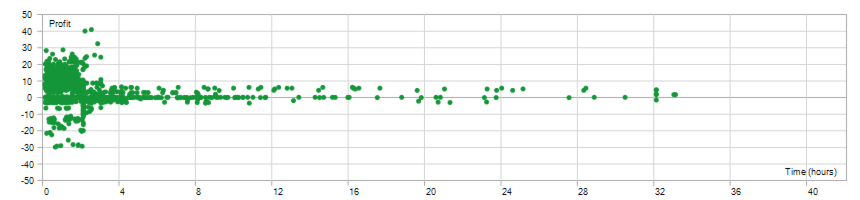
- Maximum holding time
- Emergency dollar-based stop-loss safeguard
- Maximum spread filter
- Individual lot-weight multipliers for the three configurable strategy engines
These settings allow users to adapt the system to their own account size and risk preferences. They should be tested carefully before live trading.
6. Complete Input Parameters Guide
The following guide explains the user-facing input settings and their default values in CHRONOS ECLIPSE v1.0.
Important: The values below are the defaults defined in the supplied source code. They are not universally optimal settings, and changing a parameter may alter the EA's behavior and backtest results.
Group 1 - Master AI and Gate Filters
- InpUseAIModel (Default: true ) - Enables or disables the embedded ONNX AI model system. Disabling it changes the AI model processing path; it does not mean every other trading filter is automatically disabled.
- InpUseAIEntryFilter (Default: true ) - Enables or disables the AI entry-filtering gate. When enabled, entry decisions are subject to the configured AI filtering logic.
- InpMinWinProb_TrendScalp (Default: 0.8310 ) - Minimum AI probability threshold used for the Trend Scalping strategy. The default corresponds to 83.10% on a 0-1 probability scale. It is a model threshold, not a guaranteed real-world win rate.
- InpMinWinProb_Pattern (Default: 0.8250 ) - Minimum AI probability threshold for the Price Action strategy. The default corresponds to 82.50% on a 0-1 scale.
- InpMinWinProb_SpectraV46 (Default: 0.5250 ) - Gold AI confirmation probability threshold. The default is 52.50% on a 0-1 scale. This is an internal model threshold, not a forecast of guaranteed profitability.
- InpMaxEntryRisk_Gate (Default: 0.1880 ) - Configures the maximum allowed value for the AI adverse-excursion risk measure. Lower values may make the filter more restrictive, depending on the model's output and implementation.
- InpUseJevGate (Default: true ) - Enables or disables the volatility and spread-to-ATR filter.
- InpUseChoppinessGate (Default: true ) - Enables or disables the Choppiness Index filter intended to help avoid unsuitable or whipsaw-prone conditions.
- InpMaxChoppiness (Default: 61.5 ) - Maximum allowed Choppiness Index value for the 14-bar measurement. The filter uses this threshold when enabled.
- InpOneChartAllSymbols (Default: true ) - Enables the master multi-symbol operating mode intended to manage the target markets from one chart.
- InpMultiSymbolInTester (Default: true ) - Enables the multi-symbol trading mode in the Strategy Tester. Tester data and symbol availability still affect the results.
- InpBrokerSuffix (Default: "auto" ) - Sets the broker symbol suffix handling. "auto" attempts automatic detection of suffixes such as m , p , .a , or pro .
- Gold engine activation (Default: true ) - Enables or disables the dedicated Gold engine for XAUUSD.
- Bitcoin engine activation (Default: true ) - Enables or disables the dedicated BTCUSD engine.
- Oil engine activation (Default: true ) - Enables or disables the dedicated WTI / USOIL engine.
- Seven-pair Forex engine activation (Default: true ) - Enables or disables the dedicated Forex engine for the seven supported currency pairs.
- InpMaxPositionsPerLogic (Default: 5 ) - Maximum open positions per engine. A value of 0 means unlimited according to the source-code comment. This is not necessarily a global account-wide position limit.
- InpMaxHoldMinutes (Default: 120 ) - Maximum holding time in minutes for the applicable position-management logic. A value of 0 means unlimited according to the source-code comment.
- InpMaxSL_Dollars (Default: 60.0 ) - Emergency hard stop-loss setting expressed in account-dollar terms per 0.01 lot. The actual monetary impact depends on instrument specifications, volume, and implementation.
Recommended approach: Begin by retaining the default AI and market-filter settings. Change probability thresholds or risk filters only after controlled testing, because stricter thresholds can change the number and distribution of trades.
Group 2 - Trading Engines Activation
- Enable_TrendScalp (Default: true ) - Activates or deactivates the Trend Scalping strategy, which uses EMA momentum and RSI-related logic.
- Enable_PriceAction (Default: true ) - Activates or deactivates the Price Action strategy, which evaluates candlestick patterns.
- Enable_MeanRevert (Default: true ) - Activates or deactivates the Mean Reversion strategy, which uses Stochastic and Bollinger Bands-related logic.
These three switches allow users to control the activation of the corresponding strategy engines. The dedicated Gold, Bitcoin, Oil, and Forex engine switches are located in Group 1.
Disabling a strategy may change the total number of trades and the overall portfolio behavior. Backtest results obtained with all engines enabled should not be assumed to apply to a configuration with some engines disabled.
Group 3 - Take-Profit and Stop-Loss Settings
- InpTakeProfit_ATR (Default: 2.0 ) - Take-profit distance multiplier based on ATR. The default target distance is 2.0 times the applicable ATR measurement.
- InpStopLoss_ATR (Default: 4.0 ) - Stop-loss distance multiplier based on ATR. The default stop distance is 4.0 times the applicable ATR measurement.
ATR-based distances adapt to measured market volatility rather than using a single fixed price distance for every condition.
The actual price distance depends on the ATR value and the relevant instrument. A stop-loss is not a guarantee that the final realized loss will equal the intended amount; gaps and execution conditions can affect the result.
Group 4 - Money Management and Lot Sizing
- InpMoneyManagementMode (Default: MM_FIXED_LOT ) - Selects the lot calculation mode. Available modes are Fixed Lot, Compound by Balance, Compound by Equity, and Compound by Risk Percentage.
- FixedLot (Default: 0.01 ) - Base lot size used in Fixed Lot mode. Actual minimum volume and volume increments are subject to broker specifications.
- InpBalancePer001Lot (Default: 1000.0 ) - Balance step used for compound sizing, expressed as account currency units per 0.01 lot. The default is 1,000 account-currency units per 0.01 lot.
- InpRiskPercent (Default: 1.0 ) - Risk percentage input used in Risk Percentage mode. The default is 1.0%. Actual risk depends on the EA's sizing calculation, stop distance, instrument value, and execution.
- InpMinLot (Default: 0.01 ) - Minimum permitted lot size in the EA's lot-sizing logic. The broker may impose a different minimum.
- InpMaxLot (Default: 10.0 ) - Maximum permitted lot size in the EA's lot-sizing logic. This is a software limit, not a recommendation to trade at 10 lots.
- MaxSpreadPoints (Default: 850 ) - Maximum spread threshold in points. Entries may be filtered when the spread exceeds the configured limit. The meaning of a point depends on the instrument's price precision and broker settings.
- LotMult_TrendScalp (Default: 1.0 ) - Lot-weight multiplier for the Trend Scalping strategy. A value of 1.0 applies the baseline weighting.
- LotMult_PriceAction (Default: 1.0 ) - Lot-weight multiplier for the Price Action strategy. A value of 1.0 applies the baseline weighting.
- LotMult_MeanRevert (Default: 1.0 ) - Lot-weight multiplier for the Mean Reversion strategy. A value of 1.0 applies the baseline weighting.
Money Management Modes
- Fixed Lot ( MM_FIXED_LOT ): Uses the configured fixed base lot.
- Compound by Balance ( MM_COMPOUND_BALANCE ): Calculates position sizing based on account balance and the configured balance step.
- Compound by Equity ( MM_COMPOUND_EQUITY ): Uses equity/free-margin-related sizing logic as implemented by the EA.
- Compound by Risk Percentage ( MM_COMPOUND_RISK_PERCENT ): Uses the configured risk percentage in the position-sizing calculation.
The four modes are alternatives; the selected mode determines which sizing method is used. Users should verify the resulting volume on a demo account before live operation, especially when changing from fixed lot to a compound mode.
The lot-weight multipliers apply to the three configurable strategy engines. Do not assume that they independently control the volume of every dedicated market engine.
Group 5 - System Identifiers and Logging
- Magic_TrendScalp (Default: 987002 ) - Magic Number used to identify trades associated with the Trend Scalping strategy.
- Magic_PriceAction (Default: 987003 ) - Magic Number used to identify trades associated with the Price Action strategy.
- Magic_MeanRevert (Default: 987001 ) - Magic Number used to identify trades associated with the Mean Reversion strategy.
- Comment_TrendScalp (Default: "CHRONOS_TS" ) - Order comment assigned to the Trend Scalping strategy's trades.
- Comment_PriceAction (Default: "CHRONOS_PA" ) - Order comment assigned to the Price Action strategy's trades.
- Comment_MeanRevert (Default: "CHRONOS_MR" ) - Order comment assigned to the Mean Reversion strategy's trades.
- EnableDebugLogs (Default: false ) - Enables or disables verbose debug output in the MT5 Journal. Enable this when troubleshooting; leave it disabled for ordinary operation unless additional logging is needed.
Magic Numbers help distinguish EA trades from other trades and strategies. If multiple EAs or instances operate on the same account, ensure their identifiers are configured appropriately to avoid unwanted overlap in trade management.
Order comments are identification labels. They do not change the strategy's profitability or risk by themselves.
Group 6 - On-Screen Dashboard
- InpShowDashboard (Default: true ) - Enables or disables the on-chart HUD dashboard. Disable it if you prefer a simpler chart display.
The dashboard is a display feature. Turning it off should not be interpreted as disabling the underlying trading strategies.
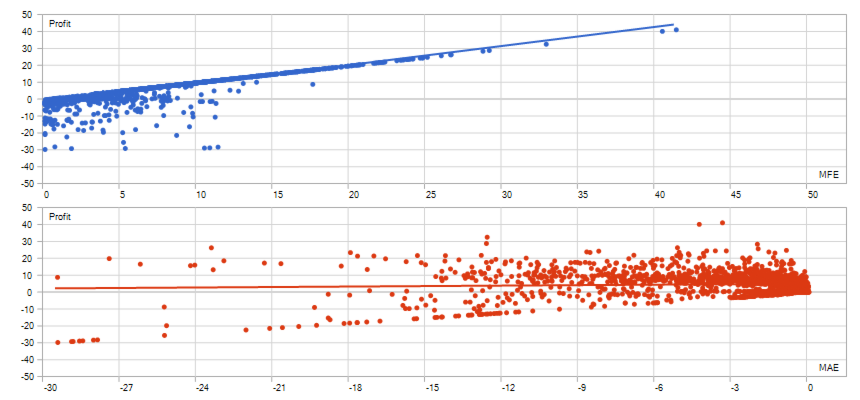
7. Backtest Performance
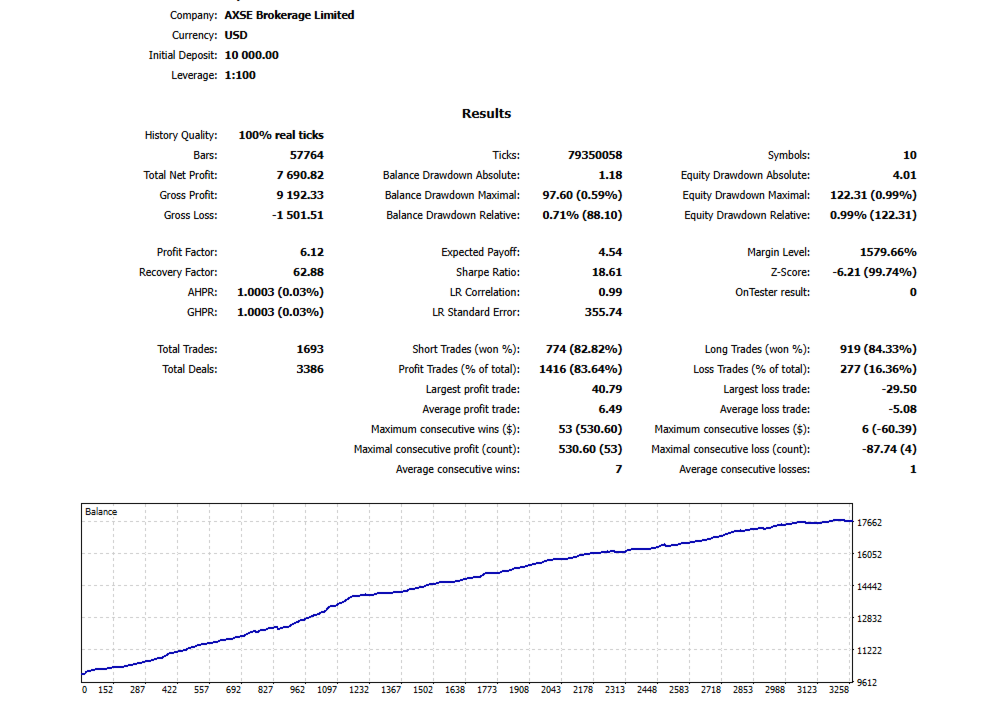
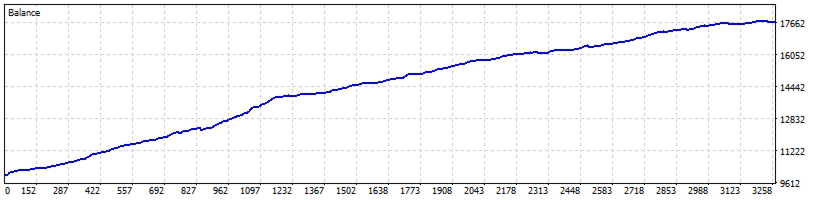
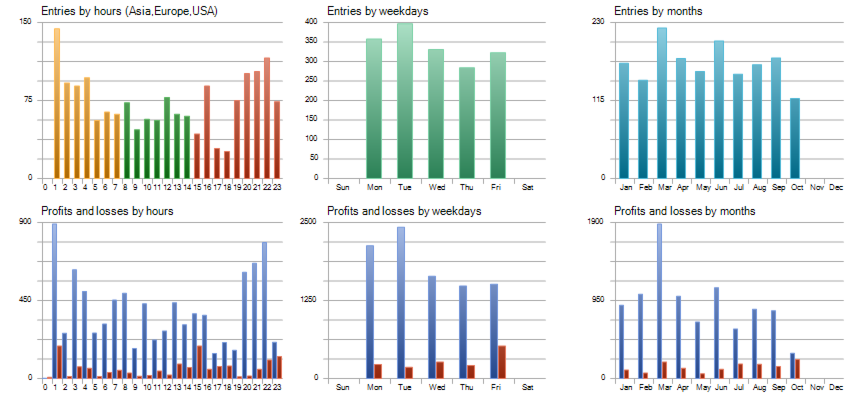
The supplied tester report for CHRONOS ECLIPSE v1.0 recorded the following results.
Test period: January 1, 2026 - October 25, 2026
Timeframe: M5
Tick model: 100% real ticks
Initial deposit: $10,000
- Net Profit: $7,690.82
- Gross Profit: $9,192.33
- Gross Loss: -$1,501.51
- Profit Factor: 6.12
- Maximum Equity Drawdown: $122.31
- Maximum Relative Equity Drawdown: 0.99%
- Maximum Balance Drawdown: 0.59%
- Total Trades: 1,693
- Winning Trades: 1,416
- Losing Trades: 277
- Win Rate: 83.64%
- Recovery Factor: 62.88
- Sharpe Ratio: 18.61
In this test, net profit was $7,690.82 against an initial deposit of $10,000, equivalent to approximately 76.91% of the initial deposit over the tested period.
These figures are historical simulation results under specific test conditions. They do not guarantee future performance or equivalent live-trading results. Actual performance can differ due to spreads, slippage, commissions, execution quality, broker specifications, market conditions, and parameter changes.
Results may also differ when engines are disabled or input parameters are changed.
8. Who Is CHRONOS ECLIPSE For?
CHRONOS ECLIPSE may be suitable for traders who:
- Want multiple trading approaches integrated into one EA
- Want exposure to Gold, Bitcoin, Oil, and Forex through an automated system
- Are interested in AI-assisted entry filtering
- Want to reduce the burden of continuous manual chart monitoring
- Prefer configurable lot sizing and position-management settings
- Want to explore multi-symbol trading through MetaTrader 5
Users should understand the risks of leveraged trading and be comfortable configuring, testing, and supervising automated trading software.
9. The CHRONOS ECLIPSE Philosophy
YOU DO NOTHING. LET AI DO THE TRADING.
You do not need to spend every moment watching charts or manually searching for every entry opportunity.
CHRONOS ECLIPSE automates market evaluation, applies its configured entry rules, and manages trades according to the system's programmed logic and selected settings.
Five trading engines. Multiple markets. AI-powered entry filtering. Configurable risk management.
One integrated trading system.
CHRONOS ECLIPSE - Your AI Trading Partner.
Automate. Analyze. Trade with a Plan.
Important Risk Disclosure
CHRONOS ECLIPSE is an automated Expert Advisor for MetaTrader 5. Trading leveraged financial instruments involves substantial risk, including the possible loss of all or part of your trading capital. Backtest results are historical simulations and do not guarantee future performance. Results may vary depending on broker conditions, execution, spreads, slippage, commissions, symbol specifications, market conditions, and user settings. Always validate the EA on a demo account and use risk settings appropriate to your circumstances before live trading. Automated trading does not eliminate the need for supervision or risk management.