Manzano Index Intelligence
- Indicatori
-
Patricia Manzano Gomez
 Founder of Manzano Trading | Algorithmic Trading Developer | Quantitative Research & Financial Technology
I am the founder of Manzano Trading, a company specializing in the development of professional trading software, algorithmic systems, and advanced financial market analysis tools. - Versione: 1.0
- Attivazioni: 5
Manzano Index Intelligence
Analysis of the underlying constituents of the Nasdaq 100, S&P 500 and Dow Jones 30 for MetaTrader 5
It is not just about knowing where an index is moving, but understanding what is driving that move.
BEFORE BUYING OR TRYING: CHECK YOUR BROKER
The indicator requires your broker to provide both the index CFD and CFDs for its constituent stocks within the same MT5 account. Having a Nasdaq 100, S&P 500 or Dow Jones 30 CFD does not necessarily mean the broker also offers its constituents: some brokers provide nearly all US stocks, while others offer only a subset.
Run the free Manzano Index Coverage Checker before trying or purchasing the indicator. Drag it onto any chart. For each index, it displays the detected index CFD and its broker-specific symbol, the number of available stocks, the percentage of index weight covered, the most important missing stocks and a clear verdict:
- Compatible: 85% or more of the index weight, with the index CFD detected. The indicator can operate with its full level of detail.
- Limited: from 60% to less than 85%. The indicator operates, but its readings are approximate because important companies are missing.
- Not compatible: less than 60% of the index weight, or no index CFD detected. We do not recommend using it with that broker.
What matters is covered index weight, not simply the number of stocks: having 77 of the Nasdaq 100's 101 constituents may represent 88% of the index if the largest companies are available. Coverage is assessed separately for each index: a broker may be compatible with the Nasdaq 100 but not the S&P 500.
Free download, installation guide and examples: Broker Compatibility Checker and Guide.
Index and stock symbol names are detected automatically (NDX, NAS100, US100, USTEC, Nas100.cash, US500, SPX500, US30, DJ30, AAPL, AAPL.US, #AAPL, AAPL_US...). If your broker uses unusual names, you can specify them in the inputs.
WHAT IS REALLY HAPPENING BEHIND AN INDEX?
An index price is the combined result of hundreds of companies, but it does not reveal which companies are moving it, how many are participating or whether the broader market supports the move. An index can rise while most of its stocks fall because three or four giants are driving it. It can also trade sideways while its constituents move sharply in opposite directions.
These are particularly relevant situations for index traders: a rally supported by the broad market generally has a different foundation from one sustained by only a handful of names. When the price rises but fewer stocks participate, the move is losing breadth.
Manzano Index Intelligence looks inside the index and displays this information in real time, calculated within MetaTrader 5 using your own broker's data. No DLLs, external connections or additional files are required.
TRADING HOURS
The panel uses the US regular cash session (9:30 a.m.–4:00 p.m. New York time), automatically converted to your broker's server time, including US and European daylight saving time changes.
If your broker quotes stocks during premarket or after-hours trading, the indicator begins working in premarket: it reads the stocks trading outside regular hours and shows their movement since the previous regular-session close.
If your broker does not provide out-of-hours stock quotes, outside the regular session you will see how far the index has moved since the cash close and a complete snapshot of the previous session. Live internal metrics begin at the New York open.
As in financial news and professional terminals, all percentage changes are measured from the previous regular-session close (4:00 p.m. New York time). They may therefore differ from the daily change shown by your broker, which often starts at server midnight. Hover over the header figure to see both reference points.
FIVE MAIN VIEWS
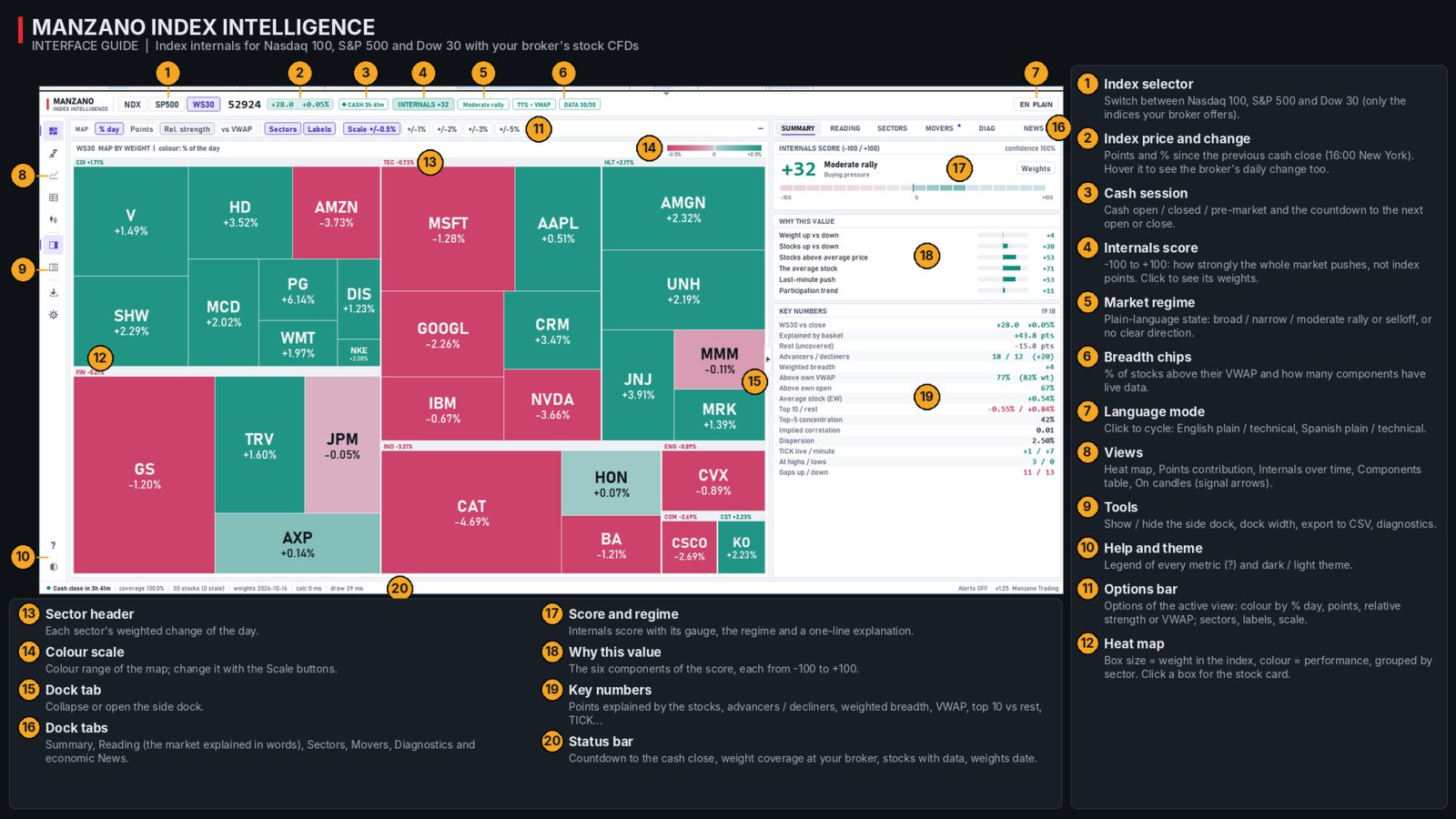
- Heatmap. Each company appears as a tile sized according to its index weight and grouped by sector. Color can represent its daily percentage change, index-point contribution, relative strength versus the index or distance from VWAP. At a glance, see where the market's strength or weakness is concentrated and whether it affects the stocks that carry the most weight. Click a tile to open the stock's detail view and intraday chart.
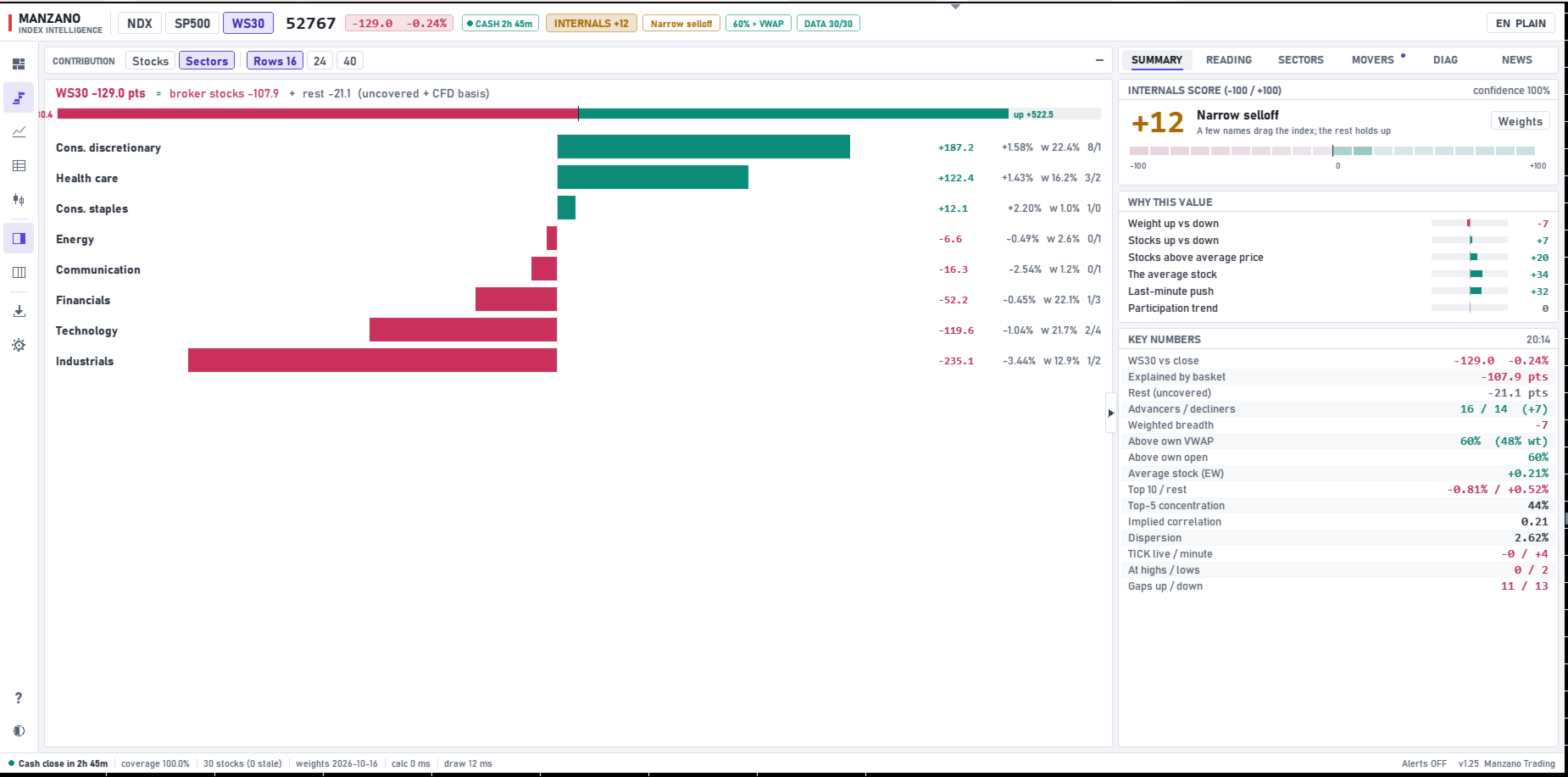
- Contribution. Bars show how many index points each stock adds or subtracts, ranked from largest positive to largest negative contribution. The header displays the index's point movement, the portion explained by the stocks available from your broker and the remainder. Quickly identify what is moving the index. A sector-level view is also available.
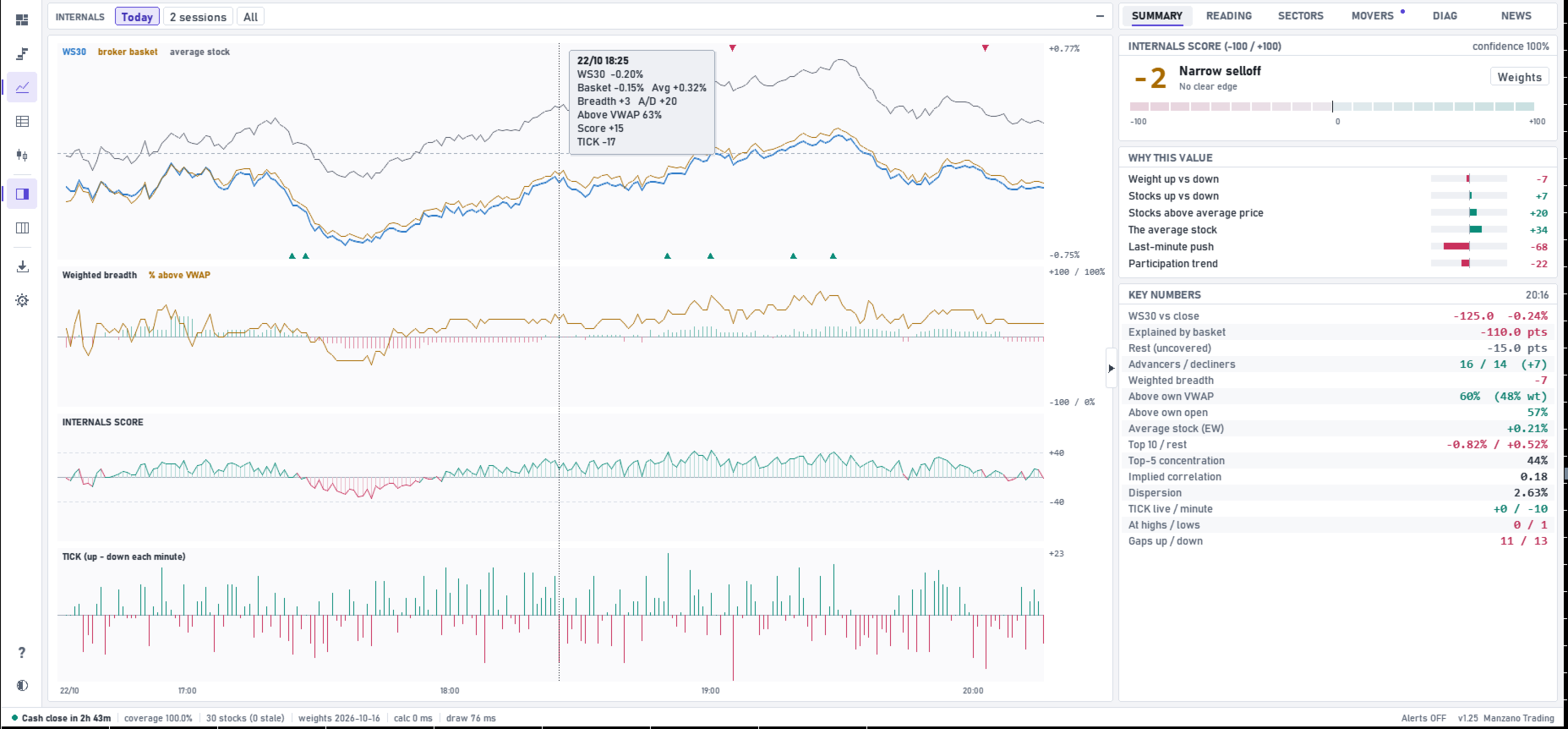
- Internals Over Time. Four session charts: the index versus your broker's stock basket and the average stock; weighted breadth and the percentage of stocks above VWAP; the Internals Score; and minute-by-minute TICK. Signals are marked, and hovering reveals details for each minute. Display today's session, two sessions or all loaded history.
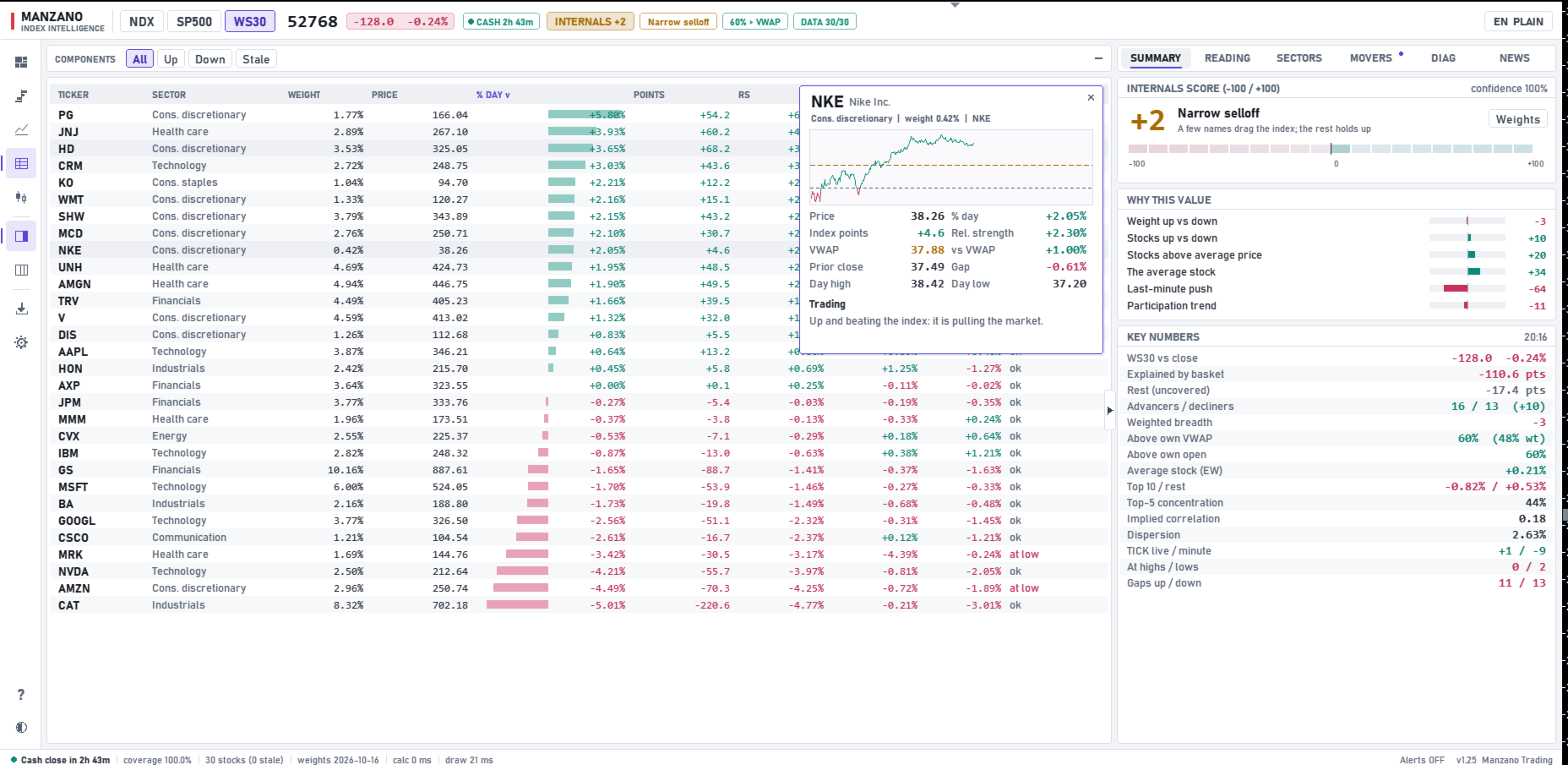
- Constituent Table. All stocks with their weights, changes, point contributions, relative strength, distance from VWAP and opening gaps. Sort by any column and filter rising, falling or unquoted stocks.
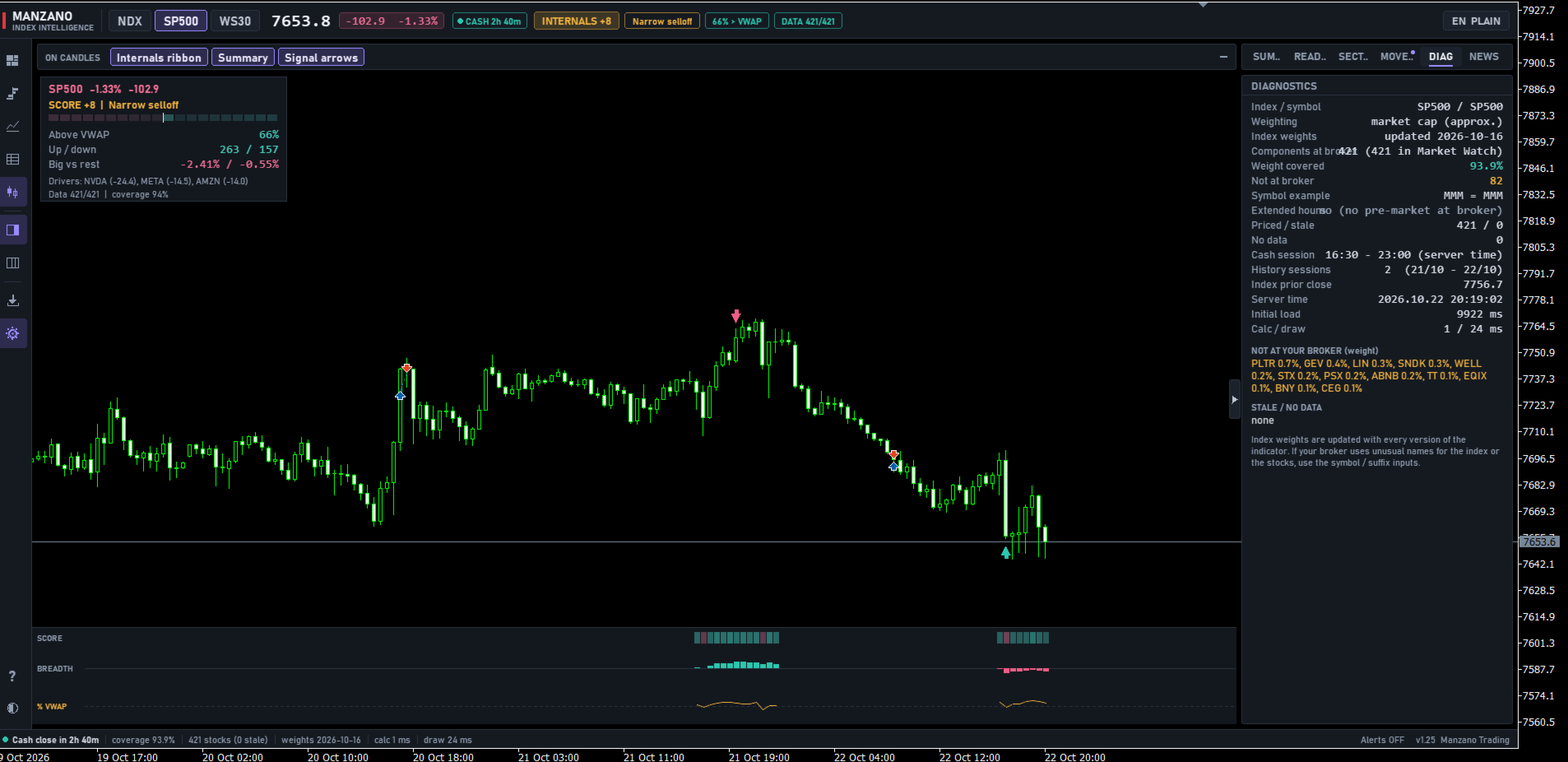
- Candlestick View. An index candlestick chart with signal arrows, a lower ribbon showing the score, breadth and percentage above VWAP aligned with each candle, and a corner summary. Switching to this view automatically changes the chart to the selected index.
SIDE PANEL
- Summary. Internals Score from -100 to +100, market regime, an explanation of the score (six components, each ranging from -100 to +100), and key metrics: index points explained by the basket, advancing and declining stocks, weighted breadth, percentage above VWAP and above the open, average stock, mega-caps versus the rest, concentration, implied correlation, dispersion, TICK, stocks at highs or lows, and gaps.
- Interpretation. A plain-language explanation of the market, like a fellow trader at your desk: current situation, key index drivers, participation, mega-caps versus the rest, momentum, regime, recent signals, conclusion and coverage. Four modes: simple Spanish, technical Spanish, simple English and technical English. Simple mode explains unfamiliar concepts; technical mode is more concise.
- Sectors. Each sector's performance, weight, point contribution and advancing/declining stock counts, making it easier to see which areas are driving or holding back the market and whether activity is rotating toward defensive sectors.
- Drivers. The stocks adding and subtracting the most points, the strongest and weakest relative to the index, and the day's signal log.
- News. The built-in MT5 economic calendar in your broker's server time, showing the next high-impact release with a countdown and actual, forecast and previous values.
- Diagnostics. The detected index symbol, available stocks, covered index weight and missing constituents, so you always know which data the analysis is based on.
HOW TO READ THE INTERNALS SCORE
The score summarizes the market's underlying participation on a scale from -100 to +100. These are not index points. It combines the weight of rising versus falling stocks, advancing versus declining stock counts, the percentage trading above their intraday volume-weighted average price, average-stock performance, the most recent minute's momentum and the trend in participation.
- Above +40, with most index weight positive: a broadly supported advance.
- +20 to +40: an advance with moderate internal support.
- -20 to +20: no clear advantage in market internals.
- -40 to -20: a decline with moderate internal support.
- Below -40, with most index weight negative: broad-based selling.
When the index and its internal metrics move in opposite directions, the panel identifies a narrow advance or decline: a few large companies are moving the index while the rest of the market is not following.
NON-REPAINTING SIGNALS
The indicator marks significant changes in index internals on both the internals view and the candlestick chart:
- Bearish divergence: the index makes a new high with less participation than at the previous high.
- Bullish divergence: the index makes a new low with fewer stocks declining than at the previous low.
- Internals Score threshold: the score crosses above or below a selected level, indicating broad participation in one direction.
- Breadth thrust: more than 80%, or fewer than 20%, of stocks trade above their VWAP.
- Concentrated advance or decline: the index moves more than 0.4% while the average stock moves in the opposite direction.
- Extreme TICK: nearly all stocks rise or fall together during the same minute.
Each signal is calculated using closed M1 candles only. Once plotted, it does not move or disappear, and the same signals are reproduced when the indicator is reloaded. On the candlestick chart, two consecutive arrows in the same direction are not repeated.
ECONOMIC CALENDAR
Macroeconomic releases (CPI, employment reports, Federal Reserve decisions, etc.) can move indices more strongly than any internal reading. The indicator uses MetaTrader 5's built-in economic calendar in your broker's time zone. It shows the next high-impact release in the header with a countdown, adds a warning to the interpretation when a release falls within the preceding or following 30 minutes—when internals can become less reliable—and marks published events on the internals chart.
FOR EXPERT ADVISORS
12 non-repainting buffers accessible via iCustom, with one value per candle: 0 buy arrow, 1 sell arrow, 2 signal code, 3 Internals Score, 4 index percentage change, 5 broker basket percentage change, 6 average stock percentage change, 7 weighted breadth, 8 percentage of stocks above VWAP, 9 A/D, 10 TICK and 11 index level. We recommend reading bar 1, the most recently closed candle.
WHAT CAN YOU USE IT FOR?
- Determine whether an index move is supported by the broad market or just a few companies.
- Avoid chasing advances or declines driven by only a handful of mega-caps, which may reverse quickly.
- Spot when price and market participation begin to diverge.
- Identify which companies and sectors explain the day's index movement.
- Stay aware of economic releases that may disrupt market behavior.
- Complement index technical analysis with information from the underlying constituents.
For example, a Nasdaq 100 rally in which 80% of index weight is advancing and most stocks trade above VWAP has a very different internal structure from a rally driven by only three mega-caps while the average stock declines.
INSTALLATION
- Run the free compatibility checker with your broker (link above).
- Attach the indicator to any chart. It automatically detects the index and its constituents and adds the stocks to Market Watch.
- On first launch, it downloads M1 history for each constituent. This may take some time, especially for the S&P 500 with approximately 500 stocks. Progress is shown on the panel.
- Switch indices, views and languages from the panel. Your chosen interface settings and language are remembered.
Index weights are updated with each new indicator version.
MAIN INPUT PARAMETERS
Initial index and symbol names (blank = automatic detection), stock symbol suffix, regular-session hours (blank = automatic), historical sessions, language and explanation mode, initial view, theme and colors, economic calendar (enable, minimum importance, hours ahead), signal arrows, alerts and push notifications.
IMPORTANT CONSIDERATIONS
This is an analytical tool, not an automated trading system. It does not place trades, guarantee profits or predict market direction with certainty. Divergences and signals provide context; they are not standalone trade-entry instructions.
Results may vary between brokers due to available symbols, constituent coverage and quote quality.
Questions and support: please send me a private message on MQL5.
Manzano Trading