Pro TDM 25 Scanner Dashboard Multi Pair Timeframe
- Indicatori
- Versione: 1.0
- Attivazioni: 5

════════════════════════════════════════════════════════════════════════════════
TDM-25 SCANNER DASHBOARD PRO MT5: INSTITUTIONAL MULTI-PAIR & MULTI-TIMEFRAME
TRIPLE EMA TREND ENGINE WITH ATR SL/TP, DUAL RISK-REWARD & 15 CONFLUENCE FILTERS
════════════════════════════════════════════════════════════════════════════════
════════════════
PRODUCT SPECIFICATIONS
════════════════
• Product Category: Institutional Market Scanner & Multi-Asset Signal Dashboard Engine
• Terminal Environment: MetaTrader 5 (MT5) Desktop (Build 3800+ Optimized)
• Compatible Asset Classes: Forex Majors, Minors, Exotics, Gold (XAUUSD), Silver, Crude Oil, Indices (US30, NAS100, DAX), Crypto (BTCUSD, ETHUSD)
• Supported Multi-Timeframes: M1, M2, M3, M4, M5, M6, M10, M12, M15, M20, M30, H1, H2, H3, H4, H6, H8, H12, D1, W1, MN1
• Strategy Architecture: TDM-25 Dynamic Triple Exponential Moving Average Zone Matrix
• Volatility Core: Built-in Average True Range (ATR) dynamic Risk-Management Model
• Profit Projections: Dual Mathematical Targets: TP1 (1:1 Risk-to-Reward) & TP2 (1:2 Risk-to-Reward)
• Quality Confluence Engine: 15 Modular Multi-Indicator Algorithmic Filters (Trend, Volume, Momentum, Oscillators, S&R, Fibonacci)
• Notification Infrastructure: Windows Audio, Terminal Popups, Mobile Push Notifications (iOS & Android), SMTP Automated Email
• Code Mechanics: 100% Non-Repainting, Bar-Close Confirmation (Shift 1), Zero Recalculation, Native Handle Optimization
• Interface Usability: Fully Draggable GUI HUD, Customizable Scale (70%-180%), Native Sorting, Single-Click "OPEN" Chart Router
════════════════
EXECUTIVE SUMMARY & INSTITUTIONAL CONCEPT
════════════════
Manual chart scanning across multiple currency pairs and timeframes is exhausting, slow, and prone to cognitive bias. By the time a trader identifies a legitimate setup on a single chart, institutional momentum has already left the station. The TDM-25 Scanner Dashboard Pro MT5 completely automates market surveillance by engineering a high-speed institutional scanning engine that continuously tracks your entire Market Watch watchlist across up to 7 distinct timeframes simultaneously.
At the heart of this tool lies the proven TDM-25 Triple Exponential Moving Average (EMA) Zone algorithm. Standard single and dual moving average crossover strategies suffer from fatal drawdowns in choppy markets because they lack macro-structural awareness. The TDM-25 protocol resolves this through a three-tier hierarchical architecture: a hyper-responsive Fast Line, an equilibrium Medium Line, and a volatility-adaptive Macro Baseline. Signals are only validated when short-term momentum triggers in direct synchronization with higher-order macro flow.
Unlike conventional indicators that leave exit execution to subjective guesswork, the TDM-25 Scanner Dashboard Pro automatically calculates precise execution prices for every valid setup. Utilizing a native Average True Range (ATR) engine, it automatically derives a volatility-adjusted Stop Loss, Take Profit 1 (1:1 RR for capital preservation), and Take Profit 2 (1:2 RR for trend maximization). Backed by 15 selectable confluence filters (including ADX, Ichimoku Cloud, Double MAs, RSI, Awesome Oscillator, Heiken Ashi, Parabolic SAR, S&R zones, and Fibonacci), this scanner is the ultimate all-in-one terminal dashboard for professional traders and prop firm challengers.
════════════════
CORE VALUE PROPOSITIONS & COMPETITIVE ADVANTAGES
════════════════
⚡ Real-Time Multi-Asset Grid: Monitors dozens of pairs and timeframes concurrently in a compact, highly responsive heads-up display.
⚡ Mathematically Non-Repainting: Evaluates historical and real-time data strictly on closed candles (Shift 1). Once printed on the HUD and chart, the signal never recalculates, disappears, or repaints.
⚡ Dynamic Volatility Risk Protection: Automatically calculates structural Stop Loss distances based on live market volatility using ATR multipliers, preventing premature whipsaws during market expansion.
⚡ Dual Risk-to-Reward Optimization: Features built-in mathematical targets projecting TP1 (1:1 RR) and TP2 (1:2 RR) for immediate split-position execution and stress-free risk management.
⚡ 15 Confluence Filtering Protocols: Stack trend filters, volume oscillators, momentum baselines, candle smoothing, and price-action structures to build custom, bulletproof trade criteria.
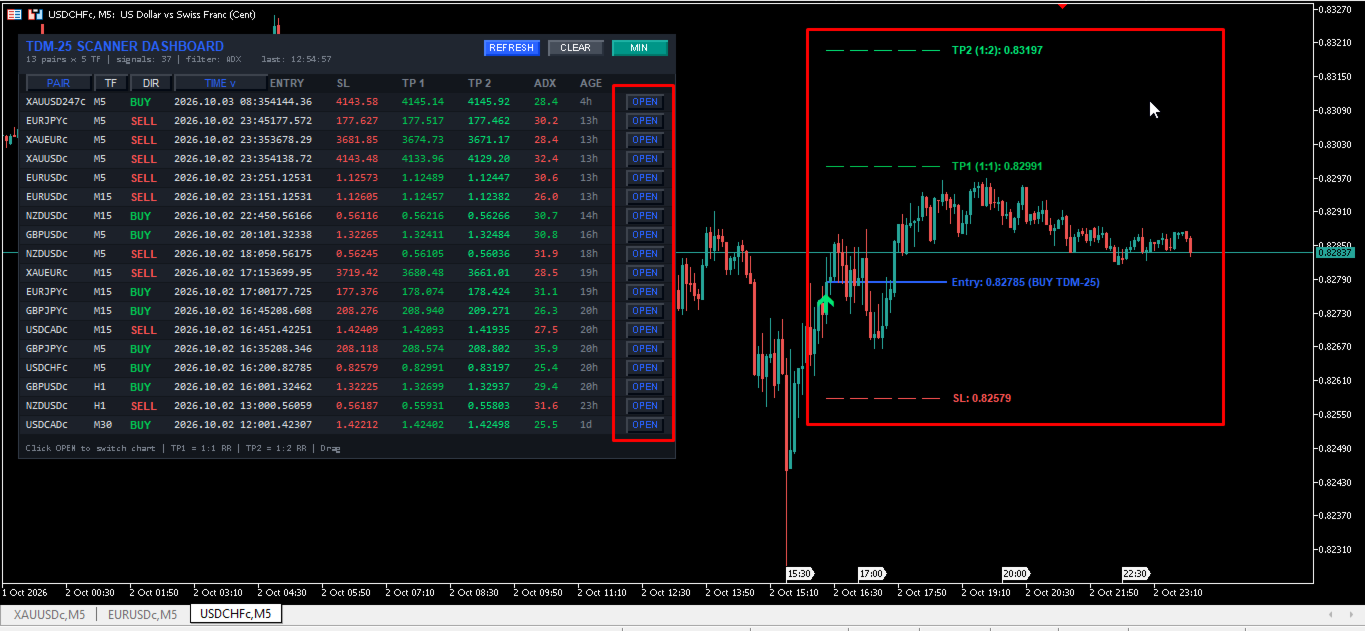
⚡ One-Click Chart Router ("OPEN" Button): Instant terminal navigation. Clicking "OPEN" immediately changes your chart to that exact pair and timeframe, automatically plotting Entry, SL, TP1, and TP2 lines.
⚡ Intelligent Asynchronous Polling: Engineered with optimized indicator handles and asynchronous timer loops, consuming virtually zero CPU and RAM resources even on multi-pair setups.
⚡ Comprehensive Multi-Channel Alerts: Receive instant actionable signals directly to your mobile phone (MT5 Push), desktop terminal popups, customizable audio alerts, and automated email dispatches.
⚡ Modern Ergonomic GUI: Features real-time column sorting (by Pair, Timeframe, Direction, or Age), draggable positioning, minimize-to-dock mode, and a responsive scale engine (70% to 180%).
════════════════
MATHEMATICAL ENGINE: TDM-25 TRIPLE EMA ZONE LOGIC
════════════════
The TDM-25 core algorithm utilizes three distinct Exponential Moving Average zones to classify market momentum, dynamic equilibrium, and macro structural trend bias:
1. Fast Zone (Inp_Zone1 - Default: 10 EMA): Captures short-term institutional velocity and order flow acceleration.
2. Medium Zone (Inp_Zone2 - Default: 25 EMA): Represents the intermediate dynamic equilibrium point of fair market value.
3. Slow Zone (Macro Trend Filter - Default: Zone2 * Zone3): Calculated dynamically via MathMax(Inp_Zone2 * Inp_Zone3, Inp_Zone2 + 10). With standard inputs, this generates a 75-period EMA baseline separating institutional bull and bear territory.
🎯 Bullish Signal Confirmation Rules:
• Fast EMA crosses above Medium EMA on the completed bar (Fast[1] > Med[1] and Fast[2] <= Med[2]).
• The closing price of the signal bar must close strictly above the Slow EMA Baseline (Close[1] > Slow[1]).
• All active secondary confluence filters (ADX, Ichimoku, RSI, Double MA, Price Action, etc.) validate the long bias.
🎯 Bearish Signal Confirmation Rules:
• Fast EMA crosses below Medium EMA on the completed bar (Fast[1] < Med[1] and Fast[2] >= Med[2]).
• The closing price of the signal bar must close strictly below the Slow EMA Baseline (Close[1] < Slow[1]).
• All active secondary confluence filters validate the short bias.
Requiring price to trade on the correct side of the Slow Baseline ensures that the trader never executes counter-trend traps, systematically eliminating low-probability market noise.
════════════════
DYNAMIC ATR RISK-TO-REWARD CALCULATION ARCHITECTURE
════════════════
In institutional trading, consistent profitability is governed by rigorous risk-to-reward ratios. The TDM-25 Scanner Dashboard Pro integrates real-time volatility tracking into every signal row:
🛡️ Volatility-Adjusted Stop Loss (SL):
The engine samples the Average True Range (ATR, default period 14) on the signal candle (Bar 1) and multiplies it by InpATRMultSL (default 1.5x) to construct a volatility buffer:
• BUY Setup Stop Loss = Entry Price - (ATR * InpATRMultSL)
• SELL Setup Stop Loss = Entry Price + (ATR * InpATRMultSL)
This dynamically expands the stop loss during high-volatility events (news releases, session openings) and tightens it during calm conditions, eliminating static-pip vulnerabilities.
🎯 Take Profit 1 (TP1 - 1:1 Risk-to-Reward):
• Calculated as: Entry Price +/- (SL Distance * InpTP1_RR).
• Purpose: Secures high-probability baseline profits. Prop firm traders utilize TP1 to bank partial profits (50% position close) and immediately move Stop Loss to Break-Even (Risk-Free Trade).
🎯 Take Profit 2 (TP2 - 1:2 Risk-to-Reward):
• Calculated as: Entry Price +/- (SL Distance * InpTP2_RR).
• Purpose: Captures explosive trend extensions. Maintaining a 1:2 RR ensures your account produces positive expectancy even with a moderate 40% win rate.
════════════════
THE 15 INSTITUTIONAL CONFLUENCE FILTERS
════════════════
Fine-tune signal selectivity across all asset classes with 15 built-in, fully modular confluence filters:
1. Native ADX Trend Strength Filter: Measures trend velocity via the Average Directional Index (default period 14). Rejects sideways consolidation when ADX is below Inp_ADX_Level (default 25.0).
2. Single Moving Average Filter: Enforces directional alignment with a major institutional baseline (e.g., 50 SMA, 100 SMA, 200 EMA). BUY setups require Close > MA; SELL setups require Close < MA.
3. Ichimoku Senkou Span B Filter: Utilizes the 52-period Kumo Cloud boundary. Validates BUY signals only above Senkou Span B and SELL signals only below it, avoiding institutional supply/demand walls.
4. RSI 75 Long-Term Momentum Filter: Employs a 75-period RSI baseline to gauge macro market regime. Longs require RSI > 50.0; shorts require RSI < 50.0.
5. Double Moving Average Ribbon Filter: Applies a dual trend ribbon (default: 75 EMA and 140 EMA). Requires Fast MA > Slow MA for long trades and Fast MA < Slow MA for short trades.
6. Awesome Oscillator (AO) Multi-Mode Filter: Validates institutional order momentum. Features customizable parameters for Volume Thresholds, Histogram Color Momentum Slope, and Zero-Line alignment.
7. Parabolic SAR Filter: Follows parabolic acceleration. Validates BUY setups only when SAR prints below price, and SELL setups only when SAR prints above price.
8. Heiken Ashi Candle Smoothing Filter: Calculates synthetic smoothed candles, filtering out false wick rejections. Requires HA Close > HA Open for longs, and HA Close < HA Open for shorts.
9. CCI Trend Filter: Classic Commodity Channel Index trend filter (period 50). Mandates CCI > 0 for bullish bias and CCI < 0 for bearish bias.
10. CCI Overbought / Oversold Filter: Mean-reversion cyclical exhaustion filter (period 14). Detects reversals by verifying CCI recovers from deep oversold (<-100) or overbought (>+100) territories.
11. Relative Volatility Index (RVI) Trend Filter: Measures volatility direction over a 75-period window. BUY setups require RVI > 0; SELL setups require RVI < 0.
12. RVI Signal Line Cross Filter: Fast momentum confirmation requiring the main RVI line to cross above its signal line for Buys, or below for Sells.
13. MACD Histogram Direction Filter: Analyzes momentum divergence. Requires the MACD histogram (12, 26, 9) to expand positively for longs and negatively for shorts.
14. MACD Zero-Line Filter: Validates macro regime momentum by requiring the main MACD line to print strictly above zero for longs and below zero for shorts.
15. Support/Resistance & Fibonacci Retracement Filter: Analyzes recent structural swing highs/lows using a ZigZag depth algorithm. Confirms setups only when price bounces from key horizontal zones or Fibonacci golden ratios (0.382 and 0.618).
════════════════
COMPLETE INPUT PARAMETERS MASTER GUIDE
════════════════
Every variable is thoroughly documented below to give you complete operational control:
⚙️ SCANNER CONFIGURATION:
• InpSymbols: Comma-separated list of symbols (e.g., "EURUSD,GBPUSD,USDJPY,XAUUSD,BTCUSD"). Leave empty to scan Market Watch symbols.
• InpTimeframes: Comma-separated timeframes to monitor (e.g., "M5,M15,M30,H1,H4,D1").
• InpUseWatch: When true, automatically imports and scans all active symbols currently visible in your Market Watch window.
• InpMaxSymbols: Sets the maximum upper limit of currency pairs or assets analyzed simultaneously (Default: 15).
• InpScanSec: Scan polling interval in seconds (Default: 5). Controls timer loop frequency without impacting terminal UI responsiveness.
• InpBarsCopy: Total historical bars copied into memory per timeframe for indicator calculations (Default: 100).
• InpLookback: Maximum historical bars searched backwards to detect the most recent confirmed TDM-25 crossover (Default: 50).
• InpDirection: Directional filter mode (0 = Both Buy & Sell, 1 = Buy Only, 2 = Sell Only).
⚙️ TDM-25 ZONE PARAMETERS:
• Inp_Zone1: Period of Fast Exponential Moving Average (Default: 10). Controls reactive momentum trigger speed.
• Inp_Zone2: Period of Medium Exponential Moving Average (Default: 25). Defines baseline value equilibrium.
• Inp_Zone3: Multiplier for Slow EMA baseline (Default: 3.0). Formula: MathMax(Zone2 * Zone3, Zone2 + 10) producing the 75 EMA macro filter.
⚙️ ATR SL & TP SETTINGS:
• InpATRPeriod: Calculation period for the Average True Range volatility index (Default: 14).
• InpATRMultSL: Volatility multiplier applied to ATR to generate the Stop Loss price distance (Default: 1.5).
• InpTP1_RR: Risk-to-Reward multiplier for Take Profit 1 target (Default: 1.0 = 1:1 RR).
• InpTP2_RR: Risk-to-Reward multiplier for Take Profit 2 target (Default: 2.0 = 1:2 RR).
⚙️ BUILT-IN ADX FILTER:
• Use_ADX_Filter: Enables or disables the native ADX trend strength filter (Default: true).
• ADX_Period: Averaging period for the ADX technical calculation (Default: 14).
• ADX_Min_Level: Minimum ADX numerical threshold required to validate a trade signal (Default: 25.0).
⚙️ OPTIONAL CONFLUENCE FILTER SETTINGS:
• Use_MA_Filter / MA_Period / MA_Method / MA_Applied / MA_Shift: Controls the single moving average trend baseline.
• Use_Ichimoku_Filter / Ichimoku_SenkouB / Ichimoku_Kijun: Configures the Japanese Ichimoku Kumo Cloud filter.
• Use_RSI75_Filter / RSI_Filter_Period / RSI_Filter_Price: Configures the long-term RSI momentum threshold.
• Use_DoubleMA_Filter / MA_A_* / MA_B_*: Configures the dual moving average trend ribbon parameters.
• Use_AO_Filter / AO_Buy_Min / AO_Sell_Max / Use_AO_Color_Filter / Use_AO_Zero_Filter: Controls the Awesome Oscillator multi-logic engine.
• Use_SAR_Filter / SAR_Step / SAR_Maximum: Parameters for the trailing Parabolic SAR volatility indicator.
• Use_HeikenAshi_Filter: Toggles smoothed Heiken Ashi candle confirmation ON/OFF.
• Use_CCI_Filter / Use_CCI_OBOS_Filter / CCI_* / CCI_Overbought / CCI_Oversold: Manages CCI trend and cyclical exhaustion levels.
• Use_RVI_Filter / Use_RVI_Signal_Filter / RVI_*: Controls the Relative Volatility Index trend and signal crossover parameters.
• Use_MACD_Filter / Use_MACD_Zero_Filter / MACD_*: Controls MACD histogram expansion and zero-line alignment.
• Use_SR_Filter / SR_Period / SR_Zone_Points: Configures horizontal Support & Resistance level lookbacks and tolerance pip zones.
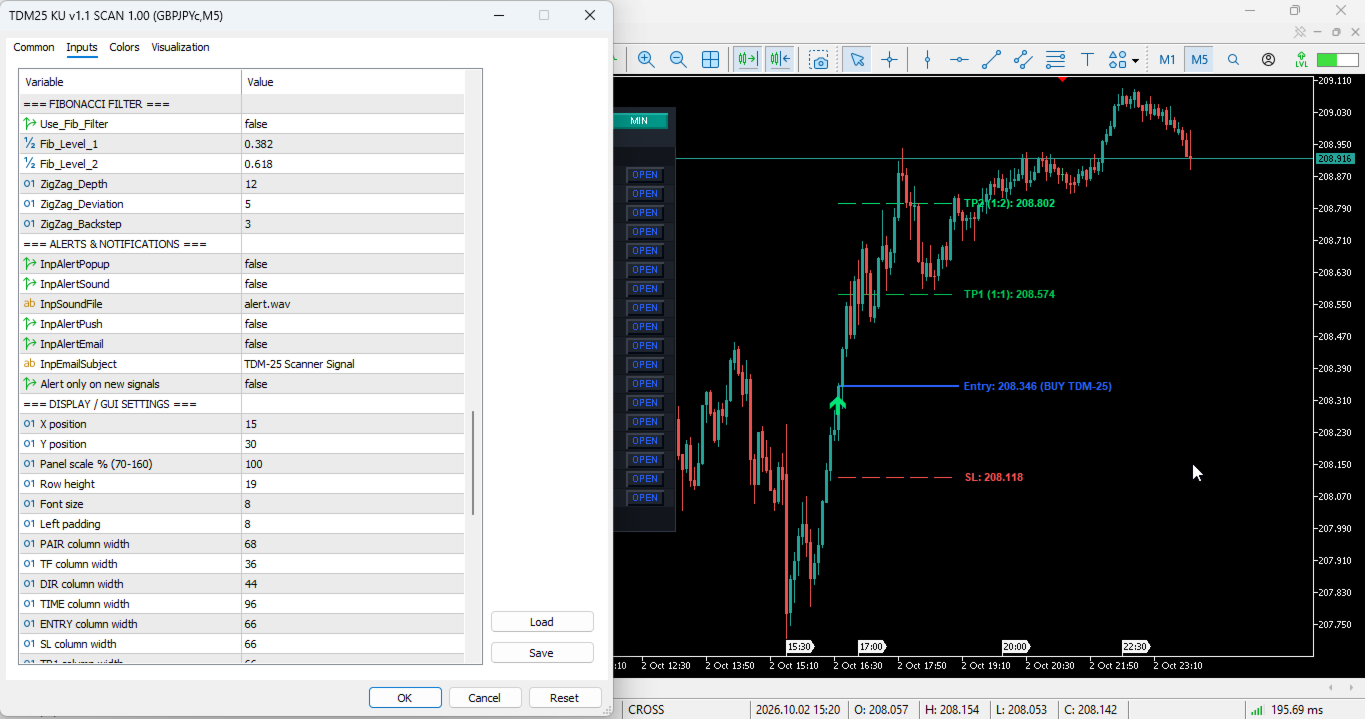
• Use_Fib_Filter / Fib_Level_1 / Fib_Level_2 / ZigZag_*: Configures dynamic swing pivot points and Fibonacci retracement boundaries.
⚙️ ALERTS & NOTIFICATIONS:
• InpAlertPopup: Enables native MT5 desktop dialog alert popup windows.
• InpAlertSound: Toggles terminal audio notifications when a confirmed signal occurs.
• InpSoundFile: Filename of the audio chime located in the terminal Sounds directory (Default: "alert.wav").
• InpAlertPush: Dispatches instant push notifications directly to MT5 mobile app on iOS and Android.
• InpAlertEmail: Automatically sends formatted trade signals to your configured email address.
• InpEmailSubject: Custom subject line header for email notifications (Default: "TDM-25 Scanner Signal").
• InpAlertOnlyNew: When true, triggers notifications strictly once per newly confirmed signal candle.
⚙️ DISPLAY & USER INTERFACE:
• InpX / InpY: Starting horizontal and vertical pixel coordinates for the dashboard HUD.
• InpScale: Global GUI scaling percentage (70% to 180%), ensuring optimal rendering on high-DPI and 4K monitors.
• InpRowH: Vertical row height in pixels (Default: 19).
• InpFont: Base typography size for table text (Default: 8).
• InpPadX: Internal left padding offset in pixels (Default: 8).
• InpWPair / InpWTF / InpWArah / InpWTime / InpWEntry / InpWSL / InpWTP1 / InpWTP2 / InpWVal / InpWUmur / InpWOpen: Custom width parameters for each table column.
• InpShowEmpty: When true, displays monitored symbols in the table even when no active signal is detected.
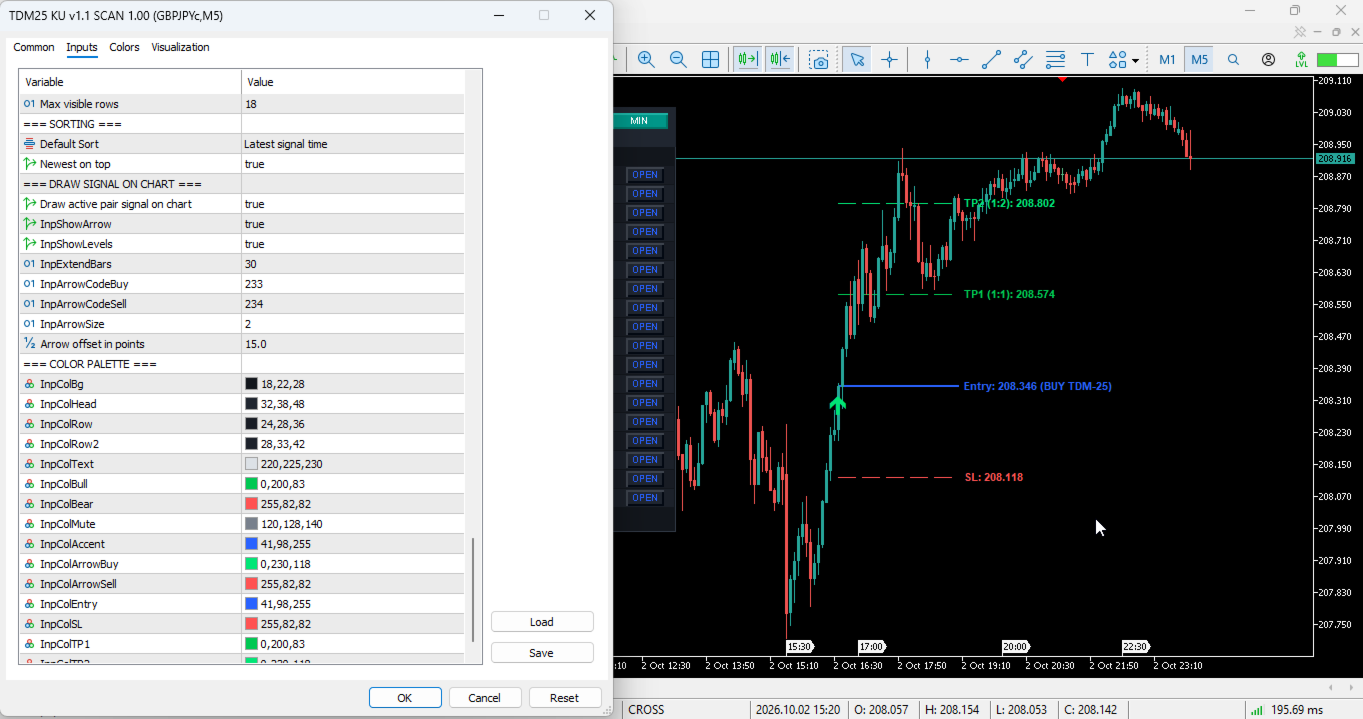
• InpMaxRows: Maximum number of rows rendered simultaneously in the visual dashboard (Default: 18).
• InpSortBy: Default sorting criteria (0 = Time, 1 = Pair Name, 2 = Timeframe, 3 = Direction).
• InpSortNewest: When true, sorts newest signals to the top of the table.
⚙️ ON-CHART GRAPHICAL PROJECTIONS:
• InpDrawOnChart: Renders directional signal arrows and price targets on the active chart.
• InpShowArrow: Toggles visual Wingdings signal arrows on the chart.
• InpShowLevels: Draws horizontal projection rays for Entry, Stop Loss, TP1, and TP2.
• InpExtendBars: Number of bars forward horizontal price lines extend into the future (Default: 30).
• InpArrowCodeBuy / InpArrowCodeSell: Wingdings character codes for arrows (Default: 233 Buy, 234 Sell).
• InpArrowSize: Visual pixel thickness for on-chart directional arrows (Default: 2).
• InpArrowDistance: Vertical offset distance between arrow and candle high/low in points.
• Color Palette Inputs: Comprehensive RGB color controls for backgrounds, headers, alternating rows, text, accents, and trading levels.
════════════════
INTERACTIVE DASHBOARD CONTROLS & HUD WORKSPACE
════════════════
The TDM-25 dashboard interface is engineered as an ergonomic command center:
• Real-Time Matrix Grid: Consolidates Symbol, Timeframe, Direction (BUY/SELL), Timestamp, Entry, SL, TP1, TP2, ADX Value, Signal Age, and Action.
• Instant Interactive Column Sorting: Click the table headers (PAIR, TF, DIR, TIME) to sort signals alphabetically, by timeframe ranking, by direction, or chronologically.
• Free-Floating Draggable Chassis: Click and drag anywhere across the top title bar to reposition the entire HUD seamlessly across multiple monitors.
• Dockable Minimize Mode ("MIN" / "MAX"): Click "MIN" to collapse the table into a sleek mini-ribbon, freeing up chart canvas for manual charting.
• Refresh & Purge Controls: Use the "REFRESH" button to reinitialize indicator caches and "CLEAR" to remove graphical objects instantly.
• Persistent State Engine: Automatically caches window position and minimize states in MT5 Global Variables, retaining your custom setup across chart switches and terminal reboots.
════════════════
ON-CHART GRAPHICAL PROJECTION SUITE
════════════════
Selecting any active signal automatically projects clean visual targets onto your chart:
• Directional Entry Markers: Wingdings arrows plotted precisely at the trigger candle without obstructing price action.
• Dotted Entry Projection: Vibrant blue horizontal ray annotating exact execution price and signal parameters.
• Dashed Stop Loss Ray: Crisp red horizontal ray clearly displaying the volatility-adjusted Stop Loss price.
• Dashed TP1 Projection (1:1 RR): Bright green horizontal target ray showing the partial profit-taking zone.
• Dashed TP2 Projection (1:2 RR): Radiant neon-green target ray showing the macro extension target.
════════════════
INSTITUTIONAL TRADING PLAYBOOK & EXECUTION MODELS
════════════════
📌 Execution Model 1: The Day Trading Momentum Strategy (M15 / H1 Alignment)
1. Enable the Native ADX Filter (ADX > 25.0) to confirm strong market participation.
2. Enable the 200 EMA Filter (Single MA Filter) to guarantee higher-timeframe trend harmony.
3. When the TDM-25 scanner alerts a confirmed signal, click "OPEN" to view the setup.
4. Execute trade at the open of the next candle following the confirmed signal.
5. Set initial Stop Loss and Take Profit levels exactly as plotted by the indicator.
6. When price reaches TP1 (1:1 RR), close 50% of the trade volume and move Stop Loss to Break-Even.
7. Trail the remaining 50% volume until price tags TP2 (1:2 RR) or the Fast EMA crosses back over the Medium EMA.
📌 Execution Model 2: The Multi-Timeframe Confluence Setup (Prop Firm Scalping)
1. Scan the dashboard for asset alignment across multiple timeframes (e.g., EURUSD displaying BUY on both H4 and H1).
2. Drop down to M5 or M15 to catch the immediate TDM-25 momentum breakout entry.
3. This multi-timeframe synchronization delivers tight risk exposure with asymmetric reward potential.
════════════════
PROP FIRM COMPLIANCE & CAPITAL PRESERVATION
════════════════
Proprietary trading firm challenges (FTMO, FundedNext, MFF, etc.) require strict risk discipline:
• Maximum Drawdown Protection: The built-in ATR Stop Loss prevents single-trade catastrophic losses.
• Positive Mathematical Expectancy: By enforcing minimum 1:1 (TP1) and 1:2 (TP2) targets, a 45% win rate generates substantial net profitability.
• No Dangerous Strategies: Completely free from Martingale, grid averaging, hedging traps, or repainting algorithms. Every trade utilizes fixed risk parameters.
════════════════
FREQUENTLY ASKED QUESTIONS (FAQ)
════════════════
Q: Does the indicator recalculate or repaint historical arrows?
A: No. The TDM-25 Scanner evaluates closed candles (Bar index 1). Once a bar closes and prints a signal, it remains permanently fixed in history.
Q: Can I run the scanner on non-forex assets like Gold, Indices, and Crypto?
A: Yes. The TDM-25 algorithm and ATR engine are asset-agnostic and adapt seamlessly to XAUUSD, US30, NAS100, BTCUSD, and commodity instruments.
Q: Will scanning many pairs cause terminal lag or freeze MT5?
A: No. The dashboard uses asynchronous timer polling and native cached indicator handles, ensuring ultra-smooth performance even on modest VPS hardware.
Q: Can this indicator be used inside automated Expert Advisors (EAs)?
A: Yes. All buffer data and signal states can be referenced seamlessly via standard iCustom calls in MQL5.
════════════════
INSTALLATION & SETUP PROTOCOL
════════════════
1. Open MetaTrader 5 and navigate to: File -> Open Data Folder -> MQL5 -> Indicators.
2. Paste the "TDM25_Scanner_Dashboard.mq5" file into the Indicators directory.
3. Restart or right-click "Indicators" in your Navigator window and click "Refresh".
4. Attach the indicator to any single chart (we recommend a clean EURUSD H1 chart).
5. In the "Inputs" tab, configure your desired symbols, timeframes, and filter parameters.
6. Ensure "Allow WebRequest" and notification settings are enabled under Tools -> Options if using Push or Email alerts.
7. Click OK and enjoy automated, real-time multi-asset market scanning!
════════════════
SPECIAL ACKNOWLEDGMENTS
════════════════
Thank you for choosing TDM-25 Scanner Dashboard Pro MT5! We are committed to developing high-performance, institutional-grade trading tools that help traders worldwide build consistency and capital growth. If this indicator enhances your daily trading, please consider supporting our development with a 5-star review on MQL5 Market. May the trend be in your favor, and happy trading! ✨🚀📈