Honcraft workspace trading agent
- Experts
-
Christopher Adie
 Quantitative Trading Expert | Algorithm Development Specialist
Professional Overview - Versione: 5.20
- Aggiornato: 10 ottobre 2026
- Attivazioni: 10
HONCRAFT WORKSPACE MT5
The Modern Trading Environment, Bring-Your-Own-Strategy (BYOS) Engine & Autonomous AI Agent
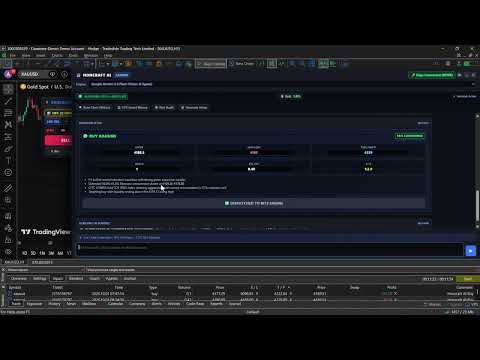
Honcraft Workspace transforms MetaTrader 5 into a unified, high-performance institutional workstation. It combines hardware-accelerated TradingView charting docked directly inside MT5, official CFTC Institutional Smart Money flow, an Autonomous Multimodal AI Trading Agent with custom strategy support, and an Unbreachable Hardware Risk Firewall designed specifically for prop firm and capital preservation.
════════════════════════════════════════════════════════════════
INTRODUCTORY LAUNCH ALLOCATION — TIER 1 ACTIVE
════════════════════════════════════════════════════════════════
To reward early adopters and build our active trader community:
- TIER 1 (First 5 Purchases): $149.00 [CURRENT TIER]
- TIER 2 (Next 10 Purchases): $299.00
- TIER 3 (Next 15 Purchases): $499.00
- FINAL PLANNED PRICE: $997.00
Once the first 5 activations are claimed, the price automatically increases to $299. Secure your lifetime license at the introductory tier.
- Get the free companion installer: https://www.mql5.com/en/blogs/post/776220
- Track the live signal: https://www.mql5.com/en/signals/2394952
════════════════════════════════════════════════════════════════
1. LIVE TRADINGVIEW DOCKED INSIDE MT5 (ZERO DLLs)
- Docked Directly into Chart Area: Embed hardware-accelerated 60fps TradingView charts directly inside your MT5 chart window. Moving, resizing, or tiling MT5 charts dynamically adjusts the workspace.
- Full Pine Script & Account Sync: Log into your personal TradingView account once. All your custom Pine Scripts, SMC indicator toolkits, cloud watchlists, and chart templates persist across PC reboots.
- 100% Native Sandbox Compliance: The Expert Advisor operates under #property strict with Zero DLL imports. All communications run via secure, private local file transactions inside MT5's Common\Files .
2. CFTC COMMITMENTS OF TRADERS (COT) INSTITUTIONAL FLOW
Retail indicators lag and only see fragmented broker tick volume. Honcraft Workspace integrates weekly official CFTC Commitments of Traders data:
- Institutional Net Speculator Delta: See whether hedge funds and commercial institutions are accumulating or distributing weekly contracts.
- 3-Year COT Stochastic Index (0–100%): Spot macro exhaustion and multi-year institutional extremes.
- Crowded Trade Squeeze Warning: Automatically flags when speculator positioning exceeds the 90th percentile, alerting you to sudden reversal and liquidity sweep risks.
- On-Chart Status Badge: Live indicator chip on your chart: [📊 COT: 🟢 +182K Net | Index: 86%] .
3. AUTONOMOUS AI AGENT & "BRING YOUR OWN STRATEGY" (BYOS)
Powered by multimodal vision models including Google Gemini, OpenAI (GPT-4o), Anthropic (Claude 3.5 Sonnet), and DeepSeek:
- Bring Your Own Strategy (BYOS): You are not locked into a fixed black-box algorithm. Choose between built-in presets (Institutional Core, Asian Judas Swing, ICT Silver Bullet, Breakout & Retest) or define your own custom entry triggers and invalidation criteria in plain English.
- "Draw, Describe, Execute" Chart Vision: Draw your zones, order blocks, or liquidity levels directly on TradingView. The multimodal vision model inspects the annotated chart and triggers execution when live price action validates your visual drawings.
- Dual-Layer Telemetry Synchronization: Eliminates AI hallucinations by anchoring chart images to verified MT5 broker ground truth (—D1 High/Low, 20-period range, ATR, spread, and tick value). Numerical data strictly overrides visual approximations.
- Execution & Session Autonomy: Configure autonomous trigger intervals across H1, M15, or M5 candle closes, or on a timed pulse scan. Restrict trading to dedicated Kill-Zones (Asia, London, NY AM/PM) or custom UTC operating hours.
- Bring Your Own Key (BYOK): No recurring monthly app subscriptions. Input your own API keys directly into the workspace vault (stored securely in local storage) with zero middleman servers.
- Dual Operating Modes:
- Interactive Copilot Mode (Semi-Autonomous): Suggests high-probability setups, displays an actionable Proposal Card, and executes upon your 1-click confirmation.
- Autonomous AutoTrader Mode (100% Hands-Free): Evaluates market structure, session gates, and COT flow automatically, executing orders strictly when confidence meets your threshold.
4. THE UNBREACHABLE TRADING CONSTITUTION (HARDWARE RISK FIREWALL)
Built specifically to protect funded trader accounts and prevent prop firm rule breaches (FTMO, The5ers, FundedNext, Darwinex Zero):
- Hard Daily Loss Lockout (e.g., -4.50%): Calculated from midnight starting equity. If daily drawdown hits your threshold, the EA physically rejects all new orders and locks execution until the next trading day.
- Geometric Invalidation Sentry: Hardcoded checks verify trade geometry before order routing—instantly rejecting inverted Stop Loss/Take Profit levels, erratic quote drift, or entries outside acceptable ATR buffers.
- Spread & Slippage Verifier: Blocks order entry during erratic spread spikes or roll-over illiquidity.
- Macro News Blackout Engine: Native circuit breaker that restricts entries minutes around high-impact economic calendar events.
- Machine Audit Trail : Logs the exact mathematical reasons why any trade was approved or rejected.
5. INSTITUTIONAL 1-CLICK EXECUTION HUD
- Dynamic Prop Firm Risk % Sizing: Automatically calculates lot sizes based on exact balance/equity risk percentage (0.25%, 0.50%, 1.00%, or custom %), stop loss points, and broker tick value. The AI is strictly forbidden from guessing lot sizes.
- Drawing Tool Scraper ( SYNC ): Read Long/Short position drawing tools directly from TradingView and automatically populate Entry, Stop Loss, and Take Profit with one click.
- Power Bar Controls:
- ⚡ BE+ (Break-Even Plus): Move Stop Loss to Entry $+ 2$ pips to lock in a risk-free trade.
- ✂️ 50% CLOSE: Instantly liquidate half your position volume, leaving runners to target.
- 🔄 REV (Position Reversal): Atomic close and opposite-direction market execution.
- ❌ CLOSE ALL: Emergency panic button to liquidate all open exposure across the symbol.
6. OUT-OF-PROCESS TELEGRAM RELAY
- Zero MT5 Thread Load: Runs asynchronously in the companion background worker without blocking MT5 ticks or chart UI.
- Instant Execution Alerts: Delivers deal notifications with live P&L and attached chart screenshots directly to your phone.
- Remote Commands: Send /status , /closeall , /be , or /cot gold securely from your phone to manage your terminal remotely.
════════════════════════════════════════════════════════════════
SYSTEM REQUIREMENTS & QUICK SETUP
- Operating System: Windows 10 or Windows 11 (64-bit).
- Terminal: MetaTrader 5 (Build 4150 or higher).
Quick Setup (Under 2 Minutes):
- Attach Honcraft_Workspace_MT5.ex5 to any chart.
- Run the free companion installer HoncraftWorkspace.exe (handles local Chromium rendering; requires Zero DLL permissions in MT5): https://www.mql5.com/en/blogs/post/776220
- Your TradingView chart will dock immediately into MT5.
💬 SUPPORT & COMMUNITY
- Free updates and ongoing feature expansions included.
- Dedicated setup assistance via MQL5 direct messaging.
Note: Because Honcraft Workspace is an interactive desktop workstation that docks live web charting onto your active workspace, the MT5 Strategy Tester cannot render external browser viewports. The EA's underlying execution rules, risk management, and Trading Constitution operate in backtesting, but the visual workstation is designed for live and demo chart execution.