SpreadCostAnalyzer
- Indicatori
-
Kun Jiao
 Senior Development Engineer. Available for custom development of various quantitative trading strategies and full-scale setup of automated trading research and backtesting environments.
 - Versione: 5.20
Spread Cost Analyzer - Professional Trading Cost Intelligence
=== OVERVIEW ===
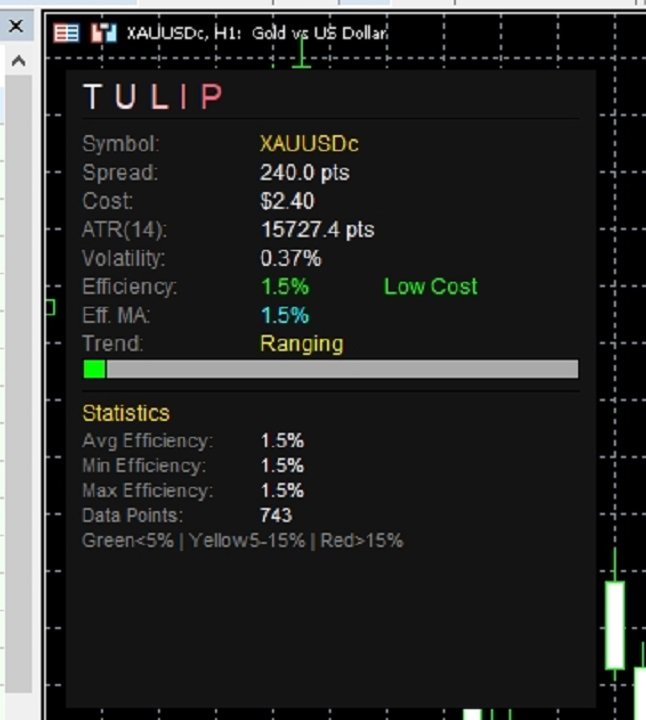
Spread Cost Analyzer is a powerful MetaTrader 5 indicator that provides real-time analysis of your trading costs relative to market volatility. Using ATR-based efficiency calculations, it helps you identify the optimal moments to enter and exit trades by quantifying exactly how much of your potential profit is being consumed by spread costs.
=== KEY FEATURES ===
- Real-time spread cost efficiency analysis
- ATR-based volatility measurement
- Color-coded histogram (Green = Low Cost, Yellow = Medium, Red = High Cost)
- Efficiency Moving Average for trend smoothing
- Built-in alert system (Popup/Sound/Both)
- Multi-mode display (Full/Simple/Minimal)
- Bilingual support (English/Chinese)
- Fully customizable colors and thresholds
- Clean, professional panel interface
=== HOW IT WORKS ===
The indicator calculates "Cost Efficiency" by comparing the current spread to the ATR (Average True Range) value. This ratio tells you what percentage of market movement is being eaten by spread costs:
Cost Efficiency = (Spread / ATR) × 100%
Lower values mean better trading conditions - your trades need less movement just to break even on costs.
=== RECOMMENDED SETTINGS ===
- Green Zone (< 5%): Optimal trading conditions - spreads are negligible relative to volatility
- Yellow Zone (5-15%): Moderate costs - proceed with caution
- Red Zone (> 15%): High costs - consider waiting for better conditions
=== INPUT PARAMETERS ===
- ATR Period: Period for volatility calculation (default: 14)
- Efficiency MA Period: Smoothing period for efficiency line (default: 5)
- Lot Size: Used for dollar cost calculation (default: 0.1)
- Low Threshold: Below this = Green/Low Cost (default: 5%)
- High Threshold: Above this = Red/High Cost (default: 15%)
- Alert Threshold: Triggers alert when exceeded (default: 20%)
=== INSTALLATION ===
1. Download the .ex5 file
2. Copy to: MetaTrader 5/MQL5/Indicators/
3. Restart MetaTrader 5 or refresh the Navigator
4. Drag the indicator onto any chart
=== BEST PRACTICES ===
1. Always check Cost Efficiency before placing trades
2. Prefer trading in Green zones for maximum profitability
3. Use the Efficiency MA to identify improving/worsening conditions
4. Set up alerts to notify you when conditions are optimal
5. Combine with your existing trading strategy for confirmation
=== COMPATIBILITY ===
- Platform: MetaTrader 5
- Build: 2000+
- Instruments: All (Forex, Stocks, Commodities, Indices, Crypto)
- Timeframes: All (M1 to Monthly)
=== VERSION HISTORY ===
v5.30 - Current release with improved panel design
- Optimized for MQL5 community
- Enhanced performance
- Clean English interface
=== SUPPORT ===
For questions or support, please visit our MQL5 profile page.