Account Performance Radar
- Utilità
- Versione: 1.8
- Attivazioni: 5

Account Performance Radar - MT4 Account Analytics Indicator
============================================================
Short Market Description
============================================================
Account Performance Radar is a MetaTrader 4 indicator for reviewing historical account performance, risk quality and trading behavior in a visual radar dashboard.
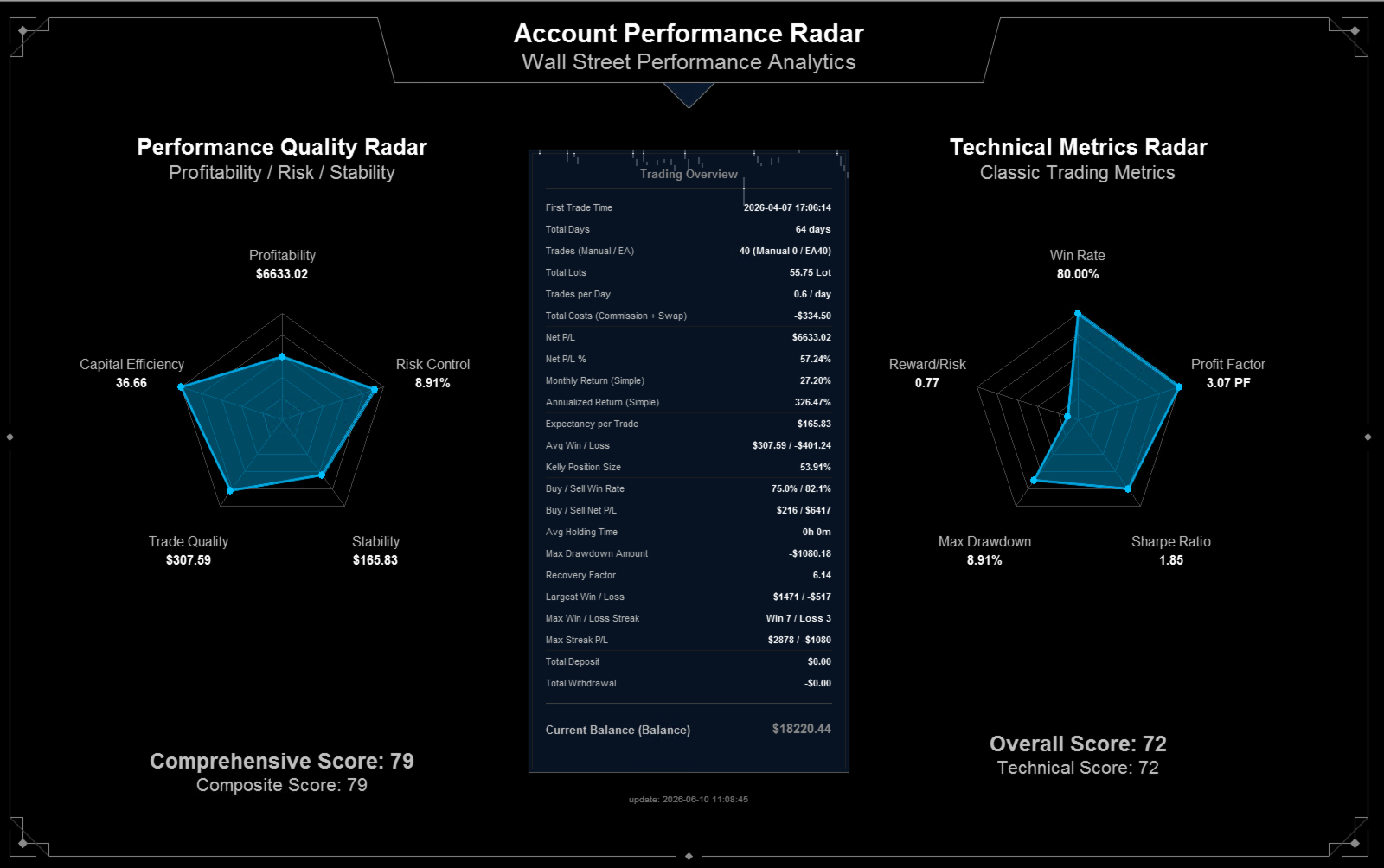
It converts closed trade history into two radar views and a central trading overview. The indicator focuses on profitability, drawdown, stability, trade quality, efficiency, win rate, profit factor, reward/risk and related account statistics.
Account Performance Radar is not a signal indicator, not an Expert Advisor and not an automatic trading system. It does not predict market direction and does not open, modify or close trades. It is a visual analytics tool for reviewing existing account history.
============================================================
Product Overview
============================================================
Account Performance Radar is designed for traders who want a clean chart-based summary of their trading history. Instead of reading many raw history rows, the indicator presents key account metrics in a large dashboard.
The main screen includes:
- A performance quality radar.
- A technical metrics radar.
- A trading overview panel.
- First trade time and total account-history days.
- Total trades, manual trades and EA trades.
- Total lots and trades per day.
- Commission and swap cost summary.
- Net P/L and net P/L percentage.
- Monthly and annualized return estimates.
- Expectancy, average win/loss and Kelly position size.
- Buy/Sell win-rate and Buy/Sell net P/L.
- Average holding time.
- Maximum drawdown amount and recovery factor.
- Deposit and withdrawal summary.
- Current balance and local update time.
The indicator uses historical closed trades from the terminal account history. For best results, set the MT4 Account History tab to show the full period that you want to review.
============================================================
Who It Is For
============================================================
Account Performance Radar is suitable for:
- Manual traders who want to review their trading record.
- Traders who use Expert Advisors and want a quick account-level quality check.
- Strategy testers who need a visual summary after running a test.
- Traders comparing manual and automated trading behavior.
- Traders who want to see risk-adjusted performance instead of only net profit.
- Traders who need a presentation-style dashboard for account review.
It is not intended to replace risk management or independent trade review. The user remains responsible for interpreting all metrics.
============================================================
Main Features
============================================================
1. Performance Quality Radar
The left radar summarizes account quality from five perspectives:
- Profitability
- Risk Control
- Stability
- Trade Quality
- Capital Efficiency
Each dimension is normalized to a 0-100 visual score so that weak areas can be spotted quickly.
2. Technical Metrics Radar
The right radar focuses on classic trading statistics:
- Win Rate
- Profit Factor
- Sharpe Ratio display slot
- Max Drawdown
- Reward/Risk
These metrics help the user evaluate trading history with familiar performance indicators.
3. Trading Overview Panel
The central panel lists account-history metrics in a compact table. It is intended for quick reading during account review, strategy testing or performance reporting.
4. Time Range Filter
The user can set a start time and end time. When both values are left at zero, the indicator reads the available history period shown by the terminal.
5. Annualization Model
The indicator includes a configurable day threshold for switching between simple annualization and compound CAGR-style annualization. This reduces the visual distortion that can happen when very short account histories are annualized.
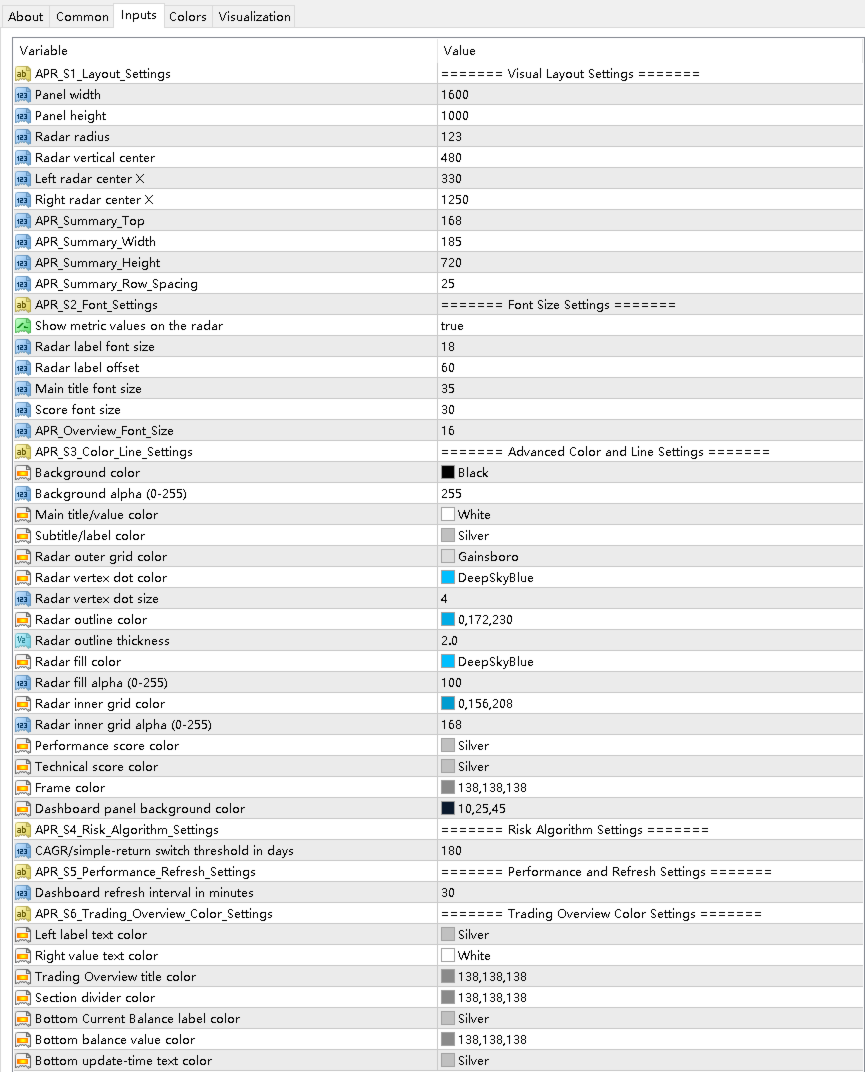
6. Visual Layout Settings
The user can adjust panel width, height, radar radius, radar position, summary panel size, row spacing, font size and colors.
============================================================
How To Use
============================================================
1. Copy the compiled indicator file into the MT4 Indicators folder.
2. Restart MT4 or refresh the Navigator panel.
3. Open a chart and attach Account Performance Radar.
4. In the MT4 Account History tab, select the history period you want to analyze.
5. Optionally set APR_Start_Time and APR_End_Time to limit the calculation range.
6. Adjust visual settings if the dashboard needs a different size or position.
7. Wait for the indicator to render the dashboard on the chart.
============================================================
Important Notes
============================================================
- The indicator analyzes closed trade history. It does not forecast future performance.
- It does not send trading orders.
- It does not manage open positions.
- It does not use DLL imports or external command execution.
- It does not require external websites or external authorization systems.
- Metrics depend on the account history currently available in the terminal.
- If the broker history is incomplete, the dashboard will reflect only the available data.
- Always review the raw account history when exact audit-level verification is required.
============================================================
Input Parameters
============================================================
Important inputs include:
- APR_Start_Time: optional start time for the history filter.
- APR_End_Time: optional end time for the history filter.
- APR_Panel_Width: dashboard canvas width.
- APR_Panel_Height: dashboard canvas height.
- APR_Radar_Radius: radar chart radius.
- APR_Radar_Center_Y: radar vertical position.
- APR_Left_Radar_Center_X: left radar horizontal position.
- APR_Right_Radar_Center_X: right radar horizontal position.
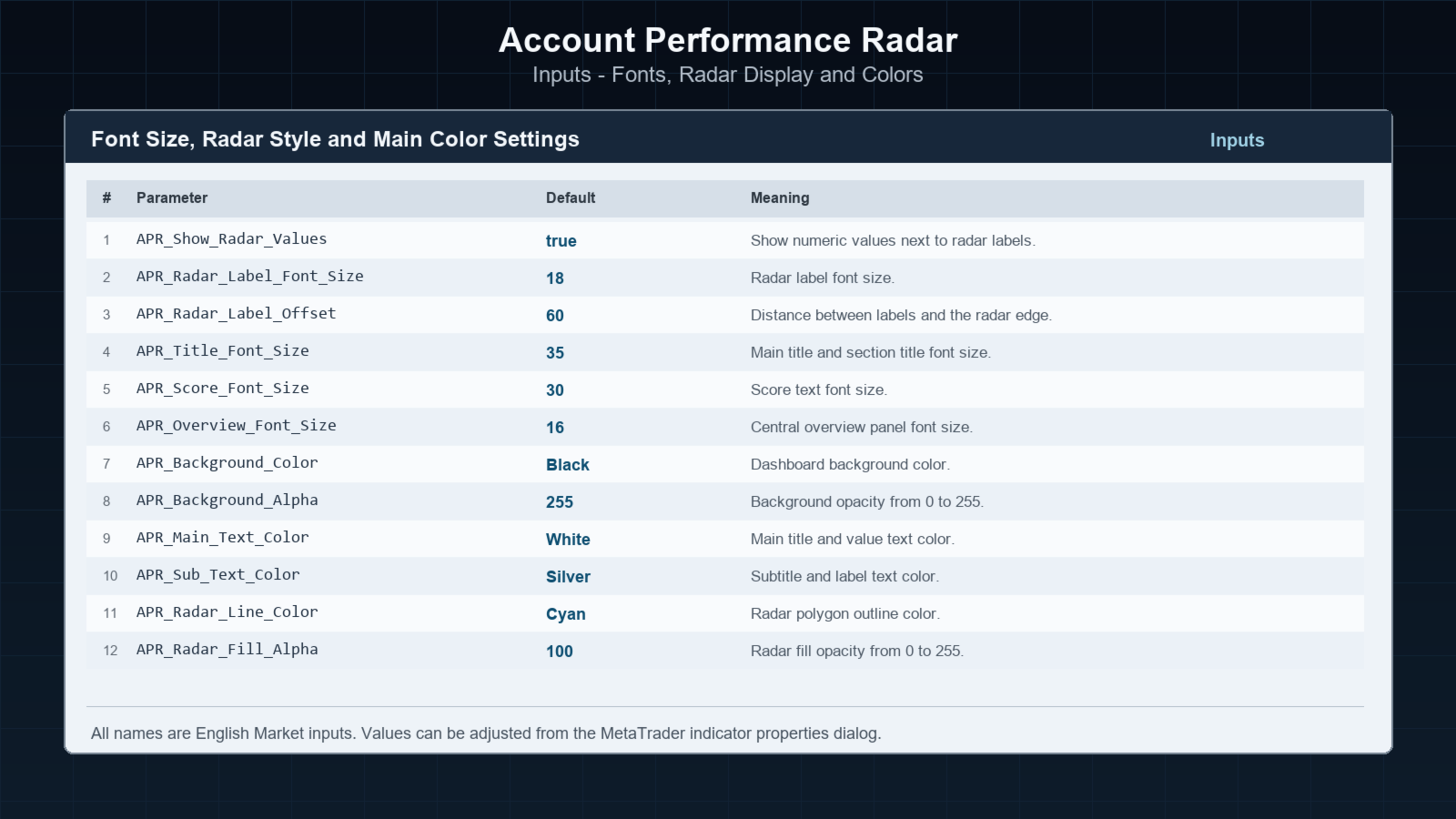
- APR_Show_Radar_Values: show or hide metric values near radar labels.
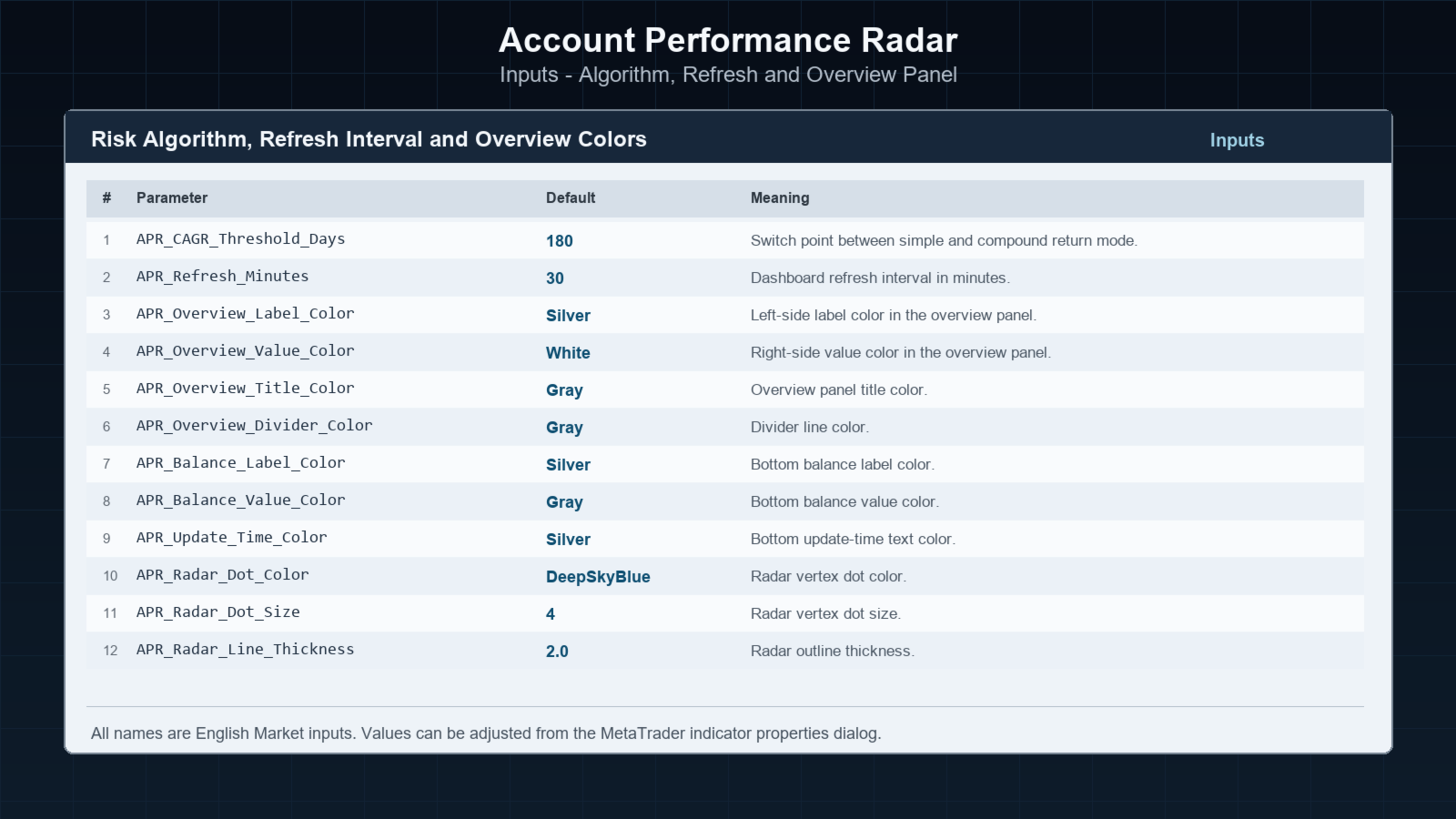
- APR_CAGR_Threshold_Days: day threshold for simple/compound annualization mode.
- APR_Refresh_Minutes: dashboard refresh interval.
- APR_Background_Color and APR_Background_Alpha: canvas background style.
- APR_Radar_Line_Color and APR_Radar_Fill_Color: radar visual style.
- APR_Overview_Label_Color and APR_Overview_Value_Color: central table text colors.
============================================================
Risk Notice
============================================================
Trading involves risk. Historical statistics do not guarantee future results. This indicator is an analysis and visualization tool only. It should be used together with the user's own trading records, broker statements and risk controls.