TrendFlow CBL Pro
- Indicatori
- Versione: 5.10
- Attivazioni: 5

TrendFlow CBL Pro is a complete trend-following indicator built on the Count Back Line (CBL) method — a proven technique for identifying dynamic support and resistance levels based on actual price structure, not lagging averages.
It does not just give you an arrow — it gives you a full trading framework: entry signal, stop loss placement, take profit target, phase-colored bars, filter confirmation, and a live performance dashboard — all in one indicator, right on your chart.
Why TrendFlow CBL Pro?
- Non-Repainting Signals — Signals are confirmed only after the bar closes. Entry fills at the next bar's open. What you see on history is what you would have seen live. No cheating, no hindsight bias.
- Count Back Line Engine — Uses the CBL algorithm to dynamically calculate support and resistance from actual swing highs and lows. This adapts to any market and any timeframe without curve-fitting.
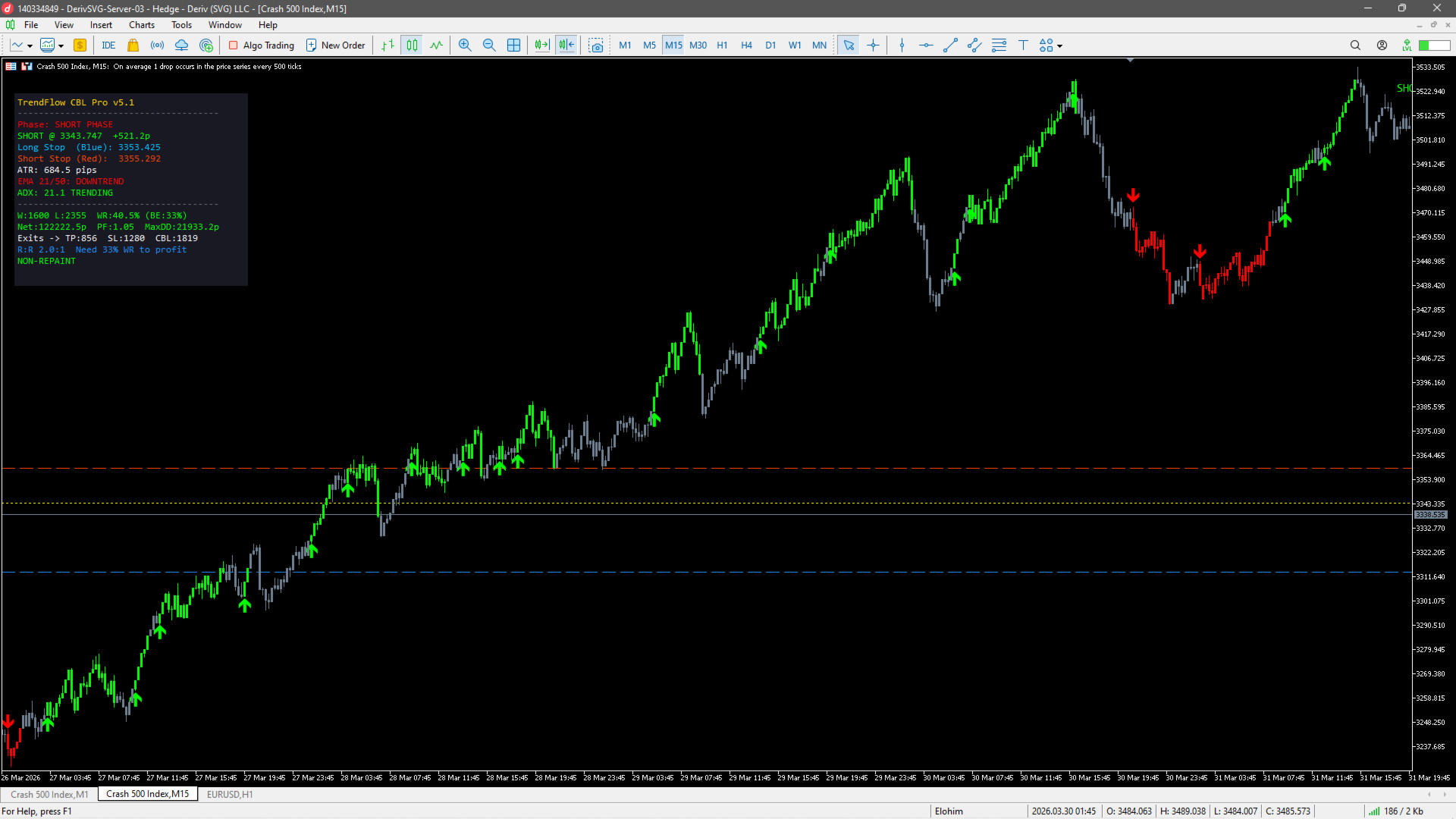
- Built-In Risk:Reward Targeting — Every signal comes with an automatically calculated Entry, Stop Loss, and Take Profit level based on your chosen R:R ratio. Visual lines are drawn on the chart so you see exactly where to enter, where your stop is, and where your target sits.
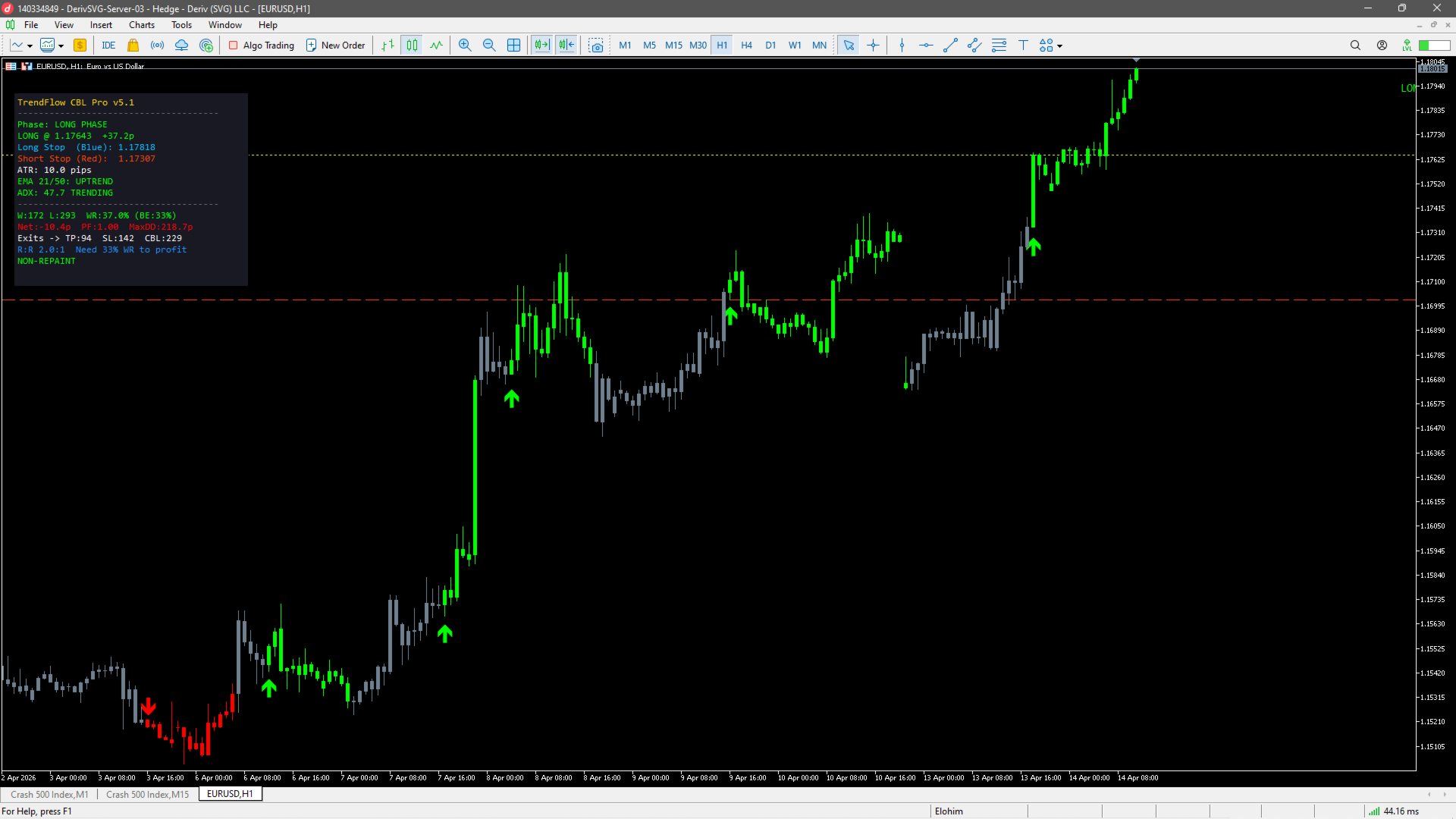
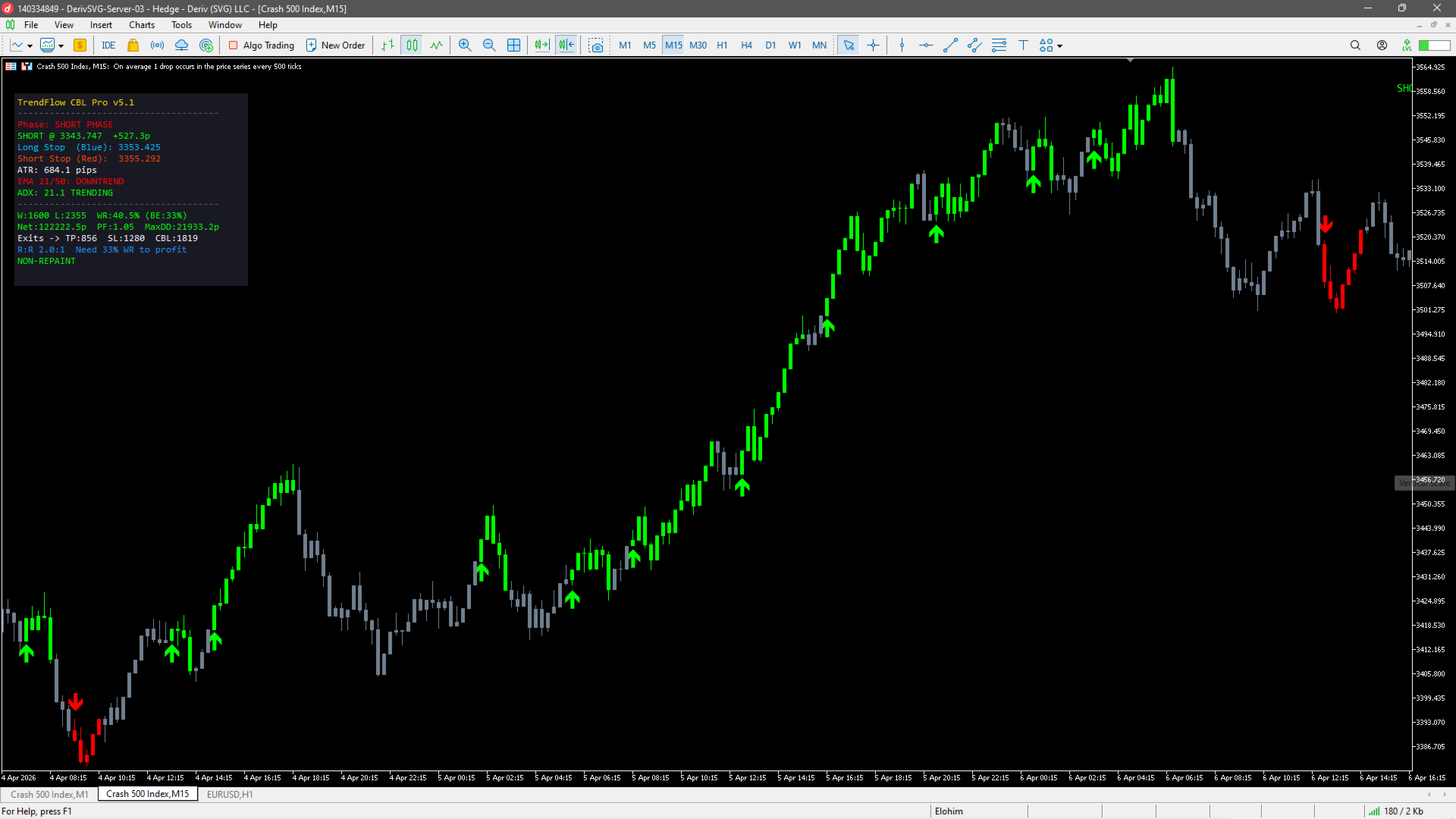
- Phase-Colored Bars — Candles are colored by phase: Green = Long Phase, Red = Short Phase, Gray = Flat/Scanning. You can see the market's trend state at a glance without looking at a single number.
- Triple-Layer Filtering — Avoid bad entries with optional Dual EMA trend filter, ADX volatility filter, and RSI overbought/oversold filter. Enable the ones you want, disable what you don't. You stay in control.
- Live Performance Dashboard — See wins, losses, win rate, net pips, profit factor, max drawdown, exit breakdown (TP / SL / CBL), breakeven win rate, and current trade status — updated in real time, directly on your chart.
How It Works
The Phase System
TrendFlow CBL Pro organizes trading into three clear phases:
- FLAT (Scanning) — No position open. The indicator watches for price to break above the upper CBL (buy signal) or below the lower CBL (sell signal), confirmed by your chosen filters.
- LONG PHASE — A buy signal was triggered. The indicator tracks entry price, stop loss (based on the lower CBL + ATR padding), and take profit (based on your R:R ratio). Bars are colored green.
- SHORT PHASE — A sell signal was triggered. Same logic, mirrored. Bars are colored red.
Transitions happen automatically based on price action — not on arbitrary indicator crossovers.
Signal Confirmation
Every signal must pass through multiple quality checks before it fires:
- Price must break the CBL level on a closed bar (non-repaint mode)
- Optional confirmation bars — require the breakout to hold for 1–3 bars
- Optional strong candle filter — the signal bar must have a real body ≥ 35% of its range (filters out dojis and weak bars)
- Cooldown period after each exit — prevents revenge re-entries
- EMA, ADX, and RSI filters must all agree (when enabled)
Exit Logic (Priority Order)
- Take Profit hit — Price wick touches TP level → exits at TP price (WIN)
- Stop Loss hit — Price wick touches SL level → exits at SL price (LOSS)
- CBL Phase Exit — Price closes beyond the CBL trailing stop → exits at bar close
Live Dashboard — Everything at a Glance
The on-chart dashboard displays:
- Current Phase (Flat / Long / Short / Pending Buy / Pending Sell)
- Open trade details with live P/L in pips
- CBL Long Stop (support) and Short Stop (resistance) levels
- Current ATR value in pips
- EMA trend direction (Uptrend / Downtrend)
- ADX trend strength (Trending / Ranging)
- RSI value with overbought/oversold highlighting
- Win / Loss count and Win Rate % vs. breakeven requirement
- Net Pips, Profit Factor, and Max Drawdown
- Exit breakdown: how many trades closed by TP, SL, or CBL
- Non-Repaint status confirmation
Alerts
Never miss a signal. Choose any combination of alert methods:
- Popup Alert on your MetaTrader terminal
- Sound Alert (customizable sound file)
- Email Notification
- Push Notification to your mobile phone
EA-Ready Signal Buffer
TrendFlow CBL Pro includes a hidden signal buffer ( Buffer 7 ) that outputs: +1 for Long phase, -1 for Short phase, and 0 for Flat. This makes it easy to read signals from an Expert Advisor using iCustom() for fully automated trading.
Input Parameters
Count Back Lines
| Parameter | Default | Description |
|---|---|---|
| CBL Period | 13 | Lookback period for Count Back Line calculation. Higher values = smoother CBL lines and fewer signals. Lower values = more responsive, more signals. Range: 3+ |
Entry Confirmation
| Parameter | Default | Description |
|---|---|---|
| Non-Repaint Mode | true | When enabled, signals only confirm after the bar closes and entry fills at the next bar's open. This guarantees what you see on history matches real-time behavior. Disable for live/early signals (may repaint). |
| Confirm Bars After Cross | 1 | Number of additional bars the breakout must hold before the signal fires. 0 = immediate, 1–3 = extra confirmation. Higher values reduce false breakouts but may delay entries. |
| Cooldown After Exit | 3 | Minimum number of bars to wait after closing a trade before a new signal can fire. Prevents revenge trading and whipsaws in choppy conditions. |
| Require Strong Signal Candle | true | When enabled, the signal bar must have a solid body (not a doji or pin bar). Filters out weak, indecisive signals. |
| Min Body % of Range | 0.35 | Minimum candle body size as a percentage of the full high-low range. Only applies when "Require Strong Signal Candle" is enabled. 0.35 = body must be at least 35% of the candle range. |
Trend Filter (Dual EMA)
| Parameter | Default | Description |
|---|---|---|
| Enable EMA Filter | true | When enabled, buy signals only fire when the fast EMA is above the slow EMA (uptrend), and sell signals only fire when fast EMA is below slow EMA (downtrend). |
| Fast EMA | 21 | Period for the fast Exponential Moving Average. |
| Slow EMA | 50 | Period for the slow Exponential Moving Average. |
Volatility Filter (ADX)
| Parameter | Default | Description |
|---|---|---|
| Enable ADX Filter | true | When enabled, signals only fire when ADX is above the minimum threshold, confirming the market is trending (not ranging). |
| ADX Period | 14 | Period for the Average Directional Index calculation. |
| Min ADX to Trade | 20.0 | Minimum ADX value required. Below this level, the market is considered ranging and signals are suppressed. |
RSI Filter
| Parameter | Default | Description |
|---|---|---|
| Enable RSI Filter | false | When enabled, buy signals are blocked if RSI is overbought, and sell signals are blocked if RSI is oversold. Disabled by default — enable it if you want to avoid chasing extended moves. |
| RSI Period | 14 | Period for the Relative Strength Index calculation. |
| Overbought | 70.0 | RSI level above which buy signals are suppressed. |
| Oversold | 30.0 | RSI level below which sell signals are suppressed. |
Risk Management
| Parameter | Default | Description |
|---|---|---|
| Show Entry/SL/TP Lines | true | Draw horizontal lines on the chart showing Entry price (yellow), Stop Loss (red), and Take Profit (blue) for the current open trade. |
| Risk:Reward Ratio | 2.0 | Target reward as a multiple of risk. Example: R:R = 2.0 means if your stop is 50 pips, your take profit is 100 pips. With R:R = 2.0, you only need a 34% win rate to break even. |
| SL Padding (ATR mult) | 0.3 | Extra buffer added to the stop loss beyond the CBL line, expressed as a multiple of ATR. Prevents the stop from being clipped by normal volatility noise. |
| Trail SL with CBL | false | When enabled, the stop loss follows the CBL line as it moves in your favor. When disabled, the stop stays fixed at the initial level. |
| Entry Color | Yellow | Color of the entry price line drawn on the chart. |
| SL Color | OrangeRed | Color of the stop loss line drawn on the chart. |
| TP Color | DodgerBlue | Color of the take profit line drawn on the chart. |
Visual
| Parameter | Default | Description |
|---|---|---|
| Buy Arrow | 233 | Wingdings character code for the buy signal arrow. |
| Sell Arrow | 234 | Wingdings character code for the sell signal arrow. |
| Arrow Offset (ATR mult) | 0.5 | Distance between the signal arrow and the candle, as a multiple of ATR. |
| ATR Period | 14 | Period for the Average True Range calculation used for arrow offset and SL padding. |
| Phase-Colored Bars | true | Color the chart candles by phase: Green (long), Red (short), Gray (flat). |
Dashboard
| Parameter | Default | Description |
|---|---|---|
| Show Dashboard | true | Display the live performance and status dashboard on the chart. |
| X Position | 20 | Horizontal position (pixels from the left edge). |
| Y Position | 50 | Vertical position (pixels from the top edge). |
| Font Size | 9 | Dashboard text size. |
| Background Color | 25,25,35 | Dashboard panel background color (dark by default). |
Alerts
| Parameter | Default | Description |
|---|---|---|
| Popup | true | Show a popup alert window on new signals. |
| Sound | true | Play a sound alert on new signals. |
| Sound File | alert.wav | Custom sound file name (must be in MT5 Sounds folder). |
| false | Send an email notification on new signals (requires MT5 email setup). | |
| Push | false | Send a push notification to your mobile device on new signals (requires MT5 mobile setup). |
Recommended Starting Settings
- Forex majors (H1/H4): CBL Period = 13, EMA 21/50 ON, ADX ON (min 20), R:R = 2.0
- Indices / Gold (M15/H1): CBL Period = 10, EMA 21/50 ON, ADX ON (min 22), R:R = 1.5–2.0
- Scalping (M5): CBL Period = 8, EMA 9/21, ADX ON (min 25), R:R = 1.5, Cooldown = 2
- Swing trading (D1): CBL Period = 13–21, EMA 21/50, ADX optional, R:R = 2.0–3.0
These are starting points — always backtest on your specific instrument and timeframe before trading live.
Summary
- Works on all symbols and all timeframes
- Non-repainting — verified signal integrity
- Complete entry + stop + target framework in one indicator
- Phase-colored bars show trend state instantly
- Triple-filter confirmation (EMA + ADX + RSI)
- Live dashboard with full performance statistics
- EA-compatible signal buffer for automated trading
- Multi-channel alerts — popup, sound, email, push
- Fully customizable — enable or disable every feature independently