
75 USD
Versione demo scaricata:
6 985
Pubblicato:
2 febbraio 2012
Versione attuale:
26.326
Non hai trovato un robot adatto?
Ordina il tuo
su Freelance
Vai alla sezione Freelance
Ordina il tuo
su Freelance
Come acquistare un Robot di Trading o un indicatore
Esegui il tuo EA
hosting virtuale
hosting virtuale
Prova un indicatore/robot di trading prima di acquistarlo
Vuoi guadagnare nel Market?
Come presentare un prodotto per venderlo con successo

Ti stai perdendo delle opportunità di trading:
- App di trading gratuite
- Oltre 8.000 segnali per il copy trading
- Notizie economiche per esplorare i mercati finanziari
Registrazione
Accedi
Accetti la politica del sito e le condizioni d’uso
Se non hai un account, registrati
Thank you Vladislav,
I have another doubt regarding partial closing of orders.
The partial closing deal tab should appear when moving cursor over the current open position as I understand from the user guide.
It is not appearing in my case, am I missing something ? or are there some input parameters that I should know.
Thank you.
Hello.
Partial Close
nao estou conseguindo instalar no terminal o virtual trade pad
MARKET MQL5.COM: HOW TO INSTALL ea from terminal?: https://www.mql5.com/en/blogs/post/734585
Installation and activation of the purchased adviser in the terminal.
After purchase, you can install an Expert Advisor in any terminal.
1 activation = 1 computer.
If you change the system or reinstall Windows, you need to re-enable (New Activation) the Expert Advisor on your computer.
You can activate the Expert Advisor 1 time on the computer and install the Expert Advisor in other terminals on the computer without activation.
Copying an Expert Advisor from one terminal to another is prohibited.
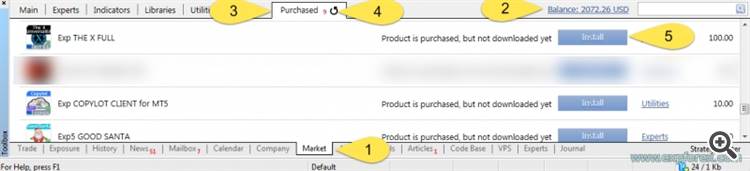
Our advisor will appear in your Navigator! Move it or double-click on the EA and install it on any currency pair, which will be an adviser to trade, for example, EURUSD.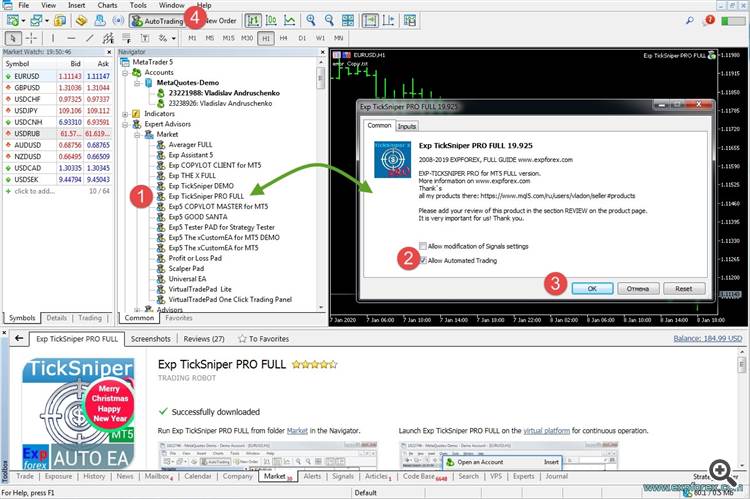
After successful installation, you will be shown on the chart, our adviser with a green smiley:The same actions for updating the Expert Advisor.
Please update the manual for your Trade Pad, it is great you do enhancements but the manual is a year old, thanks
Hi,
I´m using VTP for some days and I'm having a problem to create a stop order.
The terminal reports this error message: 2021.01.29 14:57:06.910 Trades '90374807': failed buy stop 5 WING21 at 115910 [Invalid expiration]
How can I fix it?
regrads, jm
Hi,
I´m using VTP for some days and I'm having a problem to create a stop order.
The terminal reports this error message: 2021.01.29 14:57:06.910 Trades '90374807': failed buy stop 5 WING21 at 115910 [Invalid expiration]
How can I fix it?
regrads, jm
The type of fill positions and orders.
It is used for MT5 terminal.
In AUTO mode, the Expert Advisor tries to determine the fill type automatically. But, in some situations, you need to set the fill type yourself.
If you get an error when opening a position
10030
TRADE_RETCODE_INVALID_FILL
The unspecified type of execution of the remainder order is indicated
Set the type of fill that your broker indicates.
Example:
FillOrKill
This execution policy means that the order can be executed only in the specified amount. If the market currently does not have a sufficient amount of a financial instrument, then the order will not be executed. The required volume can be made up of several offers available at the moment in the market.
ImmediateOrCancel
It means the agreement to make a deal on the maximum available volume on the market within limits specified in the warrant. In the case of the impossibility of full execution, the order will be executed for an accessible volume, and the executed order volume will be canceled.
Return
This mode is used for market, limit, and stop-limit orders, and only in the modes "Market Execution" and "Stock Execution". In case of partial execution, a market or limit order with a residual volume is not withdrawn but continues to operate.
For stop-limit orders, the corresponding limit order with the execution type Return will be created upon activation.
- 0: ORDER_TIME_GTC - No expiration date
- 1: ORDER_TIME_DAY - Expiration of the pending order until the end of the current day
- 2: ORDER_TIME_SPECIFIED_DAY - The number of days for the expiration of the pending order. The starting point from the current day.
The type of fill positions and orders.
It is used for MT5 terminal.
In AUTO mode, the Expert Advisor tries to determine the fill type automatically. But, in some situations, you need to set the fill type yourself.
If you get an error when opening a position
10030
TRADE_RETCODE_INVALID_FILL
The unspecified type of execution of the remainder order is indicated
Set the type of fill that your broker indicates.
Example:
FillOrKill
This execution policy means that the order can be executed only in the specified amount. If the market currently does not have a sufficient amount of a financial instrument, then the order will not be executed. The required volume can be made up of several offers available at the moment in the market.
ImmediateOrCancel
It means the agreement to make a deal on the maximum available volume on the market within limits specified in the warrant. In the case of the impossibility of full execution, the order will be executed for an accessible volume, and the executed order volume will be canceled.
Return
This mode is used for market, limit, and stop-limit orders, and only in the modes "Market Execution" and "Stock Execution". In case of partial execution, a market or limit order with a residual volume is not withdrawn but continues to operate.
For stop-limit orders, the corresponding limit order with the execution type Return will be created upon activation.
- 0: ORDER_TIME_GTC - No expiration date
- 1: ORDER_TIME_DAY - Expiration of the pending order until the end of the current day
- 2: ORDER_TIME_SPECIFIED_DAY - The number of days for the expiration of the pending order. The starting point from the current day.
Set TypeFilling = Return, and it worked.
Yhank you a lot.
Set TypeFilling = Return, and it worked.
Yhank you a lot.
Olá, algumas ordens de stoploss estao sendo violadas, fazendo eu ter perdas maiores... O que pode ser isso>
Bom dia,
está aparecendo para mim, duas linhas, uma do mercado e uma com spread.
como faço para retirar essa linha do spread?
Bom dia,
está aparecendo para mim, duas linhas, uma do mercado e uma com spread.
como faço para retirar essa linha do spread?
Приветствую. Есть несколько пожеланий.
1. После последнего обновления панель стала тормозить. При переключении между вкладками пропадает, потом появляется. При клике открыть позицию проходит пара секунд и тп.
2. Я уже несколько раз просил сделать CLP по-умолчанию OFF. Бывает забыл выключить, потом накидываешь на график и он закрывает все сделки, например. Это опасная тема. Или хотя бы чтобы галочки по профиту, процентам и лоссу убирались. Но лучше просто чтобы OFF было. Надо - включаешь.
3. После последнего обновление зато почему-то Show_EndofBar и Show_Spread всегда True, даже если их убрать. Не запоминает. Зато почему-то запоминает настройки CLP.
p.s. пользуюсь панелькой постоянно и другими твоими продуктами. Win764, последняя офиц версия мт5 5.0 2755
Приветствую. Есть несколько пожеланий.
1. После последнего обновления панель стала тормозить. При переключении между вкладками пропадает, потом появляется. При клике открыть позицию проходит пара секунд и тп.
2. Я уже несколько раз просил сделать CLP по-умолчанию OFF. Бывает забыл выключить, потом накидываешь на график и он закрывает все сделки, например. Это опасная тема. Или хотя бы чтобы галочки по профиту, процентам и лоссу убирались. Но лучше просто чтобы OFF было. Надо - включаешь.
3. После последнего обновление зато почему-то Show_EndofBar и Show_Spread всегда True, даже если их убрать. Не запоминает. Зато почему-то запоминает настройки CLP.
p.s. пользуюсь панелькой постоянно и другими твоими продуктами. Win764, последняя офиц версия мт5 5.0 2755
Здравствуйте.Спасибо.
Постараемся разобраться.
1. Вроде никаких дорогостоящих функций я не добавлял, которые могут влиять на открытие позиций. Поэтому нужен лог файл с эксперта и с сервера, чтобы посмотреть, кто тормозит открытие сделок. Возможно сервер долго обрабатывает приказ?
Возможно установлены какие то индикаторы поверх графика?
2. Смотрите. CLP - по умолчанию Выключена!!!! Когда Вы первый раз загружаете эксперта, все функции отключены!
Но если Вы ее включили - то она запоминает это положение на этом символе.
Если Вы не выключили его, а в следующий раз его снова пытаетесь загрузить - то да, он включен.
Сделано это не для того, чтобы мешать. А для того, чтобы быть стойким к перегрузкам компьютера, графика, ТФ.
Т.е. советник перед выгрузкой - запоминает все включенные функции. и при следующей загрузкее - восстанавливает работу программы.
Но я подумаю над этим. Даже не знаю. Сделать флаг, что если больше недели не использовалась панель - тьо выключать все и приводить к виду по умолчанию?.
3. Тоже странно именно по последнему обновлению.
Если речь идет о том, что Вы Выключили - и снова накидываете эксперта на график, то да!!!!
Это поведение всех экспертов!
Т.е. когда Вы накидываете эксперта на график , то все параметры по умолчанию.
Я провел проверки. Все именно так и работает, как задумано.
Поэтому лучше принять правила поведения экспертов:
1. При загрузке эксперта из навигатора. Все внешние параметры - по умолчанию!!!!
2. Все, что включено/отключено на панели, сохраняются в глобальных переменных и загружается оттуда при загрузке советника на этом символе!!!! (Включенные функции Трейлингстопа, стоплосса, тейкпрофита, лота, CLP , и так далее )
Bom dia,
está aparecendo para mim, duas linhas, uma do mercado e uma com spread.
como faço para retirar essa linha do spread?
Added the Show_Ask_Line parameter for automatic activation of the Ask line on the chart:
This is done to make it easier for new users to determine at what price a position/order will be opened.
Добавляю новую панельку на чистый график. При добавлении ставлю
Show_EndofBar и Show_Spread OFF
далее включаю CLP, ставлю галочки профит 10$, трейл 5$
убираю панельку, закрываю график
---
Открываю график, накидываю панельку
1. Show_EndofBar и Show_Spread ON (хотя должен запоминать?).
2. CLP ON со всеми галочками (запоминает, но лучше б не запоминал).
CLP ON с галочками, которые запоминаются это очень опасно. Я почему и прошу, если возможно, сделать чтобы он был выключен по-умолчанию. Если надо нет проблем его включить. Но когда накиываешь и он закрывает позиции потому что ты забыл перед выключением его выключить это как-то странно.
Или подскажи где в настройках CLP ON или OFF? Буду проверять при накидывании на график...
Добавляю новую панельку на чистый график. При добавлении ставлю
Show_EndofBar и Show_Spread OFF
далее включаю CLP, ставлю галочки профит 10$, трейл 5$
убираю панельку, закрываю график
---
Открываю график, накидываю панельку
1. Show_EndofBar и Show_Spread ON (хотя должен запоминать?).
2. CLP ON со всеми галочками (запоминает, но лучше б не запоминал).
CLP ON с галочками, которые запоминаются это очень опасно. Я почему и прошу, если возможно, сделать чтобы он был выключен по-умолчанию. Если надо нет проблем его включить. Но когда накиываешь и он закрывает позиции потому что ты забыл перед выключением его выключить это как-то странно.
1/ (Нет не должен. ) - При новой загрузки эксперта на график - все параметры внешние, которые Вы устанавливаете в эксперте в Входных параметрах - по умолчанию.
Так задумано терминалом! (Этого не изменить)
2/ Да, все функции панели, лоты, стопы и так далее запоминаются и записываются в глоб переменные. Поэтому при новой загрузке - он все это вытаскивает из буфера и продолжает работу.
Это сделано для того, чтобы работать на ВПС, правильно работать при выключении и перезагрузке компьютера, ТФ или терминала.
К сожалению или к счастью это так и работает.
Это сложный вопрос. Вы не поймете, если не будете программировать панельки.
Я принял Ваше мнение. Я постараюсь придумать что-нибудь интересное и правильное. Отключение CLP по умолчанию после определенного простоя ()нет активности.
На данный момент работает именно так.