LagShield Pro
- Utilità
-
Dennis Muchiri Miano
 I specialize in turning traders’ handwritten, screenshot, or PDF strategies into precise MQL4/MQL5 code, with clear specs, transparent milestones, and test builds along the way. With 7+ years of software engineering focused on MetaTrader, I convert clearly defined trading rules into robust
 - Versione: 1.50
- Attivazioni: 10
Stop watching lag eat your edge. LagShield Pro monitors your MT5 terminal's execution latency in real time and arms a one-click emergency close panel the moment lag persists beyond your tolerance. For VPS traders, prop-firm participants, and any EA strategy where a missed tick means a missed exit.
Comments section: Click Here
DeeFX Public Group: Click Here
WHAT IT DOES
LagShield Pro is a monitoring and protection utility not a trading strategy. It sits on any chart, watches every tick, and tells you exactly what your terminal is doing with a colour-coded panel and real-time metrics. When lag is brief it warns. When lag persists, the Panic Button arms. One click closes all qualifying positions cleanly.
Execution lag is invisible until it costs you. A trade that should have closed at breakeven fills 80ms late. A news spike hits and your order queues instead of executes. Your terminal looks fine, the chart is moving, the EA is running, but the connection between you and the market has quietly degraded.
LagShield Pro makes that degradation visible the moment it happens, and gives you one button to get flat when it matters most.
Manual Trader
You're watching the chart, reading price action, and clicking into trades by hand. Your edge depends on entry precision a 200ms lag on a scalp is the difference between a good fill and chasing.
What LagShield Pro does for you:
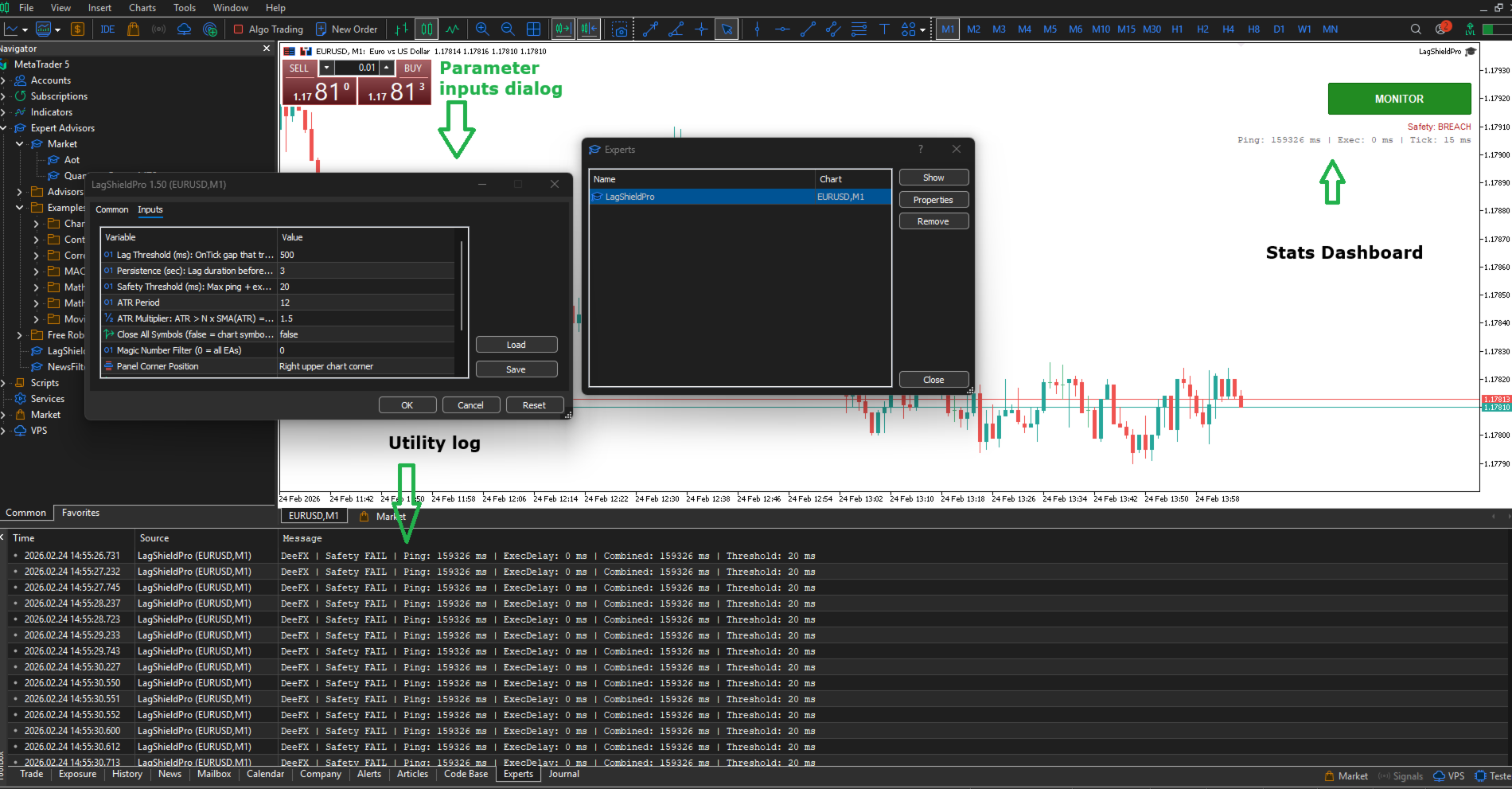
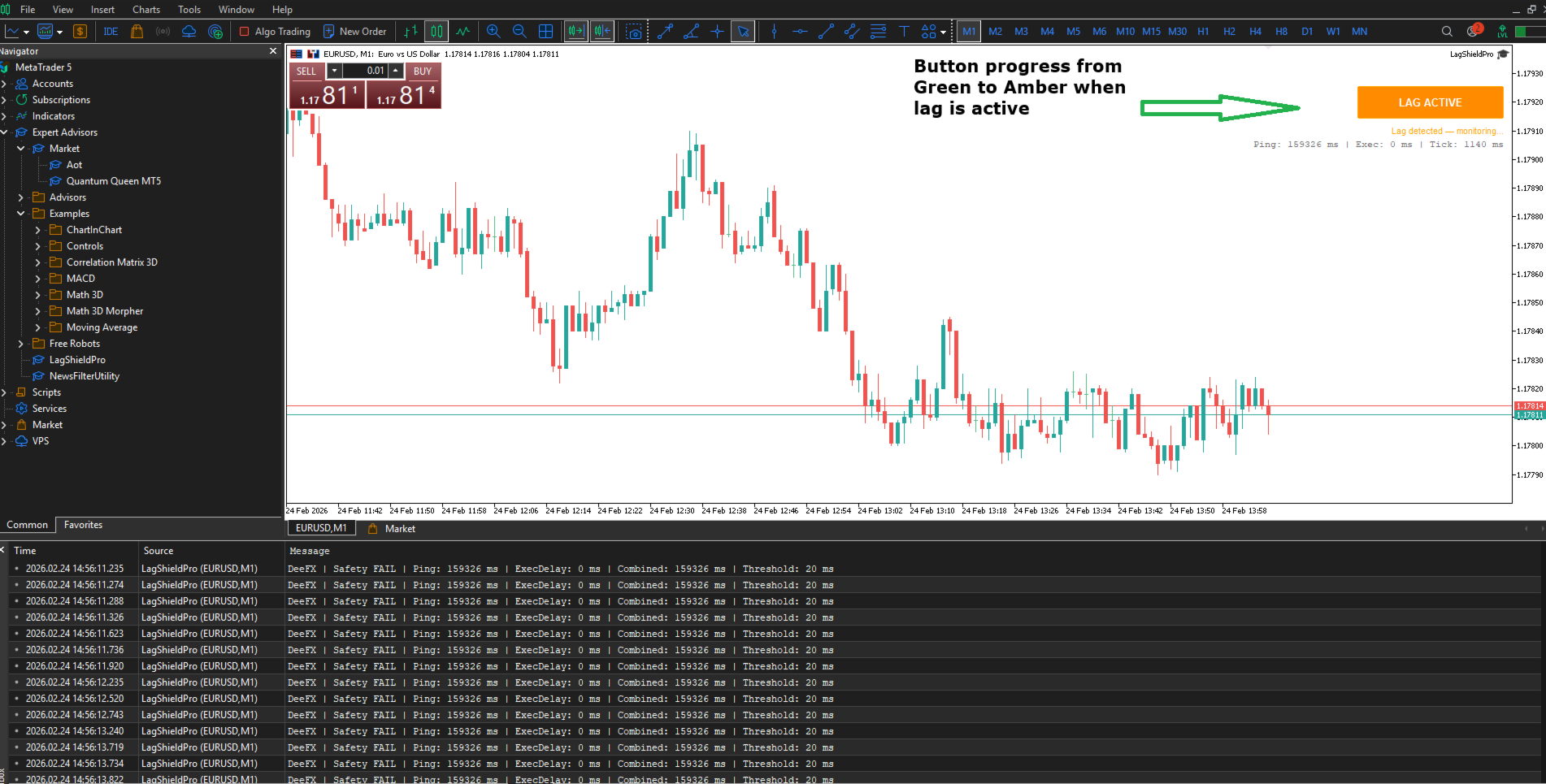
The panel sits in the corner of your chart and updates every 500ms. Green means your terminal is communicating cleanly with the broker. Amber means tick delivery has slowed you'll see it before you feel it in your fills. Red means lag has persisted long enough that your execution is compromised.
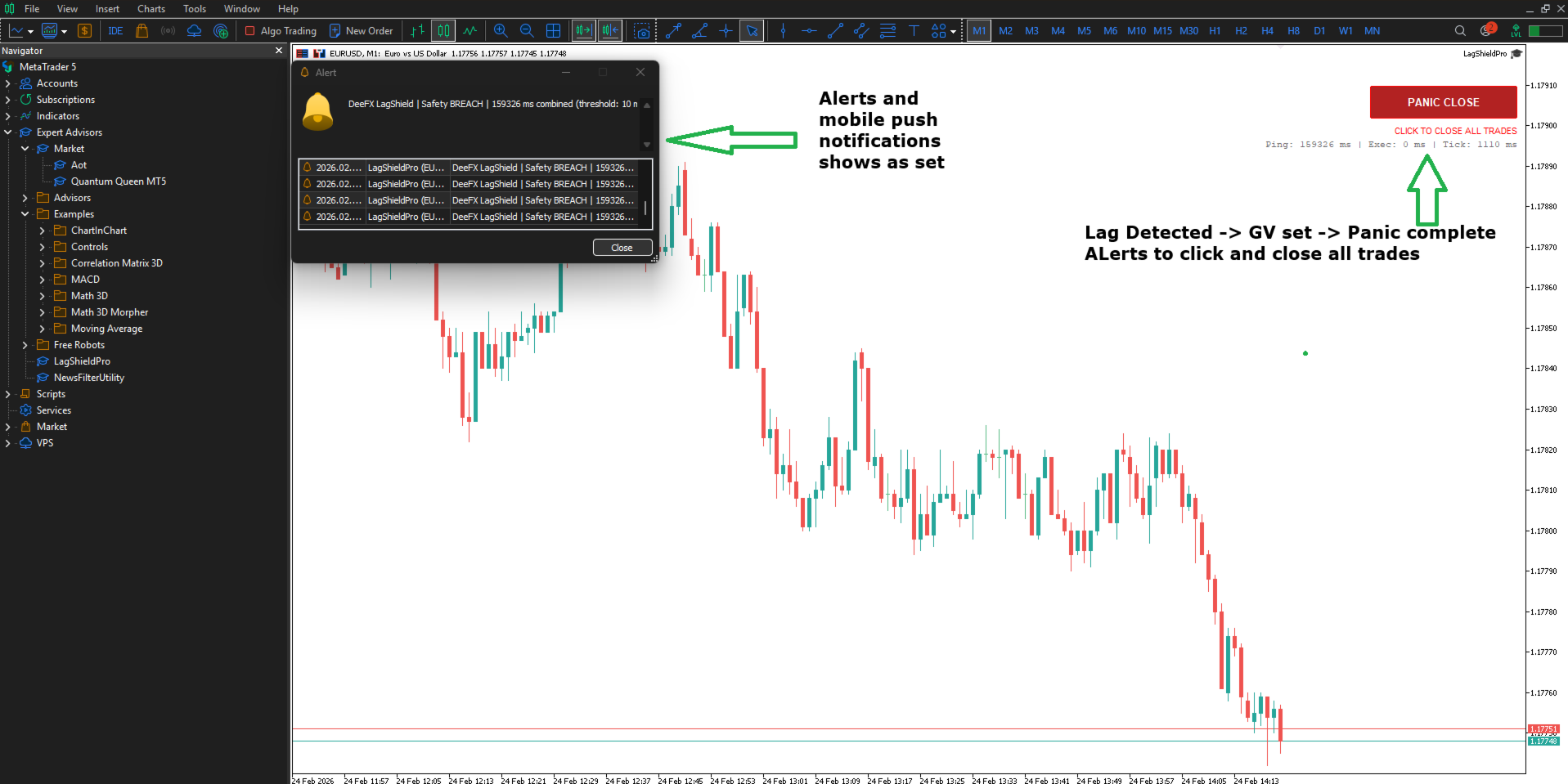
When the button turns red, one click closes every qualifying position on the chart before a bad fill makes the decision for you. You don't have to hunt through open trades or second-guess which ones to close. It's done in a single action with a full log of every ticket, P&L, and fill time written to the Expert journal.
The safety display shows your live ping and the last measured execution delay side by side. If the combined number is creeping above your threshold, you know before your next trade not after.
EA Trader
Your Expert Advisor handles entries and exits. You're not watching every tick. What you are watching is whether the EA is operating in conditions it was designed for.
What LagShield Pro does for you:
LagShield Pro runs alongside your EA on the same terminal without interfering with it. It monitors the tick stream independently and sets a GlobalVariable flag the moment persistent lag is confirmed. If your EA is built to read that flag one line of code to check Terminal_Lag_Detected it can pause new entries automatically without you being present.
Even if your EA doesn't read the flag, you have a visible override. The panic button closes all positions matching your symbol or magic number filter regardless of which EA opened them. On a multi-EA terminal you can target specifically or close everything — your choice at setup.
The execution delay measurement wraps every close operation and logs the actual fill time. If your broker's execution is degrading during high-impact news, that data is in the journal. It's useful at the end of the month when you're reviewing whether slippage was random or correlated with specific conditions.
VPS Trader
Your terminal runs on a remote server. You connect occasionally to check in, but the EA trades around the clock without supervision. Lag events happen and resolve while you're asleep.
What LagShield Pro does for you:
The GlobalVariable flag persists in the terminal for the duration of any lag event. If you've built a notification into your EA or a secondary monitor, it will catch the flag even hours after the original event. The Expert journal retains a timestamped record of every lag detection, duration, persistence confirmation, and panic close so when you review the terminal in the morning you can reconstruct exactly what happened and when.
Push notifications are built in. Enable InpEnablePush and connect your MetaQuotes ID in terminal settings. If lag persists beyond your threshold while you're away from the screen, your phone receives the alert. The cooldown prevents notification floods during sustained events one alert to wake you up, not fifty.
The ATR volatility gate means the system distinguishes between a genuinely slow market with wide tick spacing and a fast market where tick delivery has broken down. You won't receive false alerts during quiet Asian session consolidation. The alerts you do receive are events that warrant your attention.
KEY FEATURES
— Two-layer detection: OnTick fires immediately; OnTimer 500ms watchdog confirms persistence.
— ATR volatility gate: self-normalising, instrument-agnostic. Works identically on XAUUSD, indices, forex, and crypto pairs.
— GlobalVariable IPC: sets Terminal_Lag_Detected = 1.0 on persistence breach. Your other EAs can read this flag and pause trading without any additional configuration.
— Broker-adaptive fills: DetectFilling() queries SYMBOL_FILLING_MODE per instrument. Eliminates ORDER_FILLING_FOK failures on ECN/STP brokers.
— Prop-firm safe: no trade signals, no phantom orders, no position modification until you manually click the panic button.
— Magic number filter: target panic close at all EAs (0) or a specific magic number.
— All-symbols or chart-symbol close: choose whether the panic close sweeps the entire account or only the attached chart's instrument.
— Debounced alerts: configurable cooldown prevents alert floods during sustained lag events.
— Push notification support: receive a mobile alert the moment a safety breach or panic close fires.
— Corner-aware GUI: button and dashboard position correctly in all four chart corners with proper anchor calculation.
What It Monitors
| Metric | Where It Appears | What It Tells You |
|---|---|---|
| Inter-tick delta | Panel — live | Gap between tick arrivals vs your threshold |
| Terminal ping | Panel — live | Raw broker connection latency |
| Execution delay | Panel — live | Measured fill time on last CTrade operation |
| Combined safety | Panel — colour coded | Ping + execution vs your safety threshold |
| Lag duration | Expert journal | How long each event lasted |
| Panic close log | Expert journal | Ticket · symbol · P&L · fill time per position |
INPUT PARAMETERS
Latency Settings:
— Lag Threshold (ms): inter-tick gap that triggers lag detection. Default: 500 ms. Minimum: 50 ms.
— Persistence (sec): how long lag must persist before the Panic button arms. Default: 3 s.
— Safety Threshold (ms): combined ping + execution delay limit. Default: 150 ms.
Volatility Filter:
— ATR Period: lookback for the ATR indicator. Default: 14.
— ATR Multiplier: ATR must exceed N x SMA(ATR) to enable the lag gate. Default: 1.5.
Panic Button:
— Close All Symbols; false = chart symbol only, true = all account positions.
— Magic Number Filter: 0 = close all EAs. Set your EA's magic number to restrict scope.
— Panel Corner Position: CORNER_RIGHT_UPPER / LEFT / LOWER (all four positions supported).
Alerts:
— Enable Alert() popups: on/off toggle.
— Enable Push Notifications: on/off toggle.
— Alert Cooldown (sec): minimum gap between repeated alerts. Default: 10 s.
COMPATIBILITY
— MetaTrader 5 (MT5): any broker, any instrument, any timeframe.
— Tested on ECN/STP brokers with FOK, IOC, and RETURN filling modes.
— Compatible alongside all trading EAs: LagShield adds no chart indicators and claims no symbol lock.
— VPS deployment recommended for cleanest latency baseline readings.
Prop Firm Compatibility
No martingale. No DLL dependencies. No hidden position management. The utility observes and alerts — it only touches positions when you click the panic button or when your EA explicitly acts on the GlobalVariable flag. Max drawdown enforcement is left to your EA by design. LagShield Pro does one thing: tell you the truth about your connection.
IMPORTANT NOTES
— MagicFilter = 0 will target ALL open positions regardless of which EA opened them. Set with care.
— The panic close fires only on manual click confirmation in PANIC state there is no automated position closure.
— ATR handle failure is non-fatal the tool runs without the volatility gate and logs a warning.
SUPPORT & UPDATES
All v1.x updates are delivered free to Unlimited license holders. Questions, broker-specific fill issues, and feature requests are handled via the product comments section. Response within 24–48 hours on business days.Comments section: Click Here
DeeFX Public Group: Click Here