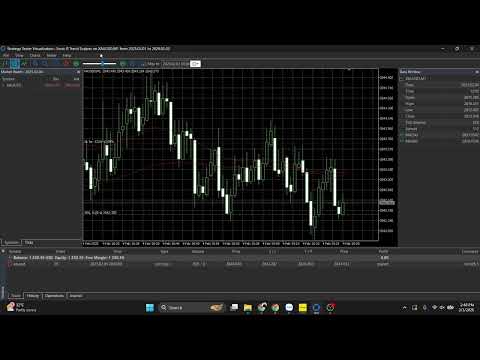
SonicR Trend Scalper
- Experts
- Versione: 2.0
- Attivazioni: 5

SonicR Trend Scalper (MT5 Expert Advisor)
What it is
SonicR Trend Scalper is an MT5 Expert Advisor (EA: automated trading robot) focused on trend-following scalps using a SonicR-style concept:
- Dual EMA trend framework (fast/slow moving averages)
- Confirmed swing structure (pivot-based market structure)
- Breakout entries via pending orders (Buy Stop / Sell Stop)
- RR-based targets (risk-reward targets) and step-by-step trade management
Designed for: one chart = one symbol, clean order management by Magic Number (unique trade ID).
Key features
- Trend-direction filter (trend filter: direction confirmation) with momentum confirmation (momentum: strength confirmation).
- Structure filter (market structure: swing confirmation) using confirmed pivots (pivot: confirmed swing point).
- Breakout entries using pending orders (pending order: order placed in advance).
- Risk-reward TP (TP: take profit) based on initial risk distance (risk distance: SL distance).
- Step trailing by R (R-multiple: profit measured in “R” units) with optional swing-based trailing (swing trailing: trailing by new confirmed swings).
- Broker safety handling (StopLevel: minimal order distance constraints).
Platform & requirements
- Platform: MetaTrader 5
- Pending orders must be allowed (Buy Stop / Sell Stop)
- Recommended: stable connection or VPS (VPS: virtual private server)
Quick setup (5 steps)
1) Open the symbol chart you want to trade.
2) Set chart timeframe to match InpTF (working timeframe).
3) Attach the EA to the chart.
4) Enable Algo Trading / AutoTrading.
5) Set a unique InpMagic and adjust InpLots + other inputs.
Recommended starting risk (example)
This EA uses fixed lots (InpLots: fixed volume). Start conservatively and scale only after stable results.
Starter suggestion:
- For $1,000 balance: 0.05 lot per trade (example starting point).
Note: actual risk depends on SL distance and symbol contract specs (tick value, point size).
Inputs (parameters)
General
- InpSymbol (symbol override): blank = chart symbol
- InpTF (working timeframe)
- InpLots (fixed lots)
- InpMagic (magic number: unique trade ID)
- InpSlippagePoints (slippage: allowed deviation in points)
Signal / entry
- InpPivotL / InpPivotR (pivot confirmation window)
- InpEntryBufTicks (entry buffer: offset in ticks)
- InpPipTicks (pip conversion: 1 pip = ? ticks)
Stops / targets
- InpStopBufPips (stop buffer: extra distance outside swing)
- InpTpRR (risk-reward ratio)
- InpBePlusPips (break-even plus: extra buffer when locking profit)
Trailing
- InpTrailToSR_AfterR1 (swing trailing after >=1R)
- InpSRBufPips (swing buffer)
Usage notes
- Recommended: one EA instance per symbol.
- Use different InpMagic values for multiple charts.
Disclaimer
Trading involves risk. This EA is a tool and does not guarantee profits. Test on a demo account first and use proper risk management.