
Vladislav Andruschenko
- i love my job à https//expforex.com/
- Ukraine
- 313551
|
14+ années
expérience
|
44
produits
|
2349
versions de démo
|
|
93
offres d’emploi
|
0
signaux
|
0
les abonnés
|
👋 Bienvenue chez Expforex
Je suis Vladislav, développeur professionnel MQL4/MQL5. Depuis 2007, je crée des outils pour MetaTrader.
Expforex développe des solutions de trading pratiques pour MetaTrader 4 et MetaTrader 5 :
Expert Advisors, panneaux de trading, copieurs de transactions, utilitaires de gestion du risque, rapports de compte, outils de test et systèmes d’automatisation.
✅ Développement pour MetaTrader depuis 2007
✅ Outils pour MT4 et MT5
✅ Documentation, guides vidéo et support produit
✅ Utilitaires professionnels pour les traders, les développeurs et les gestionnaires de comptes
━━━━━━━━━━━━━━━━━━━━
⭐ VirtualTradePad PRO SE — Espace de trading MetaTrader premium
Panneau de trading manuel professionnel pour MT4 et MT5 avec contrôle depuis le graphique, gestion des positions, outils d’ordres, clôture partielle, moyennage, espace de signaux, préparation aux tests et modules de trading avancés.
https://expforex.com/fr/vtpprosehero/
━━━━━━━━━━━━━━━━━━━━
🌐 Site officiel Expforex https://www.expforex.com/fr/
🚀 Hub complet des produits Expforex https://www.mql5.com/fr/blogs/post/760824
🛒 Tous les produits sur MQL5 Market https://www.mql5.com/fr/users/vladon/seller#products
📘 Tous les guides MQL5 https://www.mql5.com/fr/users/vladon/blog
━━━━━━━━━━━━━━━━━━━━
💬 Des questions, des idées ou besoin d’aide ?
Je recommande toujours de commencer par le guide complet et la documentation du produit. La plupart des réponses, des exemples de configuration et des détails importants y sont déjà expliqués.
Si vous avez besoin d’une aide personnalisée pour un produit, veuillez écrire votre question dans la section Comments de la page exacte du produit que vous utilisez. Cela permet de vérifier plus facilement la version du produit, les paramètres, les captures d’écran et les journaux, afin de donner une réponse plus précise.
Vos retours, vos idées et vos scénarios de trading réels aident également à améliorer les produits Expforex.
━━━━━━━━━━━━━━━━━━━━
🔗 Liens sociaux
📢 MQL5 Channel https://www.mql5.com/fr/channels/expforex
▶️ YouTube https://www.youtube.com/Expforex
📘 Facebook https://www.facebook.com/ExpForex/
𝕏 X / Twitter https://x.com/expforex
📱 Telegram https://t.me/Expforex
🎵 TikTok https://www.tiktok.com/@expforex
📧 Contact https://expforex.com/fr/contacts/
Je suis Vladislav, développeur professionnel MQL4/MQL5. Depuis 2007, je crée des outils pour MetaTrader.
Expforex développe des solutions de trading pratiques pour MetaTrader 4 et MetaTrader 5 :
Expert Advisors, panneaux de trading, copieurs de transactions, utilitaires de gestion du risque, rapports de compte, outils de test et systèmes d’automatisation.
✅ Développement pour MetaTrader depuis 2007
✅ Outils pour MT4 et MT5
✅ Documentation, guides vidéo et support produit
✅ Utilitaires professionnels pour les traders, les développeurs et les gestionnaires de comptes
━━━━━━━━━━━━━━━━━━━━
⭐ VirtualTradePad PRO SE — Espace de trading MetaTrader premium
Panneau de trading manuel professionnel pour MT4 et MT5 avec contrôle depuis le graphique, gestion des positions, outils d’ordres, clôture partielle, moyennage, espace de signaux, préparation aux tests et modules de trading avancés.
https://expforex.com/fr/vtpprosehero/
━━━━━━━━━━━━━━━━━━━━
🌐 Site officiel Expforex https://www.expforex.com/fr/
🚀 Hub complet des produits Expforex https://www.mql5.com/fr/blogs/post/760824
🛒 Tous les produits sur MQL5 Market https://www.mql5.com/fr/users/vladon/seller#products
📘 Tous les guides MQL5 https://www.mql5.com/fr/users/vladon/blog
━━━━━━━━━━━━━━━━━━━━
💬 Des questions, des idées ou besoin d’aide ?
Je recommande toujours de commencer par le guide complet et la documentation du produit. La plupart des réponses, des exemples de configuration et des détails importants y sont déjà expliqués.
Si vous avez besoin d’une aide personnalisée pour un produit, veuillez écrire votre question dans la section Comments de la page exacte du produit que vous utilisez. Cela permet de vérifier plus facilement la version du produit, les paramètres, les captures d’écran et les journaux, afin de donner une réponse plus précise.
Vos retours, vos idées et vos scénarios de trading réels aident également à améliorer les produits Expforex.
━━━━━━━━━━━━━━━━━━━━
🔗 Liens sociaux
📢 MQL5 Channel https://www.mql5.com/fr/channels/expforex
▶️ YouTube https://www.youtube.com/Expforex
📘 Facebook https://www.facebook.com/ExpForex/
𝕏 X / Twitter https://x.com/expforex
📱 Telegram https://t.me/Expforex
🎵 TikTok https://www.tiktok.com/@expforex
📧 Contact https://expforex.com/fr/contacts/






Vladislav Andruschenko
·
3
Vladislav Andruschenko
2019.07.22
Это было изменение The X в открытом коде.
Программированием других ТЗ и чужих экспертов на заказ не занимаюсь!
Программированием других ТЗ и чужих экспертов на заказ не занимаюсь!


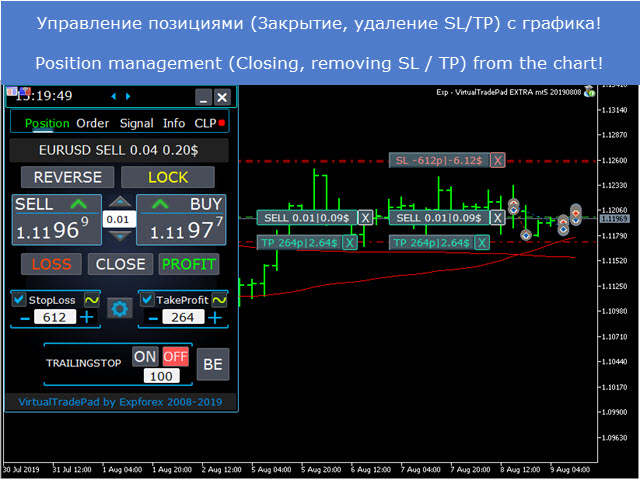
The graphical interface is very well thought through and actually helps you to trade so much easier, personally I love the free EA because it's the first time that I'm able to be consistently profitable.
I highly recommend you to check out his work, I'm sure if you start using this VIRTUALTRADEPAD and it works out for you after testing you won't be trading without it anymore.
It's just the best I ever found online, the most user friendly graphical interface ever.
Regards to Vladislav.