Centucode Pattern Candle Confluence
- Experts
- Version: 1.75
- Mise à jour: 16 octobre 2026
- Activations: 7

Trade Chart Patterns With Confirmation - Not Pattern Recognition Alone.
CENTUCODE MT5 Pattern + Candle Confluence Trading Engine is an automated MetaTrader 5 Expert Advisor built around a disciplined confluence process. The EA identifies supported chart patterns, checks direction-related candlestick confirmation, evaluates market confirmation and pattern context, applies mandatory risk and execution safeguards, ranks qualified opportunities across the scanned market, and can select the best available trade rather than relying on pattern recognition alone.
Designed for scalping, day trading and swing trading, the EA can monitor synchronized instruments selected in MT5 Market Watch from a single attached chart. The current engine supports Forex pairs and can also analyse compatible non-Forex instruments such as XAUUSD where the broker provides usable price history and trading access.
please lets write review and make comments, it will assist us to serve you better, especially those that have bought and started using it. We can also like and follow us on facebook and on X for promo and early notice of better things to come.
Try to read this to the end, you may find something juicy
1. Trade Chart Patterns With Confirmation - Not Pattern Recognition Alone.
CENTUCODE MT5 Pattern + Candle Confluence Trading Engine is an automated MetaTrader 5 Expert Advisor built around a disciplined confluence process. The EA identifies supported chart patterns, checks direction-related candlestick confirmation, evaluates market confirmation and pattern quality, applies mandatory risk and execution safeguards, ranks qualified opportunities across the scanned market, and can select the best available trade rather than relying on a rigid final-score threshold alone.
Designed for scalping, day trading and swing trading, the EA can monitor multiple Forex symbols from MT5 Market Watch while running from a single chart.
· Pattern + candle confluence: A detected chart pattern is not treated as a complete trade signal by itself. The EA looks for related bullish or bearish candlestick confirmation and market confirmation.
· Reversal and continuation trading: Users can enable reversal patterns, continuation patterns, or both families.
· Multi-timeframe operation: The strategy uses timeframe groups appropriate to the selected trading style rather than forcing every trader into one timeframe.
· Pattern Context Filter: Pattern quality is evaluated in context before a setup can progress, helping reduce technically detected patterns that do not fit the surrounding market structure.
· Multi-market Market Watch scanning: One attached EA can monitor synchronized Forex and compatible non-Forex instruments selected in MT5 Market Watch.
· Risk-aware execution: Every opportunity must still pass mandatory account-risk, reward-to-risk, exposure, spread, news, duplicate-setup, freshness and execution controls before an order can be opened.
· Trade-management automation: The EA supports stop-loss/take-profit management, break-even, ATR/R-based trailing, partial close and progressive profit-protection logic.
Read all about this expert advisor, See other expert advisors and get them cheaper from centucode, you can also be lucky to obtain free licence to use the ea on live account up to five years (for our facebook followers only) or less, based on our recent on-going promo. Seek support? click here
3. Complete Supported Chart Pattern Library
The current pattern library covers both reversal and continuation formations. Pattern availability can be controlled at family level, with optional advanced filtering for individual patterns.
Reversal Patterns
· Double Top
· Double Bottom
· Triple Top
· Triple Bottom
· Quadruple Top
· Quadruple Bottom
· Head & Shoulders
· Inverse Head & Shoulders
· Rising Wedge
· Falling Wedge
· Rounding Top
· Rounding Bottom
· Diamond Top
· Diamond Bottom
· Broadening Top
· Broadening Bottom
· V-Top
· V-Bottom
· Adam & Eve Top
· Adam & Eve Bottom
· Bump-and-Run Top
· Bump-and-Run Bottom
Continuation Patterns
· Bull Flag
· Bear Flag
· Bull Pennant
· Bear Pennant
· Ascending Triangle
· Descending Triangle
· Symmetrical Triangle
· Cup & Handle
· Inverse Cup & Handle
· Rising Channel
· Falling Channel
· Bull Rectangle
· Bear Rectangle
· Measured Move Up
· Measured Move Down
4. Candlestick Confirmation Engine
Chart-pattern direction is checked against related candlestick evidence. The current confirmation library includes:
· Bullish Engulfing
· Bearish Engulfing
· Hammer
· Shooting Star
· Morning Star
· Evening Star
· Bullish Pin Bar
· Bearish Pin Bar
The user can require one or two confirmation candles. Confirmation is direction-sensitive: bullish pattern opportunities require bullish confirmation, while bearish opportunities require bearish confirmation.
1. Detect enabled chart patterns across the selected Market Watch symbols.
2. Evaluate pattern quality and expected trade direction.
3. Confirm BUY or SELL direction with related candlestick evidence.
4. Check breakout, structural follow-through or other market confirmation.
5. Calculate a confluence score for each qualified setup.
6. Resolve competing BUY and SELL opportunities on the same symbol, rejecting close contradictory signals where appropriate.
7. Apply mandatory startup, freshness, duplicate-setup, spread, news, reward-to-risk, exposure and account-risk safeguards.
8. Build a qualified candidate pool and rank the available opportunities comparatively.
9. Attempt the best available qualified opportunity first; if it fails a mandatory execution gate, the engine can move to the next-best qualified candidate. Only after the complete execution gate is satisfied are position size, protective levels and the order finalized.
6. Dynamic Best-Available Trade Selection
Version 1.10 retains the comparative selection approach for final trade choice. A qualified setup is not accepted merely because a pattern exists. The engine first applies non-negotiable qualification and safety rules, then compares the remaining candidates and attempts the strongest available opportunity for that analysis cycle.
· Mandatory qualification first: A candidate must satisfy freshness, directional conflict, minimum reward-to-risk, spread, news, duplicate, correlation/exposure, broker execution and account-risk rules before it can compete for selection.
· Relative ranking: Confluence score is used as an important comparative measure among qualified setups rather than as the sole permission to trade.
· Best available first: The highest-ranked qualified candidate is attempted first. A moderate score may therefore still be actionable when it is the strongest valid opportunity available and all mandatory conditions are satisfied.
· No forced trade: Being ranked first does not override safety rules. If the market offers no candidate that passes the complete qualification gate, the EA does not trade.
· Fallback to the next candidate: If the top-ranked setup fails a final mandatory execution condition, the engine can evaluate the next-best qualified opportunity rather than ending the cycle unnecessarily.
· Controlled frequency: The engine opens at most one new trade per analysis cycle, helping avoid a burst of simultaneous entries from multiple READY patterns.
· Freshness protection: Pre-existing or stale formations are excluded from final selection so an old higher-timeframe setup does not unfairly outrank a newly formed valid opportunity.
7. Trading Styles & Timeframes
| Trading Style | Pattern Timeframes | Automatic Review |
| Scalping | M5, M15, M30 | 15 minutes |
| Day Trade | M15, H1, H4 | 1 hour |
| Swing | M30, H1, H4 | 4 hours |
Review timing can also be manually overridden. Faster trade-management functions such as break-even and trailing are not limited to the slower review interval.
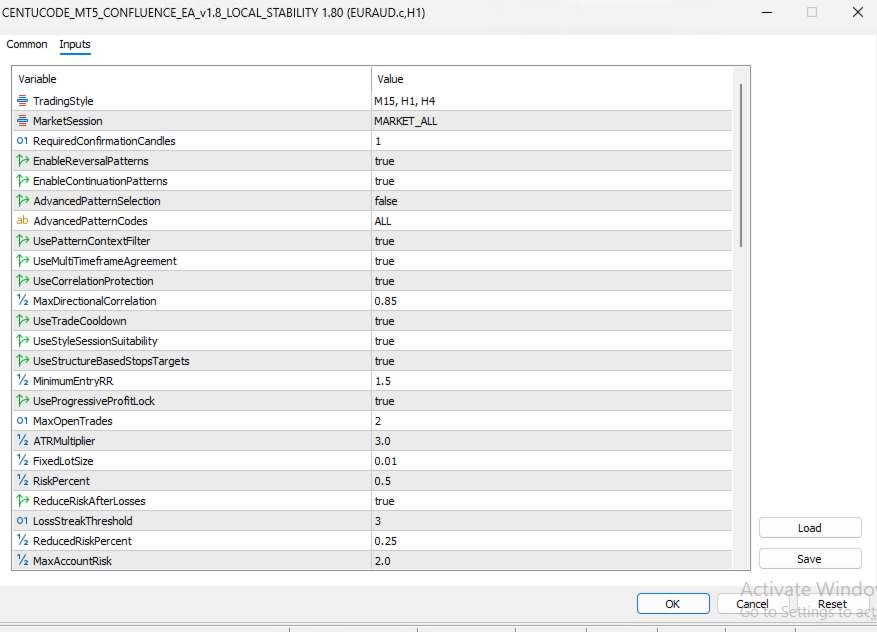
· Automatic risk-based lot sizing uses MT5 profit/loss calculation for the proposed stop distance and the configured maximum risk percentage.
· If the calculated AUTO_RISK volume falls below the broker's minimum lot size, the EA can skip the trade rather than forcing a larger position that would exceed the intended risk budget.
· Quality-adjusted AUTO_RISK can reduce the active percentage below the configured maximum when setup quality is lower or temporary loss-streak protection is active.
· Fixed-lot mode for users who prefer manual position sizing.
· Maximum open-trade control.
· Maximum account-risk controls help prevent excessive combined exposure across open positions.
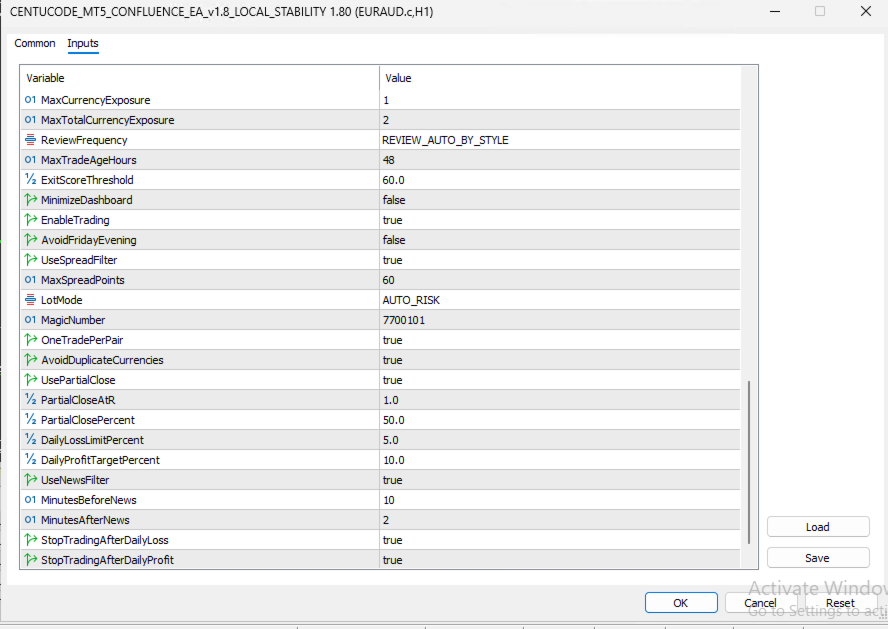
· Daily loss/profit protection.
· Consecutive-loss recovery protection with style-aware temporary cooldown rather than an indefinite lock.
· Currency exposure and correlation safeguards reduce excessive concentration in related Forex positions; non-FX symbols are not forced through Forex base/quote exposure logic.
· Dynamic spread/execution-quality checks.
· Broker-aware protective-level checks use current Bid/Ask, symbol tick size, Stops Level and Freeze Level to reduce invalid stop, break-even and trailing requests.
· Minimum reward-to-risk validation before entry.
· High-impact news protection remains active for relevant currencies; for example, XAUUSD can still be protected around high-impact USD events.
· Cooldown controls after trade closure or losses.
· Structure-aware stop-loss placement around pattern invalidation areas.
· Pattern/measured-move target support where appropriate.
· Risk-reward based target validation.
· Break-even protection.
· ATR/R-based trailing stop management.
· Reduced default trailing start and trailing distance for more responsive protection.
· Partial profit taking.
· Progressive profit-locking logic.
· Maximum trade-age/position review controls.
The EA is designed to scan synchronized instruments selected in the MetaTrader 5 Market Watch window. A trader can attach the EA to one chart and allow the engine to monitor multiple supported markets instead of installing a separate copy on every symbol. This includes standard Forex pairs and compatible non-Forex instruments such as XAUUSD where broker data and trading conditions are suitable.
Broker symbol suffixes are supported through the Market Watch symbol list. Forex-specific currency exposure rules are applied only when a symbol can be parsed as a genuine currency pair, while the chart-pattern engine itself remains asset-neutral.
· Opposite BUY and SELL qualified signals on the same symbol are compared before market-wide ranking.
· Closely matched contradictory signals can be rejected rather than forcing a direction merely because one score is slightly higher.
· Pattern quality, candle confirmation, market confirmation and other setup information contribute to comparative ranking among qualified opportunities.
· One-trade-per-setup protection helps prevent repeated entries from the same detected formation.
· Persistent setup state helps reduce duplicate trading after MT5 or VPS restarts.
· Startup quarantine prevents historical pre-attachment setups from being traded immediately.
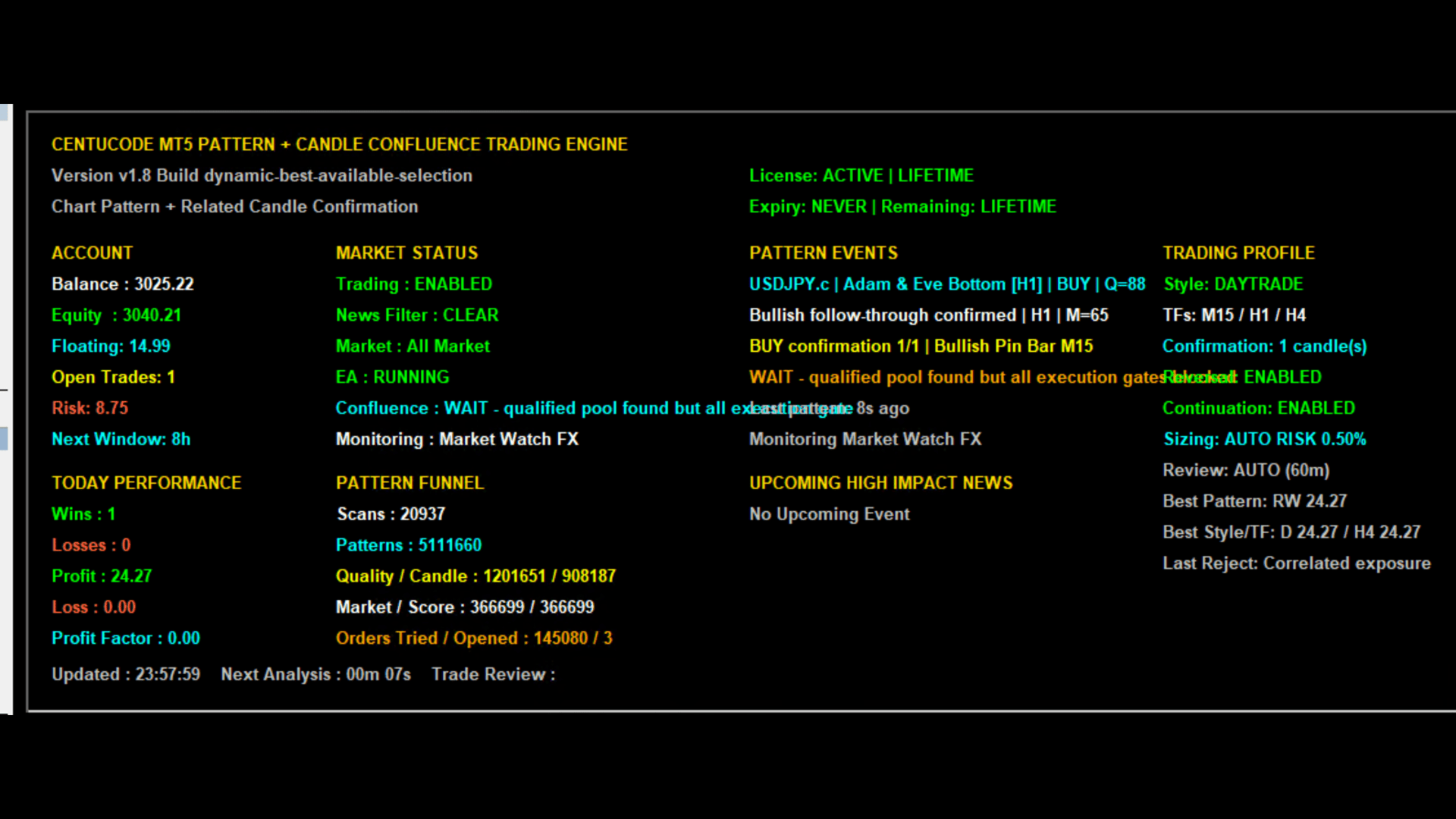
· License and expiry status.
· Risk / Protection: current EA open-risk percentage, loss-cooldown status, sizing mode and most recent execution/risk block.
· Market Status: trading enabled/blocked state, high-impact news state, selected session and Market Watch monitoring status.
· Pattern Events: latest detected pattern, related candlestick confirmation, structure/market confirmation and final decision event.
· Trading Profile: selected style and related timeframes, required confirmation candles, reversal/continuation family status, review frequency and Pattern Context Filter status.
· Performance: compact aggregate and current-month trades, wins/losses, net result and profit factor.
· Signal Diagnostics: candidate count, qualified setups, order attempts/opened orders and latest rejection reason.
· Upcoming high-impact news: compact forward-looking event view.
· The dashboard deliberately avoids duplicating figures that MT5 already shows easily, such as account balance, equity, floating P/L and open-position totals.
13. Session & Market Controls
Users can select All Market, London Market, New York Market or Asian Market operation. The EA can also apply style-aware session suitability so shorter-term trading is not treated identically to swing trading.
Suggested Website FAQ
Does the EA trade chart patterns automatically?
Yes. When automated trading is enabled, qualifying patterns can progress through candle confirmation, market confirmation, mandatory qualification gates and comparative ranking before an order is opened.
Can I enable both reversal and continuation patterns?
Yes. Either family can be enabled separately, or both can operate together. Opposing signals on the same symbol are subjected to conflict-resolution controls.
Do I need to attach the EA to every symbol?
No. The current multi-market design can monitor synchronized supported instruments selected in MT5 Market Watch from one attached chart.
Does the EA support automatic lot sizing?
Yes. AUTO_RISK calculates position size from the configured risk allowance and the proposed stop-loss distance using MT5's own profit/loss calculation. Fixed-lot mode is also available.
Which trading styles are supported?
Scalping, Day Trade and Swing profiles are supported, each with its own related timeframe group.
Does a detected pattern automatically become a trade?
No. Pattern detection is only the beginning of the decision process. Candlestick confirmation, market confirmation, conflict resolution, mandatory qualification gates, comparative ranking and risk/execution safeguards are also applied.
Does the EA require a fixed high score before every trade?
· No. Version 1.10 uses confluence score comparatively after mandatory qualification. The strongest valid opportunity can be selected even when the absolute score is moderate, while a higher-scoring setup can still be rejected if it fails context, risk, conflict, reward-to-risk, freshness, exposure or execution rules.
Can the EA avoid trading around major news?
The EA includes high-impact news protection as part of its risk controls.
Is profit guaranteed?
No. Forex, metals and other leveraged trading involve risk. No Expert Advisor can guarantee profits or eliminate losses.
Can the EA trade XAUUSD and other non-Forex instruments?
Yes, where the broker provides a synchronized and tradable instrument. Version 1.10 makes the chart-pattern engine asset-neutral, so compatible non-Forex symbols such as XAUUSD can be analysed. Forex-specific currency-exposure rules remain limited to genuine currency pairs.
Can AUTO_RISK work on a $100 account?
The EA can calculate AUTO_RISK on a $100 account, but there is no universal minimum balance. Whether a trade can be opened depends on the broker's minimum lot, contract size, the instrument, the stop-loss distance and the configured risk percentage. If the calculated volume is below the broker minimum, the EA can skip the setup instead of forcing excessive risk. A cent/micro account may therefore be more practical for very small balances than a standard account.