 MetaTrader 5
 Experts
 Indicateurs
 Bibliothèque
 Utilitaires
 Widgets
 Règles
Regardez les tutoriels vidéo de Market sur YouTube
Comment acheter un robot de trading ou un indicateur
Exécutez votre EA sur
hébergement virtuel
hébergement virtuel
Test un indicateur/robot de trading avant d'acheter
Vous voulez gagner de l'argent sur Market ?
Comment présenter un produit pour qu'il se vende bien
Nouveaux Expert Advisors et indicateurs pour MetaTrader 4 - 302
 Les robots de trading effectuent automatiquement les transactions sur le marché, tandis que les indicateurs vous permettent de mieux analyser les cotations et de prédire le comportement des prix. Grâce à ces applications, vous serez en mesure d'effectuer des transactions dans MetaTrader 4 de manière plus avisée, tout en saisissant davantage d'opportunités.
Порядок работы
Советник работает на любом таймфрейме на любых валютных парах. При работе советника анализируется несколько индикаторов, показатели объема торгов, скорость изменения цены. При возникновении необходимых условий происходит открытие отложенного ордера, который остается открытым в течение определенного времени, которое задается трейдером. Советник не открывает следующий ордер, пока не закроется предыдущий.
Советник имеет блок TrailingStop , позволяющий перемещать StopLoss за движ

The indicator is designed for opening trades for a long period. he is set up to get as many points from each trade as possible. he uses the scalping method... you can trade on any currency pairs indicator is already you can trade at any time of the day but the preferred time of trading during the European American session. currency pairs eur / jpy, eur / usd currency pairs with high volatility then the results are much better.

https://www.youtube.com/watch?v=UxrZ02V4jns
PARAMETERS EMA_1 = Periode MA 1 (Small MA period) EMA_2 = Periode MA 1 (Big MA period ) Start Trade : Hour Start Trade (only for the first open, does not apply to averaging) Stop Trade : Hour Stop Trade (only for the first open, does not apply to averaging) TF : M5, Only Pair EURUSD Lots : Lots / volume orders / Start Lot Martingale : True/ False Multiplier : Multiplier value of lot, You can use a small multiplier of 1.2 1.5 1.7 while Take Profit is

This indcator shows the trend with the color histogram. It is simple and easy to use. Usage: If the histogram changes from the aqua to the fuchsia, which means the trend is up. If the histogram changes from the fuchsia to the aqua,which means the trend is down. Inputs: MaPeriods: the periods of moving average. f1: the multiplier of inner bands f2: the multiplier of outer bands Popup Window Alert Email Alert Mobile Push Alert Alerts When the trend changes from the long trend to the short trend or

PipSense CBS (Candlestick Breakout System) is a fully automated trend following strategy with stop-loss that you can use to backtest a 10-year of data with modelling quality of at least 90%. It uses only an entry analysis based on the proprietary candlestick breakout system to detect price breakout movement. The success secrets of the Expert Advisor if backtested correctly are the combination of the entry method with the Money Management and multiple exit strategies. Once opportunity level is de
Advanced Trend Finder follow trend. Color change trend changed.
Works in EURUSD/GBPUSD/XAUUSD/USOIL/US500/USDJPY/USDCAD/JP225/USDTRY/USDMXN and all pairs
Best timeframes 5M/15M/1H/4H/DAILY
Signal on close of a bar.
DOES NOT repaint. DOES NOT repaint. DOES NOT repaint. DOES NOT repaint.
DOES NOT recalculate. DOES NOT recalculate. DOES NOT recalculate. DOES NOT recalculate Settings SoundOn : true/false EmailOn : true/false PushNotificationOn : true/false
ver 1.1 update notes:
Added Alert Arr
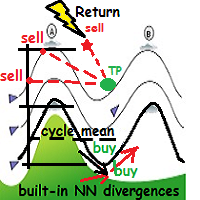
WindReturn is a fully automated solution to exploit the particular market tendence of the price to return, periodically and cyclically, to its own mean. This algo-solution is the result of years of research through charts and market theories with particular attention to dynamic behavior of currency pairs "ripples", encapsulating the observations in a technical art form.
Technical details WindReturn will mainly focus to profit in the short term trend ,but also in the "hot zones" where the pric
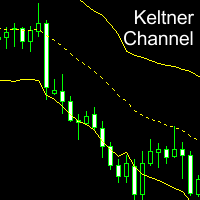
Keltner Channel is a well known indicator that not in MT4's indicators default lineup (You can get this from your broker somehow). This indicator helps you to define trend and sometimes overbought/oversold prices during flat trend. Input Description: EMAperiod: Moving Average period used for indicator. Must be higher than 1. ATRperiod: Average True Range period used for indicator. Must be higher than 1. multiplier: Multiplier used for determine channel's wide. Must be higher than 0 but may not b
FREE

This EA is a free version of Tiger Grid which is available here: https://www.mql5.com/en/market/product/33835
Tiger Grid EA is an expert advisor using trading strategy which has been developed by using machine learning concepts. It has passed 14 years of backtest of real tick data and real variable spread (with commission) from 2004 to 2018. The entries are usually accurate and in case if the trend signal has a delay the positions will be managed by a smart grid system. This system uses a gr
FREE

Советник основан на принципе трейдеров "Трэнд-ваш друг". В работе используется только наличие трэнда и направление цены. Алгоритм советника очень простой и настроен на максимальное нахождение в рынке во время трэнда и флэта. Для более комфортной работы в советнике используются некоторые функции,которые сглаживают непредсказуемые последствия рынка. умножение объема,в случае неудачного закрытия предыдущей позиции. слежение за ценой с помощью "Trailing Stop". возможность ограничения работы в опре

Space Grid is a fully automated Expert Advisor. Space Grid was developed and tested specially on eur/usd on a 5 minute timeframe . The backtest was performed with 99.90% quality data and shows excellent results. Tested with multiple spread levels, long swap and short swap included. It is essential to do the every tick backtest. Recommendations Symbol : EUR/USD Timeframe : 5 minute.
Parameters comment : comment of the order. magic_number : unique number for each chart start_lot : number o
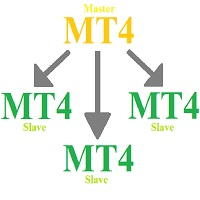
MHA Local Trade Copier
It's an EA to copy trade from one MT4 account to another MT4 account. Also you can copy trades from
single master account to multiple slave accounts. Only you should run master and slave accounts at same PC or VPS. Master account could use main password or investor password, but slave accounts needs to login by main password.
Using this copier you can copy trades between different brokers with different symbol suffix.
For example if broker of master account has EURUSDi

A signal will be formed when the needle stick is shaped like a needle. and you can set it in SHADOW. EA is good for TF5 with shadow 2 or 3 pips, and use martingale 1.5 - 2. Even better if the market is experiencing flats. This EA is only good for using the EURUSD pair and using the martingale system with a distance of TP 10-15 pips, sustainable with pipsteep 40 - 50 pips to open a martingale position if needed

这是一个交易辅助工具箱,并不是全自动交易的机器人 W10 系统请保持 100%的缩放比,如果超过这个值。按钮内的字体将超出按钮边框 常规: 一键下单、一键挂单、一键反手,自动设置止盈止损。 一键平仓、一键平多单(空单)、一键删除挂单。 一键反手、一键锁单、设置自动追踪止损。 根据画线追踪止损 非农: 消息突破单,可在非农或者其他重大消息时使用,在消息行情爆发前在当前价格上方 挂BUYSTOP,下方挂SELLSTOP。订单自动设置止盈止损。 划线下单: 支持最多四根做多趋势线或者做空趋势线并存。价格到达趋势线自动开单。 支持每根下单趋势线设置不同的仓位。 每根下单趋势线可以设置不同的止损趋势线、止盈趋势线。 支持止损止盈趋势线进行止损止盈追踪移动。 支持趋势线的“时效性”,如果价格运行到开单(止损、止盈)趋势线的右方仍未订单成交,则价格将永远不会接触到趋势线,策略失效。如需要请延长趋势线 杂项: 支持历史订单轨迹显示,可在图表显示历史记录中所有订单的下单轨迹,显示开仓价、平仓价、单量。 支持实时点差显示 支持平台信息显示,杠杆,一个点的价值,一手保证金,仓息,是否支持EA等等
FREE
Робот Standard Oscilators в своей работе использует широкий набор стандартных индик а торов MT4. Торговые решения принимаются на основе комплексного анализа показаний индикаторов. Без мартингейла. Без сетки ордеров — в любой момент времени может быть открыта только одна сделка. Робот создан строго для пары EurUsd, для таймфрейма H1. Торговые решения принимаются после закрытия очередной свечи. Для минимизации неизбежной в определенных условиях просадки и восстановления из нее в роботе реализован

Price Action EA for scalping. Open trades by bar height when bar height meet complex math calculations. Timerame is fundamentally M1 and works all forex symbols. Percentage trailing system. Time limitation. Autolot by percentage of balance. Settings by ea automatically. Close safety by time in minutes and close your order after x minute even if it is not in profit or loss by you. Set stoploss and takeprofit values automatically market price. Every major settings can be set automatically by robo

THEWINNERTURTLE EXPERT ADVISOR MT4 This EA is based on price action and RSI indicator to trade EURUSD currency pair on M15 timeframe. THEWINNERTURTLE is a price action swing system working for a long-term profit as showed by backtesting. THEWINNERTURTLE identifies price movement to easily find buy and sell opportunities and places automatically trades based on defined parameters. THEWINNERTURTLE does not use neither martingale nor averaging of losing positions. SETTINGS THEWINNERTURTLE is a long

L'indicateur Trend Line PRO est une stratégie de trading indépendante. Il montre le changement de tendance, le point d'entrée de la transaction, ainsi que le calcul automatique de trois niveaux de protection Take Profit et Stop Loss. Trend Line PRO est parfait pour tous les symboles Meta Trader : devises, métaux, crypto-monnaies, actions et indices.
L'indicateur est utilisé dans le trading sur des comptes réels, ce qui confirme la fiabilité de la stratégie.
Pour le moment, l'indicateur
This Indicator Paints levels which are very ' Adamant ' and strong in nature. These levels act as strong Price rejection levels for a life time and never repaint.
Disclaimer : If you are looking for a Fancy, colorful and eye catchy indicator please stay away.
No trader can become a good trader without considering levels where the price can hold, bounce or break. These levels help traders to enter markets at a cheaper price. They can be Support resistance, demand supply, pivot point, Fibonacci
Your safety net to turn losing trades into winners
Have you ever taken a trade at literally the worst possible moment? Have you ever bought an asset just before a significant price crash?
Or perhaps you've gone short at the worst possible moment before a rip-off rally? I have. And it sucks. It's one of the worst feelings in the world. Like a kick in the groin. To come out unscathed and in profit from these situations, I developed PZ Hedging EA. [ User Guide | Installation Guide | Update Guide |
This EA recovers losing trades using a sequential and controlled martingale: it places consecutive trades with increasing lot sizes until the initial trade is recovered, plus a small profit. It offers a complete hassle-free trading framework, from managing initial trades to recovery. Please note that the EA implements a martingale, which means that it takes balance losses that are recovered later. [ User Guide | Installation Guide | Update Guide | Troubleshooting | FAQ | All Products ] Features
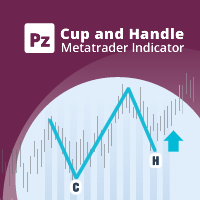
Increase trade accuracy with the time-tested cup and handle patterns
The Cup and Handle pattern is a technical price formation that resembles a cup and handle, where the cup is in the shape of a "U" and the handle has a slight downward drift. The right-hand side of the pattern -the handle- is smaller than the left-hand side -cup-, and retraces no more than 50% from the top. It can be both a continuation and a reversal pattern. [ Installation Guide | Update Guide | Troubleshooting | FAQ | All Pr
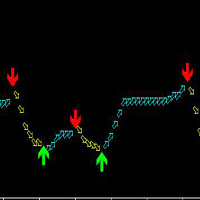
This indicator is suitable for any variety on MT4 and any cycle, but the most suitable cycle is 30 minutes and 4 hours. It is simple to use, the arrows will never change, no drift, no backfire.
The principle of this index is based on ATR and custom MA, combined with mixed computing, developed, high accuracy.
Buy: Look at the green up arrow;
Sell: Look at the red down arrow.
The arrow appears and orders immediately!
It is suggested that the two cycles should be looked at together, which is t
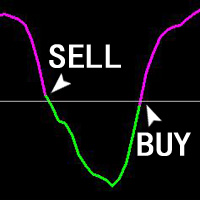
The ZhiBiJuJi indicator analysis system uses a powerful internal loop to call its own external indicators, and then calls the analysis before and after the cycle. The data calculation of this indicator analysis system is very complicated (calling before and after the cycle), so the hysteresis of the signal is reduced, and the accuracy of the advance prediction is achieved. This indicator can be used in all cycles on MT4, and is most suitable for 15 minutes, 30 minutes, 1 hour, 4 hours. Buy:

The indicator helps to identify possible rollbacks and reversals. Shows the direction of the price movement and is painted in the appropriate color. Allows you to conduct trend and counter trend trading It works on all timeframes, on any currency pairs, metals and cryptocurrency Can be used when working with binary options Distinctive features Does not redraw; Simple and clear settings; It works on all timeframes and on all symbols; Suitable for trading currencies, metals, options and cryptocurr

The Extreme Breakout EA Lite is a fully automated multi currency Expert Advisor that trades time based breakouts and has various options to improve performance. The Extreme Breakout EA Lite trades using pending orders and has the option to enter using market orders if required. Lite version is limited to 0.01 lots without money management.
View More Products - https://www.mql5.com/en/users/robots4forex/seller#!category=1
Monitoring Signals - https://www.mql5.com/en/signals/author/robots4forex?o
FREE

Taurus All4
Taurus All4 is a high-performance indicator, it will tell you the strength of the trend, and you will be able to observe the strength of the candle. Our indicator has more than 4 trend confirmations.
It is very simple and easy to use.
Confirmation Modes Candle Trend Confirmations: When the candle switches to light green the trend is high. When the candle switches to light red the trend is reverting down. When the candle changes to dark red the trend is low. Trendline Trend Confirm
Технический индикатор Forex ForexMarshalsTrend - это уникальный, эксклюзивный и прорывной финансовый инструмент, основанный на сложном математическом алгоритме колебаний стоимости конвертации цены, который способен прогнозировать дальнейшие изменения цены. Индикатор относится к группе трендовых индикаторов. Он предоставляет возможность принимать правильные решения о своевременном входе или выходе из рынка и в своих настройках указывает, следует ли открывать длинную или короткую позицию для получ

Advisor is an improved and enhanced version of ParabolicSarPro . It has a large number of adjustable parameters. Advisor Parameters:
Lots - lot size; Percentage of free money - percentage of free funds for opening each new transaction (works when Lots = 0); Slippage - slippage (maximum permissible price deviation in points); Magic - a unique identifier (it is necessary to do it differently, if several advisers are running in one terminal); MaxSpread - maximum spread for opening a trade (for

The strategy of the adviser is based on the theory of falsals: a fractal is a set that has the property of self-similarity (an object that exactly or approximately coincides with a part of itself, that is, the whole has the same shape as one or more parts).
A trading expert analyzes four fractal orders of price formations - one fractal order down, the fractal order of the current timeframe and two orders of fractals higher than the timeframe.
Recommended trading tools for the default settings

This adviser can be used without optimization. To get started, you only need to install the desired risk (or the size of the lot) and regularly withdraw profit. For a start, you can install the trial version of the Expert Advisor Hunter bot PriceLines Lite , which will work on a real account with a minimum lot (and therefore with minimal risk). In this, the main version, all settings are available. EA is designed for fully automated trading. It spelled out the function of protection against most

An expert advisor which tries to take quick trades based on a combination of the latest Stochastic oversold/overbought status and Kagi chart transitions. It closes at minimum amount of profit depending on your risk appetite. Trade position size is also gradually increased automatically depending on risk parameters. Although you can use this on any time frame and symbol, The expert is designed specifically to trigger trades based on the 1 minute time frame and it is optimized for the EURUSD symb

This StrongCurrency is a complete trading system based on a variety of technical indicators, moving averages and pivots. Each of those elements can be assessed in defined rules and coefficients (depending on the indicator) providing limitless optimization scenarios for the StrongCurrency. In order to work the StrongCurrency creates a trend strength and entry point signal list display by evaluating these data, that takes data from all symbols. It extrapolates all the information in order to get t

PipSense Ichimoku is a fully automated trend following strategy that you can use to backtest a 10-year of data with modelling quality of at least 90%. It uses only an entry analysis based on the Ichimoku Indicator with a proprietary settings to detect price breakout movement. The success secrets of the Expert Advisor if backtested correctly are the combination of the entry method with the Money Management and multiple exit strategies. Once opportunity level is determined, it will open trades rig
UniversalIndicator is a universal indicator. A great helper for beginners and professional traders. The indicator algorithm uses probabilistic and statistical methods for analyzing the price of a trading instrument. The indicator is set in the usual way. Advantages of the indicator works on any time period works with any trading tool has a high probability of a positive forecast does not redraw Indicator Parameters LengthForecast = 30 - the number of predicted bars

This product is a multi-functional MT4 indicator and is an indispensable tool for account information statistics, strategy analysis and risk assessment. Functions:
1. Statistical account basic information of profit and loss . 2. Statistics and display the account profit and loss fund curve. 3. Display the order's track on chart ,so that we can analys the strategy and risk of the account. 4 .List account's trade pairs and order totals ,we also can see the profits of each pair.
If you have any qu
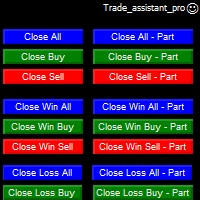
Trade Assistant helps in order management. Just run EA, set up your settings and open a store. EA automatically set = Target Profit, Stop Loss, Trailing Stop / Break Even, Close Trade after + "X" pips (Volume Size "X"%), Delete Pending Orders After "X" Seconds. See the buttons on the chart. He works to close trade, close partialli trade and delete orders
parameters: Set button - close partially (close all part) Volume Size "X"% More settings Enable / Disable Target Profit Target profit Enable
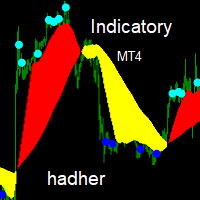
Indicatory is an indicator uses price action and averaging movement to trigger it's signals buy signal when the blue sun completely sunset's under the yellow clouds Sell signals when the aqua sun completely rise's over the red clouds you could call the indicator to any EA code for auto trading ,optimizing,sell signal index buffer number is (2) buy signals index buffer number is (3)... try to avoid weak signals which occur at the end of clouds ,strong signals occur's when there is a wid

TIMES TRAVEL IN THE TRADE
Now you have found what you were looking for !!
The Times is based on the probabilistic approach.
This EA has been working for years, is a very complex research project with the ultimate goal of creating a perfect trading robot.
This project has several updates!
This robot does not work with Grid or Martingale / Obs: There is a martingale option in it, but we do not use it, it is only for those who want to be at high risk!
The EA comes with fixed Stoploss and fix

With this indicator you'll have a general reading of the market's range using Gann's calculating modes. Gann's swing is used to have a quick reading to the market latest movements at first glance. The foundation of this swing calculation is in the count of candles in relation to the break-up and break-down of the price. When the price breaks-up the last maximum, the swing will get traced if a certain number of candles is exceeded from the last minimum. It can be used a "pure Gann" or not: If set

Over Arrow - уникальный авторский индикатор, имеющий возможность отображения сигналов в направлении основной тенденции, или против нее. Over Arrow подходит для любого таймфрейма, валютной пары, но лучше всего использовать его на средних временных периодах, таких как М30, Н1, Н4. Сигналы индикатора не пропадают ни при каких условиях. Отличительной особенностью является наличие фильтра тенденции, при активации которого, сигналы будут появляться только в направлении основного движения.
Параметры
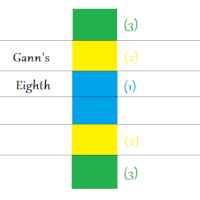
This indicator will let you have at disposal Gann's Eighth, with few clicks!! Gann's Eighth were used by this great Trader to obtain the maximum fluctuation price and the possible inversion points of it. Gann have always given importance to the number 8 in his studies, an it is the reason why we find the retracement points as 0.25(10/8=1.25). Other than the number 8, also the numer 3 had is own importance in Gann, number founded in the eighth division, infact we have three eighth describing the
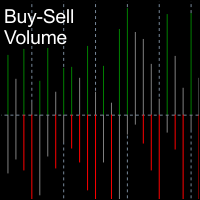
BuySell Volume is an indicator that approximates Buy and Sell volumes based on price movement. Input Description: applied_model: Choose the applied model. In low reversal mode, price is considered receive low bearish pressure during bullish candle's creation (high bearish pressure on high reversal model. In other words, Bullish Marubozu candles has really high Buy Volumes in low reversal model than in high reversal one.
Output Description: Buy and Sell Volume: Determines how many Buy and Sell vo
FREE

NIGHTCRUSHER is a fully automated expert advisor, designed for scalping on quite market situation.
The Lite - Version is limited to minimal Lot per Pair and dont has lot mulitplier and dynamic function you can also run different strategies like swing trading or grid different Trade Entry Signals different Exit Strategies included (MA Cut / Signal Change / Trailing TP) clever Risk & Money management - Balance based - Longrun trades tracking You can also use a Grid function or Lot multipier, if ne
FREE

MHA News Trader v1.0 This Is a News Trader EA that has many similarities to other News traders. Strategy is placing two pending order some seconds before releasing high impact economic news on investing.com and removing remaining pending order some seconds after news releasing time and there are some extra features like trailing Stop , hidden trailing stop , recovery loss and lot multiplier. But what is very important it's choosing proper setting of parameters in proper broker. The EA is tested
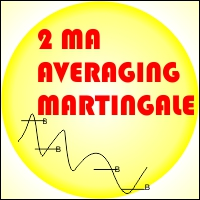
EA 2 MA Martingale Averaging If there is a crossing of the 1st MA Period through the Ma of the 2nd period from the bottom to the top then it will be Open buy, vice versa If there is a crossing of the 1st MA Period through the Ma of the 2nd period from the top to the bottom then it will be Open Sell
Installation of Charts on EA will affect the period of the Moving Average Example: EA is installed in H1 time frame, then MA indicator is Time Frame H1, EA is installed in M30 time frame, then MA i

TigerGrid EA MT4
TigerGrid EA robot is a fully automated robot for Forex trade. TigerGrid EA is based on the price actions and support and resistance, combine numerous indicators ,that It provides the possibility the best entries of the trade . This system uses a grid of orders . A new order is added into the grid only if the EA notice a potential reversal trend. The grid size is limited for more safety It can be used in any time frame but we recommend H1 . Do not believe in any backtest re

The Grid Expert Expert Advisor is a professional tool for trading grids of orders on financial instruments. The algorithm of the program is arranged in such a way that the EA uses signals based not on the current price, but on the price of the edges of channel. A special algorithm calculates the channel and the price range and uses it to generate signals. A special code processes the channel for the last several periods to identify the trend direction. Advantages Automatic trading mode, no n
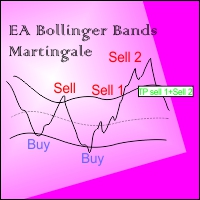
EA BB Martingale If the price touches the upper Bands then OP SELL. However, if the price rises again from the previous order, OP SELL will return with a larger Lot, if it goes down to the previous price then Close all sell transactions together (of course this profit has been calculated ), Conversely if the price touches the Lower Bands then OP BUY
This EA can run in two different directions (Buy will be counted separately from Sell orders) #Recomend Start Balance $1000 Flat movement is very
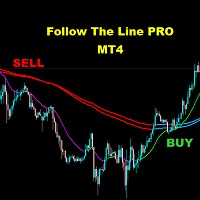
FOLLOW THE LINE (PRO VERSION) This powerful indicator is the full and complete version of my free indicator called "Follow The Line". IT IS BASED ON the popular maxim that: "THE TREND IS YOUR FRIEND" It gives alarms and alerts of all kinds. IT DOES NOT REPAINT and can be used for all currency pairs and timeframes.
AVOID FALSE SIGNALS:
BUY ONLY when price closes above the green line and the green line is above the blue channel.
SELL ONLY when price closes below the pink line and the pink line i
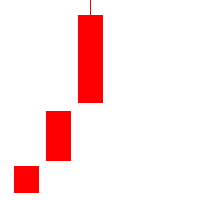
Outline A strategy based on K-line shape requires only three K-lines. Grasping opportunities quickly when the market is emotional can not only get into the market as soon as possible, but also make great profits. Understand the market through three K-lines. Parameter Lots: The basic position at the time of placing an order is 0.1 by default. SlipPage: Consider the impact of sliding points in trading,Default 3 base points.

Trading Hours:
useTradingHours = false; - if it is true, the system opens trades only in defined time;
StartTime = "06:00"; - start time of trading;
StopTime = "18:00"; - end time of trading;
GMT_Offset = 0; - GMT offset;mnvnmkvbb
Trading Days:
Monday = true;
Tuesday = true;
Wednesday = true;
Thursday = true;
Friday = true;
Saturday = true;
Sunday = true;
View settings:
showMenu = true; - if true, EA shows on graph information about open trade

This is a simple and useful indicator for gold. Timeframe is 15M.
It simply shows the meanginful potential turning check point for gold.
You can combine your method with this signal. You can use it as a part of your decision signal to become a more powful strategy for yourself to get more great decision.
The indicator will not be repianted. Just simple and useful. Guys, just try it.

The Wolfalizer Indicator combines the functionality of the Engulfing Stochastic along with the ConsecutiveRSI and adds alerts along with more detailed output to the journal. This Indicator will alert you when RSI or Stochastics cross into oversold or overbought. You can set the oversold and overbought levels for RSI and Stochastics separately. You can pick if you want an engulfing candle to appear on the cross or set a number of consecutive candles you would like to see. Interesting Inputs i

Djuba Breakout System
Djuba Breakout System is a fully automated breakout trading system.
Features
1. 100% Free
2. 100% automated trading system
3. No Martingale, No Grid
4. Trade with SL & TP
Recommendations
1. Pairs: EURUSD, GBPUSD
2. Timeframe: H1
Parameters
1. Lots: default lots. ignored if LotsFor1K > 0
2. LotsFor1K: lots per 1000 USD
3. MaxOrders: please set to 10
4. TestGmtOffset: the GMT offset for the backtest
FREE

22.12.2020 New version is released. Bug fixed and exit by MA removed.Improved fully automated Expert Advisor without martingale. Follow the trend. Checking important trade levels.
It is complex calculated to catch right trend strategy. Special candles, custom indicator and maths are used for entries. Live Results shown at here https://www.mql5.com/en/signals/669290 Default settings recomended for EURUSD m1/m5 gmt +3(or +2 winter time) . Click here for the symbol sets you can make testing .

Grid Manual est un panneau de trading permettant de travailler avec une grille d'ordres. L'utilitaire est universel, possède des paramètres flexibles et une interface intuitive. Il fonctionne avec une grille d'ordres non seulement dans le sens des pertes, mais aussi dans le sens de l'augmentation des profits. Le commerçant n'a pas besoin de créer et de maintenir une grille d'ordres, l'utilitaire le fera. Il suffit d'ouvrir une ordre et "Grid Manual" créera automatiquement une grille de ordres po
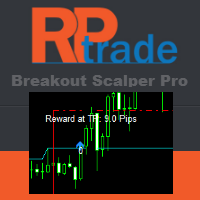
Conçu pour être utilisé seul, aucun autre indicateur n'est requis. Vous donne la tendance et le potentiel de Take Profit en début de journée. Un graphique spécifique vous montre le gain potentiel en fonction des données historiques.
Comment ça marche Breakout Pro Scalper Solution utilise une stratégie d'évasion combinée à une action sur les prix et à un support et des résistances dynamiques. La tendance nocturne et la volatilité sont analysées pour être utilisées le jour suivant. A partir de

Automatisez le processus de cassure ACB ACB Breakout Arrows EA évalue les signaux de cassure sur le graphique actif et gère les opérations avec la logique intégrée d'ACB Breakout Arrows et d'ACB Trade Filter. Placez l'EA sur le symbole et l'unité de temps à surveiller, autorisez le trading automatique, puis choisissez les règles de position, de session, de filtre et de sortie adaptées à votre plan de test. Les indicateurs et composants nécessaires sont intégrés à l'EA, aucun téléchargement sépar

Le système est une combinaison de deux stratégies, l'une complétant l'autre. La stratégie principale utilise des lignes commerciales virtuelles pour ouvrir ses ordres et l'autre stratégie ouvre un ou plusieurs ordres pour réaliser des bénéfices si le prix sort d'une fourchette prédéfinie.
Les lignes commerciales virtuelles sont également basées sur le canal commercial, ayant également la possibilité de placer des transactions au-dessus ou en dessous de la ligne de canal calculée. Le même canal

Based on MACD indicator waves with standard parameters Applies Fibonacci levels to the last two MACD waves, positive and negative respectively, if at the moment the MACD indicator runs out of negative Wave - the color is green, if at the moment the MACD indicator runs out of positive Wave - the color is red. The Wave termination criterion is two ticks with a different MACD sign. Applies trend lines on the last four MACD Waves. Works well with the expert Figures MACD https://www.mql5.com/ru/mar

The trend pigs is a trend EA with a filtering system. It is recommended to configure the EA based on your experience.
To configure the EA, you can use the following indicators:
MA Cross indicator with parameters(periods) settings. Main signal A TREND indicator with parameters(periods) settings. There is a possibility of switching off. The Squeeze indicator with the settings(periods). There is a possibility of switching off.
The expert advisors have the ability to filter signals according to t
FREE

Close all Positions by one click with Fast system strategy, work with every pairs. By the way you can set to "Close all Sell", "Close all Buy" and Close all Orders on a Common Setting. This is a MetaTrader 4 Expert Advisor, Not working on MetaTrader 5.
Thank You FxGangster Powered by TheFxInvestment.com Twitter : @FxGangsterClub Email : Admin@TheFxinvestment.com
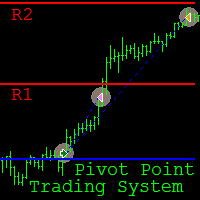
Pivot Point Trading System is a fully automated Expert Advisor (EA) designed for intraday trading on the M15 time frame . The main currency pair is GBP/USD , however it can be used on other pairs, provided that the input parameters are selected through optimization in the strategy tester. The EA implements trading strategies based on the breakout and rebound from the Pivot Point levels . The principle of the EA consists in order opening in the direction of the breakout of the Pivot Point level (

This indicator was tested on the basis of real statistics for all market indicators according to indicators for 3 months of trading. trade forecasts for usd / jpy on the m30 time frame were received on our statistics! if you have any questions, please contact us in private messages or in discussions under this indicator and we will figure it out and help
any questions will arise personal messages or in discussions under this indicator As soon as the blue points appear, we open a deal to increa

Swing & Price Action Trader ( SPA Trader) How to trade with SPA Trader? SPA Trader is a very special tool for both Automatic and Semi-Automatic trading . It works as an Indicator and Expert Advisor to trade fully automatic, if trader sets it to true and by false setting , then it will trade when trader enter into the position via SPA Trader manually, but the money management and risk management functions remain automatically to manage the opened positions for trader... The SPA Trader is the

Arrow indicator showing market trends The histogram shows the direction of movement, and the arrows indicate favorable points for opening positions. Can be used on any currency pairs, metals and cryptocurrency Suitable for working with binary options
Distinctive features Defines a change in trend; Works on all timeframes and on all symbols; Suitable for trading currencies, metals, options and cryptocurrency (Bitcoin, Litecoin, Ethereum, etc.) Suitable for manual trading and for developing advis

Grid Zone is an automated expert advisor. The system uses filtering measurements from trend signals to create buy zones and sell zones. Trading signals are processed by allocating them into the design zone. The system will automatically calculate the grid distance or the user can set it manually. The key is that it works well in all market conditions, either trend or sideways. The system has automatic management in terms of limited orders. The system can automatically manage delete pending orde
I present an indicator for professionals. ProfitMACD is very similar to classic MACD in appearance and its functions . However, ProfitMACD is based on completely new algorithms (for example, it has only one averaging period) and is more robust, especially on small timeframes, since it filters random price walks. The classic MACD indicator (Moving Average Convergence / Divergence) is a very good indicator following the trend, based on the ratio between two moving averages, namely the EM
The Expert Advisor uses the dissonance analysis strategy between the wave formation of the price movement of the lower level and the fractals of two consecutive upper levels.
The data of the MACD indicator are confirmatory and decisive when making a decision to enter a transaction.
Each trading position has a stop loss and take profit.
Dangerous trading methods are not used.
The Expert Advisor has a non-linear trailing stop system.
Recommended trading tools for default settings: 5M: EURGBP,
Le MetaTrader Market est la seule boutique où vous pouvez télécharger un robot de trading de démonstration gratuit pour le tester et l'optimiser à l'aide de données historiques.
Lisez l’aperçu de l'application et les avis d'autres clients, téléchargez-la directement sur votre terminal et testez un robot de trading avant de l'acheter. Seul MetaTrader Market vous permet de tester gratuitement une application.

Vous manquez des opportunités de trading :
- Applications de trading gratuites
- Plus de 8 000 signaux à copier
- Actualités économiques pour explorer les marchés financiers
Inscription
Se connecter
Vous acceptez la politique du site Web et les conditions d'utilisation
Si vous n'avez pas de compte, veuillez vous inscrire