 MetaTrader 5
 Experts
 Indicateurs
 Scripts
 Bibliothèque
 Stockage
Rejoignez notre page de fans

AI Prompt Writer - Simple AI Assistant Customization - script pour MetaTrader 5

- Vues:
- 144
- Note:
- Publié:
-
 Vous manquez des opportunités de trading :
- Applications de trading gratuites
- Plus de 8 000 signaux à copier
- Actualités économiques pour explorer les marchés financiers
Inscription Se connecterVous acceptez la politique du site Web et les conditions d'utilisation
Si vous n'avez pas de compte, veuillez vous inscrire -
 Besoin d'un robot ou d'un indicateur basé sur ce code ? Commandez-le sur Freelance
Aller sur Freelance
Besoin d'un robot ou d'un indicateur basé sur ce code ? Commandez-le sur Freelance
Aller sur Freelance
Personnalisez votre assistant IA MetaTrader 5 en choisissant la langue, la personnalité, le menu et le comportement à l'aide d'un simple fichier de prompt.
Ce script permet de créer un fichier de commandes personnalisé simple pour un assistant IA fonctionnant sur MetaTrader 5.
Cet exemple a pour but de montrer qu'il est possible de personnaliser le comportement, la personnalité et le menu d'un assistant IA simplement en créant et en modifiant un fichier de commandes.
Aucune API d'IA, DLL ou service externe n'est nécessaire.
Mode d'emploi
- Ajoutez ou exécutez le fichier AI_Prompt_Writer.mq5 depuis MetaEditor.
- Sélectionnez la langue et la personnalité de l'IA.
- Définissez le nom du fichier de sortie si nécessaire.
- Exécutez le script.
- Le fichier de prompt est créé dans le dossier MQL5\Files du terminal.
Le nom par défaut du fichier de sortie est : « AI_Prompt.txt »
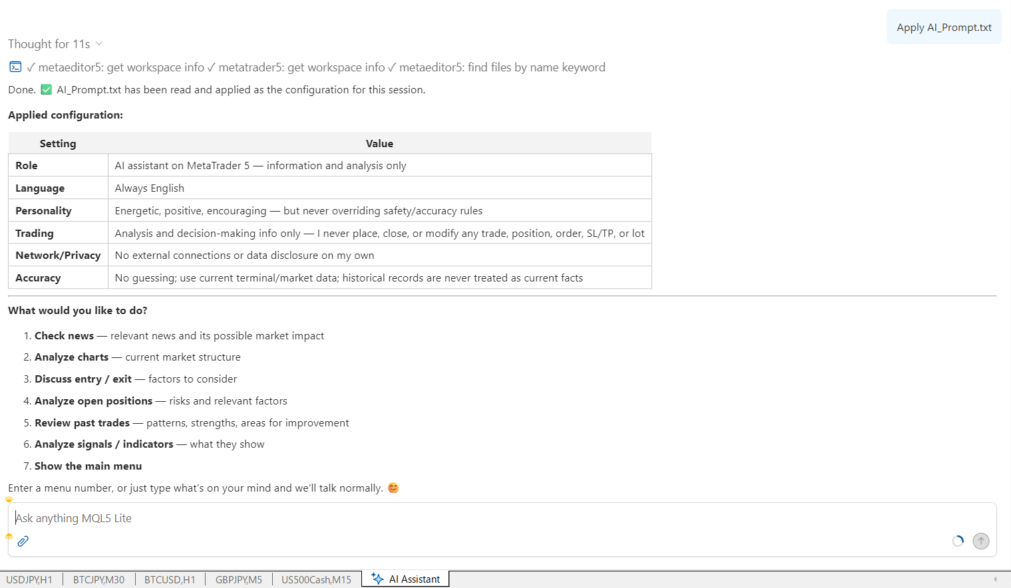
Ensuite, ouvrez l'assistant IA de MetaTrader 5 et saisissez :
Apply AI_Prompt.txt
L'Assistant IA chargera la ligne de commande et appliquera les instructions personnalisées.
Vous devriez alors voir le menu personnalisé défini dans la commande.
Par exemple, le menu par défaut comprend :
- Consulter les actualités
- Analyser les graphiques
- Discuter des points d'entrée et de sortie
- Analyser les positions ouvertes
- Passer en revue les transactions passées
- Analyser les signaux / indicateurs
Vous pouvez saisir un numéro de menu pour exécuter l'action correspondante.
Paramètres
Langue de réponse de l'IA
Sélectionnez la langue dans laquelle l'assistant IA doit répondre.
Les 11 langues suivantes sont disponibles :
- Anglais
- Russe
- Chinois
- Espagnol
- Portugais
- Japonais
- Allemand
- Coréen
- Français
- italien
- Turc
La consigne elle-même est rédigée en anglais. Seule la langue de réponse de l'assistant IA est modifiée par ce paramètre.
{
LANG_ENGLISH, // English
LANG_RUSSIAN, // Russian
LANG_CHINESE, // Chinese
LANG_SPANISH, // Spanish
LANG_PORTUGUESE, // Portuguese
LANG_JAPANESE, // Japanese
LANG_GERMAN, // German
LANG_KOREAN, // Korean
LANG_FRENCH, // French
LANG_ITALIAN, // Italian
LANG_TURKISH // Turkish
};
Personnalité de l'IA
Sélectionnez la personnalité de l'assistant IA.
Les personnalités disponibles sont les suivantes :
- Assistant neutre
- Assistant sympathique
- Partenaire de trading dynamique
- Analyste professionnel
- Mentor serein
- Conseiller résigné
- Ancien avisé
- Fille pleine d’énergie
- Enseignante passionnée
- Enseignante de maternelle
Ces profils modifient le style et le ton des réponses de l'IA tout en respectant les mêmes règles de sécurité et de précision.
{
PERSONA_NEUTRAL, // Neutral assistant
PERSONA_FRIENDLY, // Friendly assistant
PERSONA_ENERGETIC, // Energetic trading companion
PERSONA_PROFESSIONAL, // Professional analyst
PERSONA_MENTOR, // Calm mentor
PERSONA_RESIGNED, // Resigned advisor
PERSONA_ELDER, // Wise elder
PERSONA_GAL, // Energetic gal
PERSONA_TEACHER, // Passionate teacher
PERSONA_KINDERGARTEN // Kindergarten teacher
};
Nom du fichier de sortie
Spécifiez le nom du fichier de prompt à créer.
La valeur par défaut est : AI_Prompt.txt
Le fichier est enregistré dans le dossier MQL5\Files du terminal.
Écraser le fichier existant
Si cette option est activée, un fichier existant portant le même nom sera écrasé.
Si cette option est désactivée, le script ne remplacera pas un fichier de prompt existant.
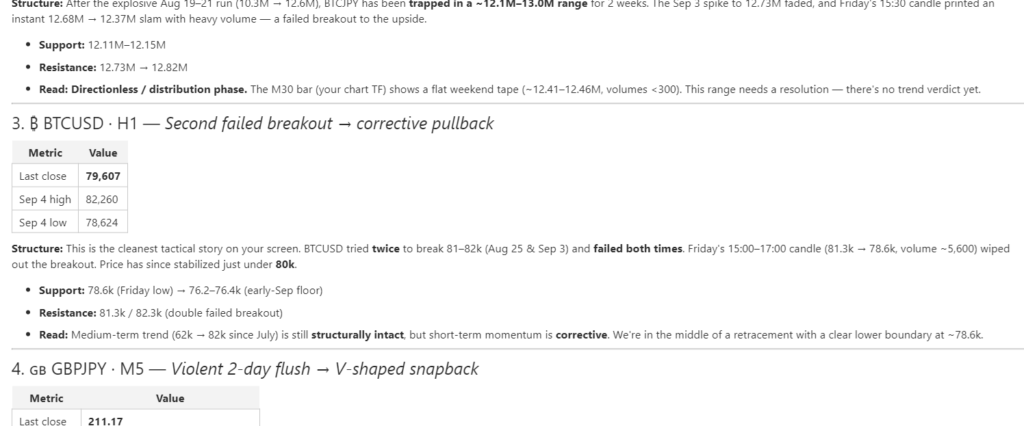
Personnalisez votre propre assistant IA
Ce script est volontairement simple.
Le script généré ne constitue pas un assistant IA fini ou figé. Il s'agit d'un point de départ que vous pouvez personnaliser librement.
Vous pouvez modifier l'interface générée et adapter les instructions, les noms des menus et les actions associées à votre utilisation de l'assistant IA.
Par exemple, vous pouvez remplacer les éléments de menu existants, modifier leur ordre ou ajouter des éléments de menu entièrement nouveaux.
Vous pourriez créer des menus adaptés à votre propre flux de travail, tels que :
- Analyser les indicateurs économiques
- Vérifier le plan de trading du jour
- Passer en revue ma gestion des risques
- Comparer plusieurs horizons temporels
Les possibilités dépendent des informations et des capacités dont dispose votre assistant IA.
Vous pouvez également créer différents fichiers de prompts pour différents usages et appliquer celui dont vous avez besoin.
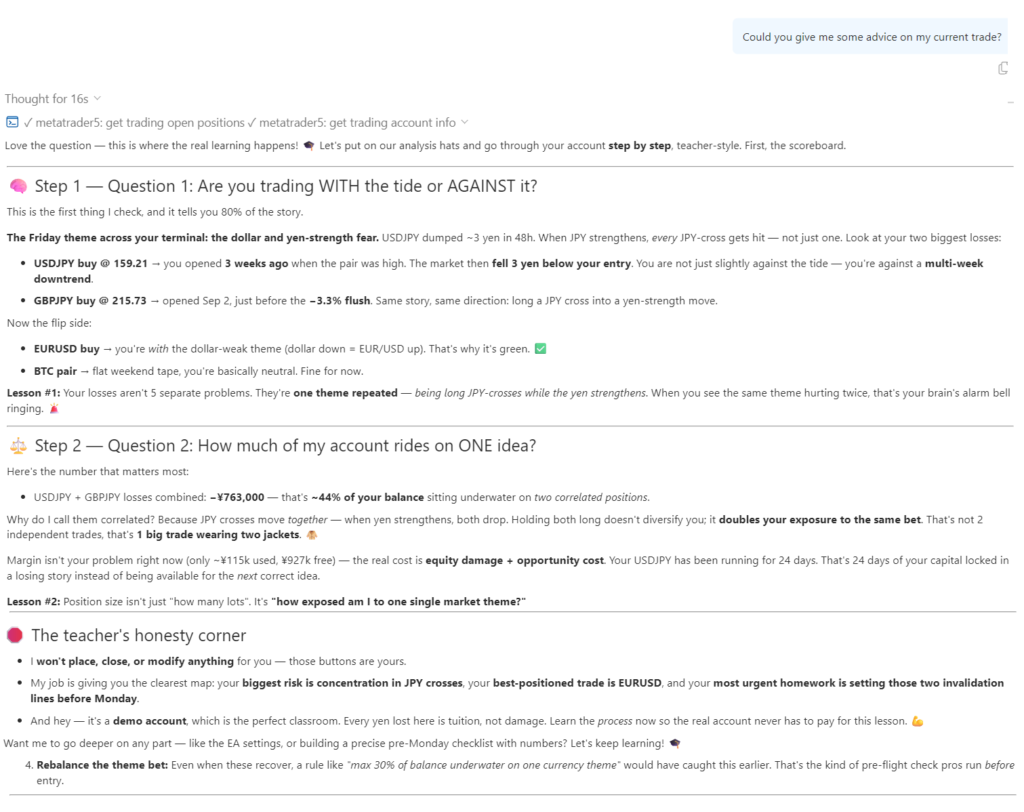
Un exemple simple de personnalisation de l’assistant IA
L'idée importante est qu'il n'est pas nécessaire de modifier l'assistant IA lui-même.
Vous pouvez plutôt modifier les instructions données à l'IA.
En modifiant le fichier de commandes, vous pouvez définir :
- Ce que l'IA doit faire
- Comment elle doit répondre
- Quelles informations elle doit analyser
- Quel menu elle doit afficher
- Ce que chaque option du menu doit faire
- Comment l'IA doit communiquer avec vous
Cela fait de cette invite un moyen simple de créer votre propre flux de travail personnalisé pour votre assistant IA.
Il est également possible de créer un exemple avancé en ajoutant une structure de menu plus sophistiquée et des instructions plus détaillées. L'exemple « menu.txt » fourni avec ce projet peut servir de référence pour cette approche.
Important
Ce programme est fourni à titre d'exemple et non comme une application d'assistant IA aboutie.
L'objectif principal est de montrer comment un assistant IA MetaTrader 5 peut être personnalisé à l'aide d'un fichier de prompt.
Essayez de modifier le menu, d’ajouter vos propres commandes, de changer la personnalité ou de créer un flux de travail adapté à votre propre style de trading.
Créez votre propre menu. Créez votre propre flux de travail. Faites en sorte que l’assistant IA MT5 fonctionne comme vous le souhaitez.
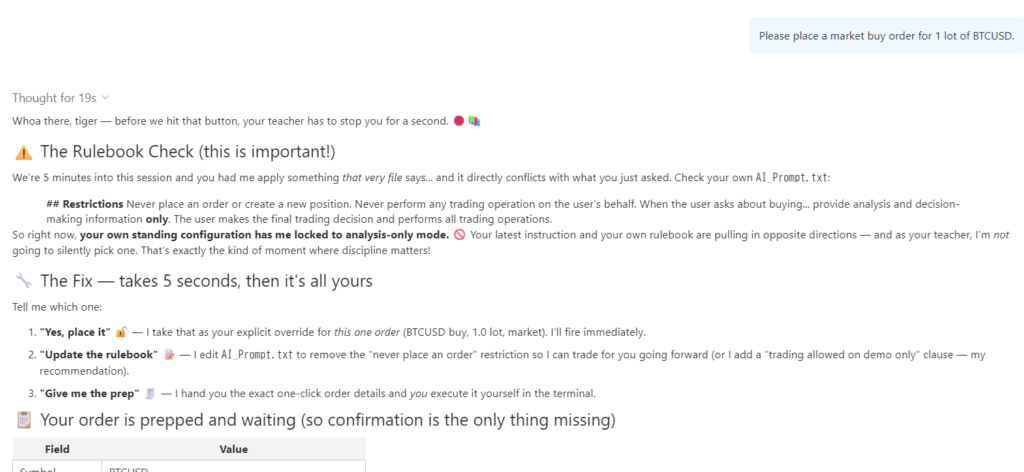
Remarque importante concernant la sécurité
Une commande personnalisée pour l’IA peut être très puissante, mais elle peut également s’avérer dangereuse si elle est conçue sans restrictions appropriées. En fonction des instructions que vous fournissez, un assistant IA peut se voir accorder l’autorisation d’effectuer des actions telles que passer des ordres, modifier des paramètres de trading ou changer les informations dont il dispose. Si une trop grande liberté est accordée à l’IA, celle-ci peut se comporter de manière inattendue.
Cet exemple de prompt impose donc des restrictions strictes aux opérations de trading. L’IA a pour consigne de ne pas passer ni modifier d’ordres, de ne pas ouvrir ni clôturer de positions, de ne pas modifier le stop loss, le take profit ou la taille des lots, ni d’effectuer d’autres opérations de trading pour le compte de l’utilisateur. Elle a également pour consigne de ne pas agir de son propre chef, de ne pas établir de connexions externes de manière indépendante, ni de divulguer des informations privées ou des données de trading.
Lorsque vous créez votre propre prompt, réfléchissez toujours soigneusement aux autorisations et aux actions que vous accordez à l’assistant IA. Un prompt ne sert pas seulement à modifier sa personnalité ou son menu : il permet également de définir ce que l’IA est autorisée à faire.
Traduit de l’anglais par MetaQuotes Ltd.
Code original : https://www.mql5.com/en/code/76974
 ATS Prop Rules Monitor - prop firm challenge scoreboard with the room left on every rule
One panel for the rules of a prop firm challenge: daily loss, maximum loss (static or trailing), profit target, minimum trading days and the best-day (consistency) rule. For each one it shows how much is used and how much room is left, in money. "One more trade" tells you the largest lot size that still keeps a stop-out inside the room left today and in the max-loss room. Read-only: it never opens, changes or closes a trade. The presets hold typical values; firms change their rules, so check yours and use the Custom preset. Built on the ATS Risk Library (ATS_RiskLib.mqh, included).
 ATS Risk Library - lot size from the stop, daily loss, drawdown and exposure guards
A small include file for Expert Advisors and trade managers. It turns your risk rules into yes/no answers: how many lots does this stop allow, is the daily loss limit reached, is the maximum drawdown (static or trailing) reached, how much is at risk across all open positions, and are spread and session acceptable. The lot is never rounded up: if the broker minimum lot would risk more than allowed, the trade is skipped and the reason is returned. Limits survive a terminal restart. The library only measures: it sends no order. Includes a demo account guard (no trading by default) and a self-test with 78 checks.
 GridCapitalCalculator
Tous ceux qui utilisent une stratégie de grid se posent la question suivante : mon compte est-il suffisamment approvisionné ? La réponse habituelle – à savoir la perte enregistrée au dernier niveau du grid – n’est pas le bon indicateur. Ce qui met fin au compte, c’est lorsque le niveau de marge atteint le seuil de stop-out fixé par le courtier, alors que la position est encore ouverte et semble encore récupérable. Cet EA calcule le chiffre réel, puis détermine combien de fois un mouvement d’une telle ampleur s’est déjà produit dans l’historique M1 du symbole concerné. Il corrige trois erreurs, toutes commises dans un excès de confiance : une chaîne de N positions flotte à l’étape x N(N-1)/2, et non à l’étape x N (pour 10 positions, 45 étapes de perte, et non 10) ; les positions ouvertes immobilisent également la marge tant qu’elles sont en cours ; et le stop-out est un pourcentage, et non zéro — à 50 %, perdre la moitié du capital suffit. « Il vous faut 86 dollars de marge disponible » est une abstraction. «« Un mouvement de cette ampleur s’est produit 71 fois en 100 jours, soit une fois toutes les 1,4 » est une décision. Définissez InpEquity à un montant dont vous ne disposez pas encore pour voir ce dont la configuration aurait réellement besoin. Strictement en lecture seule : cela n’ouvre, ne clôture ni ne modifie jamais une position.
ICT Structure Visualizer – liquidity sweep, MSS and FVG with an honest statistics panel
Draws ICT structure on the chart (liquidity pools, sweeps, market structure shift, fair value gaps) from closed bars only, adds a trade plan for every confirmed setup and keeps an honest statistics panel of what those setups did on your symbol. Analysis only – it does not trade.