Vladimir Pastushak
Vladimir Pastushak
4.4 (462)
  • Información
13+ años
experiencia
50
productos
849
versiones demo
0
trabajos
0
señales
0
suscriptores
👋 Me llamo Vladimir Pastushak. Soy trader y programador, con más de 20 años de experiencia en los mercados financieros y en el desarrollo de soluciones de software para la automatización del trading.
💻 Durante este tiempo, he desarrollado numerosos algoritmos de trading, Expert Advisors y herramientas para MetaTrader 4 y MetaTrader 5, probando constantemente mis ideas en la práctica.
📊 En mi trabajo, no me interesan las promesas llamativas, sino la lógica del algoritmo, la calidad del código, la posibilidad de configurar detalladamente el sistema de trading y evaluar objetivamente su comportamiento en diferentes condiciones de mercado.
🔍 Todos mis desarrollos se basan en mi propia experiencia práctica y son probados antes de su publicación.
⚙️ Mi objetivo es crear herramientas que permitan al trader comprender su lógica de funcionamiento, ver las configuraciones disponibles y evaluar por sí mismo si una determinada solución se adapta a sus necesidades.

Archivos Set y versiones demo de los productos con un período de funcionamiento de 30 días.

VR Proton - https://trading-go.net/mqp_proton_zip
VR Smart Grid - https://trading-go.net/mqp_smart_grid_zip
VR Lollipop - https://trading-go.net/mqp_lollipop_zip
VR Locker - https://trading-go.net/mqp_locker_zip
VR Black Box - https://trading-go.net/mqp_black_box_zip
VR Watch list and Linker – https://trading-go.net/mqp_watch_list_and_linker_zip
VR Trade Panel - https://trading-go.net/mqp_trade_panel_zip

El corredor con el que trabajo:
RoboForex https://trading-go.net/mqrb

🔥 Todo sobre trading + Formación en Telegram: https://t.me/tgforexen

💥 Al adquirir productos a través de las fuentes oficiales, recibirás:
1️⃣ Regalos, bonificaciones y otros programas.
2️⃣ La posibilidad de utilizar los programas de forma gratuita.
3️⃣ Configuraciones y archivos Set de forma gratuita.
4️⃣ Soporte técnico gratuito.
5️⃣ Todas las actualizaciones de forma gratuita.

💥 Visita mi sitio web personal: https://trading-go.net/
Vladimir Pastushak
Vladimir Pastushak
LIONEL PEREZ
LIONEL PEREZ 2021.02.04
woahhhhhhhhhhh.....your a GOD to me right now lol........ I just started learning how to pyramid trades and knew it would takes weeks to a month to figure out how to calculate each position to find the total and what your created is unbelievable .. im going to message you in a few .. Thanks
Nykolai Kalchenko
Nykolai Kalchenko 2021.02.05
супер!!! крутоо. этого не хваталоо
Vladimir Pastushak
Vladimir Pastushak
https://www.mql5.com/ru/market/product/13628 Mt 4
https://www.mql5.com/ru/market/product/42860 Mt 5

Forex Trader Risk Calculator VR-calculate Martingale
The main Forex currencies have two important differences from other exchange-traded instruments: high volatility and a stable average trading volume. These features are used in the grid strategy, which allows traders to conduct profitable trading over a long period of time.
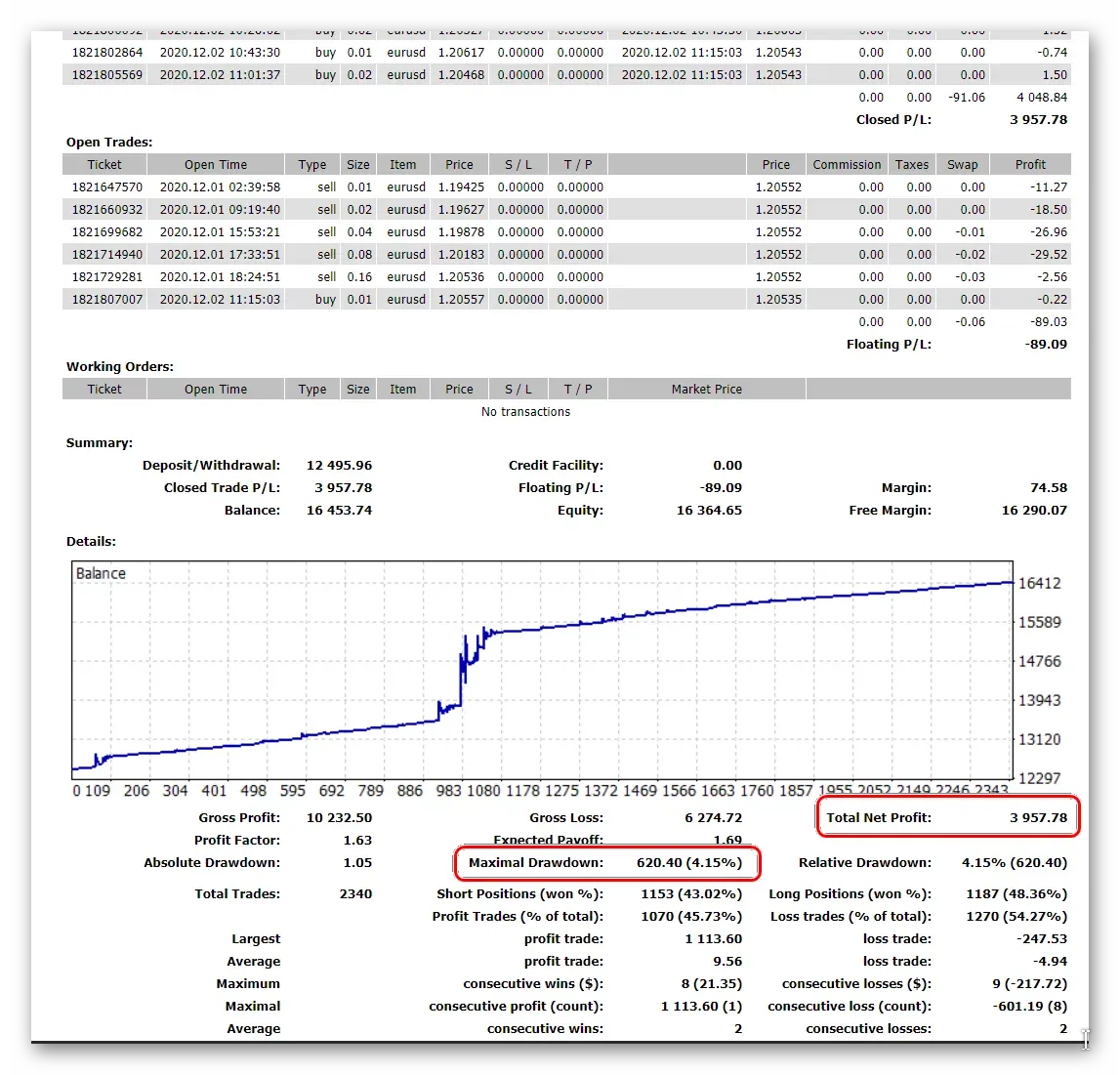
The application of the grid can be easily recognized by a "nice" profit growth line of the Forex trader's account. The picture below shows examples of the seven best real trading accounts managed by the Alpari broker investment service. At least three of them, marked with arrows, trade different types of grids, earning tens of thousands of dollars in profit for themselves and their investors.

The main secret of the grid strategy is that the results do not depend so much on the correctness of the currency pairs trends prediction. When making a loss, traders use the volatility of the Forex market, which guarantees frequent reversals of the exchange rate.
By adding new positions for averaging, sometimes increasing their size, the trader covers previous losses, gaining a minimum profit without even guessing the market movement or closing all trades at break-even.

In Forex textbooks, the Martingale strategy has become a household name for guaranteed account loss. In reality, it is used by up to 75% of the best Forex investment management services.
Criticism of the strategy is justified by the fact that its durability depends on the ability to calculate the lot, the correct choice of the number of averages and the size of the increase in positions. The trader may not have enough deposit to maintain the margin of open positions, then the broker will forcibly close his account by a margin call.
VR-calculate Martingale is a trader's calculator that allows even a beginner to calculate all the risks in advance, based on the stability of the average trading range. Professional traders can use VR-calculate Martingale as a position calculator to model future order grids on the chart using complex tactics, such as "Swing", "Tumbler", and program the opening of "locks".
Main features of the VR-calculate Martingale position calculator
The VR-calculate Martingale indicator is a calculator for MetaTrader 4 and 5, which you can download and use for free to calculate the average position price of in the Forex market.
The tool works on all timeframes and asset types, including the stock market as an averaging calculator for stocks supported by Metatrader. When working in the stock or cryptocurrency calculator mode, the trader should take into account that these instruments may have limited leverage. Pay attention to the trading conditions and specifications.
VR-calculate Martingale is a trading indicator that allows you to calculate the margin, the average value. potential gains and losses of specific positions or in total. With it, you can simultaneously run up to 7 independent grids on a single chart.
The algorithm of the VR-calculate Martingale calculator for Forex strategies
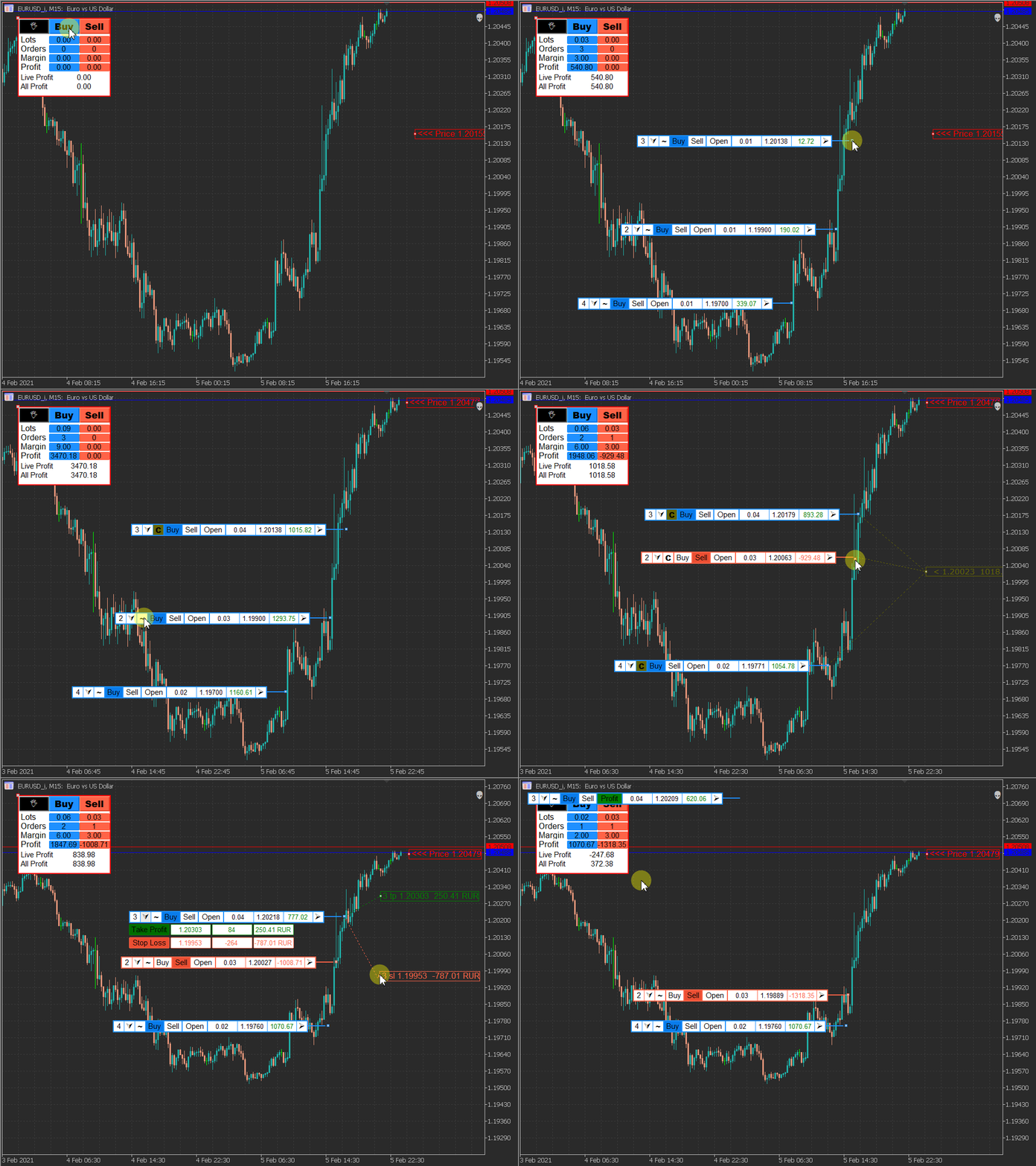
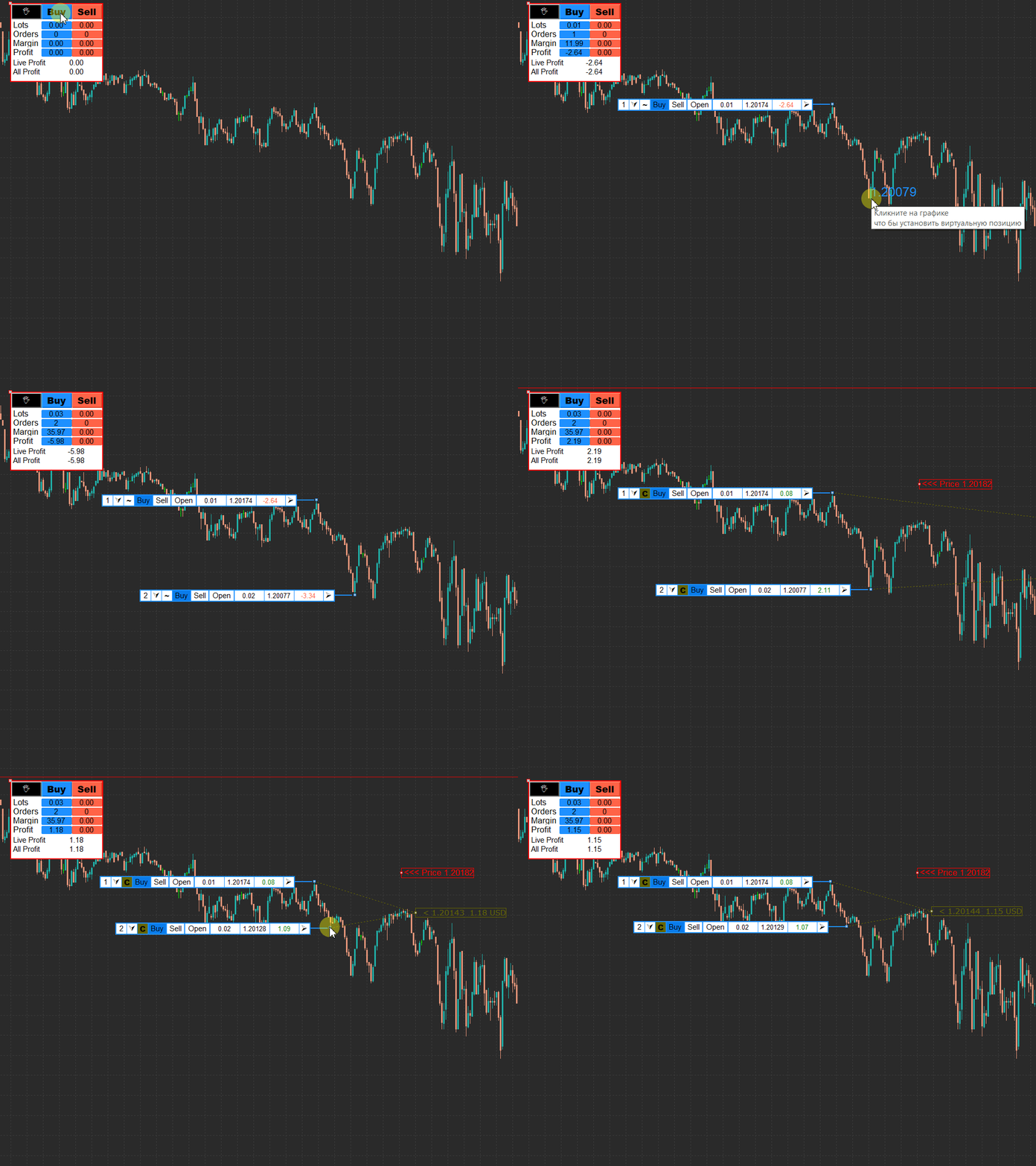
VR-calculate Martingale displays its own price tag on the chart. By moving it on the chart, a trader can calculate positions relative to any given currency pair rate or select the current market value.

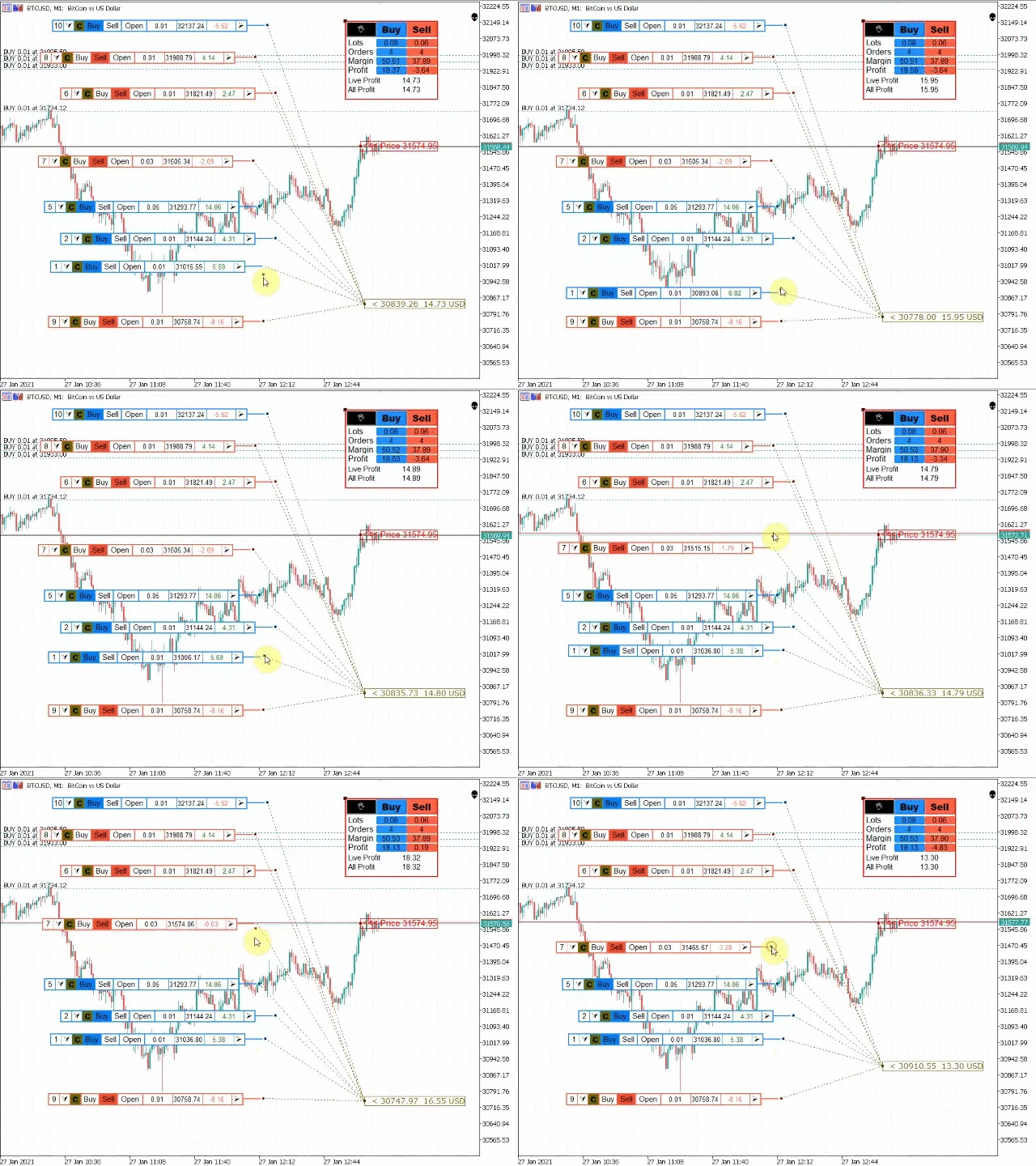
Future trades on the grid are displayed as a set of marks on the chart. They have their own menu and informers with the results of profit/loss, relative to the price tag set, the future exchange rate of the currency pair. The overall result of the trades is visible in a separate window, displayed in any place on the chart that is convenient for the trader.

Knowing the average trading range or automatically calculating its levels on the chart using the free VR Atr Pro indicator, the trader can:
Pre-determine the number of trades for averaging, based on the support or resistance levels
Calculate the margin of the total position, simulate the Martingale, estimating the size of the increase in positions at the points of the maximum price movement, calculated via VR Atr Pro
Determine the potential profit/loss by setting the total profit/stop loss level, find the breakeven level of the entire grid
Build several multidirectional networks for modeling locks, calculate the lot for the locked position
Downloading, installing, and configuring the indicator
VR-calculate Martingale is downloaded via the link at the beginning of the description of the work of this Forex calculator. In the archive, the trader should select the trading calculator file corresponding to the version of the Metatrader (ex4 for MT4, ex5 for MT5). The RU and EN indexes indicate the Russian and English versions of the indicator menu.
The selected version of the VR-calculate Martingale trader's calculator is installed in the Indicators folder, which you need to find through the "Data Directory" option via the "File" menu in the pre-launched Metatrader terminal.

If the calculator file is copied correctly, the indicator can be seen in the "Navigator" window, it is displayed after pressing the shortcut key, as shown in the figure.

By dragging the VR-calculate Martingale risk calculator with the right mouse button onto any chart, the trader will get access to the indicator settings window.
Setting up the VR-calculate Martingale Forex Calculator indicator
The main settings of VR-calculate Martingale are located on the "Input Parameters" tab of the "Settings" window. It opens at the first launch of the indicator or via the right mouse button menu when the trading indicator is already attached to the chart.
Indicator prefix – a unique grid label, which allows each copy of the indicator to calculate only its own orders and set different price labels

Start lots – the lot size in the position window, set by default when you click the Buy/Stop buttons
Take Profit and Stop Loss by default will automatically calculate the levels of profit/loss (in points)
Menu X and Y position - coordinates of the main indicator window on the chart. It can be dragged manually with the mouse
The rest of the menu functions determine the color scheme of the windows and buttons of VR-calculate Martingale, without directly affecting the operation of the Forex calculator.
compartir producto
Comentarios: 1
30.00 USD

El indicador VR Calculate Martingale es una poderosa herramienta para precalcular cualquier estrategia comercial sin riesgos. Debido a que el indicador utiliza órdenes virtuales, un operador puede calcular de antemano cualquier desarrollo de eventos en una cuenta comercial. Ya no necesita tablas ni calculadoras EXCEL, no necesita conocer las fórmulas para promediar posiciones multidireccionales con diferentes lotes comerciales. VR Calculate Martingale te ayudará a calcular todo. Las

Vladimir Pastushak
Vladimir Pastushak
Happy new Year to you!
Time for discounts -30%!
https://www.mql5.com/en/users/voldemar/seller

C наступающим вас Новым Годом!
Время скидок -30%!
https://www.mql5.com/ru/users/voldemar/seller
Vladimir Pastushak
Vladimir Pastushak
Dear friends!
There is not much time left until the end of The black Friday promotion.
The promotion will end on 10.12.2020

There is not much time left to purchase our programs with a 30% discount!
https://www.mql5.com/en/users/voldemar/seller
RobotGrail
RobotGrail 2020.12.06
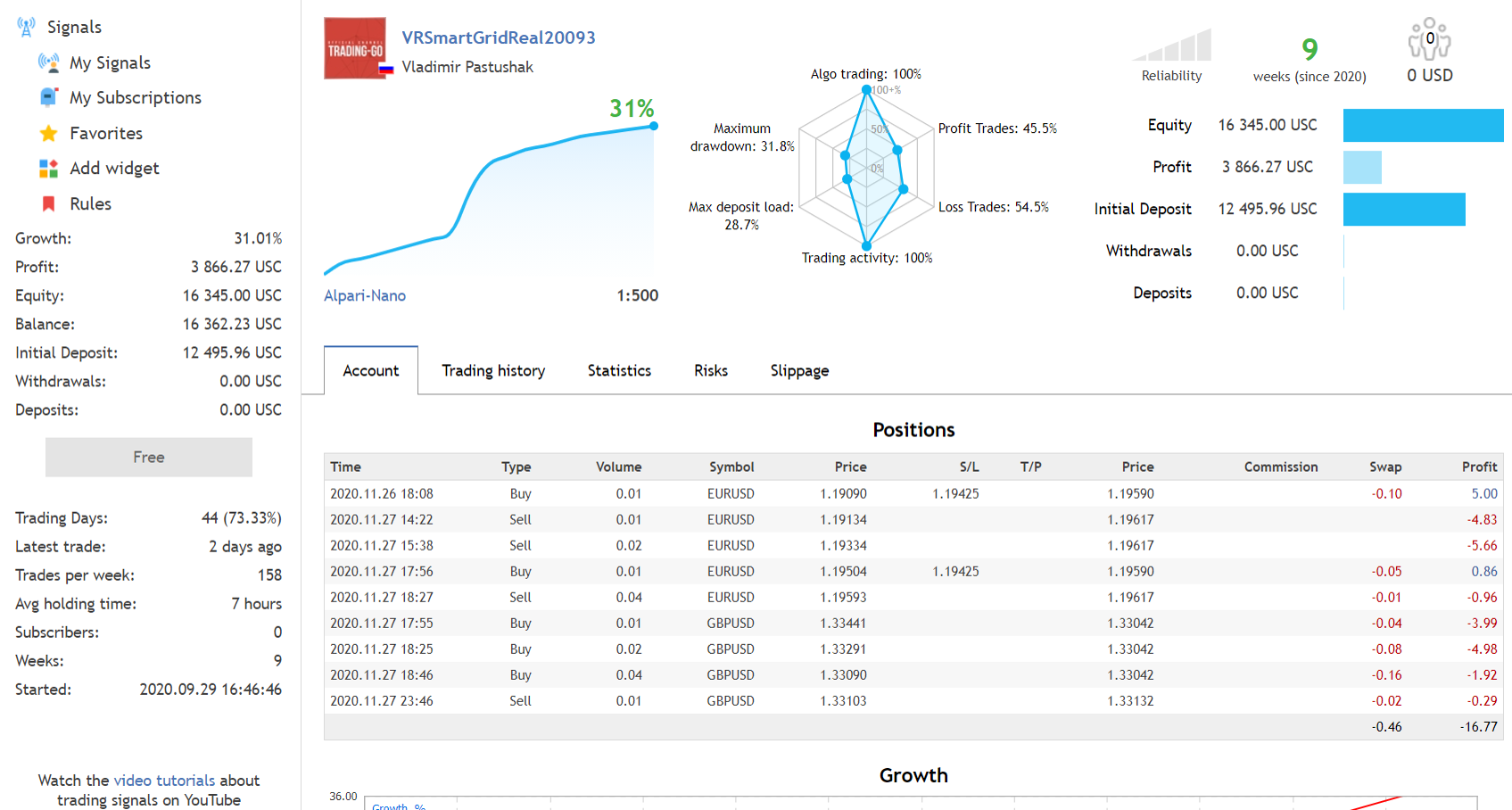
Мой любимый сеточник ! Направляю по тренду и красота просадка/доход очень хороши :)
Vladimir Pastushak
Vladimir Pastushak
❗️❗️❗️Black Friday! ❗️❗️❗️
We have made maximum discounts on all our programs. Now is the time to buy an expert Advisor, indicator, or script with maximum profit!
✅ https://www.mql5.com/en/users/voldemar/seller
teodosy87
teodosy87
Comentario sobre el producto VR Watch list and Linker
Amazing amazing! I cant live with out it works very very good! For anyone who want to be more productive this is the right tool
Ferdinandus Charlie
Ferdinandus Charlie
Comentario sobre el producto VR Watch list and Linker
Excellent Product.., 100% Satisified
Esaul
Esaul
Comentario sobre el producto VR Watch list and Linker
Программа супер! Давно искала что-то подобное. Были проблемы при установке но Владимир сработал очень оперативно! Спасибо! 5+
Vladimir Pastushak
Overview The VR Close orders script is designed to close positions in the terminal at a profit or loss mark set by the trader. The program is written as a script and can work together on the same chart with any other indicators and expert advisors...
Vladimir Pastushak
Vladimir Pastushak
Присоединяйтесь к обсуждению в группу https://t.me/tradinggoen новости разработок и обновлений https://t.me/trading_go_news_en

Join the discussion in the group https://t.me/tradinggoen development news and updates https://t.me/trading_go_news_enПрисоединяйтесь к обсуждению в группу https://t.me/tradinggoen новости разработок и обновлений https://t.me/trading_go_news_en 

Join the discussion in the group https://t.me/tradinggoen development news and updates https://t.me/trading_go_news_en
2
הטרנסצנדנטלי בעל-חזון
הטרנסצנדנטלי בעל-חזון 2020.10.06
не самый лучший вариант привлечения внимания
Vladimir Pastushak
Vladimir Pastushak 2020.11.03
Ваше внимание так то привлекло... ;-)
compartir producto
Comentarios: 5
FREE

El script VR Close orders está diseñado para cerrar posiciones en el terminal a una marca de ganancia o pérdida establecida por el operador. El programa está escrito como un script y puede trabajar conjuntamente en el mismo gráfico con cualquier otro indicador y asesor experto. El programa tiene un panel visual sencillo y es fácil de configurar con el ratón. Con la ayuda de este programa, el operador puede cerrar posiciones automáticamente y eliminar órdenes en función de las condiciones

Vladimir Pastushak Ha publicado el producto
Comentarios: 1
FREE

El script VR Close orders está diseñado para cerrar posiciones en el terminal a una marca de ganancia o pérdida establecida por el operador. El programa está escrito como un script y puede trabajar conjuntamente en el mismo gráfico con cualquier otro indicador y asesor experto. El programa tiene un panel visual sencillo y es fácil de configurar con el ratón. Con la ayuda de este programa, el operador puede cerrar posiciones automáticamente y eliminar órdenes en función de las condiciones

Vladimir Pastushak
Обзор Скрипт VR Close orders предназначен для закрытия позиций в терминале по прибыли или убытку заданным трейдером. Программа написана в виде скрипта и может совместно работать на одном графике с любыми другими индикаторами и советниками...