Todos los encargos
 Reglas
Tarea técnica
The panel should have three columns containing useful information. The first column contains the information about the account state as of the beginning of the month, i.e. the overall result is shown as a percentage and in the deposit currency. The second column shows the daily risk specified in the settings. The third column shows the current account state.
If the daily risk is exceeded or the number of orders is above the maximum allowed number, the EA closes all orders and does not let open new ones, thus protecting from "emotional trading".
Risk Manager allows to control the following trading parameters:
- Daily loss limit
- Account loss limit
- The maximum number of losing trades
- The maximum number of trades
- Forced stop after a series of losing trades
- ATO SL and TP by % and pips
The Risk Manager system should allows the trader to:
- Save the daily profit
- Review trading statistics online
- Stick to a trading discipline and improve trading results (no "tilt" or "grids")
- View current equity taking into account the broker's fees
If a trader suffers complete loss for 2 days (the loss is set in settings. For example, 4% two days in a row), he is prohibited to trade for one day.
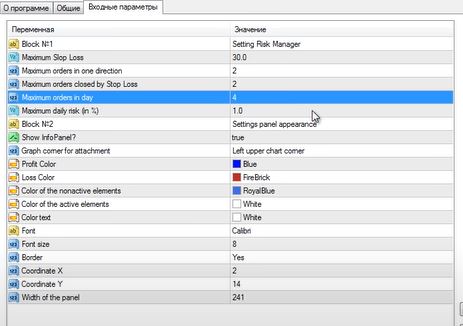
The panel should have the following configurable parameters:
- Block №1 - Basic Settings
- Maximum SlopLoss - maximum stop loss. When you open an order, Risk Manager sets stop loss specified here
- Maximum orders in one direction - the maximum number of orders in one direction on one pair - protection from grids
- Maximum orders in day - the maximum number of orders per day
- Maximum orders closed by Stop Loss - the maximum number of orders closed with a loss ( commission and swap not included)
- Maximum daily risk (in %) - maximum daily risk as % of deposit
- Block №2 - Appearance Settings
- Show InfoPanel? - display of information on a chart?
- Graph corner for attachment - chart corner to anchor the panel
- Сolor of the nonactive elements - the color of inactive (static) elements
- Color of the active elements - the color of active elements
- Profit Color - profit color
- Loss Color - loss color
- Color text - text color
- Font - font type
- Font size - font size
- Border - display the panel border
- Coordinate X - the X coordinate of the panel
- Coordinate Y - the Y coordinate of the panel
- Width of the panel - the width of the panel (if numbers do not fit into the fields)