Stsiapan Kreidzich
Stsiapan Kreidzich
4.5 (42)
  • Information
8+ years
experience
3
products
441
demo versions
0
jobs
0
signals
0
subscribers
Programmer Born in 1954 at Trader
Mail: stepkrei@gmail.com, step_bot@mail.ru. ONLY these addresses and ONLY the MQL5.com website for communication with the real author.

Experience of real forex trading (and mql4 programming) from 2011. A C programmer with more than 35 years of experience.

--------------------------------------------------------------------------------------------------------------------------------
Information on achievements on the MQL5 website (as of May, 2021):

[Code base] : Developer 1. Popular Programs: 854. Views: 6262.

[Market] : Supplier of Demo: 729. Distributed Free: 7486.

Developer of serious programs, therefore, for security reasons, do not participate in social networks and telegram channels.

The author has placed the original files of the products only on the mql5.com website using the links:

MaxiFinish Gold - https://www.mql5.com/en/market/product/125785
MaxiFinishTrend 2 - https://www.mql5.com/en/market/product/38748
Multistochastics - https://www.mql5.com/en/market/product/29997
Code Base - https://www.mql5.com/en/code/22035

Some products of 2018...2019 ("MaxiFinishTrend Free", "Stochastics Multi ... and others, >7000 downloads) are hidden after changing the MQL5 market rules.

Free download user manuals (.pdf) :

https://c.mql5.com/31/375/MaxiFinishTrend_v20_USER_MANUAL_EN__1.zip
https://c.mql5.com/31/375/MaxiFinishTrend_v20_USER_MANUAL_RU__1.zip

IMPORTANT: SCROLL THE PROFILE AND READ THE ANSWERS TO THE FREQUENT QUESTIONS - FAQ.
-------------------------------------------------------------------------------------------------------------------------------
Stsiapan Kreidzich
Stsiapan Kreidzich
Only from the mql5.com website you will receive the original indicator directly in your Metatrader 4. This is the only way you can be sure that it works correctly and gives all the signals!
Very accurately noted in the excellent review Mazis0509: In the indicator "everything is thought out to the smallest detail."
Thank you Mazis0509 and Marcos Yuge for your five stars !!!!!
Serafin Perez
Serafin Perez 2021.09.04
Estoy impresionado por este indicador, la luz se enciende en el momento justo y los errores que cometemos son fruto de nuestra propia indecisión, aún viendo las herramientas en nuestra frente. Cada vez observo creo que estoy ante un espejo viendo mis defectos, es ahí donde te das cuentas de los errores.
Un brindis para su indicador.
Stsiapan Kreidzich
Stsiapan Kreidzich 2021.09.04
¡Muchas gracias a Serafín Pérez por un gran brindis !!!!! =============Translations from Spanish===========
--------------------EN
I am impressed by this indicator, the light turns on at the right time and the mistakes we make are the result of our own indecision, even seeing the tools in our forehead. Every time I observe I think I am in front of a mirror seeing my defects, that is where you realize the errors.
A toast to your indicator.
EN : Many thanks to Serafin Perez for a great toast !!!!!
-------------------RU
Я впечатлен этим индикатором, свет включается в нужное время, а ошибки, которые мы совершаем, являются результатом нашей собственной нерешительности, даже если мы видим инструменты во лбу. Каждый раз, когда я наблюдаю, мне кажется, что я стою перед зеркалом и вижу свои недостатки, вот где вы осознаете ошибки.
Тост за ваш индикатор.
RU : Большое спасибо Serafin Perez за отличный тост !!!!!
---------------------------------------------------------------------------------------
Stsiapan Kreidzich
Stsiapan Kreidzich
💎💎💎💎💎 FAQ - Frequently asked questions in private messages - FAQ:

1. QUESTION: "... I downloaded and try to test the free demo version, but the tester after the start does not go and writes at the top (visual not respond) ..."
ANSWER:
If the Tester (not answer), wait minute and the test will run. Only the first test requires a long load of many threads, the next tests will start quickly. Please read [Comment #165 https://www.mql5.com/en/market/product/38748#!tab=comments&page=9&comment=23251513 ]. Do not use MT4 of old or non-real builds, test only on terminals of real brokers.
Click on different currencies and timeframes for quotes download to the current date. If there are no stochastic lines in the tester or not all of them - this is a Quotes error and the test is not complete. Only on a real chart is a full multi-timeframe and multi-currency test possible. In the tester, only after "Quotes error..." disappears, you see the correct test.

2. QUESTION: "... How to open the settings directly in the terminal when the indicator is already working? Only through the navigator? Or is there some other button? ..."
ANSWER:
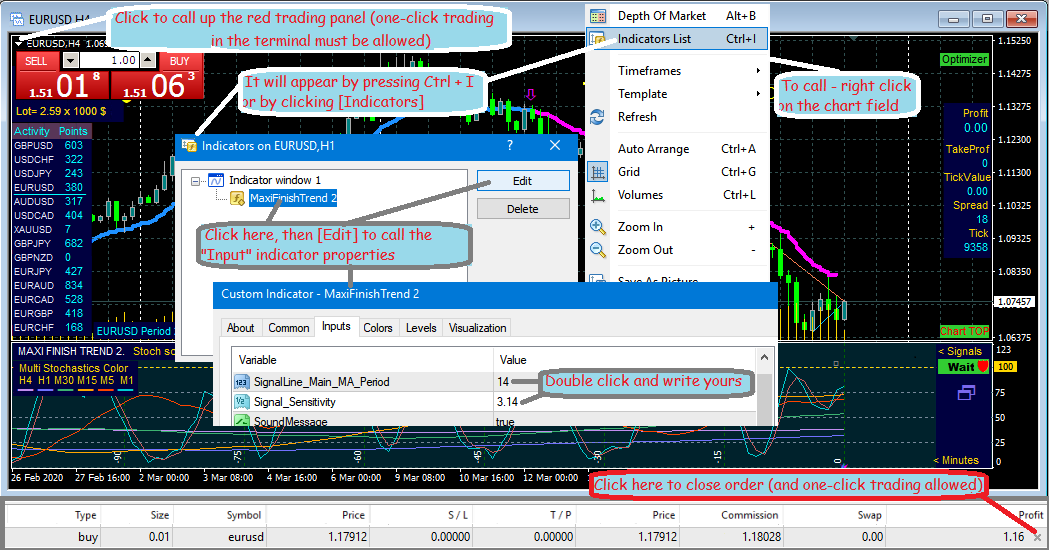
On the keyboard: Ctrl + I. Another option is to right click on the chart window in an empty space and the chart properties will appear where you need to click [indicators]. In the window that appears, click the indicator name and [Edit].
I usually open the indicator settings with a right click (or on a notebook, tap with two fingers) while hovering the pointer over any stochastic lines (preferably where there are several lines nearby). A selection of properties will appear and you need to click [indicator properties].
In the Tester, there is a button to open properties at the bottom right.
----------------------------------------
VERY IMPORTANT TO KNOW: the indicator in the navigator is always stored with default settings. Indicators on charts are stored with your personal settings for each chart.
Only on the first clean chart put the indicator from the navigator with default settings by clicking "OK".
To set the indicator parameters on each chart, you need to call its properties not from the navigator, but on the chart, as described above. After writing your options, set "COLOR_SCHEME" =3 , so that your settings are saved.
Clicks on the scanner create new charts with an indicator and your settings. You can make other settings for the indicator on each chart.
After creating and setting up the charts you need for trading, switch to view them during the trading process not by clicking on the scanner, but by clicking on their tabs below the chart. Your charts work even when you don't see them in the foreground. The chart on which the new signal appears will automatically switch to the foreground. If your MT4 does not have a chart switching bar at the bottom, then enable it in the terminal menu [ View ] - [ ✓ Charts bar ]. Switch charts on this panel.
------------------------------------------

3. QUESTION "... I just do not quite understand what exactly in the settings I need to strive for technically ... I do not see the picture ..."
ANSWER:
Set MA_Period = 52 in the settings, for example, and after clicking [OK] you will see how the picture of signals has changed. Try other values, and when you like the arrows and their frequency and suit your trading style, trade with those parameters. The configured parameters are saved at the next start of the terminal. If in the future you see that the nature of the price movement has changed and the signal arrows are not optimal, you can tune in again more accurately.
After a couple of days of trading on a demo, it will become very clear and simple for you.

4. QUESTION "... I used to trade only with robots... I hope for success with indicators... How is it easier to open and close deals without robots? ..."
ANSWER:
I usually open transactions "in one click" from the trading panel available in the terminal (red box in the picture). You must enable the terminal to trade "one click". To do this, in a new terminal, I open any order on a demo account and click to close it (at the bottom of the terminal, on the "Trade" tab, there is a cross at the end of the line. The terminal will ask you to confirm the trade in one click. After that, in the upper left corner of the chart there will be a sign for clicking to call the trading panel. Place the desired lot in it and you can open deals with one click.

I have shown these explanations in the picture. I wish you all comfortable trading and maximum success!
Stsiapan Kreidzich
Stsiapan Kreidzich
Thank you very much Mariola59 for your 5 stars !!!!!
Stsiapan Kreidzich
Stsiapan Kreidzich
Thank you very much Paulina Madariaga for your 5 stars !!!!!
Your stars motivate me to keep making the product better and better!
Stsiapan Kreidzich
Stsiapan Kreidzich
Jeremy Saylor !!! Thank you very much for your excellent reviews!...
Stsiapan Kreidzich
Stsiapan Kreidzich
Jeremy Saylor...Thank you very much!... I have traded and worked on this for over 10 years. I am 66 years old and my eyesight is getting very weak, so I decided share this - let my experience help everyone who is looking for the "Holy Grail". You wrote "Brilliant" very accurately - they are usually hidden ...
---------------------RU
Jeremy Saylor...Большое спасибо!... Я больше 10 лет торговал и работал над этим. Мне уже 66 лет и сильно слабеет зрение, поэтому я решил поделиться этим - пусть мой опыт помогает всем кто ищет "Святой Грааль". Вы очень точно написали " Brilliant" - их обычно прячут...
Stsiapan Kreidzich
Stsiapan Kreidzich
New version 20.24 MaxiFinishTrend 2 after updating Windows 10 2004. Improved protection and efficiency of CLOSE signals. Update the indicator free of charge to receive best signals.
Stsiapan Kreidzich
Stsiapan Kreidzich
Action! I am lowering the price of MaxiFinishTrend 2 by 50% due to the Pandemic Crisis. Buy at half price and earn money without leaving home! Please!
---------------------RU
Акция! Я снижаю цену на MaxiFinishTrend 2 на 50% в связи с кризисом пандемии. Покупайте за полцены и зарабатывайте не выходя из дома! Пожалуйста!
Stsiapan Kreidzich
Stsiapan Kreidzich
New version 20.20 MaxiFinishTrend 2 after updating the Terminal MT4 build 1260. A new parameter "Signal_Suppression_Sound" has been added to the "Input" settings to enable / disable the audible alarm when suppressing false signals. If you want to analyze suppressed false signals when making trading decisions, then enable "Signal_Suppression_Sound = True".
----------------------------------------------------RU
Новая версия 20.20 MaxiFinishTrend 2 после обновления Терминала MT4 build 1260. В "Input" настройки добавлен новый параметр "Signal_Suppression_Sound" для включения- выключения звуковой сигнализации при подавлении ложных сигналов. Если Вы желаете анализировать подавляемые ложные сигналы при принятии торговых решений, то включите "Signal_Suppression_Sound = True".
Stsiapan Kreidzich
Stsiapan Kreidzich
The new version 20.11 of MaxiFinishTrend 2 after updating the Terminal MT4 build 1220. Video-Test M15 on YouTube channel https://www.youtube.com/channel/UCVLMKtSPH3O_760X4kWel5Q
Stsiapan Kreidzich
Stsiapan Kreidzich
I have a Profile only on mql5.com and YouTube(ONLY FOREX VIDEO). I NOT CONNECTED TO OTHER SITES, USING MY NAME OR PUBLICATIONS...

Я имею Профиль только на mql5.com и на YouTube(ТОЛЬКО ФОРЕКС ВИДЕО). Я НЕ СВЯЗАН С ДРУГИМИ САЙТАМИ, ИСПОЛЬЗУЮЩИМИ МОЁ ИМЯ ИЛИ ПУБЛИКАЦИИ...

The new version 20.0 MaxiFinishTrend 2, FREE, and NEW USER MANUAL ( PDF). Please free download only from mql5.com , everything is improved.

https://c.mql5.com/31/375/MaxiFinishTrend_v20_USER_MANUAL_EN.zip https://c.mql5.com/31/375/MaxiFinishTrend_v20_USER_MANUAL_RU.zip
_RU is better to use this particular file for translation to another (your) language.
Stsiapan Kreidzich
Stsiapan Kreidzich
The new version of MaxiFinishTrend 2 19.9 adds the ability to disable/enable "Chart To Top" in the settings when a new signal.
Stsiapan Kreidzich
Stsiapan Kreidzich
...Alexsandr wrote to my :
"I tried your [MaxiFinishTrend Free] indicator. Honestly, I haven’t seen them yet, you can perfectly navigate and make money if you sit near a computer ... Could you lend your paid indicator at least for a month ..."

There is no technical option to "lend indicator". A properly working file can be obtained only one way - by purchasing in MQL5 Market, where it is stored in encrypted form and will be re-encrypted under the computer of the buyer. The process is automatic. Other ways are impossible for the correct work and correct signals of this indicator.

... Alexsandr написал мне:
"Я опробовал Ваш [MaxiFinishTrend Free] индикатор. Честно сказать таких я ещё не видел, отлично можно ориентироваться и зарабатывать, если сидеть около компьютера ... Не могли бы Вы одолжить Ваш платный индикатор хотя-бы на месяц... ...как получиться раскрутить депозит, я оплачу..."

Нет технической возможности "одолжить индикатор". Правильно работающий файл может быть получен только одним путём - покупкой в Маркет MQL5, где он хранится в зашифрованном виде и будет пере-шифрован под компьютер покупателя. Процесс автоматический. Другие пути невозможны для корректной работы и правильных сигналов индикатора.
---------------------------------------------------------

Estefania! Thank you very much for your excellent review of MaxiFinishTrend 2!
Stsiapan Kreidzich
Stsiapan Kreidzich
My ideas from MaxiFinishTrend have already been picked up by popular developers ("PipFinite Exit EDGE"). So far, they have partially implemented only 1 idea out of 4 - there are still 3 left. I'm not greedy, I don’t mind, that's why I published my product. But my indicator "knows" when orders are closed and opened, and does not give signals "blindly". My indicator does not need to buy additional scanners or higher TFs.
MaxiFinishTrend 2 is an autonomous trading system.
Stsiapan Kreidzich
Stsiapan Kreidzich
The new MaxiFinishTrend 2 is better protected and more functional. Highly effective for scalping on M1, M5, M15 and swing trade on higher periods.
Even for beginners is very clear and convenient.

My previously published indicators "Step Profi Tool" and "MaxiFinishTrend indicator Step Profi" was created a long time ago on Windows XP and on the old version of Meta Trader 4. Testing its work in modern conditions revealed serious shortcomings in operation and I decided to remove from the Market window.
Stsiapan Kreidzich Published product
Reviews: 33
63.00 USD

  Smart trading system . All timeframes, currencies, cryptocurrencies, metals... All MT4 and any screens and template are configured automatically. A beginner will simply trade based on a signal. The parameters of a unique flexible algorithm are open in settings.      Idea 1:   In addition to “BUY/SELL”, signal “GET PROFIT” are given at extreme points. This tactic increases the result - you have profits when maximum and have more transactions. If "Take Profit" or "Stop

Stsiapan Kreidzich
Published code Stochastics Multi not delayed Step Stoch
На всех периодах и символах показывает в одном окне движение стохастиков М1, М5, М15, М30, Н1, Н4 каждую минуту.
1026
123