Pavel Komarovsky
Pavel Komarovsky
3.7 (23)
  • Information
11+ years
experience
4
products
1245
demo versions
9
jobs
0
signals
0
subscribers
Hi, I'm Pavel!
In the forex since 2009.
Open to cooperation and to somestnym projects with EA writers, traders and investors, and the like.
Pavel Komarovsky Published product

450.00 USD

Salva EA is an advanced and fully automated system. The basis of this strategy is the price chart itself, the trade is conducted from the price movement range. Benefits This is not martingale, not arbitration Ready for operation without PreSetting Always use a stop loss and take profit to save your investments Easy to use (does not have complex settings) The results of the tester converge with the results on a real account High speed testing (can be optimized for 1 minute OHLC) Salva EA works

Pavel Komarovsky
Pavel Komarovsky
Salva System EA - advanced fully automated system - just select a pairs and risk!

Salva EA works best on the following pairs with the default settings:
EURCHF, GBPUSD, CHFJPY, GBPCAD, GBPAUD, USDCHF, CADCHF, NZDJPY, AUDCHF, GBPCHF, USDJPY, EURGBP, AUDIAD, EURCAD, EURJPY, EURAUD, CADJPY, USDCAD, AUDZD, NZDUSD

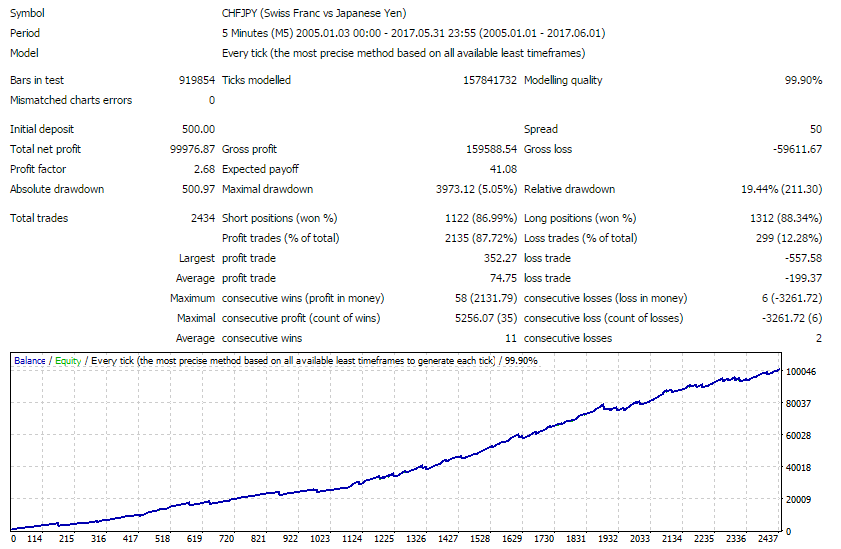
For example backtest CHFJPY in the period from 2005.01.01 to 2017.06.01,
Fix Lot
with default settings

You can free test this EA Salva System https://www.mql5.com/en/market/product/23549 on your broker
Pavel Komarovsky
Pavel Komarovsky
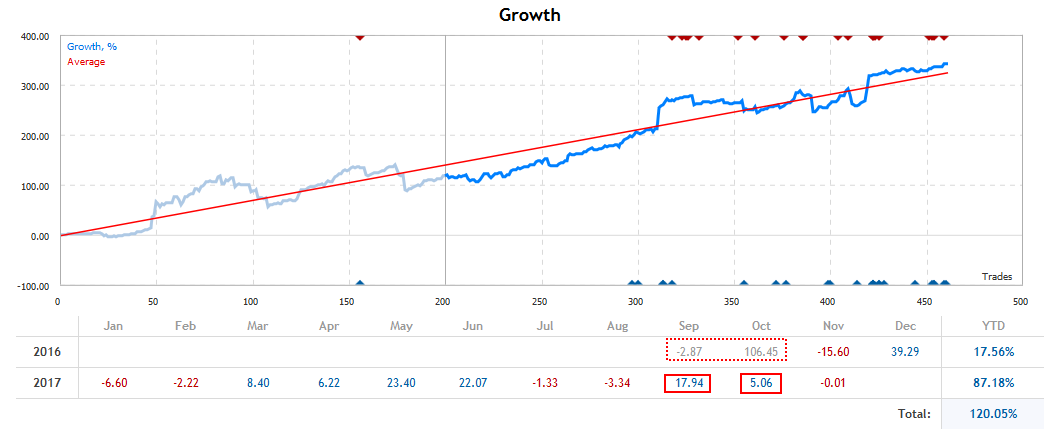
So ended October.

Salva System EA in October earned profit 5.06%.

For September the month closed at the profit level of 17.94%. Total total profit for the entire period is about 340%.

I wish everyone a profit!
Pavel Komarovsky
Pavel Komarovsky
Salva System EA - advanced fully automated system - just select a pairs and risk!

Salva EA works best on the following pairs with the default settings:
EURCHF, GBPUSD, CHFJPY, GBPCAD, GBPAUD, USDCHF, CADCHF, NZDJPY, AUDCHF, GBPCHF, USDJPY, EURGBP, AUDIAD, EURCAD, EURJPY, EURAUD, CADJPY, USDCAD, AUDZD, NZDUSD

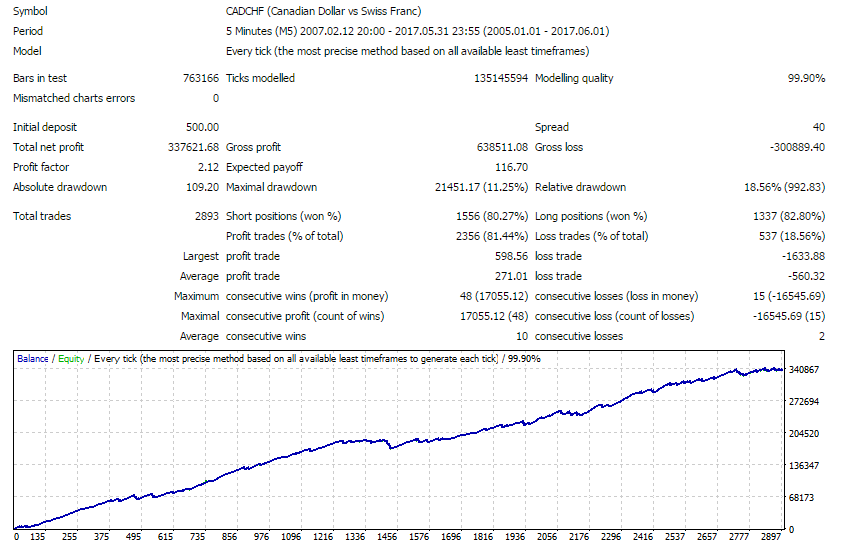
For example backtest CADCHF in the period from 2007.01.01 to 2017.06.01,
Fix Lot
with default settings

You can free test this EA Salva System https://www.mql5.com/en/market/product/23549 on your broker
Pavel Komarovsky
Pavel Komarovsky
Salva System EA - just select a pairs and the level of risk!

Salva EA works best on the following pairs with the default settings:
EURCHF, GBPUSD, CHFJPY, GBPCAD, GBPAUD, USDCHF, CADCHF, NZDJPY, AUDCHF, GBPCHF, USDJPY, EURGBP, AUDIAD, EURCAD, EURJPY, EURAUD, CADJPY, USDCAD, AUDZD, EURUSD, NZDUSD

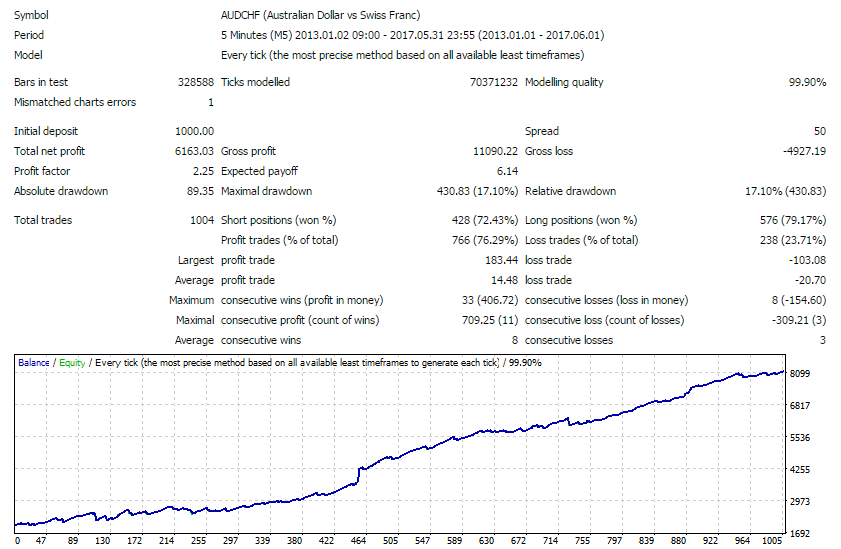
For example backtest AUDCHF in the period from 2013.01.01 to 2017.06.01,
Fix Lot
with default settings

You can free test this EA Salva System https://www.mql5.com/en/market/product/23549 on your broker
Pavel Komarovsky
Pavel Komarovsky
Salva System EA - just select a couple and the level of risk!

Salva EA works best on the following pairs with the default settings:
EURCHF, GBPUSD, CHFJPY, GBPCAD, GBPAUD, USDCHF, CADCHF, NZDJPY, AUDCHF, GBPCHF, USDJPY, EURGBP, AUDIAD, EURCAD, EURJPY, EURAUD, CADJPY, USDCAD, AUDZD, EURUSD, NZDUSD

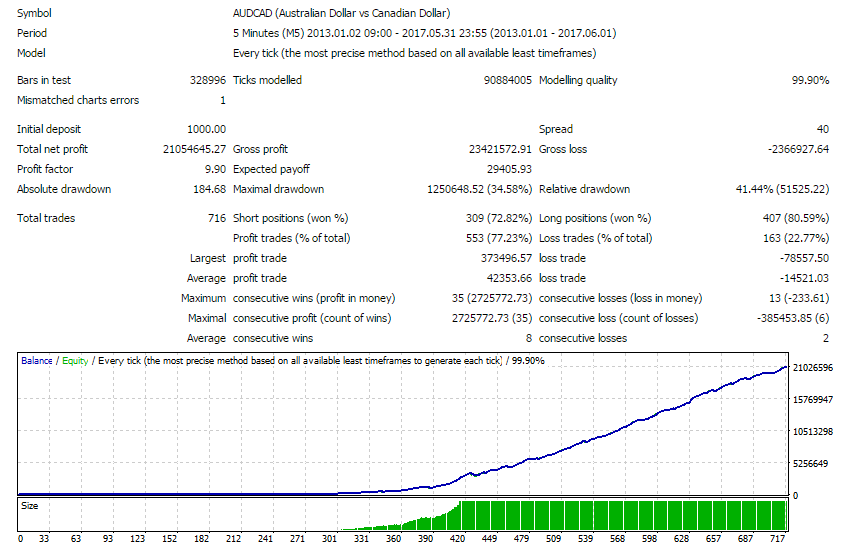
For example backtest AUDCAD in the period from 2013.01.01 to 2017.06.01,
MM Auto Lot
with default settings

You can test this Salva System EA https://www.mql5.com/en/market/product/23549 on your broker
Pavel Komarovsky
Pavel Komarovsky
Salva System EA - just select a couple and the level of risk!

Salva EA works best on the following pairs with the default settings:
EURCHF, GBPUSD, CHFJPY, GBPCAD, GBPAUD, USDCHF, CADCHF, NZDJPY, AUDCHF, GBPCHF, USDJPY, EURGBP, AUDIAD, EURCAD, EURJPY, EURAUD, CADJPY, USDCAD, AUDZD, EURUSD, NZDUSD

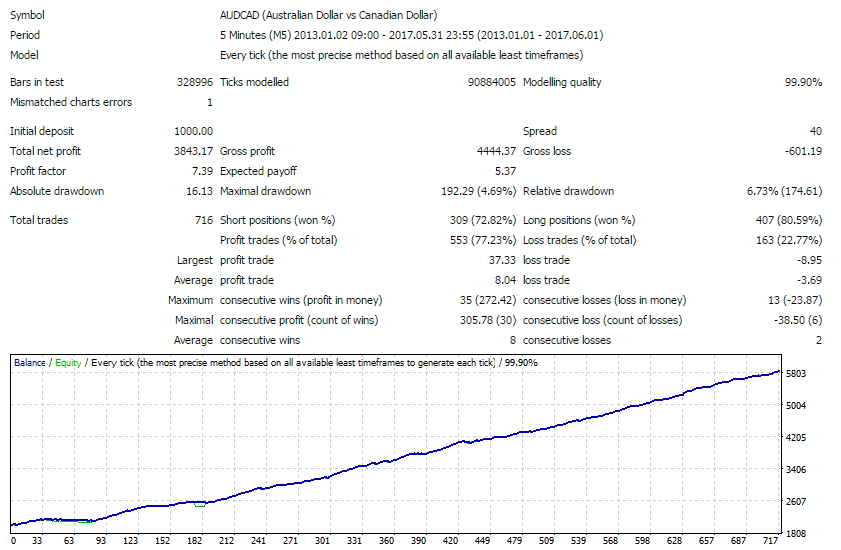
For example backtest AUDCAD in the period from 2013.01.01 to 2017.06.01,
Fixed lot = 0.1
with default settings

You can test this Salva System EA https://www.mql5.com/en/market/product/23549 on your broker
Pavel Komarovsky Published product
Reviews: 2
350.00 USD

Salva EA is an advanced and fully automated system, which passes backtesting since 2005. The basis of this strategy is the price chart itself, trading is performed based on the price movement range. Dynamic algorithms and filters are used for taking profit or closing trades. Built-in reworked system for filtering market entries and exits: Checking the trading direction using integrated trend indicators. Checking the channel range for the minimum and maximum values. Checking for the price

Pavel Komarovsky
Pavel Komarovsky
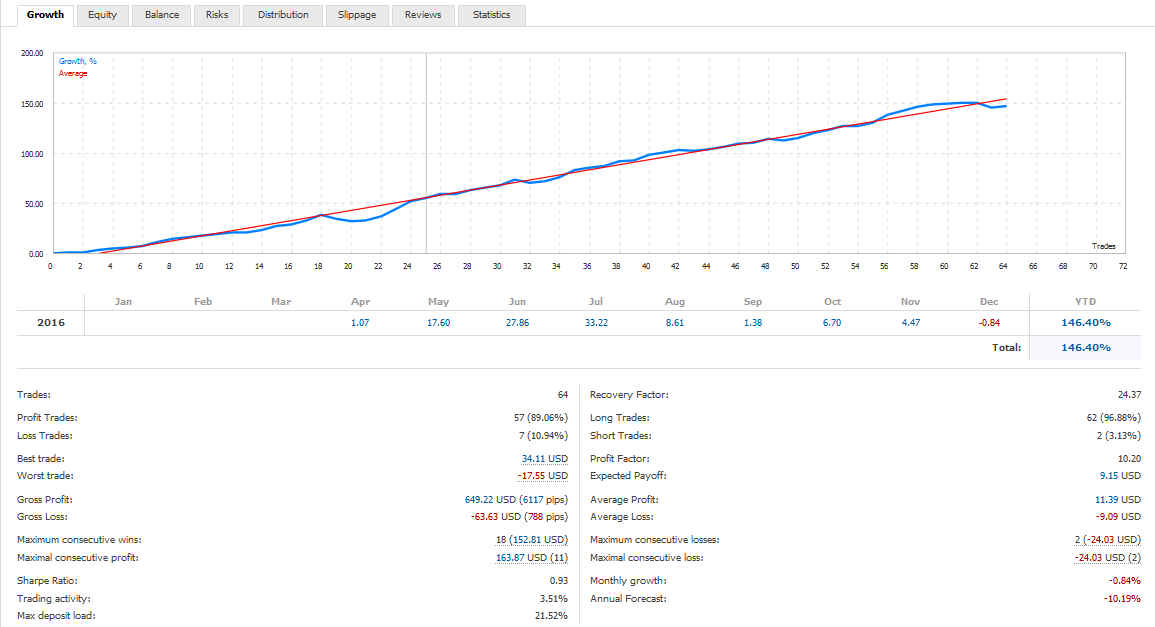
That comes to an end this year, following the results ImBrike PreSet2 GBPUSD on real account
Pavel Komarovsky
Published post GMT Offset - how to set
GMT Offset - how to set? To properly set GMT Offset need to follow the instructions below. 1. Look at the clock in MetaTrader (top left in the "Market Watch" window). If you do not see, tap the combination of buttons Ctrl + M). This is the current time, your broker...
Pavel Komarovsky
Registered at MQL5.community
12