Olufemi Adeyemo / Profile

- Information
|
11+ years
experience
|
60
products
|
36
demo versions
|
|
0
jobs
|
0
signals
|
0
subscribers
|
Central Executive Officer
at
Opengates Success International
I am a financial trading software programmer with vast experience. I create expert advisor, indicator, scripts, utility ea and sell my products with good ratings. I am also a forex trader, trainer, account manager and consultant. I am the coordinator of Opengates Forex Academy. Search Youtube for "Opengates Forex Academy" OR "Online Forex Class" Channel for more information.


Olufemi Adeyemo

FFXMV FOREX DASHBOARD CUSTOM INDICATOR (5-STAR RATED PRODUCT) Is Now AVAILABLE in BOTH MT4 and MT5 Files (See the purchase link below):
Unlock financial success with the FFXMV Forex Trading Dashboard!
Seamlessly analyze markets and use its intuitive trading system to maximize your gains.
Wave goodbye to unnecessary losses and start thriving today!
* FFXMV Forex Trading Dashboard MT5:
https://www.mql5.com/en/market/product/144573
* FFXMV Dashboard MT4 only:
https://www.mql5.com/en/market/product/23156
* FFXMV Dashboard+CSM MT4:
https://www.mql5.com/en/market/product/40191
* FFXMV Dashboard PLUS MT4:
https://www.mql5.com/en/market/product/47406
What you stand to gain by purchasing any of the FFXMV Dashboards:
* FFXMV Dashboard custom indicator with a Life-time updates.
* Forex News calendar indicator - can set daily or weekly news ahead (with Installation Guide in PDF).
* Danger Zone indicator - To help the user avoid taking a trade that will most likely end in loss. (with Video tutorials).
* Zigzag Custom indicator - To help the user get accurate entry.
* Multiple-Orders Utility Expert advisor with ALL-IN-ONE trade managements features (For FFXMV Dashboard PLUS).
* Symbol/Time-frame Changer with In-built SUPPORT and RESISTANCE indicator and Candle timer/Spread calculator.
* Comprehensive Manual Guides in PDF on how to use FFXMV Dashboard.
* Another PDF manual on how to use Multiple Orders Utility Expert advisor (For FFXMV Dashboard PLUS).
* Its MT5 Version can be found here: https://www.mql5.com/en/market/product/144573
* You-tube Videos on how to use FFXMV Dashboard, Multiple Orders Utility EA and other forex trading tools are available on our Youtube Channel => https://www.youtube.com/@ffxmvdashboards
* YOU ARE NOT ALONE: You shall be added to our PAID Members Group where you can ask questions, 24/7 supports on technical and installation challenges if there is any.
GRAB IT NOW!!!
xxxxxxxxxxxxxxxxxxxxxxxxxxxxxxxxxxxxxxxxxxxxxxxxxxxxxxxxxxxxxxxxxxxxxxxxxxxxxxxxxxxxxxx
Russian:
FFXMV FOREX DASHBOARD CUSTOM INDICATOR (ПРОДУКТ С 5-ЗВЁЗДОЧНЫМ РЕЙТИНГОМ) ТЕПЕРЬ ДОСТУПЕН В ФАЙЛАХ MT4 и MT5 (См. ссылку для покупки ниже):
Откройте финансовый успех с FFXMV Forex Trading Dashboard!
Легко анализируйте рынки и используйте его интуитивную торговую систему, чтобы максимизировать свою прибыль.
Попрощайтесь с ненужными убытками и начните зарабатывать уже сегодня!
FFXMV Forex Trading Dashboard MT5:
https://www.mql5.com/en/market/product/144573
FFXMV Dashboard MT4 только:
https://www.mql5.com/en/market/product/23156
FFXMV Dashboard+CSM MT4:
https://www.mql5.com/en/market/product/40191
FFXMV Dashboard PLUS MT4:
https://www.mql5.com/en/market/product/47406
Что вы получите, приобретая любой из FFXMV Dashboard:
Индикатор FFXMV Dashboard с пожизненными обновлениями.
Индикатор календаря Forex News – можно устанавливать новости на день или неделю вперёд (с инструкцией в PDF).
Индикатор Danger Zone – помогает избежать сделок, которые скорее всего приведут к убыткам (с видео-уроками).
Индикатор Zigzag Custom – помогает находить точные точки входа.
Утилита Multiple-Orders Expert Advisor со всеми функциями управления сделками (для FFXMV Dashboard PLUS).
Переключатель символов/таймфреймов с встроенным индикатором SUPPORT и RESISTANCE, а также таймером свечей/калькулятором спреда.
Подробные руководства в PDF о том, как использовать FFXMV Dashboard.
Дополнительное руководство в PDF о том, как использовать Multiple Orders Utility Expert Advisor (для FFXMV Dashboard PLUS).
Версия для MT5 доступна здесь: https://www.mql5.com/en/market/product/144573
Обучающие видео о том, как пользоваться FFXMV Dashboard, Multiple Orders Utility EA и другими инструментами форекс-трейдинга, доступны на нашем YouTube-канале => https://www.youtube.com/@ffxmvdashboards
ВЫ НЕ ОДНИ: Вас добавят в нашу группу платных участников, где вы сможете задавать вопросы и получать поддержку 24/7 по техническим и установочным вопросам.
ЗАХВАТЫВАЙТЕ СЕЙЧАС!!!
xxxxxxxxxxxxxxxxxxxxxxxxxxxxxxxxxxxxxxxxxxxxxxxxxxxxxxxxxxxxxxxxxxxxxxxxxxxxxxxxxxxxxxx
Chinese (Simplified):
FFXMV 外汇仪表板自定义指标(五星级产品)现已同时提供 MT4 和 MT5 文件(请查看下面的购买链接):
通过 FFXMV 外汇交易仪表板解锁财务成功!
无缝分析市场,并使用其直观的交易系统来最大化您的收益。
告别不必要的亏损,从今天开始盈利!
FFXMV Forex Trading Dashboard MT5:
https://www.mql5.com/en/market/product/144573
FFXMV Dashboard 仅限 MT4:
https://www.mql5.com/en/market/product/23156
FFXMV Dashboard+CSM MT4:
https://www.mql5.com/en/market/product/40191
FFXMV Dashboard PLUS MT4:
https://www.mql5.com/en/market/product/47406
购买任何 FFXMV 仪表板,您将获得:
带有终身更新的 FFXMV Dashboard 自定义指标。
外汇新闻日历指标 —— 可设置每日或每周新闻提醒(附带 PDF 安装指南)。
危险区指标 —— 帮助用户避免进入极有可能导致亏损的交易(附带视频教程)。
Zigzag 自定义指标 —— 帮助用户找到精确的入场点。
多订单实用程序智能交易顾问,具备一体化的交易管理功能(适用于 FFXMV Dashboard PLUS)。
符号/时间框切换器,带内置支撑与阻力指标,以及蜡烛计时器/点差计算器。
全面的 PDF 使用手册,教您如何使用 FFXMV Dashboard。
另一份 PDF 手册,教您如何使用多订单实用程序智能交易顾问(适用于 FFXMV Dashboard PLUS)。
MT5 版本可在此找到: https://www.mql5.com/en/market/product/144573
关于如何使用 FFXMV Dashboard、多订单实用 EA 以及其他外汇交易工具的 YouTube 视频,已发布在我们的频道 => https://www.youtube.com/@ffxmvdashboards
您并不孤单:您将被加入我们的付费会员群组,在那里您可以提出问题,并获得 24/7 技术与安装支持。
立即获取!!!
xxxxxxxxxxxxxxxxxxxxxxxxxxxxxxxxxxxxxxxxxxxxxxxxxxxxxxxxxxxxxxxxxxxxxxxxxxxxxxxxx
Spanish:
FFXMV FOREX DASHBOARD CUSTOM INDICATOR (PRODUCTO CALIFICADO CON 5 ESTRELLAS) YA ESTÁ DISPONIBLE EN ARCHIVOS MT4 Y MT5 (Vea el enlace de compra a continuación):
¡Desbloquea el éxito financiero con el FFXMV Forex Trading Dashboard!
Analiza los mercados sin esfuerzo y utiliza su sistema de trading intuitivo para maximizar tus ganancias.
Despídete de las pérdidas innecesarias y comienza a prosperar hoy mismo.
FFXMV Forex Trading Dashboard MT5:
https://www.mql5.com/en/market/product/144573
FFXMV Dashboard solo MT4:
https://www.mql5.com/en/market/product/23156
FFXMV Dashboard+CSM MT4:
https://www.mql5.com/en/market/product/40191
FFXMV Dashboard PLUS MT4:
https://www.mql5.com/en/market/product/47406
Lo que obtendrás al comprar cualquiera de los Dashboards FFXMV:
Indicador personalizado FFXMV Dashboard con actualizaciones de por vida.
Indicador de calendario de noticias Forex – puedes configurar noticias diarias o semanales por adelantado (con guía de instalación en PDF).
Indicador Danger Zone – para ayudar al usuario a evitar operaciones que probablemente terminen en pérdida (con tutoriales en video).
Indicador Zigzag personalizado – para ayudar al usuario a encontrar entradas precisas.
Asesor experto de utilidad Multi-Órdenes con funciones completas de gestión de operaciones (para FFXMV Dashboard PLUS).
Cambiador de símbolo/marco temporal con indicador de SOPORTE y RESISTENCIA incorporado, además de temporizador de velas/calculadora de spread.
Manuales completos en PDF sobre cómo usar el FFXMV Dashboard.
Otro manual en PDF sobre cómo usar el Asesor Experto de Multi-Órdenes (para FFXMV Dashboard PLUS).
Su versión para MT5 se encuentra aquí: https://www.mql5.com/en/market/product/144573
Videos de YouTube sobre cómo usar el FFXMV Dashboard, el EA de Multi-Órdenes y otras herramientas de trading están disponibles en nuestro canal => https://www.youtube.com/@ffxmvdashboards
NO ESTÁS SOLO: Serás añadido a nuestro grupo de miembros de pago donde podrás hacer preguntas y recibir soporte técnico e instalación 24/7.
¡¡¡CÓMPRALO AHORA!!!
xxxxxxxxxxxxxxxxxxxxxxxxxxxxxxxxxxxxxxxxxxxxxxxxxxxxxxxxxxxxxxxxxxxxxxxxxxxxxxxxxxxxxxxx
Portuguese:
FFXMV FOREX DASHBOARD CUSTOM INDICATOR (PRODUTO CLASSIFICADO COM 5 ESTRELAS) JÁ ESTÁ DISPONÍVEL NOS ARQUIVOS MT4 E MT5 (Veja o link de compra abaixo):
Desbloqueie o sucesso financeiro com o FFXMV Forex Trading Dashboard!
Analise os mercados de forma simples e utilize o seu sistema de trading intuitivo para maximizar os seus lucros.
Diga adeus às perdas desnecessárias e comece a prosperar hoje mesmo!
FFXMV Forex Trading Dashboard MT5:
https://www.mql5.com/en/market/product/144573
FFXMV Dashboard apenas MT4:
https://www.mql5.com/en/market/product/23156
FFXMV Dashboard+CSM MT4:
https://www.mql5.com/en/market/product/40191
FFXMV Dashboard PLUS MT4:
https://www.mql5.com/en/market/product/47406
O que você ganha ao adquirir qualquer um dos FFXMV Dashboards:
Indicador personalizado FFXMV Dashboard com atualizações vitalícias.
Indicador de calendário de notícias Forex – pode configurar notícias diárias ou semanais antecipadamente (com guia de instalação em PDF).
Indicador Danger Zone – ajuda o usuário a evitar operações que provavelmente terminarão em prejuízo (com tutoriais em vídeo).
Indicador Zigzag personalizado – ajuda o usuário a obter entradas precisas.
Utilitário Expert Advisor de Múltiplas Ordens com recursos completos de gestão de negociações (para FFXMV Dashboard PLUS).
Alterador de símbolo/tempo gráfico com indicador embutido de SUPORTE e RESISTÊNCIA e temporizador de velas/calculadora de spread.
Manuais completos em PDF sobre como usar o FFXMV Dashboard.
Outro manual em PDF sobre como usar o Expert Advisor de Múltiplas Ordens (para FFXMV Dashboard PLUS).
A versão para MT5 pode ser encontrada aqui: https://www.mql5.com/en/market/product/144573
Vídeos no YouTube sobre como usar o FFXMV Dashboard, o EA de Múltiplas Ordens e outras ferramentas de trading estão disponíveis em nosso canal => https://www.youtube.com/@ffxmvdashboards
VOCÊ NÃO ESTÁ SOZINHO: Você será adicionado ao nosso grupo de membros pagos, onde poderá fazer perguntas e receber suporte técnico e de instalação 24/7.
APROVEITE AGORA!!!
xxxxxxxxxxxxxxxxxxxxxxxxxxxxxxxxxxxxxxxxxxxxxxxxxxxxxxxxxxxxxxxxxxxxxxxxxxxxxxxxx
Japanese:
FFXMV FOREX DASHBOARD CUSTOM INDICATOR(5つ星評価製品)が、MT4とMT5の両方のファイルで利用可能になりました(購入リンクは下記をご覧ください):
FFXMV Forex Trading Dashboardで経済的成功を手に入れましょう!
シームレスに市場を分析し、直感的なトレーディングシステムを活用して利益を最大化。
不要な損失に別れを告げ、今日から利益を生み出しましょう!
FFXMV Forex Trading Dashboard MT5:
https://www.mql5.com/en/market/product/144573
FFXMV Dashboard MT4のみ:
https://www.mql5.com/en/market/product/23156
FFXMV Dashboard+CSM MT4:
https://www.mql5.com/en/market/product/40191
FFXMV Dashboard PLUS MT4:
https://www.mql5.com/en/market/product/47406
FFXMV Dashboardを購入すると得られるもの:
生涯アップデート付きのFFXMV Dashboardカスタムインジケーター。
Forexニュースカレンダーインジケーター – 日次または週次のニュースを事前に設定可能(PDFインストールガイド付き)。
Danger Zoneインジケーター – 損失につながる可能性の高い取引を避けるために役立ちます(ビデオチュートリアル付き)。
Zigzagカスタムインジケーター – 正確なエントリーをサポート。
複数注文ユーティリティ・エキスパートアドバイザー、オールインワンの取引管理機能付き(FFXMV Dashboard PLUS用)。
シンボル/タイムフレーム切替ツール、内蔵のサポート&レジスタンスインジケーター、キャンドルタイマー/スプレッド計算機。
FFXMV Dashboardの使い方に関する包括的なPDFマニュアル。
複数注文ユーティリティEAの使用方法についてのPDFマニュアル(FFXMV Dashboard PLUS用)。
MT5バージョンはこちらで入手可能: https://www.mql5.com/en/market/product/144573
FFXMV Dashboard、複数注文ユーティリティEA、その他のFX取引ツールの使い方に関するYouTube動画は、当社のYouTubeチャンネルでご覧いただけます => https://www.youtube.com/@ffxmvdashboards
あなたは一人ではありません:有料メンバーグループに追加され、質問ができ、技術面・インストール面の24時間サポートを受けられます。
今すぐ手に入れましょう!!!
xxxxxxxxxxxxxxxxxxxxxxxxxxxxxxxxxxxxxxxxxxxxxxxxxxxxxxxxxxxxxxxxxxxxxxxxxxxxxxxxxx
German:
FFXMV FOREX DASHBOARD CUSTOM INDICATOR (5-STERNE-BEWERTETES PRODUKT) IST JETZT IN MT4- UND MT5-DATEIEN VERFÜGBAR (Siehe den untenstehenden Kauflink):
Entfesseln Sie finanziellen Erfolg mit dem FFXMV Forex Trading Dashboard!
Analysieren Sie die Märkte nahtlos und nutzen Sie das intuitive Handelssystem, um Ihre Gewinne zu maximieren.
Verabschieden Sie sich von unnötigen Verlusten und beginnen Sie noch heute erfolgreich zu handeln!
FFXMV Forex Trading Dashboard MT5:
https://www.mql5.com/en/market/product/144573
FFXMV Dashboard nur MT4:
https://www.mql5.com/en/market/product/23156
FFXMV Dashboard+CSM MT4:
https://www.mql5.com/en/market/product/40191
FFXMV Dashboard PLUS MT4:
https://www.mql5.com/en/market/product/47406
Was Sie durch den Kauf eines der FFXMV Dashboards erhalten:
FFXMV Dashboard Custom Indicator mit lebenslangen Updates.
Forex-News-Kalender-Indikator – tägliche oder wöchentliche Nachrichten im Voraus einstellbar (mit Installationsanleitung im PDF-Format).
Danger Zone Indikator – hilft dem Benutzer, Trades zu vermeiden, die höchstwahrscheinlich im Verlust enden (mit Video-Tutorials).
Zigzag Custom Indikator – unterstützt den Benutzer beim Finden präziser Einstiege.
Multi-Orders Utility Expert Advisor mit ALL-IN-ONE Handelsmanagement-Funktionen (für FFXMV Dashboard PLUS).
Symbol-/Zeitrahmen-Wechsler mit integriertem SUPPORT- und RESISTANCE-Indikator sowie Kerzen-Timer/Spread-Rechner.
Umfassende Handbücher im PDF-Format zur Verwendung des FFXMV Dashboards.
Ein weiteres PDF-Handbuch zur Nutzung des Multi-Orders Utility Expert Advisors (für FFXMV Dashboard PLUS).
Die MT5-Version finden Sie hier: https://www.mql5.com/en/market/product/144573
YouTube-Videos zur Nutzung des FFXMV Dashboards, des Multi-Orders Utility EA und anderer Forex-Handelstools sind auf unserem YouTube-Kanal verfügbar => https://www.youtube.com/@ffxmvdashboards
SIE SIND NICHT ALLEIN: Sie werden unserer kostenpflichtigen Mitgliedergruppe hinzugefügt, wo Sie Fragen stellen und 24/7 Unterstützung bei technischen und Installationsproblemen erhalten können.
JETZT ZUGREIFEN!!!
xxxxxxxxxxxxxxxxxxxxxxxxxxxxxxxxxxxxxxxxxxxxxxxxxxxxxxxxxxxxxxxxxxxxxxxxxxxxxxxxxxxxx
Korean:
FFXMV FOREX DASHBOARD CUSTOM INDICATOR (5성급 평가 제품)이 이제 MT4와 MT5 파일 모두에서 이용 가능합니다 (아래 구매 링크 참조):
FFXMV Forex Trading Dashboard로 금융 성공을 여십시오!
시장 분석을 원활하게 수행하고 직관적인 트레이딩 시스템을 활용하여 수익을 극대화하세요.
불필요한 손실은 이제 끝내고, 오늘부터 성공을 시작하십시오!
FFXMV Forex Trading Dashboard MT5:
https://www.mql5.com/en/market/product/144573
FFXMV Dashboard MT4 전용:
https://www.mql5.com/en/market/product/23156
FFXMV Dashboard+CSM MT4:
https://www.mql5.com/en/market/product/40191
FFXMV Dashboard PLUS MT4:
https://www.mql5.com/en/market/product/47406
FFXMV Dashboard를 구매하면 얻을 수 있는 혜택:
평생 업데이트가 제공되는 FFXMV Dashboard 커스텀 인디케이터.
외환 뉴스 캘린더 인디케이터 – 일간 또는 주간 뉴스를 미리 설정 가능 (PDF 설치 가이드 포함).
Danger Zone 인디케이터 – 손실로 끝날 가능성이 높은 거래를 피할 수 있도록 도움 (비디오 튜토리얼 포함).
Zigzag 커스텀 인디케이터 – 정확한 진입을 도와줌.
다중 주문 관리 유틸리티 EA, 올인원 거래 관리 기능 제공 (FFXMV Dashboard PLUS 전용).
종목/시간 프레임 전환기, 내장된 SUPPORT & RESISTANCE 인디케이터, 캔들 타이머/스프레드 계산기 포함.
FFXMV Dashboard 사용법에 대한 종합적인 PDF 매뉴얼.
다중 주문 관리 EA 사용법에 대한 별도의 PDF 매뉴얼 (FFXMV Dashboard PLUS 전용).
MT5 버전은 여기에서 확인 가능: https://www.mql5.com/en/market/product/144573
FFXMV Dashboard, 다중 주문 EA 및 기타 외환 거래 도구 사용법에 대한 유튜브 영상은 당사 유튜브 채널에서 확인 가능 => https://www.youtube.com/@ffxmvdashboards
당신은 혼자가 아닙니다: 유료 회원 그룹에 추가되어 질문을 할 수 있으며, 기술 및 설치 문제에 대해 24/7 지원을 받으실 수 있습니다.
지금 바로 확보하세요!!!
xxxxxxxxxxxxxxxxxxxxxxxxxxxxxxxxxxxxxxxxxxxxxxxxxxxxxxxxxxxxxxxxxxxxxxxx
French:
FFXMV FOREX DASHBOARD CUSTOM INDICATOR (PRODUIT ÉVALUÉ 5 ÉTOILES) EST MAINTENANT DISPONIBLE EN FICHIERS MT4 ET MT5 (voir le lien d’achat ci-dessous) :
Débloquez le succès financier avec le FFXMV Forex Trading Dashboard !
Analysez les marchés en toute simplicité et utilisez son système de trading intuitif pour maximiser vos gains.
Dites adieu aux pertes inutiles et commencez à prospérer dès aujourd’hui !
FFXMV Forex Trading Dashboard MT5 :
https://www.mql5.com/en/market/product/144573
FFXMV Dashboard uniquement MT4 :
https://www.mql5.com/en/market/product/23156
FFXMV Dashboard+CSM MT4 :
https://www.mql5.com/en/market/product/40191
FFXMV Dashboard PLUS MT4 :
https://www.mql5.com/en/market/product/47406
Ce que vous gagnez en achetant l’un des Dashboards FFXMV :
Indicateur personnalisé FFXMV Dashboard avec mises à jour à vie.
Indicateur de calendrier des nouvelles Forex – possibilité de planifier les nouvelles quotidiennes ou hebdomadaires (avec guide d’installation en PDF).
Indicateur Danger Zone – aide l’utilisateur à éviter des trades qui se termineront très probablement en perte (avec tutoriels vidéo).
Indicateur Zigzag personnalisé – aide l’utilisateur à obtenir des points d’entrée précis.
Utilitaire Expert Advisor Multi-Ordres avec fonctions complètes de gestion de trade (pour FFXMV Dashboard PLUS).
Changeur de symbole/unité de temps avec indicateur intégré de SUPPORT et RÉSISTANCE, ainsi que minuteur de bougie/calculateur de spread.
Guides complets en PDF sur l’utilisation du FFXMV Dashboard.
Un autre guide PDF sur l’utilisation de l’Expert Advisor Multi-Ordres (pour FFXMV Dashboard PLUS).
La version MT5 se trouve ici : https://www.mql5.com/en/market/product/144573
Des vidéos YouTube expliquant comment utiliser le FFXMV Dashboard, l’EA Multi-Ordres et d’autres outils de trading Forex sont disponibles sur notre chaîne YouTube => https://www.youtube.com/@ffxmvdashboards
VOUS N’ÊTES PAS SEUL : Vous serez ajouté à notre groupe de membres payants où vous pourrez poser vos questions et bénéficier d’une assistance technique et d’installation 24h/24 et 7j/7.
OBTENEZ-LE MAINTENANT !!!
xxxxxxxxxxxxxxxxxxxxxxxxxxxxxxxxxxxxxxxxxxxxxxxxxxxxxxxxxxxxxxxxxxxxxxxxxxxxxxxxx
Italian:
FFXMV FOREX DASHBOARD CUSTOM INDICATOR (PRODOTTO VALUTATO 5 STELLE) È ORA DISPONIBILE NEI FILE MT4 E MT5 (vedi il link per l’acquisto qui sotto):
Sblocca il successo finanziario con il FFXMV Forex Trading Dashboard!
Analizza i mercati senza sforzo e utilizza il suo sistema di trading intuitivo per massimizzare i tuoi guadagni.
Dì addio alle perdite inutili e inizia a prosperare oggi stesso!
FFXMV Forex Trading Dashboard MT5:
https://www.mql5.com/en/market/product/144573
FFXMV Dashboard solo MT4:
https://www.mql5.com/en/market/product/23156
FFXMV Dashboard+CSM MT4:
https://www.mql5.com/en/market/product/40191
FFXMV Dashboard PLUS MT4:
https://www.mql5.com/en/market/product/47406
Cosa ottieni acquistando uno qualsiasi dei Dashboards FFXMV:
Indicatore personalizzato FFXMV Dashboard con aggiornamenti a vita.
Indicatore calendario notizie Forex – possibilità di impostare notizie giornaliere o settimanali in anticipo (con guida all’installazione in PDF).
Indicatore Danger Zone – aiuta l’utente a evitare operazioni che molto probabilmente finiranno in perdita (con video tutorial).
Indicatore Zigzag personalizzato – aiuta l’utente a trovare ingressi precisi.
Utility Expert Advisor Multi-Ordini con funzioni di gestione del trade ALL-IN-ONE (per FFXMV Dashboard PLUS).
Cambia simbolo/time-frame con indicatore SUPPORTO e RESISTENZA integrato e timer delle candele/calcolatore di spread.
Manuali completi in PDF su come utilizzare FFXMV Dashboard.
Un altro manuale PDF su come utilizzare l’Expert Advisor Multi-Ordini (per FFXMV Dashboard PLUS).
La versione MT5 è disponibile qui: https://www.mql5.com/en/market/product/144573
Video YouTube su come utilizzare FFXMV Dashboard, l’EA Multi-Ordini e altri strumenti di trading Forex sono disponibili sul nostro canale YouTube => https://www.youtube.com/@ffxmvdashboards
NON SEI SOLO: sarai aggiunto al nostro gruppo membri a pagamento dove potrai fare domande e ricevere supporto tecnico e per l’installazione 24/7.
PRENDILO ORA!!!
xxxxxxxxxxxxxxxxxxxxxxxxxxxxxxxxxxxxxxxxxxxxxxxxxxxxxxxxxxxxxxxxxxxxxxxx
Turkish:
FFXMV FOREX DASHBOARD CUSTOM INDICATOR (5 YILDIZLI ÜRÜN) ARTIK HEM MT4 HEM DE MT5 DOSYALARINDA MEVCUT (Satın alma bağlantısını aşağıda görebilirsiniz):
FFXMV Forex Trading Dashboard ile finansal başarıya ulaşın!
Piyasaları zahmetsizce analiz edin ve kazancınızı en üst düzeye çıkarmak için sezgisel işlem sistemini kullanın.
Gereksiz kayıplara elveda deyin ve bugünden itibaren kazanmaya başlayın!
FFXMV Forex Trading Dashboard MT5:
https://www.mql5.com/en/market/product/144573
FFXMV Dashboard sadece MT4:
https://www.mql5.com/en/market/product/23156
FFXMV Dashboard+CSM MT4:
https://www.mql5.com/en/market/product/40191
FFXMV Dashboard PLUS MT4:
https://www.mql5.com/en/market/product/47406
FFXMV Dashboard’lardan herhangi birini satın aldığınızda elde edeceğiniz avantajlar:
Ömür boyu güncellemelerle birlikte FFXMV Dashboard özel indikatörü.
Forex Haber Takvimi indikatörü – günlük veya haftalık haberleri önceden ayarlayabilme (PDF kurulum kılavuzu ile birlikte).
Danger Zone indikatörü – büyük ihtimalle zararla sonuçlanacak işlemlerden kaçınmanıza yardımcı olur (video eğitimleri ile).
Zigzag özel indikatörü – doğru giriş noktalarını bulmanıza yardımcı olur.
Çoklu Emirler Yardımcı Expert Advisor – TÜM-İÇİNDE işlem yönetim özellikleriyle (FFXMV Dashboard PLUS için).
Sembol/Zaman dilimi değiştirici – yerleşik DESTEK ve DİRENÇ indikatörü, mum sayacı/spread hesaplayıcı ile.
FFXMV Dashboard’un nasıl kullanılacağını anlatan kapsamlı PDF kılavuzları.
Çoklu Emirler Yardımcı Expert Advisor’un nasıl kullanılacağını anlatan başka bir PDF kılavuzu (FFXMV Dashboard PLUS için).
MT5 versiyonu burada bulunabilir: https://www.mql5.com/en/market/product/144573
FFXMV Dashboard, Çoklu Emirler EA ve diğer forex işlem araçlarının kullanımına dair YouTube videoları kanalımızda mevcut => https://www.youtube.com/@ffxmvdashboards
YALNIZ DEĞİLSİNİZ: Sorularınızı sorabileceğiniz, teknik ve kurulum desteği alabileceğiniz 7/24 destekli ücretli üyeler grubumuza ekleneceksiniz.
ŞİMDİ SATIN ALIN!!!
Unlock financial success with the FFXMV Forex Trading Dashboard!
Seamlessly analyze markets and use its intuitive trading system to maximize your gains.
Wave goodbye to unnecessary losses and start thriving today!
* FFXMV Forex Trading Dashboard MT5:
https://www.mql5.com/en/market/product/144573
* FFXMV Dashboard MT4 only:
https://www.mql5.com/en/market/product/23156
* FFXMV Dashboard+CSM MT4:
https://www.mql5.com/en/market/product/40191
* FFXMV Dashboard PLUS MT4:
https://www.mql5.com/en/market/product/47406
What you stand to gain by purchasing any of the FFXMV Dashboards:
* FFXMV Dashboard custom indicator with a Life-time updates.
* Forex News calendar indicator - can set daily or weekly news ahead (with Installation Guide in PDF).
* Danger Zone indicator - To help the user avoid taking a trade that will most likely end in loss. (with Video tutorials).
* Zigzag Custom indicator - To help the user get accurate entry.
* Multiple-Orders Utility Expert advisor with ALL-IN-ONE trade managements features (For FFXMV Dashboard PLUS).
* Symbol/Time-frame Changer with In-built SUPPORT and RESISTANCE indicator and Candle timer/Spread calculator.
* Comprehensive Manual Guides in PDF on how to use FFXMV Dashboard.
* Another PDF manual on how to use Multiple Orders Utility Expert advisor (For FFXMV Dashboard PLUS).
* Its MT5 Version can be found here: https://www.mql5.com/en/market/product/144573
* You-tube Videos on how to use FFXMV Dashboard, Multiple Orders Utility EA and other forex trading tools are available on our Youtube Channel => https://www.youtube.com/@ffxmvdashboards
* YOU ARE NOT ALONE: You shall be added to our PAID Members Group where you can ask questions, 24/7 supports on technical and installation challenges if there is any.
GRAB IT NOW!!!
xxxxxxxxxxxxxxxxxxxxxxxxxxxxxxxxxxxxxxxxxxxxxxxxxxxxxxxxxxxxxxxxxxxxxxxxxxxxxxxxxxxxxxx
Russian:
FFXMV FOREX DASHBOARD CUSTOM INDICATOR (ПРОДУКТ С 5-ЗВЁЗДОЧНЫМ РЕЙТИНГОМ) ТЕПЕРЬ ДОСТУПЕН В ФАЙЛАХ MT4 и MT5 (См. ссылку для покупки ниже):
Откройте финансовый успех с FFXMV Forex Trading Dashboard!
Легко анализируйте рынки и используйте его интуитивную торговую систему, чтобы максимизировать свою прибыль.
Попрощайтесь с ненужными убытками и начните зарабатывать уже сегодня!
FFXMV Forex Trading Dashboard MT5:
https://www.mql5.com/en/market/product/144573
FFXMV Dashboard MT4 только:
https://www.mql5.com/en/market/product/23156
FFXMV Dashboard+CSM MT4:
https://www.mql5.com/en/market/product/40191
FFXMV Dashboard PLUS MT4:
https://www.mql5.com/en/market/product/47406
Что вы получите, приобретая любой из FFXMV Dashboard:
Индикатор FFXMV Dashboard с пожизненными обновлениями.
Индикатор календаря Forex News – можно устанавливать новости на день или неделю вперёд (с инструкцией в PDF).
Индикатор Danger Zone – помогает избежать сделок, которые скорее всего приведут к убыткам (с видео-уроками).
Индикатор Zigzag Custom – помогает находить точные точки входа.
Утилита Multiple-Orders Expert Advisor со всеми функциями управления сделками (для FFXMV Dashboard PLUS).
Переключатель символов/таймфреймов с встроенным индикатором SUPPORT и RESISTANCE, а также таймером свечей/калькулятором спреда.
Подробные руководства в PDF о том, как использовать FFXMV Dashboard.
Дополнительное руководство в PDF о том, как использовать Multiple Orders Utility Expert Advisor (для FFXMV Dashboard PLUS).
Версия для MT5 доступна здесь: https://www.mql5.com/en/market/product/144573
Обучающие видео о том, как пользоваться FFXMV Dashboard, Multiple Orders Utility EA и другими инструментами форекс-трейдинга, доступны на нашем YouTube-канале => https://www.youtube.com/@ffxmvdashboards
ВЫ НЕ ОДНИ: Вас добавят в нашу группу платных участников, где вы сможете задавать вопросы и получать поддержку 24/7 по техническим и установочным вопросам.
ЗАХВАТЫВАЙТЕ СЕЙЧАС!!!
xxxxxxxxxxxxxxxxxxxxxxxxxxxxxxxxxxxxxxxxxxxxxxxxxxxxxxxxxxxxxxxxxxxxxxxxxxxxxxxxxxxxxxx
Chinese (Simplified):
FFXMV 外汇仪表板自定义指标(五星级产品)现已同时提供 MT4 和 MT5 文件(请查看下面的购买链接):
通过 FFXMV 外汇交易仪表板解锁财务成功!
无缝分析市场,并使用其直观的交易系统来最大化您的收益。
告别不必要的亏损,从今天开始盈利!
FFXMV Forex Trading Dashboard MT5:
https://www.mql5.com/en/market/product/144573
FFXMV Dashboard 仅限 MT4:
https://www.mql5.com/en/market/product/23156
FFXMV Dashboard+CSM MT4:
https://www.mql5.com/en/market/product/40191
FFXMV Dashboard PLUS MT4:
https://www.mql5.com/en/market/product/47406
购买任何 FFXMV 仪表板,您将获得:
带有终身更新的 FFXMV Dashboard 自定义指标。
外汇新闻日历指标 —— 可设置每日或每周新闻提醒(附带 PDF 安装指南)。
危险区指标 —— 帮助用户避免进入极有可能导致亏损的交易(附带视频教程)。
Zigzag 自定义指标 —— 帮助用户找到精确的入场点。
多订单实用程序智能交易顾问,具备一体化的交易管理功能(适用于 FFXMV Dashboard PLUS)。
符号/时间框切换器,带内置支撑与阻力指标,以及蜡烛计时器/点差计算器。
全面的 PDF 使用手册,教您如何使用 FFXMV Dashboard。
另一份 PDF 手册,教您如何使用多订单实用程序智能交易顾问(适用于 FFXMV Dashboard PLUS)。
MT5 版本可在此找到: https://www.mql5.com/en/market/product/144573
关于如何使用 FFXMV Dashboard、多订单实用 EA 以及其他外汇交易工具的 YouTube 视频,已发布在我们的频道 => https://www.youtube.com/@ffxmvdashboards
您并不孤单:您将被加入我们的付费会员群组,在那里您可以提出问题,并获得 24/7 技术与安装支持。
立即获取!!!
xxxxxxxxxxxxxxxxxxxxxxxxxxxxxxxxxxxxxxxxxxxxxxxxxxxxxxxxxxxxxxxxxxxxxxxxxxxxxxxxx
Spanish:
FFXMV FOREX DASHBOARD CUSTOM INDICATOR (PRODUCTO CALIFICADO CON 5 ESTRELLAS) YA ESTÁ DISPONIBLE EN ARCHIVOS MT4 Y MT5 (Vea el enlace de compra a continuación):
¡Desbloquea el éxito financiero con el FFXMV Forex Trading Dashboard!
Analiza los mercados sin esfuerzo y utiliza su sistema de trading intuitivo para maximizar tus ganancias.
Despídete de las pérdidas innecesarias y comienza a prosperar hoy mismo.
FFXMV Forex Trading Dashboard MT5:
https://www.mql5.com/en/market/product/144573
FFXMV Dashboard solo MT4:
https://www.mql5.com/en/market/product/23156
FFXMV Dashboard+CSM MT4:
https://www.mql5.com/en/market/product/40191
FFXMV Dashboard PLUS MT4:
https://www.mql5.com/en/market/product/47406
Lo que obtendrás al comprar cualquiera de los Dashboards FFXMV:
Indicador personalizado FFXMV Dashboard con actualizaciones de por vida.
Indicador de calendario de noticias Forex – puedes configurar noticias diarias o semanales por adelantado (con guía de instalación en PDF).
Indicador Danger Zone – para ayudar al usuario a evitar operaciones que probablemente terminen en pérdida (con tutoriales en video).
Indicador Zigzag personalizado – para ayudar al usuario a encontrar entradas precisas.
Asesor experto de utilidad Multi-Órdenes con funciones completas de gestión de operaciones (para FFXMV Dashboard PLUS).
Cambiador de símbolo/marco temporal con indicador de SOPORTE y RESISTENCIA incorporado, además de temporizador de velas/calculadora de spread.
Manuales completos en PDF sobre cómo usar el FFXMV Dashboard.
Otro manual en PDF sobre cómo usar el Asesor Experto de Multi-Órdenes (para FFXMV Dashboard PLUS).
Su versión para MT5 se encuentra aquí: https://www.mql5.com/en/market/product/144573
Videos de YouTube sobre cómo usar el FFXMV Dashboard, el EA de Multi-Órdenes y otras herramientas de trading están disponibles en nuestro canal => https://www.youtube.com/@ffxmvdashboards
NO ESTÁS SOLO: Serás añadido a nuestro grupo de miembros de pago donde podrás hacer preguntas y recibir soporte técnico e instalación 24/7.
¡¡¡CÓMPRALO AHORA!!!
xxxxxxxxxxxxxxxxxxxxxxxxxxxxxxxxxxxxxxxxxxxxxxxxxxxxxxxxxxxxxxxxxxxxxxxxxxxxxxxxxxxxxxxx
Portuguese:
FFXMV FOREX DASHBOARD CUSTOM INDICATOR (PRODUTO CLASSIFICADO COM 5 ESTRELAS) JÁ ESTÁ DISPONÍVEL NOS ARQUIVOS MT4 E MT5 (Veja o link de compra abaixo):
Desbloqueie o sucesso financeiro com o FFXMV Forex Trading Dashboard!
Analise os mercados de forma simples e utilize o seu sistema de trading intuitivo para maximizar os seus lucros.
Diga adeus às perdas desnecessárias e comece a prosperar hoje mesmo!
FFXMV Forex Trading Dashboard MT5:
https://www.mql5.com/en/market/product/144573
FFXMV Dashboard apenas MT4:
https://www.mql5.com/en/market/product/23156
FFXMV Dashboard+CSM MT4:
https://www.mql5.com/en/market/product/40191
FFXMV Dashboard PLUS MT4:
https://www.mql5.com/en/market/product/47406
O que você ganha ao adquirir qualquer um dos FFXMV Dashboards:
Indicador personalizado FFXMV Dashboard com atualizações vitalícias.
Indicador de calendário de notícias Forex – pode configurar notícias diárias ou semanais antecipadamente (com guia de instalação em PDF).
Indicador Danger Zone – ajuda o usuário a evitar operações que provavelmente terminarão em prejuízo (com tutoriais em vídeo).
Indicador Zigzag personalizado – ajuda o usuário a obter entradas precisas.
Utilitário Expert Advisor de Múltiplas Ordens com recursos completos de gestão de negociações (para FFXMV Dashboard PLUS).
Alterador de símbolo/tempo gráfico com indicador embutido de SUPORTE e RESISTÊNCIA e temporizador de velas/calculadora de spread.
Manuais completos em PDF sobre como usar o FFXMV Dashboard.
Outro manual em PDF sobre como usar o Expert Advisor de Múltiplas Ordens (para FFXMV Dashboard PLUS).
A versão para MT5 pode ser encontrada aqui: https://www.mql5.com/en/market/product/144573
Vídeos no YouTube sobre como usar o FFXMV Dashboard, o EA de Múltiplas Ordens e outras ferramentas de trading estão disponíveis em nosso canal => https://www.youtube.com/@ffxmvdashboards
VOCÊ NÃO ESTÁ SOZINHO: Você será adicionado ao nosso grupo de membros pagos, onde poderá fazer perguntas e receber suporte técnico e de instalação 24/7.
APROVEITE AGORA!!!
xxxxxxxxxxxxxxxxxxxxxxxxxxxxxxxxxxxxxxxxxxxxxxxxxxxxxxxxxxxxxxxxxxxxxxxxxxxxxxxxx
Japanese:
FFXMV FOREX DASHBOARD CUSTOM INDICATOR(5つ星評価製品)が、MT4とMT5の両方のファイルで利用可能になりました(購入リンクは下記をご覧ください):
FFXMV Forex Trading Dashboardで経済的成功を手に入れましょう!
シームレスに市場を分析し、直感的なトレーディングシステムを活用して利益を最大化。
不要な損失に別れを告げ、今日から利益を生み出しましょう!
FFXMV Forex Trading Dashboard MT5:
https://www.mql5.com/en/market/product/144573
FFXMV Dashboard MT4のみ:
https://www.mql5.com/en/market/product/23156
FFXMV Dashboard+CSM MT4:
https://www.mql5.com/en/market/product/40191
FFXMV Dashboard PLUS MT4:
https://www.mql5.com/en/market/product/47406
FFXMV Dashboardを購入すると得られるもの:
生涯アップデート付きのFFXMV Dashboardカスタムインジケーター。
Forexニュースカレンダーインジケーター – 日次または週次のニュースを事前に設定可能(PDFインストールガイド付き)。
Danger Zoneインジケーター – 損失につながる可能性の高い取引を避けるために役立ちます(ビデオチュートリアル付き)。
Zigzagカスタムインジケーター – 正確なエントリーをサポート。
複数注文ユーティリティ・エキスパートアドバイザー、オールインワンの取引管理機能付き(FFXMV Dashboard PLUS用)。
シンボル/タイムフレーム切替ツール、内蔵のサポート&レジスタンスインジケーター、キャンドルタイマー/スプレッド計算機。
FFXMV Dashboardの使い方に関する包括的なPDFマニュアル。
複数注文ユーティリティEAの使用方法についてのPDFマニュアル(FFXMV Dashboard PLUS用)。
MT5バージョンはこちらで入手可能: https://www.mql5.com/en/market/product/144573
FFXMV Dashboard、複数注文ユーティリティEA、その他のFX取引ツールの使い方に関するYouTube動画は、当社のYouTubeチャンネルでご覧いただけます => https://www.youtube.com/@ffxmvdashboards
あなたは一人ではありません:有料メンバーグループに追加され、質問ができ、技術面・インストール面の24時間サポートを受けられます。
今すぐ手に入れましょう!!!
xxxxxxxxxxxxxxxxxxxxxxxxxxxxxxxxxxxxxxxxxxxxxxxxxxxxxxxxxxxxxxxxxxxxxxxxxxxxxxxxxx
German:
FFXMV FOREX DASHBOARD CUSTOM INDICATOR (5-STERNE-BEWERTETES PRODUKT) IST JETZT IN MT4- UND MT5-DATEIEN VERFÜGBAR (Siehe den untenstehenden Kauflink):
Entfesseln Sie finanziellen Erfolg mit dem FFXMV Forex Trading Dashboard!
Analysieren Sie die Märkte nahtlos und nutzen Sie das intuitive Handelssystem, um Ihre Gewinne zu maximieren.
Verabschieden Sie sich von unnötigen Verlusten und beginnen Sie noch heute erfolgreich zu handeln!
FFXMV Forex Trading Dashboard MT5:
https://www.mql5.com/en/market/product/144573
FFXMV Dashboard nur MT4:
https://www.mql5.com/en/market/product/23156
FFXMV Dashboard+CSM MT4:
https://www.mql5.com/en/market/product/40191
FFXMV Dashboard PLUS MT4:
https://www.mql5.com/en/market/product/47406
Was Sie durch den Kauf eines der FFXMV Dashboards erhalten:
FFXMV Dashboard Custom Indicator mit lebenslangen Updates.
Forex-News-Kalender-Indikator – tägliche oder wöchentliche Nachrichten im Voraus einstellbar (mit Installationsanleitung im PDF-Format).
Danger Zone Indikator – hilft dem Benutzer, Trades zu vermeiden, die höchstwahrscheinlich im Verlust enden (mit Video-Tutorials).
Zigzag Custom Indikator – unterstützt den Benutzer beim Finden präziser Einstiege.
Multi-Orders Utility Expert Advisor mit ALL-IN-ONE Handelsmanagement-Funktionen (für FFXMV Dashboard PLUS).
Symbol-/Zeitrahmen-Wechsler mit integriertem SUPPORT- und RESISTANCE-Indikator sowie Kerzen-Timer/Spread-Rechner.
Umfassende Handbücher im PDF-Format zur Verwendung des FFXMV Dashboards.
Ein weiteres PDF-Handbuch zur Nutzung des Multi-Orders Utility Expert Advisors (für FFXMV Dashboard PLUS).
Die MT5-Version finden Sie hier: https://www.mql5.com/en/market/product/144573
YouTube-Videos zur Nutzung des FFXMV Dashboards, des Multi-Orders Utility EA und anderer Forex-Handelstools sind auf unserem YouTube-Kanal verfügbar => https://www.youtube.com/@ffxmvdashboards
SIE SIND NICHT ALLEIN: Sie werden unserer kostenpflichtigen Mitgliedergruppe hinzugefügt, wo Sie Fragen stellen und 24/7 Unterstützung bei technischen und Installationsproblemen erhalten können.
JETZT ZUGREIFEN!!!
xxxxxxxxxxxxxxxxxxxxxxxxxxxxxxxxxxxxxxxxxxxxxxxxxxxxxxxxxxxxxxxxxxxxxxxxxxxxxxxxxxxxx
Korean:
FFXMV FOREX DASHBOARD CUSTOM INDICATOR (5성급 평가 제품)이 이제 MT4와 MT5 파일 모두에서 이용 가능합니다 (아래 구매 링크 참조):
FFXMV Forex Trading Dashboard로 금융 성공을 여십시오!
시장 분석을 원활하게 수행하고 직관적인 트레이딩 시스템을 활용하여 수익을 극대화하세요.
불필요한 손실은 이제 끝내고, 오늘부터 성공을 시작하십시오!
FFXMV Forex Trading Dashboard MT5:
https://www.mql5.com/en/market/product/144573
FFXMV Dashboard MT4 전용:
https://www.mql5.com/en/market/product/23156
FFXMV Dashboard+CSM MT4:
https://www.mql5.com/en/market/product/40191
FFXMV Dashboard PLUS MT4:
https://www.mql5.com/en/market/product/47406
FFXMV Dashboard를 구매하면 얻을 수 있는 혜택:
평생 업데이트가 제공되는 FFXMV Dashboard 커스텀 인디케이터.
외환 뉴스 캘린더 인디케이터 – 일간 또는 주간 뉴스를 미리 설정 가능 (PDF 설치 가이드 포함).
Danger Zone 인디케이터 – 손실로 끝날 가능성이 높은 거래를 피할 수 있도록 도움 (비디오 튜토리얼 포함).
Zigzag 커스텀 인디케이터 – 정확한 진입을 도와줌.
다중 주문 관리 유틸리티 EA, 올인원 거래 관리 기능 제공 (FFXMV Dashboard PLUS 전용).
종목/시간 프레임 전환기, 내장된 SUPPORT & RESISTANCE 인디케이터, 캔들 타이머/스프레드 계산기 포함.
FFXMV Dashboard 사용법에 대한 종합적인 PDF 매뉴얼.
다중 주문 관리 EA 사용법에 대한 별도의 PDF 매뉴얼 (FFXMV Dashboard PLUS 전용).
MT5 버전은 여기에서 확인 가능: https://www.mql5.com/en/market/product/144573
FFXMV Dashboard, 다중 주문 EA 및 기타 외환 거래 도구 사용법에 대한 유튜브 영상은 당사 유튜브 채널에서 확인 가능 => https://www.youtube.com/@ffxmvdashboards
당신은 혼자가 아닙니다: 유료 회원 그룹에 추가되어 질문을 할 수 있으며, 기술 및 설치 문제에 대해 24/7 지원을 받으실 수 있습니다.
지금 바로 확보하세요!!!
xxxxxxxxxxxxxxxxxxxxxxxxxxxxxxxxxxxxxxxxxxxxxxxxxxxxxxxxxxxxxxxxxxxxxxxx
French:
FFXMV FOREX DASHBOARD CUSTOM INDICATOR (PRODUIT ÉVALUÉ 5 ÉTOILES) EST MAINTENANT DISPONIBLE EN FICHIERS MT4 ET MT5 (voir le lien d’achat ci-dessous) :
Débloquez le succès financier avec le FFXMV Forex Trading Dashboard !
Analysez les marchés en toute simplicité et utilisez son système de trading intuitif pour maximiser vos gains.
Dites adieu aux pertes inutiles et commencez à prospérer dès aujourd’hui !
FFXMV Forex Trading Dashboard MT5 :
https://www.mql5.com/en/market/product/144573
FFXMV Dashboard uniquement MT4 :
https://www.mql5.com/en/market/product/23156
FFXMV Dashboard+CSM MT4 :
https://www.mql5.com/en/market/product/40191
FFXMV Dashboard PLUS MT4 :
https://www.mql5.com/en/market/product/47406
Ce que vous gagnez en achetant l’un des Dashboards FFXMV :
Indicateur personnalisé FFXMV Dashboard avec mises à jour à vie.
Indicateur de calendrier des nouvelles Forex – possibilité de planifier les nouvelles quotidiennes ou hebdomadaires (avec guide d’installation en PDF).
Indicateur Danger Zone – aide l’utilisateur à éviter des trades qui se termineront très probablement en perte (avec tutoriels vidéo).
Indicateur Zigzag personnalisé – aide l’utilisateur à obtenir des points d’entrée précis.
Utilitaire Expert Advisor Multi-Ordres avec fonctions complètes de gestion de trade (pour FFXMV Dashboard PLUS).
Changeur de symbole/unité de temps avec indicateur intégré de SUPPORT et RÉSISTANCE, ainsi que minuteur de bougie/calculateur de spread.
Guides complets en PDF sur l’utilisation du FFXMV Dashboard.
Un autre guide PDF sur l’utilisation de l’Expert Advisor Multi-Ordres (pour FFXMV Dashboard PLUS).
La version MT5 se trouve ici : https://www.mql5.com/en/market/product/144573
Des vidéos YouTube expliquant comment utiliser le FFXMV Dashboard, l’EA Multi-Ordres et d’autres outils de trading Forex sont disponibles sur notre chaîne YouTube => https://www.youtube.com/@ffxmvdashboards
VOUS N’ÊTES PAS SEUL : Vous serez ajouté à notre groupe de membres payants où vous pourrez poser vos questions et bénéficier d’une assistance technique et d’installation 24h/24 et 7j/7.
OBTENEZ-LE MAINTENANT !!!
xxxxxxxxxxxxxxxxxxxxxxxxxxxxxxxxxxxxxxxxxxxxxxxxxxxxxxxxxxxxxxxxxxxxxxxxxxxxxxxxx
Italian:
FFXMV FOREX DASHBOARD CUSTOM INDICATOR (PRODOTTO VALUTATO 5 STELLE) È ORA DISPONIBILE NEI FILE MT4 E MT5 (vedi il link per l’acquisto qui sotto):
Sblocca il successo finanziario con il FFXMV Forex Trading Dashboard!
Analizza i mercati senza sforzo e utilizza il suo sistema di trading intuitivo per massimizzare i tuoi guadagni.
Dì addio alle perdite inutili e inizia a prosperare oggi stesso!
FFXMV Forex Trading Dashboard MT5:
https://www.mql5.com/en/market/product/144573
FFXMV Dashboard solo MT4:
https://www.mql5.com/en/market/product/23156
FFXMV Dashboard+CSM MT4:
https://www.mql5.com/en/market/product/40191
FFXMV Dashboard PLUS MT4:
https://www.mql5.com/en/market/product/47406
Cosa ottieni acquistando uno qualsiasi dei Dashboards FFXMV:
Indicatore personalizzato FFXMV Dashboard con aggiornamenti a vita.
Indicatore calendario notizie Forex – possibilità di impostare notizie giornaliere o settimanali in anticipo (con guida all’installazione in PDF).
Indicatore Danger Zone – aiuta l’utente a evitare operazioni che molto probabilmente finiranno in perdita (con video tutorial).
Indicatore Zigzag personalizzato – aiuta l’utente a trovare ingressi precisi.
Utility Expert Advisor Multi-Ordini con funzioni di gestione del trade ALL-IN-ONE (per FFXMV Dashboard PLUS).
Cambia simbolo/time-frame con indicatore SUPPORTO e RESISTENZA integrato e timer delle candele/calcolatore di spread.
Manuali completi in PDF su come utilizzare FFXMV Dashboard.
Un altro manuale PDF su come utilizzare l’Expert Advisor Multi-Ordini (per FFXMV Dashboard PLUS).
La versione MT5 è disponibile qui: https://www.mql5.com/en/market/product/144573
Video YouTube su come utilizzare FFXMV Dashboard, l’EA Multi-Ordini e altri strumenti di trading Forex sono disponibili sul nostro canale YouTube => https://www.youtube.com/@ffxmvdashboards
NON SEI SOLO: sarai aggiunto al nostro gruppo membri a pagamento dove potrai fare domande e ricevere supporto tecnico e per l’installazione 24/7.
PRENDILO ORA!!!
xxxxxxxxxxxxxxxxxxxxxxxxxxxxxxxxxxxxxxxxxxxxxxxxxxxxxxxxxxxxxxxxxxxxxxxx
Turkish:
FFXMV FOREX DASHBOARD CUSTOM INDICATOR (5 YILDIZLI ÜRÜN) ARTIK HEM MT4 HEM DE MT5 DOSYALARINDA MEVCUT (Satın alma bağlantısını aşağıda görebilirsiniz):
FFXMV Forex Trading Dashboard ile finansal başarıya ulaşın!
Piyasaları zahmetsizce analiz edin ve kazancınızı en üst düzeye çıkarmak için sezgisel işlem sistemini kullanın.
Gereksiz kayıplara elveda deyin ve bugünden itibaren kazanmaya başlayın!
FFXMV Forex Trading Dashboard MT5:
https://www.mql5.com/en/market/product/144573
FFXMV Dashboard sadece MT4:
https://www.mql5.com/en/market/product/23156
FFXMV Dashboard+CSM MT4:
https://www.mql5.com/en/market/product/40191
FFXMV Dashboard PLUS MT4:
https://www.mql5.com/en/market/product/47406
FFXMV Dashboard’lardan herhangi birini satın aldığınızda elde edeceğiniz avantajlar:
Ömür boyu güncellemelerle birlikte FFXMV Dashboard özel indikatörü.
Forex Haber Takvimi indikatörü – günlük veya haftalık haberleri önceden ayarlayabilme (PDF kurulum kılavuzu ile birlikte).
Danger Zone indikatörü – büyük ihtimalle zararla sonuçlanacak işlemlerden kaçınmanıza yardımcı olur (video eğitimleri ile).
Zigzag özel indikatörü – doğru giriş noktalarını bulmanıza yardımcı olur.
Çoklu Emirler Yardımcı Expert Advisor – TÜM-İÇİNDE işlem yönetim özellikleriyle (FFXMV Dashboard PLUS için).
Sembol/Zaman dilimi değiştirici – yerleşik DESTEK ve DİRENÇ indikatörü, mum sayacı/spread hesaplayıcı ile.
FFXMV Dashboard’un nasıl kullanılacağını anlatan kapsamlı PDF kılavuzları.
Çoklu Emirler Yardımcı Expert Advisor’un nasıl kullanılacağını anlatan başka bir PDF kılavuzu (FFXMV Dashboard PLUS için).
MT5 versiyonu burada bulunabilir: https://www.mql5.com/en/market/product/144573
FFXMV Dashboard, Çoklu Emirler EA ve diğer forex işlem araçlarının kullanımına dair YouTube videoları kanalımızda mevcut => https://www.youtube.com/@ffxmvdashboards
YALNIZ DEĞİLSİNİZ: Sorularınızı sorabileceğiniz, teknik ve kurulum desteği alabileceğiniz 7/24 destekli ücretli üyeler grubumuza ekleneceksiniz.
ŞİMDİ SATIN ALIN!!!
Olufemi Adeyemo

FFXMV FOREX DASHBOARD CUSTOM INDICATOR (5-STAR RATED PRODUCT) Is Now AVAILABLE in BOTH MT4 and MT5 Files (See the purchase link below):
Unlock financial success with the FFXMV Forex Trading Dashboard!
Seamlessly analyze markets and use its intuitive trading system to maximize your gains.
Wave goodbye to unnecessary losses and start thriving today!
* FFXMV Forex Trading Dashboard MT5:
https://www.mql5.com/en/market/product/144573
* FFXMV Dashboard MT4 only:
https://www.mql5.com/en/market/product/23156
* FFXMV Dashboard+CSM MT4:
https://www.mql5.com/en/market/product/40191
* FFXMV Dashboard PLUS MT4:
https://www.mql5.com/en/market/product/47406
What you stand to gain by purchasing any of the FFXMV Dashboards:
* FFXMV Dashboard custom indicator with a Life-time updates.
* Forex News calendar indicator - can set daily or weekly news ahead (with Installation Guide in PDF).
* Danger Zone indicator - To help the user avoid taking a trade that will most likely end in loss. (with Video tutorials).
* Zigzag Custom indicator - To help the user get accurate entry.
* Multiple-Orders Utility Expert advisor with ALL-IN-ONE trade managements features (For FFXMV Dashboard PLUS).
* Symbol/Time-frame Changer with In-built SUPPORT and RESISTANCE indicator and Candle timer/Spread calculator.
* Comprehensive Manual Guides in PDF on how to use FFXMV Dashboard.
* Another PDF manual on how to use Multiple Orders Utility Expert advisor (For FFXMV Dashboard PLUS).
* Its MT5 Version can be found here: https://www.mql5.com/en/market/product/144573
* You-tube Videos on how to use FFXMV Dashboard, Multiple Orders Utility EA and other forex trading tools are available on our Youtube Channel => https://www.youtube.com/@ffxmvdashboards
* YOU ARE NOT ALONE: You shall be added to our PAID Members Group where you can ask questions, 24/7 supports on technical and installation challenges if there is any.
GRAB IT NOW!!!
xxxxxxxxxxxxxxxxxxxxxxxxxxxxxxxxxxxxxxxxxxxxxxxxxxxxxxxxxxxxxxxxxxxxxxxxxxxxxxxxxxxxxxx
Russian:
FFXMV FOREX DASHBOARD CUSTOM INDICATOR (ПРОДУКТ С 5-ЗВЁЗДОЧНЫМ РЕЙТИНГОМ) ТЕПЕРЬ ДОСТУПЕН В ФАЙЛАХ MT4 и MT5 (См. ссылку для покупки ниже):
Откройте финансовый успех с FFXMV Forex Trading Dashboard!
Легко анализируйте рынки и используйте его интуитивную торговую систему, чтобы максимизировать свою прибыль.
Попрощайтесь с ненужными убытками и начните зарабатывать уже сегодня!
FFXMV Forex Trading Dashboard MT5:
https://www.mql5.com/en/market/product/144573
FFXMV Dashboard MT4 только:
https://www.mql5.com/en/market/product/23156
FFXMV Dashboard+CSM MT4:
https://www.mql5.com/en/market/product/40191
FFXMV Dashboard PLUS MT4:
https://www.mql5.com/en/market/product/47406
Что вы получите, приобретая любой из FFXMV Dashboard:
Индикатор FFXMV Dashboard с пожизненными обновлениями.
Индикатор календаря Forex News – можно устанавливать новости на день или неделю вперёд (с инструкцией в PDF).
Индикатор Danger Zone – помогает избежать сделок, которые скорее всего приведут к убыткам (с видео-уроками).
Индикатор Zigzag Custom – помогает находить точные точки входа.
Утилита Multiple-Orders Expert Advisor со всеми функциями управления сделками (для FFXMV Dashboard PLUS).
Переключатель символов/таймфреймов с встроенным индикатором SUPPORT и RESISTANCE, а также таймером свечей/калькулятором спреда.
Подробные руководства в PDF о том, как использовать FFXMV Dashboard.
Дополнительное руководство в PDF о том, как использовать Multiple Orders Utility Expert Advisor (для FFXMV Dashboard PLUS).
Версия для MT5 доступна здесь: https://www.mql5.com/en/market/product/144573
Обучающие видео о том, как пользоваться FFXMV Dashboard, Multiple Orders Utility EA и другими инструментами форекс-трейдинга, доступны на нашем YouTube-канале => https://www.youtube.com/@ffxmvdashboards
ВЫ НЕ ОДНИ: Вас добавят в нашу группу платных участников, где вы сможете задавать вопросы и получать поддержку 24/7 по техническим и установочным вопросам.
ЗАХВАТЫВАЙТЕ СЕЙЧАС!!!
xxxxxxxxxxxxxxxxxxxxxxxxxxxxxxxxxxxxxxxxxxxxxxxxxxxxxxxxxxxxxxxxxxxxxxxxxxxxxxxxxxxxxxx
Chinese (Simplified):
FFXMV 外汇仪表板自定义指标(五星级产品)现已同时提供 MT4 和 MT5 文件(请查看下面的购买链接):
通过 FFXMV 外汇交易仪表板解锁财务成功!
无缝分析市场,并使用其直观的交易系统来最大化您的收益。
告别不必要的亏损,从今天开始盈利!
FFXMV Forex Trading Dashboard MT5:
https://www.mql5.com/en/market/product/144573
FFXMV Dashboard 仅限 MT4:
https://www.mql5.com/en/market/product/23156
FFXMV Dashboard+CSM MT4:
https://www.mql5.com/en/market/product/40191
FFXMV Dashboard PLUS MT4:
https://www.mql5.com/en/market/product/47406
购买任何 FFXMV 仪表板,您将获得:
带有终身更新的 FFXMV Dashboard 自定义指标。
外汇新闻日历指标 —— 可设置每日或每周新闻提醒(附带 PDF 安装指南)。
危险区指标 —— 帮助用户避免进入极有可能导致亏损的交易(附带视频教程)。
Zigzag 自定义指标 —— 帮助用户找到精确的入场点。
多订单实用程序智能交易顾问,具备一体化的交易管理功能(适用于 FFXMV Dashboard PLUS)。
符号/时间框切换器,带内置支撑与阻力指标,以及蜡烛计时器/点差计算器。
全面的 PDF 使用手册,教您如何使用 FFXMV Dashboard。
另一份 PDF 手册,教您如何使用多订单实用程序智能交易顾问(适用于 FFXMV Dashboard PLUS)。
MT5 版本可在此找到: https://www.mql5.com/en/market/product/144573
关于如何使用 FFXMV Dashboard、多订单实用 EA 以及其他外汇交易工具的 YouTube 视频,已发布在我们的频道 => https://www.youtube.com/@ffxmvdashboards
您并不孤单:您将被加入我们的付费会员群组,在那里您可以提出问题,并获得 24/7 技术与安装支持。
立即获取!!!
xxxxxxxxxxxxxxxxxxxxxxxxxxxxxxxxxxxxxxxxxxxxxxxxxxxxxxxxxxxxxxxxxxxxxxxxxxxxxxxxx
Spanish:
FFXMV FOREX DASHBOARD CUSTOM INDICATOR (PRODUCTO CALIFICADO CON 5 ESTRELLAS) YA ESTÁ DISPONIBLE EN ARCHIVOS MT4 Y MT5 (Vea el enlace de compra a continuación):
¡Desbloquea el éxito financiero con el FFXMV Forex Trading Dashboard!
Analiza los mercados sin esfuerzo y utiliza su sistema de trading intuitivo para maximizar tus ganancias.
Despídete de las pérdidas innecesarias y comienza a prosperar hoy mismo.
FFXMV Forex Trading Dashboard MT5:
https://www.mql5.com/en/market/product/144573
FFXMV Dashboard solo MT4:
https://www.mql5.com/en/market/product/23156
FFXMV Dashboard+CSM MT4:
https://www.mql5.com/en/market/product/40191
FFXMV Dashboard PLUS MT4:
https://www.mql5.com/en/market/product/47406
Lo que obtendrás al comprar cualquiera de los Dashboards FFXMV:
Indicador personalizado FFXMV Dashboard con actualizaciones de por vida.
Indicador de calendario de noticias Forex – puedes configurar noticias diarias o semanales por adelantado (con guía de instalación en PDF).
Indicador Danger Zone – para ayudar al usuario a evitar operaciones que probablemente terminen en pérdida (con tutoriales en video).
Indicador Zigzag personalizado – para ayudar al usuario a encontrar entradas precisas.
Asesor experto de utilidad Multi-Órdenes con funciones completas de gestión de operaciones (para FFXMV Dashboard PLUS).
Cambiador de símbolo/marco temporal con indicador de SOPORTE y RESISTENCIA incorporado, además de temporizador de velas/calculadora de spread.
Manuales completos en PDF sobre cómo usar el FFXMV Dashboard.
Otro manual en PDF sobre cómo usar el Asesor Experto de Multi-Órdenes (para FFXMV Dashboard PLUS).
Su versión para MT5 se encuentra aquí: https://www.mql5.com/en/market/product/144573
Videos de YouTube sobre cómo usar el FFXMV Dashboard, el EA de Multi-Órdenes y otras herramientas de trading están disponibles en nuestro canal => https://www.youtube.com/@ffxmvdashboards
NO ESTÁS SOLO: Serás añadido a nuestro grupo de miembros de pago donde podrás hacer preguntas y recibir soporte técnico e instalación 24/7.
¡¡¡CÓMPRALO AHORA!!!
xxxxxxxxxxxxxxxxxxxxxxxxxxxxxxxxxxxxxxxxxxxxxxxxxxxxxxxxxxxxxxxxxxxxxxxxxxxxxxxxxxxxxxxx
Portuguese:
FFXMV FOREX DASHBOARD CUSTOM INDICATOR (PRODUTO CLASSIFICADO COM 5 ESTRELAS) JÁ ESTÁ DISPONÍVEL NOS ARQUIVOS MT4 E MT5 (Veja o link de compra abaixo):
Desbloqueie o sucesso financeiro com o FFXMV Forex Trading Dashboard!
Analise os mercados de forma simples e utilize o seu sistema de trading intuitivo para maximizar os seus lucros.
Diga adeus às perdas desnecessárias e comece a prosperar hoje mesmo!
FFXMV Forex Trading Dashboard MT5:
https://www.mql5.com/en/market/product/144573
FFXMV Dashboard apenas MT4:
https://www.mql5.com/en/market/product/23156
FFXMV Dashboard+CSM MT4:
https://www.mql5.com/en/market/product/40191
FFXMV Dashboard PLUS MT4:
https://www.mql5.com/en/market/product/47406
O que você ganha ao adquirir qualquer um dos FFXMV Dashboards:
Indicador personalizado FFXMV Dashboard com atualizações vitalícias.
Indicador de calendário de notícias Forex – pode configurar notícias diárias ou semanais antecipadamente (com guia de instalação em PDF).
Indicador Danger Zone – ajuda o usuário a evitar operações que provavelmente terminarão em prejuízo (com tutoriais em vídeo).
Indicador Zigzag personalizado – ajuda o usuário a obter entradas precisas.
Utilitário Expert Advisor de Múltiplas Ordens com recursos completos de gestão de negociações (para FFXMV Dashboard PLUS).
Alterador de símbolo/tempo gráfico com indicador embutido de SUPORTE e RESISTÊNCIA e temporizador de velas/calculadora de spread.
Manuais completos em PDF sobre como usar o FFXMV Dashboard.
Outro manual em PDF sobre como usar o Expert Advisor de Múltiplas Ordens (para FFXMV Dashboard PLUS).
A versão para MT5 pode ser encontrada aqui: https://www.mql5.com/en/market/product/144573
Vídeos no YouTube sobre como usar o FFXMV Dashboard, o EA de Múltiplas Ordens e outras ferramentas de trading estão disponíveis em nosso canal => https://www.youtube.com/@ffxmvdashboards
VOCÊ NÃO ESTÁ SOZINHO: Você será adicionado ao nosso grupo de membros pagos, onde poderá fazer perguntas e receber suporte técnico e de instalação 24/7.
APROVEITE AGORA!!!
xxxxxxxxxxxxxxxxxxxxxxxxxxxxxxxxxxxxxxxxxxxxxxxxxxxxxxxxxxxxxxxxxxxxxxxxxxxxxxxxx
Japanese:
FFXMV FOREX DASHBOARD CUSTOM INDICATOR(5つ星評価製品)が、MT4とMT5の両方のファイルで利用可能になりました(購入リンクは下記をご覧ください):
FFXMV Forex Trading Dashboardで経済的成功を手に入れましょう!
シームレスに市場を分析し、直感的なトレーディングシステムを活用して利益を最大化。
不要な損失に別れを告げ、今日から利益を生み出しましょう!
FFXMV Forex Trading Dashboard MT5:
https://www.mql5.com/en/market/product/144573
FFXMV Dashboard MT4のみ:
https://www.mql5.com/en/market/product/23156
FFXMV Dashboard+CSM MT4:
https://www.mql5.com/en/market/product/40191
FFXMV Dashboard PLUS MT4:
https://www.mql5.com/en/market/product/47406
FFXMV Dashboardを購入すると得られるもの:
生涯アップデート付きのFFXMV Dashboardカスタムインジケーター。
Forexニュースカレンダーインジケーター – 日次または週次のニュースを事前に設定可能(PDFインストールガイド付き)。
Danger Zoneインジケーター – 損失につながる可能性の高い取引を避けるために役立ちます(ビデオチュートリアル付き)。
Zigzagカスタムインジケーター – 正確なエントリーをサポート。
複数注文ユーティリティ・エキスパートアドバイザー、オールインワンの取引管理機能付き(FFXMV Dashboard PLUS用)。
シンボル/タイムフレーム切替ツール、内蔵のサポート&レジスタンスインジケーター、キャンドルタイマー/スプレッド計算機。
FFXMV Dashboardの使い方に関する包括的なPDFマニュアル。
複数注文ユーティリティEAの使用方法についてのPDFマニュアル(FFXMV Dashboard PLUS用)。
MT5バージョンはこちらで入手可能: https://www.mql5.com/en/market/product/144573
FFXMV Dashboard、複数注文ユーティリティEA、その他のFX取引ツールの使い方に関するYouTube動画は、当社のYouTubeチャンネルでご覧いただけます => https://www.youtube.com/@ffxmvdashboards
あなたは一人ではありません:有料メンバーグループに追加され、質問ができ、技術面・インストール面の24時間サポートを受けられます。
今すぐ手に入れましょう!!!
xxxxxxxxxxxxxxxxxxxxxxxxxxxxxxxxxxxxxxxxxxxxxxxxxxxxxxxxxxxxxxxxxxxxxxxxxxxxxxxxxx
German:
FFXMV FOREX DASHBOARD CUSTOM INDICATOR (5-STERNE-BEWERTETES PRODUKT) IST JETZT IN MT4- UND MT5-DATEIEN VERFÜGBAR (Siehe den untenstehenden Kauflink):
Entfesseln Sie finanziellen Erfolg mit dem FFXMV Forex Trading Dashboard!
Analysieren Sie die Märkte nahtlos und nutzen Sie das intuitive Handelssystem, um Ihre Gewinne zu maximieren.
Verabschieden Sie sich von unnötigen Verlusten und beginnen Sie noch heute erfolgreich zu handeln!
FFXMV Forex Trading Dashboard MT5:
https://www.mql5.com/en/market/product/144573
FFXMV Dashboard nur MT4:
https://www.mql5.com/en/market/product/23156
FFXMV Dashboard+CSM MT4:
https://www.mql5.com/en/market/product/40191
FFXMV Dashboard PLUS MT4:
https://www.mql5.com/en/market/product/47406
Was Sie durch den Kauf eines der FFXMV Dashboards erhalten:
FFXMV Dashboard Custom Indicator mit lebenslangen Updates.
Forex-News-Kalender-Indikator – tägliche oder wöchentliche Nachrichten im Voraus einstellbar (mit Installationsanleitung im PDF-Format).
Danger Zone Indikator – hilft dem Benutzer, Trades zu vermeiden, die höchstwahrscheinlich im Verlust enden (mit Video-Tutorials).
Zigzag Custom Indikator – unterstützt den Benutzer beim Finden präziser Einstiege.
Multi-Orders Utility Expert Advisor mit ALL-IN-ONE Handelsmanagement-Funktionen (für FFXMV Dashboard PLUS).
Symbol-/Zeitrahmen-Wechsler mit integriertem SUPPORT- und RESISTANCE-Indikator sowie Kerzen-Timer/Spread-Rechner.
Umfassende Handbücher im PDF-Format zur Verwendung des FFXMV Dashboards.
Ein weiteres PDF-Handbuch zur Nutzung des Multi-Orders Utility Expert Advisors (für FFXMV Dashboard PLUS).
Die MT5-Version finden Sie hier: https://www.mql5.com/en/market/product/144573
YouTube-Videos zur Nutzung des FFXMV Dashboards, des Multi-Orders Utility EA und anderer Forex-Handelstools sind auf unserem YouTube-Kanal verfügbar => https://www.youtube.com/@ffxmvdashboards
SIE SIND NICHT ALLEIN: Sie werden unserer kostenpflichtigen Mitgliedergruppe hinzugefügt, wo Sie Fragen stellen und 24/7 Unterstützung bei technischen und Installationsproblemen erhalten können.
JETZT ZUGREIFEN!!!
xxxxxxxxxxxxxxxxxxxxxxxxxxxxxxxxxxxxxxxxxxxxxxxxxxxxxxxxxxxxxxxxxxxxxxxxxxxxxxxxxxxxx
Korean:
FFXMV FOREX DASHBOARD CUSTOM INDICATOR (5성급 평가 제품)이 이제 MT4와 MT5 파일 모두에서 이용 가능합니다 (아래 구매 링크 참조):
FFXMV Forex Trading Dashboard로 금융 성공을 여십시오!
시장 분석을 원활하게 수행하고 직관적인 트레이딩 시스템을 활용하여 수익을 극대화하세요.
불필요한 손실은 이제 끝내고, 오늘부터 성공을 시작하십시오!
FFXMV Forex Trading Dashboard MT5:
https://www.mql5.com/en/market/product/144573
FFXMV Dashboard MT4 전용:
https://www.mql5.com/en/market/product/23156
FFXMV Dashboard+CSM MT4:
https://www.mql5.com/en/market/product/40191
FFXMV Dashboard PLUS MT4:
https://www.mql5.com/en/market/product/47406
FFXMV Dashboard를 구매하면 얻을 수 있는 혜택:
평생 업데이트가 제공되는 FFXMV Dashboard 커스텀 인디케이터.
외환 뉴스 캘린더 인디케이터 – 일간 또는 주간 뉴스를 미리 설정 가능 (PDF 설치 가이드 포함).
Danger Zone 인디케이터 – 손실로 끝날 가능성이 높은 거래를 피할 수 있도록 도움 (비디오 튜토리얼 포함).
Zigzag 커스텀 인디케이터 – 정확한 진입을 도와줌.
다중 주문 관리 유틸리티 EA, 올인원 거래 관리 기능 제공 (FFXMV Dashboard PLUS 전용).
종목/시간 프레임 전환기, 내장된 SUPPORT & RESISTANCE 인디케이터, 캔들 타이머/스프레드 계산기 포함.
FFXMV Dashboard 사용법에 대한 종합적인 PDF 매뉴얼.
다중 주문 관리 EA 사용법에 대한 별도의 PDF 매뉴얼 (FFXMV Dashboard PLUS 전용).
MT5 버전은 여기에서 확인 가능: https://www.mql5.com/en/market/product/144573
FFXMV Dashboard, 다중 주문 EA 및 기타 외환 거래 도구 사용법에 대한 유튜브 영상은 당사 유튜브 채널에서 확인 가능 => https://www.youtube.com/@ffxmvdashboards
당신은 혼자가 아닙니다: 유료 회원 그룹에 추가되어 질문을 할 수 있으며, 기술 및 설치 문제에 대해 24/7 지원을 받으실 수 있습니다.
지금 바로 확보하세요!!!
xxxxxxxxxxxxxxxxxxxxxxxxxxxxxxxxxxxxxxxxxxxxxxxxxxxxxxxxxxxxxxxxxxxxxxxx
French:
FFXMV FOREX DASHBOARD CUSTOM INDICATOR (PRODUIT ÉVALUÉ 5 ÉTOILES) EST MAINTENANT DISPONIBLE EN FICHIERS MT4 ET MT5 (voir le lien d’achat ci-dessous) :
Débloquez le succès financier avec le FFXMV Forex Trading Dashboard !
Analysez les marchés en toute simplicité et utilisez son système de trading intuitif pour maximiser vos gains.
Dites adieu aux pertes inutiles et commencez à prospérer dès aujourd’hui !
FFXMV Forex Trading Dashboard MT5 :
https://www.mql5.com/en/market/product/144573
FFXMV Dashboard uniquement MT4 :
https://www.mql5.com/en/market/product/23156
FFXMV Dashboard+CSM MT4 :
https://www.mql5.com/en/market/product/40191
FFXMV Dashboard PLUS MT4 :
https://www.mql5.com/en/market/product/47406
Ce que vous gagnez en achetant l’un des Dashboards FFXMV :
Indicateur personnalisé FFXMV Dashboard avec mises à jour à vie.
Indicateur de calendrier des nouvelles Forex – possibilité de planifier les nouvelles quotidiennes ou hebdomadaires (avec guide d’installation en PDF).
Indicateur Danger Zone – aide l’utilisateur à éviter des trades qui se termineront très probablement en perte (avec tutoriels vidéo).
Indicateur Zigzag personnalisé – aide l’utilisateur à obtenir des points d’entrée précis.
Utilitaire Expert Advisor Multi-Ordres avec fonctions complètes de gestion de trade (pour FFXMV Dashboard PLUS).
Changeur de symbole/unité de temps avec indicateur intégré de SUPPORT et RÉSISTANCE, ainsi que minuteur de bougie/calculateur de spread.
Guides complets en PDF sur l’utilisation du FFXMV Dashboard.
Un autre guide PDF sur l’utilisation de l’Expert Advisor Multi-Ordres (pour FFXMV Dashboard PLUS).
La version MT5 se trouve ici : https://www.mql5.com/en/market/product/144573
Des vidéos YouTube expliquant comment utiliser le FFXMV Dashboard, l’EA Multi-Ordres et d’autres outils de trading Forex sont disponibles sur notre chaîne YouTube => https://www.youtube.com/@ffxmvdashboards
VOUS N’ÊTES PAS SEUL : Vous serez ajouté à notre groupe de membres payants où vous pourrez poser vos questions et bénéficier d’une assistance technique et d’installation 24h/24 et 7j/7.
OBTENEZ-LE MAINTENANT !!!
xxxxxxxxxxxxxxxxxxxxxxxxxxxxxxxxxxxxxxxxxxxxxxxxxxxxxxxxxxxxxxxxxxxxxxxxxxxxxxxxx
Italian:
FFXMV FOREX DASHBOARD CUSTOM INDICATOR (PRODOTTO VALUTATO 5 STELLE) È ORA DISPONIBILE NEI FILE MT4 E MT5 (vedi il link per l’acquisto qui sotto):
Sblocca il successo finanziario con il FFXMV Forex Trading Dashboard!
Analizza i mercati senza sforzo e utilizza il suo sistema di trading intuitivo per massimizzare i tuoi guadagni.
Dì addio alle perdite inutili e inizia a prosperare oggi stesso!
FFXMV Forex Trading Dashboard MT5:
https://www.mql5.com/en/market/product/144573
FFXMV Dashboard solo MT4:
https://www.mql5.com/en/market/product/23156
FFXMV Dashboard+CSM MT4:
https://www.mql5.com/en/market/product/40191
FFXMV Dashboard PLUS MT4:
https://www.mql5.com/en/market/product/47406
Cosa ottieni acquistando uno qualsiasi dei Dashboards FFXMV:
Indicatore personalizzato FFXMV Dashboard con aggiornamenti a vita.
Indicatore calendario notizie Forex – possibilità di impostare notizie giornaliere o settimanali in anticipo (con guida all’installazione in PDF).
Indicatore Danger Zone – aiuta l’utente a evitare operazioni che molto probabilmente finiranno in perdita (con video tutorial).
Indicatore Zigzag personalizzato – aiuta l’utente a trovare ingressi precisi.
Utility Expert Advisor Multi-Ordini con funzioni di gestione del trade ALL-IN-ONE (per FFXMV Dashboard PLUS).
Cambia simbolo/time-frame con indicatore SUPPORTO e RESISTENZA integrato e timer delle candele/calcolatore di spread.
Manuali completi in PDF su come utilizzare FFXMV Dashboard.
Un altro manuale PDF su come utilizzare l’Expert Advisor Multi-Ordini (per FFXMV Dashboard PLUS).
La versione MT5 è disponibile qui: https://www.mql5.com/en/market/product/144573
Video YouTube su come utilizzare FFXMV Dashboard, l’EA Multi-Ordini e altri strumenti di trading Forex sono disponibili sul nostro canale YouTube => https://www.youtube.com/@ffxmvdashboards
NON SEI SOLO: sarai aggiunto al nostro gruppo membri a pagamento dove potrai fare domande e ricevere supporto tecnico e per l’installazione 24/7.
PRENDILO ORA!!!
xxxxxxxxxxxxxxxxxxxxxxxxxxxxxxxxxxxxxxxxxxxxxxxxxxxxxxxxxxxxxxxxxxxxxxxx
Turkish:
FFXMV FOREX DASHBOARD CUSTOM INDICATOR (5 YILDIZLI ÜRÜN) ARTIK HEM MT4 HEM DE MT5 DOSYALARINDA MEVCUT (Satın alma bağlantısını aşağıda görebilirsiniz):
FFXMV Forex Trading Dashboard ile finansal başarıya ulaşın!
Piyasaları zahmetsizce analiz edin ve kazancınızı en üst düzeye çıkarmak için sezgisel işlem sistemini kullanın.
Gereksiz kayıplara elveda deyin ve bugünden itibaren kazanmaya başlayın!
FFXMV Forex Trading Dashboard MT5:
https://www.mql5.com/en/market/product/144573
FFXMV Dashboard sadece MT4:
https://www.mql5.com/en/market/product/23156
FFXMV Dashboard+CSM MT4:
https://www.mql5.com/en/market/product/40191
FFXMV Dashboard PLUS MT4:
https://www.mql5.com/en/market/product/47406
FFXMV Dashboard’lardan herhangi birini satın aldığınızda elde edeceğiniz avantajlar:
Ömür boyu güncellemelerle birlikte FFXMV Dashboard özel indikatörü.
Forex Haber Takvimi indikatörü – günlük veya haftalık haberleri önceden ayarlayabilme (PDF kurulum kılavuzu ile birlikte).
Danger Zone indikatörü – büyük ihtimalle zararla sonuçlanacak işlemlerden kaçınmanıza yardımcı olur (video eğitimleri ile).
Zigzag özel indikatörü – doğru giriş noktalarını bulmanıza yardımcı olur.
Çoklu Emirler Yardımcı Expert Advisor – TÜM-İÇİNDE işlem yönetim özellikleriyle (FFXMV Dashboard PLUS için).
Sembol/Zaman dilimi değiştirici – yerleşik DESTEK ve DİRENÇ indikatörü, mum sayacı/spread hesaplayıcı ile.
FFXMV Dashboard’un nasıl kullanılacağını anlatan kapsamlı PDF kılavuzları.
Çoklu Emirler Yardımcı Expert Advisor’un nasıl kullanılacağını anlatan başka bir PDF kılavuzu (FFXMV Dashboard PLUS için).
MT5 versiyonu burada bulunabilir: https://www.mql5.com/en/market/product/144573
FFXMV Dashboard, Çoklu Emirler EA ve diğer forex işlem araçlarının kullanımına dair YouTube videoları kanalımızda mevcut => https://www.youtube.com/@ffxmvdashboards
YALNIZ DEĞİLSİNİZ: Sorularınızı sorabileceğiniz, teknik ve kurulum desteği alabileceğiniz 7/24 destekli ücretli üyeler grubumuza ekleneceksiniz.
ŞİMDİ SATIN ALIN!!!
Unlock financial success with the FFXMV Forex Trading Dashboard!
Seamlessly analyze markets and use its intuitive trading system to maximize your gains.
Wave goodbye to unnecessary losses and start thriving today!
* FFXMV Forex Trading Dashboard MT5:
https://www.mql5.com/en/market/product/144573
* FFXMV Dashboard MT4 only:
https://www.mql5.com/en/market/product/23156
* FFXMV Dashboard+CSM MT4:
https://www.mql5.com/en/market/product/40191
* FFXMV Dashboard PLUS MT4:
https://www.mql5.com/en/market/product/47406
What you stand to gain by purchasing any of the FFXMV Dashboards:
* FFXMV Dashboard custom indicator with a Life-time updates.
* Forex News calendar indicator - can set daily or weekly news ahead (with Installation Guide in PDF).
* Danger Zone indicator - To help the user avoid taking a trade that will most likely end in loss. (with Video tutorials).
* Zigzag Custom indicator - To help the user get accurate entry.
* Multiple-Orders Utility Expert advisor with ALL-IN-ONE trade managements features (For FFXMV Dashboard PLUS).
* Symbol/Time-frame Changer with In-built SUPPORT and RESISTANCE indicator and Candle timer/Spread calculator.
* Comprehensive Manual Guides in PDF on how to use FFXMV Dashboard.
* Another PDF manual on how to use Multiple Orders Utility Expert advisor (For FFXMV Dashboard PLUS).
* Its MT5 Version can be found here: https://www.mql5.com/en/market/product/144573
* You-tube Videos on how to use FFXMV Dashboard, Multiple Orders Utility EA and other forex trading tools are available on our Youtube Channel => https://www.youtube.com/@ffxmvdashboards
* YOU ARE NOT ALONE: You shall be added to our PAID Members Group where you can ask questions, 24/7 supports on technical and installation challenges if there is any.
GRAB IT NOW!!!
xxxxxxxxxxxxxxxxxxxxxxxxxxxxxxxxxxxxxxxxxxxxxxxxxxxxxxxxxxxxxxxxxxxxxxxxxxxxxxxxxxxxxxx
Russian:
FFXMV FOREX DASHBOARD CUSTOM INDICATOR (ПРОДУКТ С 5-ЗВЁЗДОЧНЫМ РЕЙТИНГОМ) ТЕПЕРЬ ДОСТУПЕН В ФАЙЛАХ MT4 и MT5 (См. ссылку для покупки ниже):
Откройте финансовый успех с FFXMV Forex Trading Dashboard!
Легко анализируйте рынки и используйте его интуитивную торговую систему, чтобы максимизировать свою прибыль.
Попрощайтесь с ненужными убытками и начните зарабатывать уже сегодня!
FFXMV Forex Trading Dashboard MT5:
https://www.mql5.com/en/market/product/144573
FFXMV Dashboard MT4 только:
https://www.mql5.com/en/market/product/23156
FFXMV Dashboard+CSM MT4:
https://www.mql5.com/en/market/product/40191
FFXMV Dashboard PLUS MT4:
https://www.mql5.com/en/market/product/47406
Что вы получите, приобретая любой из FFXMV Dashboard:
Индикатор FFXMV Dashboard с пожизненными обновлениями.
Индикатор календаря Forex News – можно устанавливать новости на день или неделю вперёд (с инструкцией в PDF).
Индикатор Danger Zone – помогает избежать сделок, которые скорее всего приведут к убыткам (с видео-уроками).
Индикатор Zigzag Custom – помогает находить точные точки входа.
Утилита Multiple-Orders Expert Advisor со всеми функциями управления сделками (для FFXMV Dashboard PLUS).
Переключатель символов/таймфреймов с встроенным индикатором SUPPORT и RESISTANCE, а также таймером свечей/калькулятором спреда.
Подробные руководства в PDF о том, как использовать FFXMV Dashboard.
Дополнительное руководство в PDF о том, как использовать Multiple Orders Utility Expert Advisor (для FFXMV Dashboard PLUS).
Версия для MT5 доступна здесь: https://www.mql5.com/en/market/product/144573
Обучающие видео о том, как пользоваться FFXMV Dashboard, Multiple Orders Utility EA и другими инструментами форекс-трейдинга, доступны на нашем YouTube-канале => https://www.youtube.com/@ffxmvdashboards
ВЫ НЕ ОДНИ: Вас добавят в нашу группу платных участников, где вы сможете задавать вопросы и получать поддержку 24/7 по техническим и установочным вопросам.
ЗАХВАТЫВАЙТЕ СЕЙЧАС!!!
xxxxxxxxxxxxxxxxxxxxxxxxxxxxxxxxxxxxxxxxxxxxxxxxxxxxxxxxxxxxxxxxxxxxxxxxxxxxxxxxxxxxxxx
Chinese (Simplified):
FFXMV 外汇仪表板自定义指标(五星级产品)现已同时提供 MT4 和 MT5 文件(请查看下面的购买链接):
通过 FFXMV 外汇交易仪表板解锁财务成功!
无缝分析市场,并使用其直观的交易系统来最大化您的收益。
告别不必要的亏损,从今天开始盈利!
FFXMV Forex Trading Dashboard MT5:
https://www.mql5.com/en/market/product/144573
FFXMV Dashboard 仅限 MT4:
https://www.mql5.com/en/market/product/23156
FFXMV Dashboard+CSM MT4:
https://www.mql5.com/en/market/product/40191
FFXMV Dashboard PLUS MT4:
https://www.mql5.com/en/market/product/47406
购买任何 FFXMV 仪表板,您将获得:
带有终身更新的 FFXMV Dashboard 自定义指标。
外汇新闻日历指标 —— 可设置每日或每周新闻提醒(附带 PDF 安装指南)。
危险区指标 —— 帮助用户避免进入极有可能导致亏损的交易(附带视频教程)。
Zigzag 自定义指标 —— 帮助用户找到精确的入场点。
多订单实用程序智能交易顾问,具备一体化的交易管理功能(适用于 FFXMV Dashboard PLUS)。
符号/时间框切换器,带内置支撑与阻力指标,以及蜡烛计时器/点差计算器。
全面的 PDF 使用手册,教您如何使用 FFXMV Dashboard。
另一份 PDF 手册,教您如何使用多订单实用程序智能交易顾问(适用于 FFXMV Dashboard PLUS)。
MT5 版本可在此找到: https://www.mql5.com/en/market/product/144573
关于如何使用 FFXMV Dashboard、多订单实用 EA 以及其他外汇交易工具的 YouTube 视频,已发布在我们的频道 => https://www.youtube.com/@ffxmvdashboards
您并不孤单:您将被加入我们的付费会员群组,在那里您可以提出问题,并获得 24/7 技术与安装支持。
立即获取!!!
xxxxxxxxxxxxxxxxxxxxxxxxxxxxxxxxxxxxxxxxxxxxxxxxxxxxxxxxxxxxxxxxxxxxxxxxxxxxxxxxx
Spanish:
FFXMV FOREX DASHBOARD CUSTOM INDICATOR (PRODUCTO CALIFICADO CON 5 ESTRELLAS) YA ESTÁ DISPONIBLE EN ARCHIVOS MT4 Y MT5 (Vea el enlace de compra a continuación):
¡Desbloquea el éxito financiero con el FFXMV Forex Trading Dashboard!
Analiza los mercados sin esfuerzo y utiliza su sistema de trading intuitivo para maximizar tus ganancias.
Despídete de las pérdidas innecesarias y comienza a prosperar hoy mismo.
FFXMV Forex Trading Dashboard MT5:
https://www.mql5.com/en/market/product/144573
FFXMV Dashboard solo MT4:
https://www.mql5.com/en/market/product/23156
FFXMV Dashboard+CSM MT4:
https://www.mql5.com/en/market/product/40191
FFXMV Dashboard PLUS MT4:
https://www.mql5.com/en/market/product/47406
Lo que obtendrás al comprar cualquiera de los Dashboards FFXMV:
Indicador personalizado FFXMV Dashboard con actualizaciones de por vida.
Indicador de calendario de noticias Forex – puedes configurar noticias diarias o semanales por adelantado (con guía de instalación en PDF).
Indicador Danger Zone – para ayudar al usuario a evitar operaciones que probablemente terminen en pérdida (con tutoriales en video).
Indicador Zigzag personalizado – para ayudar al usuario a encontrar entradas precisas.
Asesor experto de utilidad Multi-Órdenes con funciones completas de gestión de operaciones (para FFXMV Dashboard PLUS).
Cambiador de símbolo/marco temporal con indicador de SOPORTE y RESISTENCIA incorporado, además de temporizador de velas/calculadora de spread.
Manuales completos en PDF sobre cómo usar el FFXMV Dashboard.
Otro manual en PDF sobre cómo usar el Asesor Experto de Multi-Órdenes (para FFXMV Dashboard PLUS).
Su versión para MT5 se encuentra aquí: https://www.mql5.com/en/market/product/144573
Videos de YouTube sobre cómo usar el FFXMV Dashboard, el EA de Multi-Órdenes y otras herramientas de trading están disponibles en nuestro canal => https://www.youtube.com/@ffxmvdashboards
NO ESTÁS SOLO: Serás añadido a nuestro grupo de miembros de pago donde podrás hacer preguntas y recibir soporte técnico e instalación 24/7.
¡¡¡CÓMPRALO AHORA!!!
xxxxxxxxxxxxxxxxxxxxxxxxxxxxxxxxxxxxxxxxxxxxxxxxxxxxxxxxxxxxxxxxxxxxxxxxxxxxxxxxxxxxxxxx
Portuguese:
FFXMV FOREX DASHBOARD CUSTOM INDICATOR (PRODUTO CLASSIFICADO COM 5 ESTRELAS) JÁ ESTÁ DISPONÍVEL NOS ARQUIVOS MT4 E MT5 (Veja o link de compra abaixo):
Desbloqueie o sucesso financeiro com o FFXMV Forex Trading Dashboard!
Analise os mercados de forma simples e utilize o seu sistema de trading intuitivo para maximizar os seus lucros.
Diga adeus às perdas desnecessárias e comece a prosperar hoje mesmo!
FFXMV Forex Trading Dashboard MT5:
https://www.mql5.com/en/market/product/144573
FFXMV Dashboard apenas MT4:
https://www.mql5.com/en/market/product/23156
FFXMV Dashboard+CSM MT4:
https://www.mql5.com/en/market/product/40191
FFXMV Dashboard PLUS MT4:
https://www.mql5.com/en/market/product/47406
O que você ganha ao adquirir qualquer um dos FFXMV Dashboards:
Indicador personalizado FFXMV Dashboard com atualizações vitalícias.
Indicador de calendário de notícias Forex – pode configurar notícias diárias ou semanais antecipadamente (com guia de instalação em PDF).
Indicador Danger Zone – ajuda o usuário a evitar operações que provavelmente terminarão em prejuízo (com tutoriais em vídeo).
Indicador Zigzag personalizado – ajuda o usuário a obter entradas precisas.
Utilitário Expert Advisor de Múltiplas Ordens com recursos completos de gestão de negociações (para FFXMV Dashboard PLUS).
Alterador de símbolo/tempo gráfico com indicador embutido de SUPORTE e RESISTÊNCIA e temporizador de velas/calculadora de spread.
Manuais completos em PDF sobre como usar o FFXMV Dashboard.
Outro manual em PDF sobre como usar o Expert Advisor de Múltiplas Ordens (para FFXMV Dashboard PLUS).
A versão para MT5 pode ser encontrada aqui: https://www.mql5.com/en/market/product/144573
Vídeos no YouTube sobre como usar o FFXMV Dashboard, o EA de Múltiplas Ordens e outras ferramentas de trading estão disponíveis em nosso canal => https://www.youtube.com/@ffxmvdashboards
VOCÊ NÃO ESTÁ SOZINHO: Você será adicionado ao nosso grupo de membros pagos, onde poderá fazer perguntas e receber suporte técnico e de instalação 24/7.
APROVEITE AGORA!!!
xxxxxxxxxxxxxxxxxxxxxxxxxxxxxxxxxxxxxxxxxxxxxxxxxxxxxxxxxxxxxxxxxxxxxxxxxxxxxxxxx
Japanese:
FFXMV FOREX DASHBOARD CUSTOM INDICATOR(5つ星評価製品)が、MT4とMT5の両方のファイルで利用可能になりました(購入リンクは下記をご覧ください):
FFXMV Forex Trading Dashboardで経済的成功を手に入れましょう!
シームレスに市場を分析し、直感的なトレーディングシステムを活用して利益を最大化。
不要な損失に別れを告げ、今日から利益を生み出しましょう!
FFXMV Forex Trading Dashboard MT5:
https://www.mql5.com/en/market/product/144573
FFXMV Dashboard MT4のみ:
https://www.mql5.com/en/market/product/23156
FFXMV Dashboard+CSM MT4:
https://www.mql5.com/en/market/product/40191
FFXMV Dashboard PLUS MT4:
https://www.mql5.com/en/market/product/47406
FFXMV Dashboardを購入すると得られるもの:
生涯アップデート付きのFFXMV Dashboardカスタムインジケーター。
Forexニュースカレンダーインジケーター – 日次または週次のニュースを事前に設定可能(PDFインストールガイド付き)。
Danger Zoneインジケーター – 損失につながる可能性の高い取引を避けるために役立ちます(ビデオチュートリアル付き)。
Zigzagカスタムインジケーター – 正確なエントリーをサポート。
複数注文ユーティリティ・エキスパートアドバイザー、オールインワンの取引管理機能付き(FFXMV Dashboard PLUS用)。
シンボル/タイムフレーム切替ツール、内蔵のサポート&レジスタンスインジケーター、キャンドルタイマー/スプレッド計算機。
FFXMV Dashboardの使い方に関する包括的なPDFマニュアル。
複数注文ユーティリティEAの使用方法についてのPDFマニュアル(FFXMV Dashboard PLUS用)。
MT5バージョンはこちらで入手可能: https://www.mql5.com/en/market/product/144573
FFXMV Dashboard、複数注文ユーティリティEA、その他のFX取引ツールの使い方に関するYouTube動画は、当社のYouTubeチャンネルでご覧いただけます => https://www.youtube.com/@ffxmvdashboards
あなたは一人ではありません:有料メンバーグループに追加され、質問ができ、技術面・インストール面の24時間サポートを受けられます。
今すぐ手に入れましょう!!!
xxxxxxxxxxxxxxxxxxxxxxxxxxxxxxxxxxxxxxxxxxxxxxxxxxxxxxxxxxxxxxxxxxxxxxxxxxxxxxxxxx
German:
FFXMV FOREX DASHBOARD CUSTOM INDICATOR (5-STERNE-BEWERTETES PRODUKT) IST JETZT IN MT4- UND MT5-DATEIEN VERFÜGBAR (Siehe den untenstehenden Kauflink):
Entfesseln Sie finanziellen Erfolg mit dem FFXMV Forex Trading Dashboard!
Analysieren Sie die Märkte nahtlos und nutzen Sie das intuitive Handelssystem, um Ihre Gewinne zu maximieren.
Verabschieden Sie sich von unnötigen Verlusten und beginnen Sie noch heute erfolgreich zu handeln!
FFXMV Forex Trading Dashboard MT5:
https://www.mql5.com/en/market/product/144573
FFXMV Dashboard nur MT4:
https://www.mql5.com/en/market/product/23156
FFXMV Dashboard+CSM MT4:
https://www.mql5.com/en/market/product/40191
FFXMV Dashboard PLUS MT4:
https://www.mql5.com/en/market/product/47406
Was Sie durch den Kauf eines der FFXMV Dashboards erhalten:
FFXMV Dashboard Custom Indicator mit lebenslangen Updates.
Forex-News-Kalender-Indikator – tägliche oder wöchentliche Nachrichten im Voraus einstellbar (mit Installationsanleitung im PDF-Format).
Danger Zone Indikator – hilft dem Benutzer, Trades zu vermeiden, die höchstwahrscheinlich im Verlust enden (mit Video-Tutorials).
Zigzag Custom Indikator – unterstützt den Benutzer beim Finden präziser Einstiege.
Multi-Orders Utility Expert Advisor mit ALL-IN-ONE Handelsmanagement-Funktionen (für FFXMV Dashboard PLUS).
Symbol-/Zeitrahmen-Wechsler mit integriertem SUPPORT- und RESISTANCE-Indikator sowie Kerzen-Timer/Spread-Rechner.
Umfassende Handbücher im PDF-Format zur Verwendung des FFXMV Dashboards.
Ein weiteres PDF-Handbuch zur Nutzung des Multi-Orders Utility Expert Advisors (für FFXMV Dashboard PLUS).
Die MT5-Version finden Sie hier: https://www.mql5.com/en/market/product/144573
YouTube-Videos zur Nutzung des FFXMV Dashboards, des Multi-Orders Utility EA und anderer Forex-Handelstools sind auf unserem YouTube-Kanal verfügbar => https://www.youtube.com/@ffxmvdashboards
SIE SIND NICHT ALLEIN: Sie werden unserer kostenpflichtigen Mitgliedergruppe hinzugefügt, wo Sie Fragen stellen und 24/7 Unterstützung bei technischen und Installationsproblemen erhalten können.
JETZT ZUGREIFEN!!!
xxxxxxxxxxxxxxxxxxxxxxxxxxxxxxxxxxxxxxxxxxxxxxxxxxxxxxxxxxxxxxxxxxxxxxxxxxxxxxxxxxxxx
Korean:
FFXMV FOREX DASHBOARD CUSTOM INDICATOR (5성급 평가 제품)이 이제 MT4와 MT5 파일 모두에서 이용 가능합니다 (아래 구매 링크 참조):
FFXMV Forex Trading Dashboard로 금융 성공을 여십시오!
시장 분석을 원활하게 수행하고 직관적인 트레이딩 시스템을 활용하여 수익을 극대화하세요.
불필요한 손실은 이제 끝내고, 오늘부터 성공을 시작하십시오!
FFXMV Forex Trading Dashboard MT5:
https://www.mql5.com/en/market/product/144573
FFXMV Dashboard MT4 전용:
https://www.mql5.com/en/market/product/23156
FFXMV Dashboard+CSM MT4:
https://www.mql5.com/en/market/product/40191
FFXMV Dashboard PLUS MT4:
https://www.mql5.com/en/market/product/47406
FFXMV Dashboard를 구매하면 얻을 수 있는 혜택:
평생 업데이트가 제공되는 FFXMV Dashboard 커스텀 인디케이터.
외환 뉴스 캘린더 인디케이터 – 일간 또는 주간 뉴스를 미리 설정 가능 (PDF 설치 가이드 포함).
Danger Zone 인디케이터 – 손실로 끝날 가능성이 높은 거래를 피할 수 있도록 도움 (비디오 튜토리얼 포함).
Zigzag 커스텀 인디케이터 – 정확한 진입을 도와줌.
다중 주문 관리 유틸리티 EA, 올인원 거래 관리 기능 제공 (FFXMV Dashboard PLUS 전용).
종목/시간 프레임 전환기, 내장된 SUPPORT & RESISTANCE 인디케이터, 캔들 타이머/스프레드 계산기 포함.
FFXMV Dashboard 사용법에 대한 종합적인 PDF 매뉴얼.
다중 주문 관리 EA 사용법에 대한 별도의 PDF 매뉴얼 (FFXMV Dashboard PLUS 전용).
MT5 버전은 여기에서 확인 가능: https://www.mql5.com/en/market/product/144573
FFXMV Dashboard, 다중 주문 EA 및 기타 외환 거래 도구 사용법에 대한 유튜브 영상은 당사 유튜브 채널에서 확인 가능 => https://www.youtube.com/@ffxmvdashboards
당신은 혼자가 아닙니다: 유료 회원 그룹에 추가되어 질문을 할 수 있으며, 기술 및 설치 문제에 대해 24/7 지원을 받으실 수 있습니다.
지금 바로 확보하세요!!!
xxxxxxxxxxxxxxxxxxxxxxxxxxxxxxxxxxxxxxxxxxxxxxxxxxxxxxxxxxxxxxxxxxxxxxxx
French:
FFXMV FOREX DASHBOARD CUSTOM INDICATOR (PRODUIT ÉVALUÉ 5 ÉTOILES) EST MAINTENANT DISPONIBLE EN FICHIERS MT4 ET MT5 (voir le lien d’achat ci-dessous) :
Débloquez le succès financier avec le FFXMV Forex Trading Dashboard !
Analysez les marchés en toute simplicité et utilisez son système de trading intuitif pour maximiser vos gains.
Dites adieu aux pertes inutiles et commencez à prospérer dès aujourd’hui !
FFXMV Forex Trading Dashboard MT5 :
https://www.mql5.com/en/market/product/144573
FFXMV Dashboard uniquement MT4 :
https://www.mql5.com/en/market/product/23156
FFXMV Dashboard+CSM MT4 :
https://www.mql5.com/en/market/product/40191
FFXMV Dashboard PLUS MT4 :
https://www.mql5.com/en/market/product/47406
Ce que vous gagnez en achetant l’un des Dashboards FFXMV :
Indicateur personnalisé FFXMV Dashboard avec mises à jour à vie.
Indicateur de calendrier des nouvelles Forex – possibilité de planifier les nouvelles quotidiennes ou hebdomadaires (avec guide d’installation en PDF).
Indicateur Danger Zone – aide l’utilisateur à éviter des trades qui se termineront très probablement en perte (avec tutoriels vidéo).
Indicateur Zigzag personnalisé – aide l’utilisateur à obtenir des points d’entrée précis.
Utilitaire Expert Advisor Multi-Ordres avec fonctions complètes de gestion de trade (pour FFXMV Dashboard PLUS).
Changeur de symbole/unité de temps avec indicateur intégré de SUPPORT et RÉSISTANCE, ainsi que minuteur de bougie/calculateur de spread.
Guides complets en PDF sur l’utilisation du FFXMV Dashboard.
Un autre guide PDF sur l’utilisation de l’Expert Advisor Multi-Ordres (pour FFXMV Dashboard PLUS).
La version MT5 se trouve ici : https://www.mql5.com/en/market/product/144573
Des vidéos YouTube expliquant comment utiliser le FFXMV Dashboard, l’EA Multi-Ordres et d’autres outils de trading Forex sont disponibles sur notre chaîne YouTube => https://www.youtube.com/@ffxmvdashboards
VOUS N’ÊTES PAS SEUL : Vous serez ajouté à notre groupe de membres payants où vous pourrez poser vos questions et bénéficier d’une assistance technique et d’installation 24h/24 et 7j/7.
OBTENEZ-LE MAINTENANT !!!
xxxxxxxxxxxxxxxxxxxxxxxxxxxxxxxxxxxxxxxxxxxxxxxxxxxxxxxxxxxxxxxxxxxxxxxxxxxxxxxxx
Italian:
FFXMV FOREX DASHBOARD CUSTOM INDICATOR (PRODOTTO VALUTATO 5 STELLE) È ORA DISPONIBILE NEI FILE MT4 E MT5 (vedi il link per l’acquisto qui sotto):
Sblocca il successo finanziario con il FFXMV Forex Trading Dashboard!
Analizza i mercati senza sforzo e utilizza il suo sistema di trading intuitivo per massimizzare i tuoi guadagni.
Dì addio alle perdite inutili e inizia a prosperare oggi stesso!
FFXMV Forex Trading Dashboard MT5:
https://www.mql5.com/en/market/product/144573
FFXMV Dashboard solo MT4:
https://www.mql5.com/en/market/product/23156
FFXMV Dashboard+CSM MT4:
https://www.mql5.com/en/market/product/40191
FFXMV Dashboard PLUS MT4:
https://www.mql5.com/en/market/product/47406
Cosa ottieni acquistando uno qualsiasi dei Dashboards FFXMV:
Indicatore personalizzato FFXMV Dashboard con aggiornamenti a vita.
Indicatore calendario notizie Forex – possibilità di impostare notizie giornaliere o settimanali in anticipo (con guida all’installazione in PDF).
Indicatore Danger Zone – aiuta l’utente a evitare operazioni che molto probabilmente finiranno in perdita (con video tutorial).
Indicatore Zigzag personalizzato – aiuta l’utente a trovare ingressi precisi.
Utility Expert Advisor Multi-Ordini con funzioni di gestione del trade ALL-IN-ONE (per FFXMV Dashboard PLUS).
Cambia simbolo/time-frame con indicatore SUPPORTO e RESISTENZA integrato e timer delle candele/calcolatore di spread.
Manuali completi in PDF su come utilizzare FFXMV Dashboard.
Un altro manuale PDF su come utilizzare l’Expert Advisor Multi-Ordini (per FFXMV Dashboard PLUS).
La versione MT5 è disponibile qui: https://www.mql5.com/en/market/product/144573
Video YouTube su come utilizzare FFXMV Dashboard, l’EA Multi-Ordini e altri strumenti di trading Forex sono disponibili sul nostro canale YouTube => https://www.youtube.com/@ffxmvdashboards
NON SEI SOLO: sarai aggiunto al nostro gruppo membri a pagamento dove potrai fare domande e ricevere supporto tecnico e per l’installazione 24/7.
PRENDILO ORA!!!
xxxxxxxxxxxxxxxxxxxxxxxxxxxxxxxxxxxxxxxxxxxxxxxxxxxxxxxxxxxxxxxxxxxxxxxx
Turkish:
FFXMV FOREX DASHBOARD CUSTOM INDICATOR (5 YILDIZLI ÜRÜN) ARTIK HEM MT4 HEM DE MT5 DOSYALARINDA MEVCUT (Satın alma bağlantısını aşağıda görebilirsiniz):
FFXMV Forex Trading Dashboard ile finansal başarıya ulaşın!
Piyasaları zahmetsizce analiz edin ve kazancınızı en üst düzeye çıkarmak için sezgisel işlem sistemini kullanın.
Gereksiz kayıplara elveda deyin ve bugünden itibaren kazanmaya başlayın!
FFXMV Forex Trading Dashboard MT5:
https://www.mql5.com/en/market/product/144573
FFXMV Dashboard sadece MT4:
https://www.mql5.com/en/market/product/23156
FFXMV Dashboard+CSM MT4:
https://www.mql5.com/en/market/product/40191
FFXMV Dashboard PLUS MT4:
https://www.mql5.com/en/market/product/47406
FFXMV Dashboard’lardan herhangi birini satın aldığınızda elde edeceğiniz avantajlar:
Ömür boyu güncellemelerle birlikte FFXMV Dashboard özel indikatörü.
Forex Haber Takvimi indikatörü – günlük veya haftalık haberleri önceden ayarlayabilme (PDF kurulum kılavuzu ile birlikte).
Danger Zone indikatörü – büyük ihtimalle zararla sonuçlanacak işlemlerden kaçınmanıza yardımcı olur (video eğitimleri ile).
Zigzag özel indikatörü – doğru giriş noktalarını bulmanıza yardımcı olur.
Çoklu Emirler Yardımcı Expert Advisor – TÜM-İÇİNDE işlem yönetim özellikleriyle (FFXMV Dashboard PLUS için).
Sembol/Zaman dilimi değiştirici – yerleşik DESTEK ve DİRENÇ indikatörü, mum sayacı/spread hesaplayıcı ile.
FFXMV Dashboard’un nasıl kullanılacağını anlatan kapsamlı PDF kılavuzları.
Çoklu Emirler Yardımcı Expert Advisor’un nasıl kullanılacağını anlatan başka bir PDF kılavuzu (FFXMV Dashboard PLUS için).
MT5 versiyonu burada bulunabilir: https://www.mql5.com/en/market/product/144573
FFXMV Dashboard, Çoklu Emirler EA ve diğer forex işlem araçlarının kullanımına dair YouTube videoları kanalımızda mevcut => https://www.youtube.com/@ffxmvdashboards
YALNIZ DEĞİLSİNİZ: Sorularınızı sorabileceğiniz, teknik ve kurulum desteği alabileceğiniz 7/24 destekli ücretli üyeler grubumuza ekleneceksiniz.
ŞİMDİ SATIN ALIN!!!
Olufemi Adeyemo

FFXMV FOREX DASHBOARD CUSTOM INDICATOR (5-STAR RATED PRODUCT) Is Now AVAILABLE in BOTH MT4 and MT5 Files (See the purchase link below):
Unlock financial success with the FFXMV Forex Trading Dashboard!
Seamlessly analyze markets and use its intuitive trading system to maximize your gains.
Wave goodbye to unnecessary losses and start thriving today!
* FFXMV Forex Trading Dashboard MT5:
https://www.mql5.com/en/market/product/144573
* FFXMV Dashboard MT4 only:
https://www.mql5.com/en/market/product/23156
* FFXMV Dashboard+CSM MT4:
https://www.mql5.com/en/market/product/40191
* FFXMV Dashboard PLUS MT4:
https://www.mql5.com/en/market/product/47406
What you stand to gain by purchasing any of the FFXMV Dashboards:
* FFXMV Dashboard custom indicator with a Life-time updates.
* Forex News calendar indicator - can set daily or weekly news ahead (with Installation Guide in PDF).
* Danger Zone indicator - To help the user avoid taking a trade that will most likely end in loss. (with Video tutorials).
* Zigzag Custom indicator - To help the user get accurate entry.
* Multiple-Orders Utility Expert advisor with ALL-IN-ONE trade managements features (For FFXMV Dashboard PLUS).
* Symbol/Time-frame Changer with In-built SUPPORT and RESISTANCE indicator and Candle timer/Spread calculator.
* Comprehensive Manual Guides in PDF on how to use FFXMV Dashboard.
* Another PDF manual on how to use Multiple Orders Utility Expert advisor (For FFXMV Dashboard PLUS).
* Its MT5 Version can be found here: https://www.mql5.com/en/market/product/144573
* You-tube Videos on how to use FFXMV Dashboard, Multiple Orders Utility EA and other forex trading tools are available on our Youtube Channel => https://www.youtube.com/@ffxmvdashboards
* YOU ARE NOT ALONE: You shall be added to our PAID Members Group where you can ask questions, 24/7 supports on technical and installation challenges if there is any.
GRAB IT NOW!!!
xxxxxxxxxxxxxxxxxxxxxxxxxxxxxxxxxxxxxxxxxxxxxxxxxxxxxxxxxxxxxxxxxxxxxxxxxxxxxxxxxxxxxxx
Russian:
FFXMV FOREX DASHBOARD CUSTOM INDICATOR (ПРОДУКТ С 5-ЗВЁЗДОЧНЫМ РЕЙТИНГОМ) ТЕПЕРЬ ДОСТУПЕН В ФАЙЛАХ MT4 и MT5 (См. ссылку для покупки ниже):
Откройте финансовый успех с FFXMV Forex Trading Dashboard!
Легко анализируйте рынки и используйте его интуитивную торговую систему, чтобы максимизировать свою прибыль.
Попрощайтесь с ненужными убытками и начните зарабатывать уже сегодня!
FFXMV Forex Trading Dashboard MT5:
https://www.mql5.com/en/market/product/144573
FFXMV Dashboard MT4 только:
https://www.mql5.com/en/market/product/23156
FFXMV Dashboard+CSM MT4:
https://www.mql5.com/en/market/product/40191
FFXMV Dashboard PLUS MT4:
https://www.mql5.com/en/market/product/47406
Что вы получите, приобретая любой из FFXMV Dashboard:
Индикатор FFXMV Dashboard с пожизненными обновлениями.
Индикатор календаря Forex News – можно устанавливать новости на день или неделю вперёд (с инструкцией в PDF).
Индикатор Danger Zone – помогает избежать сделок, которые скорее всего приведут к убыткам (с видео-уроками).
Индикатор Zigzag Custom – помогает находить точные точки входа.
Утилита Multiple-Orders Expert Advisor со всеми функциями управления сделками (для FFXMV Dashboard PLUS).
Переключатель символов/таймфреймов с встроенным индикатором SUPPORT и RESISTANCE, а также таймером свечей/калькулятором спреда.
Подробные руководства в PDF о том, как использовать FFXMV Dashboard.
Дополнительное руководство в PDF о том, как использовать Multiple Orders Utility Expert Advisor (для FFXMV Dashboard PLUS).
Версия для MT5 доступна здесь: https://www.mql5.com/en/market/product/144573
Обучающие видео о том, как пользоваться FFXMV Dashboard, Multiple Orders Utility EA и другими инструментами форекс-трейдинга, доступны на нашем YouTube-канале => https://www.youtube.com/@ffxmvdashboards
ВЫ НЕ ОДНИ: Вас добавят в нашу группу платных участников, где вы сможете задавать вопросы и получать поддержку 24/7 по техническим и установочным вопросам.
ЗАХВАТЫВАЙТЕ СЕЙЧАС!!!
xxxxxxxxxxxxxxxxxxxxxxxxxxxxxxxxxxxxxxxxxxxxxxxxxxxxxxxxxxxxxxxxxxxxxxxxxxxxxxxxxxxxxxx
Chinese (Simplified):
FFXMV 外汇仪表板自定义指标(五星级产品)现已同时提供 MT4 和 MT5 文件(请查看下面的购买链接):
通过 FFXMV 外汇交易仪表板解锁财务成功!
无缝分析市场,并使用其直观的交易系统来最大化您的收益。
告别不必要的亏损,从今天开始盈利!
FFXMV Forex Trading Dashboard MT5:
https://www.mql5.com/en/market/product/144573
FFXMV Dashboard 仅限 MT4:
https://www.mql5.com/en/market/product/23156
FFXMV Dashboard+CSM MT4:
https://www.mql5.com/en/market/product/40191
FFXMV Dashboard PLUS MT4:
https://www.mql5.com/en/market/product/47406
购买任何 FFXMV 仪表板,您将获得:
带有终身更新的 FFXMV Dashboard 自定义指标。
外汇新闻日历指标 —— 可设置每日或每周新闻提醒(附带 PDF 安装指南)。
危险区指标 —— 帮助用户避免进入极有可能导致亏损的交易(附带视频教程)。
Zigzag 自定义指标 —— 帮助用户找到精确的入场点。
多订单实用程序智能交易顾问,具备一体化的交易管理功能(适用于 FFXMV Dashboard PLUS)。
符号/时间框切换器,带内置支撑与阻力指标,以及蜡烛计时器/点差计算器。
全面的 PDF 使用手册,教您如何使用 FFXMV Dashboard。
另一份 PDF 手册,教您如何使用多订单实用程序智能交易顾问(适用于 FFXMV Dashboard PLUS)。
MT5 版本可在此找到: https://www.mql5.com/en/market/product/144573
关于如何使用 FFXMV Dashboard、多订单实用 EA 以及其他外汇交易工具的 YouTube 视频,已发布在我们的频道 => https://www.youtube.com/@ffxmvdashboards
您并不孤单:您将被加入我们的付费会员群组,在那里您可以提出问题,并获得 24/7 技术与安装支持。
立即获取!!!
xxxxxxxxxxxxxxxxxxxxxxxxxxxxxxxxxxxxxxxxxxxxxxxxxxxxxxxxxxxxxxxxxxxxxxxxxxxxxxxxx
Spanish:
FFXMV FOREX DASHBOARD CUSTOM INDICATOR (PRODUCTO CALIFICADO CON 5 ESTRELLAS) YA ESTÁ DISPONIBLE EN ARCHIVOS MT4 Y MT5 (Vea el enlace de compra a continuación):
¡Desbloquea el éxito financiero con el FFXMV Forex Trading Dashboard!
Analiza los mercados sin esfuerzo y utiliza su sistema de trading intuitivo para maximizar tus ganancias.
Despídete de las pérdidas innecesarias y comienza a prosperar hoy mismo.
FFXMV Forex Trading Dashboard MT5:
https://www.mql5.com/en/market/product/144573
FFXMV Dashboard solo MT4:
https://www.mql5.com/en/market/product/23156
FFXMV Dashboard+CSM MT4:
https://www.mql5.com/en/market/product/40191
FFXMV Dashboard PLUS MT4:
https://www.mql5.com/en/market/product/47406
Lo que obtendrás al comprar cualquiera de los Dashboards FFXMV:
Indicador personalizado FFXMV Dashboard con actualizaciones de por vida.
Indicador de calendario de noticias Forex – puedes configurar noticias diarias o semanales por adelantado (con guía de instalación en PDF).
Indicador Danger Zone – para ayudar al usuario a evitar operaciones que probablemente terminen en pérdida (con tutoriales en video).
Indicador Zigzag personalizado – para ayudar al usuario a encontrar entradas precisas.
Asesor experto de utilidad Multi-Órdenes con funciones completas de gestión de operaciones (para FFXMV Dashboard PLUS).
Cambiador de símbolo/marco temporal con indicador de SOPORTE y RESISTENCIA incorporado, además de temporizador de velas/calculadora de spread.
Manuales completos en PDF sobre cómo usar el FFXMV Dashboard.
Otro manual en PDF sobre cómo usar el Asesor Experto de Multi-Órdenes (para FFXMV Dashboard PLUS).
Su versión para MT5 se encuentra aquí: https://www.mql5.com/en/market/product/144573
Videos de YouTube sobre cómo usar el FFXMV Dashboard, el EA de Multi-Órdenes y otras herramientas de trading están disponibles en nuestro canal => https://www.youtube.com/@ffxmvdashboards
NO ESTÁS SOLO: Serás añadido a nuestro grupo de miembros de pago donde podrás hacer preguntas y recibir soporte técnico e instalación 24/7.
¡¡¡CÓMPRALO AHORA!!!
xxxxxxxxxxxxxxxxxxxxxxxxxxxxxxxxxxxxxxxxxxxxxxxxxxxxxxxxxxxxxxxxxxxxxxxxxxxxxxxxxxxxxxxx
Portuguese:
FFXMV FOREX DASHBOARD CUSTOM INDICATOR (PRODUTO CLASSIFICADO COM 5 ESTRELAS) JÁ ESTÁ DISPONÍVEL NOS ARQUIVOS MT4 E MT5 (Veja o link de compra abaixo):
Desbloqueie o sucesso financeiro com o FFXMV Forex Trading Dashboard!
Analise os mercados de forma simples e utilize o seu sistema de trading intuitivo para maximizar os seus lucros.
Diga adeus às perdas desnecessárias e comece a prosperar hoje mesmo!
FFXMV Forex Trading Dashboard MT5:
https://www.mql5.com/en/market/product/144573
FFXMV Dashboard apenas MT4:
https://www.mql5.com/en/market/product/23156
FFXMV Dashboard+CSM MT4:
https://www.mql5.com/en/market/product/40191
FFXMV Dashboard PLUS MT4:
https://www.mql5.com/en/market/product/47406
O que você ganha ao adquirir qualquer um dos FFXMV Dashboards:
Indicador personalizado FFXMV Dashboard com atualizações vitalícias.
Indicador de calendário de notícias Forex – pode configurar notícias diárias ou semanais antecipadamente (com guia de instalação em PDF).
Indicador Danger Zone – ajuda o usuário a evitar operações que provavelmente terminarão em prejuízo (com tutoriais em vídeo).
Indicador Zigzag personalizado – ajuda o usuário a obter entradas precisas.
Utilitário Expert Advisor de Múltiplas Ordens com recursos completos de gestão de negociações (para FFXMV Dashboard PLUS).
Alterador de símbolo/tempo gráfico com indicador embutido de SUPORTE e RESISTÊNCIA e temporizador de velas/calculadora de spread.
Manuais completos em PDF sobre como usar o FFXMV Dashboard.
Outro manual em PDF sobre como usar o Expert Advisor de Múltiplas Ordens (para FFXMV Dashboard PLUS).
A versão para MT5 pode ser encontrada aqui: https://www.mql5.com/en/market/product/144573
Vídeos no YouTube sobre como usar o FFXMV Dashboard, o EA de Múltiplas Ordens e outras ferramentas de trading estão disponíveis em nosso canal => https://www.youtube.com/@ffxmvdashboards
VOCÊ NÃO ESTÁ SOZINHO: Você será adicionado ao nosso grupo de membros pagos, onde poderá fazer perguntas e receber suporte técnico e de instalação 24/7.
APROVEITE AGORA!!!
xxxxxxxxxxxxxxxxxxxxxxxxxxxxxxxxxxxxxxxxxxxxxxxxxxxxxxxxxxxxxxxxxxxxxxxxxxxxxxxxx
Japanese:
FFXMV FOREX DASHBOARD CUSTOM INDICATOR(5つ星評価製品)が、MT4とMT5の両方のファイルで利用可能になりました(購入リンクは下記をご覧ください):
FFXMV Forex Trading Dashboardで経済的成功を手に入れましょう!
シームレスに市場を分析し、直感的なトレーディングシステムを活用して利益を最大化。
不要な損失に別れを告げ、今日から利益を生み出しましょう!
FFXMV Forex Trading Dashboard MT5:
https://www.mql5.com/en/market/product/144573
FFXMV Dashboard MT4のみ:
https://www.mql5.com/en/market/product/23156
FFXMV Dashboard+CSM MT4:
https://www.mql5.com/en/market/product/40191
FFXMV Dashboard PLUS MT4:
https://www.mql5.com/en/market/product/47406
FFXMV Dashboardを購入すると得られるもの:
生涯アップデート付きのFFXMV Dashboardカスタムインジケーター。
Forexニュースカレンダーインジケーター – 日次または週次のニュースを事前に設定可能(PDFインストールガイド付き)。
Danger Zoneインジケーター – 損失につながる可能性の高い取引を避けるために役立ちます(ビデオチュートリアル付き)。
Zigzagカスタムインジケーター – 正確なエントリーをサポート。
複数注文ユーティリティ・エキスパートアドバイザー、オールインワンの取引管理機能付き(FFXMV Dashboard PLUS用)。
シンボル/タイムフレーム切替ツール、内蔵のサポート&レジスタンスインジケーター、キャンドルタイマー/スプレッド計算機。
FFXMV Dashboardの使い方に関する包括的なPDFマニュアル。
複数注文ユーティリティEAの使用方法についてのPDFマニュアル(FFXMV Dashboard PLUS用)。
MT5バージョンはこちらで入手可能: https://www.mql5.com/en/market/product/144573
FFXMV Dashboard、複数注文ユーティリティEA、その他のFX取引ツールの使い方に関するYouTube動画は、当社のYouTubeチャンネルでご覧いただけます => https://www.youtube.com/@ffxmvdashboards
あなたは一人ではありません:有料メンバーグループに追加され、質問ができ、技術面・インストール面の24時間サポートを受けられます。
今すぐ手に入れましょう!!!
xxxxxxxxxxxxxxxxxxxxxxxxxxxxxxxxxxxxxxxxxxxxxxxxxxxxxxxxxxxxxxxxxxxxxxxxxxxxxxxxxx
German:
FFXMV FOREX DASHBOARD CUSTOM INDICATOR (5-STERNE-BEWERTETES PRODUKT) IST JETZT IN MT4- UND MT5-DATEIEN VERFÜGBAR (Siehe den untenstehenden Kauflink):
Entfesseln Sie finanziellen Erfolg mit dem FFXMV Forex Trading Dashboard!
Analysieren Sie die Märkte nahtlos und nutzen Sie das intuitive Handelssystem, um Ihre Gewinne zu maximieren.
Verabschieden Sie sich von unnötigen Verlusten und beginnen Sie noch heute erfolgreich zu handeln!
FFXMV Forex Trading Dashboard MT5:
https://www.mql5.com/en/market/product/144573
FFXMV Dashboard nur MT4:
https://www.mql5.com/en/market/product/23156
FFXMV Dashboard+CSM MT4:
https://www.mql5.com/en/market/product/40191
FFXMV Dashboard PLUS MT4:
https://www.mql5.com/en/market/product/47406
Was Sie durch den Kauf eines der FFXMV Dashboards erhalten:
FFXMV Dashboard Custom Indicator mit lebenslangen Updates.
Forex-News-Kalender-Indikator – tägliche oder wöchentliche Nachrichten im Voraus einstellbar (mit Installationsanleitung im PDF-Format).
Danger Zone Indikator – hilft dem Benutzer, Trades zu vermeiden, die höchstwahrscheinlich im Verlust enden (mit Video-Tutorials).
Zigzag Custom Indikator – unterstützt den Benutzer beim Finden präziser Einstiege.
Multi-Orders Utility Expert Advisor mit ALL-IN-ONE Handelsmanagement-Funktionen (für FFXMV Dashboard PLUS).
Symbol-/Zeitrahmen-Wechsler mit integriertem SUPPORT- und RESISTANCE-Indikator sowie Kerzen-Timer/Spread-Rechner.
Umfassende Handbücher im PDF-Format zur Verwendung des FFXMV Dashboards.
Ein weiteres PDF-Handbuch zur Nutzung des Multi-Orders Utility Expert Advisors (für FFXMV Dashboard PLUS).
Die MT5-Version finden Sie hier: https://www.mql5.com/en/market/product/144573
YouTube-Videos zur Nutzung des FFXMV Dashboards, des Multi-Orders Utility EA und anderer Forex-Handelstools sind auf unserem YouTube-Kanal verfügbar => https://www.youtube.com/@ffxmvdashboards
SIE SIND NICHT ALLEIN: Sie werden unserer kostenpflichtigen Mitgliedergruppe hinzugefügt, wo Sie Fragen stellen und 24/7 Unterstützung bei technischen und Installationsproblemen erhalten können.
JETZT ZUGREIFEN!!!
xxxxxxxxxxxxxxxxxxxxxxxxxxxxxxxxxxxxxxxxxxxxxxxxxxxxxxxxxxxxxxxxxxxxxxxxxxxxxxxxxxxxx
Korean:
FFXMV FOREX DASHBOARD CUSTOM INDICATOR (5성급 평가 제품)이 이제 MT4와 MT5 파일 모두에서 이용 가능합니다 (아래 구매 링크 참조):
FFXMV Forex Trading Dashboard로 금융 성공을 여십시오!
시장 분석을 원활하게 수행하고 직관적인 트레이딩 시스템을 활용하여 수익을 극대화하세요.
불필요한 손실은 이제 끝내고, 오늘부터 성공을 시작하십시오!
FFXMV Forex Trading Dashboard MT5:
https://www.mql5.com/en/market/product/144573
FFXMV Dashboard MT4 전용:
https://www.mql5.com/en/market/product/23156
FFXMV Dashboard+CSM MT4:
https://www.mql5.com/en/market/product/40191
FFXMV Dashboard PLUS MT4:
https://www.mql5.com/en/market/product/47406
FFXMV Dashboard를 구매하면 얻을 수 있는 혜택:
평생 업데이트가 제공되는 FFXMV Dashboard 커스텀 인디케이터.
외환 뉴스 캘린더 인디케이터 – 일간 또는 주간 뉴스를 미리 설정 가능 (PDF 설치 가이드 포함).
Danger Zone 인디케이터 – 손실로 끝날 가능성이 높은 거래를 피할 수 있도록 도움 (비디오 튜토리얼 포함).
Zigzag 커스텀 인디케이터 – 정확한 진입을 도와줌.
다중 주문 관리 유틸리티 EA, 올인원 거래 관리 기능 제공 (FFXMV Dashboard PLUS 전용).
종목/시간 프레임 전환기, 내장된 SUPPORT & RESISTANCE 인디케이터, 캔들 타이머/스프레드 계산기 포함.
FFXMV Dashboard 사용법에 대한 종합적인 PDF 매뉴얼.
다중 주문 관리 EA 사용법에 대한 별도의 PDF 매뉴얼 (FFXMV Dashboard PLUS 전용).
MT5 버전은 여기에서 확인 가능: https://www.mql5.com/en/market/product/144573
FFXMV Dashboard, 다중 주문 EA 및 기타 외환 거래 도구 사용법에 대한 유튜브 영상은 당사 유튜브 채널에서 확인 가능 => https://www.youtube.com/@ffxmvdashboards
당신은 혼자가 아닙니다: 유료 회원 그룹에 추가되어 질문을 할 수 있으며, 기술 및 설치 문제에 대해 24/7 지원을 받으실 수 있습니다.
지금 바로 확보하세요!!!
xxxxxxxxxxxxxxxxxxxxxxxxxxxxxxxxxxxxxxxxxxxxxxxxxxxxxxxxxxxxxxxxxxxxxxxx
French:
FFXMV FOREX DASHBOARD CUSTOM INDICATOR (PRODUIT ÉVALUÉ 5 ÉTOILES) EST MAINTENANT DISPONIBLE EN FICHIERS MT4 ET MT5 (voir le lien d’achat ci-dessous) :
Débloquez le succès financier avec le FFXMV Forex Trading Dashboard !
Analysez les marchés en toute simplicité et utilisez son système de trading intuitif pour maximiser vos gains.
Dites adieu aux pertes inutiles et commencez à prospérer dès aujourd’hui !
FFXMV Forex Trading Dashboard MT5 :
https://www.mql5.com/en/market/product/144573
FFXMV Dashboard uniquement MT4 :
https://www.mql5.com/en/market/product/23156
FFXMV Dashboard+CSM MT4 :
https://www.mql5.com/en/market/product/40191
FFXMV Dashboard PLUS MT4 :
https://www.mql5.com/en/market/product/47406
Ce que vous gagnez en achetant l’un des Dashboards FFXMV :
Indicateur personnalisé FFXMV Dashboard avec mises à jour à vie.
Indicateur de calendrier des nouvelles Forex – possibilité de planifier les nouvelles quotidiennes ou hebdomadaires (avec guide d’installation en PDF).
Indicateur Danger Zone – aide l’utilisateur à éviter des trades qui se termineront très probablement en perte (avec tutoriels vidéo).
Indicateur Zigzag personnalisé – aide l’utilisateur à obtenir des points d’entrée précis.
Utilitaire Expert Advisor Multi-Ordres avec fonctions complètes de gestion de trade (pour FFXMV Dashboard PLUS).
Changeur de symbole/unité de temps avec indicateur intégré de SUPPORT et RÉSISTANCE, ainsi que minuteur de bougie/calculateur de spread.
Guides complets en PDF sur l’utilisation du FFXMV Dashboard.
Un autre guide PDF sur l’utilisation de l’Expert Advisor Multi-Ordres (pour FFXMV Dashboard PLUS).
La version MT5 se trouve ici : https://www.mql5.com/en/market/product/144573
Des vidéos YouTube expliquant comment utiliser le FFXMV Dashboard, l’EA Multi-Ordres et d’autres outils de trading Forex sont disponibles sur notre chaîne YouTube => https://www.youtube.com/@ffxmvdashboards
VOUS N’ÊTES PAS SEUL : Vous serez ajouté à notre groupe de membres payants où vous pourrez poser vos questions et bénéficier d’une assistance technique et d’installation 24h/24 et 7j/7.
OBTENEZ-LE MAINTENANT !!!
xxxxxxxxxxxxxxxxxxxxxxxxxxxxxxxxxxxxxxxxxxxxxxxxxxxxxxxxxxxxxxxxxxxxxxxxxxxxxxxxx
Italian:
FFXMV FOREX DASHBOARD CUSTOM INDICATOR (PRODOTTO VALUTATO 5 STELLE) È ORA DISPONIBILE NEI FILE MT4 E MT5 (vedi il link per l’acquisto qui sotto):
Sblocca il successo finanziario con il FFXMV Forex Trading Dashboard!
Analizza i mercati senza sforzo e utilizza il suo sistema di trading intuitivo per massimizzare i tuoi guadagni.
Dì addio alle perdite inutili e inizia a prosperare oggi stesso!
FFXMV Forex Trading Dashboard MT5:
https://www.mql5.com/en/market/product/144573
FFXMV Dashboard solo MT4:
https://www.mql5.com/en/market/product/23156
FFXMV Dashboard+CSM MT4:
https://www.mql5.com/en/market/product/40191
FFXMV Dashboard PLUS MT4:
https://www.mql5.com/en/market/product/47406
Cosa ottieni acquistando uno qualsiasi dei Dashboards FFXMV:
Indicatore personalizzato FFXMV Dashboard con aggiornamenti a vita.
Indicatore calendario notizie Forex – possibilità di impostare notizie giornaliere o settimanali in anticipo (con guida all’installazione in PDF).
Indicatore Danger Zone – aiuta l’utente a evitare operazioni che molto probabilmente finiranno in perdita (con video tutorial).
Indicatore Zigzag personalizzato – aiuta l’utente a trovare ingressi precisi.
Utility Expert Advisor Multi-Ordini con funzioni di gestione del trade ALL-IN-ONE (per FFXMV Dashboard PLUS).
Cambia simbolo/time-frame con indicatore SUPPORTO e RESISTENZA integrato e timer delle candele/calcolatore di spread.
Manuali completi in PDF su come utilizzare FFXMV Dashboard.
Un altro manuale PDF su come utilizzare l’Expert Advisor Multi-Ordini (per FFXMV Dashboard PLUS).
La versione MT5 è disponibile qui: https://www.mql5.com/en/market/product/144573
Video YouTube su come utilizzare FFXMV Dashboard, l’EA Multi-Ordini e altri strumenti di trading Forex sono disponibili sul nostro canale YouTube => https://www.youtube.com/@ffxmvdashboards
NON SEI SOLO: sarai aggiunto al nostro gruppo membri a pagamento dove potrai fare domande e ricevere supporto tecnico e per l’installazione 24/7.
PRENDILO ORA!!!
xxxxxxxxxxxxxxxxxxxxxxxxxxxxxxxxxxxxxxxxxxxxxxxxxxxxxxxxxxxxxxxxxxxxxxxx
Turkish:
FFXMV FOREX DASHBOARD CUSTOM INDICATOR (5 YILDIZLI ÜRÜN) ARTIK HEM MT4 HEM DE MT5 DOSYALARINDA MEVCUT (Satın alma bağlantısını aşağıda görebilirsiniz):
FFXMV Forex Trading Dashboard ile finansal başarıya ulaşın!
Piyasaları zahmetsizce analiz edin ve kazancınızı en üst düzeye çıkarmak için sezgisel işlem sistemini kullanın.
Gereksiz kayıplara elveda deyin ve bugünden itibaren kazanmaya başlayın!
FFXMV Forex Trading Dashboard MT5:
https://www.mql5.com/en/market/product/144573
FFXMV Dashboard sadece MT4:
https://www.mql5.com/en/market/product/23156
FFXMV Dashboard+CSM MT4:
https://www.mql5.com/en/market/product/40191
FFXMV Dashboard PLUS MT4:
https://www.mql5.com/en/market/product/47406
FFXMV Dashboard’lardan herhangi birini satın aldığınızda elde edeceğiniz avantajlar:
Ömür boyu güncellemelerle birlikte FFXMV Dashboard özel indikatörü.
Forex Haber Takvimi indikatörü – günlük veya haftalık haberleri önceden ayarlayabilme (PDF kurulum kılavuzu ile birlikte).
Danger Zone indikatörü – büyük ihtimalle zararla sonuçlanacak işlemlerden kaçınmanıza yardımcı olur (video eğitimleri ile).
Zigzag özel indikatörü – doğru giriş noktalarını bulmanıza yardımcı olur.
Çoklu Emirler Yardımcı Expert Advisor – TÜM-İÇİNDE işlem yönetim özellikleriyle (FFXMV Dashboard PLUS için).
Sembol/Zaman dilimi değiştirici – yerleşik DESTEK ve DİRENÇ indikatörü, mum sayacı/spread hesaplayıcı ile.
FFXMV Dashboard’un nasıl kullanılacağını anlatan kapsamlı PDF kılavuzları.
Çoklu Emirler Yardımcı Expert Advisor’un nasıl kullanılacağını anlatan başka bir PDF kılavuzu (FFXMV Dashboard PLUS için).
MT5 versiyonu burada bulunabilir: https://www.mql5.com/en/market/product/144573
FFXMV Dashboard, Çoklu Emirler EA ve diğer forex işlem araçlarının kullanımına dair YouTube videoları kanalımızda mevcut => https://www.youtube.com/@ffxmvdashboards
YALNIZ DEĞİLSİNİZ: Sorularınızı sorabileceğiniz, teknik ve kurulum desteği alabileceğiniz 7/24 destekli ücretli üyeler grubumuza ekleneceksiniz.
ŞİMDİ SATIN ALIN!!!
Unlock financial success with the FFXMV Forex Trading Dashboard!
Seamlessly analyze markets and use its intuitive trading system to maximize your gains.
Wave goodbye to unnecessary losses and start thriving today!
* FFXMV Forex Trading Dashboard MT5:
https://www.mql5.com/en/market/product/144573
* FFXMV Dashboard MT4 only:
https://www.mql5.com/en/market/product/23156
* FFXMV Dashboard+CSM MT4:
https://www.mql5.com/en/market/product/40191
* FFXMV Dashboard PLUS MT4:
https://www.mql5.com/en/market/product/47406
What you stand to gain by purchasing any of the FFXMV Dashboards:
* FFXMV Dashboard custom indicator with a Life-time updates.
* Forex News calendar indicator - can set daily or weekly news ahead (with Installation Guide in PDF).
* Danger Zone indicator - To help the user avoid taking a trade that will most likely end in loss. (with Video tutorials).
* Zigzag Custom indicator - To help the user get accurate entry.
* Multiple-Orders Utility Expert advisor with ALL-IN-ONE trade managements features (For FFXMV Dashboard PLUS).
* Symbol/Time-frame Changer with In-built SUPPORT and RESISTANCE indicator and Candle timer/Spread calculator.
* Comprehensive Manual Guides in PDF on how to use FFXMV Dashboard.
* Another PDF manual on how to use Multiple Orders Utility Expert advisor (For FFXMV Dashboard PLUS).
* Its MT5 Version can be found here: https://www.mql5.com/en/market/product/144573
* You-tube Videos on how to use FFXMV Dashboard, Multiple Orders Utility EA and other forex trading tools are available on our Youtube Channel => https://www.youtube.com/@ffxmvdashboards
* YOU ARE NOT ALONE: You shall be added to our PAID Members Group where you can ask questions, 24/7 supports on technical and installation challenges if there is any.
GRAB IT NOW!!!
xxxxxxxxxxxxxxxxxxxxxxxxxxxxxxxxxxxxxxxxxxxxxxxxxxxxxxxxxxxxxxxxxxxxxxxxxxxxxxxxxxxxxxx
Russian:
FFXMV FOREX DASHBOARD CUSTOM INDICATOR (ПРОДУКТ С 5-ЗВЁЗДОЧНЫМ РЕЙТИНГОМ) ТЕПЕРЬ ДОСТУПЕН В ФАЙЛАХ MT4 и MT5 (См. ссылку для покупки ниже):
Откройте финансовый успех с FFXMV Forex Trading Dashboard!
Легко анализируйте рынки и используйте его интуитивную торговую систему, чтобы максимизировать свою прибыль.
Попрощайтесь с ненужными убытками и начните зарабатывать уже сегодня!
FFXMV Forex Trading Dashboard MT5:
https://www.mql5.com/en/market/product/144573
FFXMV Dashboard MT4 только:
https://www.mql5.com/en/market/product/23156
FFXMV Dashboard+CSM MT4:
https://www.mql5.com/en/market/product/40191
FFXMV Dashboard PLUS MT4:
https://www.mql5.com/en/market/product/47406
Что вы получите, приобретая любой из FFXMV Dashboard:
Индикатор FFXMV Dashboard с пожизненными обновлениями.
Индикатор календаря Forex News – можно устанавливать новости на день или неделю вперёд (с инструкцией в PDF).
Индикатор Danger Zone – помогает избежать сделок, которые скорее всего приведут к убыткам (с видео-уроками).
Индикатор Zigzag Custom – помогает находить точные точки входа.
Утилита Multiple-Orders Expert Advisor со всеми функциями управления сделками (для FFXMV Dashboard PLUS).
Переключатель символов/таймфреймов с встроенным индикатором SUPPORT и RESISTANCE, а также таймером свечей/калькулятором спреда.
Подробные руководства в PDF о том, как использовать FFXMV Dashboard.
Дополнительное руководство в PDF о том, как использовать Multiple Orders Utility Expert Advisor (для FFXMV Dashboard PLUS).
Версия для MT5 доступна здесь: https://www.mql5.com/en/market/product/144573
Обучающие видео о том, как пользоваться FFXMV Dashboard, Multiple Orders Utility EA и другими инструментами форекс-трейдинга, доступны на нашем YouTube-канале => https://www.youtube.com/@ffxmvdashboards
ВЫ НЕ ОДНИ: Вас добавят в нашу группу платных участников, где вы сможете задавать вопросы и получать поддержку 24/7 по техническим и установочным вопросам.
ЗАХВАТЫВАЙТЕ СЕЙЧАС!!!
xxxxxxxxxxxxxxxxxxxxxxxxxxxxxxxxxxxxxxxxxxxxxxxxxxxxxxxxxxxxxxxxxxxxxxxxxxxxxxxxxxxxxxx
Chinese (Simplified):
FFXMV 外汇仪表板自定义指标(五星级产品)现已同时提供 MT4 和 MT5 文件(请查看下面的购买链接):
通过 FFXMV 外汇交易仪表板解锁财务成功!
无缝分析市场,并使用其直观的交易系统来最大化您的收益。
告别不必要的亏损,从今天开始盈利!
FFXMV Forex Trading Dashboard MT5:
https://www.mql5.com/en/market/product/144573
FFXMV Dashboard 仅限 MT4:
https://www.mql5.com/en/market/product/23156
FFXMV Dashboard+CSM MT4:
https://www.mql5.com/en/market/product/40191
FFXMV Dashboard PLUS MT4:
https://www.mql5.com/en/market/product/47406
购买任何 FFXMV 仪表板,您将获得:
带有终身更新的 FFXMV Dashboard 自定义指标。
外汇新闻日历指标 —— 可设置每日或每周新闻提醒(附带 PDF 安装指南)。
危险区指标 —— 帮助用户避免进入极有可能导致亏损的交易(附带视频教程)。
Zigzag 自定义指标 —— 帮助用户找到精确的入场点。
多订单实用程序智能交易顾问,具备一体化的交易管理功能(适用于 FFXMV Dashboard PLUS)。
符号/时间框切换器,带内置支撑与阻力指标,以及蜡烛计时器/点差计算器。
全面的 PDF 使用手册,教您如何使用 FFXMV Dashboard。
另一份 PDF 手册,教您如何使用多订单实用程序智能交易顾问(适用于 FFXMV Dashboard PLUS)。
MT5 版本可在此找到: https://www.mql5.com/en/market/product/144573
关于如何使用 FFXMV Dashboard、多订单实用 EA 以及其他外汇交易工具的 YouTube 视频,已发布在我们的频道 => https://www.youtube.com/@ffxmvdashboards
您并不孤单:您将被加入我们的付费会员群组,在那里您可以提出问题,并获得 24/7 技术与安装支持。
立即获取!!!
xxxxxxxxxxxxxxxxxxxxxxxxxxxxxxxxxxxxxxxxxxxxxxxxxxxxxxxxxxxxxxxxxxxxxxxxxxxxxxxxx
Spanish:
FFXMV FOREX DASHBOARD CUSTOM INDICATOR (PRODUCTO CALIFICADO CON 5 ESTRELLAS) YA ESTÁ DISPONIBLE EN ARCHIVOS MT4 Y MT5 (Vea el enlace de compra a continuación):
¡Desbloquea el éxito financiero con el FFXMV Forex Trading Dashboard!
Analiza los mercados sin esfuerzo y utiliza su sistema de trading intuitivo para maximizar tus ganancias.
Despídete de las pérdidas innecesarias y comienza a prosperar hoy mismo.
FFXMV Forex Trading Dashboard MT5:
https://www.mql5.com/en/market/product/144573
FFXMV Dashboard solo MT4:
https://www.mql5.com/en/market/product/23156
FFXMV Dashboard+CSM MT4:
https://www.mql5.com/en/market/product/40191
FFXMV Dashboard PLUS MT4:
https://www.mql5.com/en/market/product/47406
Lo que obtendrás al comprar cualquiera de los Dashboards FFXMV:
Indicador personalizado FFXMV Dashboard con actualizaciones de por vida.
Indicador de calendario de noticias Forex – puedes configurar noticias diarias o semanales por adelantado (con guía de instalación en PDF).
Indicador Danger Zone – para ayudar al usuario a evitar operaciones que probablemente terminen en pérdida (con tutoriales en video).
Indicador Zigzag personalizado – para ayudar al usuario a encontrar entradas precisas.
Asesor experto de utilidad Multi-Órdenes con funciones completas de gestión de operaciones (para FFXMV Dashboard PLUS).
Cambiador de símbolo/marco temporal con indicador de SOPORTE y RESISTENCIA incorporado, además de temporizador de velas/calculadora de spread.
Manuales completos en PDF sobre cómo usar el FFXMV Dashboard.
Otro manual en PDF sobre cómo usar el Asesor Experto de Multi-Órdenes (para FFXMV Dashboard PLUS).
Su versión para MT5 se encuentra aquí: https://www.mql5.com/en/market/product/144573
Videos de YouTube sobre cómo usar el FFXMV Dashboard, el EA de Multi-Órdenes y otras herramientas de trading están disponibles en nuestro canal => https://www.youtube.com/@ffxmvdashboards
NO ESTÁS SOLO: Serás añadido a nuestro grupo de miembros de pago donde podrás hacer preguntas y recibir soporte técnico e instalación 24/7.
¡¡¡CÓMPRALO AHORA!!!
xxxxxxxxxxxxxxxxxxxxxxxxxxxxxxxxxxxxxxxxxxxxxxxxxxxxxxxxxxxxxxxxxxxxxxxxxxxxxxxxxxxxxxxx
Portuguese:
FFXMV FOREX DASHBOARD CUSTOM INDICATOR (PRODUTO CLASSIFICADO COM 5 ESTRELAS) JÁ ESTÁ DISPONÍVEL NOS ARQUIVOS MT4 E MT5 (Veja o link de compra abaixo):
Desbloqueie o sucesso financeiro com o FFXMV Forex Trading Dashboard!
Analise os mercados de forma simples e utilize o seu sistema de trading intuitivo para maximizar os seus lucros.
Diga adeus às perdas desnecessárias e comece a prosperar hoje mesmo!
FFXMV Forex Trading Dashboard MT5:
https://www.mql5.com/en/market/product/144573
FFXMV Dashboard apenas MT4:
https://www.mql5.com/en/market/product/23156
FFXMV Dashboard+CSM MT4:
https://www.mql5.com/en/market/product/40191
FFXMV Dashboard PLUS MT4:
https://www.mql5.com/en/market/product/47406
O que você ganha ao adquirir qualquer um dos FFXMV Dashboards:
Indicador personalizado FFXMV Dashboard com atualizações vitalícias.
Indicador de calendário de notícias Forex – pode configurar notícias diárias ou semanais antecipadamente (com guia de instalação em PDF).
Indicador Danger Zone – ajuda o usuário a evitar operações que provavelmente terminarão em prejuízo (com tutoriais em vídeo).
Indicador Zigzag personalizado – ajuda o usuário a obter entradas precisas.
Utilitário Expert Advisor de Múltiplas Ordens com recursos completos de gestão de negociações (para FFXMV Dashboard PLUS).
Alterador de símbolo/tempo gráfico com indicador embutido de SUPORTE e RESISTÊNCIA e temporizador de velas/calculadora de spread.
Manuais completos em PDF sobre como usar o FFXMV Dashboard.
Outro manual em PDF sobre como usar o Expert Advisor de Múltiplas Ordens (para FFXMV Dashboard PLUS).
A versão para MT5 pode ser encontrada aqui: https://www.mql5.com/en/market/product/144573
Vídeos no YouTube sobre como usar o FFXMV Dashboard, o EA de Múltiplas Ordens e outras ferramentas de trading estão disponíveis em nosso canal => https://www.youtube.com/@ffxmvdashboards
VOCÊ NÃO ESTÁ SOZINHO: Você será adicionado ao nosso grupo de membros pagos, onde poderá fazer perguntas e receber suporte técnico e de instalação 24/7.
APROVEITE AGORA!!!
xxxxxxxxxxxxxxxxxxxxxxxxxxxxxxxxxxxxxxxxxxxxxxxxxxxxxxxxxxxxxxxxxxxxxxxxxxxxxxxxx
Japanese:
FFXMV FOREX DASHBOARD CUSTOM INDICATOR(5つ星評価製品)が、MT4とMT5の両方のファイルで利用可能になりました(購入リンクは下記をご覧ください):
FFXMV Forex Trading Dashboardで経済的成功を手に入れましょう!
シームレスに市場を分析し、直感的なトレーディングシステムを活用して利益を最大化。
不要な損失に別れを告げ、今日から利益を生み出しましょう!
FFXMV Forex Trading Dashboard MT5:
https://www.mql5.com/en/market/product/144573
FFXMV Dashboard MT4のみ:
https://www.mql5.com/en/market/product/23156
FFXMV Dashboard+CSM MT4:
https://www.mql5.com/en/market/product/40191
FFXMV Dashboard PLUS MT4:
https://www.mql5.com/en/market/product/47406
FFXMV Dashboardを購入すると得られるもの:
生涯アップデート付きのFFXMV Dashboardカスタムインジケーター。
Forexニュースカレンダーインジケーター – 日次または週次のニュースを事前に設定可能(PDFインストールガイド付き)。
Danger Zoneインジケーター – 損失につながる可能性の高い取引を避けるために役立ちます(ビデオチュートリアル付き)。
Zigzagカスタムインジケーター – 正確なエントリーをサポート。
複数注文ユーティリティ・エキスパートアドバイザー、オールインワンの取引管理機能付き(FFXMV Dashboard PLUS用)。
シンボル/タイムフレーム切替ツール、内蔵のサポート&レジスタンスインジケーター、キャンドルタイマー/スプレッド計算機。
FFXMV Dashboardの使い方に関する包括的なPDFマニュアル。
複数注文ユーティリティEAの使用方法についてのPDFマニュアル(FFXMV Dashboard PLUS用)。
MT5バージョンはこちらで入手可能: https://www.mql5.com/en/market/product/144573
FFXMV Dashboard、複数注文ユーティリティEA、その他のFX取引ツールの使い方に関するYouTube動画は、当社のYouTubeチャンネルでご覧いただけます => https://www.youtube.com/@ffxmvdashboards
あなたは一人ではありません:有料メンバーグループに追加され、質問ができ、技術面・インストール面の24時間サポートを受けられます。
今すぐ手に入れましょう!!!
xxxxxxxxxxxxxxxxxxxxxxxxxxxxxxxxxxxxxxxxxxxxxxxxxxxxxxxxxxxxxxxxxxxxxxxxxxxxxxxxxx
German:
FFXMV FOREX DASHBOARD CUSTOM INDICATOR (5-STERNE-BEWERTETES PRODUKT) IST JETZT IN MT4- UND MT5-DATEIEN VERFÜGBAR (Siehe den untenstehenden Kauflink):
Entfesseln Sie finanziellen Erfolg mit dem FFXMV Forex Trading Dashboard!
Analysieren Sie die Märkte nahtlos und nutzen Sie das intuitive Handelssystem, um Ihre Gewinne zu maximieren.
Verabschieden Sie sich von unnötigen Verlusten und beginnen Sie noch heute erfolgreich zu handeln!
FFXMV Forex Trading Dashboard MT5:
https://www.mql5.com/en/market/product/144573
FFXMV Dashboard nur MT4:
https://www.mql5.com/en/market/product/23156
FFXMV Dashboard+CSM MT4:
https://www.mql5.com/en/market/product/40191
FFXMV Dashboard PLUS MT4:
https://www.mql5.com/en/market/product/47406
Was Sie durch den Kauf eines der FFXMV Dashboards erhalten:
FFXMV Dashboard Custom Indicator mit lebenslangen Updates.
Forex-News-Kalender-Indikator – tägliche oder wöchentliche Nachrichten im Voraus einstellbar (mit Installationsanleitung im PDF-Format).
Danger Zone Indikator – hilft dem Benutzer, Trades zu vermeiden, die höchstwahrscheinlich im Verlust enden (mit Video-Tutorials).
Zigzag Custom Indikator – unterstützt den Benutzer beim Finden präziser Einstiege.
Multi-Orders Utility Expert Advisor mit ALL-IN-ONE Handelsmanagement-Funktionen (für FFXMV Dashboard PLUS).
Symbol-/Zeitrahmen-Wechsler mit integriertem SUPPORT- und RESISTANCE-Indikator sowie Kerzen-Timer/Spread-Rechner.
Umfassende Handbücher im PDF-Format zur Verwendung des FFXMV Dashboards.
Ein weiteres PDF-Handbuch zur Nutzung des Multi-Orders Utility Expert Advisors (für FFXMV Dashboard PLUS).
Die MT5-Version finden Sie hier: https://www.mql5.com/en/market/product/144573
YouTube-Videos zur Nutzung des FFXMV Dashboards, des Multi-Orders Utility EA und anderer Forex-Handelstools sind auf unserem YouTube-Kanal verfügbar => https://www.youtube.com/@ffxmvdashboards
SIE SIND NICHT ALLEIN: Sie werden unserer kostenpflichtigen Mitgliedergruppe hinzugefügt, wo Sie Fragen stellen und 24/7 Unterstützung bei technischen und Installationsproblemen erhalten können.
JETZT ZUGREIFEN!!!
xxxxxxxxxxxxxxxxxxxxxxxxxxxxxxxxxxxxxxxxxxxxxxxxxxxxxxxxxxxxxxxxxxxxxxxxxxxxxxxxxxxxx
Korean:
FFXMV FOREX DASHBOARD CUSTOM INDICATOR (5성급 평가 제품)이 이제 MT4와 MT5 파일 모두에서 이용 가능합니다 (아래 구매 링크 참조):
FFXMV Forex Trading Dashboard로 금융 성공을 여십시오!
시장 분석을 원활하게 수행하고 직관적인 트레이딩 시스템을 활용하여 수익을 극대화하세요.
불필요한 손실은 이제 끝내고, 오늘부터 성공을 시작하십시오!
FFXMV Forex Trading Dashboard MT5:
https://www.mql5.com/en/market/product/144573
FFXMV Dashboard MT4 전용:
https://www.mql5.com/en/market/product/23156
FFXMV Dashboard+CSM MT4:
https://www.mql5.com/en/market/product/40191
FFXMV Dashboard PLUS MT4:
https://www.mql5.com/en/market/product/47406
FFXMV Dashboard를 구매하면 얻을 수 있는 혜택:
평생 업데이트가 제공되는 FFXMV Dashboard 커스텀 인디케이터.
외환 뉴스 캘린더 인디케이터 – 일간 또는 주간 뉴스를 미리 설정 가능 (PDF 설치 가이드 포함).
Danger Zone 인디케이터 – 손실로 끝날 가능성이 높은 거래를 피할 수 있도록 도움 (비디오 튜토리얼 포함).
Zigzag 커스텀 인디케이터 – 정확한 진입을 도와줌.
다중 주문 관리 유틸리티 EA, 올인원 거래 관리 기능 제공 (FFXMV Dashboard PLUS 전용).
종목/시간 프레임 전환기, 내장된 SUPPORT & RESISTANCE 인디케이터, 캔들 타이머/스프레드 계산기 포함.
FFXMV Dashboard 사용법에 대한 종합적인 PDF 매뉴얼.
다중 주문 관리 EA 사용법에 대한 별도의 PDF 매뉴얼 (FFXMV Dashboard PLUS 전용).
MT5 버전은 여기에서 확인 가능: https://www.mql5.com/en/market/product/144573
FFXMV Dashboard, 다중 주문 EA 및 기타 외환 거래 도구 사용법에 대한 유튜브 영상은 당사 유튜브 채널에서 확인 가능 => https://www.youtube.com/@ffxmvdashboards
당신은 혼자가 아닙니다: 유료 회원 그룹에 추가되어 질문을 할 수 있으며, 기술 및 설치 문제에 대해 24/7 지원을 받으실 수 있습니다.
지금 바로 확보하세요!!!
xxxxxxxxxxxxxxxxxxxxxxxxxxxxxxxxxxxxxxxxxxxxxxxxxxxxxxxxxxxxxxxxxxxxxxxx
French:
FFXMV FOREX DASHBOARD CUSTOM INDICATOR (PRODUIT ÉVALUÉ 5 ÉTOILES) EST MAINTENANT DISPONIBLE EN FICHIERS MT4 ET MT5 (voir le lien d’achat ci-dessous) :
Débloquez le succès financier avec le FFXMV Forex Trading Dashboard !
Analysez les marchés en toute simplicité et utilisez son système de trading intuitif pour maximiser vos gains.
Dites adieu aux pertes inutiles et commencez à prospérer dès aujourd’hui !
FFXMV Forex Trading Dashboard MT5 :
https://www.mql5.com/en/market/product/144573
FFXMV Dashboard uniquement MT4 :
https://www.mql5.com/en/market/product/23156
FFXMV Dashboard+CSM MT4 :
https://www.mql5.com/en/market/product/40191
FFXMV Dashboard PLUS MT4 :
https://www.mql5.com/en/market/product/47406
Ce que vous gagnez en achetant l’un des Dashboards FFXMV :
Indicateur personnalisé FFXMV Dashboard avec mises à jour à vie.
Indicateur de calendrier des nouvelles Forex – possibilité de planifier les nouvelles quotidiennes ou hebdomadaires (avec guide d’installation en PDF).
Indicateur Danger Zone – aide l’utilisateur à éviter des trades qui se termineront très probablement en perte (avec tutoriels vidéo).
Indicateur Zigzag personnalisé – aide l’utilisateur à obtenir des points d’entrée précis.
Utilitaire Expert Advisor Multi-Ordres avec fonctions complètes de gestion de trade (pour FFXMV Dashboard PLUS).
Changeur de symbole/unité de temps avec indicateur intégré de SUPPORT et RÉSISTANCE, ainsi que minuteur de bougie/calculateur de spread.
Guides complets en PDF sur l’utilisation du FFXMV Dashboard.
Un autre guide PDF sur l’utilisation de l’Expert Advisor Multi-Ordres (pour FFXMV Dashboard PLUS).
La version MT5 se trouve ici : https://www.mql5.com/en/market/product/144573
Des vidéos YouTube expliquant comment utiliser le FFXMV Dashboard, l’EA Multi-Ordres et d’autres outils de trading Forex sont disponibles sur notre chaîne YouTube => https://www.youtube.com/@ffxmvdashboards
VOUS N’ÊTES PAS SEUL : Vous serez ajouté à notre groupe de membres payants où vous pourrez poser vos questions et bénéficier d’une assistance technique et d’installation 24h/24 et 7j/7.
OBTENEZ-LE MAINTENANT !!!
xxxxxxxxxxxxxxxxxxxxxxxxxxxxxxxxxxxxxxxxxxxxxxxxxxxxxxxxxxxxxxxxxxxxxxxxxxxxxxxxx
Italian:
FFXMV FOREX DASHBOARD CUSTOM INDICATOR (PRODOTTO VALUTATO 5 STELLE) È ORA DISPONIBILE NEI FILE MT4 E MT5 (vedi il link per l’acquisto qui sotto):
Sblocca il successo finanziario con il FFXMV Forex Trading Dashboard!
Analizza i mercati senza sforzo e utilizza il suo sistema di trading intuitivo per massimizzare i tuoi guadagni.
Dì addio alle perdite inutili e inizia a prosperare oggi stesso!
FFXMV Forex Trading Dashboard MT5:
https://www.mql5.com/en/market/product/144573
FFXMV Dashboard solo MT4:
https://www.mql5.com/en/market/product/23156
FFXMV Dashboard+CSM MT4:
https://www.mql5.com/en/market/product/40191
FFXMV Dashboard PLUS MT4:
https://www.mql5.com/en/market/product/47406
Cosa ottieni acquistando uno qualsiasi dei Dashboards FFXMV:
Indicatore personalizzato FFXMV Dashboard con aggiornamenti a vita.
Indicatore calendario notizie Forex – possibilità di impostare notizie giornaliere o settimanali in anticipo (con guida all’installazione in PDF).
Indicatore Danger Zone – aiuta l’utente a evitare operazioni che molto probabilmente finiranno in perdita (con video tutorial).
Indicatore Zigzag personalizzato – aiuta l’utente a trovare ingressi precisi.
Utility Expert Advisor Multi-Ordini con funzioni di gestione del trade ALL-IN-ONE (per FFXMV Dashboard PLUS).
Cambia simbolo/time-frame con indicatore SUPPORTO e RESISTENZA integrato e timer delle candele/calcolatore di spread.
Manuali completi in PDF su come utilizzare FFXMV Dashboard.
Un altro manuale PDF su come utilizzare l’Expert Advisor Multi-Ordini (per FFXMV Dashboard PLUS).
La versione MT5 è disponibile qui: https://www.mql5.com/en/market/product/144573
Video YouTube su come utilizzare FFXMV Dashboard, l’EA Multi-Ordini e altri strumenti di trading Forex sono disponibili sul nostro canale YouTube => https://www.youtube.com/@ffxmvdashboards
NON SEI SOLO: sarai aggiunto al nostro gruppo membri a pagamento dove potrai fare domande e ricevere supporto tecnico e per l’installazione 24/7.
PRENDILO ORA!!!
xxxxxxxxxxxxxxxxxxxxxxxxxxxxxxxxxxxxxxxxxxxxxxxxxxxxxxxxxxxxxxxxxxxxxxxx
Turkish:
FFXMV FOREX DASHBOARD CUSTOM INDICATOR (5 YILDIZLI ÜRÜN) ARTIK HEM MT4 HEM DE MT5 DOSYALARINDA MEVCUT (Satın alma bağlantısını aşağıda görebilirsiniz):
FFXMV Forex Trading Dashboard ile finansal başarıya ulaşın!
Piyasaları zahmetsizce analiz edin ve kazancınızı en üst düzeye çıkarmak için sezgisel işlem sistemini kullanın.
Gereksiz kayıplara elveda deyin ve bugünden itibaren kazanmaya başlayın!
FFXMV Forex Trading Dashboard MT5:
https://www.mql5.com/en/market/product/144573
FFXMV Dashboard sadece MT4:
https://www.mql5.com/en/market/product/23156
FFXMV Dashboard+CSM MT4:
https://www.mql5.com/en/market/product/40191
FFXMV Dashboard PLUS MT4:
https://www.mql5.com/en/market/product/47406
FFXMV Dashboard’lardan herhangi birini satın aldığınızda elde edeceğiniz avantajlar:
Ömür boyu güncellemelerle birlikte FFXMV Dashboard özel indikatörü.
Forex Haber Takvimi indikatörü – günlük veya haftalık haberleri önceden ayarlayabilme (PDF kurulum kılavuzu ile birlikte).
Danger Zone indikatörü – büyük ihtimalle zararla sonuçlanacak işlemlerden kaçınmanıza yardımcı olur (video eğitimleri ile).
Zigzag özel indikatörü – doğru giriş noktalarını bulmanıza yardımcı olur.
Çoklu Emirler Yardımcı Expert Advisor – TÜM-İÇİNDE işlem yönetim özellikleriyle (FFXMV Dashboard PLUS için).
Sembol/Zaman dilimi değiştirici – yerleşik DESTEK ve DİRENÇ indikatörü, mum sayacı/spread hesaplayıcı ile.
FFXMV Dashboard’un nasıl kullanılacağını anlatan kapsamlı PDF kılavuzları.
Çoklu Emirler Yardımcı Expert Advisor’un nasıl kullanılacağını anlatan başka bir PDF kılavuzu (FFXMV Dashboard PLUS için).
MT5 versiyonu burada bulunabilir: https://www.mql5.com/en/market/product/144573
FFXMV Dashboard, Çoklu Emirler EA ve diğer forex işlem araçlarının kullanımına dair YouTube videoları kanalımızda mevcut => https://www.youtube.com/@ffxmvdashboards
YALNIZ DEĞİLSİNİZ: Sorularınızı sorabileceğiniz, teknik ve kurulum desteği alabileceğiniz 7/24 destekli ücretli üyeler grubumuza ekleneceksiniz.
ŞİMDİ SATIN ALIN!!!
Olufemi Adeyemo

FFXMV FOREX DASHBOARD CUSTOM INDICATOR (5-STAR RATED PRODUCT) Is Now AVAILABLE in BOTH MT4 and MT5 Files (See the purchase link below):
Unlock financial success with the FFXMV Forex Trading Dashboard!
Seamlessly analyze markets and use its intuitive trading system to maximize your gains.
Wave goodbye to unnecessary losses and start thriving today!
* FFXMV Forex Trading Dashboard MT5:
https://www.mql5.com/en/market/product/144573
* FFXMV Dashboard MT4 only:
https://www.mql5.com/en/market/product/23156
* FFXMV Dashboard+CSM MT4:
https://www.mql5.com/en/market/product/40191
* FFXMV Dashboard PLUS MT4:
https://www.mql5.com/en/market/product/47406
What you stand to gain by purchasing any of the FFXMV Dashboards:
* FFXMV Dashboard custom indicator with a Life-time updates.
* Forex News calendar indicator - can set daily or weekly news ahead (with Installation Guide in PDF).
* Danger Zone indicator - To help the user avoid taking a trade that will most likely end in loss. (with Video tutorials).
* Zigzag Custom indicator - To help the user get accurate entry.
* Multiple-Orders Utility Expert advisor with ALL-IN-ONE trade managements features (For FFXMV Dashboard PLUS).
* Symbol/Time-frame Changer with In-built SUPPORT and RESISTANCE indicator and Candle timer/Spread calculator.
* Comprehensive Manual Guides in PDF on how to use FFXMV Dashboard.
* Another PDF manual on how to use Multiple Orders Utility Expert advisor (For FFXMV Dashboard PLUS).
* Its MT5 Version can be found here: https://www.mql5.com/en/market/product/144573
* You-tube Videos on how to use FFXMV Dashboard, Multiple Orders Utility EA and other forex trading tools are available on our Youtube Channel => https://www.youtube.com/@ffxmvdashboards
* YOU ARE NOT ALONE: You shall be added to our PAID Members Group where you can ask questions, 24/7 supports on technical and installation challenges if there is any.
GRAB IT NOW!!!
xxxxxxxxxxxxxxxxxxxxxxxxxxxxxxxxxxxxxxxxxxxxxxxxxxxxxxxxxxxxxxxxxxxxxxxxxxxxxxxxxxxxxxx
Russian:
FFXMV FOREX DASHBOARD CUSTOM INDICATOR (ПРОДУКТ С 5-ЗВЁЗДОЧНЫМ РЕЙТИНГОМ) ТЕПЕРЬ ДОСТУПЕН В ФАЙЛАХ MT4 и MT5 (См. ссылку для покупки ниже):
Откройте финансовый успех с FFXMV Forex Trading Dashboard!
Легко анализируйте рынки и используйте его интуитивную торговую систему, чтобы максимизировать свою прибыль.
Попрощайтесь с ненужными убытками и начните зарабатывать уже сегодня!
FFXMV Forex Trading Dashboard MT5:
https://www.mql5.com/en/market/product/144573
FFXMV Dashboard MT4 только:
https://www.mql5.com/en/market/product/23156
FFXMV Dashboard+CSM MT4:
https://www.mql5.com/en/market/product/40191
FFXMV Dashboard PLUS MT4:
https://www.mql5.com/en/market/product/47406
Что вы получите, приобретая любой из FFXMV Dashboard:
Индикатор FFXMV Dashboard с пожизненными обновлениями.
Индикатор календаря Forex News – можно устанавливать новости на день или неделю вперёд (с инструкцией в PDF).
Индикатор Danger Zone – помогает избежать сделок, которые скорее всего приведут к убыткам (с видео-уроками).
Индикатор Zigzag Custom – помогает находить точные точки входа.
Утилита Multiple-Orders Expert Advisor со всеми функциями управления сделками (для FFXMV Dashboard PLUS).
Переключатель символов/таймфреймов с встроенным индикатором SUPPORT и RESISTANCE, а также таймером свечей/калькулятором спреда.
Подробные руководства в PDF о том, как использовать FFXMV Dashboard.
Дополнительное руководство в PDF о том, как использовать Multiple Orders Utility Expert Advisor (для FFXMV Dashboard PLUS).
Версия для MT5 доступна здесь: https://www.mql5.com/en/market/product/144573
Обучающие видео о том, как пользоваться FFXMV Dashboard, Multiple Orders Utility EA и другими инструментами форекс-трейдинга, доступны на нашем YouTube-канале => https://www.youtube.com/@ffxmvdashboards
ВЫ НЕ ОДНИ: Вас добавят в нашу группу платных участников, где вы сможете задавать вопросы и получать поддержку 24/7 по техническим и установочным вопросам.
ЗАХВАТЫВАЙТЕ СЕЙЧАС!!!
xxxxxxxxxxxxxxxxxxxxxxxxxxxxxxxxxxxxxxxxxxxxxxxxxxxxxxxxxxxxxxxxxxxxxxxxxxxxxxxxxxxxxxx
Chinese (Simplified):
FFXMV 外汇仪表板自定义指标(五星级产品)现已同时提供 MT4 和 MT5 文件(请查看下面的购买链接):
通过 FFXMV 外汇交易仪表板解锁财务成功!
无缝分析市场,并使用其直观的交易系统来最大化您的收益。
告别不必要的亏损,从今天开始盈利!
FFXMV Forex Trading Dashboard MT5:
https://www.mql5.com/en/market/product/144573
FFXMV Dashboard 仅限 MT4:
https://www.mql5.com/en/market/product/23156
FFXMV Dashboard+CSM MT4:
https://www.mql5.com/en/market/product/40191
FFXMV Dashboard PLUS MT4:
https://www.mql5.com/en/market/product/47406
购买任何 FFXMV 仪表板,您将获得:
带有终身更新的 FFXMV Dashboard 自定义指标。
外汇新闻日历指标 —— 可设置每日或每周新闻提醒(附带 PDF 安装指南)。
危险区指标 —— 帮助用户避免进入极有可能导致亏损的交易(附带视频教程)。
Zigzag 自定义指标 —— 帮助用户找到精确的入场点。
多订单实用程序智能交易顾问,具备一体化的交易管理功能(适用于 FFXMV Dashboard PLUS)。
符号/时间框切换器,带内置支撑与阻力指标,以及蜡烛计时器/点差计算器。
全面的 PDF 使用手册,教您如何使用 FFXMV Dashboard。
另一份 PDF 手册,教您如何使用多订单实用程序智能交易顾问(适用于 FFXMV Dashboard PLUS)。
MT5 版本可在此找到: https://www.mql5.com/en/market/product/144573
关于如何使用 FFXMV Dashboard、多订单实用 EA 以及其他外汇交易工具的 YouTube 视频,已发布在我们的频道 => https://www.youtube.com/@ffxmvdashboards
您并不孤单:您将被加入我们的付费会员群组,在那里您可以提出问题,并获得 24/7 技术与安装支持。
立即获取!!!
xxxxxxxxxxxxxxxxxxxxxxxxxxxxxxxxxxxxxxxxxxxxxxxxxxxxxxxxxxxxxxxxxxxxxxxxxxxxxxxxx
Spanish:
FFXMV FOREX DASHBOARD CUSTOM INDICATOR (PRODUCTO CALIFICADO CON 5 ESTRELLAS) YA ESTÁ DISPONIBLE EN ARCHIVOS MT4 Y MT5 (Vea el enlace de compra a continuación):
¡Desbloquea el éxito financiero con el FFXMV Forex Trading Dashboard!
Analiza los mercados sin esfuerzo y utiliza su sistema de trading intuitivo para maximizar tus ganancias.
Despídete de las pérdidas innecesarias y comienza a prosperar hoy mismo.
FFXMV Forex Trading Dashboard MT5:
https://www.mql5.com/en/market/product/144573
FFXMV Dashboard solo MT4:
https://www.mql5.com/en/market/product/23156
FFXMV Dashboard+CSM MT4:
https://www.mql5.com/en/market/product/40191
FFXMV Dashboard PLUS MT4:
https://www.mql5.com/en/market/product/47406
Lo que obtendrás al comprar cualquiera de los Dashboards FFXMV:
Indicador personalizado FFXMV Dashboard con actualizaciones de por vida.
Indicador de calendario de noticias Forex – puedes configurar noticias diarias o semanales por adelantado (con guía de instalación en PDF).
Indicador Danger Zone – para ayudar al usuario a evitar operaciones que probablemente terminen en pérdida (con tutoriales en video).
Indicador Zigzag personalizado – para ayudar al usuario a encontrar entradas precisas.
Asesor experto de utilidad Multi-Órdenes con funciones completas de gestión de operaciones (para FFXMV Dashboard PLUS).
Cambiador de símbolo/marco temporal con indicador de SOPORTE y RESISTENCIA incorporado, además de temporizador de velas/calculadora de spread.
Manuales completos en PDF sobre cómo usar el FFXMV Dashboard.
Otro manual en PDF sobre cómo usar el Asesor Experto de Multi-Órdenes (para FFXMV Dashboard PLUS).
Su versión para MT5 se encuentra aquí: https://www.mql5.com/en/market/product/144573
Videos de YouTube sobre cómo usar el FFXMV Dashboard, el EA de Multi-Órdenes y otras herramientas de trading están disponibles en nuestro canal => https://www.youtube.com/@ffxmvdashboards
NO ESTÁS SOLO: Serás añadido a nuestro grupo de miembros de pago donde podrás hacer preguntas y recibir soporte técnico e instalación 24/7.
¡¡¡CÓMPRALO AHORA!!!
xxxxxxxxxxxxxxxxxxxxxxxxxxxxxxxxxxxxxxxxxxxxxxxxxxxxxxxxxxxxxxxxxxxxxxxxxxxxxxxxxxxxxxxx
Portuguese:
FFXMV FOREX DASHBOARD CUSTOM INDICATOR (PRODUTO CLASSIFICADO COM 5 ESTRELAS) JÁ ESTÁ DISPONÍVEL NOS ARQUIVOS MT4 E MT5 (Veja o link de compra abaixo):
Desbloqueie o sucesso financeiro com o FFXMV Forex Trading Dashboard!
Analise os mercados de forma simples e utilize o seu sistema de trading intuitivo para maximizar os seus lucros.
Diga adeus às perdas desnecessárias e comece a prosperar hoje mesmo!
FFXMV Forex Trading Dashboard MT5:
https://www.mql5.com/en/market/product/144573
FFXMV Dashboard apenas MT4:
https://www.mql5.com/en/market/product/23156
FFXMV Dashboard+CSM MT4:
https://www.mql5.com/en/market/product/40191
FFXMV Dashboard PLUS MT4:
https://www.mql5.com/en/market/product/47406
O que você ganha ao adquirir qualquer um dos FFXMV Dashboards:
Indicador personalizado FFXMV Dashboard com atualizações vitalícias.
Indicador de calendário de notícias Forex – pode configurar notícias diárias ou semanais antecipadamente (com guia de instalação em PDF).
Indicador Danger Zone – ajuda o usuário a evitar operações que provavelmente terminarão em prejuízo (com tutoriais em vídeo).
Indicador Zigzag personalizado – ajuda o usuário a obter entradas precisas.
Utilitário Expert Advisor de Múltiplas Ordens com recursos completos de gestão de negociações (para FFXMV Dashboard PLUS).
Alterador de símbolo/tempo gráfico com indicador embutido de SUPORTE e RESISTÊNCIA e temporizador de velas/calculadora de spread.
Manuais completos em PDF sobre como usar o FFXMV Dashboard.
Outro manual em PDF sobre como usar o Expert Advisor de Múltiplas Ordens (para FFXMV Dashboard PLUS).
A versão para MT5 pode ser encontrada aqui: https://www.mql5.com/en/market/product/144573
Vídeos no YouTube sobre como usar o FFXMV Dashboard, o EA de Múltiplas Ordens e outras ferramentas de trading estão disponíveis em nosso canal => https://www.youtube.com/@ffxmvdashboards
VOCÊ NÃO ESTÁ SOZINHO: Você será adicionado ao nosso grupo de membros pagos, onde poderá fazer perguntas e receber suporte técnico e de instalação 24/7.
APROVEITE AGORA!!!
xxxxxxxxxxxxxxxxxxxxxxxxxxxxxxxxxxxxxxxxxxxxxxxxxxxxxxxxxxxxxxxxxxxxxxxxxxxxxxxxx
Japanese:
FFXMV FOREX DASHBOARD CUSTOM INDICATOR(5つ星評価製品)が、MT4とMT5の両方のファイルで利用可能になりました(購入リンクは下記をご覧ください):
FFXMV Forex Trading Dashboardで経済的成功を手に入れましょう!
シームレスに市場を分析し、直感的なトレーディングシステムを活用して利益を最大化。
不要な損失に別れを告げ、今日から利益を生み出しましょう!
FFXMV Forex Trading Dashboard MT5:
https://www.mql5.com/en/market/product/144573
FFXMV Dashboard MT4のみ:
https://www.mql5.com/en/market/product/23156
FFXMV Dashboard+CSM MT4:
https://www.mql5.com/en/market/product/40191
FFXMV Dashboard PLUS MT4:
https://www.mql5.com/en/market/product/47406
FFXMV Dashboardを購入すると得られるもの:
生涯アップデート付きのFFXMV Dashboardカスタムインジケーター。
Forexニュースカレンダーインジケーター – 日次または週次のニュースを事前に設定可能(PDFインストールガイド付き)。
Danger Zoneインジケーター – 損失につながる可能性の高い取引を避けるために役立ちます(ビデオチュートリアル付き)。
Zigzagカスタムインジケーター – 正確なエントリーをサポート。
複数注文ユーティリティ・エキスパートアドバイザー、オールインワンの取引管理機能付き(FFXMV Dashboard PLUS用)。
シンボル/タイムフレーム切替ツール、内蔵のサポート&レジスタンスインジケーター、キャンドルタイマー/スプレッド計算機。
FFXMV Dashboardの使い方に関する包括的なPDFマニュアル。
複数注文ユーティリティEAの使用方法についてのPDFマニュアル(FFXMV Dashboard PLUS用)。
MT5バージョンはこちらで入手可能: https://www.mql5.com/en/market/product/144573
FFXMV Dashboard、複数注文ユーティリティEA、その他のFX取引ツールの使い方に関するYouTube動画は、当社のYouTubeチャンネルでご覧いただけます => https://www.youtube.com/@ffxmvdashboards
あなたは一人ではありません:有料メンバーグループに追加され、質問ができ、技術面・インストール面の24時間サポートを受けられます。
今すぐ手に入れましょう!!!
xxxxxxxxxxxxxxxxxxxxxxxxxxxxxxxxxxxxxxxxxxxxxxxxxxxxxxxxxxxxxxxxxxxxxxxxxxxxxxxxxx
German:
FFXMV FOREX DASHBOARD CUSTOM INDICATOR (5-STERNE-BEWERTETES PRODUKT) IST JETZT IN MT4- UND MT5-DATEIEN VERFÜGBAR (Siehe den untenstehenden Kauflink):
Entfesseln Sie finanziellen Erfolg mit dem FFXMV Forex Trading Dashboard!
Analysieren Sie die Märkte nahtlos und nutzen Sie das intuitive Handelssystem, um Ihre Gewinne zu maximieren.
Verabschieden Sie sich von unnötigen Verlusten und beginnen Sie noch heute erfolgreich zu handeln!
FFXMV Forex Trading Dashboard MT5:
https://www.mql5.com/en/market/product/144573
FFXMV Dashboard nur MT4:
https://www.mql5.com/en/market/product/23156
FFXMV Dashboard+CSM MT4:
https://www.mql5.com/en/market/product/40191
FFXMV Dashboard PLUS MT4:
https://www.mql5.com/en/market/product/47406
Was Sie durch den Kauf eines der FFXMV Dashboards erhalten:
FFXMV Dashboard Custom Indicator mit lebenslangen Updates.
Forex-News-Kalender-Indikator – tägliche oder wöchentliche Nachrichten im Voraus einstellbar (mit Installationsanleitung im PDF-Format).
Danger Zone Indikator – hilft dem Benutzer, Trades zu vermeiden, die höchstwahrscheinlich im Verlust enden (mit Video-Tutorials).
Zigzag Custom Indikator – unterstützt den Benutzer beim Finden präziser Einstiege.
Multi-Orders Utility Expert Advisor mit ALL-IN-ONE Handelsmanagement-Funktionen (für FFXMV Dashboard PLUS).
Symbol-/Zeitrahmen-Wechsler mit integriertem SUPPORT- und RESISTANCE-Indikator sowie Kerzen-Timer/Spread-Rechner.
Umfassende Handbücher im PDF-Format zur Verwendung des FFXMV Dashboards.
Ein weiteres PDF-Handbuch zur Nutzung des Multi-Orders Utility Expert Advisors (für FFXMV Dashboard PLUS).
Die MT5-Version finden Sie hier: https://www.mql5.com/en/market/product/144573
YouTube-Videos zur Nutzung des FFXMV Dashboards, des Multi-Orders Utility EA und anderer Forex-Handelstools sind auf unserem YouTube-Kanal verfügbar => https://www.youtube.com/@ffxmvdashboards
SIE SIND NICHT ALLEIN: Sie werden unserer kostenpflichtigen Mitgliedergruppe hinzugefügt, wo Sie Fragen stellen und 24/7 Unterstützung bei technischen und Installationsproblemen erhalten können.
JETZT ZUGREIFEN!!!
xxxxxxxxxxxxxxxxxxxxxxxxxxxxxxxxxxxxxxxxxxxxxxxxxxxxxxxxxxxxxxxxxxxxxxxxxxxxxxxxxxxxx
Korean:
FFXMV FOREX DASHBOARD CUSTOM INDICATOR (5성급 평가 제품)이 이제 MT4와 MT5 파일 모두에서 이용 가능합니다 (아래 구매 링크 참조):
FFXMV Forex Trading Dashboard로 금융 성공을 여십시오!
시장 분석을 원활하게 수행하고 직관적인 트레이딩 시스템을 활용하여 수익을 극대화하세요.
불필요한 손실은 이제 끝내고, 오늘부터 성공을 시작하십시오!
FFXMV Forex Trading Dashboard MT5:
https://www.mql5.com/en/market/product/144573
FFXMV Dashboard MT4 전용:
https://www.mql5.com/en/market/product/23156
FFXMV Dashboard+CSM MT4:
https://www.mql5.com/en/market/product/40191
FFXMV Dashboard PLUS MT4:
https://www.mql5.com/en/market/product/47406
FFXMV Dashboard를 구매하면 얻을 수 있는 혜택:
평생 업데이트가 제공되는 FFXMV Dashboard 커스텀 인디케이터.
외환 뉴스 캘린더 인디케이터 – 일간 또는 주간 뉴스를 미리 설정 가능 (PDF 설치 가이드 포함).
Danger Zone 인디케이터 – 손실로 끝날 가능성이 높은 거래를 피할 수 있도록 도움 (비디오 튜토리얼 포함).
Zigzag 커스텀 인디케이터 – 정확한 진입을 도와줌.
다중 주문 관리 유틸리티 EA, 올인원 거래 관리 기능 제공 (FFXMV Dashboard PLUS 전용).
종목/시간 프레임 전환기, 내장된 SUPPORT & RESISTANCE 인디케이터, 캔들 타이머/스프레드 계산기 포함.
FFXMV Dashboard 사용법에 대한 종합적인 PDF 매뉴얼.
다중 주문 관리 EA 사용법에 대한 별도의 PDF 매뉴얼 (FFXMV Dashboard PLUS 전용).
MT5 버전은 여기에서 확인 가능: https://www.mql5.com/en/market/product/144573
FFXMV Dashboard, 다중 주문 EA 및 기타 외환 거래 도구 사용법에 대한 유튜브 영상은 당사 유튜브 채널에서 확인 가능 => https://www.youtube.com/@ffxmvdashboards
당신은 혼자가 아닙니다: 유료 회원 그룹에 추가되어 질문을 할 수 있으며, 기술 및 설치 문제에 대해 24/7 지원을 받으실 수 있습니다.
지금 바로 확보하세요!!!
xxxxxxxxxxxxxxxxxxxxxxxxxxxxxxxxxxxxxxxxxxxxxxxxxxxxxxxxxxxxxxxxxxxxxxxx
French:
FFXMV FOREX DASHBOARD CUSTOM INDICATOR (PRODUIT ÉVALUÉ 5 ÉTOILES) EST MAINTENANT DISPONIBLE EN FICHIERS MT4 ET MT5 (voir le lien d’achat ci-dessous) :
Débloquez le succès financier avec le FFXMV Forex Trading Dashboard !
Analysez les marchés en toute simplicité et utilisez son système de trading intuitif pour maximiser vos gains.
Dites adieu aux pertes inutiles et commencez à prospérer dès aujourd’hui !
FFXMV Forex Trading Dashboard MT5 :
https://www.mql5.com/en/market/product/144573
FFXMV Dashboard uniquement MT4 :
https://www.mql5.com/en/market/product/23156
FFXMV Dashboard+CSM MT4 :
https://www.mql5.com/en/market/product/40191
FFXMV Dashboard PLUS MT4 :
https://www.mql5.com/en/market/product/47406
Ce que vous gagnez en achetant l’un des Dashboards FFXMV :
Indicateur personnalisé FFXMV Dashboard avec mises à jour à vie.
Indicateur de calendrier des nouvelles Forex – possibilité de planifier les nouvelles quotidiennes ou hebdomadaires (avec guide d’installation en PDF).
Indicateur Danger Zone – aide l’utilisateur à éviter des trades qui se termineront très probablement en perte (avec tutoriels vidéo).
Indicateur Zigzag personnalisé – aide l’utilisateur à obtenir des points d’entrée précis.
Utilitaire Expert Advisor Multi-Ordres avec fonctions complètes de gestion de trade (pour FFXMV Dashboard PLUS).
Changeur de symbole/unité de temps avec indicateur intégré de SUPPORT et RÉSISTANCE, ainsi que minuteur de bougie/calculateur de spread.
Guides complets en PDF sur l’utilisation du FFXMV Dashboard.
Un autre guide PDF sur l’utilisation de l’Expert Advisor Multi-Ordres (pour FFXMV Dashboard PLUS).
La version MT5 se trouve ici : https://www.mql5.com/en/market/product/144573
Des vidéos YouTube expliquant comment utiliser le FFXMV Dashboard, l’EA Multi-Ordres et d’autres outils de trading Forex sont disponibles sur notre chaîne YouTube => https://www.youtube.com/@ffxmvdashboards
VOUS N’ÊTES PAS SEUL : Vous serez ajouté à notre groupe de membres payants où vous pourrez poser vos questions et bénéficier d’une assistance technique et d’installation 24h/24 et 7j/7.
OBTENEZ-LE MAINTENANT !!!
xxxxxxxxxxxxxxxxxxxxxxxxxxxxxxxxxxxxxxxxxxxxxxxxxxxxxxxxxxxxxxxxxxxxxxxxxxxxxxxxx
Italian:
FFXMV FOREX DASHBOARD CUSTOM INDICATOR (PRODOTTO VALUTATO 5 STELLE) È ORA DISPONIBILE NEI FILE MT4 E MT5 (vedi il link per l’acquisto qui sotto):
Sblocca il successo finanziario con il FFXMV Forex Trading Dashboard!
Analizza i mercati senza sforzo e utilizza il suo sistema di trading intuitivo per massimizzare i tuoi guadagni.
Dì addio alle perdite inutili e inizia a prosperare oggi stesso!
FFXMV Forex Trading Dashboard MT5:
https://www.mql5.com/en/market/product/144573
FFXMV Dashboard solo MT4:
https://www.mql5.com/en/market/product/23156
FFXMV Dashboard+CSM MT4:
https://www.mql5.com/en/market/product/40191
FFXMV Dashboard PLUS MT4:
https://www.mql5.com/en/market/product/47406
Cosa ottieni acquistando uno qualsiasi dei Dashboards FFXMV:
Indicatore personalizzato FFXMV Dashboard con aggiornamenti a vita.
Indicatore calendario notizie Forex – possibilità di impostare notizie giornaliere o settimanali in anticipo (con guida all’installazione in PDF).
Indicatore Danger Zone – aiuta l’utente a evitare operazioni che molto probabilmente finiranno in perdita (con video tutorial).
Indicatore Zigzag personalizzato – aiuta l’utente a trovare ingressi precisi.
Utility Expert Advisor Multi-Ordini con funzioni di gestione del trade ALL-IN-ONE (per FFXMV Dashboard PLUS).
Cambia simbolo/time-frame con indicatore SUPPORTO e RESISTENZA integrato e timer delle candele/calcolatore di spread.
Manuali completi in PDF su come utilizzare FFXMV Dashboard.
Un altro manuale PDF su come utilizzare l’Expert Advisor Multi-Ordini (per FFXMV Dashboard PLUS).
La versione MT5 è disponibile qui: https://www.mql5.com/en/market/product/144573
Video YouTube su come utilizzare FFXMV Dashboard, l’EA Multi-Ordini e altri strumenti di trading Forex sono disponibili sul nostro canale YouTube => https://www.youtube.com/@ffxmvdashboards
NON SEI SOLO: sarai aggiunto al nostro gruppo membri a pagamento dove potrai fare domande e ricevere supporto tecnico e per l’installazione 24/7.
PRENDILO ORA!!!
xxxxxxxxxxxxxxxxxxxxxxxxxxxxxxxxxxxxxxxxxxxxxxxxxxxxxxxxxxxxxxxxxxxxxxxx
Turkish:
FFXMV FOREX DASHBOARD CUSTOM INDICATOR (5 YILDIZLI ÜRÜN) ARTIK HEM MT4 HEM DE MT5 DOSYALARINDA MEVCUT (Satın alma bağlantısını aşağıda görebilirsiniz):
FFXMV Forex Trading Dashboard ile finansal başarıya ulaşın!
Piyasaları zahmetsizce analiz edin ve kazancınızı en üst düzeye çıkarmak için sezgisel işlem sistemini kullanın.
Gereksiz kayıplara elveda deyin ve bugünden itibaren kazanmaya başlayın!
FFXMV Forex Trading Dashboard MT5:
https://www.mql5.com/en/market/product/144573
FFXMV Dashboard sadece MT4:
https://www.mql5.com/en/market/product/23156
FFXMV Dashboard+CSM MT4:
https://www.mql5.com/en/market/product/40191
FFXMV Dashboard PLUS MT4:
https://www.mql5.com/en/market/product/47406
FFXMV Dashboard’lardan herhangi birini satın aldığınızda elde edeceğiniz avantajlar:
Ömür boyu güncellemelerle birlikte FFXMV Dashboard özel indikatörü.
Forex Haber Takvimi indikatörü – günlük veya haftalık haberleri önceden ayarlayabilme (PDF kurulum kılavuzu ile birlikte).
Danger Zone indikatörü – büyük ihtimalle zararla sonuçlanacak işlemlerden kaçınmanıza yardımcı olur (video eğitimleri ile).
Zigzag özel indikatörü – doğru giriş noktalarını bulmanıza yardımcı olur.
Çoklu Emirler Yardımcı Expert Advisor – TÜM-İÇİNDE işlem yönetim özellikleriyle (FFXMV Dashboard PLUS için).
Sembol/Zaman dilimi değiştirici – yerleşik DESTEK ve DİRENÇ indikatörü, mum sayacı/spread hesaplayıcı ile.
FFXMV Dashboard’un nasıl kullanılacağını anlatan kapsamlı PDF kılavuzları.
Çoklu Emirler Yardımcı Expert Advisor’un nasıl kullanılacağını anlatan başka bir PDF kılavuzu (FFXMV Dashboard PLUS için).
MT5 versiyonu burada bulunabilir: https://www.mql5.com/en/market/product/144573
FFXMV Dashboard, Çoklu Emirler EA ve diğer forex işlem araçlarının kullanımına dair YouTube videoları kanalımızda mevcut => https://www.youtube.com/@ffxmvdashboards
YALNIZ DEĞİLSİNİZ: Sorularınızı sorabileceğiniz, teknik ve kurulum desteği alabileceğiniz 7/24 destekli ücretli üyeler grubumuza ekleneceksiniz.
ŞİMDİ SATIN ALIN!!!
Unlock financial success with the FFXMV Forex Trading Dashboard!
Seamlessly analyze markets and use its intuitive trading system to maximize your gains.
Wave goodbye to unnecessary losses and start thriving today!
* FFXMV Forex Trading Dashboard MT5:
https://www.mql5.com/en/market/product/144573
* FFXMV Dashboard MT4 only:
https://www.mql5.com/en/market/product/23156
* FFXMV Dashboard+CSM MT4:
https://www.mql5.com/en/market/product/40191
* FFXMV Dashboard PLUS MT4:
https://www.mql5.com/en/market/product/47406
What you stand to gain by purchasing any of the FFXMV Dashboards:
* FFXMV Dashboard custom indicator with a Life-time updates.
* Forex News calendar indicator - can set daily or weekly news ahead (with Installation Guide in PDF).
* Danger Zone indicator - To help the user avoid taking a trade that will most likely end in loss. (with Video tutorials).
* Zigzag Custom indicator - To help the user get accurate entry.
* Multiple-Orders Utility Expert advisor with ALL-IN-ONE trade managements features (For FFXMV Dashboard PLUS).
* Symbol/Time-frame Changer with In-built SUPPORT and RESISTANCE indicator and Candle timer/Spread calculator.
* Comprehensive Manual Guides in PDF on how to use FFXMV Dashboard.
* Another PDF manual on how to use Multiple Orders Utility Expert advisor (For FFXMV Dashboard PLUS).
* Its MT5 Version can be found here: https://www.mql5.com/en/market/product/144573
* You-tube Videos on how to use FFXMV Dashboard, Multiple Orders Utility EA and other forex trading tools are available on our Youtube Channel => https://www.youtube.com/@ffxmvdashboards
* YOU ARE NOT ALONE: You shall be added to our PAID Members Group where you can ask questions, 24/7 supports on technical and installation challenges if there is any.
GRAB IT NOW!!!
xxxxxxxxxxxxxxxxxxxxxxxxxxxxxxxxxxxxxxxxxxxxxxxxxxxxxxxxxxxxxxxxxxxxxxxxxxxxxxxxxxxxxxx
Russian:
FFXMV FOREX DASHBOARD CUSTOM INDICATOR (ПРОДУКТ С 5-ЗВЁЗДОЧНЫМ РЕЙТИНГОМ) ТЕПЕРЬ ДОСТУПЕН В ФАЙЛАХ MT4 и MT5 (См. ссылку для покупки ниже):
Откройте финансовый успех с FFXMV Forex Trading Dashboard!
Легко анализируйте рынки и используйте его интуитивную торговую систему, чтобы максимизировать свою прибыль.
Попрощайтесь с ненужными убытками и начните зарабатывать уже сегодня!
FFXMV Forex Trading Dashboard MT5:
https://www.mql5.com/en/market/product/144573
FFXMV Dashboard MT4 только:
https://www.mql5.com/en/market/product/23156
FFXMV Dashboard+CSM MT4:
https://www.mql5.com/en/market/product/40191
FFXMV Dashboard PLUS MT4:
https://www.mql5.com/en/market/product/47406
Что вы получите, приобретая любой из FFXMV Dashboard:
Индикатор FFXMV Dashboard с пожизненными обновлениями.
Индикатор календаря Forex News – можно устанавливать новости на день или неделю вперёд (с инструкцией в PDF).
Индикатор Danger Zone – помогает избежать сделок, которые скорее всего приведут к убыткам (с видео-уроками).
Индикатор Zigzag Custom – помогает находить точные точки входа.
Утилита Multiple-Orders Expert Advisor со всеми функциями управления сделками (для FFXMV Dashboard PLUS).
Переключатель символов/таймфреймов с встроенным индикатором SUPPORT и RESISTANCE, а также таймером свечей/калькулятором спреда.
Подробные руководства в PDF о том, как использовать FFXMV Dashboard.
Дополнительное руководство в PDF о том, как использовать Multiple Orders Utility Expert Advisor (для FFXMV Dashboard PLUS).
Версия для MT5 доступна здесь: https://www.mql5.com/en/market/product/144573
Обучающие видео о том, как пользоваться FFXMV Dashboard, Multiple Orders Utility EA и другими инструментами форекс-трейдинга, доступны на нашем YouTube-канале => https://www.youtube.com/@ffxmvdashboards
ВЫ НЕ ОДНИ: Вас добавят в нашу группу платных участников, где вы сможете задавать вопросы и получать поддержку 24/7 по техническим и установочным вопросам.
ЗАХВАТЫВАЙТЕ СЕЙЧАС!!!
xxxxxxxxxxxxxxxxxxxxxxxxxxxxxxxxxxxxxxxxxxxxxxxxxxxxxxxxxxxxxxxxxxxxxxxxxxxxxxxxxxxxxxx
Chinese (Simplified):
FFXMV 外汇仪表板自定义指标(五星级产品)现已同时提供 MT4 和 MT5 文件(请查看下面的购买链接):
通过 FFXMV 外汇交易仪表板解锁财务成功!
无缝分析市场,并使用其直观的交易系统来最大化您的收益。
告别不必要的亏损,从今天开始盈利!
FFXMV Forex Trading Dashboard MT5:
https://www.mql5.com/en/market/product/144573
FFXMV Dashboard 仅限 MT4:
https://www.mql5.com/en/market/product/23156
FFXMV Dashboard+CSM MT4:
https://www.mql5.com/en/market/product/40191
FFXMV Dashboard PLUS MT4:
https://www.mql5.com/en/market/product/47406
购买任何 FFXMV 仪表板,您将获得:
带有终身更新的 FFXMV Dashboard 自定义指标。
外汇新闻日历指标 —— 可设置每日或每周新闻提醒(附带 PDF 安装指南)。
危险区指标 —— 帮助用户避免进入极有可能导致亏损的交易(附带视频教程)。
Zigzag 自定义指标 —— 帮助用户找到精确的入场点。
多订单实用程序智能交易顾问,具备一体化的交易管理功能(适用于 FFXMV Dashboard PLUS)。
符号/时间框切换器,带内置支撑与阻力指标,以及蜡烛计时器/点差计算器。
全面的 PDF 使用手册,教您如何使用 FFXMV Dashboard。
另一份 PDF 手册,教您如何使用多订单实用程序智能交易顾问(适用于 FFXMV Dashboard PLUS)。
MT5 版本可在此找到: https://www.mql5.com/en/market/product/144573
关于如何使用 FFXMV Dashboard、多订单实用 EA 以及其他外汇交易工具的 YouTube 视频,已发布在我们的频道 => https://www.youtube.com/@ffxmvdashboards
您并不孤单:您将被加入我们的付费会员群组,在那里您可以提出问题,并获得 24/7 技术与安装支持。
立即获取!!!
xxxxxxxxxxxxxxxxxxxxxxxxxxxxxxxxxxxxxxxxxxxxxxxxxxxxxxxxxxxxxxxxxxxxxxxxxxxxxxxxx
Spanish:
FFXMV FOREX DASHBOARD CUSTOM INDICATOR (PRODUCTO CALIFICADO CON 5 ESTRELLAS) YA ESTÁ DISPONIBLE EN ARCHIVOS MT4 Y MT5 (Vea el enlace de compra a continuación):
¡Desbloquea el éxito financiero con el FFXMV Forex Trading Dashboard!
Analiza los mercados sin esfuerzo y utiliza su sistema de trading intuitivo para maximizar tus ganancias.
Despídete de las pérdidas innecesarias y comienza a prosperar hoy mismo.
FFXMV Forex Trading Dashboard MT5:
https://www.mql5.com/en/market/product/144573
FFXMV Dashboard solo MT4:
https://www.mql5.com/en/market/product/23156
FFXMV Dashboard+CSM MT4:
https://www.mql5.com/en/market/product/40191
FFXMV Dashboard PLUS MT4:
https://www.mql5.com/en/market/product/47406
Lo que obtendrás al comprar cualquiera de los Dashboards FFXMV:
Indicador personalizado FFXMV Dashboard con actualizaciones de por vida.
Indicador de calendario de noticias Forex – puedes configurar noticias diarias o semanales por adelantado (con guía de instalación en PDF).
Indicador Danger Zone – para ayudar al usuario a evitar operaciones que probablemente terminen en pérdida (con tutoriales en video).
Indicador Zigzag personalizado – para ayudar al usuario a encontrar entradas precisas.
Asesor experto de utilidad Multi-Órdenes con funciones completas de gestión de operaciones (para FFXMV Dashboard PLUS).
Cambiador de símbolo/marco temporal con indicador de SOPORTE y RESISTENCIA incorporado, además de temporizador de velas/calculadora de spread.
Manuales completos en PDF sobre cómo usar el FFXMV Dashboard.
Otro manual en PDF sobre cómo usar el Asesor Experto de Multi-Órdenes (para FFXMV Dashboard PLUS).
Su versión para MT5 se encuentra aquí: https://www.mql5.com/en/market/product/144573
Videos de YouTube sobre cómo usar el FFXMV Dashboard, el EA de Multi-Órdenes y otras herramientas de trading están disponibles en nuestro canal => https://www.youtube.com/@ffxmvdashboards
NO ESTÁS SOLO: Serás añadido a nuestro grupo de miembros de pago donde podrás hacer preguntas y recibir soporte técnico e instalación 24/7.
¡¡¡CÓMPRALO AHORA!!!
xxxxxxxxxxxxxxxxxxxxxxxxxxxxxxxxxxxxxxxxxxxxxxxxxxxxxxxxxxxxxxxxxxxxxxxxxxxxxxxxxxxxxxxx
Portuguese:
FFXMV FOREX DASHBOARD CUSTOM INDICATOR (PRODUTO CLASSIFICADO COM 5 ESTRELAS) JÁ ESTÁ DISPONÍVEL NOS ARQUIVOS MT4 E MT5 (Veja o link de compra abaixo):
Desbloqueie o sucesso financeiro com o FFXMV Forex Trading Dashboard!
Analise os mercados de forma simples e utilize o seu sistema de trading intuitivo para maximizar os seus lucros.
Diga adeus às perdas desnecessárias e comece a prosperar hoje mesmo!
FFXMV Forex Trading Dashboard MT5:
https://www.mql5.com/en/market/product/144573
FFXMV Dashboard apenas MT4:
https://www.mql5.com/en/market/product/23156
FFXMV Dashboard+CSM MT4:
https://www.mql5.com/en/market/product/40191
FFXMV Dashboard PLUS MT4:
https://www.mql5.com/en/market/product/47406
O que você ganha ao adquirir qualquer um dos FFXMV Dashboards:
Indicador personalizado FFXMV Dashboard com atualizações vitalícias.
Indicador de calendário de notícias Forex – pode configurar notícias diárias ou semanais antecipadamente (com guia de instalação em PDF).
Indicador Danger Zone – ajuda o usuário a evitar operações que provavelmente terminarão em prejuízo (com tutoriais em vídeo).
Indicador Zigzag personalizado – ajuda o usuário a obter entradas precisas.
Utilitário Expert Advisor de Múltiplas Ordens com recursos completos de gestão de negociações (para FFXMV Dashboard PLUS).
Alterador de símbolo/tempo gráfico com indicador embutido de SUPORTE e RESISTÊNCIA e temporizador de velas/calculadora de spread.
Manuais completos em PDF sobre como usar o FFXMV Dashboard.
Outro manual em PDF sobre como usar o Expert Advisor de Múltiplas Ordens (para FFXMV Dashboard PLUS).
A versão para MT5 pode ser encontrada aqui: https://www.mql5.com/en/market/product/144573
Vídeos no YouTube sobre como usar o FFXMV Dashboard, o EA de Múltiplas Ordens e outras ferramentas de trading estão disponíveis em nosso canal => https://www.youtube.com/@ffxmvdashboards
VOCÊ NÃO ESTÁ SOZINHO: Você será adicionado ao nosso grupo de membros pagos, onde poderá fazer perguntas e receber suporte técnico e de instalação 24/7.
APROVEITE AGORA!!!
xxxxxxxxxxxxxxxxxxxxxxxxxxxxxxxxxxxxxxxxxxxxxxxxxxxxxxxxxxxxxxxxxxxxxxxxxxxxxxxxx
Japanese:
FFXMV FOREX DASHBOARD CUSTOM INDICATOR(5つ星評価製品)が、MT4とMT5の両方のファイルで利用可能になりました(購入リンクは下記をご覧ください):
FFXMV Forex Trading Dashboardで経済的成功を手に入れましょう!
シームレスに市場を分析し、直感的なトレーディングシステムを活用して利益を最大化。
不要な損失に別れを告げ、今日から利益を生み出しましょう!
FFXMV Forex Trading Dashboard MT5:
https://www.mql5.com/en/market/product/144573
FFXMV Dashboard MT4のみ:
https://www.mql5.com/en/market/product/23156
FFXMV Dashboard+CSM MT4:
https://www.mql5.com/en/market/product/40191
FFXMV Dashboard PLUS MT4:
https://www.mql5.com/en/market/product/47406
FFXMV Dashboardを購入すると得られるもの:
生涯アップデート付きのFFXMV Dashboardカスタムインジケーター。
Forexニュースカレンダーインジケーター – 日次または週次のニュースを事前に設定可能(PDFインストールガイド付き)。
Danger Zoneインジケーター – 損失につながる可能性の高い取引を避けるために役立ちます(ビデオチュートリアル付き)。
Zigzagカスタムインジケーター – 正確なエントリーをサポート。
複数注文ユーティリティ・エキスパートアドバイザー、オールインワンの取引管理機能付き(FFXMV Dashboard PLUS用)。
シンボル/タイムフレーム切替ツール、内蔵のサポート&レジスタンスインジケーター、キャンドルタイマー/スプレッド計算機。
FFXMV Dashboardの使い方に関する包括的なPDFマニュアル。
複数注文ユーティリティEAの使用方法についてのPDFマニュアル(FFXMV Dashboard PLUS用)。
MT5バージョンはこちらで入手可能: https://www.mql5.com/en/market/product/144573
FFXMV Dashboard、複数注文ユーティリティEA、その他のFX取引ツールの使い方に関するYouTube動画は、当社のYouTubeチャンネルでご覧いただけます => https://www.youtube.com/@ffxmvdashboards
あなたは一人ではありません:有料メンバーグループに追加され、質問ができ、技術面・インストール面の24時間サポートを受けられます。
今すぐ手に入れましょう!!!
xxxxxxxxxxxxxxxxxxxxxxxxxxxxxxxxxxxxxxxxxxxxxxxxxxxxxxxxxxxxxxxxxxxxxxxxxxxxxxxxxx
German:
FFXMV FOREX DASHBOARD CUSTOM INDICATOR (5-STERNE-BEWERTETES PRODUKT) IST JETZT IN MT4- UND MT5-DATEIEN VERFÜGBAR (Siehe den untenstehenden Kauflink):
Entfesseln Sie finanziellen Erfolg mit dem FFXMV Forex Trading Dashboard!
Analysieren Sie die Märkte nahtlos und nutzen Sie das intuitive Handelssystem, um Ihre Gewinne zu maximieren.
Verabschieden Sie sich von unnötigen Verlusten und beginnen Sie noch heute erfolgreich zu handeln!
FFXMV Forex Trading Dashboard MT5:
https://www.mql5.com/en/market/product/144573
FFXMV Dashboard nur MT4:
https://www.mql5.com/en/market/product/23156
FFXMV Dashboard+CSM MT4:
https://www.mql5.com/en/market/product/40191
FFXMV Dashboard PLUS MT4:
https://www.mql5.com/en/market/product/47406
Was Sie durch den Kauf eines der FFXMV Dashboards erhalten:
FFXMV Dashboard Custom Indicator mit lebenslangen Updates.
Forex-News-Kalender-Indikator – tägliche oder wöchentliche Nachrichten im Voraus einstellbar (mit Installationsanleitung im PDF-Format).
Danger Zone Indikator – hilft dem Benutzer, Trades zu vermeiden, die höchstwahrscheinlich im Verlust enden (mit Video-Tutorials).
Zigzag Custom Indikator – unterstützt den Benutzer beim Finden präziser Einstiege.
Multi-Orders Utility Expert Advisor mit ALL-IN-ONE Handelsmanagement-Funktionen (für FFXMV Dashboard PLUS).
Symbol-/Zeitrahmen-Wechsler mit integriertem SUPPORT- und RESISTANCE-Indikator sowie Kerzen-Timer/Spread-Rechner.
Umfassende Handbücher im PDF-Format zur Verwendung des FFXMV Dashboards.
Ein weiteres PDF-Handbuch zur Nutzung des Multi-Orders Utility Expert Advisors (für FFXMV Dashboard PLUS).
Die MT5-Version finden Sie hier: https://www.mql5.com/en/market/product/144573
YouTube-Videos zur Nutzung des FFXMV Dashboards, des Multi-Orders Utility EA und anderer Forex-Handelstools sind auf unserem YouTube-Kanal verfügbar => https://www.youtube.com/@ffxmvdashboards
SIE SIND NICHT ALLEIN: Sie werden unserer kostenpflichtigen Mitgliedergruppe hinzugefügt, wo Sie Fragen stellen und 24/7 Unterstützung bei technischen und Installationsproblemen erhalten können.
JETZT ZUGREIFEN!!!
xxxxxxxxxxxxxxxxxxxxxxxxxxxxxxxxxxxxxxxxxxxxxxxxxxxxxxxxxxxxxxxxxxxxxxxxxxxxxxxxxxxxx
Korean:
FFXMV FOREX DASHBOARD CUSTOM INDICATOR (5성급 평가 제품)이 이제 MT4와 MT5 파일 모두에서 이용 가능합니다 (아래 구매 링크 참조):
FFXMV Forex Trading Dashboard로 금융 성공을 여십시오!
시장 분석을 원활하게 수행하고 직관적인 트레이딩 시스템을 활용하여 수익을 극대화하세요.
불필요한 손실은 이제 끝내고, 오늘부터 성공을 시작하십시오!
FFXMV Forex Trading Dashboard MT5:
https://www.mql5.com/en/market/product/144573
FFXMV Dashboard MT4 전용:
https://www.mql5.com/en/market/product/23156
FFXMV Dashboard+CSM MT4:
https://www.mql5.com/en/market/product/40191
FFXMV Dashboard PLUS MT4:
https://www.mql5.com/en/market/product/47406
FFXMV Dashboard를 구매하면 얻을 수 있는 혜택:
평생 업데이트가 제공되는 FFXMV Dashboard 커스텀 인디케이터.
외환 뉴스 캘린더 인디케이터 – 일간 또는 주간 뉴스를 미리 설정 가능 (PDF 설치 가이드 포함).
Danger Zone 인디케이터 – 손실로 끝날 가능성이 높은 거래를 피할 수 있도록 도움 (비디오 튜토리얼 포함).
Zigzag 커스텀 인디케이터 – 정확한 진입을 도와줌.
다중 주문 관리 유틸리티 EA, 올인원 거래 관리 기능 제공 (FFXMV Dashboard PLUS 전용).
종목/시간 프레임 전환기, 내장된 SUPPORT & RESISTANCE 인디케이터, 캔들 타이머/스프레드 계산기 포함.
FFXMV Dashboard 사용법에 대한 종합적인 PDF 매뉴얼.
다중 주문 관리 EA 사용법에 대한 별도의 PDF 매뉴얼 (FFXMV Dashboard PLUS 전용).
MT5 버전은 여기에서 확인 가능: https://www.mql5.com/en/market/product/144573
FFXMV Dashboard, 다중 주문 EA 및 기타 외환 거래 도구 사용법에 대한 유튜브 영상은 당사 유튜브 채널에서 확인 가능 => https://www.youtube.com/@ffxmvdashboards
당신은 혼자가 아닙니다: 유료 회원 그룹에 추가되어 질문을 할 수 있으며, 기술 및 설치 문제에 대해 24/7 지원을 받으실 수 있습니다.
지금 바로 확보하세요!!!
xxxxxxxxxxxxxxxxxxxxxxxxxxxxxxxxxxxxxxxxxxxxxxxxxxxxxxxxxxxxxxxxxxxxxxxx
French:
FFXMV FOREX DASHBOARD CUSTOM INDICATOR (PRODUIT ÉVALUÉ 5 ÉTOILES) EST MAINTENANT DISPONIBLE EN FICHIERS MT4 ET MT5 (voir le lien d’achat ci-dessous) :
Débloquez le succès financier avec le FFXMV Forex Trading Dashboard !
Analysez les marchés en toute simplicité et utilisez son système de trading intuitif pour maximiser vos gains.
Dites adieu aux pertes inutiles et commencez à prospérer dès aujourd’hui !
FFXMV Forex Trading Dashboard MT5 :
https://www.mql5.com/en/market/product/144573
FFXMV Dashboard uniquement MT4 :
https://www.mql5.com/en/market/product/23156
FFXMV Dashboard+CSM MT4 :
https://www.mql5.com/en/market/product/40191
FFXMV Dashboard PLUS MT4 :
https://www.mql5.com/en/market/product/47406
Ce que vous gagnez en achetant l’un des Dashboards FFXMV :
Indicateur personnalisé FFXMV Dashboard avec mises à jour à vie.
Indicateur de calendrier des nouvelles Forex – possibilité de planifier les nouvelles quotidiennes ou hebdomadaires (avec guide d’installation en PDF).
Indicateur Danger Zone – aide l’utilisateur à éviter des trades qui se termineront très probablement en perte (avec tutoriels vidéo).
Indicateur Zigzag personnalisé – aide l’utilisateur à obtenir des points d’entrée précis.
Utilitaire Expert Advisor Multi-Ordres avec fonctions complètes de gestion de trade (pour FFXMV Dashboard PLUS).
Changeur de symbole/unité de temps avec indicateur intégré de SUPPORT et RÉSISTANCE, ainsi que minuteur de bougie/calculateur de spread.
Guides complets en PDF sur l’utilisation du FFXMV Dashboard.
Un autre guide PDF sur l’utilisation de l’Expert Advisor Multi-Ordres (pour FFXMV Dashboard PLUS).
La version MT5 se trouve ici : https://www.mql5.com/en/market/product/144573
Des vidéos YouTube expliquant comment utiliser le FFXMV Dashboard, l’EA Multi-Ordres et d’autres outils de trading Forex sont disponibles sur notre chaîne YouTube => https://www.youtube.com/@ffxmvdashboards
VOUS N’ÊTES PAS SEUL : Vous serez ajouté à notre groupe de membres payants où vous pourrez poser vos questions et bénéficier d’une assistance technique et d’installation 24h/24 et 7j/7.
OBTENEZ-LE MAINTENANT !!!
xxxxxxxxxxxxxxxxxxxxxxxxxxxxxxxxxxxxxxxxxxxxxxxxxxxxxxxxxxxxxxxxxxxxxxxxxxxxxxxxx
Italian:
FFXMV FOREX DASHBOARD CUSTOM INDICATOR (PRODOTTO VALUTATO 5 STELLE) È ORA DISPONIBILE NEI FILE MT4 E MT5 (vedi il link per l’acquisto qui sotto):
Sblocca il successo finanziario con il FFXMV Forex Trading Dashboard!
Analizza i mercati senza sforzo e utilizza il suo sistema di trading intuitivo per massimizzare i tuoi guadagni.
Dì addio alle perdite inutili e inizia a prosperare oggi stesso!
FFXMV Forex Trading Dashboard MT5:
https://www.mql5.com/en/market/product/144573
FFXMV Dashboard solo MT4:
https://www.mql5.com/en/market/product/23156
FFXMV Dashboard+CSM MT4:
https://www.mql5.com/en/market/product/40191
FFXMV Dashboard PLUS MT4:
https://www.mql5.com/en/market/product/47406
Cosa ottieni acquistando uno qualsiasi dei Dashboards FFXMV:
Indicatore personalizzato FFXMV Dashboard con aggiornamenti a vita.
Indicatore calendario notizie Forex – possibilità di impostare notizie giornaliere o settimanali in anticipo (con guida all’installazione in PDF).
Indicatore Danger Zone – aiuta l’utente a evitare operazioni che molto probabilmente finiranno in perdita (con video tutorial).
Indicatore Zigzag personalizzato – aiuta l’utente a trovare ingressi precisi.
Utility Expert Advisor Multi-Ordini con funzioni di gestione del trade ALL-IN-ONE (per FFXMV Dashboard PLUS).
Cambia simbolo/time-frame con indicatore SUPPORTO e RESISTENZA integrato e timer delle candele/calcolatore di spread.
Manuali completi in PDF su come utilizzare FFXMV Dashboard.
Un altro manuale PDF su come utilizzare l’Expert Advisor Multi-Ordini (per FFXMV Dashboard PLUS).
La versione MT5 è disponibile qui: https://www.mql5.com/en/market/product/144573
Video YouTube su come utilizzare FFXMV Dashboard, l’EA Multi-Ordini e altri strumenti di trading Forex sono disponibili sul nostro canale YouTube => https://www.youtube.com/@ffxmvdashboards
NON SEI SOLO: sarai aggiunto al nostro gruppo membri a pagamento dove potrai fare domande e ricevere supporto tecnico e per l’installazione 24/7.
PRENDILO ORA!!!
xxxxxxxxxxxxxxxxxxxxxxxxxxxxxxxxxxxxxxxxxxxxxxxxxxxxxxxxxxxxxxxxxxxxxxxx
Turkish:
FFXMV FOREX DASHBOARD CUSTOM INDICATOR (5 YILDIZLI ÜRÜN) ARTIK HEM MT4 HEM DE MT5 DOSYALARINDA MEVCUT (Satın alma bağlantısını aşağıda görebilirsiniz):
FFXMV Forex Trading Dashboard ile finansal başarıya ulaşın!
Piyasaları zahmetsizce analiz edin ve kazancınızı en üst düzeye çıkarmak için sezgisel işlem sistemini kullanın.
Gereksiz kayıplara elveda deyin ve bugünden itibaren kazanmaya başlayın!
FFXMV Forex Trading Dashboard MT5:
https://www.mql5.com/en/market/product/144573
FFXMV Dashboard sadece MT4:
https://www.mql5.com/en/market/product/23156
FFXMV Dashboard+CSM MT4:
https://www.mql5.com/en/market/product/40191
FFXMV Dashboard PLUS MT4:
https://www.mql5.com/en/market/product/47406
FFXMV Dashboard’lardan herhangi birini satın aldığınızda elde edeceğiniz avantajlar:
Ömür boyu güncellemelerle birlikte FFXMV Dashboard özel indikatörü.
Forex Haber Takvimi indikatörü – günlük veya haftalık haberleri önceden ayarlayabilme (PDF kurulum kılavuzu ile birlikte).
Danger Zone indikatörü – büyük ihtimalle zararla sonuçlanacak işlemlerden kaçınmanıza yardımcı olur (video eğitimleri ile).
Zigzag özel indikatörü – doğru giriş noktalarını bulmanıza yardımcı olur.
Çoklu Emirler Yardımcı Expert Advisor – TÜM-İÇİNDE işlem yönetim özellikleriyle (FFXMV Dashboard PLUS için).
Sembol/Zaman dilimi değiştirici – yerleşik DESTEK ve DİRENÇ indikatörü, mum sayacı/spread hesaplayıcı ile.
FFXMV Dashboard’un nasıl kullanılacağını anlatan kapsamlı PDF kılavuzları.
Çoklu Emirler Yardımcı Expert Advisor’un nasıl kullanılacağını anlatan başka bir PDF kılavuzu (FFXMV Dashboard PLUS için).
MT5 versiyonu burada bulunabilir: https://www.mql5.com/en/market/product/144573
FFXMV Dashboard, Çoklu Emirler EA ve diğer forex işlem araçlarının kullanımına dair YouTube videoları kanalımızda mevcut => https://www.youtube.com/@ffxmvdashboards
YALNIZ DEĞİLSİNİZ: Sorularınızı sorabileceğiniz, teknik ve kurulum desteği alabileceğiniz 7/24 destekli ücretli üyeler grubumuza ekleneceksiniz.
ŞİMDİ SATIN ALIN!!!
Olufemi Adeyemo

FFXMV FOREX DASHBOARD CUSTOM INDICATOR (5-STAR RATED PRODUCT) Is Now AVAILABLE in BOTH MT4 and MT5 Files (See the purchase link below):
Unlock financial success with the FFXMV Forex Trading Dashboard!
Seamlessly analyze markets and use its intuitive trading system to maximize your gains.
Wave goodbye to unnecessary losses and start thriving today!
* FFXMV Forex Trading Dashboard MT5:
https://www.mql5.com/en/market/product/144573
* FFXMV Dashboard MT4 only:
https://www.mql5.com/en/market/product/23156
* FFXMV Dashboard+CSM MT4:
https://www.mql5.com/en/market/product/40191
* FFXMV Dashboard PLUS MT4:
https://www.mql5.com/en/market/product/47406
What you stand to gain by purchasing any of the FFXMV Dashboards:
* FFXMV Dashboard custom indicator with a Life-time updates.
* Forex News calendar indicator - can set daily or weekly news ahead (with Installation Guide in PDF).
* Danger Zone indicator - To help the user avoid taking a trade that will most likely end in loss. (with Video tutorials).
* Zigzag Custom indicator - To help the user get accurate entry.
* Multiple-Orders Utility Expert advisor with ALL-IN-ONE trade managements features (For FFXMV Dashboard PLUS).
* Symbol/Time-frame Changer with In-built SUPPORT and RESISTANCE indicator and Candle timer/Spread calculator.
* Comprehensive Manual Guides in PDF on how to use FFXMV Dashboard.
* Another PDF manual on how to use Multiple Orders Utility Expert advisor (For FFXMV Dashboard PLUS).
* Its MT5 Version can be found here: https://www.mql5.com/en/market/product/144573
* You-tube Videos on how to use FFXMV Dashboard, Multiple Orders Utility EA and other forex trading tools are available on our Youtube Channel => https://www.youtube.com/@ffxmvdashboards
* YOU ARE NOT ALONE: You shall be added to our PAID Members Group where you can ask questions, 24/7 supports on technical and installation challenges if there is any.
GRAB IT NOW!!!
xxxxxxxxxxxxxxxxxxxxxxxxxxxxxxxxxxxxxxxxxxxxxxxxxxxxxxxxxxxxxxxxxxxxxxxxxxxxxxxxxxxxxxx
Russian:
FFXMV FOREX DASHBOARD CUSTOM INDICATOR (ПРОДУКТ С 5-ЗВЁЗДОЧНЫМ РЕЙТИНГОМ) ТЕПЕРЬ ДОСТУПЕН В ФАЙЛАХ MT4 и MT5 (См. ссылку для покупки ниже):
Откройте финансовый успех с FFXMV Forex Trading Dashboard!
Легко анализируйте рынки и используйте его интуитивную торговую систему, чтобы максимизировать свою прибыль.
Попрощайтесь с ненужными убытками и начните зарабатывать уже сегодня!
FFXMV Forex Trading Dashboard MT5:
https://www.mql5.com/en/market/product/144573
FFXMV Dashboard MT4 только:
https://www.mql5.com/en/market/product/23156
FFXMV Dashboard+CSM MT4:
https://www.mql5.com/en/market/product/40191
FFXMV Dashboard PLUS MT4:
https://www.mql5.com/en/market/product/47406
Что вы получите, приобретая любой из FFXMV Dashboard:
Индикатор FFXMV Dashboard с пожизненными обновлениями.
Индикатор календаря Forex News – можно устанавливать новости на день или неделю вперёд (с инструкцией в PDF).
Индикатор Danger Zone – помогает избежать сделок, которые скорее всего приведут к убыткам (с видео-уроками).
Индикатор Zigzag Custom – помогает находить точные точки входа.
Утилита Multiple-Orders Expert Advisor со всеми функциями управления сделками (для FFXMV Dashboard PLUS).
Переключатель символов/таймфреймов с встроенным индикатором SUPPORT и RESISTANCE, а также таймером свечей/калькулятором спреда.
Подробные руководства в PDF о том, как использовать FFXMV Dashboard.
Дополнительное руководство в PDF о том, как использовать Multiple Orders Utility Expert Advisor (для FFXMV Dashboard PLUS).
Версия для MT5 доступна здесь: https://www.mql5.com/en/market/product/144573
Обучающие видео о том, как пользоваться FFXMV Dashboard, Multiple Orders Utility EA и другими инструментами форекс-трейдинга, доступны на нашем YouTube-канале => https://www.youtube.com/@ffxmvdashboards
ВЫ НЕ ОДНИ: Вас добавят в нашу группу платных участников, где вы сможете задавать вопросы и получать поддержку 24/7 по техническим и установочным вопросам.
ЗАХВАТЫВАЙТЕ СЕЙЧАС!!!
xxxxxxxxxxxxxxxxxxxxxxxxxxxxxxxxxxxxxxxxxxxxxxxxxxxxxxxxxxxxxxxxxxxxxxxxxxxxxxxxxxxxxxx
Chinese (Simplified):
FFXMV 外汇仪表板自定义指标(五星级产品)现已同时提供 MT4 和 MT5 文件(请查看下面的购买链接):
通过 FFXMV 外汇交易仪表板解锁财务成功!
无缝分析市场,并使用其直观的交易系统来最大化您的收益。
告别不必要的亏损,从今天开始盈利!
FFXMV Forex Trading Dashboard MT5:
https://www.mql5.com/en/market/product/144573
FFXMV Dashboard 仅限 MT4:
https://www.mql5.com/en/market/product/23156
FFXMV Dashboard+CSM MT4:
https://www.mql5.com/en/market/product/40191
FFXMV Dashboard PLUS MT4:
https://www.mql5.com/en/market/product/47406
购买任何 FFXMV 仪表板,您将获得:
带有终身更新的 FFXMV Dashboard 自定义指标。
外汇新闻日历指标 —— 可设置每日或每周新闻提醒(附带 PDF 安装指南)。
危险区指标 —— 帮助用户避免进入极有可能导致亏损的交易(附带视频教程)。
Zigzag 自定义指标 —— 帮助用户找到精确的入场点。
多订单实用程序智能交易顾问,具备一体化的交易管理功能(适用于 FFXMV Dashboard PLUS)。
符号/时间框切换器,带内置支撑与阻力指标,以及蜡烛计时器/点差计算器。
全面的 PDF 使用手册,教您如何使用 FFXMV Dashboard。
另一份 PDF 手册,教您如何使用多订单实用程序智能交易顾问(适用于 FFXMV Dashboard PLUS)。
MT5 版本可在此找到: https://www.mql5.com/en/market/product/144573
关于如何使用 FFXMV Dashboard、多订单实用 EA 以及其他外汇交易工具的 YouTube 视频,已发布在我们的频道 => https://www.youtube.com/@ffxmvdashboards
您并不孤单:您将被加入我们的付费会员群组,在那里您可以提出问题,并获得 24/7 技术与安装支持。
立即获取!!!
xxxxxxxxxxxxxxxxxxxxxxxxxxxxxxxxxxxxxxxxxxxxxxxxxxxxxxxxxxxxxxxxxxxxxxxxxxxxxxxxx
Spanish:
FFXMV FOREX DASHBOARD CUSTOM INDICATOR (PRODUCTO CALIFICADO CON 5 ESTRELLAS) YA ESTÁ DISPONIBLE EN ARCHIVOS MT4 Y MT5 (Vea el enlace de compra a continuación):
¡Desbloquea el éxito financiero con el FFXMV Forex Trading Dashboard!
Analiza los mercados sin esfuerzo y utiliza su sistema de trading intuitivo para maximizar tus ganancias.
Despídete de las pérdidas innecesarias y comienza a prosperar hoy mismo.
FFXMV Forex Trading Dashboard MT5:
https://www.mql5.com/en/market/product/144573
FFXMV Dashboard solo MT4:
https://www.mql5.com/en/market/product/23156
FFXMV Dashboard+CSM MT4:
https://www.mql5.com/en/market/product/40191
FFXMV Dashboard PLUS MT4:
https://www.mql5.com/en/market/product/47406
Lo que obtendrás al comprar cualquiera de los Dashboards FFXMV:
Indicador personalizado FFXMV Dashboard con actualizaciones de por vida.
Indicador de calendario de noticias Forex – puedes configurar noticias diarias o semanales por adelantado (con guía de instalación en PDF).
Indicador Danger Zone – para ayudar al usuario a evitar operaciones que probablemente terminen en pérdida (con tutoriales en video).
Indicador Zigzag personalizado – para ayudar al usuario a encontrar entradas precisas.
Asesor experto de utilidad Multi-Órdenes con funciones completas de gestión de operaciones (para FFXMV Dashboard PLUS).
Cambiador de símbolo/marco temporal con indicador de SOPORTE y RESISTENCIA incorporado, además de temporizador de velas/calculadora de spread.
Manuales completos en PDF sobre cómo usar el FFXMV Dashboard.
Otro manual en PDF sobre cómo usar el Asesor Experto de Multi-Órdenes (para FFXMV Dashboard PLUS).
Su versión para MT5 se encuentra aquí: https://www.mql5.com/en/market/product/144573
Videos de YouTube sobre cómo usar el FFXMV Dashboard, el EA de Multi-Órdenes y otras herramientas de trading están disponibles en nuestro canal => https://www.youtube.com/@ffxmvdashboards
NO ESTÁS SOLO: Serás añadido a nuestro grupo de miembros de pago donde podrás hacer preguntas y recibir soporte técnico e instalación 24/7.
¡¡¡CÓMPRALO AHORA!!!
xxxxxxxxxxxxxxxxxxxxxxxxxxxxxxxxxxxxxxxxxxxxxxxxxxxxxxxxxxxxxxxxxxxxxxxxxxxxxxxxxxxxxxxx
Portuguese:
FFXMV FOREX DASHBOARD CUSTOM INDICATOR (PRODUTO CLASSIFICADO COM 5 ESTRELAS) JÁ ESTÁ DISPONÍVEL NOS ARQUIVOS MT4 E MT5 (Veja o link de compra abaixo):
Desbloqueie o sucesso financeiro com o FFXMV Forex Trading Dashboard!
Analise os mercados de forma simples e utilize o seu sistema de trading intuitivo para maximizar os seus lucros.
Diga adeus às perdas desnecessárias e comece a prosperar hoje mesmo!
FFXMV Forex Trading Dashboard MT5:
https://www.mql5.com/en/market/product/144573
FFXMV Dashboard apenas MT4:
https://www.mql5.com/en/market/product/23156
FFXMV Dashboard+CSM MT4:
https://www.mql5.com/en/market/product/40191
FFXMV Dashboard PLUS MT4:
https://www.mql5.com/en/market/product/47406
O que você ganha ao adquirir qualquer um dos FFXMV Dashboards:
Indicador personalizado FFXMV Dashboard com atualizações vitalícias.
Indicador de calendário de notícias Forex – pode configurar notícias diárias ou semanais antecipadamente (com guia de instalação em PDF).
Indicador Danger Zone – ajuda o usuário a evitar operações que provavelmente terminarão em prejuízo (com tutoriais em vídeo).
Indicador Zigzag personalizado – ajuda o usuário a obter entradas precisas.
Utilitário Expert Advisor de Múltiplas Ordens com recursos completos de gestão de negociações (para FFXMV Dashboard PLUS).
Alterador de símbolo/tempo gráfico com indicador embutido de SUPORTE e RESISTÊNCIA e temporizador de velas/calculadora de spread.
Manuais completos em PDF sobre como usar o FFXMV Dashboard.
Outro manual em PDF sobre como usar o Expert Advisor de Múltiplas Ordens (para FFXMV Dashboard PLUS).
A versão para MT5 pode ser encontrada aqui: https://www.mql5.com/en/market/product/144573
Vídeos no YouTube sobre como usar o FFXMV Dashboard, o EA de Múltiplas Ordens e outras ferramentas de trading estão disponíveis em nosso canal => https://www.youtube.com/@ffxmvdashboards
VOCÊ NÃO ESTÁ SOZINHO: Você será adicionado ao nosso grupo de membros pagos, onde poderá fazer perguntas e receber suporte técnico e de instalação 24/7.
APROVEITE AGORA!!!
xxxxxxxxxxxxxxxxxxxxxxxxxxxxxxxxxxxxxxxxxxxxxxxxxxxxxxxxxxxxxxxxxxxxxxxxxxxxxxxxx
Japanese:
FFXMV FOREX DASHBOARD CUSTOM INDICATOR(5つ星評価製品)が、MT4とMT5の両方のファイルで利用可能になりました(購入リンクは下記をご覧ください):
FFXMV Forex Trading Dashboardで経済的成功を手に入れましょう!
シームレスに市場を分析し、直感的なトレーディングシステムを活用して利益を最大化。
不要な損失に別れを告げ、今日から利益を生み出しましょう!
FFXMV Forex Trading Dashboard MT5:
https://www.mql5.com/en/market/product/144573
FFXMV Dashboard MT4のみ:
https://www.mql5.com/en/market/product/23156
FFXMV Dashboard+CSM MT4:
https://www.mql5.com/en/market/product/40191
FFXMV Dashboard PLUS MT4:
https://www.mql5.com/en/market/product/47406
FFXMV Dashboardを購入すると得られるもの:
生涯アップデート付きのFFXMV Dashboardカスタムインジケーター。
Forexニュースカレンダーインジケーター – 日次または週次のニュースを事前に設定可能(PDFインストールガイド付き)。
Danger Zoneインジケーター – 損失につながる可能性の高い取引を避けるために役立ちます(ビデオチュートリアル付き)。
Zigzagカスタムインジケーター – 正確なエントリーをサポート。
複数注文ユーティリティ・エキスパートアドバイザー、オールインワンの取引管理機能付き(FFXMV Dashboard PLUS用)。
シンボル/タイムフレーム切替ツール、内蔵のサポート&レジスタンスインジケーター、キャンドルタイマー/スプレッド計算機。
FFXMV Dashboardの使い方に関する包括的なPDFマニュアル。
複数注文ユーティリティEAの使用方法についてのPDFマニュアル(FFXMV Dashboard PLUS用)。
MT5バージョンはこちらで入手可能: https://www.mql5.com/en/market/product/144573
FFXMV Dashboard、複数注文ユーティリティEA、その他のFX取引ツールの使い方に関するYouTube動画は、当社のYouTubeチャンネルでご覧いただけます => https://www.youtube.com/@ffxmvdashboards
あなたは一人ではありません:有料メンバーグループに追加され、質問ができ、技術面・インストール面の24時間サポートを受けられます。
今すぐ手に入れましょう!!!
xxxxxxxxxxxxxxxxxxxxxxxxxxxxxxxxxxxxxxxxxxxxxxxxxxxxxxxxxxxxxxxxxxxxxxxxxxxxxxxxxx
German:
FFXMV FOREX DASHBOARD CUSTOM INDICATOR (5-STERNE-BEWERTETES PRODUKT) IST JETZT IN MT4- UND MT5-DATEIEN VERFÜGBAR (Siehe den untenstehenden Kauflink):
Entfesseln Sie finanziellen Erfolg mit dem FFXMV Forex Trading Dashboard!
Analysieren Sie die Märkte nahtlos und nutzen Sie das intuitive Handelssystem, um Ihre Gewinne zu maximieren.
Verabschieden Sie sich von unnötigen Verlusten und beginnen Sie noch heute erfolgreich zu handeln!
FFXMV Forex Trading Dashboard MT5:
https://www.mql5.com/en/market/product/144573
FFXMV Dashboard nur MT4:
https://www.mql5.com/en/market/product/23156
FFXMV Dashboard+CSM MT4:
https://www.mql5.com/en/market/product/40191
FFXMV Dashboard PLUS MT4:
https://www.mql5.com/en/market/product/47406
Was Sie durch den Kauf eines der FFXMV Dashboards erhalten:
FFXMV Dashboard Custom Indicator mit lebenslangen Updates.
Forex-News-Kalender-Indikator – tägliche oder wöchentliche Nachrichten im Voraus einstellbar (mit Installationsanleitung im PDF-Format).
Danger Zone Indikator – hilft dem Benutzer, Trades zu vermeiden, die höchstwahrscheinlich im Verlust enden (mit Video-Tutorials).
Zigzag Custom Indikator – unterstützt den Benutzer beim Finden präziser Einstiege.
Multi-Orders Utility Expert Advisor mit ALL-IN-ONE Handelsmanagement-Funktionen (für FFXMV Dashboard PLUS).
Symbol-/Zeitrahmen-Wechsler mit integriertem SUPPORT- und RESISTANCE-Indikator sowie Kerzen-Timer/Spread-Rechner.
Umfassende Handbücher im PDF-Format zur Verwendung des FFXMV Dashboards.
Ein weiteres PDF-Handbuch zur Nutzung des Multi-Orders Utility Expert Advisors (für FFXMV Dashboard PLUS).
Die MT5-Version finden Sie hier: https://www.mql5.com/en/market/product/144573
YouTube-Videos zur Nutzung des FFXMV Dashboards, des Multi-Orders Utility EA und anderer Forex-Handelstools sind auf unserem YouTube-Kanal verfügbar => https://www.youtube.com/@ffxmvdashboards
SIE SIND NICHT ALLEIN: Sie werden unserer kostenpflichtigen Mitgliedergruppe hinzugefügt, wo Sie Fragen stellen und 24/7 Unterstützung bei technischen und Installationsproblemen erhalten können.
JETZT ZUGREIFEN!!!
xxxxxxxxxxxxxxxxxxxxxxxxxxxxxxxxxxxxxxxxxxxxxxxxxxxxxxxxxxxxxxxxxxxxxxxxxxxxxxxxxxxxx
Korean:
FFXMV FOREX DASHBOARD CUSTOM INDICATOR (5성급 평가 제품)이 이제 MT4와 MT5 파일 모두에서 이용 가능합니다 (아래 구매 링크 참조):
FFXMV Forex Trading Dashboard로 금융 성공을 여십시오!
시장 분석을 원활하게 수행하고 직관적인 트레이딩 시스템을 활용하여 수익을 극대화하세요.
불필요한 손실은 이제 끝내고, 오늘부터 성공을 시작하십시오!
FFXMV Forex Trading Dashboard MT5:
https://www.mql5.com/en/market/product/144573
FFXMV Dashboard MT4 전용:
https://www.mql5.com/en/market/product/23156
FFXMV Dashboard+CSM MT4:
https://www.mql5.com/en/market/product/40191
FFXMV Dashboard PLUS MT4:
https://www.mql5.com/en/market/product/47406
FFXMV Dashboard를 구매하면 얻을 수 있는 혜택:
평생 업데이트가 제공되는 FFXMV Dashboard 커스텀 인디케이터.
외환 뉴스 캘린더 인디케이터 – 일간 또는 주간 뉴스를 미리 설정 가능 (PDF 설치 가이드 포함).
Danger Zone 인디케이터 – 손실로 끝날 가능성이 높은 거래를 피할 수 있도록 도움 (비디오 튜토리얼 포함).
Zigzag 커스텀 인디케이터 – 정확한 진입을 도와줌.
다중 주문 관리 유틸리티 EA, 올인원 거래 관리 기능 제공 (FFXMV Dashboard PLUS 전용).
종목/시간 프레임 전환기, 내장된 SUPPORT & RESISTANCE 인디케이터, 캔들 타이머/스프레드 계산기 포함.
FFXMV Dashboard 사용법에 대한 종합적인 PDF 매뉴얼.
다중 주문 관리 EA 사용법에 대한 별도의 PDF 매뉴얼 (FFXMV Dashboard PLUS 전용).
MT5 버전은 여기에서 확인 가능: https://www.mql5.com/en/market/product/144573
FFXMV Dashboard, 다중 주문 EA 및 기타 외환 거래 도구 사용법에 대한 유튜브 영상은 당사 유튜브 채널에서 확인 가능 => https://www.youtube.com/@ffxmvdashboards
당신은 혼자가 아닙니다: 유료 회원 그룹에 추가되어 질문을 할 수 있으며, 기술 및 설치 문제에 대해 24/7 지원을 받으실 수 있습니다.
지금 바로 확보하세요!!!
xxxxxxxxxxxxxxxxxxxxxxxxxxxxxxxxxxxxxxxxxxxxxxxxxxxxxxxxxxxxxxxxxxxxxxxx
French:
FFXMV FOREX DASHBOARD CUSTOM INDICATOR (PRODUIT ÉVALUÉ 5 ÉTOILES) EST MAINTENANT DISPONIBLE EN FICHIERS MT4 ET MT5 (voir le lien d’achat ci-dessous) :
Débloquez le succès financier avec le FFXMV Forex Trading Dashboard !
Analysez les marchés en toute simplicité et utilisez son système de trading intuitif pour maximiser vos gains.
Dites adieu aux pertes inutiles et commencez à prospérer dès aujourd’hui !
FFXMV Forex Trading Dashboard MT5 :
https://www.mql5.com/en/market/product/144573
FFXMV Dashboard uniquement MT4 :
https://www.mql5.com/en/market/product/23156
FFXMV Dashboard+CSM MT4 :
https://www.mql5.com/en/market/product/40191
FFXMV Dashboard PLUS MT4 :
https://www.mql5.com/en/market/product/47406
Ce que vous gagnez en achetant l’un des Dashboards FFXMV :
Indicateur personnalisé FFXMV Dashboard avec mises à jour à vie.
Indicateur de calendrier des nouvelles Forex – possibilité de planifier les nouvelles quotidiennes ou hebdomadaires (avec guide d’installation en PDF).
Indicateur Danger Zone – aide l’utilisateur à éviter des trades qui se termineront très probablement en perte (avec tutoriels vidéo).
Indicateur Zigzag personnalisé – aide l’utilisateur à obtenir des points d’entrée précis.
Utilitaire Expert Advisor Multi-Ordres avec fonctions complètes de gestion de trade (pour FFXMV Dashboard PLUS).
Changeur de symbole/unité de temps avec indicateur intégré de SUPPORT et RÉSISTANCE, ainsi que minuteur de bougie/calculateur de spread.
Guides complets en PDF sur l’utilisation du FFXMV Dashboard.
Un autre guide PDF sur l’utilisation de l’Expert Advisor Multi-Ordres (pour FFXMV Dashboard PLUS).
La version MT5 se trouve ici : https://www.mql5.com/en/market/product/144573
Des vidéos YouTube expliquant comment utiliser le FFXMV Dashboard, l’EA Multi-Ordres et d’autres outils de trading Forex sont disponibles sur notre chaîne YouTube => https://www.youtube.com/@ffxmvdashboards
VOUS N’ÊTES PAS SEUL : Vous serez ajouté à notre groupe de membres payants où vous pourrez poser vos questions et bénéficier d’une assistance technique et d’installation 24h/24 et 7j/7.
OBTENEZ-LE MAINTENANT !!!
xxxxxxxxxxxxxxxxxxxxxxxxxxxxxxxxxxxxxxxxxxxxxxxxxxxxxxxxxxxxxxxxxxxxxxxxxxxxxxxxx
Italian:
FFXMV FOREX DASHBOARD CUSTOM INDICATOR (PRODOTTO VALUTATO 5 STELLE) È ORA DISPONIBILE NEI FILE MT4 E MT5 (vedi il link per l’acquisto qui sotto):
Sblocca il successo finanziario con il FFXMV Forex Trading Dashboard!
Analizza i mercati senza sforzo e utilizza il suo sistema di trading intuitivo per massimizzare i tuoi guadagni.
Dì addio alle perdite inutili e inizia a prosperare oggi stesso!
FFXMV Forex Trading Dashboard MT5:
https://www.mql5.com/en/market/product/144573
FFXMV Dashboard solo MT4:
https://www.mql5.com/en/market/product/23156
FFXMV Dashboard+CSM MT4:
https://www.mql5.com/en/market/product/40191
FFXMV Dashboard PLUS MT4:
https://www.mql5.com/en/market/product/47406
Cosa ottieni acquistando uno qualsiasi dei Dashboards FFXMV:
Indicatore personalizzato FFXMV Dashboard con aggiornamenti a vita.
Indicatore calendario notizie Forex – possibilità di impostare notizie giornaliere o settimanali in anticipo (con guida all’installazione in PDF).
Indicatore Danger Zone – aiuta l’utente a evitare operazioni che molto probabilmente finiranno in perdita (con video tutorial).
Indicatore Zigzag personalizzato – aiuta l’utente a trovare ingressi precisi.
Utility Expert Advisor Multi-Ordini con funzioni di gestione del trade ALL-IN-ONE (per FFXMV Dashboard PLUS).
Cambia simbolo/time-frame con indicatore SUPPORTO e RESISTENZA integrato e timer delle candele/calcolatore di spread.
Manuali completi in PDF su come utilizzare FFXMV Dashboard.
Un altro manuale PDF su come utilizzare l’Expert Advisor Multi-Ordini (per FFXMV Dashboard PLUS).
La versione MT5 è disponibile qui: https://www.mql5.com/en/market/product/144573
Video YouTube su come utilizzare FFXMV Dashboard, l’EA Multi-Ordini e altri strumenti di trading Forex sono disponibili sul nostro canale YouTube => https://www.youtube.com/@ffxmvdashboards
NON SEI SOLO: sarai aggiunto al nostro gruppo membri a pagamento dove potrai fare domande e ricevere supporto tecnico e per l’installazione 24/7.
PRENDILO ORA!!!
xxxxxxxxxxxxxxxxxxxxxxxxxxxxxxxxxxxxxxxxxxxxxxxxxxxxxxxxxxxxxxxxxxxxxxxx
Turkish:
FFXMV FOREX DASHBOARD CUSTOM INDICATOR (5 YILDIZLI ÜRÜN) ARTIK HEM MT4 HEM DE MT5 DOSYALARINDA MEVCUT (Satın alma bağlantısını aşağıda görebilirsiniz):
FFXMV Forex Trading Dashboard ile finansal başarıya ulaşın!
Piyasaları zahmetsizce analiz edin ve kazancınızı en üst düzeye çıkarmak için sezgisel işlem sistemini kullanın.
Gereksiz kayıplara elveda deyin ve bugünden itibaren kazanmaya başlayın!
FFXMV Forex Trading Dashboard MT5:
https://www.mql5.com/en/market/product/144573
FFXMV Dashboard sadece MT4:
https://www.mql5.com/en/market/product/23156
FFXMV Dashboard+CSM MT4:
https://www.mql5.com/en/market/product/40191
FFXMV Dashboard PLUS MT4:
https://www.mql5.com/en/market/product/47406
FFXMV Dashboard’lardan herhangi birini satın aldığınızda elde edeceğiniz avantajlar:
Ömür boyu güncellemelerle birlikte FFXMV Dashboard özel indikatörü.
Forex Haber Takvimi indikatörü – günlük veya haftalık haberleri önceden ayarlayabilme (PDF kurulum kılavuzu ile birlikte).
Danger Zone indikatörü – büyük ihtimalle zararla sonuçlanacak işlemlerden kaçınmanıza yardımcı olur (video eğitimleri ile).
Zigzag özel indikatörü – doğru giriş noktalarını bulmanıza yardımcı olur.
Çoklu Emirler Yardımcı Expert Advisor – TÜM-İÇİNDE işlem yönetim özellikleriyle (FFXMV Dashboard PLUS için).
Sembol/Zaman dilimi değiştirici – yerleşik DESTEK ve DİRENÇ indikatörü, mum sayacı/spread hesaplayıcı ile.
FFXMV Dashboard’un nasıl kullanılacağını anlatan kapsamlı PDF kılavuzları.
Çoklu Emirler Yardımcı Expert Advisor’un nasıl kullanılacağını anlatan başka bir PDF kılavuzu (FFXMV Dashboard PLUS için).
MT5 versiyonu burada bulunabilir: https://www.mql5.com/en/market/product/144573
FFXMV Dashboard, Çoklu Emirler EA ve diğer forex işlem araçlarının kullanımına dair YouTube videoları kanalımızda mevcut => https://www.youtube.com/@ffxmvdashboards
YALNIZ DEĞİLSİNİZ: Sorularınızı sorabileceğiniz, teknik ve kurulum desteği alabileceğiniz 7/24 destekli ücretli üyeler grubumuza ekleneceksiniz.
ŞİMDİ SATIN ALIN!!!
Unlock financial success with the FFXMV Forex Trading Dashboard!
Seamlessly analyze markets and use its intuitive trading system to maximize your gains.
Wave goodbye to unnecessary losses and start thriving today!
* FFXMV Forex Trading Dashboard MT5:
https://www.mql5.com/en/market/product/144573
* FFXMV Dashboard MT4 only:
https://www.mql5.com/en/market/product/23156
* FFXMV Dashboard+CSM MT4:
https://www.mql5.com/en/market/product/40191
* FFXMV Dashboard PLUS MT4:
https://www.mql5.com/en/market/product/47406
What you stand to gain by purchasing any of the FFXMV Dashboards:
* FFXMV Dashboard custom indicator with a Life-time updates.
* Forex News calendar indicator - can set daily or weekly news ahead (with Installation Guide in PDF).
* Danger Zone indicator - To help the user avoid taking a trade that will most likely end in loss. (with Video tutorials).
* Zigzag Custom indicator - To help the user get accurate entry.
* Multiple-Orders Utility Expert advisor with ALL-IN-ONE trade managements features (For FFXMV Dashboard PLUS).
* Symbol/Time-frame Changer with In-built SUPPORT and RESISTANCE indicator and Candle timer/Spread calculator.
* Comprehensive Manual Guides in PDF on how to use FFXMV Dashboard.
* Another PDF manual on how to use Multiple Orders Utility Expert advisor (For FFXMV Dashboard PLUS).
* Its MT5 Version can be found here: https://www.mql5.com/en/market/product/144573
* You-tube Videos on how to use FFXMV Dashboard, Multiple Orders Utility EA and other forex trading tools are available on our Youtube Channel => https://www.youtube.com/@ffxmvdashboards
* YOU ARE NOT ALONE: You shall be added to our PAID Members Group where you can ask questions, 24/7 supports on technical and installation challenges if there is any.
GRAB IT NOW!!!
xxxxxxxxxxxxxxxxxxxxxxxxxxxxxxxxxxxxxxxxxxxxxxxxxxxxxxxxxxxxxxxxxxxxxxxxxxxxxxxxxxxxxxx
Russian:
FFXMV FOREX DASHBOARD CUSTOM INDICATOR (ПРОДУКТ С 5-ЗВЁЗДОЧНЫМ РЕЙТИНГОМ) ТЕПЕРЬ ДОСТУПЕН В ФАЙЛАХ MT4 и MT5 (См. ссылку для покупки ниже):
Откройте финансовый успех с FFXMV Forex Trading Dashboard!
Легко анализируйте рынки и используйте его интуитивную торговую систему, чтобы максимизировать свою прибыль.
Попрощайтесь с ненужными убытками и начните зарабатывать уже сегодня!
FFXMV Forex Trading Dashboard MT5:
https://www.mql5.com/en/market/product/144573
FFXMV Dashboard MT4 только:
https://www.mql5.com/en/market/product/23156
FFXMV Dashboard+CSM MT4:
https://www.mql5.com/en/market/product/40191
FFXMV Dashboard PLUS MT4:
https://www.mql5.com/en/market/product/47406
Что вы получите, приобретая любой из FFXMV Dashboard:
Индикатор FFXMV Dashboard с пожизненными обновлениями.
Индикатор календаря Forex News – можно устанавливать новости на день или неделю вперёд (с инструкцией в PDF).
Индикатор Danger Zone – помогает избежать сделок, которые скорее всего приведут к убыткам (с видео-уроками).
Индикатор Zigzag Custom – помогает находить точные точки входа.
Утилита Multiple-Orders Expert Advisor со всеми функциями управления сделками (для FFXMV Dashboard PLUS).
Переключатель символов/таймфреймов с встроенным индикатором SUPPORT и RESISTANCE, а также таймером свечей/калькулятором спреда.
Подробные руководства в PDF о том, как использовать FFXMV Dashboard.
Дополнительное руководство в PDF о том, как использовать Multiple Orders Utility Expert Advisor (для FFXMV Dashboard PLUS).
Версия для MT5 доступна здесь: https://www.mql5.com/en/market/product/144573
Обучающие видео о том, как пользоваться FFXMV Dashboard, Multiple Orders Utility EA и другими инструментами форекс-трейдинга, доступны на нашем YouTube-канале => https://www.youtube.com/@ffxmvdashboards
ВЫ НЕ ОДНИ: Вас добавят в нашу группу платных участников, где вы сможете задавать вопросы и получать поддержку 24/7 по техническим и установочным вопросам.
ЗАХВАТЫВАЙТЕ СЕЙЧАС!!!
xxxxxxxxxxxxxxxxxxxxxxxxxxxxxxxxxxxxxxxxxxxxxxxxxxxxxxxxxxxxxxxxxxxxxxxxxxxxxxxxxxxxxxx
Chinese (Simplified):
FFXMV 外汇仪表板自定义指标(五星级产品)现已同时提供 MT4 和 MT5 文件(请查看下面的购买链接):
通过 FFXMV 外汇交易仪表板解锁财务成功!
无缝分析市场,并使用其直观的交易系统来最大化您的收益。
告别不必要的亏损,从今天开始盈利!
FFXMV Forex Trading Dashboard MT5:
https://www.mql5.com/en/market/product/144573
FFXMV Dashboard 仅限 MT4:
https://www.mql5.com/en/market/product/23156
FFXMV Dashboard+CSM MT4:
https://www.mql5.com/en/market/product/40191
FFXMV Dashboard PLUS MT4:
https://www.mql5.com/en/market/product/47406
购买任何 FFXMV 仪表板,您将获得:
带有终身更新的 FFXMV Dashboard 自定义指标。
外汇新闻日历指标 —— 可设置每日或每周新闻提醒(附带 PDF 安装指南)。
危险区指标 —— 帮助用户避免进入极有可能导致亏损的交易(附带视频教程)。
Zigzag 自定义指标 —— 帮助用户找到精确的入场点。
多订单实用程序智能交易顾问,具备一体化的交易管理功能(适用于 FFXMV Dashboard PLUS)。
符号/时间框切换器,带内置支撑与阻力指标,以及蜡烛计时器/点差计算器。
全面的 PDF 使用手册,教您如何使用 FFXMV Dashboard。
另一份 PDF 手册,教您如何使用多订单实用程序智能交易顾问(适用于 FFXMV Dashboard PLUS)。
MT5 版本可在此找到: https://www.mql5.com/en/market/product/144573
关于如何使用 FFXMV Dashboard、多订单实用 EA 以及其他外汇交易工具的 YouTube 视频,已发布在我们的频道 => https://www.youtube.com/@ffxmvdashboards
您并不孤单:您将被加入我们的付费会员群组,在那里您可以提出问题,并获得 24/7 技术与安装支持。
立即获取!!!
xxxxxxxxxxxxxxxxxxxxxxxxxxxxxxxxxxxxxxxxxxxxxxxxxxxxxxxxxxxxxxxxxxxxxxxxxxxxxxxxx
Spanish:
FFXMV FOREX DASHBOARD CUSTOM INDICATOR (PRODUCTO CALIFICADO CON 5 ESTRELLAS) YA ESTÁ DISPONIBLE EN ARCHIVOS MT4 Y MT5 (Vea el enlace de compra a continuación):
¡Desbloquea el éxito financiero con el FFXMV Forex Trading Dashboard!
Analiza los mercados sin esfuerzo y utiliza su sistema de trading intuitivo para maximizar tus ganancias.
Despídete de las pérdidas innecesarias y comienza a prosperar hoy mismo.
FFXMV Forex Trading Dashboard MT5:
https://www.mql5.com/en/market/product/144573
FFXMV Dashboard solo MT4:
https://www.mql5.com/en/market/product/23156
FFXMV Dashboard+CSM MT4:
https://www.mql5.com/en/market/product/40191
FFXMV Dashboard PLUS MT4:
https://www.mql5.com/en/market/product/47406
Lo que obtendrás al comprar cualquiera de los Dashboards FFXMV:
Indicador personalizado FFXMV Dashboard con actualizaciones de por vida.
Indicador de calendario de noticias Forex – puedes configurar noticias diarias o semanales por adelantado (con guía de instalación en PDF).
Indicador Danger Zone – para ayudar al usuario a evitar operaciones que probablemente terminen en pérdida (con tutoriales en video).
Indicador Zigzag personalizado – para ayudar al usuario a encontrar entradas precisas.
Asesor experto de utilidad Multi-Órdenes con funciones completas de gestión de operaciones (para FFXMV Dashboard PLUS).
Cambiador de símbolo/marco temporal con indicador de SOPORTE y RESISTENCIA incorporado, además de temporizador de velas/calculadora de spread.
Manuales completos en PDF sobre cómo usar el FFXMV Dashboard.
Otro manual en PDF sobre cómo usar el Asesor Experto de Multi-Órdenes (para FFXMV Dashboard PLUS).
Su versión para MT5 se encuentra aquí: https://www.mql5.com/en/market/product/144573
Videos de YouTube sobre cómo usar el FFXMV Dashboard, el EA de Multi-Órdenes y otras herramientas de trading están disponibles en nuestro canal => https://www.youtube.com/@ffxmvdashboards
NO ESTÁS SOLO: Serás añadido a nuestro grupo de miembros de pago donde podrás hacer preguntas y recibir soporte técnico e instalación 24/7.
¡¡¡CÓMPRALO AHORA!!!
xxxxxxxxxxxxxxxxxxxxxxxxxxxxxxxxxxxxxxxxxxxxxxxxxxxxxxxxxxxxxxxxxxxxxxxxxxxxxxxxxxxxxxxx
Portuguese:
FFXMV FOREX DASHBOARD CUSTOM INDICATOR (PRODUTO CLASSIFICADO COM 5 ESTRELAS) JÁ ESTÁ DISPONÍVEL NOS ARQUIVOS MT4 E MT5 (Veja o link de compra abaixo):
Desbloqueie o sucesso financeiro com o FFXMV Forex Trading Dashboard!
Analise os mercados de forma simples e utilize o seu sistema de trading intuitivo para maximizar os seus lucros.
Diga adeus às perdas desnecessárias e comece a prosperar hoje mesmo!
FFXMV Forex Trading Dashboard MT5:
https://www.mql5.com/en/market/product/144573
FFXMV Dashboard apenas MT4:
https://www.mql5.com/en/market/product/23156
FFXMV Dashboard+CSM MT4:
https://www.mql5.com/en/market/product/40191
FFXMV Dashboard PLUS MT4:
https://www.mql5.com/en/market/product/47406
O que você ganha ao adquirir qualquer um dos FFXMV Dashboards:
Indicador personalizado FFXMV Dashboard com atualizações vitalícias.
Indicador de calendário de notícias Forex – pode configurar notícias diárias ou semanais antecipadamente (com guia de instalação em PDF).
Indicador Danger Zone – ajuda o usuário a evitar operações que provavelmente terminarão em prejuízo (com tutoriais em vídeo).
Indicador Zigzag personalizado – ajuda o usuário a obter entradas precisas.
Utilitário Expert Advisor de Múltiplas Ordens com recursos completos de gestão de negociações (para FFXMV Dashboard PLUS).
Alterador de símbolo/tempo gráfico com indicador embutido de SUPORTE e RESISTÊNCIA e temporizador de velas/calculadora de spread.
Manuais completos em PDF sobre como usar o FFXMV Dashboard.
Outro manual em PDF sobre como usar o Expert Advisor de Múltiplas Ordens (para FFXMV Dashboard PLUS).
A versão para MT5 pode ser encontrada aqui: https://www.mql5.com/en/market/product/144573
Vídeos no YouTube sobre como usar o FFXMV Dashboard, o EA de Múltiplas Ordens e outras ferramentas de trading estão disponíveis em nosso canal => https://www.youtube.com/@ffxmvdashboards
VOCÊ NÃO ESTÁ SOZINHO: Você será adicionado ao nosso grupo de membros pagos, onde poderá fazer perguntas e receber suporte técnico e de instalação 24/7.
APROVEITE AGORA!!!
xxxxxxxxxxxxxxxxxxxxxxxxxxxxxxxxxxxxxxxxxxxxxxxxxxxxxxxxxxxxxxxxxxxxxxxxxxxxxxxxx
Japanese:
FFXMV FOREX DASHBOARD CUSTOM INDICATOR(5つ星評価製品)が、MT4とMT5の両方のファイルで利用可能になりました(購入リンクは下記をご覧ください):
FFXMV Forex Trading Dashboardで経済的成功を手に入れましょう!
シームレスに市場を分析し、直感的なトレーディングシステムを活用して利益を最大化。
不要な損失に別れを告げ、今日から利益を生み出しましょう!
FFXMV Forex Trading Dashboard MT5:
https://www.mql5.com/en/market/product/144573
FFXMV Dashboard MT4のみ:
https://www.mql5.com/en/market/product/23156
FFXMV Dashboard+CSM MT4:
https://www.mql5.com/en/market/product/40191
FFXMV Dashboard PLUS MT4:
https://www.mql5.com/en/market/product/47406
FFXMV Dashboardを購入すると得られるもの:
生涯アップデート付きのFFXMV Dashboardカスタムインジケーター。
Forexニュースカレンダーインジケーター – 日次または週次のニュースを事前に設定可能(PDFインストールガイド付き)。
Danger Zoneインジケーター – 損失につながる可能性の高い取引を避けるために役立ちます(ビデオチュートリアル付き)。
Zigzagカスタムインジケーター – 正確なエントリーをサポート。
複数注文ユーティリティ・エキスパートアドバイザー、オールインワンの取引管理機能付き(FFXMV Dashboard PLUS用)。
シンボル/タイムフレーム切替ツール、内蔵のサポート&レジスタンスインジケーター、キャンドルタイマー/スプレッド計算機。
FFXMV Dashboardの使い方に関する包括的なPDFマニュアル。
複数注文ユーティリティEAの使用方法についてのPDFマニュアル(FFXMV Dashboard PLUS用)。
MT5バージョンはこちらで入手可能: https://www.mql5.com/en/market/product/144573
FFXMV Dashboard、複数注文ユーティリティEA、その他のFX取引ツールの使い方に関するYouTube動画は、当社のYouTubeチャンネルでご覧いただけます => https://www.youtube.com/@ffxmvdashboards
あなたは一人ではありません:有料メンバーグループに追加され、質問ができ、技術面・インストール面の24時間サポートを受けられます。
今すぐ手に入れましょう!!!
xxxxxxxxxxxxxxxxxxxxxxxxxxxxxxxxxxxxxxxxxxxxxxxxxxxxxxxxxxxxxxxxxxxxxxxxxxxxxxxxxx
German:
FFXMV FOREX DASHBOARD CUSTOM INDICATOR (5-STERNE-BEWERTETES PRODUKT) IST JETZT IN MT4- UND MT5-DATEIEN VERFÜGBAR (Siehe den untenstehenden Kauflink):
Entfesseln Sie finanziellen Erfolg mit dem FFXMV Forex Trading Dashboard!
Analysieren Sie die Märkte nahtlos und nutzen Sie das intuitive Handelssystem, um Ihre Gewinne zu maximieren.
Verabschieden Sie sich von unnötigen Verlusten und beginnen Sie noch heute erfolgreich zu handeln!
FFXMV Forex Trading Dashboard MT5:
https://www.mql5.com/en/market/product/144573
FFXMV Dashboard nur MT4:
https://www.mql5.com/en/market/product/23156
FFXMV Dashboard+CSM MT4:
https://www.mql5.com/en/market/product/40191
FFXMV Dashboard PLUS MT4:
https://www.mql5.com/en/market/product/47406
Was Sie durch den Kauf eines der FFXMV Dashboards erhalten:
FFXMV Dashboard Custom Indicator mit lebenslangen Updates.
Forex-News-Kalender-Indikator – tägliche oder wöchentliche Nachrichten im Voraus einstellbar (mit Installationsanleitung im PDF-Format).
Danger Zone Indikator – hilft dem Benutzer, Trades zu vermeiden, die höchstwahrscheinlich im Verlust enden (mit Video-Tutorials).
Zigzag Custom Indikator – unterstützt den Benutzer beim Finden präziser Einstiege.
Multi-Orders Utility Expert Advisor mit ALL-IN-ONE Handelsmanagement-Funktionen (für FFXMV Dashboard PLUS).
Symbol-/Zeitrahmen-Wechsler mit integriertem SUPPORT- und RESISTANCE-Indikator sowie Kerzen-Timer/Spread-Rechner.
Umfassende Handbücher im PDF-Format zur Verwendung des FFXMV Dashboards.
Ein weiteres PDF-Handbuch zur Nutzung des Multi-Orders Utility Expert Advisors (für FFXMV Dashboard PLUS).
Die MT5-Version finden Sie hier: https://www.mql5.com/en/market/product/144573
YouTube-Videos zur Nutzung des FFXMV Dashboards, des Multi-Orders Utility EA und anderer Forex-Handelstools sind auf unserem YouTube-Kanal verfügbar => https://www.youtube.com/@ffxmvdashboards
SIE SIND NICHT ALLEIN: Sie werden unserer kostenpflichtigen Mitgliedergruppe hinzugefügt, wo Sie Fragen stellen und 24/7 Unterstützung bei technischen und Installationsproblemen erhalten können.
JETZT ZUGREIFEN!!!
xxxxxxxxxxxxxxxxxxxxxxxxxxxxxxxxxxxxxxxxxxxxxxxxxxxxxxxxxxxxxxxxxxxxxxxxxxxxxxxxxxxxx
Korean:
FFXMV FOREX DASHBOARD CUSTOM INDICATOR (5성급 평가 제품)이 이제 MT4와 MT5 파일 모두에서 이용 가능합니다 (아래 구매 링크 참조):
FFXMV Forex Trading Dashboard로 금융 성공을 여십시오!
시장 분석을 원활하게 수행하고 직관적인 트레이딩 시스템을 활용하여 수익을 극대화하세요.
불필요한 손실은 이제 끝내고, 오늘부터 성공을 시작하십시오!
FFXMV Forex Trading Dashboard MT5:
https://www.mql5.com/en/market/product/144573
FFXMV Dashboard MT4 전용:
https://www.mql5.com/en/market/product/23156
FFXMV Dashboard+CSM MT4:
https://www.mql5.com/en/market/product/40191
FFXMV Dashboard PLUS MT4:
https://www.mql5.com/en/market/product/47406
FFXMV Dashboard를 구매하면 얻을 수 있는 혜택:
평생 업데이트가 제공되는 FFXMV Dashboard 커스텀 인디케이터.
외환 뉴스 캘린더 인디케이터 – 일간 또는 주간 뉴스를 미리 설정 가능 (PDF 설치 가이드 포함).
Danger Zone 인디케이터 – 손실로 끝날 가능성이 높은 거래를 피할 수 있도록 도움 (비디오 튜토리얼 포함).
Zigzag 커스텀 인디케이터 – 정확한 진입을 도와줌.
다중 주문 관리 유틸리티 EA, 올인원 거래 관리 기능 제공 (FFXMV Dashboard PLUS 전용).
종목/시간 프레임 전환기, 내장된 SUPPORT & RESISTANCE 인디케이터, 캔들 타이머/스프레드 계산기 포함.
FFXMV Dashboard 사용법에 대한 종합적인 PDF 매뉴얼.
다중 주문 관리 EA 사용법에 대한 별도의 PDF 매뉴얼 (FFXMV Dashboard PLUS 전용).
MT5 버전은 여기에서 확인 가능: https://www.mql5.com/en/market/product/144573
FFXMV Dashboard, 다중 주문 EA 및 기타 외환 거래 도구 사용법에 대한 유튜브 영상은 당사 유튜브 채널에서 확인 가능 => https://www.youtube.com/@ffxmvdashboards
당신은 혼자가 아닙니다: 유료 회원 그룹에 추가되어 질문을 할 수 있으며, 기술 및 설치 문제에 대해 24/7 지원을 받으실 수 있습니다.
지금 바로 확보하세요!!!
xxxxxxxxxxxxxxxxxxxxxxxxxxxxxxxxxxxxxxxxxxxxxxxxxxxxxxxxxxxxxxxxxxxxxxxx
French:
FFXMV FOREX DASHBOARD CUSTOM INDICATOR (PRODUIT ÉVALUÉ 5 ÉTOILES) EST MAINTENANT DISPONIBLE EN FICHIERS MT4 ET MT5 (voir le lien d’achat ci-dessous) :
Débloquez le succès financier avec le FFXMV Forex Trading Dashboard !
Analysez les marchés en toute simplicité et utilisez son système de trading intuitif pour maximiser vos gains.
Dites adieu aux pertes inutiles et commencez à prospérer dès aujourd’hui !
FFXMV Forex Trading Dashboard MT5 :
https://www.mql5.com/en/market/product/144573
FFXMV Dashboard uniquement MT4 :
https://www.mql5.com/en/market/product/23156
FFXMV Dashboard+CSM MT4 :
https://www.mql5.com/en/market/product/40191
FFXMV Dashboard PLUS MT4 :
https://www.mql5.com/en/market/product/47406
Ce que vous gagnez en achetant l’un des Dashboards FFXMV :
Indicateur personnalisé FFXMV Dashboard avec mises à jour à vie.
Indicateur de calendrier des nouvelles Forex – possibilité de planifier les nouvelles quotidiennes ou hebdomadaires (avec guide d’installation en PDF).
Indicateur Danger Zone – aide l’utilisateur à éviter des trades qui se termineront très probablement en perte (avec tutoriels vidéo).
Indicateur Zigzag personnalisé – aide l’utilisateur à obtenir des points d’entrée précis.
Utilitaire Expert Advisor Multi-Ordres avec fonctions complètes de gestion de trade (pour FFXMV Dashboard PLUS).
Changeur de symbole/unité de temps avec indicateur intégré de SUPPORT et RÉSISTANCE, ainsi que minuteur de bougie/calculateur de spread.
Guides complets en PDF sur l’utilisation du FFXMV Dashboard.
Un autre guide PDF sur l’utilisation de l’Expert Advisor Multi-Ordres (pour FFXMV Dashboard PLUS).
La version MT5 se trouve ici : https://www.mql5.com/en/market/product/144573
Des vidéos YouTube expliquant comment utiliser le FFXMV Dashboard, l’EA Multi-Ordres et d’autres outils de trading Forex sont disponibles sur notre chaîne YouTube => https://www.youtube.com/@ffxmvdashboards
VOUS N’ÊTES PAS SEUL : Vous serez ajouté à notre groupe de membres payants où vous pourrez poser vos questions et bénéficier d’une assistance technique et d’installation 24h/24 et 7j/7.
OBTENEZ-LE MAINTENANT !!!
xxxxxxxxxxxxxxxxxxxxxxxxxxxxxxxxxxxxxxxxxxxxxxxxxxxxxxxxxxxxxxxxxxxxxxxxxxxxxxxxx
Italian:
FFXMV FOREX DASHBOARD CUSTOM INDICATOR (PRODOTTO VALUTATO 5 STELLE) È ORA DISPONIBILE NEI FILE MT4 E MT5 (vedi il link per l’acquisto qui sotto):
Sblocca il successo finanziario con il FFXMV Forex Trading Dashboard!
Analizza i mercati senza sforzo e utilizza il suo sistema di trading intuitivo per massimizzare i tuoi guadagni.
Dì addio alle perdite inutili e inizia a prosperare oggi stesso!
FFXMV Forex Trading Dashboard MT5:
https://www.mql5.com/en/market/product/144573
FFXMV Dashboard solo MT4:
https://www.mql5.com/en/market/product/23156
FFXMV Dashboard+CSM MT4:
https://www.mql5.com/en/market/product/40191
FFXMV Dashboard PLUS MT4:
https://www.mql5.com/en/market/product/47406
Cosa ottieni acquistando uno qualsiasi dei Dashboards FFXMV:
Indicatore personalizzato FFXMV Dashboard con aggiornamenti a vita.
Indicatore calendario notizie Forex – possibilità di impostare notizie giornaliere o settimanali in anticipo (con guida all’installazione in PDF).
Indicatore Danger Zone – aiuta l’utente a evitare operazioni che molto probabilmente finiranno in perdita (con video tutorial).
Indicatore Zigzag personalizzato – aiuta l’utente a trovare ingressi precisi.
Utility Expert Advisor Multi-Ordini con funzioni di gestione del trade ALL-IN-ONE (per FFXMV Dashboard PLUS).
Cambia simbolo/time-frame con indicatore SUPPORTO e RESISTENZA integrato e timer delle candele/calcolatore di spread.
Manuali completi in PDF su come utilizzare FFXMV Dashboard.
Un altro manuale PDF su come utilizzare l’Expert Advisor Multi-Ordini (per FFXMV Dashboard PLUS).
La versione MT5 è disponibile qui: https://www.mql5.com/en/market/product/144573
Video YouTube su come utilizzare FFXMV Dashboard, l’EA Multi-Ordini e altri strumenti di trading Forex sono disponibili sul nostro canale YouTube => https://www.youtube.com/@ffxmvdashboards
NON SEI SOLO: sarai aggiunto al nostro gruppo membri a pagamento dove potrai fare domande e ricevere supporto tecnico e per l’installazione 24/7.
PRENDILO ORA!!!
xxxxxxxxxxxxxxxxxxxxxxxxxxxxxxxxxxxxxxxxxxxxxxxxxxxxxxxxxxxxxxxxxxxxxxxx
Turkish:
FFXMV FOREX DASHBOARD CUSTOM INDICATOR (5 YILDIZLI ÜRÜN) ARTIK HEM MT4 HEM DE MT5 DOSYALARINDA MEVCUT (Satın alma bağlantısını aşağıda görebilirsiniz):
FFXMV Forex Trading Dashboard ile finansal başarıya ulaşın!
Piyasaları zahmetsizce analiz edin ve kazancınızı en üst düzeye çıkarmak için sezgisel işlem sistemini kullanın.
Gereksiz kayıplara elveda deyin ve bugünden itibaren kazanmaya başlayın!
FFXMV Forex Trading Dashboard MT5:
https://www.mql5.com/en/market/product/144573
FFXMV Dashboard sadece MT4:
https://www.mql5.com/en/market/product/23156
FFXMV Dashboard+CSM MT4:
https://www.mql5.com/en/market/product/40191
FFXMV Dashboard PLUS MT4:
https://www.mql5.com/en/market/product/47406
FFXMV Dashboard’lardan herhangi birini satın aldığınızda elde edeceğiniz avantajlar:
Ömür boyu güncellemelerle birlikte FFXMV Dashboard özel indikatörü.
Forex Haber Takvimi indikatörü – günlük veya haftalık haberleri önceden ayarlayabilme (PDF kurulum kılavuzu ile birlikte).
Danger Zone indikatörü – büyük ihtimalle zararla sonuçlanacak işlemlerden kaçınmanıza yardımcı olur (video eğitimleri ile).
Zigzag özel indikatörü – doğru giriş noktalarını bulmanıza yardımcı olur.
Çoklu Emirler Yardımcı Expert Advisor – TÜM-İÇİNDE işlem yönetim özellikleriyle (FFXMV Dashboard PLUS için).
Sembol/Zaman dilimi değiştirici – yerleşik DESTEK ve DİRENÇ indikatörü, mum sayacı/spread hesaplayıcı ile.
FFXMV Dashboard’un nasıl kullanılacağını anlatan kapsamlı PDF kılavuzları.
Çoklu Emirler Yardımcı Expert Advisor’un nasıl kullanılacağını anlatan başka bir PDF kılavuzu (FFXMV Dashboard PLUS için).
MT5 versiyonu burada bulunabilir: https://www.mql5.com/en/market/product/144573
FFXMV Dashboard, Çoklu Emirler EA ve diğer forex işlem araçlarının kullanımına dair YouTube videoları kanalımızda mevcut => https://www.youtube.com/@ffxmvdashboards
YALNIZ DEĞİLSİNİZ: Sorularınızı sorabileceğiniz, teknik ve kurulum desteği alabileceğiniz 7/24 destekli ücretli üyeler grubumuza ekleneceksiniz.
ŞİMDİ SATIN ALIN!!!
Olufemi Adeyemo

FFXMV FOREX DASHBOARD CUSTOM INDICATOR (5-STAR RATED PRODUCT) Is Now AVAILABLE in BOTH MT4 and MT5 Files (See the purchase link below):
Unlock financial success with the FFXMV Forex Trading Dashboard!
Seamlessly analyze markets and use its intuitive trading system to maximize your gains.
Wave goodbye to unnecessary losses and start thriving today!
* FFXMV Forex Trading Dashboard MT5:
https://www.mql5.com/en/market/product/144573
* FFXMV Dashboard MT4 only:
https://www.mql5.com/en/market/product/23156
* FFXMV Dashboard+CSM MT4:
https://www.mql5.com/en/market/product/40191
* FFXMV Dashboard PLUS MT4:
https://www.mql5.com/en/market/product/47406
What you stand to gain by purchasing any of the FFXMV Dashboards:
* FFXMV Dashboard custom indicator with a Life-time updates.
* Forex News calendar indicator - can set daily or weekly news ahead (with Installation Guide in PDF).
* Danger Zone indicator - To help the user avoid taking a trade that will most likely end in loss. (with Video tutorials).
* Zigzag Custom indicator - To help the user get accurate entry.
* Multiple-Orders Utility Expert advisor with ALL-IN-ONE trade managements features (For FFXMV Dashboard PLUS).
* Symbol/Time-frame Changer with In-built SUPPORT and RESISTANCE indicator and Candle timer/Spread calculator.
* Comprehensive Manual Guides in PDF on how to use FFXMV Dashboard.
* Another PDF manual on how to use Multiple Orders Utility Expert advisor (For FFXMV Dashboard PLUS).
* Its MT5 Version can be found here: https://www.mql5.com/en/market/product/144573
* You-tube Videos on how to use FFXMV Dashboard, Multiple Orders Utility EA and other forex trading tools are available on our Youtube Channel => https://www.youtube.com/@ffxmvdashboards
* YOU ARE NOT ALONE: You shall be added to our PAID Members Group where you can ask questions, 24/7 supports on technical and installation challenges if there is any.
GRAB IT NOW!!!
xxxxxxxxxxxxxxxxxxxxxxxxxxxxxxxxxxxxxxxxxxxxxxxxxxxxxxxxxxxxxxxxxxxxxxxxxxxxxxxxxxxxxxx
Russian:
FFXMV FOREX DASHBOARD CUSTOM INDICATOR (ПРОДУКТ С 5-ЗВЁЗДОЧНЫМ РЕЙТИНГОМ) ТЕПЕРЬ ДОСТУПЕН В ФАЙЛАХ MT4 и MT5 (См. ссылку для покупки ниже):
Откройте финансовый успех с FFXMV Forex Trading Dashboard!
Легко анализируйте рынки и используйте его интуитивную торговую систему, чтобы максимизировать свою прибыль.
Попрощайтесь с ненужными убытками и начните зарабатывать уже сегодня!
FFXMV Forex Trading Dashboard MT5:
https://www.mql5.com/en/market/product/144573
FFXMV Dashboard MT4 только:
https://www.mql5.com/en/market/product/23156
FFXMV Dashboard+CSM MT4:
https://www.mql5.com/en/market/product/40191
FFXMV Dashboard PLUS MT4:
https://www.mql5.com/en/market/product/47406
Что вы получите, приобретая любой из FFXMV Dashboard:
Индикатор FFXMV Dashboard с пожизненными обновлениями.
Индикатор календаря Forex News – можно устанавливать новости на день или неделю вперёд (с инструкцией в PDF).
Индикатор Danger Zone – помогает избежать сделок, которые скорее всего приведут к убыткам (с видео-уроками).
Индикатор Zigzag Custom – помогает находить точные точки входа.
Утилита Multiple-Orders Expert Advisor со всеми функциями управления сделками (для FFXMV Dashboard PLUS).
Переключатель символов/таймфреймов с встроенным индикатором SUPPORT и RESISTANCE, а также таймером свечей/калькулятором спреда.
Подробные руководства в PDF о том, как использовать FFXMV Dashboard.
Дополнительное руководство в PDF о том, как использовать Multiple Orders Utility Expert Advisor (для FFXMV Dashboard PLUS).
Версия для MT5 доступна здесь: https://www.mql5.com/en/market/product/144573
Обучающие видео о том, как пользоваться FFXMV Dashboard, Multiple Orders Utility EA и другими инструментами форекс-трейдинга, доступны на нашем YouTube-канале => https://www.youtube.com/@ffxmvdashboards
ВЫ НЕ ОДНИ: Вас добавят в нашу группу платных участников, где вы сможете задавать вопросы и получать поддержку 24/7 по техническим и установочным вопросам.
ЗАХВАТЫВАЙТЕ СЕЙЧАС!!!
xxxxxxxxxxxxxxxxxxxxxxxxxxxxxxxxxxxxxxxxxxxxxxxxxxxxxxxxxxxxxxxxxxxxxxxxxxxxxxxxxxxxxxx
Chinese (Simplified):
FFXMV 外汇仪表板自定义指标(五星级产品)现已同时提供 MT4 和 MT5 文件(请查看下面的购买链接):
通过 FFXMV 外汇交易仪表板解锁财务成功!
无缝分析市场,并使用其直观的交易系统来最大化您的收益。
告别不必要的亏损,从今天开始盈利!
FFXMV Forex Trading Dashboard MT5:
https://www.mql5.com/en/market/product/144573
FFXMV Dashboard 仅限 MT4:
https://www.mql5.com/en/market/product/23156
FFXMV Dashboard+CSM MT4:
https://www.mql5.com/en/market/product/40191
FFXMV Dashboard PLUS MT4:
https://www.mql5.com/en/market/product/47406
购买任何 FFXMV 仪表板,您将获得:
带有终身更新的 FFXMV Dashboard 自定义指标。
外汇新闻日历指标 —— 可设置每日或每周新闻提醒(附带 PDF 安装指南)。
危险区指标 —— 帮助用户避免进入极有可能导致亏损的交易(附带视频教程)。
Zigzag 自定义指标 —— 帮助用户找到精确的入场点。
多订单实用程序智能交易顾问,具备一体化的交易管理功能(适用于 FFXMV Dashboard PLUS)。
符号/时间框切换器,带内置支撑与阻力指标,以及蜡烛计时器/点差计算器。
全面的 PDF 使用手册,教您如何使用 FFXMV Dashboard。
另一份 PDF 手册,教您如何使用多订单实用程序智能交易顾问(适用于 FFXMV Dashboard PLUS)。
MT5 版本可在此找到: https://www.mql5.com/en/market/product/144573
关于如何使用 FFXMV Dashboard、多订单实用 EA 以及其他外汇交易工具的 YouTube 视频,已发布在我们的频道 => https://www.youtube.com/@ffxmvdashboards
您并不孤单:您将被加入我们的付费会员群组,在那里您可以提出问题,并获得 24/7 技术与安装支持。
立即获取!!!
xxxxxxxxxxxxxxxxxxxxxxxxxxxxxxxxxxxxxxxxxxxxxxxxxxxxxxxxxxxxxxxxxxxxxxxxxxxxxxxxx
Spanish:
FFXMV FOREX DASHBOARD CUSTOM INDICATOR (PRODUCTO CALIFICADO CON 5 ESTRELLAS) YA ESTÁ DISPONIBLE EN ARCHIVOS MT4 Y MT5 (Vea el enlace de compra a continuación):
¡Desbloquea el éxito financiero con el FFXMV Forex Trading Dashboard!
Analiza los mercados sin esfuerzo y utiliza su sistema de trading intuitivo para maximizar tus ganancias.
Despídete de las pérdidas innecesarias y comienza a prosperar hoy mismo.
FFXMV Forex Trading Dashboard MT5:
https://www.mql5.com/en/market/product/144573
FFXMV Dashboard solo MT4:
https://www.mql5.com/en/market/product/23156
FFXMV Dashboard+CSM MT4:
https://www.mql5.com/en/market/product/40191
FFXMV Dashboard PLUS MT4:
https://www.mql5.com/en/market/product/47406
Lo que obtendrás al comprar cualquiera de los Dashboards FFXMV:
Indicador personalizado FFXMV Dashboard con actualizaciones de por vida.
Indicador de calendario de noticias Forex – puedes configurar noticias diarias o semanales por adelantado (con guía de instalación en PDF).
Indicador Danger Zone – para ayudar al usuario a evitar operaciones que probablemente terminen en pérdida (con tutoriales en video).
Indicador Zigzag personalizado – para ayudar al usuario a encontrar entradas precisas.
Asesor experto de utilidad Multi-Órdenes con funciones completas de gestión de operaciones (para FFXMV Dashboard PLUS).
Cambiador de símbolo/marco temporal con indicador de SOPORTE y RESISTENCIA incorporado, además de temporizador de velas/calculadora de spread.
Manuales completos en PDF sobre cómo usar el FFXMV Dashboard.
Otro manual en PDF sobre cómo usar el Asesor Experto de Multi-Órdenes (para FFXMV Dashboard PLUS).
Su versión para MT5 se encuentra aquí: https://www.mql5.com/en/market/product/144573
Videos de YouTube sobre cómo usar el FFXMV Dashboard, el EA de Multi-Órdenes y otras herramientas de trading están disponibles en nuestro canal => https://www.youtube.com/@ffxmvdashboards
NO ESTÁS SOLO: Serás añadido a nuestro grupo de miembros de pago donde podrás hacer preguntas y recibir soporte técnico e instalación 24/7.
¡¡¡CÓMPRALO AHORA!!!
xxxxxxxxxxxxxxxxxxxxxxxxxxxxxxxxxxxxxxxxxxxxxxxxxxxxxxxxxxxxxxxxxxxxxxxxxxxxxxxxxxxxxxxx
Portuguese:
FFXMV FOREX DASHBOARD CUSTOM INDICATOR (PRODUTO CLASSIFICADO COM 5 ESTRELAS) JÁ ESTÁ DISPONÍVEL NOS ARQUIVOS MT4 E MT5 (Veja o link de compra abaixo):
Desbloqueie o sucesso financeiro com o FFXMV Forex Trading Dashboard!
Analise os mercados de forma simples e utilize o seu sistema de trading intuitivo para maximizar os seus lucros.
Diga adeus às perdas desnecessárias e comece a prosperar hoje mesmo!
FFXMV Forex Trading Dashboard MT5:
https://www.mql5.com/en/market/product/144573
FFXMV Dashboard apenas MT4:
https://www.mql5.com/en/market/product/23156
FFXMV Dashboard+CSM MT4:
https://www.mql5.com/en/market/product/40191
FFXMV Dashboard PLUS MT4:
https://www.mql5.com/en/market/product/47406
O que você ganha ao adquirir qualquer um dos FFXMV Dashboards:
Indicador personalizado FFXMV Dashboard com atualizações vitalícias.
Indicador de calendário de notícias Forex – pode configurar notícias diárias ou semanais antecipadamente (com guia de instalação em PDF).
Indicador Danger Zone – ajuda o usuário a evitar operações que provavelmente terminarão em prejuízo (com tutoriais em vídeo).
Indicador Zigzag personalizado – ajuda o usuário a obter entradas precisas.
Utilitário Expert Advisor de Múltiplas Ordens com recursos completos de gestão de negociações (para FFXMV Dashboard PLUS).
Alterador de símbolo/tempo gráfico com indicador embutido de SUPORTE e RESISTÊNCIA e temporizador de velas/calculadora de spread.
Manuais completos em PDF sobre como usar o FFXMV Dashboard.
Outro manual em PDF sobre como usar o Expert Advisor de Múltiplas Ordens (para FFXMV Dashboard PLUS).
A versão para MT5 pode ser encontrada aqui: https://www.mql5.com/en/market/product/144573
Vídeos no YouTube sobre como usar o FFXMV Dashboard, o EA de Múltiplas Ordens e outras ferramentas de trading estão disponíveis em nosso canal => https://www.youtube.com/@ffxmvdashboards
VOCÊ NÃO ESTÁ SOZINHO: Você será adicionado ao nosso grupo de membros pagos, onde poderá fazer perguntas e receber suporte técnico e de instalação 24/7.
APROVEITE AGORA!!!
xxxxxxxxxxxxxxxxxxxxxxxxxxxxxxxxxxxxxxxxxxxxxxxxxxxxxxxxxxxxxxxxxxxxxxxxxxxxxxxxx
Japanese:
FFXMV FOREX DASHBOARD CUSTOM INDICATOR(5つ星評価製品)が、MT4とMT5の両方のファイルで利用可能になりました(購入リンクは下記をご覧ください):
FFXMV Forex Trading Dashboardで経済的成功を手に入れましょう!
シームレスに市場を分析し、直感的なトレーディングシステムを活用して利益を最大化。
不要な損失に別れを告げ、今日から利益を生み出しましょう!
FFXMV Forex Trading Dashboard MT5:
https://www.mql5.com/en/market/product/144573
FFXMV Dashboard MT4のみ:
https://www.mql5.com/en/market/product/23156
FFXMV Dashboard+CSM MT4:
https://www.mql5.com/en/market/product/40191
FFXMV Dashboard PLUS MT4:
https://www.mql5.com/en/market/product/47406
FFXMV Dashboardを購入すると得られるもの:
生涯アップデート付きのFFXMV Dashboardカスタムインジケーター。
Forexニュースカレンダーインジケーター – 日次または週次のニュースを事前に設定可能(PDFインストールガイド付き)。
Danger Zoneインジケーター – 損失につながる可能性の高い取引を避けるために役立ちます(ビデオチュートリアル付き)。
Zigzagカスタムインジケーター – 正確なエントリーをサポート。
複数注文ユーティリティ・エキスパートアドバイザー、オールインワンの取引管理機能付き(FFXMV Dashboard PLUS用)。
シンボル/タイムフレーム切替ツール、内蔵のサポート&レジスタンスインジケーター、キャンドルタイマー/スプレッド計算機。
FFXMV Dashboardの使い方に関する包括的なPDFマニュアル。
複数注文ユーティリティEAの使用方法についてのPDFマニュアル(FFXMV Dashboard PLUS用)。
MT5バージョンはこちらで入手可能: https://www.mql5.com/en/market/product/144573
FFXMV Dashboard、複数注文ユーティリティEA、その他のFX取引ツールの使い方に関するYouTube動画は、当社のYouTubeチャンネルでご覧いただけます => https://www.youtube.com/@ffxmvdashboards
あなたは一人ではありません:有料メンバーグループに追加され、質問ができ、技術面・インストール面の24時間サポートを受けられます。
今すぐ手に入れましょう!!!
xxxxxxxxxxxxxxxxxxxxxxxxxxxxxxxxxxxxxxxxxxxxxxxxxxxxxxxxxxxxxxxxxxxxxxxxxxxxxxxxxx
German:
FFXMV FOREX DASHBOARD CUSTOM INDICATOR (5-STERNE-BEWERTETES PRODUKT) IST JETZT IN MT4- UND MT5-DATEIEN VERFÜGBAR (Siehe den untenstehenden Kauflink):
Entfesseln Sie finanziellen Erfolg mit dem FFXMV Forex Trading Dashboard!
Analysieren Sie die Märkte nahtlos und nutzen Sie das intuitive Handelssystem, um Ihre Gewinne zu maximieren.
Verabschieden Sie sich von unnötigen Verlusten und beginnen Sie noch heute erfolgreich zu handeln!
FFXMV Forex Trading Dashboard MT5:
https://www.mql5.com/en/market/product/144573
FFXMV Dashboard nur MT4:
https://www.mql5.com/en/market/product/23156
FFXMV Dashboard+CSM MT4:
https://www.mql5.com/en/market/product/40191
FFXMV Dashboard PLUS MT4:
https://www.mql5.com/en/market/product/47406
Was Sie durch den Kauf eines der FFXMV Dashboards erhalten:
FFXMV Dashboard Custom Indicator mit lebenslangen Updates.
Forex-News-Kalender-Indikator – tägliche oder wöchentliche Nachrichten im Voraus einstellbar (mit Installationsanleitung im PDF-Format).
Danger Zone Indikator – hilft dem Benutzer, Trades zu vermeiden, die höchstwahrscheinlich im Verlust enden (mit Video-Tutorials).
Zigzag Custom Indikator – unterstützt den Benutzer beim Finden präziser Einstiege.
Multi-Orders Utility Expert Advisor mit ALL-IN-ONE Handelsmanagement-Funktionen (für FFXMV Dashboard PLUS).
Symbol-/Zeitrahmen-Wechsler mit integriertem SUPPORT- und RESISTANCE-Indikator sowie Kerzen-Timer/Spread-Rechner.
Umfassende Handbücher im PDF-Format zur Verwendung des FFXMV Dashboards.
Ein weiteres PDF-Handbuch zur Nutzung des Multi-Orders Utility Expert Advisors (für FFXMV Dashboard PLUS).
Die MT5-Version finden Sie hier: https://www.mql5.com/en/market/product/144573
YouTube-Videos zur Nutzung des FFXMV Dashboards, des Multi-Orders Utility EA und anderer Forex-Handelstools sind auf unserem YouTube-Kanal verfügbar => https://www.youtube.com/@ffxmvdashboards
SIE SIND NICHT ALLEIN: Sie werden unserer kostenpflichtigen Mitgliedergruppe hinzugefügt, wo Sie Fragen stellen und 24/7 Unterstützung bei technischen und Installationsproblemen erhalten können.
JETZT ZUGREIFEN!!!
xxxxxxxxxxxxxxxxxxxxxxxxxxxxxxxxxxxxxxxxxxxxxxxxxxxxxxxxxxxxxxxxxxxxxxxxxxxxxxxxxxxxx
Korean:
FFXMV FOREX DASHBOARD CUSTOM INDICATOR (5성급 평가 제품)이 이제 MT4와 MT5 파일 모두에서 이용 가능합니다 (아래 구매 링크 참조):
FFXMV Forex Trading Dashboard로 금융 성공을 여십시오!
시장 분석을 원활하게 수행하고 직관적인 트레이딩 시스템을 활용하여 수익을 극대화하세요.
불필요한 손실은 이제 끝내고, 오늘부터 성공을 시작하십시오!
FFXMV Forex Trading Dashboard MT5:
https://www.mql5.com/en/market/product/144573
FFXMV Dashboard MT4 전용:
https://www.mql5.com/en/market/product/23156
FFXMV Dashboard+CSM MT4:
https://www.mql5.com/en/market/product/40191
FFXMV Dashboard PLUS MT4:
https://www.mql5.com/en/market/product/47406
FFXMV Dashboard를 구매하면 얻을 수 있는 혜택:
평생 업데이트가 제공되는 FFXMV Dashboard 커스텀 인디케이터.
외환 뉴스 캘린더 인디케이터 – 일간 또는 주간 뉴스를 미리 설정 가능 (PDF 설치 가이드 포함).
Danger Zone 인디케이터 – 손실로 끝날 가능성이 높은 거래를 피할 수 있도록 도움 (비디오 튜토리얼 포함).
Zigzag 커스텀 인디케이터 – 정확한 진입을 도와줌.
다중 주문 관리 유틸리티 EA, 올인원 거래 관리 기능 제공 (FFXMV Dashboard PLUS 전용).
종목/시간 프레임 전환기, 내장된 SUPPORT & RESISTANCE 인디케이터, 캔들 타이머/스프레드 계산기 포함.
FFXMV Dashboard 사용법에 대한 종합적인 PDF 매뉴얼.
다중 주문 관리 EA 사용법에 대한 별도의 PDF 매뉴얼 (FFXMV Dashboard PLUS 전용).
MT5 버전은 여기에서 확인 가능: https://www.mql5.com/en/market/product/144573
FFXMV Dashboard, 다중 주문 EA 및 기타 외환 거래 도구 사용법에 대한 유튜브 영상은 당사 유튜브 채널에서 확인 가능 => https://www.youtube.com/@ffxmvdashboards
당신은 혼자가 아닙니다: 유료 회원 그룹에 추가되어 질문을 할 수 있으며, 기술 및 설치 문제에 대해 24/7 지원을 받으실 수 있습니다.
지금 바로 확보하세요!!!
xxxxxxxxxxxxxxxxxxxxxxxxxxxxxxxxxxxxxxxxxxxxxxxxxxxxxxxxxxxxxxxxxxxxxxxx
French:
FFXMV FOREX DASHBOARD CUSTOM INDICATOR (PRODUIT ÉVALUÉ 5 ÉTOILES) EST MAINTENANT DISPONIBLE EN FICHIERS MT4 ET MT5 (voir le lien d’achat ci-dessous) :
Débloquez le succès financier avec le FFXMV Forex Trading Dashboard !
Analysez les marchés en toute simplicité et utilisez son système de trading intuitif pour maximiser vos gains.
Dites adieu aux pertes inutiles et commencez à prospérer dès aujourd’hui !
FFXMV Forex Trading Dashboard MT5 :
https://www.mql5.com/en/market/product/144573
FFXMV Dashboard uniquement MT4 :
https://www.mql5.com/en/market/product/23156
FFXMV Dashboard+CSM MT4 :
https://www.mql5.com/en/market/product/40191
FFXMV Dashboard PLUS MT4 :
https://www.mql5.com/en/market/product/47406
Ce que vous gagnez en achetant l’un des Dashboards FFXMV :
Indicateur personnalisé FFXMV Dashboard avec mises à jour à vie.
Indicateur de calendrier des nouvelles Forex – possibilité de planifier les nouvelles quotidiennes ou hebdomadaires (avec guide d’installation en PDF).
Indicateur Danger Zone – aide l’utilisateur à éviter des trades qui se termineront très probablement en perte (avec tutoriels vidéo).
Indicateur Zigzag personnalisé – aide l’utilisateur à obtenir des points d’entrée précis.
Utilitaire Expert Advisor Multi-Ordres avec fonctions complètes de gestion de trade (pour FFXMV Dashboard PLUS).
Changeur de symbole/unité de temps avec indicateur intégré de SUPPORT et RÉSISTANCE, ainsi que minuteur de bougie/calculateur de spread.
Guides complets en PDF sur l’utilisation du FFXMV Dashboard.
Un autre guide PDF sur l’utilisation de l’Expert Advisor Multi-Ordres (pour FFXMV Dashboard PLUS).
La version MT5 se trouve ici : https://www.mql5.com/en/market/product/144573
Des vidéos YouTube expliquant comment utiliser le FFXMV Dashboard, l’EA Multi-Ordres et d’autres outils de trading Forex sont disponibles sur notre chaîne YouTube => https://www.youtube.com/@ffxmvdashboards
VOUS N’ÊTES PAS SEUL : Vous serez ajouté à notre groupe de membres payants où vous pourrez poser vos questions et bénéficier d’une assistance technique et d’installation 24h/24 et 7j/7.
OBTENEZ-LE MAINTENANT !!!
xxxxxxxxxxxxxxxxxxxxxxxxxxxxxxxxxxxxxxxxxxxxxxxxxxxxxxxxxxxxxxxxxxxxxxxxxxxxxxxxx
Italian:
FFXMV FOREX DASHBOARD CUSTOM INDICATOR (PRODOTTO VALUTATO 5 STELLE) È ORA DISPONIBILE NEI FILE MT4 E MT5 (vedi il link per l’acquisto qui sotto):
Sblocca il successo finanziario con il FFXMV Forex Trading Dashboard!
Analizza i mercati senza sforzo e utilizza il suo sistema di trading intuitivo per massimizzare i tuoi guadagni.
Dì addio alle perdite inutili e inizia a prosperare oggi stesso!
FFXMV Forex Trading Dashboard MT5:
https://www.mql5.com/en/market/product/144573
FFXMV Dashboard solo MT4:
https://www.mql5.com/en/market/product/23156
FFXMV Dashboard+CSM MT4:
https://www.mql5.com/en/market/product/40191
FFXMV Dashboard PLUS MT4:
https://www.mql5.com/en/market/product/47406
Cosa ottieni acquistando uno qualsiasi dei Dashboards FFXMV:
Indicatore personalizzato FFXMV Dashboard con aggiornamenti a vita.
Indicatore calendario notizie Forex – possibilità di impostare notizie giornaliere o settimanali in anticipo (con guida all’installazione in PDF).
Indicatore Danger Zone – aiuta l’utente a evitare operazioni che molto probabilmente finiranno in perdita (con video tutorial).
Indicatore Zigzag personalizzato – aiuta l’utente a trovare ingressi precisi.
Utility Expert Advisor Multi-Ordini con funzioni di gestione del trade ALL-IN-ONE (per FFXMV Dashboard PLUS).
Cambia simbolo/time-frame con indicatore SUPPORTO e RESISTENZA integrato e timer delle candele/calcolatore di spread.
Manuali completi in PDF su come utilizzare FFXMV Dashboard.
Un altro manuale PDF su come utilizzare l’Expert Advisor Multi-Ordini (per FFXMV Dashboard PLUS).
La versione MT5 è disponibile qui: https://www.mql5.com/en/market/product/144573
Video YouTube su come utilizzare FFXMV Dashboard, l’EA Multi-Ordini e altri strumenti di trading Forex sono disponibili sul nostro canale YouTube => https://www.youtube.com/@ffxmvdashboards
NON SEI SOLO: sarai aggiunto al nostro gruppo membri a pagamento dove potrai fare domande e ricevere supporto tecnico e per l’installazione 24/7.
PRENDILO ORA!!!
xxxxxxxxxxxxxxxxxxxxxxxxxxxxxxxxxxxxxxxxxxxxxxxxxxxxxxxxxxxxxxxxxxxxxxxx
Turkish:
FFXMV FOREX DASHBOARD CUSTOM INDICATOR (5 YILDIZLI ÜRÜN) ARTIK HEM MT4 HEM DE MT5 DOSYALARINDA MEVCUT (Satın alma bağlantısını aşağıda görebilirsiniz):
FFXMV Forex Trading Dashboard ile finansal başarıya ulaşın!
Piyasaları zahmetsizce analiz edin ve kazancınızı en üst düzeye çıkarmak için sezgisel işlem sistemini kullanın.
Gereksiz kayıplara elveda deyin ve bugünden itibaren kazanmaya başlayın!
FFXMV Forex Trading Dashboard MT5:
https://www.mql5.com/en/market/product/144573
FFXMV Dashboard sadece MT4:
https://www.mql5.com/en/market/product/23156
FFXMV Dashboard+CSM MT4:
https://www.mql5.com/en/market/product/40191
FFXMV Dashboard PLUS MT4:
https://www.mql5.com/en/market/product/47406
FFXMV Dashboard’lardan herhangi birini satın aldığınızda elde edeceğiniz avantajlar:
Ömür boyu güncellemelerle birlikte FFXMV Dashboard özel indikatörü.
Forex Haber Takvimi indikatörü – günlük veya haftalık haberleri önceden ayarlayabilme (PDF kurulum kılavuzu ile birlikte).
Danger Zone indikatörü – büyük ihtimalle zararla sonuçlanacak işlemlerden kaçınmanıza yardımcı olur (video eğitimleri ile).
Zigzag özel indikatörü – doğru giriş noktalarını bulmanıza yardımcı olur.
Çoklu Emirler Yardımcı Expert Advisor – TÜM-İÇİNDE işlem yönetim özellikleriyle (FFXMV Dashboard PLUS için).
Sembol/Zaman dilimi değiştirici – yerleşik DESTEK ve DİRENÇ indikatörü, mum sayacı/spread hesaplayıcı ile.
FFXMV Dashboard’un nasıl kullanılacağını anlatan kapsamlı PDF kılavuzları.
Çoklu Emirler Yardımcı Expert Advisor’un nasıl kullanılacağını anlatan başka bir PDF kılavuzu (FFXMV Dashboard PLUS için).
MT5 versiyonu burada bulunabilir: https://www.mql5.com/en/market/product/144573
FFXMV Dashboard, Çoklu Emirler EA ve diğer forex işlem araçlarının kullanımına dair YouTube videoları kanalımızda mevcut => https://www.youtube.com/@ffxmvdashboards
YALNIZ DEĞİLSİNİZ: Sorularınızı sorabileceğiniz, teknik ve kurulum desteği alabileceğiniz 7/24 destekli ücretli üyeler grubumuza ekleneceksiniz.
ŞİMDİ SATIN ALIN!!!
Unlock financial success with the FFXMV Forex Trading Dashboard!
Seamlessly analyze markets and use its intuitive trading system to maximize your gains.
Wave goodbye to unnecessary losses and start thriving today!
* FFXMV Forex Trading Dashboard MT5:
https://www.mql5.com/en/market/product/144573
* FFXMV Dashboard MT4 only:
https://www.mql5.com/en/market/product/23156
* FFXMV Dashboard+CSM MT4:
https://www.mql5.com/en/market/product/40191
* FFXMV Dashboard PLUS MT4:
https://www.mql5.com/en/market/product/47406
What you stand to gain by purchasing any of the FFXMV Dashboards:
* FFXMV Dashboard custom indicator with a Life-time updates.
* Forex News calendar indicator - can set daily or weekly news ahead (with Installation Guide in PDF).
* Danger Zone indicator - To help the user avoid taking a trade that will most likely end in loss. (with Video tutorials).
* Zigzag Custom indicator - To help the user get accurate entry.
* Multiple-Orders Utility Expert advisor with ALL-IN-ONE trade managements features (For FFXMV Dashboard PLUS).
* Symbol/Time-frame Changer with In-built SUPPORT and RESISTANCE indicator and Candle timer/Spread calculator.
* Comprehensive Manual Guides in PDF on how to use FFXMV Dashboard.
* Another PDF manual on how to use Multiple Orders Utility Expert advisor (For FFXMV Dashboard PLUS).
* Its MT5 Version can be found here: https://www.mql5.com/en/market/product/144573
* You-tube Videos on how to use FFXMV Dashboard, Multiple Orders Utility EA and other forex trading tools are available on our Youtube Channel => https://www.youtube.com/@ffxmvdashboards
* YOU ARE NOT ALONE: You shall be added to our PAID Members Group where you can ask questions, 24/7 supports on technical and installation challenges if there is any.
GRAB IT NOW!!!
xxxxxxxxxxxxxxxxxxxxxxxxxxxxxxxxxxxxxxxxxxxxxxxxxxxxxxxxxxxxxxxxxxxxxxxxxxxxxxxxxxxxxxx
Russian:
FFXMV FOREX DASHBOARD CUSTOM INDICATOR (ПРОДУКТ С 5-ЗВЁЗДОЧНЫМ РЕЙТИНГОМ) ТЕПЕРЬ ДОСТУПЕН В ФАЙЛАХ MT4 и MT5 (См. ссылку для покупки ниже):
Откройте финансовый успех с FFXMV Forex Trading Dashboard!
Легко анализируйте рынки и используйте его интуитивную торговую систему, чтобы максимизировать свою прибыль.
Попрощайтесь с ненужными убытками и начните зарабатывать уже сегодня!
FFXMV Forex Trading Dashboard MT5:
https://www.mql5.com/en/market/product/144573
FFXMV Dashboard MT4 только:
https://www.mql5.com/en/market/product/23156
FFXMV Dashboard+CSM MT4:
https://www.mql5.com/en/market/product/40191
FFXMV Dashboard PLUS MT4:
https://www.mql5.com/en/market/product/47406
Что вы получите, приобретая любой из FFXMV Dashboard:
Индикатор FFXMV Dashboard с пожизненными обновлениями.
Индикатор календаря Forex News – можно устанавливать новости на день или неделю вперёд (с инструкцией в PDF).
Индикатор Danger Zone – помогает избежать сделок, которые скорее всего приведут к убыткам (с видео-уроками).
Индикатор Zigzag Custom – помогает находить точные точки входа.
Утилита Multiple-Orders Expert Advisor со всеми функциями управления сделками (для FFXMV Dashboard PLUS).
Переключатель символов/таймфреймов с встроенным индикатором SUPPORT и RESISTANCE, а также таймером свечей/калькулятором спреда.
Подробные руководства в PDF о том, как использовать FFXMV Dashboard.
Дополнительное руководство в PDF о том, как использовать Multiple Orders Utility Expert Advisor (для FFXMV Dashboard PLUS).
Версия для MT5 доступна здесь: https://www.mql5.com/en/market/product/144573
Обучающие видео о том, как пользоваться FFXMV Dashboard, Multiple Orders Utility EA и другими инструментами форекс-трейдинга, доступны на нашем YouTube-канале => https://www.youtube.com/@ffxmvdashboards
ВЫ НЕ ОДНИ: Вас добавят в нашу группу платных участников, где вы сможете задавать вопросы и получать поддержку 24/7 по техническим и установочным вопросам.
ЗАХВАТЫВАЙТЕ СЕЙЧАС!!!
xxxxxxxxxxxxxxxxxxxxxxxxxxxxxxxxxxxxxxxxxxxxxxxxxxxxxxxxxxxxxxxxxxxxxxxxxxxxxxxxxxxxxxx
Chinese (Simplified):
FFXMV 外汇仪表板自定义指标(五星级产品)现已同时提供 MT4 和 MT5 文件(请查看下面的购买链接):
通过 FFXMV 外汇交易仪表板解锁财务成功!
无缝分析市场,并使用其直观的交易系统来最大化您的收益。
告别不必要的亏损,从今天开始盈利!
FFXMV Forex Trading Dashboard MT5:
https://www.mql5.com/en/market/product/144573
FFXMV Dashboard 仅限 MT4:
https://www.mql5.com/en/market/product/23156
FFXMV Dashboard+CSM MT4:
https://www.mql5.com/en/market/product/40191
FFXMV Dashboard PLUS MT4:
https://www.mql5.com/en/market/product/47406
购买任何 FFXMV 仪表板,您将获得:
带有终身更新的 FFXMV Dashboard 自定义指标。
外汇新闻日历指标 —— 可设置每日或每周新闻提醒(附带 PDF 安装指南)。
危险区指标 —— 帮助用户避免进入极有可能导致亏损的交易(附带视频教程)。
Zigzag 自定义指标 —— 帮助用户找到精确的入场点。
多订单实用程序智能交易顾问,具备一体化的交易管理功能(适用于 FFXMV Dashboard PLUS)。
符号/时间框切换器,带内置支撑与阻力指标,以及蜡烛计时器/点差计算器。
全面的 PDF 使用手册,教您如何使用 FFXMV Dashboard。
另一份 PDF 手册,教您如何使用多订单实用程序智能交易顾问(适用于 FFXMV Dashboard PLUS)。
MT5 版本可在此找到: https://www.mql5.com/en/market/product/144573
关于如何使用 FFXMV Dashboard、多订单实用 EA 以及其他外汇交易工具的 YouTube 视频,已发布在我们的频道 => https://www.youtube.com/@ffxmvdashboards
您并不孤单:您将被加入我们的付费会员群组,在那里您可以提出问题,并获得 24/7 技术与安装支持。
立即获取!!!
xxxxxxxxxxxxxxxxxxxxxxxxxxxxxxxxxxxxxxxxxxxxxxxxxxxxxxxxxxxxxxxxxxxxxxxxxxxxxxxxx
Spanish:
FFXMV FOREX DASHBOARD CUSTOM INDICATOR (PRODUCTO CALIFICADO CON 5 ESTRELLAS) YA ESTÁ DISPONIBLE EN ARCHIVOS MT4 Y MT5 (Vea el enlace de compra a continuación):
¡Desbloquea el éxito financiero con el FFXMV Forex Trading Dashboard!
Analiza los mercados sin esfuerzo y utiliza su sistema de trading intuitivo para maximizar tus ganancias.
Despídete de las pérdidas innecesarias y comienza a prosperar hoy mismo.
FFXMV Forex Trading Dashboard MT5:
https://www.mql5.com/en/market/product/144573
FFXMV Dashboard solo MT4:
https://www.mql5.com/en/market/product/23156
FFXMV Dashboard+CSM MT4:
https://www.mql5.com/en/market/product/40191
FFXMV Dashboard PLUS MT4:
https://www.mql5.com/en/market/product/47406
Lo que obtendrás al comprar cualquiera de los Dashboards FFXMV:
Indicador personalizado FFXMV Dashboard con actualizaciones de por vida.
Indicador de calendario de noticias Forex – puedes configurar noticias diarias o semanales por adelantado (con guía de instalación en PDF).
Indicador Danger Zone – para ayudar al usuario a evitar operaciones que probablemente terminen en pérdida (con tutoriales en video).
Indicador Zigzag personalizado – para ayudar al usuario a encontrar entradas precisas.
Asesor experto de utilidad Multi-Órdenes con funciones completas de gestión de operaciones (para FFXMV Dashboard PLUS).
Cambiador de símbolo/marco temporal con indicador de SOPORTE y RESISTENCIA incorporado, además de temporizador de velas/calculadora de spread.
Manuales completos en PDF sobre cómo usar el FFXMV Dashboard.
Otro manual en PDF sobre cómo usar el Asesor Experto de Multi-Órdenes (para FFXMV Dashboard PLUS).
Su versión para MT5 se encuentra aquí: https://www.mql5.com/en/market/product/144573
Videos de YouTube sobre cómo usar el FFXMV Dashboard, el EA de Multi-Órdenes y otras herramientas de trading están disponibles en nuestro canal => https://www.youtube.com/@ffxmvdashboards
NO ESTÁS SOLO: Serás añadido a nuestro grupo de miembros de pago donde podrás hacer preguntas y recibir soporte técnico e instalación 24/7.
¡¡¡CÓMPRALO AHORA!!!
xxxxxxxxxxxxxxxxxxxxxxxxxxxxxxxxxxxxxxxxxxxxxxxxxxxxxxxxxxxxxxxxxxxxxxxxxxxxxxxxxxxxxxxx
Portuguese:
FFXMV FOREX DASHBOARD CUSTOM INDICATOR (PRODUTO CLASSIFICADO COM 5 ESTRELAS) JÁ ESTÁ DISPONÍVEL NOS ARQUIVOS MT4 E MT5 (Veja o link de compra abaixo):
Desbloqueie o sucesso financeiro com o FFXMV Forex Trading Dashboard!
Analise os mercados de forma simples e utilize o seu sistema de trading intuitivo para maximizar os seus lucros.
Diga adeus às perdas desnecessárias e comece a prosperar hoje mesmo!
FFXMV Forex Trading Dashboard MT5:
https://www.mql5.com/en/market/product/144573
FFXMV Dashboard apenas MT4:
https://www.mql5.com/en/market/product/23156
FFXMV Dashboard+CSM MT4:
https://www.mql5.com/en/market/product/40191
FFXMV Dashboard PLUS MT4:
https://www.mql5.com/en/market/product/47406
O que você ganha ao adquirir qualquer um dos FFXMV Dashboards:
Indicador personalizado FFXMV Dashboard com atualizações vitalícias.
Indicador de calendário de notícias Forex – pode configurar notícias diárias ou semanais antecipadamente (com guia de instalação em PDF).
Indicador Danger Zone – ajuda o usuário a evitar operações que provavelmente terminarão em prejuízo (com tutoriais em vídeo).
Indicador Zigzag personalizado – ajuda o usuário a obter entradas precisas.
Utilitário Expert Advisor de Múltiplas Ordens com recursos completos de gestão de negociações (para FFXMV Dashboard PLUS).
Alterador de símbolo/tempo gráfico com indicador embutido de SUPORTE e RESISTÊNCIA e temporizador de velas/calculadora de spread.
Manuais completos em PDF sobre como usar o FFXMV Dashboard.
Outro manual em PDF sobre como usar o Expert Advisor de Múltiplas Ordens (para FFXMV Dashboard PLUS).
A versão para MT5 pode ser encontrada aqui: https://www.mql5.com/en/market/product/144573
Vídeos no YouTube sobre como usar o FFXMV Dashboard, o EA de Múltiplas Ordens e outras ferramentas de trading estão disponíveis em nosso canal => https://www.youtube.com/@ffxmvdashboards
VOCÊ NÃO ESTÁ SOZINHO: Você será adicionado ao nosso grupo de membros pagos, onde poderá fazer perguntas e receber suporte técnico e de instalação 24/7.
APROVEITE AGORA!!!
xxxxxxxxxxxxxxxxxxxxxxxxxxxxxxxxxxxxxxxxxxxxxxxxxxxxxxxxxxxxxxxxxxxxxxxxxxxxxxxxx
Japanese:
FFXMV FOREX DASHBOARD CUSTOM INDICATOR(5つ星評価製品)が、MT4とMT5の両方のファイルで利用可能になりました(購入リンクは下記をご覧ください):
FFXMV Forex Trading Dashboardで経済的成功を手に入れましょう!
シームレスに市場を分析し、直感的なトレーディングシステムを活用して利益を最大化。
不要な損失に別れを告げ、今日から利益を生み出しましょう!
FFXMV Forex Trading Dashboard MT5:
https://www.mql5.com/en/market/product/144573
FFXMV Dashboard MT4のみ:
https://www.mql5.com/en/market/product/23156
FFXMV Dashboard+CSM MT4:
https://www.mql5.com/en/market/product/40191
FFXMV Dashboard PLUS MT4:
https://www.mql5.com/en/market/product/47406
FFXMV Dashboardを購入すると得られるもの:
生涯アップデート付きのFFXMV Dashboardカスタムインジケーター。
Forexニュースカレンダーインジケーター – 日次または週次のニュースを事前に設定可能(PDFインストールガイド付き)。
Danger Zoneインジケーター – 損失につながる可能性の高い取引を避けるために役立ちます(ビデオチュートリアル付き)。
Zigzagカスタムインジケーター – 正確なエントリーをサポート。
複数注文ユーティリティ・エキスパートアドバイザー、オールインワンの取引管理機能付き(FFXMV Dashboard PLUS用)。
シンボル/タイムフレーム切替ツール、内蔵のサポート&レジスタンスインジケーター、キャンドルタイマー/スプレッド計算機。
FFXMV Dashboardの使い方に関する包括的なPDFマニュアル。
複数注文ユーティリティEAの使用方法についてのPDFマニュアル(FFXMV Dashboard PLUS用)。
MT5バージョンはこちらで入手可能: https://www.mql5.com/en/market/product/144573
FFXMV Dashboard、複数注文ユーティリティEA、その他のFX取引ツールの使い方に関するYouTube動画は、当社のYouTubeチャンネルでご覧いただけます => https://www.youtube.com/@ffxmvdashboards
あなたは一人ではありません:有料メンバーグループに追加され、質問ができ、技術面・インストール面の24時間サポートを受けられます。
今すぐ手に入れましょう!!!
xxxxxxxxxxxxxxxxxxxxxxxxxxxxxxxxxxxxxxxxxxxxxxxxxxxxxxxxxxxxxxxxxxxxxxxxxxxxxxxxxx
German:
FFXMV FOREX DASHBOARD CUSTOM INDICATOR (5-STERNE-BEWERTETES PRODUKT) IST JETZT IN MT4- UND MT5-DATEIEN VERFÜGBAR (Siehe den untenstehenden Kauflink):
Entfesseln Sie finanziellen Erfolg mit dem FFXMV Forex Trading Dashboard!
Analysieren Sie die Märkte nahtlos und nutzen Sie das intuitive Handelssystem, um Ihre Gewinne zu maximieren.
Verabschieden Sie sich von unnötigen Verlusten und beginnen Sie noch heute erfolgreich zu handeln!
FFXMV Forex Trading Dashboard MT5:
https://www.mql5.com/en/market/product/144573
FFXMV Dashboard nur MT4:
https://www.mql5.com/en/market/product/23156
FFXMV Dashboard+CSM MT4:
https://www.mql5.com/en/market/product/40191
FFXMV Dashboard PLUS MT4:
https://www.mql5.com/en/market/product/47406
Was Sie durch den Kauf eines der FFXMV Dashboards erhalten:
FFXMV Dashboard Custom Indicator mit lebenslangen Updates.
Forex-News-Kalender-Indikator – tägliche oder wöchentliche Nachrichten im Voraus einstellbar (mit Installationsanleitung im PDF-Format).
Danger Zone Indikator – hilft dem Benutzer, Trades zu vermeiden, die höchstwahrscheinlich im Verlust enden (mit Video-Tutorials).
Zigzag Custom Indikator – unterstützt den Benutzer beim Finden präziser Einstiege.
Multi-Orders Utility Expert Advisor mit ALL-IN-ONE Handelsmanagement-Funktionen (für FFXMV Dashboard PLUS).
Symbol-/Zeitrahmen-Wechsler mit integriertem SUPPORT- und RESISTANCE-Indikator sowie Kerzen-Timer/Spread-Rechner.
Umfassende Handbücher im PDF-Format zur Verwendung des FFXMV Dashboards.
Ein weiteres PDF-Handbuch zur Nutzung des Multi-Orders Utility Expert Advisors (für FFXMV Dashboard PLUS).
Die MT5-Version finden Sie hier: https://www.mql5.com/en/market/product/144573
YouTube-Videos zur Nutzung des FFXMV Dashboards, des Multi-Orders Utility EA und anderer Forex-Handelstools sind auf unserem YouTube-Kanal verfügbar => https://www.youtube.com/@ffxmvdashboards
SIE SIND NICHT ALLEIN: Sie werden unserer kostenpflichtigen Mitgliedergruppe hinzugefügt, wo Sie Fragen stellen und 24/7 Unterstützung bei technischen und Installationsproblemen erhalten können.
JETZT ZUGREIFEN!!!
xxxxxxxxxxxxxxxxxxxxxxxxxxxxxxxxxxxxxxxxxxxxxxxxxxxxxxxxxxxxxxxxxxxxxxxxxxxxxxxxxxxxx
Korean:
FFXMV FOREX DASHBOARD CUSTOM INDICATOR (5성급 평가 제품)이 이제 MT4와 MT5 파일 모두에서 이용 가능합니다 (아래 구매 링크 참조):
FFXMV Forex Trading Dashboard로 금융 성공을 여십시오!
시장 분석을 원활하게 수행하고 직관적인 트레이딩 시스템을 활용하여 수익을 극대화하세요.
불필요한 손실은 이제 끝내고, 오늘부터 성공을 시작하십시오!
FFXMV Forex Trading Dashboard MT5:
https://www.mql5.com/en/market/product/144573
FFXMV Dashboard MT4 전용:
https://www.mql5.com/en/market/product/23156
FFXMV Dashboard+CSM MT4:
https://www.mql5.com/en/market/product/40191
FFXMV Dashboard PLUS MT4:
https://www.mql5.com/en/market/product/47406
FFXMV Dashboard를 구매하면 얻을 수 있는 혜택:
평생 업데이트가 제공되는 FFXMV Dashboard 커스텀 인디케이터.
외환 뉴스 캘린더 인디케이터 – 일간 또는 주간 뉴스를 미리 설정 가능 (PDF 설치 가이드 포함).
Danger Zone 인디케이터 – 손실로 끝날 가능성이 높은 거래를 피할 수 있도록 도움 (비디오 튜토리얼 포함).
Zigzag 커스텀 인디케이터 – 정확한 진입을 도와줌.
다중 주문 관리 유틸리티 EA, 올인원 거래 관리 기능 제공 (FFXMV Dashboard PLUS 전용).
종목/시간 프레임 전환기, 내장된 SUPPORT & RESISTANCE 인디케이터, 캔들 타이머/스프레드 계산기 포함.
FFXMV Dashboard 사용법에 대한 종합적인 PDF 매뉴얼.
다중 주문 관리 EA 사용법에 대한 별도의 PDF 매뉴얼 (FFXMV Dashboard PLUS 전용).
MT5 버전은 여기에서 확인 가능: https://www.mql5.com/en/market/product/144573
FFXMV Dashboard, 다중 주문 EA 및 기타 외환 거래 도구 사용법에 대한 유튜브 영상은 당사 유튜브 채널에서 확인 가능 => https://www.youtube.com/@ffxmvdashboards
당신은 혼자가 아닙니다: 유료 회원 그룹에 추가되어 질문을 할 수 있으며, 기술 및 설치 문제에 대해 24/7 지원을 받으실 수 있습니다.
지금 바로 확보하세요!!!
xxxxxxxxxxxxxxxxxxxxxxxxxxxxxxxxxxxxxxxxxxxxxxxxxxxxxxxxxxxxxxxxxxxxxxxx
French:
FFXMV FOREX DASHBOARD CUSTOM INDICATOR (PRODUIT ÉVALUÉ 5 ÉTOILES) EST MAINTENANT DISPONIBLE EN FICHIERS MT4 ET MT5 (voir le lien d’achat ci-dessous) :
Débloquez le succès financier avec le FFXMV Forex Trading Dashboard !
Analysez les marchés en toute simplicité et utilisez son système de trading intuitif pour maximiser vos gains.
Dites adieu aux pertes inutiles et commencez à prospérer dès aujourd’hui !
FFXMV Forex Trading Dashboard MT5 :
https://www.mql5.com/en/market/product/144573
FFXMV Dashboard uniquement MT4 :
https://www.mql5.com/en/market/product/23156
FFXMV Dashboard+CSM MT4 :
https://www.mql5.com/en/market/product/40191
FFXMV Dashboard PLUS MT4 :
https://www.mql5.com/en/market/product/47406
Ce que vous gagnez en achetant l’un des Dashboards FFXMV :
Indicateur personnalisé FFXMV Dashboard avec mises à jour à vie.
Indicateur de calendrier des nouvelles Forex – possibilité de planifier les nouvelles quotidiennes ou hebdomadaires (avec guide d’installation en PDF).
Indicateur Danger Zone – aide l’utilisateur à éviter des trades qui se termineront très probablement en perte (avec tutoriels vidéo).
Indicateur Zigzag personnalisé – aide l’utilisateur à obtenir des points d’entrée précis.
Utilitaire Expert Advisor Multi-Ordres avec fonctions complètes de gestion de trade (pour FFXMV Dashboard PLUS).
Changeur de symbole/unité de temps avec indicateur intégré de SUPPORT et RÉSISTANCE, ainsi que minuteur de bougie/calculateur de spread.
Guides complets en PDF sur l’utilisation du FFXMV Dashboard.
Un autre guide PDF sur l’utilisation de l’Expert Advisor Multi-Ordres (pour FFXMV Dashboard PLUS).
La version MT5 se trouve ici : https://www.mql5.com/en/market/product/144573
Des vidéos YouTube expliquant comment utiliser le FFXMV Dashboard, l’EA Multi-Ordres et d’autres outils de trading Forex sont disponibles sur notre chaîne YouTube => https://www.youtube.com/@ffxmvdashboards
VOUS N’ÊTES PAS SEUL : Vous serez ajouté à notre groupe de membres payants où vous pourrez poser vos questions et bénéficier d’une assistance technique et d’installation 24h/24 et 7j/7.
OBTENEZ-LE MAINTENANT !!!
xxxxxxxxxxxxxxxxxxxxxxxxxxxxxxxxxxxxxxxxxxxxxxxxxxxxxxxxxxxxxxxxxxxxxxxxxxxxxxxxx
Italian:
FFXMV FOREX DASHBOARD CUSTOM INDICATOR (PRODOTTO VALUTATO 5 STELLE) È ORA DISPONIBILE NEI FILE MT4 E MT5 (vedi il link per l’acquisto qui sotto):
Sblocca il successo finanziario con il FFXMV Forex Trading Dashboard!
Analizza i mercati senza sforzo e utilizza il suo sistema di trading intuitivo per massimizzare i tuoi guadagni.
Dì addio alle perdite inutili e inizia a prosperare oggi stesso!
FFXMV Forex Trading Dashboard MT5:
https://www.mql5.com/en/market/product/144573
FFXMV Dashboard solo MT4:
https://www.mql5.com/en/market/product/23156
FFXMV Dashboard+CSM MT4:
https://www.mql5.com/en/market/product/40191
FFXMV Dashboard PLUS MT4:
https://www.mql5.com/en/market/product/47406
Cosa ottieni acquistando uno qualsiasi dei Dashboards FFXMV:
Indicatore personalizzato FFXMV Dashboard con aggiornamenti a vita.
Indicatore calendario notizie Forex – possibilità di impostare notizie giornaliere o settimanali in anticipo (con guida all’installazione in PDF).
Indicatore Danger Zone – aiuta l’utente a evitare operazioni che molto probabilmente finiranno in perdita (con video tutorial).
Indicatore Zigzag personalizzato – aiuta l’utente a trovare ingressi precisi.
Utility Expert Advisor Multi-Ordini con funzioni di gestione del trade ALL-IN-ONE (per FFXMV Dashboard PLUS).
Cambia simbolo/time-frame con indicatore SUPPORTO e RESISTENZA integrato e timer delle candele/calcolatore di spread.
Manuali completi in PDF su come utilizzare FFXMV Dashboard.
Un altro manuale PDF su come utilizzare l’Expert Advisor Multi-Ordini (per FFXMV Dashboard PLUS).
La versione MT5 è disponibile qui: https://www.mql5.com/en/market/product/144573
Video YouTube su come utilizzare FFXMV Dashboard, l’EA Multi-Ordini e altri strumenti di trading Forex sono disponibili sul nostro canale YouTube => https://www.youtube.com/@ffxmvdashboards
NON SEI SOLO: sarai aggiunto al nostro gruppo membri a pagamento dove potrai fare domande e ricevere supporto tecnico e per l’installazione 24/7.
PRENDILO ORA!!!
xxxxxxxxxxxxxxxxxxxxxxxxxxxxxxxxxxxxxxxxxxxxxxxxxxxxxxxxxxxxxxxxxxxxxxxx
Turkish:
FFXMV FOREX DASHBOARD CUSTOM INDICATOR (5 YILDIZLI ÜRÜN) ARTIK HEM MT4 HEM DE MT5 DOSYALARINDA MEVCUT (Satın alma bağlantısını aşağıda görebilirsiniz):
FFXMV Forex Trading Dashboard ile finansal başarıya ulaşın!
Piyasaları zahmetsizce analiz edin ve kazancınızı en üst düzeye çıkarmak için sezgisel işlem sistemini kullanın.
Gereksiz kayıplara elveda deyin ve bugünden itibaren kazanmaya başlayın!
FFXMV Forex Trading Dashboard MT5:
https://www.mql5.com/en/market/product/144573
FFXMV Dashboard sadece MT4:
https://www.mql5.com/en/market/product/23156
FFXMV Dashboard+CSM MT4:
https://www.mql5.com/en/market/product/40191
FFXMV Dashboard PLUS MT4:
https://www.mql5.com/en/market/product/47406
FFXMV Dashboard’lardan herhangi birini satın aldığınızda elde edeceğiniz avantajlar:
Ömür boyu güncellemelerle birlikte FFXMV Dashboard özel indikatörü.
Forex Haber Takvimi indikatörü – günlük veya haftalık haberleri önceden ayarlayabilme (PDF kurulum kılavuzu ile birlikte).
Danger Zone indikatörü – büyük ihtimalle zararla sonuçlanacak işlemlerden kaçınmanıza yardımcı olur (video eğitimleri ile).
Zigzag özel indikatörü – doğru giriş noktalarını bulmanıza yardımcı olur.
Çoklu Emirler Yardımcı Expert Advisor – TÜM-İÇİNDE işlem yönetim özellikleriyle (FFXMV Dashboard PLUS için).
Sembol/Zaman dilimi değiştirici – yerleşik DESTEK ve DİRENÇ indikatörü, mum sayacı/spread hesaplayıcı ile.
FFXMV Dashboard’un nasıl kullanılacağını anlatan kapsamlı PDF kılavuzları.
Çoklu Emirler Yardımcı Expert Advisor’un nasıl kullanılacağını anlatan başka bir PDF kılavuzu (FFXMV Dashboard PLUS için).
MT5 versiyonu burada bulunabilir: https://www.mql5.com/en/market/product/144573
FFXMV Dashboard, Çoklu Emirler EA ve diğer forex işlem araçlarının kullanımına dair YouTube videoları kanalımızda mevcut => https://www.youtube.com/@ffxmvdashboards
YALNIZ DEĞİLSİNİZ: Sorularınızı sorabileceğiniz, teknik ve kurulum desteği alabileceğiniz 7/24 destekli ücretli üyeler grubumuza ekleneceksiniz.
ŞİMDİ SATIN ALIN!!!
Olufemi Adeyemo

FFXMV FOREX DASHBOARD CUSTOM INDICATOR (5-STAR RATED PRODUCT) Is Now AVAILABLE in BOTH MT4 and MT5 Files (See the purchase link below):
Unlock financial success with the FFXMV Forex Trading Dashboard!
Seamlessly analyze markets and use its intuitive trading system to maximize your gains.
Wave goodbye to unnecessary losses and start thriving today!
* FFXMV Forex Trading Dashboard MT5:
https://www.mql5.com/en/market/product/144573
* FFXMV Dashboard MT4 only:
https://www.mql5.com/en/market/product/23156
* FFXMV Dashboard+CSM MT4:
https://www.mql5.com/en/market/product/40191
* FFXMV Dashboard PLUS MT4:
https://www.mql5.com/en/market/product/47406
What you stand to gain by purchasing any of the FFXMV Dashboards:
* FFXMV Dashboard custom indicator with a Life-time updates.
* Forex News calendar indicator - can set daily or weekly news ahead (with Installation Guide in PDF).
* Danger Zone indicator - To help the user avoid taking a trade that will most likely end in loss. (with Video tutorials).
* Zigzag Custom indicator - To help the user get accurate entry.
* Multiple-Orders Utility Expert advisor with ALL-IN-ONE trade managements features (For FFXMV Dashboard PLUS).
* Symbol/Time-frame Changer with In-built SUPPORT and RESISTANCE indicator and Candle timer/Spread calculator.
* Comprehensive Manual Guides in PDF on how to use FFXMV Dashboard.
* Another PDF manual on how to use Multiple Orders Utility Expert advisor (For FFXMV Dashboard PLUS).
* Its MT5 Version can be found here: https://www.mql5.com/en/market/product/144573
* You-tube Videos on how to use FFXMV Dashboard, Multiple Orders Utility EA and other forex trading tools are available on our Youtube Channel => https://www.youtube.com/@ffxmvdashboards
* YOU ARE NOT ALONE: You shall be added to our PAID Members Group where you can ask questions, 24/7 supports on technical and installation challenges if there is any.
GRAB IT NOW!!!
xxxxxxxxxxxxxxxxxxxxxxxxxxxxxxxxxxxxxxxxxxxxxxxxxxxxxxxxxxxxxxxxxxxxxxxxxxxxxxxxxxxxxxx
Russian:
FFXMV FOREX DASHBOARD CUSTOM INDICATOR (ПРОДУКТ С 5-ЗВЁЗДОЧНЫМ РЕЙТИНГОМ) ТЕПЕРЬ ДОСТУПЕН В ФАЙЛАХ MT4 и MT5 (См. ссылку для покупки ниже):
Откройте финансовый успех с FFXMV Forex Trading Dashboard!
Легко анализируйте рынки и используйте его интуитивную торговую систему, чтобы максимизировать свою прибыль.
Попрощайтесь с ненужными убытками и начните зарабатывать уже сегодня!
FFXMV Forex Trading Dashboard MT5:
https://www.mql5.com/en/market/product/144573
FFXMV Dashboard MT4 только:
https://www.mql5.com/en/market/product/23156
FFXMV Dashboard+CSM MT4:
https://www.mql5.com/en/market/product/40191
FFXMV Dashboard PLUS MT4:
https://www.mql5.com/en/market/product/47406
Что вы получите, приобретая любой из FFXMV Dashboard:
Индикатор FFXMV Dashboard с пожизненными обновлениями.
Индикатор календаря Forex News – можно устанавливать новости на день или неделю вперёд (с инструкцией в PDF).
Индикатор Danger Zone – помогает избежать сделок, которые скорее всего приведут к убыткам (с видео-уроками).
Индикатор Zigzag Custom – помогает находить точные точки входа.
Утилита Multiple-Orders Expert Advisor со всеми функциями управления сделками (для FFXMV Dashboard PLUS).
Переключатель символов/таймфреймов с встроенным индикатором SUPPORT и RESISTANCE, а также таймером свечей/калькулятором спреда.
Подробные руководства в PDF о том, как использовать FFXMV Dashboard.
Дополнительное руководство в PDF о том, как использовать Multiple Orders Utility Expert Advisor (для FFXMV Dashboard PLUS).
Версия для MT5 доступна здесь: https://www.mql5.com/en/market/product/144573
Обучающие видео о том, как пользоваться FFXMV Dashboard, Multiple Orders Utility EA и другими инструментами форекс-трейдинга, доступны на нашем YouTube-канале => https://www.youtube.com/@ffxmvdashboards
ВЫ НЕ ОДНИ: Вас добавят в нашу группу платных участников, где вы сможете задавать вопросы и получать поддержку 24/7 по техническим и установочным вопросам.
ЗАХВАТЫВАЙТЕ СЕЙЧАС!!!
xxxxxxxxxxxxxxxxxxxxxxxxxxxxxxxxxxxxxxxxxxxxxxxxxxxxxxxxxxxxxxxxxxxxxxxxxxxxxxxxxxxxxxx
Chinese (Simplified):
FFXMV 外汇仪表板自定义指标(五星级产品)现已同时提供 MT4 和 MT5 文件(请查看下面的购买链接):
通过 FFXMV 外汇交易仪表板解锁财务成功!
无缝分析市场,并使用其直观的交易系统来最大化您的收益。
告别不必要的亏损,从今天开始盈利!
FFXMV Forex Trading Dashboard MT5:
https://www.mql5.com/en/market/product/144573
FFXMV Dashboard 仅限 MT4:
https://www.mql5.com/en/market/product/23156
FFXMV Dashboard+CSM MT4:
https://www.mql5.com/en/market/product/40191
FFXMV Dashboard PLUS MT4:
https://www.mql5.com/en/market/product/47406
购买任何 FFXMV 仪表板,您将获得:
带有终身更新的 FFXMV Dashboard 自定义指标。
外汇新闻日历指标 —— 可设置每日或每周新闻提醒(附带 PDF 安装指南)。
危险区指标 —— 帮助用户避免进入极有可能导致亏损的交易(附带视频教程)。
Zigzag 自定义指标 —— 帮助用户找到精确的入场点。
多订单实用程序智能交易顾问,具备一体化的交易管理功能(适用于 FFXMV Dashboard PLUS)。
符号/时间框切换器,带内置支撑与阻力指标,以及蜡烛计时器/点差计算器。
全面的 PDF 使用手册,教您如何使用 FFXMV Dashboard。
另一份 PDF 手册,教您如何使用多订单实用程序智能交易顾问(适用于 FFXMV Dashboard PLUS)。
MT5 版本可在此找到: https://www.mql5.com/en/market/product/144573
关于如何使用 FFXMV Dashboard、多订单实用 EA 以及其他外汇交易工具的 YouTube 视频,已发布在我们的频道 => https://www.youtube.com/@ffxmvdashboards
您并不孤单:您将被加入我们的付费会员群组,在那里您可以提出问题,并获得 24/7 技术与安装支持。
立即获取!!!
xxxxxxxxxxxxxxxxxxxxxxxxxxxxxxxxxxxxxxxxxxxxxxxxxxxxxxxxxxxxxxxxxxxxxxxxxxxxxxxxx
Spanish:
FFXMV FOREX DASHBOARD CUSTOM INDICATOR (PRODUCTO CALIFICADO CON 5 ESTRELLAS) YA ESTÁ DISPONIBLE EN ARCHIVOS MT4 Y MT5 (Vea el enlace de compra a continuación):
¡Desbloquea el éxito financiero con el FFXMV Forex Trading Dashboard!
Analiza los mercados sin esfuerzo y utiliza su sistema de trading intuitivo para maximizar tus ganancias.
Despídete de las pérdidas innecesarias y comienza a prosperar hoy mismo.
FFXMV Forex Trading Dashboard MT5:
https://www.mql5.com/en/market/product/144573
FFXMV Dashboard solo MT4:
https://www.mql5.com/en/market/product/23156
FFXMV Dashboard+CSM MT4:
https://www.mql5.com/en/market/product/40191
FFXMV Dashboard PLUS MT4:
https://www.mql5.com/en/market/product/47406
Lo que obtendrás al comprar cualquiera de los Dashboards FFXMV:
Indicador personalizado FFXMV Dashboard con actualizaciones de por vida.
Indicador de calendario de noticias Forex – puedes configurar noticias diarias o semanales por adelantado (con guía de instalación en PDF).
Indicador Danger Zone – para ayudar al usuario a evitar operaciones que probablemente terminen en pérdida (con tutoriales en video).
Indicador Zigzag personalizado – para ayudar al usuario a encontrar entradas precisas.
Asesor experto de utilidad Multi-Órdenes con funciones completas de gestión de operaciones (para FFXMV Dashboard PLUS).
Cambiador de símbolo/marco temporal con indicador de SOPORTE y RESISTENCIA incorporado, además de temporizador de velas/calculadora de spread.
Manuales completos en PDF sobre cómo usar el FFXMV Dashboard.
Otro manual en PDF sobre cómo usar el Asesor Experto de Multi-Órdenes (para FFXMV Dashboard PLUS).
Su versión para MT5 se encuentra aquí: https://www.mql5.com/en/market/product/144573
Videos de YouTube sobre cómo usar el FFXMV Dashboard, el EA de Multi-Órdenes y otras herramientas de trading están disponibles en nuestro canal => https://www.youtube.com/@ffxmvdashboards
NO ESTÁS SOLO: Serás añadido a nuestro grupo de miembros de pago donde podrás hacer preguntas y recibir soporte técnico e instalación 24/7.
¡¡¡CÓMPRALO AHORA!!!
xxxxxxxxxxxxxxxxxxxxxxxxxxxxxxxxxxxxxxxxxxxxxxxxxxxxxxxxxxxxxxxxxxxxxxxxxxxxxxxxxxxxxxxx
Portuguese:
FFXMV FOREX DASHBOARD CUSTOM INDICATOR (PRODUTO CLASSIFICADO COM 5 ESTRELAS) JÁ ESTÁ DISPONÍVEL NOS ARQUIVOS MT4 E MT5 (Veja o link de compra abaixo):
Desbloqueie o sucesso financeiro com o FFXMV Forex Trading Dashboard!
Analise os mercados de forma simples e utilize o seu sistema de trading intuitivo para maximizar os seus lucros.
Diga adeus às perdas desnecessárias e comece a prosperar hoje mesmo!
FFXMV Forex Trading Dashboard MT5:
https://www.mql5.com/en/market/product/144573
FFXMV Dashboard apenas MT4:
https://www.mql5.com/en/market/product/23156
FFXMV Dashboard+CSM MT4:
https://www.mql5.com/en/market/product/40191
FFXMV Dashboard PLUS MT4:
https://www.mql5.com/en/market/product/47406
O que você ganha ao adquirir qualquer um dos FFXMV Dashboards:
Indicador personalizado FFXMV Dashboard com atualizações vitalícias.
Indicador de calendário de notícias Forex – pode configurar notícias diárias ou semanais antecipadamente (com guia de instalação em PDF).
Indicador Danger Zone – ajuda o usuário a evitar operações que provavelmente terminarão em prejuízo (com tutoriais em vídeo).
Indicador Zigzag personalizado – ajuda o usuário a obter entradas precisas.
Utilitário Expert Advisor de Múltiplas Ordens com recursos completos de gestão de negociações (para FFXMV Dashboard PLUS).
Alterador de símbolo/tempo gráfico com indicador embutido de SUPORTE e RESISTÊNCIA e temporizador de velas/calculadora de spread.
Manuais completos em PDF sobre como usar o FFXMV Dashboard.
Outro manual em PDF sobre como usar o Expert Advisor de Múltiplas Ordens (para FFXMV Dashboard PLUS).
A versão para MT5 pode ser encontrada aqui: https://www.mql5.com/en/market/product/144573
Vídeos no YouTube sobre como usar o FFXMV Dashboard, o EA de Múltiplas Ordens e outras ferramentas de trading estão disponíveis em nosso canal => https://www.youtube.com/@ffxmvdashboards
VOCÊ NÃO ESTÁ SOZINHO: Você será adicionado ao nosso grupo de membros pagos, onde poderá fazer perguntas e receber suporte técnico e de instalação 24/7.
APROVEITE AGORA!!!
xxxxxxxxxxxxxxxxxxxxxxxxxxxxxxxxxxxxxxxxxxxxxxxxxxxxxxxxxxxxxxxxxxxxxxxxxxxxxxxxx
Japanese:
FFXMV FOREX DASHBOARD CUSTOM INDICATOR(5つ星評価製品)が、MT4とMT5の両方のファイルで利用可能になりました(購入リンクは下記をご覧ください):
FFXMV Forex Trading Dashboardで経済的成功を手に入れましょう!
シームレスに市場を分析し、直感的なトレーディングシステムを活用して利益を最大化。
不要な損失に別れを告げ、今日から利益を生み出しましょう!
FFXMV Forex Trading Dashboard MT5:
https://www.mql5.com/en/market/product/144573
FFXMV Dashboard MT4のみ:
https://www.mql5.com/en/market/product/23156
FFXMV Dashboard+CSM MT4:
https://www.mql5.com/en/market/product/40191
FFXMV Dashboard PLUS MT4:
https://www.mql5.com/en/market/product/47406
FFXMV Dashboardを購入すると得られるもの:
生涯アップデート付きのFFXMV Dashboardカスタムインジケーター。
Forexニュースカレンダーインジケーター – 日次または週次のニュースを事前に設定可能(PDFインストールガイド付き)。
Danger Zoneインジケーター – 損失につながる可能性の高い取引を避けるために役立ちます(ビデオチュートリアル付き)。
Zigzagカスタムインジケーター – 正確なエントリーをサポート。
複数注文ユーティリティ・エキスパートアドバイザー、オールインワンの取引管理機能付き(FFXMV Dashboard PLUS用)。
シンボル/タイムフレーム切替ツール、内蔵のサポート&レジスタンスインジケーター、キャンドルタイマー/スプレッド計算機。
FFXMV Dashboardの使い方に関する包括的なPDFマニュアル。
複数注文ユーティリティEAの使用方法についてのPDFマニュアル(FFXMV Dashboard PLUS用)。
MT5バージョンはこちらで入手可能: https://www.mql5.com/en/market/product/144573
FFXMV Dashboard、複数注文ユーティリティEA、その他のFX取引ツールの使い方に関するYouTube動画は、当社のYouTubeチャンネルでご覧いただけます => https://www.youtube.com/@ffxmvdashboards
あなたは一人ではありません:有料メンバーグループに追加され、質問ができ、技術面・インストール面の24時間サポートを受けられます。
今すぐ手に入れましょう!!!
xxxxxxxxxxxxxxxxxxxxxxxxxxxxxxxxxxxxxxxxxxxxxxxxxxxxxxxxxxxxxxxxxxxxxxxxxxxxxxxxxx
German:
FFXMV FOREX DASHBOARD CUSTOM INDICATOR (5-STERNE-BEWERTETES PRODUKT) IST JETZT IN MT4- UND MT5-DATEIEN VERFÜGBAR (Siehe den untenstehenden Kauflink):
Entfesseln Sie finanziellen Erfolg mit dem FFXMV Forex Trading Dashboard!
Analysieren Sie die Märkte nahtlos und nutzen Sie das intuitive Handelssystem, um Ihre Gewinne zu maximieren.
Verabschieden Sie sich von unnötigen Verlusten und beginnen Sie noch heute erfolgreich zu handeln!
FFXMV Forex Trading Dashboard MT5:
https://www.mql5.com/en/market/product/144573
FFXMV Dashboard nur MT4:
https://www.mql5.com/en/market/product/23156
FFXMV Dashboard+CSM MT4:
https://www.mql5.com/en/market/product/40191
FFXMV Dashboard PLUS MT4:
https://www.mql5.com/en/market/product/47406
Was Sie durch den Kauf eines der FFXMV Dashboards erhalten:
FFXMV Dashboard Custom Indicator mit lebenslangen Updates.
Forex-News-Kalender-Indikator – tägliche oder wöchentliche Nachrichten im Voraus einstellbar (mit Installationsanleitung im PDF-Format).
Danger Zone Indikator – hilft dem Benutzer, Trades zu vermeiden, die höchstwahrscheinlich im Verlust enden (mit Video-Tutorials).
Zigzag Custom Indikator – unterstützt den Benutzer beim Finden präziser Einstiege.
Multi-Orders Utility Expert Advisor mit ALL-IN-ONE Handelsmanagement-Funktionen (für FFXMV Dashboard PLUS).
Symbol-/Zeitrahmen-Wechsler mit integriertem SUPPORT- und RESISTANCE-Indikator sowie Kerzen-Timer/Spread-Rechner.
Umfassende Handbücher im PDF-Format zur Verwendung des FFXMV Dashboards.
Ein weiteres PDF-Handbuch zur Nutzung des Multi-Orders Utility Expert Advisors (für FFXMV Dashboard PLUS).
Die MT5-Version finden Sie hier: https://www.mql5.com/en/market/product/144573
YouTube-Videos zur Nutzung des FFXMV Dashboards, des Multi-Orders Utility EA und anderer Forex-Handelstools sind auf unserem YouTube-Kanal verfügbar => https://www.youtube.com/@ffxmvdashboards
SIE SIND NICHT ALLEIN: Sie werden unserer kostenpflichtigen Mitgliedergruppe hinzugefügt, wo Sie Fragen stellen und 24/7 Unterstützung bei technischen und Installationsproblemen erhalten können.
JETZT ZUGREIFEN!!!
xxxxxxxxxxxxxxxxxxxxxxxxxxxxxxxxxxxxxxxxxxxxxxxxxxxxxxxxxxxxxxxxxxxxxxxxxxxxxxxxxxxxx
Korean:
FFXMV FOREX DASHBOARD CUSTOM INDICATOR (5성급 평가 제품)이 이제 MT4와 MT5 파일 모두에서 이용 가능합니다 (아래 구매 링크 참조):
FFXMV Forex Trading Dashboard로 금융 성공을 여십시오!
시장 분석을 원활하게 수행하고 직관적인 트레이딩 시스템을 활용하여 수익을 극대화하세요.
불필요한 손실은 이제 끝내고, 오늘부터 성공을 시작하십시오!
FFXMV Forex Trading Dashboard MT5:
https://www.mql5.com/en/market/product/144573
FFXMV Dashboard MT4 전용:
https://www.mql5.com/en/market/product/23156
FFXMV Dashboard+CSM MT4:
https://www.mql5.com/en/market/product/40191
FFXMV Dashboard PLUS MT4:
https://www.mql5.com/en/market/product/47406
FFXMV Dashboard를 구매하면 얻을 수 있는 혜택:
평생 업데이트가 제공되는 FFXMV Dashboard 커스텀 인디케이터.
외환 뉴스 캘린더 인디케이터 – 일간 또는 주간 뉴스를 미리 설정 가능 (PDF 설치 가이드 포함).
Danger Zone 인디케이터 – 손실로 끝날 가능성이 높은 거래를 피할 수 있도록 도움 (비디오 튜토리얼 포함).
Zigzag 커스텀 인디케이터 – 정확한 진입을 도와줌.
다중 주문 관리 유틸리티 EA, 올인원 거래 관리 기능 제공 (FFXMV Dashboard PLUS 전용).
종목/시간 프레임 전환기, 내장된 SUPPORT & RESISTANCE 인디케이터, 캔들 타이머/스프레드 계산기 포함.
FFXMV Dashboard 사용법에 대한 종합적인 PDF 매뉴얼.
다중 주문 관리 EA 사용법에 대한 별도의 PDF 매뉴얼 (FFXMV Dashboard PLUS 전용).
MT5 버전은 여기에서 확인 가능: https://www.mql5.com/en/market/product/144573
FFXMV Dashboard, 다중 주문 EA 및 기타 외환 거래 도구 사용법에 대한 유튜브 영상은 당사 유튜브 채널에서 확인 가능 => https://www.youtube.com/@ffxmvdashboards
당신은 혼자가 아닙니다: 유료 회원 그룹에 추가되어 질문을 할 수 있으며, 기술 및 설치 문제에 대해 24/7 지원을 받으실 수 있습니다.
지금 바로 확보하세요!!!
xxxxxxxxxxxxxxxxxxxxxxxxxxxxxxxxxxxxxxxxxxxxxxxxxxxxxxxxxxxxxxxxxxxxxxxx
French:
FFXMV FOREX DASHBOARD CUSTOM INDICATOR (PRODUIT ÉVALUÉ 5 ÉTOILES) EST MAINTENANT DISPONIBLE EN FICHIERS MT4 ET MT5 (voir le lien d’achat ci-dessous) :
Débloquez le succès financier avec le FFXMV Forex Trading Dashboard !
Analysez les marchés en toute simplicité et utilisez son système de trading intuitif pour maximiser vos gains.
Dites adieu aux pertes inutiles et commencez à prospérer dès aujourd’hui !
FFXMV Forex Trading Dashboard MT5 :
https://www.mql5.com/en/market/product/144573
FFXMV Dashboard uniquement MT4 :
https://www.mql5.com/en/market/product/23156
FFXMV Dashboard+CSM MT4 :
https://www.mql5.com/en/market/product/40191
FFXMV Dashboard PLUS MT4 :
https://www.mql5.com/en/market/product/47406
Ce que vous gagnez en achetant l’un des Dashboards FFXMV :
Indicateur personnalisé FFXMV Dashboard avec mises à jour à vie.
Indicateur de calendrier des nouvelles Forex – possibilité de planifier les nouvelles quotidiennes ou hebdomadaires (avec guide d’installation en PDF).
Indicateur Danger Zone – aide l’utilisateur à éviter des trades qui se termineront très probablement en perte (avec tutoriels vidéo).
Indicateur Zigzag personnalisé – aide l’utilisateur à obtenir des points d’entrée précis.
Utilitaire Expert Advisor Multi-Ordres avec fonctions complètes de gestion de trade (pour FFXMV Dashboard PLUS).
Changeur de symbole/unité de temps avec indicateur intégré de SUPPORT et RÉSISTANCE, ainsi que minuteur de bougie/calculateur de spread.
Guides complets en PDF sur l’utilisation du FFXMV Dashboard.
Un autre guide PDF sur l’utilisation de l’Expert Advisor Multi-Ordres (pour FFXMV Dashboard PLUS).
La version MT5 se trouve ici : https://www.mql5.com/en/market/product/144573
Des vidéos YouTube expliquant comment utiliser le FFXMV Dashboard, l’EA Multi-Ordres et d’autres outils de trading Forex sont disponibles sur notre chaîne YouTube => https://www.youtube.com/@ffxmvdashboards
VOUS N’ÊTES PAS SEUL : Vous serez ajouté à notre groupe de membres payants où vous pourrez poser vos questions et bénéficier d’une assistance technique et d’installation 24h/24 et 7j/7.
OBTENEZ-LE MAINTENANT !!!
xxxxxxxxxxxxxxxxxxxxxxxxxxxxxxxxxxxxxxxxxxxxxxxxxxxxxxxxxxxxxxxxxxxxxxxxxxxxxxxxx
Italian:
FFXMV FOREX DASHBOARD CUSTOM INDICATOR (PRODOTTO VALUTATO 5 STELLE) È ORA DISPONIBILE NEI FILE MT4 E MT5 (vedi il link per l’acquisto qui sotto):
Sblocca il successo finanziario con il FFXMV Forex Trading Dashboard!
Analizza i mercati senza sforzo e utilizza il suo sistema di trading intuitivo per massimizzare i tuoi guadagni.
Dì addio alle perdite inutili e inizia a prosperare oggi stesso!
FFXMV Forex Trading Dashboard MT5:
https://www.mql5.com/en/market/product/144573
FFXMV Dashboard solo MT4:
https://www.mql5.com/en/market/product/23156
FFXMV Dashboard+CSM MT4:
https://www.mql5.com/en/market/product/40191
FFXMV Dashboard PLUS MT4:
https://www.mql5.com/en/market/product/47406
Cosa ottieni acquistando uno qualsiasi dei Dashboards FFXMV:
Indicatore personalizzato FFXMV Dashboard con aggiornamenti a vita.
Indicatore calendario notizie Forex – possibilità di impostare notizie giornaliere o settimanali in anticipo (con guida all’installazione in PDF).
Indicatore Danger Zone – aiuta l’utente a evitare operazioni che molto probabilmente finiranno in perdita (con video tutorial).
Indicatore Zigzag personalizzato – aiuta l’utente a trovare ingressi precisi.
Utility Expert Advisor Multi-Ordini con funzioni di gestione del trade ALL-IN-ONE (per FFXMV Dashboard PLUS).
Cambia simbolo/time-frame con indicatore SUPPORTO e RESISTENZA integrato e timer delle candele/calcolatore di spread.
Manuali completi in PDF su come utilizzare FFXMV Dashboard.
Un altro manuale PDF su come utilizzare l’Expert Advisor Multi-Ordini (per FFXMV Dashboard PLUS).
La versione MT5 è disponibile qui: https://www.mql5.com/en/market/product/144573
Video YouTube su come utilizzare FFXMV Dashboard, l’EA Multi-Ordini e altri strumenti di trading Forex sono disponibili sul nostro canale YouTube => https://www.youtube.com/@ffxmvdashboards
NON SEI SOLO: sarai aggiunto al nostro gruppo membri a pagamento dove potrai fare domande e ricevere supporto tecnico e per l’installazione 24/7.
PRENDILO ORA!!!
xxxxxxxxxxxxxxxxxxxxxxxxxxxxxxxxxxxxxxxxxxxxxxxxxxxxxxxxxxxxxxxxxxxxxxxx
Turkish:
FFXMV FOREX DASHBOARD CUSTOM INDICATOR (5 YILDIZLI ÜRÜN) ARTIK HEM MT4 HEM DE MT5 DOSYALARINDA MEVCUT (Satın alma bağlantısını aşağıda görebilirsiniz):
FFXMV Forex Trading Dashboard ile finansal başarıya ulaşın!
Piyasaları zahmetsizce analiz edin ve kazancınızı en üst düzeye çıkarmak için sezgisel işlem sistemini kullanın.
Gereksiz kayıplara elveda deyin ve bugünden itibaren kazanmaya başlayın!
FFXMV Forex Trading Dashboard MT5:
https://www.mql5.com/en/market/product/144573
FFXMV Dashboard sadece MT4:
https://www.mql5.com/en/market/product/23156
FFXMV Dashboard+CSM MT4:
https://www.mql5.com/en/market/product/40191
FFXMV Dashboard PLUS MT4:
https://www.mql5.com/en/market/product/47406
FFXMV Dashboard’lardan herhangi birini satın aldığınızda elde edeceğiniz avantajlar:
Ömür boyu güncellemelerle birlikte FFXMV Dashboard özel indikatörü.
Forex Haber Takvimi indikatörü – günlük veya haftalık haberleri önceden ayarlayabilme (PDF kurulum kılavuzu ile birlikte).
Danger Zone indikatörü – büyük ihtimalle zararla sonuçlanacak işlemlerden kaçınmanıza yardımcı olur (video eğitimleri ile).
Zigzag özel indikatörü – doğru giriş noktalarını bulmanıza yardımcı olur.
Çoklu Emirler Yardımcı Expert Advisor – TÜM-İÇİNDE işlem yönetim özellikleriyle (FFXMV Dashboard PLUS için).
Sembol/Zaman dilimi değiştirici – yerleşik DESTEK ve DİRENÇ indikatörü, mum sayacı/spread hesaplayıcı ile.
FFXMV Dashboard’un nasıl kullanılacağını anlatan kapsamlı PDF kılavuzları.
Çoklu Emirler Yardımcı Expert Advisor’un nasıl kullanılacağını anlatan başka bir PDF kılavuzu (FFXMV Dashboard PLUS için).
MT5 versiyonu burada bulunabilir: https://www.mql5.com/en/market/product/144573
FFXMV Dashboard, Çoklu Emirler EA ve diğer forex işlem araçlarının kullanımına dair YouTube videoları kanalımızda mevcut => https://www.youtube.com/@ffxmvdashboards
YALNIZ DEĞİLSİNİZ: Sorularınızı sorabileceğiniz, teknik ve kurulum desteği alabileceğiniz 7/24 destekli ücretli üyeler grubumuza ekleneceksiniz.
ŞİMDİ SATIN ALIN!!!
Unlock financial success with the FFXMV Forex Trading Dashboard!
Seamlessly analyze markets and use its intuitive trading system to maximize your gains.
Wave goodbye to unnecessary losses and start thriving today!
* FFXMV Forex Trading Dashboard MT5:
https://www.mql5.com/en/market/product/144573
* FFXMV Dashboard MT4 only:
https://www.mql5.com/en/market/product/23156
* FFXMV Dashboard+CSM MT4:
https://www.mql5.com/en/market/product/40191
* FFXMV Dashboard PLUS MT4:
https://www.mql5.com/en/market/product/47406
What you stand to gain by purchasing any of the FFXMV Dashboards:
* FFXMV Dashboard custom indicator with a Life-time updates.
* Forex News calendar indicator - can set daily or weekly news ahead (with Installation Guide in PDF).
* Danger Zone indicator - To help the user avoid taking a trade that will most likely end in loss. (with Video tutorials).
* Zigzag Custom indicator - To help the user get accurate entry.
* Multiple-Orders Utility Expert advisor with ALL-IN-ONE trade managements features (For FFXMV Dashboard PLUS).
* Symbol/Time-frame Changer with In-built SUPPORT and RESISTANCE indicator and Candle timer/Spread calculator.
* Comprehensive Manual Guides in PDF on how to use FFXMV Dashboard.
* Another PDF manual on how to use Multiple Orders Utility Expert advisor (For FFXMV Dashboard PLUS).
* Its MT5 Version can be found here: https://www.mql5.com/en/market/product/144573
* You-tube Videos on how to use FFXMV Dashboard, Multiple Orders Utility EA and other forex trading tools are available on our Youtube Channel => https://www.youtube.com/@ffxmvdashboards
* YOU ARE NOT ALONE: You shall be added to our PAID Members Group where you can ask questions, 24/7 supports on technical and installation challenges if there is any.
GRAB IT NOW!!!
xxxxxxxxxxxxxxxxxxxxxxxxxxxxxxxxxxxxxxxxxxxxxxxxxxxxxxxxxxxxxxxxxxxxxxxxxxxxxxxxxxxxxxx
Russian:
FFXMV FOREX DASHBOARD CUSTOM INDICATOR (ПРОДУКТ С 5-ЗВЁЗДОЧНЫМ РЕЙТИНГОМ) ТЕПЕРЬ ДОСТУПЕН В ФАЙЛАХ MT4 и MT5 (См. ссылку для покупки ниже):
Откройте финансовый успех с FFXMV Forex Trading Dashboard!
Легко анализируйте рынки и используйте его интуитивную торговую систему, чтобы максимизировать свою прибыль.
Попрощайтесь с ненужными убытками и начните зарабатывать уже сегодня!
FFXMV Forex Trading Dashboard MT5:
https://www.mql5.com/en/market/product/144573
FFXMV Dashboard MT4 только:
https://www.mql5.com/en/market/product/23156
FFXMV Dashboard+CSM MT4:
https://www.mql5.com/en/market/product/40191
FFXMV Dashboard PLUS MT4:
https://www.mql5.com/en/market/product/47406
Что вы получите, приобретая любой из FFXMV Dashboard:
Индикатор FFXMV Dashboard с пожизненными обновлениями.
Индикатор календаря Forex News – можно устанавливать новости на день или неделю вперёд (с инструкцией в PDF).
Индикатор Danger Zone – помогает избежать сделок, которые скорее всего приведут к убыткам (с видео-уроками).
Индикатор Zigzag Custom – помогает находить точные точки входа.
Утилита Multiple-Orders Expert Advisor со всеми функциями управления сделками (для FFXMV Dashboard PLUS).
Переключатель символов/таймфреймов с встроенным индикатором SUPPORT и RESISTANCE, а также таймером свечей/калькулятором спреда.
Подробные руководства в PDF о том, как использовать FFXMV Dashboard.
Дополнительное руководство в PDF о том, как использовать Multiple Orders Utility Expert Advisor (для FFXMV Dashboard PLUS).
Версия для MT5 доступна здесь: https://www.mql5.com/en/market/product/144573
Обучающие видео о том, как пользоваться FFXMV Dashboard, Multiple Orders Utility EA и другими инструментами форекс-трейдинга, доступны на нашем YouTube-канале => https://www.youtube.com/@ffxmvdashboards
ВЫ НЕ ОДНИ: Вас добавят в нашу группу платных участников, где вы сможете задавать вопросы и получать поддержку 24/7 по техническим и установочным вопросам.
ЗАХВАТЫВАЙТЕ СЕЙЧАС!!!
xxxxxxxxxxxxxxxxxxxxxxxxxxxxxxxxxxxxxxxxxxxxxxxxxxxxxxxxxxxxxxxxxxxxxxxxxxxxxxxxxxxxxxx
Chinese (Simplified):
FFXMV 外汇仪表板自定义指标(五星级产品)现已同时提供 MT4 和 MT5 文件(请查看下面的购买链接):
通过 FFXMV 外汇交易仪表板解锁财务成功!
无缝分析市场,并使用其直观的交易系统来最大化您的收益。
告别不必要的亏损,从今天开始盈利!
FFXMV Forex Trading Dashboard MT5:
https://www.mql5.com/en/market/product/144573
FFXMV Dashboard 仅限 MT4:
https://www.mql5.com/en/market/product/23156
FFXMV Dashboard+CSM MT4:
https://www.mql5.com/en/market/product/40191
FFXMV Dashboard PLUS MT4:
https://www.mql5.com/en/market/product/47406
购买任何 FFXMV 仪表板,您将获得:
带有终身更新的 FFXMV Dashboard 自定义指标。
外汇新闻日历指标 —— 可设置每日或每周新闻提醒(附带 PDF 安装指南)。
危险区指标 —— 帮助用户避免进入极有可能导致亏损的交易(附带视频教程)。
Zigzag 自定义指标 —— 帮助用户找到精确的入场点。
多订单实用程序智能交易顾问,具备一体化的交易管理功能(适用于 FFXMV Dashboard PLUS)。
符号/时间框切换器,带内置支撑与阻力指标,以及蜡烛计时器/点差计算器。
全面的 PDF 使用手册,教您如何使用 FFXMV Dashboard。
另一份 PDF 手册,教您如何使用多订单实用程序智能交易顾问(适用于 FFXMV Dashboard PLUS)。
MT5 版本可在此找到: https://www.mql5.com/en/market/product/144573
关于如何使用 FFXMV Dashboard、多订单实用 EA 以及其他外汇交易工具的 YouTube 视频,已发布在我们的频道 => https://www.youtube.com/@ffxmvdashboards
您并不孤单:您将被加入我们的付费会员群组,在那里您可以提出问题,并获得 24/7 技术与安装支持。
立即获取!!!
xxxxxxxxxxxxxxxxxxxxxxxxxxxxxxxxxxxxxxxxxxxxxxxxxxxxxxxxxxxxxxxxxxxxxxxxxxxxxxxxx
Spanish:
FFXMV FOREX DASHBOARD CUSTOM INDICATOR (PRODUCTO CALIFICADO CON 5 ESTRELLAS) YA ESTÁ DISPONIBLE EN ARCHIVOS MT4 Y MT5 (Vea el enlace de compra a continuación):
¡Desbloquea el éxito financiero con el FFXMV Forex Trading Dashboard!
Analiza los mercados sin esfuerzo y utiliza su sistema de trading intuitivo para maximizar tus ganancias.
Despídete de las pérdidas innecesarias y comienza a prosperar hoy mismo.
FFXMV Forex Trading Dashboard MT5:
https://www.mql5.com/en/market/product/144573
FFXMV Dashboard solo MT4:
https://www.mql5.com/en/market/product/23156
FFXMV Dashboard+CSM MT4:
https://www.mql5.com/en/market/product/40191
FFXMV Dashboard PLUS MT4:
https://www.mql5.com/en/market/product/47406
Lo que obtendrás al comprar cualquiera de los Dashboards FFXMV:
Indicador personalizado FFXMV Dashboard con actualizaciones de por vida.
Indicador de calendario de noticias Forex – puedes configurar noticias diarias o semanales por adelantado (con guía de instalación en PDF).
Indicador Danger Zone – para ayudar al usuario a evitar operaciones que probablemente terminen en pérdida (con tutoriales en video).
Indicador Zigzag personalizado – para ayudar al usuario a encontrar entradas precisas.
Asesor experto de utilidad Multi-Órdenes con funciones completas de gestión de operaciones (para FFXMV Dashboard PLUS).
Cambiador de símbolo/marco temporal con indicador de SOPORTE y RESISTENCIA incorporado, además de temporizador de velas/calculadora de spread.
Manuales completos en PDF sobre cómo usar el FFXMV Dashboard.
Otro manual en PDF sobre cómo usar el Asesor Experto de Multi-Órdenes (para FFXMV Dashboard PLUS).
Su versión para MT5 se encuentra aquí: https://www.mql5.com/en/market/product/144573
Videos de YouTube sobre cómo usar el FFXMV Dashboard, el EA de Multi-Órdenes y otras herramientas de trading están disponibles en nuestro canal => https://www.youtube.com/@ffxmvdashboards
NO ESTÁS SOLO: Serás añadido a nuestro grupo de miembros de pago donde podrás hacer preguntas y recibir soporte técnico e instalación 24/7.
¡¡¡CÓMPRALO AHORA!!!
xxxxxxxxxxxxxxxxxxxxxxxxxxxxxxxxxxxxxxxxxxxxxxxxxxxxxxxxxxxxxxxxxxxxxxxxxxxxxxxxxxxxxxxx
Portuguese:
FFXMV FOREX DASHBOARD CUSTOM INDICATOR (PRODUTO CLASSIFICADO COM 5 ESTRELAS) JÁ ESTÁ DISPONÍVEL NOS ARQUIVOS MT4 E MT5 (Veja o link de compra abaixo):
Desbloqueie o sucesso financeiro com o FFXMV Forex Trading Dashboard!
Analise os mercados de forma simples e utilize o seu sistema de trading intuitivo para maximizar os seus lucros.
Diga adeus às perdas desnecessárias e comece a prosperar hoje mesmo!
FFXMV Forex Trading Dashboard MT5:
https://www.mql5.com/en/market/product/144573
FFXMV Dashboard apenas MT4:
https://www.mql5.com/en/market/product/23156
FFXMV Dashboard+CSM MT4:
https://www.mql5.com/en/market/product/40191
FFXMV Dashboard PLUS MT4:
https://www.mql5.com/en/market/product/47406
O que você ganha ao adquirir qualquer um dos FFXMV Dashboards:
Indicador personalizado FFXMV Dashboard com atualizações vitalícias.
Indicador de calendário de notícias Forex – pode configurar notícias diárias ou semanais antecipadamente (com guia de instalação em PDF).
Indicador Danger Zone – ajuda o usuário a evitar operações que provavelmente terminarão em prejuízo (com tutoriais em vídeo).
Indicador Zigzag personalizado – ajuda o usuário a obter entradas precisas.
Utilitário Expert Advisor de Múltiplas Ordens com recursos completos de gestão de negociações (para FFXMV Dashboard PLUS).
Alterador de símbolo/tempo gráfico com indicador embutido de SUPORTE e RESISTÊNCIA e temporizador de velas/calculadora de spread.
Manuais completos em PDF sobre como usar o FFXMV Dashboard.
Outro manual em PDF sobre como usar o Expert Advisor de Múltiplas Ordens (para FFXMV Dashboard PLUS).
A versão para MT5 pode ser encontrada aqui: https://www.mql5.com/en/market/product/144573
Vídeos no YouTube sobre como usar o FFXMV Dashboard, o EA de Múltiplas Ordens e outras ferramentas de trading estão disponíveis em nosso canal => https://www.youtube.com/@ffxmvdashboards
VOCÊ NÃO ESTÁ SOZINHO: Você será adicionado ao nosso grupo de membros pagos, onde poderá fazer perguntas e receber suporte técnico e de instalação 24/7.
APROVEITE AGORA!!!
xxxxxxxxxxxxxxxxxxxxxxxxxxxxxxxxxxxxxxxxxxxxxxxxxxxxxxxxxxxxxxxxxxxxxxxxxxxxxxxxx
Japanese:
FFXMV FOREX DASHBOARD CUSTOM INDICATOR(5つ星評価製品)が、MT4とMT5の両方のファイルで利用可能になりました(購入リンクは下記をご覧ください):
FFXMV Forex Trading Dashboardで経済的成功を手に入れましょう!
シームレスに市場を分析し、直感的なトレーディングシステムを活用して利益を最大化。
不要な損失に別れを告げ、今日から利益を生み出しましょう!
FFXMV Forex Trading Dashboard MT5:
https://www.mql5.com/en/market/product/144573
FFXMV Dashboard MT4のみ:
https://www.mql5.com/en/market/product/23156
FFXMV Dashboard+CSM MT4:
https://www.mql5.com/en/market/product/40191
FFXMV Dashboard PLUS MT4:
https://www.mql5.com/en/market/product/47406
FFXMV Dashboardを購入すると得られるもの:
生涯アップデート付きのFFXMV Dashboardカスタムインジケーター。
Forexニュースカレンダーインジケーター – 日次または週次のニュースを事前に設定可能(PDFインストールガイド付き)。
Danger Zoneインジケーター – 損失につながる可能性の高い取引を避けるために役立ちます(ビデオチュートリアル付き)。
Zigzagカスタムインジケーター – 正確なエントリーをサポート。
複数注文ユーティリティ・エキスパートアドバイザー、オールインワンの取引管理機能付き(FFXMV Dashboard PLUS用)。
シンボル/タイムフレーム切替ツール、内蔵のサポート&レジスタンスインジケーター、キャンドルタイマー/スプレッド計算機。
FFXMV Dashboardの使い方に関する包括的なPDFマニュアル。
複数注文ユーティリティEAの使用方法についてのPDFマニュアル(FFXMV Dashboard PLUS用)。
MT5バージョンはこちらで入手可能: https://www.mql5.com/en/market/product/144573
FFXMV Dashboard、複数注文ユーティリティEA、その他のFX取引ツールの使い方に関するYouTube動画は、当社のYouTubeチャンネルでご覧いただけます => https://www.youtube.com/@ffxmvdashboards
あなたは一人ではありません:有料メンバーグループに追加され、質問ができ、技術面・インストール面の24時間サポートを受けられます。
今すぐ手に入れましょう!!!
xxxxxxxxxxxxxxxxxxxxxxxxxxxxxxxxxxxxxxxxxxxxxxxxxxxxxxxxxxxxxxxxxxxxxxxxxxxxxxxxxx
German:
FFXMV FOREX DASHBOARD CUSTOM INDICATOR (5-STERNE-BEWERTETES PRODUKT) IST JETZT IN MT4- UND MT5-DATEIEN VERFÜGBAR (Siehe den untenstehenden Kauflink):
Entfesseln Sie finanziellen Erfolg mit dem FFXMV Forex Trading Dashboard!
Analysieren Sie die Märkte nahtlos und nutzen Sie das intuitive Handelssystem, um Ihre Gewinne zu maximieren.
Verabschieden Sie sich von unnötigen Verlusten und beginnen Sie noch heute erfolgreich zu handeln!
FFXMV Forex Trading Dashboard MT5:
https://www.mql5.com/en/market/product/144573
FFXMV Dashboard nur MT4:
https://www.mql5.com/en/market/product/23156
FFXMV Dashboard+CSM MT4:
https://www.mql5.com/en/market/product/40191
FFXMV Dashboard PLUS MT4:
https://www.mql5.com/en/market/product/47406
Was Sie durch den Kauf eines der FFXMV Dashboards erhalten:
FFXMV Dashboard Custom Indicator mit lebenslangen Updates.
Forex-News-Kalender-Indikator – tägliche oder wöchentliche Nachrichten im Voraus einstellbar (mit Installationsanleitung im PDF-Format).
Danger Zone Indikator – hilft dem Benutzer, Trades zu vermeiden, die höchstwahrscheinlich im Verlust enden (mit Video-Tutorials).
Zigzag Custom Indikator – unterstützt den Benutzer beim Finden präziser Einstiege.
Multi-Orders Utility Expert Advisor mit ALL-IN-ONE Handelsmanagement-Funktionen (für FFXMV Dashboard PLUS).
Symbol-/Zeitrahmen-Wechsler mit integriertem SUPPORT- und RESISTANCE-Indikator sowie Kerzen-Timer/Spread-Rechner.
Umfassende Handbücher im PDF-Format zur Verwendung des FFXMV Dashboards.
Ein weiteres PDF-Handbuch zur Nutzung des Multi-Orders Utility Expert Advisors (für FFXMV Dashboard PLUS).
Die MT5-Version finden Sie hier: https://www.mql5.com/en/market/product/144573
YouTube-Videos zur Nutzung des FFXMV Dashboards, des Multi-Orders Utility EA und anderer Forex-Handelstools sind auf unserem YouTube-Kanal verfügbar => https://www.youtube.com/@ffxmvdashboards
SIE SIND NICHT ALLEIN: Sie werden unserer kostenpflichtigen Mitgliedergruppe hinzugefügt, wo Sie Fragen stellen und 24/7 Unterstützung bei technischen und Installationsproblemen erhalten können.
JETZT ZUGREIFEN!!!
xxxxxxxxxxxxxxxxxxxxxxxxxxxxxxxxxxxxxxxxxxxxxxxxxxxxxxxxxxxxxxxxxxxxxxxxxxxxxxxxxxxxx
Korean:
FFXMV FOREX DASHBOARD CUSTOM INDICATOR (5성급 평가 제품)이 이제 MT4와 MT5 파일 모두에서 이용 가능합니다 (아래 구매 링크 참조):
FFXMV Forex Trading Dashboard로 금융 성공을 여십시오!
시장 분석을 원활하게 수행하고 직관적인 트레이딩 시스템을 활용하여 수익을 극대화하세요.
불필요한 손실은 이제 끝내고, 오늘부터 성공을 시작하십시오!
FFXMV Forex Trading Dashboard MT5:
https://www.mql5.com/en/market/product/144573
FFXMV Dashboard MT4 전용:
https://www.mql5.com/en/market/product/23156
FFXMV Dashboard+CSM MT4:
https://www.mql5.com/en/market/product/40191
FFXMV Dashboard PLUS MT4:
https://www.mql5.com/en/market/product/47406
FFXMV Dashboard를 구매하면 얻을 수 있는 혜택:
평생 업데이트가 제공되는 FFXMV Dashboard 커스텀 인디케이터.
외환 뉴스 캘린더 인디케이터 – 일간 또는 주간 뉴스를 미리 설정 가능 (PDF 설치 가이드 포함).
Danger Zone 인디케이터 – 손실로 끝날 가능성이 높은 거래를 피할 수 있도록 도움 (비디오 튜토리얼 포함).
Zigzag 커스텀 인디케이터 – 정확한 진입을 도와줌.
다중 주문 관리 유틸리티 EA, 올인원 거래 관리 기능 제공 (FFXMV Dashboard PLUS 전용).
종목/시간 프레임 전환기, 내장된 SUPPORT & RESISTANCE 인디케이터, 캔들 타이머/스프레드 계산기 포함.
FFXMV Dashboard 사용법에 대한 종합적인 PDF 매뉴얼.
다중 주문 관리 EA 사용법에 대한 별도의 PDF 매뉴얼 (FFXMV Dashboard PLUS 전용).
MT5 버전은 여기에서 확인 가능: https://www.mql5.com/en/market/product/144573
FFXMV Dashboard, 다중 주문 EA 및 기타 외환 거래 도구 사용법에 대한 유튜브 영상은 당사 유튜브 채널에서 확인 가능 => https://www.youtube.com/@ffxmvdashboards
당신은 혼자가 아닙니다: 유료 회원 그룹에 추가되어 질문을 할 수 있으며, 기술 및 설치 문제에 대해 24/7 지원을 받으실 수 있습니다.
지금 바로 확보하세요!!!
xxxxxxxxxxxxxxxxxxxxxxxxxxxxxxxxxxxxxxxxxxxxxxxxxxxxxxxxxxxxxxxxxxxxxxxx
French:
FFXMV FOREX DASHBOARD CUSTOM INDICATOR (PRODUIT ÉVALUÉ 5 ÉTOILES) EST MAINTENANT DISPONIBLE EN FICHIERS MT4 ET MT5 (voir le lien d’achat ci-dessous) :
Débloquez le succès financier avec le FFXMV Forex Trading Dashboard !
Analysez les marchés en toute simplicité et utilisez son système de trading intuitif pour maximiser vos gains.
Dites adieu aux pertes inutiles et commencez à prospérer dès aujourd’hui !
FFXMV Forex Trading Dashboard MT5 :
https://www.mql5.com/en/market/product/144573
FFXMV Dashboard uniquement MT4 :
https://www.mql5.com/en/market/product/23156
FFXMV Dashboard+CSM MT4 :
https://www.mql5.com/en/market/product/40191
FFXMV Dashboard PLUS MT4 :
https://www.mql5.com/en/market/product/47406
Ce que vous gagnez en achetant l’un des Dashboards FFXMV :
Indicateur personnalisé FFXMV Dashboard avec mises à jour à vie.
Indicateur de calendrier des nouvelles Forex – possibilité de planifier les nouvelles quotidiennes ou hebdomadaires (avec guide d’installation en PDF).
Indicateur Danger Zone – aide l’utilisateur à éviter des trades qui se termineront très probablement en perte (avec tutoriels vidéo).
Indicateur Zigzag personnalisé – aide l’utilisateur à obtenir des points d’entrée précis.
Utilitaire Expert Advisor Multi-Ordres avec fonctions complètes de gestion de trade (pour FFXMV Dashboard PLUS).
Changeur de symbole/unité de temps avec indicateur intégré de SUPPORT et RÉSISTANCE, ainsi que minuteur de bougie/calculateur de spread.
Guides complets en PDF sur l’utilisation du FFXMV Dashboard.
Un autre guide PDF sur l’utilisation de l’Expert Advisor Multi-Ordres (pour FFXMV Dashboard PLUS).
La version MT5 se trouve ici : https://www.mql5.com/en/market/product/144573
Des vidéos YouTube expliquant comment utiliser le FFXMV Dashboard, l’EA Multi-Ordres et d’autres outils de trading Forex sont disponibles sur notre chaîne YouTube => https://www.youtube.com/@ffxmvdashboards
VOUS N’ÊTES PAS SEUL : Vous serez ajouté à notre groupe de membres payants où vous pourrez poser vos questions et bénéficier d’une assistance technique et d’installation 24h/24 et 7j/7.
OBTENEZ-LE MAINTENANT !!!
xxxxxxxxxxxxxxxxxxxxxxxxxxxxxxxxxxxxxxxxxxxxxxxxxxxxxxxxxxxxxxxxxxxxxxxxxxxxxxxxx
Italian:
FFXMV FOREX DASHBOARD CUSTOM INDICATOR (PRODOTTO VALUTATO 5 STELLE) È ORA DISPONIBILE NEI FILE MT4 E MT5 (vedi il link per l’acquisto qui sotto):
Sblocca il successo finanziario con il FFXMV Forex Trading Dashboard!
Analizza i mercati senza sforzo e utilizza il suo sistema di trading intuitivo per massimizzare i tuoi guadagni.
Dì addio alle perdite inutili e inizia a prosperare oggi stesso!
FFXMV Forex Trading Dashboard MT5:
https://www.mql5.com/en/market/product/144573
FFXMV Dashboard solo MT4:
https://www.mql5.com/en/market/product/23156
FFXMV Dashboard+CSM MT4:
https://www.mql5.com/en/market/product/40191
FFXMV Dashboard PLUS MT4:
https://www.mql5.com/en/market/product/47406
Cosa ottieni acquistando uno qualsiasi dei Dashboards FFXMV:
Indicatore personalizzato FFXMV Dashboard con aggiornamenti a vita.
Indicatore calendario notizie Forex – possibilità di impostare notizie giornaliere o settimanali in anticipo (con guida all’installazione in PDF).
Indicatore Danger Zone – aiuta l’utente a evitare operazioni che molto probabilmente finiranno in perdita (con video tutorial).
Indicatore Zigzag personalizzato – aiuta l’utente a trovare ingressi precisi.
Utility Expert Advisor Multi-Ordini con funzioni di gestione del trade ALL-IN-ONE (per FFXMV Dashboard PLUS).
Cambia simbolo/time-frame con indicatore SUPPORTO e RESISTENZA integrato e timer delle candele/calcolatore di spread.
Manuali completi in PDF su come utilizzare FFXMV Dashboard.
Un altro manuale PDF su come utilizzare l’Expert Advisor Multi-Ordini (per FFXMV Dashboard PLUS).
La versione MT5 è disponibile qui: https://www.mql5.com/en/market/product/144573
Video YouTube su come utilizzare FFXMV Dashboard, l’EA Multi-Ordini e altri strumenti di trading Forex sono disponibili sul nostro canale YouTube => https://www.youtube.com/@ffxmvdashboards
NON SEI SOLO: sarai aggiunto al nostro gruppo membri a pagamento dove potrai fare domande e ricevere supporto tecnico e per l’installazione 24/7.
PRENDILO ORA!!!
xxxxxxxxxxxxxxxxxxxxxxxxxxxxxxxxxxxxxxxxxxxxxxxxxxxxxxxxxxxxxxxxxxxxxxxx
Turkish:
FFXMV FOREX DASHBOARD CUSTOM INDICATOR (5 YILDIZLI ÜRÜN) ARTIK HEM MT4 HEM DE MT5 DOSYALARINDA MEVCUT (Satın alma bağlantısını aşağıda görebilirsiniz):
FFXMV Forex Trading Dashboard ile finansal başarıya ulaşın!
Piyasaları zahmetsizce analiz edin ve kazancınızı en üst düzeye çıkarmak için sezgisel işlem sistemini kullanın.
Gereksiz kayıplara elveda deyin ve bugünden itibaren kazanmaya başlayın!
FFXMV Forex Trading Dashboard MT5:
https://www.mql5.com/en/market/product/144573
FFXMV Dashboard sadece MT4:
https://www.mql5.com/en/market/product/23156
FFXMV Dashboard+CSM MT4:
https://www.mql5.com/en/market/product/40191
FFXMV Dashboard PLUS MT4:
https://www.mql5.com/en/market/product/47406
FFXMV Dashboard’lardan herhangi birini satın aldığınızda elde edeceğiniz avantajlar:
Ömür boyu güncellemelerle birlikte FFXMV Dashboard özel indikatörü.
Forex Haber Takvimi indikatörü – günlük veya haftalık haberleri önceden ayarlayabilme (PDF kurulum kılavuzu ile birlikte).
Danger Zone indikatörü – büyük ihtimalle zararla sonuçlanacak işlemlerden kaçınmanıza yardımcı olur (video eğitimleri ile).
Zigzag özel indikatörü – doğru giriş noktalarını bulmanıza yardımcı olur.
Çoklu Emirler Yardımcı Expert Advisor – TÜM-İÇİNDE işlem yönetim özellikleriyle (FFXMV Dashboard PLUS için).
Sembol/Zaman dilimi değiştirici – yerleşik DESTEK ve DİRENÇ indikatörü, mum sayacı/spread hesaplayıcı ile.
FFXMV Dashboard’un nasıl kullanılacağını anlatan kapsamlı PDF kılavuzları.
Çoklu Emirler Yardımcı Expert Advisor’un nasıl kullanılacağını anlatan başka bir PDF kılavuzu (FFXMV Dashboard PLUS için).
MT5 versiyonu burada bulunabilir: https://www.mql5.com/en/market/product/144573
FFXMV Dashboard, Çoklu Emirler EA ve diğer forex işlem araçlarının kullanımına dair YouTube videoları kanalımızda mevcut => https://www.youtube.com/@ffxmvdashboards
YALNIZ DEĞİLSİNİZ: Sorularınızı sorabileceğiniz, teknik ve kurulum desteği alabileceğiniz 7/24 destekli ücretli üyeler grubumuza ekleneceksiniz.
ŞİMDİ SATIN ALIN!!!
Olufemi Adeyemo

FFXMV FOREX DASHBOARD CUSTOM INDICATOR (5-STAR RATED PRODUCT) Is Now AVAILABLE in BOTH MT4 and MT5 Files (See the purchase link below):
Unlock financial success with the FFXMV Forex Trading Dashboard!
Seamlessly analyze markets and use its intuitive trading system to maximize your gains.
Wave goodbye to unnecessary losses and start thriving today!
* FFXMV Forex Trading Dashboard MT5:
https://www.mql5.com/en/market/product/144573
* FFXMV Dashboard MT4 only:
https://www.mql5.com/en/market/product/23156
* FFXMV Dashboard+CSM MT4:
https://www.mql5.com/en/market/product/40191
* FFXMV Dashboard PLUS MT4:
https://www.mql5.com/en/market/product/47406
What you stand to gain by purchasing any of the FFXMV Dashboards:
* FFXMV Dashboard custom indicator with a Life-time updates.
* Forex News calendar indicator - can set daily or weekly news ahead (with Installation Guide in PDF).
* Danger Zone indicator - To help the user avoid taking a trade that will most likely end in loss. (with Video tutorials).
* Zigzag Custom indicator - To help the user get accurate entry.
* Multiple-Orders Utility Expert advisor with ALL-IN-ONE trade managements features (For FFXMV Dashboard PLUS).
* Symbol/Time-frame Changer with In-built SUPPORT and RESISTANCE indicator and Candle timer/Spread calculator.
* Comprehensive Manual Guides in PDF on how to use FFXMV Dashboard.
* Another PDF manual on how to use Multiple Orders Utility Expert advisor (For FFXMV Dashboard PLUS).
* Its MT5 Version can be found here: https://www.mql5.com/en/market/product/144573
* You-tube Videos on how to use FFXMV Dashboard, Multiple Orders Utility EA and other forex trading tools are available on our Youtube Channel => https://www.youtube.com/@ffxmvdashboards
* YOU ARE NOT ALONE: You shall be added to our PAID Members Group where you can ask questions, 24/7 supports on technical and installation challenges if there is any.
GRAB IT NOW!!!
xxxxxxxxxxxxxxxxxxxxxxxxxxxxxxxxxxxxxxxxxxxxxxxxxxxxxxxxxxxxxxxxxxxxxxxxxxxxxxxxxxxxxxx
Russian:
FFXMV FOREX DASHBOARD CUSTOM INDICATOR (ПРОДУКТ С 5-ЗВЁЗДОЧНЫМ РЕЙТИНГОМ) ТЕПЕРЬ ДОСТУПЕН В ФАЙЛАХ MT4 и MT5 (См. ссылку для покупки ниже):
Откройте финансовый успех с FFXMV Forex Trading Dashboard!
Легко анализируйте рынки и используйте его интуитивную торговую систему, чтобы максимизировать свою прибыль.
Попрощайтесь с ненужными убытками и начните зарабатывать уже сегодня!
FFXMV Forex Trading Dashboard MT5:
https://www.mql5.com/en/market/product/144573
FFXMV Dashboard MT4 только:
https://www.mql5.com/en/market/product/23156
FFXMV Dashboard+CSM MT4:
https://www.mql5.com/en/market/product/40191
FFXMV Dashboard PLUS MT4:
https://www.mql5.com/en/market/product/47406
Что вы получите, приобретая любой из FFXMV Dashboard:
Индикатор FFXMV Dashboard с пожизненными обновлениями.
Индикатор календаря Forex News – можно устанавливать новости на день или неделю вперёд (с инструкцией в PDF).
Индикатор Danger Zone – помогает избежать сделок, которые скорее всего приведут к убыткам (с видео-уроками).
Индикатор Zigzag Custom – помогает находить точные точки входа.
Утилита Multiple-Orders Expert Advisor со всеми функциями управления сделками (для FFXMV Dashboard PLUS).
Переключатель символов/таймфреймов с встроенным индикатором SUPPORT и RESISTANCE, а также таймером свечей/калькулятором спреда.
Подробные руководства в PDF о том, как использовать FFXMV Dashboard.
Дополнительное руководство в PDF о том, как использовать Multiple Orders Utility Expert Advisor (для FFXMV Dashboard PLUS).
Версия для MT5 доступна здесь: https://www.mql5.com/en/market/product/144573
Обучающие видео о том, как пользоваться FFXMV Dashboard, Multiple Orders Utility EA и другими инструментами форекс-трейдинга, доступны на нашем YouTube-канале => https://www.youtube.com/@ffxmvdashboards
ВЫ НЕ ОДНИ: Вас добавят в нашу группу платных участников, где вы сможете задавать вопросы и получать поддержку 24/7 по техническим и установочным вопросам.
ЗАХВАТЫВАЙТЕ СЕЙЧАС!!!
xxxxxxxxxxxxxxxxxxxxxxxxxxxxxxxxxxxxxxxxxxxxxxxxxxxxxxxxxxxxxxxxxxxxxxxxxxxxxxxxxxxxxxx
Chinese (Simplified):
FFXMV 外汇仪表板自定义指标(五星级产品)现已同时提供 MT4 和 MT5 文件(请查看下面的购买链接):
通过 FFXMV 外汇交易仪表板解锁财务成功!
无缝分析市场,并使用其直观的交易系统来最大化您的收益。
告别不必要的亏损,从今天开始盈利!
FFXMV Forex Trading Dashboard MT5:
https://www.mql5.com/en/market/product/144573
FFXMV Dashboard 仅限 MT4:
https://www.mql5.com/en/market/product/23156
FFXMV Dashboard+CSM MT4:
https://www.mql5.com/en/market/product/40191
FFXMV Dashboard PLUS MT4:
https://www.mql5.com/en/market/product/47406
购买任何 FFXMV 仪表板,您将获得:
带有终身更新的 FFXMV Dashboard 自定义指标。
外汇新闻日历指标 —— 可设置每日或每周新闻提醒(附带 PDF 安装指南)。
危险区指标 —— 帮助用户避免进入极有可能导致亏损的交易(附带视频教程)。
Zigzag 自定义指标 —— 帮助用户找到精确的入场点。
多订单实用程序智能交易顾问,具备一体化的交易管理功能(适用于 FFXMV Dashboard PLUS)。
符号/时间框切换器,带内置支撑与阻力指标,以及蜡烛计时器/点差计算器。
全面的 PDF 使用手册,教您如何使用 FFXMV Dashboard。
另一份 PDF 手册,教您如何使用多订单实用程序智能交易顾问(适用于 FFXMV Dashboard PLUS)。
MT5 版本可在此找到: https://www.mql5.com/en/market/product/144573
关于如何使用 FFXMV Dashboard、多订单实用 EA 以及其他外汇交易工具的 YouTube 视频,已发布在我们的频道 => https://www.youtube.com/@ffxmvdashboards
您并不孤单:您将被加入我们的付费会员群组,在那里您可以提出问题,并获得 24/7 技术与安装支持。
立即获取!!!
xxxxxxxxxxxxxxxxxxxxxxxxxxxxxxxxxxxxxxxxxxxxxxxxxxxxxxxxxxxxxxxxxxxxxxxxxxxxxxxxx
Spanish:
FFXMV FOREX DASHBOARD CUSTOM INDICATOR (PRODUCTO CALIFICADO CON 5 ESTRELLAS) YA ESTÁ DISPONIBLE EN ARCHIVOS MT4 Y MT5 (Vea el enlace de compra a continuación):
¡Desbloquea el éxito financiero con el FFXMV Forex Trading Dashboard!
Analiza los mercados sin esfuerzo y utiliza su sistema de trading intuitivo para maximizar tus ganancias.
Despídete de las pérdidas innecesarias y comienza a prosperar hoy mismo.
FFXMV Forex Trading Dashboard MT5:
https://www.mql5.com/en/market/product/144573
FFXMV Dashboard solo MT4:
https://www.mql5.com/en/market/product/23156
FFXMV Dashboard+CSM MT4:
https://www.mql5.com/en/market/product/40191
FFXMV Dashboard PLUS MT4:
https://www.mql5.com/en/market/product/47406
Lo que obtendrás al comprar cualquiera de los Dashboards FFXMV:
Indicador personalizado FFXMV Dashboard con actualizaciones de por vida.
Indicador de calendario de noticias Forex – puedes configurar noticias diarias o semanales por adelantado (con guía de instalación en PDF).
Indicador Danger Zone – para ayudar al usuario a evitar operaciones que probablemente terminen en pérdida (con tutoriales en video).
Indicador Zigzag personalizado – para ayudar al usuario a encontrar entradas precisas.
Asesor experto de utilidad Multi-Órdenes con funciones completas de gestión de operaciones (para FFXMV Dashboard PLUS).
Cambiador de símbolo/marco temporal con indicador de SOPORTE y RESISTENCIA incorporado, además de temporizador de velas/calculadora de spread.
Manuales completos en PDF sobre cómo usar el FFXMV Dashboard.
Otro manual en PDF sobre cómo usar el Asesor Experto de Multi-Órdenes (para FFXMV Dashboard PLUS).
Su versión para MT5 se encuentra aquí: https://www.mql5.com/en/market/product/144573
Videos de YouTube sobre cómo usar el FFXMV Dashboard, el EA de Multi-Órdenes y otras herramientas de trading están disponibles en nuestro canal => https://www.youtube.com/@ffxmvdashboards
NO ESTÁS SOLO: Serás añadido a nuestro grupo de miembros de pago donde podrás hacer preguntas y recibir soporte técnico e instalación 24/7.
¡¡¡CÓMPRALO AHORA!!!
xxxxxxxxxxxxxxxxxxxxxxxxxxxxxxxxxxxxxxxxxxxxxxxxxxxxxxxxxxxxxxxxxxxxxxxxxxxxxxxxxxxxxxxx
Portuguese:
FFXMV FOREX DASHBOARD CUSTOM INDICATOR (PRODUTO CLASSIFICADO COM 5 ESTRELAS) JÁ ESTÁ DISPONÍVEL NOS ARQUIVOS MT4 E MT5 (Veja o link de compra abaixo):
Desbloqueie o sucesso financeiro com o FFXMV Forex Trading Dashboard!
Analise os mercados de forma simples e utilize o seu sistema de trading intuitivo para maximizar os seus lucros.
Diga adeus às perdas desnecessárias e comece a prosperar hoje mesmo!
FFXMV Forex Trading Dashboard MT5:
https://www.mql5.com/en/market/product/144573
FFXMV Dashboard apenas MT4:
https://www.mql5.com/en/market/product/23156
FFXMV Dashboard+CSM MT4:
https://www.mql5.com/en/market/product/40191
FFXMV Dashboard PLUS MT4:
https://www.mql5.com/en/market/product/47406
O que você ganha ao adquirir qualquer um dos FFXMV Dashboards:
Indicador personalizado FFXMV Dashboard com atualizações vitalícias.
Indicador de calendário de notícias Forex – pode configurar notícias diárias ou semanais antecipadamente (com guia de instalação em PDF).
Indicador Danger Zone – ajuda o usuário a evitar operações que provavelmente terminarão em prejuízo (com tutoriais em vídeo).
Indicador Zigzag personalizado – ajuda o usuário a obter entradas precisas.
Utilitário Expert Advisor de Múltiplas Ordens com recursos completos de gestão de negociações (para FFXMV Dashboard PLUS).
Alterador de símbolo/tempo gráfico com indicador embutido de SUPORTE e RESISTÊNCIA e temporizador de velas/calculadora de spread.
Manuais completos em PDF sobre como usar o FFXMV Dashboard.
Outro manual em PDF sobre como usar o Expert Advisor de Múltiplas Ordens (para FFXMV Dashboard PLUS).
A versão para MT5 pode ser encontrada aqui: https://www.mql5.com/en/market/product/144573
Vídeos no YouTube sobre como usar o FFXMV Dashboard, o EA de Múltiplas Ordens e outras ferramentas de trading estão disponíveis em nosso canal => https://www.youtube.com/@ffxmvdashboards
VOCÊ NÃO ESTÁ SOZINHO: Você será adicionado ao nosso grupo de membros pagos, onde poderá fazer perguntas e receber suporte técnico e de instalação 24/7.
APROVEITE AGORA!!!
xxxxxxxxxxxxxxxxxxxxxxxxxxxxxxxxxxxxxxxxxxxxxxxxxxxxxxxxxxxxxxxxxxxxxxxxxxxxxxxxx
Japanese:
FFXMV FOREX DASHBOARD CUSTOM INDICATOR(5つ星評価製品)が、MT4とMT5の両方のファイルで利用可能になりました(購入リンクは下記をご覧ください):
FFXMV Forex Trading Dashboardで経済的成功を手に入れましょう!
シームレスに市場を分析し、直感的なトレーディングシステムを活用して利益を最大化。
不要な損失に別れを告げ、今日から利益を生み出しましょう!
FFXMV Forex Trading Dashboard MT5:
https://www.mql5.com/en/market/product/144573
FFXMV Dashboard MT4のみ:
https://www.mql5.com/en/market/product/23156
FFXMV Dashboard+CSM MT4:
https://www.mql5.com/en/market/product/40191
FFXMV Dashboard PLUS MT4:
https://www.mql5.com/en/market/product/47406
FFXMV Dashboardを購入すると得られるもの:
生涯アップデート付きのFFXMV Dashboardカスタムインジケーター。
Forexニュースカレンダーインジケーター – 日次または週次のニュースを事前に設定可能(PDFインストールガイド付き)。
Danger Zoneインジケーター – 損失につながる可能性の高い取引を避けるために役立ちます(ビデオチュートリアル付き)。
Zigzagカスタムインジケーター – 正確なエントリーをサポート。
複数注文ユーティリティ・エキスパートアドバイザー、オールインワンの取引管理機能付き(FFXMV Dashboard PLUS用)。
シンボル/タイムフレーム切替ツール、内蔵のサポート&レジスタンスインジケーター、キャンドルタイマー/スプレッド計算機。
FFXMV Dashboardの使い方に関する包括的なPDFマニュアル。
複数注文ユーティリティEAの使用方法についてのPDFマニュアル(FFXMV Dashboard PLUS用)。
MT5バージョンはこちらで入手可能: https://www.mql5.com/en/market/product/144573
FFXMV Dashboard、複数注文ユーティリティEA、その他のFX取引ツールの使い方に関するYouTube動画は、当社のYouTubeチャンネルでご覧いただけます => https://www.youtube.com/@ffxmvdashboards
あなたは一人ではありません:有料メンバーグループに追加され、質問ができ、技術面・インストール面の24時間サポートを受けられます。
今すぐ手に入れましょう!!!
xxxxxxxxxxxxxxxxxxxxxxxxxxxxxxxxxxxxxxxxxxxxxxxxxxxxxxxxxxxxxxxxxxxxxxxxxxxxxxxxxx
German:
FFXMV FOREX DASHBOARD CUSTOM INDICATOR (5-STERNE-BEWERTETES PRODUKT) IST JETZT IN MT4- UND MT5-DATEIEN VERFÜGBAR (Siehe den untenstehenden Kauflink):
Entfesseln Sie finanziellen Erfolg mit dem FFXMV Forex Trading Dashboard!
Analysieren Sie die Märkte nahtlos und nutzen Sie das intuitive Handelssystem, um Ihre Gewinne zu maximieren.
Verabschieden Sie sich von unnötigen Verlusten und beginnen Sie noch heute erfolgreich zu handeln!
FFXMV Forex Trading Dashboard MT5:
https://www.mql5.com/en/market/product/144573
FFXMV Dashboard nur MT4:
https://www.mql5.com/en/market/product/23156
FFXMV Dashboard+CSM MT4:
https://www.mql5.com/en/market/product/40191
FFXMV Dashboard PLUS MT4:
https://www.mql5.com/en/market/product/47406
Was Sie durch den Kauf eines der FFXMV Dashboards erhalten:
FFXMV Dashboard Custom Indicator mit lebenslangen Updates.
Forex-News-Kalender-Indikator – tägliche oder wöchentliche Nachrichten im Voraus einstellbar (mit Installationsanleitung im PDF-Format).
Danger Zone Indikator – hilft dem Benutzer, Trades zu vermeiden, die höchstwahrscheinlich im Verlust enden (mit Video-Tutorials).
Zigzag Custom Indikator – unterstützt den Benutzer beim Finden präziser Einstiege.
Multi-Orders Utility Expert Advisor mit ALL-IN-ONE Handelsmanagement-Funktionen (für FFXMV Dashboard PLUS).
Symbol-/Zeitrahmen-Wechsler mit integriertem SUPPORT- und RESISTANCE-Indikator sowie Kerzen-Timer/Spread-Rechner.
Umfassende Handbücher im PDF-Format zur Verwendung des FFXMV Dashboards.
Ein weiteres PDF-Handbuch zur Nutzung des Multi-Orders Utility Expert Advisors (für FFXMV Dashboard PLUS).
Die MT5-Version finden Sie hier: https://www.mql5.com/en/market/product/144573
YouTube-Videos zur Nutzung des FFXMV Dashboards, des Multi-Orders Utility EA und anderer Forex-Handelstools sind auf unserem YouTube-Kanal verfügbar => https://www.youtube.com/@ffxmvdashboards
SIE SIND NICHT ALLEIN: Sie werden unserer kostenpflichtigen Mitgliedergruppe hinzugefügt, wo Sie Fragen stellen und 24/7 Unterstützung bei technischen und Installationsproblemen erhalten können.
JETZT ZUGREIFEN!!!
xxxxxxxxxxxxxxxxxxxxxxxxxxxxxxxxxxxxxxxxxxxxxxxxxxxxxxxxxxxxxxxxxxxxxxxxxxxxxxxxxxxxx
Korean:
FFXMV FOREX DASHBOARD CUSTOM INDICATOR (5성급 평가 제품)이 이제 MT4와 MT5 파일 모두에서 이용 가능합니다 (아래 구매 링크 참조):
FFXMV Forex Trading Dashboard로 금융 성공을 여십시오!
시장 분석을 원활하게 수행하고 직관적인 트레이딩 시스템을 활용하여 수익을 극대화하세요.
불필요한 손실은 이제 끝내고, 오늘부터 성공을 시작하십시오!
FFXMV Forex Trading Dashboard MT5:
https://www.mql5.com/en/market/product/144573
FFXMV Dashboard MT4 전용:
https://www.mql5.com/en/market/product/23156
FFXMV Dashboard+CSM MT4:
https://www.mql5.com/en/market/product/40191
FFXMV Dashboard PLUS MT4:
https://www.mql5.com/en/market/product/47406
FFXMV Dashboard를 구매하면 얻을 수 있는 혜택:
평생 업데이트가 제공되는 FFXMV Dashboard 커스텀 인디케이터.
외환 뉴스 캘린더 인디케이터 – 일간 또는 주간 뉴스를 미리 설정 가능 (PDF 설치 가이드 포함).
Danger Zone 인디케이터 – 손실로 끝날 가능성이 높은 거래를 피할 수 있도록 도움 (비디오 튜토리얼 포함).
Zigzag 커스텀 인디케이터 – 정확한 진입을 도와줌.
다중 주문 관리 유틸리티 EA, 올인원 거래 관리 기능 제공 (FFXMV Dashboard PLUS 전용).
종목/시간 프레임 전환기, 내장된 SUPPORT & RESISTANCE 인디케이터, 캔들 타이머/스프레드 계산기 포함.
FFXMV Dashboard 사용법에 대한 종합적인 PDF 매뉴얼.
다중 주문 관리 EA 사용법에 대한 별도의 PDF 매뉴얼 (FFXMV Dashboard PLUS 전용).
MT5 버전은 여기에서 확인 가능: https://www.mql5.com/en/market/product/144573
FFXMV Dashboard, 다중 주문 EA 및 기타 외환 거래 도구 사용법에 대한 유튜브 영상은 당사 유튜브 채널에서 확인 가능 => https://www.youtube.com/@ffxmvdashboards
당신은 혼자가 아닙니다: 유료 회원 그룹에 추가되어 질문을 할 수 있으며, 기술 및 설치 문제에 대해 24/7 지원을 받으실 수 있습니다.
지금 바로 확보하세요!!!
xxxxxxxxxxxxxxxxxxxxxxxxxxxxxxxxxxxxxxxxxxxxxxxxxxxxxxxxxxxxxxxxxxxxxxxx
French:
FFXMV FOREX DASHBOARD CUSTOM INDICATOR (PRODUIT ÉVALUÉ 5 ÉTOILES) EST MAINTENANT DISPONIBLE EN FICHIERS MT4 ET MT5 (voir le lien d’achat ci-dessous) :
Débloquez le succès financier avec le FFXMV Forex Trading Dashboard !
Analysez les marchés en toute simplicité et utilisez son système de trading intuitif pour maximiser vos gains.
Dites adieu aux pertes inutiles et commencez à prospérer dès aujourd’hui !
FFXMV Forex Trading Dashboard MT5 :
https://www.mql5.com/en/market/product/144573
FFXMV Dashboard uniquement MT4 :
https://www.mql5.com/en/market/product/23156
FFXMV Dashboard+CSM MT4 :
https://www.mql5.com/en/market/product/40191
FFXMV Dashboard PLUS MT4 :
https://www.mql5.com/en/market/product/47406
Ce que vous gagnez en achetant l’un des Dashboards FFXMV :
Indicateur personnalisé FFXMV Dashboard avec mises à jour à vie.
Indicateur de calendrier des nouvelles Forex – possibilité de planifier les nouvelles quotidiennes ou hebdomadaires (avec guide d’installation en PDF).
Indicateur Danger Zone – aide l’utilisateur à éviter des trades qui se termineront très probablement en perte (avec tutoriels vidéo).
Indicateur Zigzag personnalisé – aide l’utilisateur à obtenir des points d’entrée précis.
Utilitaire Expert Advisor Multi-Ordres avec fonctions complètes de gestion de trade (pour FFXMV Dashboard PLUS).
Changeur de symbole/unité de temps avec indicateur intégré de SUPPORT et RÉSISTANCE, ainsi que minuteur de bougie/calculateur de spread.
Guides complets en PDF sur l’utilisation du FFXMV Dashboard.
Un autre guide PDF sur l’utilisation de l’Expert Advisor Multi-Ordres (pour FFXMV Dashboard PLUS).
La version MT5 se trouve ici : https://www.mql5.com/en/market/product/144573
Des vidéos YouTube expliquant comment utiliser le FFXMV Dashboard, l’EA Multi-Ordres et d’autres outils de trading Forex sont disponibles sur notre chaîne YouTube => https://www.youtube.com/@ffxmvdashboards
VOUS N’ÊTES PAS SEUL : Vous serez ajouté à notre groupe de membres payants où vous pourrez poser vos questions et bénéficier d’une assistance technique et d’installation 24h/24 et 7j/7.
OBTENEZ-LE MAINTENANT !!!
xxxxxxxxxxxxxxxxxxxxxxxxxxxxxxxxxxxxxxxxxxxxxxxxxxxxxxxxxxxxxxxxxxxxxxxxxxxxxxxxx
Italian:
FFXMV FOREX DASHBOARD CUSTOM INDICATOR (PRODOTTO VALUTATO 5 STELLE) È ORA DISPONIBILE NEI FILE MT4 E MT5 (vedi il link per l’acquisto qui sotto):
Sblocca il successo finanziario con il FFXMV Forex Trading Dashboard!
Analizza i mercati senza sforzo e utilizza il suo sistema di trading intuitivo per massimizzare i tuoi guadagni.
Dì addio alle perdite inutili e inizia a prosperare oggi stesso!
FFXMV Forex Trading Dashboard MT5:
https://www.mql5.com/en/market/product/144573
FFXMV Dashboard solo MT4:
https://www.mql5.com/en/market/product/23156
FFXMV Dashboard+CSM MT4:
https://www.mql5.com/en/market/product/40191
FFXMV Dashboard PLUS MT4:
https://www.mql5.com/en/market/product/47406
Cosa ottieni acquistando uno qualsiasi dei Dashboards FFXMV:
Indicatore personalizzato FFXMV Dashboard con aggiornamenti a vita.
Indicatore calendario notizie Forex – possibilità di impostare notizie giornaliere o settimanali in anticipo (con guida all’installazione in PDF).
Indicatore Danger Zone – aiuta l’utente a evitare operazioni che molto probabilmente finiranno in perdita (con video tutorial).
Indicatore Zigzag personalizzato – aiuta l’utente a trovare ingressi precisi.
Utility Expert Advisor Multi-Ordini con funzioni di gestione del trade ALL-IN-ONE (per FFXMV Dashboard PLUS).
Cambia simbolo/time-frame con indicatore SUPPORTO e RESISTENZA integrato e timer delle candele/calcolatore di spread.
Manuali completi in PDF su come utilizzare FFXMV Dashboard.
Un altro manuale PDF su come utilizzare l’Expert Advisor Multi-Ordini (per FFXMV Dashboard PLUS).
La versione MT5 è disponibile qui: https://www.mql5.com/en/market/product/144573
Video YouTube su come utilizzare FFXMV Dashboard, l’EA Multi-Ordini e altri strumenti di trading Forex sono disponibili sul nostro canale YouTube => https://www.youtube.com/@ffxmvdashboards
NON SEI SOLO: sarai aggiunto al nostro gruppo membri a pagamento dove potrai fare domande e ricevere supporto tecnico e per l’installazione 24/7.
PRENDILO ORA!!!
xxxxxxxxxxxxxxxxxxxxxxxxxxxxxxxxxxxxxxxxxxxxxxxxxxxxxxxxxxxxxxxxxxxxxxxx
Turkish:
FFXMV FOREX DASHBOARD CUSTOM INDICATOR (5 YILDIZLI ÜRÜN) ARTIK HEM MT4 HEM DE MT5 DOSYALARINDA MEVCUT (Satın alma bağlantısını aşağıda görebilirsiniz):
FFXMV Forex Trading Dashboard ile finansal başarıya ulaşın!
Piyasaları zahmetsizce analiz edin ve kazancınızı en üst düzeye çıkarmak için sezgisel işlem sistemini kullanın.
Gereksiz kayıplara elveda deyin ve bugünden itibaren kazanmaya başlayın!
FFXMV Forex Trading Dashboard MT5:
https://www.mql5.com/en/market/product/144573
FFXMV Dashboard sadece MT4:
https://www.mql5.com/en/market/product/23156
FFXMV Dashboard+CSM MT4:
https://www.mql5.com/en/market/product/40191
FFXMV Dashboard PLUS MT4:
https://www.mql5.com/en/market/product/47406
FFXMV Dashboard’lardan herhangi birini satın aldığınızda elde edeceğiniz avantajlar:
Ömür boyu güncellemelerle birlikte FFXMV Dashboard özel indikatörü.
Forex Haber Takvimi indikatörü – günlük veya haftalık haberleri önceden ayarlayabilme (PDF kurulum kılavuzu ile birlikte).
Danger Zone indikatörü – büyük ihtimalle zararla sonuçlanacak işlemlerden kaçınmanıza yardımcı olur (video eğitimleri ile).
Zigzag özel indikatörü – doğru giriş noktalarını bulmanıza yardımcı olur.
Çoklu Emirler Yardımcı Expert Advisor – TÜM-İÇİNDE işlem yönetim özellikleriyle (FFXMV Dashboard PLUS için).
Sembol/Zaman dilimi değiştirici – yerleşik DESTEK ve DİRENÇ indikatörü, mum sayacı/spread hesaplayıcı ile.
FFXMV Dashboard’un nasıl kullanılacağını anlatan kapsamlı PDF kılavuzları.
Çoklu Emirler Yardımcı Expert Advisor’un nasıl kullanılacağını anlatan başka bir PDF kılavuzu (FFXMV Dashboard PLUS için).
MT5 versiyonu burada bulunabilir: https://www.mql5.com/en/market/product/144573
FFXMV Dashboard, Çoklu Emirler EA ve diğer forex işlem araçlarının kullanımına dair YouTube videoları kanalımızda mevcut => https://www.youtube.com/@ffxmvdashboards
YALNIZ DEĞİLSİNİZ: Sorularınızı sorabileceğiniz, teknik ve kurulum desteği alabileceğiniz 7/24 destekli ücretli üyeler grubumuza ekleneceksiniz.
ŞİMDİ SATIN ALIN!!!
Unlock financial success with the FFXMV Forex Trading Dashboard!
Seamlessly analyze markets and use its intuitive trading system to maximize your gains.
Wave goodbye to unnecessary losses and start thriving today!
* FFXMV Forex Trading Dashboard MT5:
https://www.mql5.com/en/market/product/144573
* FFXMV Dashboard MT4 only:
https://www.mql5.com/en/market/product/23156
* FFXMV Dashboard+CSM MT4:
https://www.mql5.com/en/market/product/40191
* FFXMV Dashboard PLUS MT4:
https://www.mql5.com/en/market/product/47406
What you stand to gain by purchasing any of the FFXMV Dashboards:
* FFXMV Dashboard custom indicator with a Life-time updates.
* Forex News calendar indicator - can set daily or weekly news ahead (with Installation Guide in PDF).
* Danger Zone indicator - To help the user avoid taking a trade that will most likely end in loss. (with Video tutorials).
* Zigzag Custom indicator - To help the user get accurate entry.
* Multiple-Orders Utility Expert advisor with ALL-IN-ONE trade managements features (For FFXMV Dashboard PLUS).
* Symbol/Time-frame Changer with In-built SUPPORT and RESISTANCE indicator and Candle timer/Spread calculator.
* Comprehensive Manual Guides in PDF on how to use FFXMV Dashboard.
* Another PDF manual on how to use Multiple Orders Utility Expert advisor (For FFXMV Dashboard PLUS).
* Its MT5 Version can be found here: https://www.mql5.com/en/market/product/144573
* You-tube Videos on how to use FFXMV Dashboard, Multiple Orders Utility EA and other forex trading tools are available on our Youtube Channel => https://www.youtube.com/@ffxmvdashboards
* YOU ARE NOT ALONE: You shall be added to our PAID Members Group where you can ask questions, 24/7 supports on technical and installation challenges if there is any.
GRAB IT NOW!!!
xxxxxxxxxxxxxxxxxxxxxxxxxxxxxxxxxxxxxxxxxxxxxxxxxxxxxxxxxxxxxxxxxxxxxxxxxxxxxxxxxxxxxxx
Russian:
FFXMV FOREX DASHBOARD CUSTOM INDICATOR (ПРОДУКТ С 5-ЗВЁЗДОЧНЫМ РЕЙТИНГОМ) ТЕПЕРЬ ДОСТУПЕН В ФАЙЛАХ MT4 и MT5 (См. ссылку для покупки ниже):
Откройте финансовый успех с FFXMV Forex Trading Dashboard!
Легко анализируйте рынки и используйте его интуитивную торговую систему, чтобы максимизировать свою прибыль.
Попрощайтесь с ненужными убытками и начните зарабатывать уже сегодня!
FFXMV Forex Trading Dashboard MT5:
https://www.mql5.com/en/market/product/144573
FFXMV Dashboard MT4 только:
https://www.mql5.com/en/market/product/23156
FFXMV Dashboard+CSM MT4:
https://www.mql5.com/en/market/product/40191
FFXMV Dashboard PLUS MT4:
https://www.mql5.com/en/market/product/47406
Что вы получите, приобретая любой из FFXMV Dashboard:
Индикатор FFXMV Dashboard с пожизненными обновлениями.
Индикатор календаря Forex News – можно устанавливать новости на день или неделю вперёд (с инструкцией в PDF).
Индикатор Danger Zone – помогает избежать сделок, которые скорее всего приведут к убыткам (с видео-уроками).
Индикатор Zigzag Custom – помогает находить точные точки входа.
Утилита Multiple-Orders Expert Advisor со всеми функциями управления сделками (для FFXMV Dashboard PLUS).
Переключатель символов/таймфреймов с встроенным индикатором SUPPORT и RESISTANCE, а также таймером свечей/калькулятором спреда.
Подробные руководства в PDF о том, как использовать FFXMV Dashboard.
Дополнительное руководство в PDF о том, как использовать Multiple Orders Utility Expert Advisor (для FFXMV Dashboard PLUS).
Версия для MT5 доступна здесь: https://www.mql5.com/en/market/product/144573
Обучающие видео о том, как пользоваться FFXMV Dashboard, Multiple Orders Utility EA и другими инструментами форекс-трейдинга, доступны на нашем YouTube-канале => https://www.youtube.com/@ffxmvdashboards
ВЫ НЕ ОДНИ: Вас добавят в нашу группу платных участников, где вы сможете задавать вопросы и получать поддержку 24/7 по техническим и установочным вопросам.
ЗАХВАТЫВАЙТЕ СЕЙЧАС!!!
xxxxxxxxxxxxxxxxxxxxxxxxxxxxxxxxxxxxxxxxxxxxxxxxxxxxxxxxxxxxxxxxxxxxxxxxxxxxxxxxxxxxxxx
Chinese (Simplified):
FFXMV 外汇仪表板自定义指标(五星级产品)现已同时提供 MT4 和 MT5 文件(请查看下面的购买链接):
通过 FFXMV 外汇交易仪表板解锁财务成功!
无缝分析市场,并使用其直观的交易系统来最大化您的收益。
告别不必要的亏损,从今天开始盈利!
FFXMV Forex Trading Dashboard MT5:
https://www.mql5.com/en/market/product/144573
FFXMV Dashboard 仅限 MT4:
https://www.mql5.com/en/market/product/23156
FFXMV Dashboard+CSM MT4:
https://www.mql5.com/en/market/product/40191
FFXMV Dashboard PLUS MT4:
https://www.mql5.com/en/market/product/47406
购买任何 FFXMV 仪表板,您将获得:
带有终身更新的 FFXMV Dashboard 自定义指标。
外汇新闻日历指标 —— 可设置每日或每周新闻提醒(附带 PDF 安装指南)。
危险区指标 —— 帮助用户避免进入极有可能导致亏损的交易(附带视频教程)。
Zigzag 自定义指标 —— 帮助用户找到精确的入场点。
多订单实用程序智能交易顾问,具备一体化的交易管理功能(适用于 FFXMV Dashboard PLUS)。
符号/时间框切换器,带内置支撑与阻力指标,以及蜡烛计时器/点差计算器。
全面的 PDF 使用手册,教您如何使用 FFXMV Dashboard。
另一份 PDF 手册,教您如何使用多订单实用程序智能交易顾问(适用于 FFXMV Dashboard PLUS)。
MT5 版本可在此找到: https://www.mql5.com/en/market/product/144573
关于如何使用 FFXMV Dashboard、多订单实用 EA 以及其他外汇交易工具的 YouTube 视频,已发布在我们的频道 => https://www.youtube.com/@ffxmvdashboards
您并不孤单:您将被加入我们的付费会员群组,在那里您可以提出问题,并获得 24/7 技术与安装支持。
立即获取!!!
xxxxxxxxxxxxxxxxxxxxxxxxxxxxxxxxxxxxxxxxxxxxxxxxxxxxxxxxxxxxxxxxxxxxxxxxxxxxxxxxx
Spanish:
FFXMV FOREX DASHBOARD CUSTOM INDICATOR (PRODUCTO CALIFICADO CON 5 ESTRELLAS) YA ESTÁ DISPONIBLE EN ARCHIVOS MT4 Y MT5 (Vea el enlace de compra a continuación):
¡Desbloquea el éxito financiero con el FFXMV Forex Trading Dashboard!
Analiza los mercados sin esfuerzo y utiliza su sistema de trading intuitivo para maximizar tus ganancias.
Despídete de las pérdidas innecesarias y comienza a prosperar hoy mismo.
FFXMV Forex Trading Dashboard MT5:
https://www.mql5.com/en/market/product/144573
FFXMV Dashboard solo MT4:
https://www.mql5.com/en/market/product/23156
FFXMV Dashboard+CSM MT4:
https://www.mql5.com/en/market/product/40191
FFXMV Dashboard PLUS MT4:
https://www.mql5.com/en/market/product/47406
Lo que obtendrás al comprar cualquiera de los Dashboards FFXMV:
Indicador personalizado FFXMV Dashboard con actualizaciones de por vida.
Indicador de calendario de noticias Forex – puedes configurar noticias diarias o semanales por adelantado (con guía de instalación en PDF).
Indicador Danger Zone – para ayudar al usuario a evitar operaciones que probablemente terminen en pérdida (con tutoriales en video).
Indicador Zigzag personalizado – para ayudar al usuario a encontrar entradas precisas.
Asesor experto de utilidad Multi-Órdenes con funciones completas de gestión de operaciones (para FFXMV Dashboard PLUS).
Cambiador de símbolo/marco temporal con indicador de SOPORTE y RESISTENCIA incorporado, además de temporizador de velas/calculadora de spread.
Manuales completos en PDF sobre cómo usar el FFXMV Dashboard.
Otro manual en PDF sobre cómo usar el Asesor Experto de Multi-Órdenes (para FFXMV Dashboard PLUS).
Su versión para MT5 se encuentra aquí: https://www.mql5.com/en/market/product/144573
Videos de YouTube sobre cómo usar el FFXMV Dashboard, el EA de Multi-Órdenes y otras herramientas de trading están disponibles en nuestro canal => https://www.youtube.com/@ffxmvdashboards
NO ESTÁS SOLO: Serás añadido a nuestro grupo de miembros de pago donde podrás hacer preguntas y recibir soporte técnico e instalación 24/7.
¡¡¡CÓMPRALO AHORA!!!
xxxxxxxxxxxxxxxxxxxxxxxxxxxxxxxxxxxxxxxxxxxxxxxxxxxxxxxxxxxxxxxxxxxxxxxxxxxxxxxxxxxxxxxx
Portuguese:
FFXMV FOREX DASHBOARD CUSTOM INDICATOR (PRODUTO CLASSIFICADO COM 5 ESTRELAS) JÁ ESTÁ DISPONÍVEL NOS ARQUIVOS MT4 E MT5 (Veja o link de compra abaixo):
Desbloqueie o sucesso financeiro com o FFXMV Forex Trading Dashboard!
Analise os mercados de forma simples e utilize o seu sistema de trading intuitivo para maximizar os seus lucros.
Diga adeus às perdas desnecessárias e comece a prosperar hoje mesmo!
FFXMV Forex Trading Dashboard MT5:
https://www.mql5.com/en/market/product/144573
FFXMV Dashboard apenas MT4:
https://www.mql5.com/en/market/product/23156
FFXMV Dashboard+CSM MT4:
https://www.mql5.com/en/market/product/40191
FFXMV Dashboard PLUS MT4:
https://www.mql5.com/en/market/product/47406
O que você ganha ao adquirir qualquer um dos FFXMV Dashboards:
Indicador personalizado FFXMV Dashboard com atualizações vitalícias.
Indicador de calendário de notícias Forex – pode configurar notícias diárias ou semanais antecipadamente (com guia de instalação em PDF).
Indicador Danger Zone – ajuda o usuário a evitar operações que provavelmente terminarão em prejuízo (com tutoriais em vídeo).
Indicador Zigzag personalizado – ajuda o usuário a obter entradas precisas.
Utilitário Expert Advisor de Múltiplas Ordens com recursos completos de gestão de negociações (para FFXMV Dashboard PLUS).
Alterador de símbolo/tempo gráfico com indicador embutido de SUPORTE e RESISTÊNCIA e temporizador de velas/calculadora de spread.
Manuais completos em PDF sobre como usar o FFXMV Dashboard.
Outro manual em PDF sobre como usar o Expert Advisor de Múltiplas Ordens (para FFXMV Dashboard PLUS).
A versão para MT5 pode ser encontrada aqui: https://www.mql5.com/en/market/product/144573
Vídeos no YouTube sobre como usar o FFXMV Dashboard, o EA de Múltiplas Ordens e outras ferramentas de trading estão disponíveis em nosso canal => https://www.youtube.com/@ffxmvdashboards
VOCÊ NÃO ESTÁ SOZINHO: Você será adicionado ao nosso grupo de membros pagos, onde poderá fazer perguntas e receber suporte técnico e de instalação 24/7.
APROVEITE AGORA!!!
xxxxxxxxxxxxxxxxxxxxxxxxxxxxxxxxxxxxxxxxxxxxxxxxxxxxxxxxxxxxxxxxxxxxxxxxxxxxxxxxx
Japanese:
FFXMV FOREX DASHBOARD CUSTOM INDICATOR(5つ星評価製品)が、MT4とMT5の両方のファイルで利用可能になりました(購入リンクは下記をご覧ください):
FFXMV Forex Trading Dashboardで経済的成功を手に入れましょう!
シームレスに市場を分析し、直感的なトレーディングシステムを活用して利益を最大化。
不要な損失に別れを告げ、今日から利益を生み出しましょう!
FFXMV Forex Trading Dashboard MT5:
https://www.mql5.com/en/market/product/144573
FFXMV Dashboard MT4のみ:
https://www.mql5.com/en/market/product/23156
FFXMV Dashboard+CSM MT4:
https://www.mql5.com/en/market/product/40191
FFXMV Dashboard PLUS MT4:
https://www.mql5.com/en/market/product/47406
FFXMV Dashboardを購入すると得られるもの:
生涯アップデート付きのFFXMV Dashboardカスタムインジケーター。
Forexニュースカレンダーインジケーター – 日次または週次のニュースを事前に設定可能(PDFインストールガイド付き)。
Danger Zoneインジケーター – 損失につながる可能性の高い取引を避けるために役立ちます(ビデオチュートリアル付き)。
Zigzagカスタムインジケーター – 正確なエントリーをサポート。
複数注文ユーティリティ・エキスパートアドバイザー、オールインワンの取引管理機能付き(FFXMV Dashboard PLUS用)。
シンボル/タイムフレーム切替ツール、内蔵のサポート&レジスタンスインジケーター、キャンドルタイマー/スプレッド計算機。
FFXMV Dashboardの使い方に関する包括的なPDFマニュアル。
複数注文ユーティリティEAの使用方法についてのPDFマニュアル(FFXMV Dashboard PLUS用)。
MT5バージョンはこちらで入手可能: https://www.mql5.com/en/market/product/144573
FFXMV Dashboard、複数注文ユーティリティEA、その他のFX取引ツールの使い方に関するYouTube動画は、当社のYouTubeチャンネルでご覧いただけます => https://www.youtube.com/@ffxmvdashboards
あなたは一人ではありません:有料メンバーグループに追加され、質問ができ、技術面・インストール面の24時間サポートを受けられます。
今すぐ手に入れましょう!!!
xxxxxxxxxxxxxxxxxxxxxxxxxxxxxxxxxxxxxxxxxxxxxxxxxxxxxxxxxxxxxxxxxxxxxxxxxxxxxxxxxx
German:
FFXMV FOREX DASHBOARD CUSTOM INDICATOR (5-STERNE-BEWERTETES PRODUKT) IST JETZT IN MT4- UND MT5-DATEIEN VERFÜGBAR (Siehe den untenstehenden Kauflink):
Entfesseln Sie finanziellen Erfolg mit dem FFXMV Forex Trading Dashboard!
Analysieren Sie die Märkte nahtlos und nutzen Sie das intuitive Handelssystem, um Ihre Gewinne zu maximieren.
Verabschieden Sie sich von unnötigen Verlusten und beginnen Sie noch heute erfolgreich zu handeln!
FFXMV Forex Trading Dashboard MT5:
https://www.mql5.com/en/market/product/144573
FFXMV Dashboard nur MT4:
https://www.mql5.com/en/market/product/23156
FFXMV Dashboard+CSM MT4:
https://www.mql5.com/en/market/product/40191
FFXMV Dashboard PLUS MT4:
https://www.mql5.com/en/market/product/47406
Was Sie durch den Kauf eines der FFXMV Dashboards erhalten:
FFXMV Dashboard Custom Indicator mit lebenslangen Updates.
Forex-News-Kalender-Indikator – tägliche oder wöchentliche Nachrichten im Voraus einstellbar (mit Installationsanleitung im PDF-Format).
Danger Zone Indikator – hilft dem Benutzer, Trades zu vermeiden, die höchstwahrscheinlich im Verlust enden (mit Video-Tutorials).
Zigzag Custom Indikator – unterstützt den Benutzer beim Finden präziser Einstiege.
Multi-Orders Utility Expert Advisor mit ALL-IN-ONE Handelsmanagement-Funktionen (für FFXMV Dashboard PLUS).
Symbol-/Zeitrahmen-Wechsler mit integriertem SUPPORT- und RESISTANCE-Indikator sowie Kerzen-Timer/Spread-Rechner.
Umfassende Handbücher im PDF-Format zur Verwendung des FFXMV Dashboards.
Ein weiteres PDF-Handbuch zur Nutzung des Multi-Orders Utility Expert Advisors (für FFXMV Dashboard PLUS).
Die MT5-Version finden Sie hier: https://www.mql5.com/en/market/product/144573
YouTube-Videos zur Nutzung des FFXMV Dashboards, des Multi-Orders Utility EA und anderer Forex-Handelstools sind auf unserem YouTube-Kanal verfügbar => https://www.youtube.com/@ffxmvdashboards
SIE SIND NICHT ALLEIN: Sie werden unserer kostenpflichtigen Mitgliedergruppe hinzugefügt, wo Sie Fragen stellen und 24/7 Unterstützung bei technischen und Installationsproblemen erhalten können.
JETZT ZUGREIFEN!!!
xxxxxxxxxxxxxxxxxxxxxxxxxxxxxxxxxxxxxxxxxxxxxxxxxxxxxxxxxxxxxxxxxxxxxxxxxxxxxxxxxxxxx
Korean:
FFXMV FOREX DASHBOARD CUSTOM INDICATOR (5성급 평가 제품)이 이제 MT4와 MT5 파일 모두에서 이용 가능합니다 (아래 구매 링크 참조):
FFXMV Forex Trading Dashboard로 금융 성공을 여십시오!
시장 분석을 원활하게 수행하고 직관적인 트레이딩 시스템을 활용하여 수익을 극대화하세요.
불필요한 손실은 이제 끝내고, 오늘부터 성공을 시작하십시오!
FFXMV Forex Trading Dashboard MT5:
https://www.mql5.com/en/market/product/144573
FFXMV Dashboard MT4 전용:
https://www.mql5.com/en/market/product/23156
FFXMV Dashboard+CSM MT4:
https://www.mql5.com/en/market/product/40191
FFXMV Dashboard PLUS MT4:
https://www.mql5.com/en/market/product/47406
FFXMV Dashboard를 구매하면 얻을 수 있는 혜택:
평생 업데이트가 제공되는 FFXMV Dashboard 커스텀 인디케이터.
외환 뉴스 캘린더 인디케이터 – 일간 또는 주간 뉴스를 미리 설정 가능 (PDF 설치 가이드 포함).
Danger Zone 인디케이터 – 손실로 끝날 가능성이 높은 거래를 피할 수 있도록 도움 (비디오 튜토리얼 포함).
Zigzag 커스텀 인디케이터 – 정확한 진입을 도와줌.
다중 주문 관리 유틸리티 EA, 올인원 거래 관리 기능 제공 (FFXMV Dashboard PLUS 전용).
종목/시간 프레임 전환기, 내장된 SUPPORT & RESISTANCE 인디케이터, 캔들 타이머/스프레드 계산기 포함.
FFXMV Dashboard 사용법에 대한 종합적인 PDF 매뉴얼.
다중 주문 관리 EA 사용법에 대한 별도의 PDF 매뉴얼 (FFXMV Dashboard PLUS 전용).
MT5 버전은 여기에서 확인 가능: https://www.mql5.com/en/market/product/144573
FFXMV Dashboard, 다중 주문 EA 및 기타 외환 거래 도구 사용법에 대한 유튜브 영상은 당사 유튜브 채널에서 확인 가능 => https://www.youtube.com/@ffxmvdashboards
당신은 혼자가 아닙니다: 유료 회원 그룹에 추가되어 질문을 할 수 있으며, 기술 및 설치 문제에 대해 24/7 지원을 받으실 수 있습니다.
지금 바로 확보하세요!!!
xxxxxxxxxxxxxxxxxxxxxxxxxxxxxxxxxxxxxxxxxxxxxxxxxxxxxxxxxxxxxxxxxxxxxxxx
French:
FFXMV FOREX DASHBOARD CUSTOM INDICATOR (PRODUIT ÉVALUÉ 5 ÉTOILES) EST MAINTENANT DISPONIBLE EN FICHIERS MT4 ET MT5 (voir le lien d’achat ci-dessous) :
Débloquez le succès financier avec le FFXMV Forex Trading Dashboard !
Analysez les marchés en toute simplicité et utilisez son système de trading intuitif pour maximiser vos gains.
Dites adieu aux pertes inutiles et commencez à prospérer dès aujourd’hui !
FFXMV Forex Trading Dashboard MT5 :
https://www.mql5.com/en/market/product/144573
FFXMV Dashboard uniquement MT4 :
https://www.mql5.com/en/market/product/23156
FFXMV Dashboard+CSM MT4 :
https://www.mql5.com/en/market/product/40191
FFXMV Dashboard PLUS MT4 :
https://www.mql5.com/en/market/product/47406
Ce que vous gagnez en achetant l’un des Dashboards FFXMV :
Indicateur personnalisé FFXMV Dashboard avec mises à jour à vie.
Indicateur de calendrier des nouvelles Forex – possibilité de planifier les nouvelles quotidiennes ou hebdomadaires (avec guide d’installation en PDF).
Indicateur Danger Zone – aide l’utilisateur à éviter des trades qui se termineront très probablement en perte (avec tutoriels vidéo).
Indicateur Zigzag personnalisé – aide l’utilisateur à obtenir des points d’entrée précis.
Utilitaire Expert Advisor Multi-Ordres avec fonctions complètes de gestion de trade (pour FFXMV Dashboard PLUS).
Changeur de symbole/unité de temps avec indicateur intégré de SUPPORT et RÉSISTANCE, ainsi que minuteur de bougie/calculateur de spread.
Guides complets en PDF sur l’utilisation du FFXMV Dashboard.
Un autre guide PDF sur l’utilisation de l’Expert Advisor Multi-Ordres (pour FFXMV Dashboard PLUS).
La version MT5 se trouve ici : https://www.mql5.com/en/market/product/144573
Des vidéos YouTube expliquant comment utiliser le FFXMV Dashboard, l’EA Multi-Ordres et d’autres outils de trading Forex sont disponibles sur notre chaîne YouTube => https://www.youtube.com/@ffxmvdashboards
VOUS N’ÊTES PAS SEUL : Vous serez ajouté à notre groupe de membres payants où vous pourrez poser vos questions et bénéficier d’une assistance technique et d’installation 24h/24 et 7j/7.
OBTENEZ-LE MAINTENANT !!!
xxxxxxxxxxxxxxxxxxxxxxxxxxxxxxxxxxxxxxxxxxxxxxxxxxxxxxxxxxxxxxxxxxxxxxxxxxxxxxxxx
Italian:
FFXMV FOREX DASHBOARD CUSTOM INDICATOR (PRODOTTO VALUTATO 5 STELLE) È ORA DISPONIBILE NEI FILE MT4 E MT5 (vedi il link per l’acquisto qui sotto):
Sblocca il successo finanziario con il FFXMV Forex Trading Dashboard!
Analizza i mercati senza sforzo e utilizza il suo sistema di trading intuitivo per massimizzare i tuoi guadagni.
Dì addio alle perdite inutili e inizia a prosperare oggi stesso!
FFXMV Forex Trading Dashboard MT5:
https://www.mql5.com/en/market/product/144573
FFXMV Dashboard solo MT4:
https://www.mql5.com/en/market/product/23156
FFXMV Dashboard+CSM MT4:
https://www.mql5.com/en/market/product/40191
FFXMV Dashboard PLUS MT4:
https://www.mql5.com/en/market/product/47406
Cosa ottieni acquistando uno qualsiasi dei Dashboards FFXMV:
Indicatore personalizzato FFXMV Dashboard con aggiornamenti a vita.
Indicatore calendario notizie Forex – possibilità di impostare notizie giornaliere o settimanali in anticipo (con guida all’installazione in PDF).
Indicatore Danger Zone – aiuta l’utente a evitare operazioni che molto probabilmente finiranno in perdita (con video tutorial).
Indicatore Zigzag personalizzato – aiuta l’utente a trovare ingressi precisi.
Utility Expert Advisor Multi-Ordini con funzioni di gestione del trade ALL-IN-ONE (per FFXMV Dashboard PLUS).
Cambia simbolo/time-frame con indicatore SUPPORTO e RESISTENZA integrato e timer delle candele/calcolatore di spread.
Manuali completi in PDF su come utilizzare FFXMV Dashboard.
Un altro manuale PDF su come utilizzare l’Expert Advisor Multi-Ordini (per FFXMV Dashboard PLUS).
La versione MT5 è disponibile qui: https://www.mql5.com/en/market/product/144573
Video YouTube su come utilizzare FFXMV Dashboard, l’EA Multi-Ordini e altri strumenti di trading Forex sono disponibili sul nostro canale YouTube => https://www.youtube.com/@ffxmvdashboards
NON SEI SOLO: sarai aggiunto al nostro gruppo membri a pagamento dove potrai fare domande e ricevere supporto tecnico e per l’installazione 24/7.
PRENDILO ORA!!!
xxxxxxxxxxxxxxxxxxxxxxxxxxxxxxxxxxxxxxxxxxxxxxxxxxxxxxxxxxxxxxxxxxxxxxxx
Turkish:
FFXMV FOREX DASHBOARD CUSTOM INDICATOR (5 YILDIZLI ÜRÜN) ARTIK HEM MT4 HEM DE MT5 DOSYALARINDA MEVCUT (Satın alma bağlantısını aşağıda görebilirsiniz):
FFXMV Forex Trading Dashboard ile finansal başarıya ulaşın!
Piyasaları zahmetsizce analiz edin ve kazancınızı en üst düzeye çıkarmak için sezgisel işlem sistemini kullanın.
Gereksiz kayıplara elveda deyin ve bugünden itibaren kazanmaya başlayın!
FFXMV Forex Trading Dashboard MT5:
https://www.mql5.com/en/market/product/144573
FFXMV Dashboard sadece MT4:
https://www.mql5.com/en/market/product/23156
FFXMV Dashboard+CSM MT4:
https://www.mql5.com/en/market/product/40191
FFXMV Dashboard PLUS MT4:
https://www.mql5.com/en/market/product/47406
FFXMV Dashboard’lardan herhangi birini satın aldığınızda elde edeceğiniz avantajlar:
Ömür boyu güncellemelerle birlikte FFXMV Dashboard özel indikatörü.
Forex Haber Takvimi indikatörü – günlük veya haftalık haberleri önceden ayarlayabilme (PDF kurulum kılavuzu ile birlikte).
Danger Zone indikatörü – büyük ihtimalle zararla sonuçlanacak işlemlerden kaçınmanıza yardımcı olur (video eğitimleri ile).
Zigzag özel indikatörü – doğru giriş noktalarını bulmanıza yardımcı olur.
Çoklu Emirler Yardımcı Expert Advisor – TÜM-İÇİNDE işlem yönetim özellikleriyle (FFXMV Dashboard PLUS için).
Sembol/Zaman dilimi değiştirici – yerleşik DESTEK ve DİRENÇ indikatörü, mum sayacı/spread hesaplayıcı ile.
FFXMV Dashboard’un nasıl kullanılacağını anlatan kapsamlı PDF kılavuzları.
Çoklu Emirler Yardımcı Expert Advisor’un nasıl kullanılacağını anlatan başka bir PDF kılavuzu (FFXMV Dashboard PLUS için).
MT5 versiyonu burada bulunabilir: https://www.mql5.com/en/market/product/144573
FFXMV Dashboard, Çoklu Emirler EA ve diğer forex işlem araçlarının kullanımına dair YouTube videoları kanalımızda mevcut => https://www.youtube.com/@ffxmvdashboards
YALNIZ DEĞİLSİNİZ: Sorularınızı sorabileceğiniz, teknik ve kurulum desteği alabileceğiniz 7/24 destekli ücretli üyeler grubumuza ekleneceksiniz.
ŞİMDİ SATIN ALIN!!!
Olufemi Adeyemo

FFXMV FOREX DASHBOARD CUSTOM INDICATOR (5-STAR RATED PRODUCT) Is Now AVAILABLE in BOTH MT4 and MT5 Files (See the purchase link below):
Unlock financial success with the FFXMV Forex Trading Dashboard!
Seamlessly analyze markets and use its intuitive trading system to maximize your gains.
Wave goodbye to unnecessary losses and start thriving today!
* FFXMV Forex Trading Dashboard MT5:
https://www.mql5.com/en/market/product/144573
* FFXMV Dashboard MT4 only:
https://www.mql5.com/en/market/product/23156
* FFXMV Dashboard+CSM MT4:
https://www.mql5.com/en/market/product/40191
* FFXMV Dashboard PLUS MT4:
https://www.mql5.com/en/market/product/47406
What you stand to gain by purchasing any of the FFXMV Dashboards:
* FFXMV Dashboard custom indicator with a Life-time updates.
* Forex News calendar indicator - can set daily or weekly news ahead (with Installation Guide in PDF).
* Danger Zone indicator - To help the user avoid taking a trade that will most likely end in loss. (with Video tutorials).
* Zigzag Custom indicator - To help the user get accurate entry.
* Multiple-Orders Utility Expert advisor with ALL-IN-ONE trade managements features (For FFXMV Dashboard PLUS).
* Symbol/Time-frame Changer with In-built SUPPORT and RESISTANCE indicator and Candle timer/Spread calculator.
* Comprehensive Manual Guides in PDF on how to use FFXMV Dashboard.
* Another PDF manual on how to use Multiple Orders Utility Expert advisor (For FFXMV Dashboard PLUS).
* Its MT5 Version can be found here: https://www.mql5.com/en/market/product/144573
* You-tube Videos on how to use FFXMV Dashboard, Multiple Orders Utility EA and other forex trading tools are available on our Youtube Channel => https://www.youtube.com/@ffxmvdashboards
* YOU ARE NOT ALONE: You shall be added to our PAID Members Group where you can ask questions, 24/7 supports on technical and installation challenges if there is any.
GRAB IT NOW!!!
xxxxxxxxxxxxxxxxxxxxxxxxxxxxxxxxxxxxxxxxxxxxxxxxxxxxxxxxxxxxxxxxxxxxxxxxxxxxxxxxxxxxxxx
Russian:
FFXMV FOREX DASHBOARD CUSTOM INDICATOR (ПРОДУКТ С 5-ЗВЁЗДОЧНЫМ РЕЙТИНГОМ) ТЕПЕРЬ ДОСТУПЕН В ФАЙЛАХ MT4 и MT5 (См. ссылку для покупки ниже):
Откройте финансовый успех с FFXMV Forex Trading Dashboard!
Легко анализируйте рынки и используйте его интуитивную торговую систему, чтобы максимизировать свою прибыль.
Попрощайтесь с ненужными убытками и начните зарабатывать уже сегодня!
FFXMV Forex Trading Dashboard MT5:
https://www.mql5.com/en/market/product/144573
FFXMV Dashboard MT4 только:
https://www.mql5.com/en/market/product/23156
FFXMV Dashboard+CSM MT4:
https://www.mql5.com/en/market/product/40191
FFXMV Dashboard PLUS MT4:
https://www.mql5.com/en/market/product/47406
Что вы получите, приобретая любой из FFXMV Dashboard:
Индикатор FFXMV Dashboard с пожизненными обновлениями.
Индикатор календаря Forex News – можно устанавливать новости на день или неделю вперёд (с инструкцией в PDF).
Индикатор Danger Zone – помогает избежать сделок, которые скорее всего приведут к убыткам (с видео-уроками).
Индикатор Zigzag Custom – помогает находить точные точки входа.
Утилита Multiple-Orders Expert Advisor со всеми функциями управления сделками (для FFXMV Dashboard PLUS).
Переключатель символов/таймфреймов с встроенным индикатором SUPPORT и RESISTANCE, а также таймером свечей/калькулятором спреда.
Подробные руководства в PDF о том, как использовать FFXMV Dashboard.
Дополнительное руководство в PDF о том, как использовать Multiple Orders Utility Expert Advisor (для FFXMV Dashboard PLUS).
Версия для MT5 доступна здесь: https://www.mql5.com/en/market/product/144573
Обучающие видео о том, как пользоваться FFXMV Dashboard, Multiple Orders Utility EA и другими инструментами форекс-трейдинга, доступны на нашем YouTube-канале => https://www.youtube.com/@ffxmvdashboards
ВЫ НЕ ОДНИ: Вас добавят в нашу группу платных участников, где вы сможете задавать вопросы и получать поддержку 24/7 по техническим и установочным вопросам.
ЗАХВАТЫВАЙТЕ СЕЙЧАС!!!
xxxxxxxxxxxxxxxxxxxxxxxxxxxxxxxxxxxxxxxxxxxxxxxxxxxxxxxxxxxxxxxxxxxxxxxxxxxxxxxxxxxxxxx
Chinese (Simplified):
FFXMV 外汇仪表板自定义指标(五星级产品)现已同时提供 MT4 和 MT5 文件(请查看下面的购买链接):
通过 FFXMV 外汇交易仪表板解锁财务成功!
无缝分析市场,并使用其直观的交易系统来最大化您的收益。
告别不必要的亏损,从今天开始盈利!
FFXMV Forex Trading Dashboard MT5:
https://www.mql5.com/en/market/product/144573
FFXMV Dashboard 仅限 MT4:
https://www.mql5.com/en/market/product/23156
FFXMV Dashboard+CSM MT4:
https://www.mql5.com/en/market/product/40191
FFXMV Dashboard PLUS MT4:
https://www.mql5.com/en/market/product/47406
购买任何 FFXMV 仪表板,您将获得:
带有终身更新的 FFXMV Dashboard 自定义指标。
外汇新闻日历指标 —— 可设置每日或每周新闻提醒(附带 PDF 安装指南)。
危险区指标 —— 帮助用户避免进入极有可能导致亏损的交易(附带视频教程)。
Zigzag 自定义指标 —— 帮助用户找到精确的入场点。
多订单实用程序智能交易顾问,具备一体化的交易管理功能(适用于 FFXMV Dashboard PLUS)。
符号/时间框切换器,带内置支撑与阻力指标,以及蜡烛计时器/点差计算器。
全面的 PDF 使用手册,教您如何使用 FFXMV Dashboard。
另一份 PDF 手册,教您如何使用多订单实用程序智能交易顾问(适用于 FFXMV Dashboard PLUS)。
MT5 版本可在此找到: https://www.mql5.com/en/market/product/144573
关于如何使用 FFXMV Dashboard、多订单实用 EA 以及其他外汇交易工具的 YouTube 视频,已发布在我们的频道 => https://www.youtube.com/@ffxmvdashboards
您并不孤单:您将被加入我们的付费会员群组,在那里您可以提出问题,并获得 24/7 技术与安装支持。
立即获取!!!
xxxxxxxxxxxxxxxxxxxxxxxxxxxxxxxxxxxxxxxxxxxxxxxxxxxxxxxxxxxxxxxxxxxxxxxxxxxxxxxxx
Spanish:
FFXMV FOREX DASHBOARD CUSTOM INDICATOR (PRODUCTO CALIFICADO CON 5 ESTRELLAS) YA ESTÁ DISPONIBLE EN ARCHIVOS MT4 Y MT5 (Vea el enlace de compra a continuación):
¡Desbloquea el éxito financiero con el FFXMV Forex Trading Dashboard!
Analiza los mercados sin esfuerzo y utiliza su sistema de trading intuitivo para maximizar tus ganancias.
Despídete de las pérdidas innecesarias y comienza a prosperar hoy mismo.
FFXMV Forex Trading Dashboard MT5:
https://www.mql5.com/en/market/product/144573
FFXMV Dashboard solo MT4:
https://www.mql5.com/en/market/product/23156
FFXMV Dashboard+CSM MT4:
https://www.mql5.com/en/market/product/40191
FFXMV Dashboard PLUS MT4:
https://www.mql5.com/en/market/product/47406
Lo que obtendrás al comprar cualquiera de los Dashboards FFXMV:
Indicador personalizado FFXMV Dashboard con actualizaciones de por vida.
Indicador de calendario de noticias Forex – puedes configurar noticias diarias o semanales por adelantado (con guía de instalación en PDF).
Indicador Danger Zone – para ayudar al usuario a evitar operaciones que probablemente terminen en pérdida (con tutoriales en video).
Indicador Zigzag personalizado – para ayudar al usuario a encontrar entradas precisas.
Asesor experto de utilidad Multi-Órdenes con funciones completas de gestión de operaciones (para FFXMV Dashboard PLUS).
Cambiador de símbolo/marco temporal con indicador de SOPORTE y RESISTENCIA incorporado, además de temporizador de velas/calculadora de spread.
Manuales completos en PDF sobre cómo usar el FFXMV Dashboard.
Otro manual en PDF sobre cómo usar el Asesor Experto de Multi-Órdenes (para FFXMV Dashboard PLUS).
Su versión para MT5 se encuentra aquí: https://www.mql5.com/en/market/product/144573
Videos de YouTube sobre cómo usar el FFXMV Dashboard, el EA de Multi-Órdenes y otras herramientas de trading están disponibles en nuestro canal => https://www.youtube.com/@ffxmvdashboards
NO ESTÁS SOLO: Serás añadido a nuestro grupo de miembros de pago donde podrás hacer preguntas y recibir soporte técnico e instalación 24/7.
¡¡¡CÓMPRALO AHORA!!!
xxxxxxxxxxxxxxxxxxxxxxxxxxxxxxxxxxxxxxxxxxxxxxxxxxxxxxxxxxxxxxxxxxxxxxxxxxxxxxxxxxxxxxxx
Portuguese:
FFXMV FOREX DASHBOARD CUSTOM INDICATOR (PRODUTO CLASSIFICADO COM 5 ESTRELAS) JÁ ESTÁ DISPONÍVEL NOS ARQUIVOS MT4 E MT5 (Veja o link de compra abaixo):
Desbloqueie o sucesso financeiro com o FFXMV Forex Trading Dashboard!
Analise os mercados de forma simples e utilize o seu sistema de trading intuitivo para maximizar os seus lucros.
Diga adeus às perdas desnecessárias e comece a prosperar hoje mesmo!
FFXMV Forex Trading Dashboard MT5:
https://www.mql5.com/en/market/product/144573
FFXMV Dashboard apenas MT4:
https://www.mql5.com/en/market/product/23156
FFXMV Dashboard+CSM MT4:
https://www.mql5.com/en/market/product/40191
FFXMV Dashboard PLUS MT4:
https://www.mql5.com/en/market/product/47406
O que você ganha ao adquirir qualquer um dos FFXMV Dashboards:
Indicador personalizado FFXMV Dashboard com atualizações vitalícias.
Indicador de calendário de notícias Forex – pode configurar notícias diárias ou semanais antecipadamente (com guia de instalação em PDF).
Indicador Danger Zone – ajuda o usuário a evitar operações que provavelmente terminarão em prejuízo (com tutoriais em vídeo).
Indicador Zigzag personalizado – ajuda o usuário a obter entradas precisas.
Utilitário Expert Advisor de Múltiplas Ordens com recursos completos de gestão de negociações (para FFXMV Dashboard PLUS).
Alterador de símbolo/tempo gráfico com indicador embutido de SUPORTE e RESISTÊNCIA e temporizador de velas/calculadora de spread.
Manuais completos em PDF sobre como usar o FFXMV Dashboard.
Outro manual em PDF sobre como usar o Expert Advisor de Múltiplas Ordens (para FFXMV Dashboard PLUS).
A versão para MT5 pode ser encontrada aqui: https://www.mql5.com/en/market/product/144573
Vídeos no YouTube sobre como usar o FFXMV Dashboard, o EA de Múltiplas Ordens e outras ferramentas de trading estão disponíveis em nosso canal => https://www.youtube.com/@ffxmvdashboards
VOCÊ NÃO ESTÁ SOZINHO: Você será adicionado ao nosso grupo de membros pagos, onde poderá fazer perguntas e receber suporte técnico e de instalação 24/7.
APROVEITE AGORA!!!
xxxxxxxxxxxxxxxxxxxxxxxxxxxxxxxxxxxxxxxxxxxxxxxxxxxxxxxxxxxxxxxxxxxxxxxxxxxxxxxxx
Japanese:
FFXMV FOREX DASHBOARD CUSTOM INDICATOR(5つ星評価製品)が、MT4とMT5の両方のファイルで利用可能になりました(購入リンクは下記をご覧ください):
FFXMV Forex Trading Dashboardで経済的成功を手に入れましょう!
シームレスに市場を分析し、直感的なトレーディングシステムを活用して利益を最大化。
不要な損失に別れを告げ、今日から利益を生み出しましょう!
FFXMV Forex Trading Dashboard MT5:
https://www.mql5.com/en/market/product/144573
FFXMV Dashboard MT4のみ:
https://www.mql5.com/en/market/product/23156
FFXMV Dashboard+CSM MT4:
https://www.mql5.com/en/market/product/40191
FFXMV Dashboard PLUS MT4:
https://www.mql5.com/en/market/product/47406
FFXMV Dashboardを購入すると得られるもの:
生涯アップデート付きのFFXMV Dashboardカスタムインジケーター。
Forexニュースカレンダーインジケーター – 日次または週次のニュースを事前に設定可能(PDFインストールガイド付き)。
Danger Zoneインジケーター – 損失につながる可能性の高い取引を避けるために役立ちます(ビデオチュートリアル付き)。
Zigzagカスタムインジケーター – 正確なエントリーをサポート。
複数注文ユーティリティ・エキスパートアドバイザー、オールインワンの取引管理機能付き(FFXMV Dashboard PLUS用)。
シンボル/タイムフレーム切替ツール、内蔵のサポート&レジスタンスインジケーター、キャンドルタイマー/スプレッド計算機。
FFXMV Dashboardの使い方に関する包括的なPDFマニュアル。
複数注文ユーティリティEAの使用方法についてのPDFマニュアル(FFXMV Dashboard PLUS用)。
MT5バージョンはこちらで入手可能: https://www.mql5.com/en/market/product/144573
FFXMV Dashboard、複数注文ユーティリティEA、その他のFX取引ツールの使い方に関するYouTube動画は、当社のYouTubeチャンネルでご覧いただけます => https://www.youtube.com/@ffxmvdashboards
あなたは一人ではありません:有料メンバーグループに追加され、質問ができ、技術面・インストール面の24時間サポートを受けられます。
今すぐ手に入れましょう!!!
xxxxxxxxxxxxxxxxxxxxxxxxxxxxxxxxxxxxxxxxxxxxxxxxxxxxxxxxxxxxxxxxxxxxxxxxxxxxxxxxxx
German:
FFXMV FOREX DASHBOARD CUSTOM INDICATOR (5-STERNE-BEWERTETES PRODUKT) IST JETZT IN MT4- UND MT5-DATEIEN VERFÜGBAR (Siehe den untenstehenden Kauflink):
Entfesseln Sie finanziellen Erfolg mit dem FFXMV Forex Trading Dashboard!
Analysieren Sie die Märkte nahtlos und nutzen Sie das intuitive Handelssystem, um Ihre Gewinne zu maximieren.
Verabschieden Sie sich von unnötigen Verlusten und beginnen Sie noch heute erfolgreich zu handeln!
FFXMV Forex Trading Dashboard MT5:
https://www.mql5.com/en/market/product/144573
FFXMV Dashboard nur MT4:
https://www.mql5.com/en/market/product/23156
FFXMV Dashboard+CSM MT4:
https://www.mql5.com/en/market/product/40191
FFXMV Dashboard PLUS MT4:
https://www.mql5.com/en/market/product/47406
Was Sie durch den Kauf eines der FFXMV Dashboards erhalten:
FFXMV Dashboard Custom Indicator mit lebenslangen Updates.
Forex-News-Kalender-Indikator – tägliche oder wöchentliche Nachrichten im Voraus einstellbar (mit Installationsanleitung im PDF-Format).
Danger Zone Indikator – hilft dem Benutzer, Trades zu vermeiden, die höchstwahrscheinlich im Verlust enden (mit Video-Tutorials).
Zigzag Custom Indikator – unterstützt den Benutzer beim Finden präziser Einstiege.
Multi-Orders Utility Expert Advisor mit ALL-IN-ONE Handelsmanagement-Funktionen (für FFXMV Dashboard PLUS).
Symbol-/Zeitrahmen-Wechsler mit integriertem SUPPORT- und RESISTANCE-Indikator sowie Kerzen-Timer/Spread-Rechner.
Umfassende Handbücher im PDF-Format zur Verwendung des FFXMV Dashboards.
Ein weiteres PDF-Handbuch zur Nutzung des Multi-Orders Utility Expert Advisors (für FFXMV Dashboard PLUS).
Die MT5-Version finden Sie hier: https://www.mql5.com/en/market/product/144573
YouTube-Videos zur Nutzung des FFXMV Dashboards, des Multi-Orders Utility EA und anderer Forex-Handelstools sind auf unserem YouTube-Kanal verfügbar => https://www.youtube.com/@ffxmvdashboards
SIE SIND NICHT ALLEIN: Sie werden unserer kostenpflichtigen Mitgliedergruppe hinzugefügt, wo Sie Fragen stellen und 24/7 Unterstützung bei technischen und Installationsproblemen erhalten können.
JETZT ZUGREIFEN!!!
xxxxxxxxxxxxxxxxxxxxxxxxxxxxxxxxxxxxxxxxxxxxxxxxxxxxxxxxxxxxxxxxxxxxxxxxxxxxxxxxxxxxx
Korean:
FFXMV FOREX DASHBOARD CUSTOM INDICATOR (5성급 평가 제품)이 이제 MT4와 MT5 파일 모두에서 이용 가능합니다 (아래 구매 링크 참조):
FFXMV Forex Trading Dashboard로 금융 성공을 여십시오!
시장 분석을 원활하게 수행하고 직관적인 트레이딩 시스템을 활용하여 수익을 극대화하세요.
불필요한 손실은 이제 끝내고, 오늘부터 성공을 시작하십시오!
FFXMV Forex Trading Dashboard MT5:
https://www.mql5.com/en/market/product/144573
FFXMV Dashboard MT4 전용:
https://www.mql5.com/en/market/product/23156
FFXMV Dashboard+CSM MT4:
https://www.mql5.com/en/market/product/40191
FFXMV Dashboard PLUS MT4:
https://www.mql5.com/en/market/product/47406
FFXMV Dashboard를 구매하면 얻을 수 있는 혜택:
평생 업데이트가 제공되는 FFXMV Dashboard 커스텀 인디케이터.
외환 뉴스 캘린더 인디케이터 – 일간 또는 주간 뉴스를 미리 설정 가능 (PDF 설치 가이드 포함).
Danger Zone 인디케이터 – 손실로 끝날 가능성이 높은 거래를 피할 수 있도록 도움 (비디오 튜토리얼 포함).
Zigzag 커스텀 인디케이터 – 정확한 진입을 도와줌.
다중 주문 관리 유틸리티 EA, 올인원 거래 관리 기능 제공 (FFXMV Dashboard PLUS 전용).
종목/시간 프레임 전환기, 내장된 SUPPORT & RESISTANCE 인디케이터, 캔들 타이머/스프레드 계산기 포함.
FFXMV Dashboard 사용법에 대한 종합적인 PDF 매뉴얼.
다중 주문 관리 EA 사용법에 대한 별도의 PDF 매뉴얼 (FFXMV Dashboard PLUS 전용).
MT5 버전은 여기에서 확인 가능: https://www.mql5.com/en/market/product/144573
FFXMV Dashboard, 다중 주문 EA 및 기타 외환 거래 도구 사용법에 대한 유튜브 영상은 당사 유튜브 채널에서 확인 가능 => https://www.youtube.com/@ffxmvdashboards
당신은 혼자가 아닙니다: 유료 회원 그룹에 추가되어 질문을 할 수 있으며, 기술 및 설치 문제에 대해 24/7 지원을 받으실 수 있습니다.
지금 바로 확보하세요!!!
xxxxxxxxxxxxxxxxxxxxxxxxxxxxxxxxxxxxxxxxxxxxxxxxxxxxxxxxxxxxxxxxxxxxxxxx
French:
FFXMV FOREX DASHBOARD CUSTOM INDICATOR (PRODUIT ÉVALUÉ 5 ÉTOILES) EST MAINTENANT DISPONIBLE EN FICHIERS MT4 ET MT5 (voir le lien d’achat ci-dessous) :
Débloquez le succès financier avec le FFXMV Forex Trading Dashboard !
Analysez les marchés en toute simplicité et utilisez son système de trading intuitif pour maximiser vos gains.
Dites adieu aux pertes inutiles et commencez à prospérer dès aujourd’hui !
FFXMV Forex Trading Dashboard MT5 :
https://www.mql5.com/en/market/product/144573
FFXMV Dashboard uniquement MT4 :
https://www.mql5.com/en/market/product/23156
FFXMV Dashboard+CSM MT4 :
https://www.mql5.com/en/market/product/40191
FFXMV Dashboard PLUS MT4 :
https://www.mql5.com/en/market/product/47406
Ce que vous gagnez en achetant l’un des Dashboards FFXMV :
Indicateur personnalisé FFXMV Dashboard avec mises à jour à vie.
Indicateur de calendrier des nouvelles Forex – possibilité de planifier les nouvelles quotidiennes ou hebdomadaires (avec guide d’installation en PDF).
Indicateur Danger Zone – aide l’utilisateur à éviter des trades qui se termineront très probablement en perte (avec tutoriels vidéo).
Indicateur Zigzag personnalisé – aide l’utilisateur à obtenir des points d’entrée précis.
Utilitaire Expert Advisor Multi-Ordres avec fonctions complètes de gestion de trade (pour FFXMV Dashboard PLUS).
Changeur de symbole/unité de temps avec indicateur intégré de SUPPORT et RÉSISTANCE, ainsi que minuteur de bougie/calculateur de spread.
Guides complets en PDF sur l’utilisation du FFXMV Dashboard.
Un autre guide PDF sur l’utilisation de l’Expert Advisor Multi-Ordres (pour FFXMV Dashboard PLUS).
La version MT5 se trouve ici : https://www.mql5.com/en/market/product/144573
Des vidéos YouTube expliquant comment utiliser le FFXMV Dashboard, l’EA Multi-Ordres et d’autres outils de trading Forex sont disponibles sur notre chaîne YouTube => https://www.youtube.com/@ffxmvdashboards
VOUS N’ÊTES PAS SEUL : Vous serez ajouté à notre groupe de membres payants où vous pourrez poser vos questions et bénéficier d’une assistance technique et d’installation 24h/24 et 7j/7.
OBTENEZ-LE MAINTENANT !!!
xxxxxxxxxxxxxxxxxxxxxxxxxxxxxxxxxxxxxxxxxxxxxxxxxxxxxxxxxxxxxxxxxxxxxxxxxxxxxxxxx
Italian:
FFXMV FOREX DASHBOARD CUSTOM INDICATOR (PRODOTTO VALUTATO 5 STELLE) È ORA DISPONIBILE NEI FILE MT4 E MT5 (vedi il link per l’acquisto qui sotto):
Sblocca il successo finanziario con il FFXMV Forex Trading Dashboard!
Analizza i mercati senza sforzo e utilizza il suo sistema di trading intuitivo per massimizzare i tuoi guadagni.
Dì addio alle perdite inutili e inizia a prosperare oggi stesso!
FFXMV Forex Trading Dashboard MT5:
https://www.mql5.com/en/market/product/144573
FFXMV Dashboard solo MT4:
https://www.mql5.com/en/market/product/23156
FFXMV Dashboard+CSM MT4:
https://www.mql5.com/en/market/product/40191
FFXMV Dashboard PLUS MT4:
https://www.mql5.com/en/market/product/47406
Cosa ottieni acquistando uno qualsiasi dei Dashboards FFXMV:
Indicatore personalizzato FFXMV Dashboard con aggiornamenti a vita.
Indicatore calendario notizie Forex – possibilità di impostare notizie giornaliere o settimanali in anticipo (con guida all’installazione in PDF).
Indicatore Danger Zone – aiuta l’utente a evitare operazioni che molto probabilmente finiranno in perdita (con video tutorial).
Indicatore Zigzag personalizzato – aiuta l’utente a trovare ingressi precisi.
Utility Expert Advisor Multi-Ordini con funzioni di gestione del trade ALL-IN-ONE (per FFXMV Dashboard PLUS).
Cambia simbolo/time-frame con indicatore SUPPORTO e RESISTENZA integrato e timer delle candele/calcolatore di spread.
Manuali completi in PDF su come utilizzare FFXMV Dashboard.
Un altro manuale PDF su come utilizzare l’Expert Advisor Multi-Ordini (per FFXMV Dashboard PLUS).
La versione MT5 è disponibile qui: https://www.mql5.com/en/market/product/144573
Video YouTube su come utilizzare FFXMV Dashboard, l’EA Multi-Ordini e altri strumenti di trading Forex sono disponibili sul nostro canale YouTube => https://www.youtube.com/@ffxmvdashboards
NON SEI SOLO: sarai aggiunto al nostro gruppo membri a pagamento dove potrai fare domande e ricevere supporto tecnico e per l’installazione 24/7.
PRENDILO ORA!!!
xxxxxxxxxxxxxxxxxxxxxxxxxxxxxxxxxxxxxxxxxxxxxxxxxxxxxxxxxxxxxxxxxxxxxxxx
Turkish:
FFXMV FOREX DASHBOARD CUSTOM INDICATOR (5 YILDIZLI ÜRÜN) ARTIK HEM MT4 HEM DE MT5 DOSYALARINDA MEVCUT (Satın alma bağlantısını aşağıda görebilirsiniz):
FFXMV Forex Trading Dashboard ile finansal başarıya ulaşın!
Piyasaları zahmetsizce analiz edin ve kazancınızı en üst düzeye çıkarmak için sezgisel işlem sistemini kullanın.
Gereksiz kayıplara elveda deyin ve bugünden itibaren kazanmaya başlayın!
FFXMV Forex Trading Dashboard MT5:
https://www.mql5.com/en/market/product/144573
FFXMV Dashboard sadece MT4:
https://www.mql5.com/en/market/product/23156
FFXMV Dashboard+CSM MT4:
https://www.mql5.com/en/market/product/40191
FFXMV Dashboard PLUS MT4:
https://www.mql5.com/en/market/product/47406
FFXMV Dashboard’lardan herhangi birini satın aldığınızda elde edeceğiniz avantajlar:
Ömür boyu güncellemelerle birlikte FFXMV Dashboard özel indikatörü.
Forex Haber Takvimi indikatörü – günlük veya haftalık haberleri önceden ayarlayabilme (PDF kurulum kılavuzu ile birlikte).
Danger Zone indikatörü – büyük ihtimalle zararla sonuçlanacak işlemlerden kaçınmanıza yardımcı olur (video eğitimleri ile).
Zigzag özel indikatörü – doğru giriş noktalarını bulmanıza yardımcı olur.
Çoklu Emirler Yardımcı Expert Advisor – TÜM-İÇİNDE işlem yönetim özellikleriyle (FFXMV Dashboard PLUS için).
Sembol/Zaman dilimi değiştirici – yerleşik DESTEK ve DİRENÇ indikatörü, mum sayacı/spread hesaplayıcı ile.
FFXMV Dashboard’un nasıl kullanılacağını anlatan kapsamlı PDF kılavuzları.
Çoklu Emirler Yardımcı Expert Advisor’un nasıl kullanılacağını anlatan başka bir PDF kılavuzu (FFXMV Dashboard PLUS için).
MT5 versiyonu burada bulunabilir: https://www.mql5.com/en/market/product/144573
FFXMV Dashboard, Çoklu Emirler EA ve diğer forex işlem araçlarının kullanımına dair YouTube videoları kanalımızda mevcut => https://www.youtube.com/@ffxmvdashboards
YALNIZ DEĞİLSİNİZ: Sorularınızı sorabileceğiniz, teknik ve kurulum desteği alabileceğiniz 7/24 destekli ücretli üyeler grubumuza ekleneceksiniz.
ŞİMDİ SATIN ALIN!!!
Unlock financial success with the FFXMV Forex Trading Dashboard!
Seamlessly analyze markets and use its intuitive trading system to maximize your gains.
Wave goodbye to unnecessary losses and start thriving today!
* FFXMV Forex Trading Dashboard MT5:
https://www.mql5.com/en/market/product/144573
* FFXMV Dashboard MT4 only:
https://www.mql5.com/en/market/product/23156
* FFXMV Dashboard+CSM MT4:
https://www.mql5.com/en/market/product/40191
* FFXMV Dashboard PLUS MT4:
https://www.mql5.com/en/market/product/47406
What you stand to gain by purchasing any of the FFXMV Dashboards:
* FFXMV Dashboard custom indicator with a Life-time updates.
* Forex News calendar indicator - can set daily or weekly news ahead (with Installation Guide in PDF).
* Danger Zone indicator - To help the user avoid taking a trade that will most likely end in loss. (with Video tutorials).
* Zigzag Custom indicator - To help the user get accurate entry.
* Multiple-Orders Utility Expert advisor with ALL-IN-ONE trade managements features (For FFXMV Dashboard PLUS).
* Symbol/Time-frame Changer with In-built SUPPORT and RESISTANCE indicator and Candle timer/Spread calculator.
* Comprehensive Manual Guides in PDF on how to use FFXMV Dashboard.
* Another PDF manual on how to use Multiple Orders Utility Expert advisor (For FFXMV Dashboard PLUS).
* Its MT5 Version can be found here: https://www.mql5.com/en/market/product/144573
* You-tube Videos on how to use FFXMV Dashboard, Multiple Orders Utility EA and other forex trading tools are available on our Youtube Channel => https://www.youtube.com/@ffxmvdashboards
* YOU ARE NOT ALONE: You shall be added to our PAID Members Group where you can ask questions, 24/7 supports on technical and installation challenges if there is any.
GRAB IT NOW!!!
xxxxxxxxxxxxxxxxxxxxxxxxxxxxxxxxxxxxxxxxxxxxxxxxxxxxxxxxxxxxxxxxxxxxxxxxxxxxxxxxxxxxxxx
Russian:
FFXMV FOREX DASHBOARD CUSTOM INDICATOR (ПРОДУКТ С 5-ЗВЁЗДОЧНЫМ РЕЙТИНГОМ) ТЕПЕРЬ ДОСТУПЕН В ФАЙЛАХ MT4 и MT5 (См. ссылку для покупки ниже):
Откройте финансовый успех с FFXMV Forex Trading Dashboard!
Легко анализируйте рынки и используйте его интуитивную торговую систему, чтобы максимизировать свою прибыль.
Попрощайтесь с ненужными убытками и начните зарабатывать уже сегодня!
FFXMV Forex Trading Dashboard MT5:
https://www.mql5.com/en/market/product/144573
FFXMV Dashboard MT4 только:
https://www.mql5.com/en/market/product/23156
FFXMV Dashboard+CSM MT4:
https://www.mql5.com/en/market/product/40191
FFXMV Dashboard PLUS MT4:
https://www.mql5.com/en/market/product/47406
Что вы получите, приобретая любой из FFXMV Dashboard:
Индикатор FFXMV Dashboard с пожизненными обновлениями.
Индикатор календаря Forex News – можно устанавливать новости на день или неделю вперёд (с инструкцией в PDF).
Индикатор Danger Zone – помогает избежать сделок, которые скорее всего приведут к убыткам (с видео-уроками).
Индикатор Zigzag Custom – помогает находить точные точки входа.
Утилита Multiple-Orders Expert Advisor со всеми функциями управления сделками (для FFXMV Dashboard PLUS).
Переключатель символов/таймфреймов с встроенным индикатором SUPPORT и RESISTANCE, а также таймером свечей/калькулятором спреда.
Подробные руководства в PDF о том, как использовать FFXMV Dashboard.
Дополнительное руководство в PDF о том, как использовать Multiple Orders Utility Expert Advisor (для FFXMV Dashboard PLUS).
Версия для MT5 доступна здесь: https://www.mql5.com/en/market/product/144573
Обучающие видео о том, как пользоваться FFXMV Dashboard, Multiple Orders Utility EA и другими инструментами форекс-трейдинга, доступны на нашем YouTube-канале => https://www.youtube.com/@ffxmvdashboards
ВЫ НЕ ОДНИ: Вас добавят в нашу группу платных участников, где вы сможете задавать вопросы и получать поддержку 24/7 по техническим и установочным вопросам.
ЗАХВАТЫВАЙТЕ СЕЙЧАС!!!
xxxxxxxxxxxxxxxxxxxxxxxxxxxxxxxxxxxxxxxxxxxxxxxxxxxxxxxxxxxxxxxxxxxxxxxxxxxxxxxxxxxxxxx
Chinese (Simplified):
FFXMV 外汇仪表板自定义指标(五星级产品)现已同时提供 MT4 和 MT5 文件(请查看下面的购买链接):
通过 FFXMV 外汇交易仪表板解锁财务成功!
无缝分析市场,并使用其直观的交易系统来最大化您的收益。
告别不必要的亏损,从今天开始盈利!
FFXMV Forex Trading Dashboard MT5:
https://www.mql5.com/en/market/product/144573
FFXMV Dashboard 仅限 MT4:
https://www.mql5.com/en/market/product/23156
FFXMV Dashboard+CSM MT4:
https://www.mql5.com/en/market/product/40191
FFXMV Dashboard PLUS MT4:
https://www.mql5.com/en/market/product/47406
购买任何 FFXMV 仪表板,您将获得:
带有终身更新的 FFXMV Dashboard 自定义指标。
外汇新闻日历指标 —— 可设置每日或每周新闻提醒(附带 PDF 安装指南)。
危险区指标 —— 帮助用户避免进入极有可能导致亏损的交易(附带视频教程)。
Zigzag 自定义指标 —— 帮助用户找到精确的入场点。
多订单实用程序智能交易顾问,具备一体化的交易管理功能(适用于 FFXMV Dashboard PLUS)。
符号/时间框切换器,带内置支撑与阻力指标,以及蜡烛计时器/点差计算器。
全面的 PDF 使用手册,教您如何使用 FFXMV Dashboard。
另一份 PDF 手册,教您如何使用多订单实用程序智能交易顾问(适用于 FFXMV Dashboard PLUS)。
MT5 版本可在此找到: https://www.mql5.com/en/market/product/144573
关于如何使用 FFXMV Dashboard、多订单实用 EA 以及其他外汇交易工具的 YouTube 视频,已发布在我们的频道 => https://www.youtube.com/@ffxmvdashboards
您并不孤单:您将被加入我们的付费会员群组,在那里您可以提出问题,并获得 24/7 技术与安装支持。
立即获取!!!
xxxxxxxxxxxxxxxxxxxxxxxxxxxxxxxxxxxxxxxxxxxxxxxxxxxxxxxxxxxxxxxxxxxxxxxxxxxxxxxxx
Spanish:
FFXMV FOREX DASHBOARD CUSTOM INDICATOR (PRODUCTO CALIFICADO CON 5 ESTRELLAS) YA ESTÁ DISPONIBLE EN ARCHIVOS MT4 Y MT5 (Vea el enlace de compra a continuación):
¡Desbloquea el éxito financiero con el FFXMV Forex Trading Dashboard!
Analiza los mercados sin esfuerzo y utiliza su sistema de trading intuitivo para maximizar tus ganancias.
Despídete de las pérdidas innecesarias y comienza a prosperar hoy mismo.
FFXMV Forex Trading Dashboard MT5:
https://www.mql5.com/en/market/product/144573
FFXMV Dashboard solo MT4:
https://www.mql5.com/en/market/product/23156
FFXMV Dashboard+CSM MT4:
https://www.mql5.com/en/market/product/40191
FFXMV Dashboard PLUS MT4:
https://www.mql5.com/en/market/product/47406
Lo que obtendrás al comprar cualquiera de los Dashboards FFXMV:
Indicador personalizado FFXMV Dashboard con actualizaciones de por vida.
Indicador de calendario de noticias Forex – puedes configurar noticias diarias o semanales por adelantado (con guía de instalación en PDF).
Indicador Danger Zone – para ayudar al usuario a evitar operaciones que probablemente terminen en pérdida (con tutoriales en video).
Indicador Zigzag personalizado – para ayudar al usuario a encontrar entradas precisas.
Asesor experto de utilidad Multi-Órdenes con funciones completas de gestión de operaciones (para FFXMV Dashboard PLUS).
Cambiador de símbolo/marco temporal con indicador de SOPORTE y RESISTENCIA incorporado, además de temporizador de velas/calculadora de spread.
Manuales completos en PDF sobre cómo usar el FFXMV Dashboard.
Otro manual en PDF sobre cómo usar el Asesor Experto de Multi-Órdenes (para FFXMV Dashboard PLUS).
Su versión para MT5 se encuentra aquí: https://www.mql5.com/en/market/product/144573
Videos de YouTube sobre cómo usar el FFXMV Dashboard, el EA de Multi-Órdenes y otras herramientas de trading están disponibles en nuestro canal => https://www.youtube.com/@ffxmvdashboards
NO ESTÁS SOLO: Serás añadido a nuestro grupo de miembros de pago donde podrás hacer preguntas y recibir soporte técnico e instalación 24/7.
¡¡¡CÓMPRALO AHORA!!!
xxxxxxxxxxxxxxxxxxxxxxxxxxxxxxxxxxxxxxxxxxxxxxxxxxxxxxxxxxxxxxxxxxxxxxxxxxxxxxxxxxxxxxxx
Portuguese:
FFXMV FOREX DASHBOARD CUSTOM INDICATOR (PRODUTO CLASSIFICADO COM 5 ESTRELAS) JÁ ESTÁ DISPONÍVEL NOS ARQUIVOS MT4 E MT5 (Veja o link de compra abaixo):
Desbloqueie o sucesso financeiro com o FFXMV Forex Trading Dashboard!
Analise os mercados de forma simples e utilize o seu sistema de trading intuitivo para maximizar os seus lucros.
Diga adeus às perdas desnecessárias e comece a prosperar hoje mesmo!
FFXMV Forex Trading Dashboard MT5:
https://www.mql5.com/en/market/product/144573
FFXMV Dashboard apenas MT4:
https://www.mql5.com/en/market/product/23156
FFXMV Dashboard+CSM MT4:
https://www.mql5.com/en/market/product/40191
FFXMV Dashboard PLUS MT4:
https://www.mql5.com/en/market/product/47406
O que você ganha ao adquirir qualquer um dos FFXMV Dashboards:
Indicador personalizado FFXMV Dashboard com atualizações vitalícias.
Indicador de calendário de notícias Forex – pode configurar notícias diárias ou semanais antecipadamente (com guia de instalação em PDF).
Indicador Danger Zone – ajuda o usuário a evitar operações que provavelmente terminarão em prejuízo (com tutoriais em vídeo).
Indicador Zigzag personalizado – ajuda o usuário a obter entradas precisas.
Utilitário Expert Advisor de Múltiplas Ordens com recursos completos de gestão de negociações (para FFXMV Dashboard PLUS).
Alterador de símbolo/tempo gráfico com indicador embutido de SUPORTE e RESISTÊNCIA e temporizador de velas/calculadora de spread.
Manuais completos em PDF sobre como usar o FFXMV Dashboard.
Outro manual em PDF sobre como usar o Expert Advisor de Múltiplas Ordens (para FFXMV Dashboard PLUS).
A versão para MT5 pode ser encontrada aqui: https://www.mql5.com/en/market/product/144573
Vídeos no YouTube sobre como usar o FFXMV Dashboard, o EA de Múltiplas Ordens e outras ferramentas de trading estão disponíveis em nosso canal => https://www.youtube.com/@ffxmvdashboards
VOCÊ NÃO ESTÁ SOZINHO: Você será adicionado ao nosso grupo de membros pagos, onde poderá fazer perguntas e receber suporte técnico e de instalação 24/7.
APROVEITE AGORA!!!
xxxxxxxxxxxxxxxxxxxxxxxxxxxxxxxxxxxxxxxxxxxxxxxxxxxxxxxxxxxxxxxxxxxxxxxxxxxxxxxxx
Japanese:
FFXMV FOREX DASHBOARD CUSTOM INDICATOR(5つ星評価製品)が、MT4とMT5の両方のファイルで利用可能になりました(購入リンクは下記をご覧ください):
FFXMV Forex Trading Dashboardで経済的成功を手に入れましょう!
シームレスに市場を分析し、直感的なトレーディングシステムを活用して利益を最大化。
不要な損失に別れを告げ、今日から利益を生み出しましょう!
FFXMV Forex Trading Dashboard MT5:
https://www.mql5.com/en/market/product/144573
FFXMV Dashboard MT4のみ:
https://www.mql5.com/en/market/product/23156
FFXMV Dashboard+CSM MT4:
https://www.mql5.com/en/market/product/40191
FFXMV Dashboard PLUS MT4:
https://www.mql5.com/en/market/product/47406
FFXMV Dashboardを購入すると得られるもの:
生涯アップデート付きのFFXMV Dashboardカスタムインジケーター。
Forexニュースカレンダーインジケーター – 日次または週次のニュースを事前に設定可能(PDFインストールガイド付き)。
Danger Zoneインジケーター – 損失につながる可能性の高い取引を避けるために役立ちます(ビデオチュートリアル付き)。
Zigzagカスタムインジケーター – 正確なエントリーをサポート。
複数注文ユーティリティ・エキスパートアドバイザー、オールインワンの取引管理機能付き(FFXMV Dashboard PLUS用)。
シンボル/タイムフレーム切替ツール、内蔵のサポート&レジスタンスインジケーター、キャンドルタイマー/スプレッド計算機。
FFXMV Dashboardの使い方に関する包括的なPDFマニュアル。
複数注文ユーティリティEAの使用方法についてのPDFマニュアル(FFXMV Dashboard PLUS用)。
MT5バージョンはこちらで入手可能: https://www.mql5.com/en/market/product/144573
FFXMV Dashboard、複数注文ユーティリティEA、その他のFX取引ツールの使い方に関するYouTube動画は、当社のYouTubeチャンネルでご覧いただけます => https://www.youtube.com/@ffxmvdashboards
あなたは一人ではありません:有料メンバーグループに追加され、質問ができ、技術面・インストール面の24時間サポートを受けられます。
今すぐ手に入れましょう!!!
xxxxxxxxxxxxxxxxxxxxxxxxxxxxxxxxxxxxxxxxxxxxxxxxxxxxxxxxxxxxxxxxxxxxxxxxxxxxxxxxxx
German:
FFXMV FOREX DASHBOARD CUSTOM INDICATOR (5-STERNE-BEWERTETES PRODUKT) IST JETZT IN MT4- UND MT5-DATEIEN VERFÜGBAR (Siehe den untenstehenden Kauflink):
Entfesseln Sie finanziellen Erfolg mit dem FFXMV Forex Trading Dashboard!
Analysieren Sie die Märkte nahtlos und nutzen Sie das intuitive Handelssystem, um Ihre Gewinne zu maximieren.
Verabschieden Sie sich von unnötigen Verlusten und beginnen Sie noch heute erfolgreich zu handeln!
FFXMV Forex Trading Dashboard MT5:
https://www.mql5.com/en/market/product/144573
FFXMV Dashboard nur MT4:
https://www.mql5.com/en/market/product/23156
FFXMV Dashboard+CSM MT4:
https://www.mql5.com/en/market/product/40191
FFXMV Dashboard PLUS MT4:
https://www.mql5.com/en/market/product/47406
Was Sie durch den Kauf eines der FFXMV Dashboards erhalten:
FFXMV Dashboard Custom Indicator mit lebenslangen Updates.
Forex-News-Kalender-Indikator – tägliche oder wöchentliche Nachrichten im Voraus einstellbar (mit Installationsanleitung im PDF-Format).
Danger Zone Indikator – hilft dem Benutzer, Trades zu vermeiden, die höchstwahrscheinlich im Verlust enden (mit Video-Tutorials).
Zigzag Custom Indikator – unterstützt den Benutzer beim Finden präziser Einstiege.
Multi-Orders Utility Expert Advisor mit ALL-IN-ONE Handelsmanagement-Funktionen (für FFXMV Dashboard PLUS).
Symbol-/Zeitrahmen-Wechsler mit integriertem SUPPORT- und RESISTANCE-Indikator sowie Kerzen-Timer/Spread-Rechner.
Umfassende Handbücher im PDF-Format zur Verwendung des FFXMV Dashboards.
Ein weiteres PDF-Handbuch zur Nutzung des Multi-Orders Utility Expert Advisors (für FFXMV Dashboard PLUS).
Die MT5-Version finden Sie hier: https://www.mql5.com/en/market/product/144573
YouTube-Videos zur Nutzung des FFXMV Dashboards, des Multi-Orders Utility EA und anderer Forex-Handelstools sind auf unserem YouTube-Kanal verfügbar => https://www.youtube.com/@ffxmvdashboards
SIE SIND NICHT ALLEIN: Sie werden unserer kostenpflichtigen Mitgliedergruppe hinzugefügt, wo Sie Fragen stellen und 24/7 Unterstützung bei technischen und Installationsproblemen erhalten können.
JETZT ZUGREIFEN!!!
xxxxxxxxxxxxxxxxxxxxxxxxxxxxxxxxxxxxxxxxxxxxxxxxxxxxxxxxxxxxxxxxxxxxxxxxxxxxxxxxxxxxx
Korean:
FFXMV FOREX DASHBOARD CUSTOM INDICATOR (5성급 평가 제품)이 이제 MT4와 MT5 파일 모두에서 이용 가능합니다 (아래 구매 링크 참조):
FFXMV Forex Trading Dashboard로 금융 성공을 여십시오!
시장 분석을 원활하게 수행하고 직관적인 트레이딩 시스템을 활용하여 수익을 극대화하세요.
불필요한 손실은 이제 끝내고, 오늘부터 성공을 시작하십시오!
FFXMV Forex Trading Dashboard MT5:
https://www.mql5.com/en/market/product/144573
FFXMV Dashboard MT4 전용:
https://www.mql5.com/en/market/product/23156
FFXMV Dashboard+CSM MT4:
https://www.mql5.com/en/market/product/40191
FFXMV Dashboard PLUS MT4:
https://www.mql5.com/en/market/product/47406
FFXMV Dashboard를 구매하면 얻을 수 있는 혜택:
평생 업데이트가 제공되는 FFXMV Dashboard 커스텀 인디케이터.
외환 뉴스 캘린더 인디케이터 – 일간 또는 주간 뉴스를 미리 설정 가능 (PDF 설치 가이드 포함).
Danger Zone 인디케이터 – 손실로 끝날 가능성이 높은 거래를 피할 수 있도록 도움 (비디오 튜토리얼 포함).
Zigzag 커스텀 인디케이터 – 정확한 진입을 도와줌.
다중 주문 관리 유틸리티 EA, 올인원 거래 관리 기능 제공 (FFXMV Dashboard PLUS 전용).
종목/시간 프레임 전환기, 내장된 SUPPORT & RESISTANCE 인디케이터, 캔들 타이머/스프레드 계산기 포함.
FFXMV Dashboard 사용법에 대한 종합적인 PDF 매뉴얼.
다중 주문 관리 EA 사용법에 대한 별도의 PDF 매뉴얼 (FFXMV Dashboard PLUS 전용).
MT5 버전은 여기에서 확인 가능: https://www.mql5.com/en/market/product/144573
FFXMV Dashboard, 다중 주문 EA 및 기타 외환 거래 도구 사용법에 대한 유튜브 영상은 당사 유튜브 채널에서 확인 가능 => https://www.youtube.com/@ffxmvdashboards
당신은 혼자가 아닙니다: 유료 회원 그룹에 추가되어 질문을 할 수 있으며, 기술 및 설치 문제에 대해 24/7 지원을 받으실 수 있습니다.
지금 바로 확보하세요!!!
xxxxxxxxxxxxxxxxxxxxxxxxxxxxxxxxxxxxxxxxxxxxxxxxxxxxxxxxxxxxxxxxxxxxxxxx
French:
FFXMV FOREX DASHBOARD CUSTOM INDICATOR (PRODUIT ÉVALUÉ 5 ÉTOILES) EST MAINTENANT DISPONIBLE EN FICHIERS MT4 ET MT5 (voir le lien d’achat ci-dessous) :
Débloquez le succès financier avec le FFXMV Forex Trading Dashboard !
Analysez les marchés en toute simplicité et utilisez son système de trading intuitif pour maximiser vos gains.
Dites adieu aux pertes inutiles et commencez à prospérer dès aujourd’hui !
FFXMV Forex Trading Dashboard MT5 :
https://www.mql5.com/en/market/product/144573
FFXMV Dashboard uniquement MT4 :
https://www.mql5.com/en/market/product/23156
FFXMV Dashboard+CSM MT4 :
https://www.mql5.com/en/market/product/40191
FFXMV Dashboard PLUS MT4 :
https://www.mql5.com/en/market/product/47406
Ce que vous gagnez en achetant l’un des Dashboards FFXMV :
Indicateur personnalisé FFXMV Dashboard avec mises à jour à vie.
Indicateur de calendrier des nouvelles Forex – possibilité de planifier les nouvelles quotidiennes ou hebdomadaires (avec guide d’installation en PDF).
Indicateur Danger Zone – aide l’utilisateur à éviter des trades qui se termineront très probablement en perte (avec tutoriels vidéo).
Indicateur Zigzag personnalisé – aide l’utilisateur à obtenir des points d’entrée précis.
Utilitaire Expert Advisor Multi-Ordres avec fonctions complètes de gestion de trade (pour FFXMV Dashboard PLUS).
Changeur de symbole/unité de temps avec indicateur intégré de SUPPORT et RÉSISTANCE, ainsi que minuteur de bougie/calculateur de spread.
Guides complets en PDF sur l’utilisation du FFXMV Dashboard.
Un autre guide PDF sur l’utilisation de l’Expert Advisor Multi-Ordres (pour FFXMV Dashboard PLUS).
La version MT5 se trouve ici : https://www.mql5.com/en/market/product/144573
Des vidéos YouTube expliquant comment utiliser le FFXMV Dashboard, l’EA Multi-Ordres et d’autres outils de trading Forex sont disponibles sur notre chaîne YouTube => https://www.youtube.com/@ffxmvdashboards
VOUS N’ÊTES PAS SEUL : Vous serez ajouté à notre groupe de membres payants où vous pourrez poser vos questions et bénéficier d’une assistance technique et d’installation 24h/24 et 7j/7.
OBTENEZ-LE MAINTENANT !!!
xxxxxxxxxxxxxxxxxxxxxxxxxxxxxxxxxxxxxxxxxxxxxxxxxxxxxxxxxxxxxxxxxxxxxxxxxxxxxxxxx
Italian:
FFXMV FOREX DASHBOARD CUSTOM INDICATOR (PRODOTTO VALUTATO 5 STELLE) È ORA DISPONIBILE NEI FILE MT4 E MT5 (vedi il link per l’acquisto qui sotto):
Sblocca il successo finanziario con il FFXMV Forex Trading Dashboard!
Analizza i mercati senza sforzo e utilizza il suo sistema di trading intuitivo per massimizzare i tuoi guadagni.
Dì addio alle perdite inutili e inizia a prosperare oggi stesso!
FFXMV Forex Trading Dashboard MT5:
https://www.mql5.com/en/market/product/144573
FFXMV Dashboard solo MT4:
https://www.mql5.com/en/market/product/23156
FFXMV Dashboard+CSM MT4:
https://www.mql5.com/en/market/product/40191
FFXMV Dashboard PLUS MT4:
https://www.mql5.com/en/market/product/47406
Cosa ottieni acquistando uno qualsiasi dei Dashboards FFXMV:
Indicatore personalizzato FFXMV Dashboard con aggiornamenti a vita.
Indicatore calendario notizie Forex – possibilità di impostare notizie giornaliere o settimanali in anticipo (con guida all’installazione in PDF).
Indicatore Danger Zone – aiuta l’utente a evitare operazioni che molto probabilmente finiranno in perdita (con video tutorial).
Indicatore Zigzag personalizzato – aiuta l’utente a trovare ingressi precisi.
Utility Expert Advisor Multi-Ordini con funzioni di gestione del trade ALL-IN-ONE (per FFXMV Dashboard PLUS).
Cambia simbolo/time-frame con indicatore SUPPORTO e RESISTENZA integrato e timer delle candele/calcolatore di spread.
Manuali completi in PDF su come utilizzare FFXMV Dashboard.
Un altro manuale PDF su come utilizzare l’Expert Advisor Multi-Ordini (per FFXMV Dashboard PLUS).
La versione MT5 è disponibile qui: https://www.mql5.com/en/market/product/144573
Video YouTube su come utilizzare FFXMV Dashboard, l’EA Multi-Ordini e altri strumenti di trading Forex sono disponibili sul nostro canale YouTube => https://www.youtube.com/@ffxmvdashboards
NON SEI SOLO: sarai aggiunto al nostro gruppo membri a pagamento dove potrai fare domande e ricevere supporto tecnico e per l’installazione 24/7.
PRENDILO ORA!!!
xxxxxxxxxxxxxxxxxxxxxxxxxxxxxxxxxxxxxxxxxxxxxxxxxxxxxxxxxxxxxxxxxxxxxxxx
Turkish:
FFXMV FOREX DASHBOARD CUSTOM INDICATOR (5 YILDIZLI ÜRÜN) ARTIK HEM MT4 HEM DE MT5 DOSYALARINDA MEVCUT (Satın alma bağlantısını aşağıda görebilirsiniz):
FFXMV Forex Trading Dashboard ile finansal başarıya ulaşın!
Piyasaları zahmetsizce analiz edin ve kazancınızı en üst düzeye çıkarmak için sezgisel işlem sistemini kullanın.
Gereksiz kayıplara elveda deyin ve bugünden itibaren kazanmaya başlayın!
FFXMV Forex Trading Dashboard MT5:
https://www.mql5.com/en/market/product/144573
FFXMV Dashboard sadece MT4:
https://www.mql5.com/en/market/product/23156
FFXMV Dashboard+CSM MT4:
https://www.mql5.com/en/market/product/40191
FFXMV Dashboard PLUS MT4:
https://www.mql5.com/en/market/product/47406
FFXMV Dashboard’lardan herhangi birini satın aldığınızda elde edeceğiniz avantajlar:
Ömür boyu güncellemelerle birlikte FFXMV Dashboard özel indikatörü.
Forex Haber Takvimi indikatörü – günlük veya haftalık haberleri önceden ayarlayabilme (PDF kurulum kılavuzu ile birlikte).
Danger Zone indikatörü – büyük ihtimalle zararla sonuçlanacak işlemlerden kaçınmanıza yardımcı olur (video eğitimleri ile).
Zigzag özel indikatörü – doğru giriş noktalarını bulmanıza yardımcı olur.
Çoklu Emirler Yardımcı Expert Advisor – TÜM-İÇİNDE işlem yönetim özellikleriyle (FFXMV Dashboard PLUS için).
Sembol/Zaman dilimi değiştirici – yerleşik DESTEK ve DİRENÇ indikatörü, mum sayacı/spread hesaplayıcı ile.
FFXMV Dashboard’un nasıl kullanılacağını anlatan kapsamlı PDF kılavuzları.
Çoklu Emirler Yardımcı Expert Advisor’un nasıl kullanılacağını anlatan başka bir PDF kılavuzu (FFXMV Dashboard PLUS için).
MT5 versiyonu burada bulunabilir: https://www.mql5.com/en/market/product/144573
FFXMV Dashboard, Çoklu Emirler EA ve diğer forex işlem araçlarının kullanımına dair YouTube videoları kanalımızda mevcut => https://www.youtube.com/@ffxmvdashboards
YALNIZ DEĞİLSİNİZ: Sorularınızı sorabileceğiniz, teknik ve kurulum desteği alabileceğiniz 7/24 destekli ücretli üyeler grubumuza ekleneceksiniz.
ŞİMDİ SATIN ALIN!!!
Olufemi Adeyemo

FFXMV FOREX DASHBOARD CUSTOM INDICATOR (5-STAR RATED PRODUCT) Is Now AVAILABLE in BOTH MT4 and MT5 Files (See the purchase link below):
Unlock financial success with the FFXMV Forex Trading Dashboard!
Seamlessly analyze markets and use its intuitive trading system to maximize your gains.
Wave goodbye to unnecessary losses and start thriving today!
* FFXMV Forex Trading Dashboard MT5:
https://www.mql5.com/en/market/product/144573
* FFXMV Dashboard MT4 only:
https://www.mql5.com/en/market/product/23156
* FFXMV Dashboard+CSM MT4:
https://www.mql5.com/en/market/product/40191
* FFXMV Dashboard PLUS MT4:
https://www.mql5.com/en/market/product/47406
What you stand to gain by purchasing any of the FFXMV Dashboards:
* FFXMV Dashboard custom indicator with a Life-time updates.
* Forex News calendar indicator - can set daily or weekly news ahead (with Installation Guide in PDF).
* Danger Zone indicator - To help the user avoid taking a trade that will most likely end in loss. (with Video tutorials).
* Zigzag Custom indicator - To help the user get accurate entry.
* Multiple-Orders Utility Expert advisor with ALL-IN-ONE trade managements features (For FFXMV Dashboard PLUS).
* Symbol/Time-frame Changer with In-built SUPPORT and RESISTANCE indicator and Candle timer/Spread calculator.
* Comprehensive Manual Guides in PDF on how to use FFXMV Dashboard.
* Another PDF manual on how to use Multiple Orders Utility Expert advisor (For FFXMV Dashboard PLUS).
* Its MT5 Version can be found here: https://www.mql5.com/en/market/product/144573
* You-tube Videos on how to use FFXMV Dashboard, Multiple Orders Utility EA and other forex trading tools are available on our Youtube Channel => https://www.youtube.com/@ffxmvdashboards
* YOU ARE NOT ALONE: You shall be added to our PAID Members Group where you can ask questions, 24/7 supports on technical and installation challenges if there is any.
GRAB IT NOW!!!
xxxxxxxxxxxxxxxxxxxxxxxxxxxxxxxxxxxxxxxxxxxxxxxxxxxxxxxxxxxxxxxxxxxxxxxxxxxxxxxxxxxxxxx
Russian:
FFXMV FOREX DASHBOARD CUSTOM INDICATOR (ПРОДУКТ С 5-ЗВЁЗДОЧНЫМ РЕЙТИНГОМ) ТЕПЕРЬ ДОСТУПЕН В ФАЙЛАХ MT4 и MT5 (См. ссылку для покупки ниже):
Откройте финансовый успех с FFXMV Forex Trading Dashboard!
Легко анализируйте рынки и используйте его интуитивную торговую систему, чтобы максимизировать свою прибыль.
Попрощайтесь с ненужными убытками и начните зарабатывать уже сегодня!
FFXMV Forex Trading Dashboard MT5:
https://www.mql5.com/en/market/product/144573
FFXMV Dashboard MT4 только:
https://www.mql5.com/en/market/product/23156
FFXMV Dashboard+CSM MT4:
https://www.mql5.com/en/market/product/40191
FFXMV Dashboard PLUS MT4:
https://www.mql5.com/en/market/product/47406
Что вы получите, приобретая любой из FFXMV Dashboard:
Индикатор FFXMV Dashboard с пожизненными обновлениями.
Индикатор календаря Forex News – можно устанавливать новости на день или неделю вперёд (с инструкцией в PDF).
Индикатор Danger Zone – помогает избежать сделок, которые скорее всего приведут к убыткам (с видео-уроками).
Индикатор Zigzag Custom – помогает находить точные точки входа.
Утилита Multiple-Orders Expert Advisor со всеми функциями управления сделками (для FFXMV Dashboard PLUS).
Переключатель символов/таймфреймов с встроенным индикатором SUPPORT и RESISTANCE, а также таймером свечей/калькулятором спреда.
Подробные руководства в PDF о том, как использовать FFXMV Dashboard.
Дополнительное руководство в PDF о том, как использовать Multiple Orders Utility Expert Advisor (для FFXMV Dashboard PLUS).
Версия для MT5 доступна здесь: https://www.mql5.com/en/market/product/144573
Обучающие видео о том, как пользоваться FFXMV Dashboard, Multiple Orders Utility EA и другими инструментами форекс-трейдинга, доступны на нашем YouTube-канале => https://www.youtube.com/@ffxmvdashboards
ВЫ НЕ ОДНИ: Вас добавят в нашу группу платных участников, где вы сможете задавать вопросы и получать поддержку 24/7 по техническим и установочным вопросам.
ЗАХВАТЫВАЙТЕ СЕЙЧАС!!!
xxxxxxxxxxxxxxxxxxxxxxxxxxxxxxxxxxxxxxxxxxxxxxxxxxxxxxxxxxxxxxxxxxxxxxxxxxxxxxxxxxxxxxx
Chinese (Simplified):
FFXMV 外汇仪表板自定义指标(五星级产品)现已同时提供 MT4 和 MT5 文件(请查看下面的购买链接):
通过 FFXMV 外汇交易仪表板解锁财务成功!
无缝分析市场,并使用其直观的交易系统来最大化您的收益。
告别不必要的亏损,从今天开始盈利!
FFXMV Forex Trading Dashboard MT5:
https://www.mql5.com/en/market/product/144573
FFXMV Dashboard 仅限 MT4:
https://www.mql5.com/en/market/product/23156
FFXMV Dashboard+CSM MT4:
https://www.mql5.com/en/market/product/40191
FFXMV Dashboard PLUS MT4:
https://www.mql5.com/en/market/product/47406
购买任何 FFXMV 仪表板,您将获得:
带有终身更新的 FFXMV Dashboard 自定义指标。
外汇新闻日历指标 —— 可设置每日或每周新闻提醒(附带 PDF 安装指南)。
危险区指标 —— 帮助用户避免进入极有可能导致亏损的交易(附带视频教程)。
Zigzag 自定义指标 —— 帮助用户找到精确的入场点。
多订单实用程序智能交易顾问,具备一体化的交易管理功能(适用于 FFXMV Dashboard PLUS)。
符号/时间框切换器,带内置支撑与阻力指标,以及蜡烛计时器/点差计算器。
全面的 PDF 使用手册,教您如何使用 FFXMV Dashboard。
另一份 PDF 手册,教您如何使用多订单实用程序智能交易顾问(适用于 FFXMV Dashboard PLUS)。
MT5 版本可在此找到: https://www.mql5.com/en/market/product/144573
关于如何使用 FFXMV Dashboard、多订单实用 EA 以及其他外汇交易工具的 YouTube 视频,已发布在我们的频道 => https://www.youtube.com/@ffxmvdashboards
您并不孤单:您将被加入我们的付费会员群组,在那里您可以提出问题,并获得 24/7 技术与安装支持。
立即获取!!!
xxxxxxxxxxxxxxxxxxxxxxxxxxxxxxxxxxxxxxxxxxxxxxxxxxxxxxxxxxxxxxxxxxxxxxxxxxxxxxxxx
Spanish:
FFXMV FOREX DASHBOARD CUSTOM INDICATOR (PRODUCTO CALIFICADO CON 5 ESTRELLAS) YA ESTÁ DISPONIBLE EN ARCHIVOS MT4 Y MT5 (Vea el enlace de compra a continuación):
¡Desbloquea el éxito financiero con el FFXMV Forex Trading Dashboard!
Analiza los mercados sin esfuerzo y utiliza su sistema de trading intuitivo para maximizar tus ganancias.
Despídete de las pérdidas innecesarias y comienza a prosperar hoy mismo.
FFXMV Forex Trading Dashboard MT5:
https://www.mql5.com/en/market/product/144573
FFXMV Dashboard solo MT4:
https://www.mql5.com/en/market/product/23156
FFXMV Dashboard+CSM MT4:
https://www.mql5.com/en/market/product/40191
FFXMV Dashboard PLUS MT4:
https://www.mql5.com/en/market/product/47406
Lo que obtendrás al comprar cualquiera de los Dashboards FFXMV:
Indicador personalizado FFXMV Dashboard con actualizaciones de por vida.
Indicador de calendario de noticias Forex – puedes configurar noticias diarias o semanales por adelantado (con guía de instalación en PDF).
Indicador Danger Zone – para ayudar al usuario a evitar operaciones que probablemente terminen en pérdida (con tutoriales en video).
Indicador Zigzag personalizado – para ayudar al usuario a encontrar entradas precisas.
Asesor experto de utilidad Multi-Órdenes con funciones completas de gestión de operaciones (para FFXMV Dashboard PLUS).
Cambiador de símbolo/marco temporal con indicador de SOPORTE y RESISTENCIA incorporado, además de temporizador de velas/calculadora de spread.
Manuales completos en PDF sobre cómo usar el FFXMV Dashboard.
Otro manual en PDF sobre cómo usar el Asesor Experto de Multi-Órdenes (para FFXMV Dashboard PLUS).
Su versión para MT5 se encuentra aquí: https://www.mql5.com/en/market/product/144573
Videos de YouTube sobre cómo usar el FFXMV Dashboard, el EA de Multi-Órdenes y otras herramientas de trading están disponibles en nuestro canal => https://www.youtube.com/@ffxmvdashboards
NO ESTÁS SOLO: Serás añadido a nuestro grupo de miembros de pago donde podrás hacer preguntas y recibir soporte técnico e instalación 24/7.
¡¡¡CÓMPRALO AHORA!!!
xxxxxxxxxxxxxxxxxxxxxxxxxxxxxxxxxxxxxxxxxxxxxxxxxxxxxxxxxxxxxxxxxxxxxxxxxxxxxxxxxxxxxxxx
Portuguese:
FFXMV FOREX DASHBOARD CUSTOM INDICATOR (PRODUTO CLASSIFICADO COM 5 ESTRELAS) JÁ ESTÁ DISPONÍVEL NOS ARQUIVOS MT4 E MT5 (Veja o link de compra abaixo):
Desbloqueie o sucesso financeiro com o FFXMV Forex Trading Dashboard!
Analise os mercados de forma simples e utilize o seu sistema de trading intuitivo para maximizar os seus lucros.
Diga adeus às perdas desnecessárias e comece a prosperar hoje mesmo!
FFXMV Forex Trading Dashboard MT5:
https://www.mql5.com/en/market/product/144573
FFXMV Dashboard apenas MT4:
https://www.mql5.com/en/market/product/23156
FFXMV Dashboard+CSM MT4:
https://www.mql5.com/en/market/product/40191
FFXMV Dashboard PLUS MT4:
https://www.mql5.com/en/market/product/47406
O que você ganha ao adquirir qualquer um dos FFXMV Dashboards:
Indicador personalizado FFXMV Dashboard com atualizações vitalícias.
Indicador de calendário de notícias Forex – pode configurar notícias diárias ou semanais antecipadamente (com guia de instalação em PDF).
Indicador Danger Zone – ajuda o usuário a evitar operações que provavelmente terminarão em prejuízo (com tutoriais em vídeo).
Indicador Zigzag personalizado – ajuda o usuário a obter entradas precisas.
Utilitário Expert Advisor de Múltiplas Ordens com recursos completos de gestão de negociações (para FFXMV Dashboard PLUS).
Alterador de símbolo/tempo gráfico com indicador embutido de SUPORTE e RESISTÊNCIA e temporizador de velas/calculadora de spread.
Manuais completos em PDF sobre como usar o FFXMV Dashboard.
Outro manual em PDF sobre como usar o Expert Advisor de Múltiplas Ordens (para FFXMV Dashboard PLUS).
A versão para MT5 pode ser encontrada aqui: https://www.mql5.com/en/market/product/144573
Vídeos no YouTube sobre como usar o FFXMV Dashboard, o EA de Múltiplas Ordens e outras ferramentas de trading estão disponíveis em nosso canal => https://www.youtube.com/@ffxmvdashboards
VOCÊ NÃO ESTÁ SOZINHO: Você será adicionado ao nosso grupo de membros pagos, onde poderá fazer perguntas e receber suporte técnico e de instalação 24/7.
APROVEITE AGORA!!!
xxxxxxxxxxxxxxxxxxxxxxxxxxxxxxxxxxxxxxxxxxxxxxxxxxxxxxxxxxxxxxxxxxxxxxxxxxxxxxxxx
Japanese:
FFXMV FOREX DASHBOARD CUSTOM INDICATOR(5つ星評価製品)が、MT4とMT5の両方のファイルで利用可能になりました(購入リンクは下記をご覧ください):
FFXMV Forex Trading Dashboardで経済的成功を手に入れましょう!
シームレスに市場を分析し、直感的なトレーディングシステムを活用して利益を最大化。
不要な損失に別れを告げ、今日から利益を生み出しましょう!
FFXMV Forex Trading Dashboard MT5:
https://www.mql5.com/en/market/product/144573
FFXMV Dashboard MT4のみ:
https://www.mql5.com/en/market/product/23156
FFXMV Dashboard+CSM MT4:
https://www.mql5.com/en/market/product/40191
FFXMV Dashboard PLUS MT4:
https://www.mql5.com/en/market/product/47406
FFXMV Dashboardを購入すると得られるもの:
生涯アップデート付きのFFXMV Dashboardカスタムインジケーター。
Forexニュースカレンダーインジケーター – 日次または週次のニュースを事前に設定可能(PDFインストールガイド付き)。
Danger Zoneインジケーター – 損失につながる可能性の高い取引を避けるために役立ちます(ビデオチュートリアル付き)。
Zigzagカスタムインジケーター – 正確なエントリーをサポート。
複数注文ユーティリティ・エキスパートアドバイザー、オールインワンの取引管理機能付き(FFXMV Dashboard PLUS用)。
シンボル/タイムフレーム切替ツール、内蔵のサポート&レジスタンスインジケーター、キャンドルタイマー/スプレッド計算機。
FFXMV Dashboardの使い方に関する包括的なPDFマニュアル。
複数注文ユーティリティEAの使用方法についてのPDFマニュアル(FFXMV Dashboard PLUS用)。
MT5バージョンはこちらで入手可能: https://www.mql5.com/en/market/product/144573
FFXMV Dashboard、複数注文ユーティリティEA、その他のFX取引ツールの使い方に関するYouTube動画は、当社のYouTubeチャンネルでご覧いただけます => https://www.youtube.com/@ffxmvdashboards
あなたは一人ではありません:有料メンバーグループに追加され、質問ができ、技術面・インストール面の24時間サポートを受けられます。
今すぐ手に入れましょう!!!
xxxxxxxxxxxxxxxxxxxxxxxxxxxxxxxxxxxxxxxxxxxxxxxxxxxxxxxxxxxxxxxxxxxxxxxxxxxxxxxxxx
German:
FFXMV FOREX DASHBOARD CUSTOM INDICATOR (5-STERNE-BEWERTETES PRODUKT) IST JETZT IN MT4- UND MT5-DATEIEN VERFÜGBAR (Siehe den untenstehenden Kauflink):
Entfesseln Sie finanziellen Erfolg mit dem FFXMV Forex Trading Dashboard!
Analysieren Sie die Märkte nahtlos und nutzen Sie das intuitive Handelssystem, um Ihre Gewinne zu maximieren.
Verabschieden Sie sich von unnötigen Verlusten und beginnen Sie noch heute erfolgreich zu handeln!
FFXMV Forex Trading Dashboard MT5:
https://www.mql5.com/en/market/product/144573
FFXMV Dashboard nur MT4:
https://www.mql5.com/en/market/product/23156
FFXMV Dashboard+CSM MT4:
https://www.mql5.com/en/market/product/40191
FFXMV Dashboard PLUS MT4:
https://www.mql5.com/en/market/product/47406
Was Sie durch den Kauf eines der FFXMV Dashboards erhalten:
FFXMV Dashboard Custom Indicator mit lebenslangen Updates.
Forex-News-Kalender-Indikator – tägliche oder wöchentliche Nachrichten im Voraus einstellbar (mit Installationsanleitung im PDF-Format).
Danger Zone Indikator – hilft dem Benutzer, Trades zu vermeiden, die höchstwahrscheinlich im Verlust enden (mit Video-Tutorials).
Zigzag Custom Indikator – unterstützt den Benutzer beim Finden präziser Einstiege.
Multi-Orders Utility Expert Advisor mit ALL-IN-ONE Handelsmanagement-Funktionen (für FFXMV Dashboard PLUS).
Symbol-/Zeitrahmen-Wechsler mit integriertem SUPPORT- und RESISTANCE-Indikator sowie Kerzen-Timer/Spread-Rechner.
Umfassende Handbücher im PDF-Format zur Verwendung des FFXMV Dashboards.
Ein weiteres PDF-Handbuch zur Nutzung des Multi-Orders Utility Expert Advisors (für FFXMV Dashboard PLUS).
Die MT5-Version finden Sie hier: https://www.mql5.com/en/market/product/144573
YouTube-Videos zur Nutzung des FFXMV Dashboards, des Multi-Orders Utility EA und anderer Forex-Handelstools sind auf unserem YouTube-Kanal verfügbar => https://www.youtube.com/@ffxmvdashboards
SIE SIND NICHT ALLEIN: Sie werden unserer kostenpflichtigen Mitgliedergruppe hinzugefügt, wo Sie Fragen stellen und 24/7 Unterstützung bei technischen und Installationsproblemen erhalten können.
JETZT ZUGREIFEN!!!
xxxxxxxxxxxxxxxxxxxxxxxxxxxxxxxxxxxxxxxxxxxxxxxxxxxxxxxxxxxxxxxxxxxxxxxxxxxxxxxxxxxxx
Korean:
FFXMV FOREX DASHBOARD CUSTOM INDICATOR (5성급 평가 제품)이 이제 MT4와 MT5 파일 모두에서 이용 가능합니다 (아래 구매 링크 참조):
FFXMV Forex Trading Dashboard로 금융 성공을 여십시오!
시장 분석을 원활하게 수행하고 직관적인 트레이딩 시스템을 활용하여 수익을 극대화하세요.
불필요한 손실은 이제 끝내고, 오늘부터 성공을 시작하십시오!
FFXMV Forex Trading Dashboard MT5:
https://www.mql5.com/en/market/product/144573
FFXMV Dashboard MT4 전용:
https://www.mql5.com/en/market/product/23156
FFXMV Dashboard+CSM MT4:
https://www.mql5.com/en/market/product/40191
FFXMV Dashboard PLUS MT4:
https://www.mql5.com/en/market/product/47406
FFXMV Dashboard를 구매하면 얻을 수 있는 혜택:
평생 업데이트가 제공되는 FFXMV Dashboard 커스텀 인디케이터.
외환 뉴스 캘린더 인디케이터 – 일간 또는 주간 뉴스를 미리 설정 가능 (PDF 설치 가이드 포함).
Danger Zone 인디케이터 – 손실로 끝날 가능성이 높은 거래를 피할 수 있도록 도움 (비디오 튜토리얼 포함).
Zigzag 커스텀 인디케이터 – 정확한 진입을 도와줌.
다중 주문 관리 유틸리티 EA, 올인원 거래 관리 기능 제공 (FFXMV Dashboard PLUS 전용).
종목/시간 프레임 전환기, 내장된 SUPPORT & RESISTANCE 인디케이터, 캔들 타이머/스프레드 계산기 포함.
FFXMV Dashboard 사용법에 대한 종합적인 PDF 매뉴얼.
다중 주문 관리 EA 사용법에 대한 별도의 PDF 매뉴얼 (FFXMV Dashboard PLUS 전용).
MT5 버전은 여기에서 확인 가능: https://www.mql5.com/en/market/product/144573
FFXMV Dashboard, 다중 주문 EA 및 기타 외환 거래 도구 사용법에 대한 유튜브 영상은 당사 유튜브 채널에서 확인 가능 => https://www.youtube.com/@ffxmvdashboards
당신은 혼자가 아닙니다: 유료 회원 그룹에 추가되어 질문을 할 수 있으며, 기술 및 설치 문제에 대해 24/7 지원을 받으실 수 있습니다.
지금 바로 확보하세요!!!
xxxxxxxxxxxxxxxxxxxxxxxxxxxxxxxxxxxxxxxxxxxxxxxxxxxxxxxxxxxxxxxxxxxxxxxx
French:
FFXMV FOREX DASHBOARD CUSTOM INDICATOR (PRODUIT ÉVALUÉ 5 ÉTOILES) EST MAINTENANT DISPONIBLE EN FICHIERS MT4 ET MT5 (voir le lien d’achat ci-dessous) :
Débloquez le succès financier avec le FFXMV Forex Trading Dashboard !
Analysez les marchés en toute simplicité et utilisez son système de trading intuitif pour maximiser vos gains.
Dites adieu aux pertes inutiles et commencez à prospérer dès aujourd’hui !
FFXMV Forex Trading Dashboard MT5 :
https://www.mql5.com/en/market/product/144573
FFXMV Dashboard uniquement MT4 :
https://www.mql5.com/en/market/product/23156
FFXMV Dashboard+CSM MT4 :
https://www.mql5.com/en/market/product/40191
FFXMV Dashboard PLUS MT4 :
https://www.mql5.com/en/market/product/47406
Ce que vous gagnez en achetant l’un des Dashboards FFXMV :
Indicateur personnalisé FFXMV Dashboard avec mises à jour à vie.
Indicateur de calendrier des nouvelles Forex – possibilité de planifier les nouvelles quotidiennes ou hebdomadaires (avec guide d’installation en PDF).
Indicateur Danger Zone – aide l’utilisateur à éviter des trades qui se termineront très probablement en perte (avec tutoriels vidéo).
Indicateur Zigzag personnalisé – aide l’utilisateur à obtenir des points d’entrée précis.
Utilitaire Expert Advisor Multi-Ordres avec fonctions complètes de gestion de trade (pour FFXMV Dashboard PLUS).
Changeur de symbole/unité de temps avec indicateur intégré de SUPPORT et RÉSISTANCE, ainsi que minuteur de bougie/calculateur de spread.
Guides complets en PDF sur l’utilisation du FFXMV Dashboard.
Un autre guide PDF sur l’utilisation de l’Expert Advisor Multi-Ordres (pour FFXMV Dashboard PLUS).
La version MT5 se trouve ici : https://www.mql5.com/en/market/product/144573
Des vidéos YouTube expliquant comment utiliser le FFXMV Dashboard, l’EA Multi-Ordres et d’autres outils de trading Forex sont disponibles sur notre chaîne YouTube => https://www.youtube.com/@ffxmvdashboards
VOUS N’ÊTES PAS SEUL : Vous serez ajouté à notre groupe de membres payants où vous pourrez poser vos questions et bénéficier d’une assistance technique et d’installation 24h/24 et 7j/7.
OBTENEZ-LE MAINTENANT !!!
xxxxxxxxxxxxxxxxxxxxxxxxxxxxxxxxxxxxxxxxxxxxxxxxxxxxxxxxxxxxxxxxxxxxxxxxxxxxxxxxx
Italian:
FFXMV FOREX DASHBOARD CUSTOM INDICATOR (PRODOTTO VALUTATO 5 STELLE) È ORA DISPONIBILE NEI FILE MT4 E MT5 (vedi il link per l’acquisto qui sotto):
Sblocca il successo finanziario con il FFXMV Forex Trading Dashboard!
Analizza i mercati senza sforzo e utilizza il suo sistema di trading intuitivo per massimizzare i tuoi guadagni.
Dì addio alle perdite inutili e inizia a prosperare oggi stesso!
FFXMV Forex Trading Dashboard MT5:
https://www.mql5.com/en/market/product/144573
FFXMV Dashboard solo MT4:
https://www.mql5.com/en/market/product/23156
FFXMV Dashboard+CSM MT4:
https://www.mql5.com/en/market/product/40191
FFXMV Dashboard PLUS MT4:
https://www.mql5.com/en/market/product/47406
Cosa ottieni acquistando uno qualsiasi dei Dashboards FFXMV:
Indicatore personalizzato FFXMV Dashboard con aggiornamenti a vita.
Indicatore calendario notizie Forex – possibilità di impostare notizie giornaliere o settimanali in anticipo (con guida all’installazione in PDF).
Indicatore Danger Zone – aiuta l’utente a evitare operazioni che molto probabilmente finiranno in perdita (con video tutorial).
Indicatore Zigzag personalizzato – aiuta l’utente a trovare ingressi precisi.
Utility Expert Advisor Multi-Ordini con funzioni di gestione del trade ALL-IN-ONE (per FFXMV Dashboard PLUS).
Cambia simbolo/time-frame con indicatore SUPPORTO e RESISTENZA integrato e timer delle candele/calcolatore di spread.
Manuali completi in PDF su come utilizzare FFXMV Dashboard.
Un altro manuale PDF su come utilizzare l’Expert Advisor Multi-Ordini (per FFXMV Dashboard PLUS).
La versione MT5 è disponibile qui: https://www.mql5.com/en/market/product/144573
Video YouTube su come utilizzare FFXMV Dashboard, l’EA Multi-Ordini e altri strumenti di trading Forex sono disponibili sul nostro canale YouTube => https://www.youtube.com/@ffxmvdashboards
NON SEI SOLO: sarai aggiunto al nostro gruppo membri a pagamento dove potrai fare domande e ricevere supporto tecnico e per l’installazione 24/7.
PRENDILO ORA!!!
xxxxxxxxxxxxxxxxxxxxxxxxxxxxxxxxxxxxxxxxxxxxxxxxxxxxxxxxxxxxxxxxxxxxxxxx
Turkish:
FFXMV FOREX DASHBOARD CUSTOM INDICATOR (5 YILDIZLI ÜRÜN) ARTIK HEM MT4 HEM DE MT5 DOSYALARINDA MEVCUT (Satın alma bağlantısını aşağıda görebilirsiniz):
FFXMV Forex Trading Dashboard ile finansal başarıya ulaşın!
Piyasaları zahmetsizce analiz edin ve kazancınızı en üst düzeye çıkarmak için sezgisel işlem sistemini kullanın.
Gereksiz kayıplara elveda deyin ve bugünden itibaren kazanmaya başlayın!
FFXMV Forex Trading Dashboard MT5:
https://www.mql5.com/en/market/product/144573
FFXMV Dashboard sadece MT4:
https://www.mql5.com/en/market/product/23156
FFXMV Dashboard+CSM MT4:
https://www.mql5.com/en/market/product/40191
FFXMV Dashboard PLUS MT4:
https://www.mql5.com/en/market/product/47406
FFXMV Dashboard’lardan herhangi birini satın aldığınızda elde edeceğiniz avantajlar:
Ömür boyu güncellemelerle birlikte FFXMV Dashboard özel indikatörü.
Forex Haber Takvimi indikatörü – günlük veya haftalık haberleri önceden ayarlayabilme (PDF kurulum kılavuzu ile birlikte).
Danger Zone indikatörü – büyük ihtimalle zararla sonuçlanacak işlemlerden kaçınmanıza yardımcı olur (video eğitimleri ile).
Zigzag özel indikatörü – doğru giriş noktalarını bulmanıza yardımcı olur.
Çoklu Emirler Yardımcı Expert Advisor – TÜM-İÇİNDE işlem yönetim özellikleriyle (FFXMV Dashboard PLUS için).
Sembol/Zaman dilimi değiştirici – yerleşik DESTEK ve DİRENÇ indikatörü, mum sayacı/spread hesaplayıcı ile.
FFXMV Dashboard’un nasıl kullanılacağını anlatan kapsamlı PDF kılavuzları.
Çoklu Emirler Yardımcı Expert Advisor’un nasıl kullanılacağını anlatan başka bir PDF kılavuzu (FFXMV Dashboard PLUS için).
MT5 versiyonu burada bulunabilir: https://www.mql5.com/en/market/product/144573
FFXMV Dashboard, Çoklu Emirler EA ve diğer forex işlem araçlarının kullanımına dair YouTube videoları kanalımızda mevcut => https://www.youtube.com/@ffxmvdashboards
YALNIZ DEĞİLSİNİZ: Sorularınızı sorabileceğiniz, teknik ve kurulum desteği alabileceğiniz 7/24 destekli ücretli üyeler grubumuza ekleneceksiniz.
ŞİMDİ SATIN ALIN!!!
Unlock financial success with the FFXMV Forex Trading Dashboard!
Seamlessly analyze markets and use its intuitive trading system to maximize your gains.
Wave goodbye to unnecessary losses and start thriving today!
* FFXMV Forex Trading Dashboard MT5:
https://www.mql5.com/en/market/product/144573
* FFXMV Dashboard MT4 only:
https://www.mql5.com/en/market/product/23156
* FFXMV Dashboard+CSM MT4:
https://www.mql5.com/en/market/product/40191
* FFXMV Dashboard PLUS MT4:
https://www.mql5.com/en/market/product/47406
What you stand to gain by purchasing any of the FFXMV Dashboards:
* FFXMV Dashboard custom indicator with a Life-time updates.
* Forex News calendar indicator - can set daily or weekly news ahead (with Installation Guide in PDF).
* Danger Zone indicator - To help the user avoid taking a trade that will most likely end in loss. (with Video tutorials).
* Zigzag Custom indicator - To help the user get accurate entry.
* Multiple-Orders Utility Expert advisor with ALL-IN-ONE trade managements features (For FFXMV Dashboard PLUS).
* Symbol/Time-frame Changer with In-built SUPPORT and RESISTANCE indicator and Candle timer/Spread calculator.
* Comprehensive Manual Guides in PDF on how to use FFXMV Dashboard.
* Another PDF manual on how to use Multiple Orders Utility Expert advisor (For FFXMV Dashboard PLUS).
* Its MT5 Version can be found here: https://www.mql5.com/en/market/product/144573
* You-tube Videos on how to use FFXMV Dashboard, Multiple Orders Utility EA and other forex trading tools are available on our Youtube Channel => https://www.youtube.com/@ffxmvdashboards
* YOU ARE NOT ALONE: You shall be added to our PAID Members Group where you can ask questions, 24/7 supports on technical and installation challenges if there is any.
GRAB IT NOW!!!
xxxxxxxxxxxxxxxxxxxxxxxxxxxxxxxxxxxxxxxxxxxxxxxxxxxxxxxxxxxxxxxxxxxxxxxxxxxxxxxxxxxxxxx
Russian:
FFXMV FOREX DASHBOARD CUSTOM INDICATOR (ПРОДУКТ С 5-ЗВЁЗДОЧНЫМ РЕЙТИНГОМ) ТЕПЕРЬ ДОСТУПЕН В ФАЙЛАХ MT4 и MT5 (См. ссылку для покупки ниже):
Откройте финансовый успех с FFXMV Forex Trading Dashboard!
Легко анализируйте рынки и используйте его интуитивную торговую систему, чтобы максимизировать свою прибыль.
Попрощайтесь с ненужными убытками и начните зарабатывать уже сегодня!
FFXMV Forex Trading Dashboard MT5:
https://www.mql5.com/en/market/product/144573
FFXMV Dashboard MT4 только:
https://www.mql5.com/en/market/product/23156
FFXMV Dashboard+CSM MT4:
https://www.mql5.com/en/market/product/40191
FFXMV Dashboard PLUS MT4:
https://www.mql5.com/en/market/product/47406
Что вы получите, приобретая любой из FFXMV Dashboard:
Индикатор FFXMV Dashboard с пожизненными обновлениями.
Индикатор календаря Forex News – можно устанавливать новости на день или неделю вперёд (с инструкцией в PDF).
Индикатор Danger Zone – помогает избежать сделок, которые скорее всего приведут к убыткам (с видео-уроками).
Индикатор Zigzag Custom – помогает находить точные точки входа.
Утилита Multiple-Orders Expert Advisor со всеми функциями управления сделками (для FFXMV Dashboard PLUS).
Переключатель символов/таймфреймов с встроенным индикатором SUPPORT и RESISTANCE, а также таймером свечей/калькулятором спреда.
Подробные руководства в PDF о том, как использовать FFXMV Dashboard.
Дополнительное руководство в PDF о том, как использовать Multiple Orders Utility Expert Advisor (для FFXMV Dashboard PLUS).
Версия для MT5 доступна здесь: https://www.mql5.com/en/market/product/144573
Обучающие видео о том, как пользоваться FFXMV Dashboard, Multiple Orders Utility EA и другими инструментами форекс-трейдинга, доступны на нашем YouTube-канале => https://www.youtube.com/@ffxmvdashboards
ВЫ НЕ ОДНИ: Вас добавят в нашу группу платных участников, где вы сможете задавать вопросы и получать поддержку 24/7 по техническим и установочным вопросам.
ЗАХВАТЫВАЙТЕ СЕЙЧАС!!!
xxxxxxxxxxxxxxxxxxxxxxxxxxxxxxxxxxxxxxxxxxxxxxxxxxxxxxxxxxxxxxxxxxxxxxxxxxxxxxxxxxxxxxx
Chinese (Simplified):
FFXMV 外汇仪表板自定义指标(五星级产品)现已同时提供 MT4 和 MT5 文件(请查看下面的购买链接):
通过 FFXMV 外汇交易仪表板解锁财务成功!
无缝分析市场,并使用其直观的交易系统来最大化您的收益。
告别不必要的亏损,从今天开始盈利!
FFXMV Forex Trading Dashboard MT5:
https://www.mql5.com/en/market/product/144573
FFXMV Dashboard 仅限 MT4:
https://www.mql5.com/en/market/product/23156
FFXMV Dashboard+CSM MT4:
https://www.mql5.com/en/market/product/40191
FFXMV Dashboard PLUS MT4:
https://www.mql5.com/en/market/product/47406
购买任何 FFXMV 仪表板,您将获得:
带有终身更新的 FFXMV Dashboard 自定义指标。
外汇新闻日历指标 —— 可设置每日或每周新闻提醒(附带 PDF 安装指南)。
危险区指标 —— 帮助用户避免进入极有可能导致亏损的交易(附带视频教程)。
Zigzag 自定义指标 —— 帮助用户找到精确的入场点。
多订单实用程序智能交易顾问,具备一体化的交易管理功能(适用于 FFXMV Dashboard PLUS)。
符号/时间框切换器,带内置支撑与阻力指标,以及蜡烛计时器/点差计算器。
全面的 PDF 使用手册,教您如何使用 FFXMV Dashboard。
另一份 PDF 手册,教您如何使用多订单实用程序智能交易顾问(适用于 FFXMV Dashboard PLUS)。
MT5 版本可在此找到: https://www.mql5.com/en/market/product/144573
关于如何使用 FFXMV Dashboard、多订单实用 EA 以及其他外汇交易工具的 YouTube 视频,已发布在我们的频道 => https://www.youtube.com/@ffxmvdashboards
您并不孤单:您将被加入我们的付费会员群组,在那里您可以提出问题,并获得 24/7 技术与安装支持。
立即获取!!!
xxxxxxxxxxxxxxxxxxxxxxxxxxxxxxxxxxxxxxxxxxxxxxxxxxxxxxxxxxxxxxxxxxxxxxxxxxxxxxxxx
Spanish:
FFXMV FOREX DASHBOARD CUSTOM INDICATOR (PRODUCTO CALIFICADO CON 5 ESTRELLAS) YA ESTÁ DISPONIBLE EN ARCHIVOS MT4 Y MT5 (Vea el enlace de compra a continuación):
¡Desbloquea el éxito financiero con el FFXMV Forex Trading Dashboard!
Analiza los mercados sin esfuerzo y utiliza su sistema de trading intuitivo para maximizar tus ganancias.
Despídete de las pérdidas innecesarias y comienza a prosperar hoy mismo.
FFXMV Forex Trading Dashboard MT5:
https://www.mql5.com/en/market/product/144573
FFXMV Dashboard solo MT4:
https://www.mql5.com/en/market/product/23156
FFXMV Dashboard+CSM MT4:
https://www.mql5.com/en/market/product/40191
FFXMV Dashboard PLUS MT4:
https://www.mql5.com/en/market/product/47406
Lo que obtendrás al comprar cualquiera de los Dashboards FFXMV:
Indicador personalizado FFXMV Dashboard con actualizaciones de por vida.
Indicador de calendario de noticias Forex – puedes configurar noticias diarias o semanales por adelantado (con guía de instalación en PDF).
Indicador Danger Zone – para ayudar al usuario a evitar operaciones que probablemente terminen en pérdida (con tutoriales en video).
Indicador Zigzag personalizado – para ayudar al usuario a encontrar entradas precisas.
Asesor experto de utilidad Multi-Órdenes con funciones completas de gestión de operaciones (para FFXMV Dashboard PLUS).
Cambiador de símbolo/marco temporal con indicador de SOPORTE y RESISTENCIA incorporado, además de temporizador de velas/calculadora de spread.
Manuales completos en PDF sobre cómo usar el FFXMV Dashboard.
Otro manual en PDF sobre cómo usar el Asesor Experto de Multi-Órdenes (para FFXMV Dashboard PLUS).
Su versión para MT5 se encuentra aquí: https://www.mql5.com/en/market/product/144573
Videos de YouTube sobre cómo usar el FFXMV Dashboard, el EA de Multi-Órdenes y otras herramientas de trading están disponibles en nuestro canal => https://www.youtube.com/@ffxmvdashboards
NO ESTÁS SOLO: Serás añadido a nuestro grupo de miembros de pago donde podrás hacer preguntas y recibir soporte técnico e instalación 24/7.
¡¡¡CÓMPRALO AHORA!!!
xxxxxxxxxxxxxxxxxxxxxxxxxxxxxxxxxxxxxxxxxxxxxxxxxxxxxxxxxxxxxxxxxxxxxxxxxxxxxxxxxxxxxxxx
Portuguese:
FFXMV FOREX DASHBOARD CUSTOM INDICATOR (PRODUTO CLASSIFICADO COM 5 ESTRELAS) JÁ ESTÁ DISPONÍVEL NOS ARQUIVOS MT4 E MT5 (Veja o link de compra abaixo):
Desbloqueie o sucesso financeiro com o FFXMV Forex Trading Dashboard!
Analise os mercados de forma simples e utilize o seu sistema de trading intuitivo para maximizar os seus lucros.
Diga adeus às perdas desnecessárias e comece a prosperar hoje mesmo!
FFXMV Forex Trading Dashboard MT5:
https://www.mql5.com/en/market/product/144573
FFXMV Dashboard apenas MT4:
https://www.mql5.com/en/market/product/23156
FFXMV Dashboard+CSM MT4:
https://www.mql5.com/en/market/product/40191
FFXMV Dashboard PLUS MT4:
https://www.mql5.com/en/market/product/47406
O que você ganha ao adquirir qualquer um dos FFXMV Dashboards:
Indicador personalizado FFXMV Dashboard com atualizações vitalícias.
Indicador de calendário de notícias Forex – pode configurar notícias diárias ou semanais antecipadamente (com guia de instalação em PDF).
Indicador Danger Zone – ajuda o usuário a evitar operações que provavelmente terminarão em prejuízo (com tutoriais em vídeo).
Indicador Zigzag personalizado – ajuda o usuário a obter entradas precisas.
Utilitário Expert Advisor de Múltiplas Ordens com recursos completos de gestão de negociações (para FFXMV Dashboard PLUS).
Alterador de símbolo/tempo gráfico com indicador embutido de SUPORTE e RESISTÊNCIA e temporizador de velas/calculadora de spread.
Manuais completos em PDF sobre como usar o FFXMV Dashboard.
Outro manual em PDF sobre como usar o Expert Advisor de Múltiplas Ordens (para FFXMV Dashboard PLUS).
A versão para MT5 pode ser encontrada aqui: https://www.mql5.com/en/market/product/144573
Vídeos no YouTube sobre como usar o FFXMV Dashboard, o EA de Múltiplas Ordens e outras ferramentas de trading estão disponíveis em nosso canal => https://www.youtube.com/@ffxmvdashboards
VOCÊ NÃO ESTÁ SOZINHO: Você será adicionado ao nosso grupo de membros pagos, onde poderá fazer perguntas e receber suporte técnico e de instalação 24/7.
APROVEITE AGORA!!!
xxxxxxxxxxxxxxxxxxxxxxxxxxxxxxxxxxxxxxxxxxxxxxxxxxxxxxxxxxxxxxxxxxxxxxxxxxxxxxxxx
Japanese:
FFXMV FOREX DASHBOARD CUSTOM INDICATOR(5つ星評価製品)が、MT4とMT5の両方のファイルで利用可能になりました(購入リンクは下記をご覧ください):
FFXMV Forex Trading Dashboardで経済的成功を手に入れましょう!
シームレスに市場を分析し、直感的なトレーディングシステムを活用して利益を最大化。
不要な損失に別れを告げ、今日から利益を生み出しましょう!
FFXMV Forex Trading Dashboard MT5:
https://www.mql5.com/en/market/product/144573
FFXMV Dashboard MT4のみ:
https://www.mql5.com/en/market/product/23156
FFXMV Dashboard+CSM MT4:
https://www.mql5.com/en/market/product/40191
FFXMV Dashboard PLUS MT4:
https://www.mql5.com/en/market/product/47406
FFXMV Dashboardを購入すると得られるもの:
生涯アップデート付きのFFXMV Dashboardカスタムインジケーター。
Forexニュースカレンダーインジケーター – 日次または週次のニュースを事前に設定可能(PDFインストールガイド付き)。
Danger Zoneインジケーター – 損失につながる可能性の高い取引を避けるために役立ちます(ビデオチュートリアル付き)。
Zigzagカスタムインジケーター – 正確なエントリーをサポート。
複数注文ユーティリティ・エキスパートアドバイザー、オールインワンの取引管理機能付き(FFXMV Dashboard PLUS用)。
シンボル/タイムフレーム切替ツール、内蔵のサポート&レジスタンスインジケーター、キャンドルタイマー/スプレッド計算機。
FFXMV Dashboardの使い方に関する包括的なPDFマニュアル。
複数注文ユーティリティEAの使用方法についてのPDFマニュアル(FFXMV Dashboard PLUS用)。
MT5バージョンはこちらで入手可能: https://www.mql5.com/en/market/product/144573
FFXMV Dashboard、複数注文ユーティリティEA、その他のFX取引ツールの使い方に関するYouTube動画は、当社のYouTubeチャンネルでご覧いただけます => https://www.youtube.com/@ffxmvdashboards
あなたは一人ではありません:有料メンバーグループに追加され、質問ができ、技術面・インストール面の24時間サポートを受けられます。
今すぐ手に入れましょう!!!
xxxxxxxxxxxxxxxxxxxxxxxxxxxxxxxxxxxxxxxxxxxxxxxxxxxxxxxxxxxxxxxxxxxxxxxxxxxxxxxxxx
German:
FFXMV FOREX DASHBOARD CUSTOM INDICATOR (5-STERNE-BEWERTETES PRODUKT) IST JETZT IN MT4- UND MT5-DATEIEN VERFÜGBAR (Siehe den untenstehenden Kauflink):
Entfesseln Sie finanziellen Erfolg mit dem FFXMV Forex Trading Dashboard!
Analysieren Sie die Märkte nahtlos und nutzen Sie das intuitive Handelssystem, um Ihre Gewinne zu maximieren.
Verabschieden Sie sich von unnötigen Verlusten und beginnen Sie noch heute erfolgreich zu handeln!
FFXMV Forex Trading Dashboard MT5:
https://www.mql5.com/en/market/product/144573
FFXMV Dashboard nur MT4:
https://www.mql5.com/en/market/product/23156
FFXMV Dashboard+CSM MT4:
https://www.mql5.com/en/market/product/40191
FFXMV Dashboard PLUS MT4:
https://www.mql5.com/en/market/product/47406
Was Sie durch den Kauf eines der FFXMV Dashboards erhalten:
FFXMV Dashboard Custom Indicator mit lebenslangen Updates.
Forex-News-Kalender-Indikator – tägliche oder wöchentliche Nachrichten im Voraus einstellbar (mit Installationsanleitung im PDF-Format).
Danger Zone Indikator – hilft dem Benutzer, Trades zu vermeiden, die höchstwahrscheinlich im Verlust enden (mit Video-Tutorials).
Zigzag Custom Indikator – unterstützt den Benutzer beim Finden präziser Einstiege.
Multi-Orders Utility Expert Advisor mit ALL-IN-ONE Handelsmanagement-Funktionen (für FFXMV Dashboard PLUS).
Symbol-/Zeitrahmen-Wechsler mit integriertem SUPPORT- und RESISTANCE-Indikator sowie Kerzen-Timer/Spread-Rechner.
Umfassende Handbücher im PDF-Format zur Verwendung des FFXMV Dashboards.
Ein weiteres PDF-Handbuch zur Nutzung des Multi-Orders Utility Expert Advisors (für FFXMV Dashboard PLUS).
Die MT5-Version finden Sie hier: https://www.mql5.com/en/market/product/144573
YouTube-Videos zur Nutzung des FFXMV Dashboards, des Multi-Orders Utility EA und anderer Forex-Handelstools sind auf unserem YouTube-Kanal verfügbar => https://www.youtube.com/@ffxmvdashboards
SIE SIND NICHT ALLEIN: Sie werden unserer kostenpflichtigen Mitgliedergruppe hinzugefügt, wo Sie Fragen stellen und 24/7 Unterstützung bei technischen und Installationsproblemen erhalten können.
JETZT ZUGREIFEN!!!
xxxxxxxxxxxxxxxxxxxxxxxxxxxxxxxxxxxxxxxxxxxxxxxxxxxxxxxxxxxxxxxxxxxxxxxxxxxxxxxxxxxxx
Korean:
FFXMV FOREX DASHBOARD CUSTOM INDICATOR (5성급 평가 제품)이 이제 MT4와 MT5 파일 모두에서 이용 가능합니다 (아래 구매 링크 참조):
FFXMV Forex Trading Dashboard로 금융 성공을 여십시오!
시장 분석을 원활하게 수행하고 직관적인 트레이딩 시스템을 활용하여 수익을 극대화하세요.
불필요한 손실은 이제 끝내고, 오늘부터 성공을 시작하십시오!
FFXMV Forex Trading Dashboard MT5:
https://www.mql5.com/en/market/product/144573
FFXMV Dashboard MT4 전용:
https://www.mql5.com/en/market/product/23156
FFXMV Dashboard+CSM MT4:
https://www.mql5.com/en/market/product/40191
FFXMV Dashboard PLUS MT4:
https://www.mql5.com/en/market/product/47406
FFXMV Dashboard를 구매하면 얻을 수 있는 혜택:
평생 업데이트가 제공되는 FFXMV Dashboard 커스텀 인디케이터.
외환 뉴스 캘린더 인디케이터 – 일간 또는 주간 뉴스를 미리 설정 가능 (PDF 설치 가이드 포함).
Danger Zone 인디케이터 – 손실로 끝날 가능성이 높은 거래를 피할 수 있도록 도움 (비디오 튜토리얼 포함).
Zigzag 커스텀 인디케이터 – 정확한 진입을 도와줌.
다중 주문 관리 유틸리티 EA, 올인원 거래 관리 기능 제공 (FFXMV Dashboard PLUS 전용).
종목/시간 프레임 전환기, 내장된 SUPPORT & RESISTANCE 인디케이터, 캔들 타이머/스프레드 계산기 포함.
FFXMV Dashboard 사용법에 대한 종합적인 PDF 매뉴얼.
다중 주문 관리 EA 사용법에 대한 별도의 PDF 매뉴얼 (FFXMV Dashboard PLUS 전용).
MT5 버전은 여기에서 확인 가능: https://www.mql5.com/en/market/product/144573
FFXMV Dashboard, 다중 주문 EA 및 기타 외환 거래 도구 사용법에 대한 유튜브 영상은 당사 유튜브 채널에서 확인 가능 => https://www.youtube.com/@ffxmvdashboards
당신은 혼자가 아닙니다: 유료 회원 그룹에 추가되어 질문을 할 수 있으며, 기술 및 설치 문제에 대해 24/7 지원을 받으실 수 있습니다.
지금 바로 확보하세요!!!
xxxxxxxxxxxxxxxxxxxxxxxxxxxxxxxxxxxxxxxxxxxxxxxxxxxxxxxxxxxxxxxxxxxxxxxx
French:
FFXMV FOREX DASHBOARD CUSTOM INDICATOR (PRODUIT ÉVALUÉ 5 ÉTOILES) EST MAINTENANT DISPONIBLE EN FICHIERS MT4 ET MT5 (voir le lien d’achat ci-dessous) :
Débloquez le succès financier avec le FFXMV Forex Trading Dashboard !
Analysez les marchés en toute simplicité et utilisez son système de trading intuitif pour maximiser vos gains.
Dites adieu aux pertes inutiles et commencez à prospérer dès aujourd’hui !
FFXMV Forex Trading Dashboard MT5 :
https://www.mql5.com/en/market/product/144573
FFXMV Dashboard uniquement MT4 :
https://www.mql5.com/en/market/product/23156
FFXMV Dashboard+CSM MT4 :
https://www.mql5.com/en/market/product/40191
FFXMV Dashboard PLUS MT4 :
https://www.mql5.com/en/market/product/47406
Ce que vous gagnez en achetant l’un des Dashboards FFXMV :
Indicateur personnalisé FFXMV Dashboard avec mises à jour à vie.
Indicateur de calendrier des nouvelles Forex – possibilité de planifier les nouvelles quotidiennes ou hebdomadaires (avec guide d’installation en PDF).
Indicateur Danger Zone – aide l’utilisateur à éviter des trades qui se termineront très probablement en perte (avec tutoriels vidéo).
Indicateur Zigzag personnalisé – aide l’utilisateur à obtenir des points d’entrée précis.
Utilitaire Expert Advisor Multi-Ordres avec fonctions complètes de gestion de trade (pour FFXMV Dashboard PLUS).
Changeur de symbole/unité de temps avec indicateur intégré de SUPPORT et RÉSISTANCE, ainsi que minuteur de bougie/calculateur de spread.
Guides complets en PDF sur l’utilisation du FFXMV Dashboard.
Un autre guide PDF sur l’utilisation de l’Expert Advisor Multi-Ordres (pour FFXMV Dashboard PLUS).
La version MT5 se trouve ici : https://www.mql5.com/en/market/product/144573
Des vidéos YouTube expliquant comment utiliser le FFXMV Dashboard, l’EA Multi-Ordres et d’autres outils de trading Forex sont disponibles sur notre chaîne YouTube => https://www.youtube.com/@ffxmvdashboards
VOUS N’ÊTES PAS SEUL : Vous serez ajouté à notre groupe de membres payants où vous pourrez poser vos questions et bénéficier d’une assistance technique et d’installation 24h/24 et 7j/7.
OBTENEZ-LE MAINTENANT !!!
xxxxxxxxxxxxxxxxxxxxxxxxxxxxxxxxxxxxxxxxxxxxxxxxxxxxxxxxxxxxxxxxxxxxxxxxxxxxxxxxx
Italian:
FFXMV FOREX DASHBOARD CUSTOM INDICATOR (PRODOTTO VALUTATO 5 STELLE) È ORA DISPONIBILE NEI FILE MT4 E MT5 (vedi il link per l’acquisto qui sotto):
Sblocca il successo finanziario con il FFXMV Forex Trading Dashboard!
Analizza i mercati senza sforzo e utilizza il suo sistema di trading intuitivo per massimizzare i tuoi guadagni.
Dì addio alle perdite inutili e inizia a prosperare oggi stesso!
FFXMV Forex Trading Dashboard MT5:
https://www.mql5.com/en/market/product/144573
FFXMV Dashboard solo MT4:
https://www.mql5.com/en/market/product/23156
FFXMV Dashboard+CSM MT4:
https://www.mql5.com/en/market/product/40191
FFXMV Dashboard PLUS MT4:
https://www.mql5.com/en/market/product/47406
Cosa ottieni acquistando uno qualsiasi dei Dashboards FFXMV:
Indicatore personalizzato FFXMV Dashboard con aggiornamenti a vita.
Indicatore calendario notizie Forex – possibilità di impostare notizie giornaliere o settimanali in anticipo (con guida all’installazione in PDF).
Indicatore Danger Zone – aiuta l’utente a evitare operazioni che molto probabilmente finiranno in perdita (con video tutorial).
Indicatore Zigzag personalizzato – aiuta l’utente a trovare ingressi precisi.
Utility Expert Advisor Multi-Ordini con funzioni di gestione del trade ALL-IN-ONE (per FFXMV Dashboard PLUS).
Cambia simbolo/time-frame con indicatore SUPPORTO e RESISTENZA integrato e timer delle candele/calcolatore di spread.
Manuali completi in PDF su come utilizzare FFXMV Dashboard.
Un altro manuale PDF su come utilizzare l’Expert Advisor Multi-Ordini (per FFXMV Dashboard PLUS).
La versione MT5 è disponibile qui: https://www.mql5.com/en/market/product/144573
Video YouTube su come utilizzare FFXMV Dashboard, l’EA Multi-Ordini e altri strumenti di trading Forex sono disponibili sul nostro canale YouTube => https://www.youtube.com/@ffxmvdashboards
NON SEI SOLO: sarai aggiunto al nostro gruppo membri a pagamento dove potrai fare domande e ricevere supporto tecnico e per l’installazione 24/7.
PRENDILO ORA!!!
xxxxxxxxxxxxxxxxxxxxxxxxxxxxxxxxxxxxxxxxxxxxxxxxxxxxxxxxxxxxxxxxxxxxxxxx
Turkish:
FFXMV FOREX DASHBOARD CUSTOM INDICATOR (5 YILDIZLI ÜRÜN) ARTIK HEM MT4 HEM DE MT5 DOSYALARINDA MEVCUT (Satın alma bağlantısını aşağıda görebilirsiniz):
FFXMV Forex Trading Dashboard ile finansal başarıya ulaşın!
Piyasaları zahmetsizce analiz edin ve kazancınızı en üst düzeye çıkarmak için sezgisel işlem sistemini kullanın.
Gereksiz kayıplara elveda deyin ve bugünden itibaren kazanmaya başlayın!
FFXMV Forex Trading Dashboard MT5:
https://www.mql5.com/en/market/product/144573
FFXMV Dashboard sadece MT4:
https://www.mql5.com/en/market/product/23156
FFXMV Dashboard+CSM MT4:
https://www.mql5.com/en/market/product/40191
FFXMV Dashboard PLUS MT4:
https://www.mql5.com/en/market/product/47406
FFXMV Dashboard’lardan herhangi birini satın aldığınızda elde edeceğiniz avantajlar:
Ömür boyu güncellemelerle birlikte FFXMV Dashboard özel indikatörü.
Forex Haber Takvimi indikatörü – günlük veya haftalık haberleri önceden ayarlayabilme (PDF kurulum kılavuzu ile birlikte).
Danger Zone indikatörü – büyük ihtimalle zararla sonuçlanacak işlemlerden kaçınmanıza yardımcı olur (video eğitimleri ile).
Zigzag özel indikatörü – doğru giriş noktalarını bulmanıza yardımcı olur.
Çoklu Emirler Yardımcı Expert Advisor – TÜM-İÇİNDE işlem yönetim özellikleriyle (FFXMV Dashboard PLUS için).
Sembol/Zaman dilimi değiştirici – yerleşik DESTEK ve DİRENÇ indikatörü, mum sayacı/spread hesaplayıcı ile.
FFXMV Dashboard’un nasıl kullanılacağını anlatan kapsamlı PDF kılavuzları.
Çoklu Emirler Yardımcı Expert Advisor’un nasıl kullanılacağını anlatan başka bir PDF kılavuzu (FFXMV Dashboard PLUS için).
MT5 versiyonu burada bulunabilir: https://www.mql5.com/en/market/product/144573
FFXMV Dashboard, Çoklu Emirler EA ve diğer forex işlem araçlarının kullanımına dair YouTube videoları kanalımızda mevcut => https://www.youtube.com/@ffxmvdashboards
YALNIZ DEĞİLSİNİZ: Sorularınızı sorabileceğiniz, teknik ve kurulum desteği alabileceğiniz 7/24 destekli ücretli üyeler grubumuza ekleneceksiniz.
ŞİMDİ SATIN ALIN!!!
Olufemi Adeyemo

FFXMV FOREX DASHBOARD CUSTOM INDICATOR (5-STAR RATED PRODUCT) Is Now AVAILABLE in BOTH MT4 and MT5 Files (See the purchase link below):
Unlock financial success with the FFXMV Forex Trading Dashboard!
Seamlessly analyze markets and use its intuitive trading system to maximize your gains.
Wave goodbye to unnecessary losses and start thriving today!
* FFXMV Forex Trading Dashboard MT5:
https://www.mql5.com/en/market/product/144573
* FFXMV Dashboard MT4 only:
https://www.mql5.com/en/market/product/23156
* FFXMV Dashboard+CSM MT4:
https://www.mql5.com/en/market/product/40191
* FFXMV Dashboard PLUS MT4:
https://www.mql5.com/en/market/product/47406
What you stand to gain by purchasing any of the FFXMV Dashboards:
* FFXMV Dashboard custom indicator with a Life-time updates.
* Forex News calendar indicator - can set daily or weekly news ahead (with Installation Guide in PDF).
* Danger Zone indicator - To help the user avoid taking a trade that will most likely end in loss. (with Video tutorials).
* Zigzag Custom indicator - To help the user get accurate entry.
* Multiple-Orders Utility Expert advisor with ALL-IN-ONE trade managements features (For FFXMV Dashboard PLUS).
* Symbol/Time-frame Changer with In-built SUPPORT and RESISTANCE indicator and Candle timer/Spread calculator.
* Comprehensive Manual Guides in PDF on how to use FFXMV Dashboard.
* Another PDF manual on how to use Multiple Orders Utility Expert advisor (For FFXMV Dashboard PLUS).
* Its MT5 Version can be found here: https://www.mql5.com/en/market/product/144573
* You-tube Videos on how to use FFXMV Dashboard, Multiple Orders Utility EA and other forex trading tools are available on our Youtube Channel => https://www.youtube.com/@ffxmvdashboards
* YOU ARE NOT ALONE: You shall be added to our PAID Members Group where you can ask questions, 24/7 supports on technical and installation challenges if there is any.
GRAB IT NOW!!!
xxxxxxxxxxxxxxxxxxxxxxxxxxxxxxxxxxxxxxxxxxxxxxxxxxxxxxxxxxxxxxxxxxxxxxxxxxxxxxxxxxxxxxx
Russian:
FFXMV FOREX DASHBOARD CUSTOM INDICATOR (ПРОДУКТ С 5-ЗВЁЗДОЧНЫМ РЕЙТИНГОМ) ТЕПЕРЬ ДОСТУПЕН В ФАЙЛАХ MT4 и MT5 (См. ссылку для покупки ниже):
Откройте финансовый успех с FFXMV Forex Trading Dashboard!
Легко анализируйте рынки и используйте его интуитивную торговую систему, чтобы максимизировать свою прибыль.
Попрощайтесь с ненужными убытками и начните зарабатывать уже сегодня!
FFXMV Forex Trading Dashboard MT5:
https://www.mql5.com/en/market/product/144573
FFXMV Dashboard MT4 только:
https://www.mql5.com/en/market/product/23156
FFXMV Dashboard+CSM MT4:
https://www.mql5.com/en/market/product/40191
FFXMV Dashboard PLUS MT4:
https://www.mql5.com/en/market/product/47406
Что вы получите, приобретая любой из FFXMV Dashboard:
Индикатор FFXMV Dashboard с пожизненными обновлениями.
Индикатор календаря Forex News – можно устанавливать новости на день или неделю вперёд (с инструкцией в PDF).
Индикатор Danger Zone – помогает избежать сделок, которые скорее всего приведут к убыткам (с видео-уроками).
Индикатор Zigzag Custom – помогает находить точные точки входа.
Утилита Multiple-Orders Expert Advisor со всеми функциями управления сделками (для FFXMV Dashboard PLUS).
Переключатель символов/таймфреймов с встроенным индикатором SUPPORT и RESISTANCE, а также таймером свечей/калькулятором спреда.
Подробные руководства в PDF о том, как использовать FFXMV Dashboard.
Дополнительное руководство в PDF о том, как использовать Multiple Orders Utility Expert Advisor (для FFXMV Dashboard PLUS).
Версия для MT5 доступна здесь: https://www.mql5.com/en/market/product/144573
Обучающие видео о том, как пользоваться FFXMV Dashboard, Multiple Orders Utility EA и другими инструментами форекс-трейдинга, доступны на нашем YouTube-канале => https://www.youtube.com/@ffxmvdashboards
ВЫ НЕ ОДНИ: Вас добавят в нашу группу платных участников, где вы сможете задавать вопросы и получать поддержку 24/7 по техническим и установочным вопросам.
ЗАХВАТЫВАЙТЕ СЕЙЧАС!!!
xxxxxxxxxxxxxxxxxxxxxxxxxxxxxxxxxxxxxxxxxxxxxxxxxxxxxxxxxxxxxxxxxxxxxxxxxxxxxxxxxxxxxxx
Chinese (Simplified):
FFXMV 外汇仪表板自定义指标(五星级产品)现已同时提供 MT4 和 MT5 文件(请查看下面的购买链接):
通过 FFXMV 外汇交易仪表板解锁财务成功!
无缝分析市场,并使用其直观的交易系统来最大化您的收益。
告别不必要的亏损,从今天开始盈利!
FFXMV Forex Trading Dashboard MT5:
https://www.mql5.com/en/market/product/144573
FFXMV Dashboard 仅限 MT4:
https://www.mql5.com/en/market/product/23156
FFXMV Dashboard+CSM MT4:
https://www.mql5.com/en/market/product/40191
FFXMV Dashboard PLUS MT4:
https://www.mql5.com/en/market/product/47406
购买任何 FFXMV 仪表板,您将获得:
带有终身更新的 FFXMV Dashboard 自定义指标。
外汇新闻日历指标 —— 可设置每日或每周新闻提醒(附带 PDF 安装指南)。
危险区指标 —— 帮助用户避免进入极有可能导致亏损的交易(附带视频教程)。
Zigzag 自定义指标 —— 帮助用户找到精确的入场点。
多订单实用程序智能交易顾问,具备一体化的交易管理功能(适用于 FFXMV Dashboard PLUS)。
符号/时间框切换器,带内置支撑与阻力指标,以及蜡烛计时器/点差计算器。
全面的 PDF 使用手册,教您如何使用 FFXMV Dashboard。
另一份 PDF 手册,教您如何使用多订单实用程序智能交易顾问(适用于 FFXMV Dashboard PLUS)。
MT5 版本可在此找到: https://www.mql5.com/en/market/product/144573
关于如何使用 FFXMV Dashboard、多订单实用 EA 以及其他外汇交易工具的 YouTube 视频,已发布在我们的频道 => https://www.youtube.com/@ffxmvdashboards
您并不孤单:您将被加入我们的付费会员群组,在那里您可以提出问题,并获得 24/7 技术与安装支持。
立即获取!!!
xxxxxxxxxxxxxxxxxxxxxxxxxxxxxxxxxxxxxxxxxxxxxxxxxxxxxxxxxxxxxxxxxxxxxxxxxxxxxxxxx
Spanish:
FFXMV FOREX DASHBOARD CUSTOM INDICATOR (PRODUCTO CALIFICADO CON 5 ESTRELLAS) YA ESTÁ DISPONIBLE EN ARCHIVOS MT4 Y MT5 (Vea el enlace de compra a continuación):
¡Desbloquea el éxito financiero con el FFXMV Forex Trading Dashboard!
Analiza los mercados sin esfuerzo y utiliza su sistema de trading intuitivo para maximizar tus ganancias.
Despídete de las pérdidas innecesarias y comienza a prosperar hoy mismo.
FFXMV Forex Trading Dashboard MT5:
https://www.mql5.com/en/market/product/144573
FFXMV Dashboard solo MT4:
https://www.mql5.com/en/market/product/23156
FFXMV Dashboard+CSM MT4:
https://www.mql5.com/en/market/product/40191
FFXMV Dashboard PLUS MT4:
https://www.mql5.com/en/market/product/47406
Lo que obtendrás al comprar cualquiera de los Dashboards FFXMV:
Indicador personalizado FFXMV Dashboard con actualizaciones de por vida.
Indicador de calendario de noticias Forex – puedes configurar noticias diarias o semanales por adelantado (con guía de instalación en PDF).
Indicador Danger Zone – para ayudar al usuario a evitar operaciones que probablemente terminen en pérdida (con tutoriales en video).
Indicador Zigzag personalizado – para ayudar al usuario a encontrar entradas precisas.
Asesor experto de utilidad Multi-Órdenes con funciones completas de gestión de operaciones (para FFXMV Dashboard PLUS).
Cambiador de símbolo/marco temporal con indicador de SOPORTE y RESISTENCIA incorporado, además de temporizador de velas/calculadora de spread.
Manuales completos en PDF sobre cómo usar el FFXMV Dashboard.
Otro manual en PDF sobre cómo usar el Asesor Experto de Multi-Órdenes (para FFXMV Dashboard PLUS).
Su versión para MT5 se encuentra aquí: https://www.mql5.com/en/market/product/144573
Videos de YouTube sobre cómo usar el FFXMV Dashboard, el EA de Multi-Órdenes y otras herramientas de trading están disponibles en nuestro canal => https://www.youtube.com/@ffxmvdashboards
NO ESTÁS SOLO: Serás añadido a nuestro grupo de miembros de pago donde podrás hacer preguntas y recibir soporte técnico e instalación 24/7.
¡¡¡CÓMPRALO AHORA!!!
xxxxxxxxxxxxxxxxxxxxxxxxxxxxxxxxxxxxxxxxxxxxxxxxxxxxxxxxxxxxxxxxxxxxxxxxxxxxxxxxxxxxxxxx
Portuguese:
FFXMV FOREX DASHBOARD CUSTOM INDICATOR (PRODUTO CLASSIFICADO COM 5 ESTRELAS) JÁ ESTÁ DISPONÍVEL NOS ARQUIVOS MT4 E MT5 (Veja o link de compra abaixo):
Desbloqueie o sucesso financeiro com o FFXMV Forex Trading Dashboard!
Analise os mercados de forma simples e utilize o seu sistema de trading intuitivo para maximizar os seus lucros.
Diga adeus às perdas desnecessárias e comece a prosperar hoje mesmo!
FFXMV Forex Trading Dashboard MT5:
https://www.mql5.com/en/market/product/144573
FFXMV Dashboard apenas MT4:
https://www.mql5.com/en/market/product/23156
FFXMV Dashboard+CSM MT4:
https://www.mql5.com/en/market/product/40191
FFXMV Dashboard PLUS MT4:
https://www.mql5.com/en/market/product/47406
O que você ganha ao adquirir qualquer um dos FFXMV Dashboards:
Indicador personalizado FFXMV Dashboard com atualizações vitalícias.
Indicador de calendário de notícias Forex – pode configurar notícias diárias ou semanais antecipadamente (com guia de instalação em PDF).
Indicador Danger Zone – ajuda o usuário a evitar operações que provavelmente terminarão em prejuízo (com tutoriais em vídeo).
Indicador Zigzag personalizado – ajuda o usuário a obter entradas precisas.
Utilitário Expert Advisor de Múltiplas Ordens com recursos completos de gestão de negociações (para FFXMV Dashboard PLUS).
Alterador de símbolo/tempo gráfico com indicador embutido de SUPORTE e RESISTÊNCIA e temporizador de velas/calculadora de spread.
Manuais completos em PDF sobre como usar o FFXMV Dashboard.
Outro manual em PDF sobre como usar o Expert Advisor de Múltiplas Ordens (para FFXMV Dashboard PLUS).
A versão para MT5 pode ser encontrada aqui: https://www.mql5.com/en/market/product/144573
Vídeos no YouTube sobre como usar o FFXMV Dashboard, o EA de Múltiplas Ordens e outras ferramentas de trading estão disponíveis em nosso canal => https://www.youtube.com/@ffxmvdashboards
VOCÊ NÃO ESTÁ SOZINHO: Você será adicionado ao nosso grupo de membros pagos, onde poderá fazer perguntas e receber suporte técnico e de instalação 24/7.
APROVEITE AGORA!!!
xxxxxxxxxxxxxxxxxxxxxxxxxxxxxxxxxxxxxxxxxxxxxxxxxxxxxxxxxxxxxxxxxxxxxxxxxxxxxxxxx
Japanese:
FFXMV FOREX DASHBOARD CUSTOM INDICATOR(5つ星評価製品)が、MT4とMT5の両方のファイルで利用可能になりました(購入リンクは下記をご覧ください):
FFXMV Forex Trading Dashboardで経済的成功を手に入れましょう!
シームレスに市場を分析し、直感的なトレーディングシステムを活用して利益を最大化。
不要な損失に別れを告げ、今日から利益を生み出しましょう!
FFXMV Forex Trading Dashboard MT5:
https://www.mql5.com/en/market/product/144573
FFXMV Dashboard MT4のみ:
https://www.mql5.com/en/market/product/23156
FFXMV Dashboard+CSM MT4:
https://www.mql5.com/en/market/product/40191
FFXMV Dashboard PLUS MT4:
https://www.mql5.com/en/market/product/47406
FFXMV Dashboardを購入すると得られるもの:
生涯アップデート付きのFFXMV Dashboardカスタムインジケーター。
Forexニュースカレンダーインジケーター – 日次または週次のニュースを事前に設定可能(PDFインストールガイド付き)。
Danger Zoneインジケーター – 損失につながる可能性の高い取引を避けるために役立ちます(ビデオチュートリアル付き)。
Zigzagカスタムインジケーター – 正確なエントリーをサポート。
複数注文ユーティリティ・エキスパートアドバイザー、オールインワンの取引管理機能付き(FFXMV Dashboard PLUS用)。
シンボル/タイムフレーム切替ツール、内蔵のサポート&レジスタンスインジケーター、キャンドルタイマー/スプレッド計算機。
FFXMV Dashboardの使い方に関する包括的なPDFマニュアル。
複数注文ユーティリティEAの使用方法についてのPDFマニュアル(FFXMV Dashboard PLUS用)。
MT5バージョンはこちらで入手可能: https://www.mql5.com/en/market/product/144573
FFXMV Dashboard、複数注文ユーティリティEA、その他のFX取引ツールの使い方に関するYouTube動画は、当社のYouTubeチャンネルでご覧いただけます => https://www.youtube.com/@ffxmvdashboards
あなたは一人ではありません:有料メンバーグループに追加され、質問ができ、技術面・インストール面の24時間サポートを受けられます。
今すぐ手に入れましょう!!!
xxxxxxxxxxxxxxxxxxxxxxxxxxxxxxxxxxxxxxxxxxxxxxxxxxxxxxxxxxxxxxxxxxxxxxxxxxxxxxxxxx
German:
FFXMV FOREX DASHBOARD CUSTOM INDICATOR (5-STERNE-BEWERTETES PRODUKT) IST JETZT IN MT4- UND MT5-DATEIEN VERFÜGBAR (Siehe den untenstehenden Kauflink):
Entfesseln Sie finanziellen Erfolg mit dem FFXMV Forex Trading Dashboard!
Analysieren Sie die Märkte nahtlos und nutzen Sie das intuitive Handelssystem, um Ihre Gewinne zu maximieren.
Verabschieden Sie sich von unnötigen Verlusten und beginnen Sie noch heute erfolgreich zu handeln!
FFXMV Forex Trading Dashboard MT5:
https://www.mql5.com/en/market/product/144573
FFXMV Dashboard nur MT4:
https://www.mql5.com/en/market/product/23156
FFXMV Dashboard+CSM MT4:
https://www.mql5.com/en/market/product/40191
FFXMV Dashboard PLUS MT4:
https://www.mql5.com/en/market/product/47406
Was Sie durch den Kauf eines der FFXMV Dashboards erhalten:
FFXMV Dashboard Custom Indicator mit lebenslangen Updates.
Forex-News-Kalender-Indikator – tägliche oder wöchentliche Nachrichten im Voraus einstellbar (mit Installationsanleitung im PDF-Format).
Danger Zone Indikator – hilft dem Benutzer, Trades zu vermeiden, die höchstwahrscheinlich im Verlust enden (mit Video-Tutorials).
Zigzag Custom Indikator – unterstützt den Benutzer beim Finden präziser Einstiege.
Multi-Orders Utility Expert Advisor mit ALL-IN-ONE Handelsmanagement-Funktionen (für FFXMV Dashboard PLUS).
Symbol-/Zeitrahmen-Wechsler mit integriertem SUPPORT- und RESISTANCE-Indikator sowie Kerzen-Timer/Spread-Rechner.
Umfassende Handbücher im PDF-Format zur Verwendung des FFXMV Dashboards.
Ein weiteres PDF-Handbuch zur Nutzung des Multi-Orders Utility Expert Advisors (für FFXMV Dashboard PLUS).
Die MT5-Version finden Sie hier: https://www.mql5.com/en/market/product/144573
YouTube-Videos zur Nutzung des FFXMV Dashboards, des Multi-Orders Utility EA und anderer Forex-Handelstools sind auf unserem YouTube-Kanal verfügbar => https://www.youtube.com/@ffxmvdashboards
SIE SIND NICHT ALLEIN: Sie werden unserer kostenpflichtigen Mitgliedergruppe hinzugefügt, wo Sie Fragen stellen und 24/7 Unterstützung bei technischen und Installationsproblemen erhalten können.
JETZT ZUGREIFEN!!!
xxxxxxxxxxxxxxxxxxxxxxxxxxxxxxxxxxxxxxxxxxxxxxxxxxxxxxxxxxxxxxxxxxxxxxxxxxxxxxxxxxxxx
Korean:
FFXMV FOREX DASHBOARD CUSTOM INDICATOR (5성급 평가 제품)이 이제 MT4와 MT5 파일 모두에서 이용 가능합니다 (아래 구매 링크 참조):
FFXMV Forex Trading Dashboard로 금융 성공을 여십시오!
시장 분석을 원활하게 수행하고 직관적인 트레이딩 시스템을 활용하여 수익을 극대화하세요.
불필요한 손실은 이제 끝내고, 오늘부터 성공을 시작하십시오!
FFXMV Forex Trading Dashboard MT5:
https://www.mql5.com/en/market/product/144573
FFXMV Dashboard MT4 전용:
https://www.mql5.com/en/market/product/23156
FFXMV Dashboard+CSM MT4:
https://www.mql5.com/en/market/product/40191
FFXMV Dashboard PLUS MT4:
https://www.mql5.com/en/market/product/47406
FFXMV Dashboard를 구매하면 얻을 수 있는 혜택:
평생 업데이트가 제공되는 FFXMV Dashboard 커스텀 인디케이터.
외환 뉴스 캘린더 인디케이터 – 일간 또는 주간 뉴스를 미리 설정 가능 (PDF 설치 가이드 포함).
Danger Zone 인디케이터 – 손실로 끝날 가능성이 높은 거래를 피할 수 있도록 도움 (비디오 튜토리얼 포함).
Zigzag 커스텀 인디케이터 – 정확한 진입을 도와줌.
다중 주문 관리 유틸리티 EA, 올인원 거래 관리 기능 제공 (FFXMV Dashboard PLUS 전용).
종목/시간 프레임 전환기, 내장된 SUPPORT & RESISTANCE 인디케이터, 캔들 타이머/스프레드 계산기 포함.
FFXMV Dashboard 사용법에 대한 종합적인 PDF 매뉴얼.
다중 주문 관리 EA 사용법에 대한 별도의 PDF 매뉴얼 (FFXMV Dashboard PLUS 전용).
MT5 버전은 여기에서 확인 가능: https://www.mql5.com/en/market/product/144573
FFXMV Dashboard, 다중 주문 EA 및 기타 외환 거래 도구 사용법에 대한 유튜브 영상은 당사 유튜브 채널에서 확인 가능 => https://www.youtube.com/@ffxmvdashboards
당신은 혼자가 아닙니다: 유료 회원 그룹에 추가되어 질문을 할 수 있으며, 기술 및 설치 문제에 대해 24/7 지원을 받으실 수 있습니다.
지금 바로 확보하세요!!!
xxxxxxxxxxxxxxxxxxxxxxxxxxxxxxxxxxxxxxxxxxxxxxxxxxxxxxxxxxxxxxxxxxxxxxxx
French:
FFXMV FOREX DASHBOARD CUSTOM INDICATOR (PRODUIT ÉVALUÉ 5 ÉTOILES) EST MAINTENANT DISPONIBLE EN FICHIERS MT4 ET MT5 (voir le lien d’achat ci-dessous) :
Débloquez le succès financier avec le FFXMV Forex Trading Dashboard !
Analysez les marchés en toute simplicité et utilisez son système de trading intuitif pour maximiser vos gains.
Dites adieu aux pertes inutiles et commencez à prospérer dès aujourd’hui !
FFXMV Forex Trading Dashboard MT5 :
https://www.mql5.com/en/market/product/144573
FFXMV Dashboard uniquement MT4 :
https://www.mql5.com/en/market/product/23156
FFXMV Dashboard+CSM MT4 :
https://www.mql5.com/en/market/product/40191
FFXMV Dashboard PLUS MT4 :
https://www.mql5.com/en/market/product/47406
Ce que vous gagnez en achetant l’un des Dashboards FFXMV :
Indicateur personnalisé FFXMV Dashboard avec mises à jour à vie.
Indicateur de calendrier des nouvelles Forex – possibilité de planifier les nouvelles quotidiennes ou hebdomadaires (avec guide d’installation en PDF).
Indicateur Danger Zone – aide l’utilisateur à éviter des trades qui se termineront très probablement en perte (avec tutoriels vidéo).
Indicateur Zigzag personnalisé – aide l’utilisateur à obtenir des points d’entrée précis.
Utilitaire Expert Advisor Multi-Ordres avec fonctions complètes de gestion de trade (pour FFXMV Dashboard PLUS).
Changeur de symbole/unité de temps avec indicateur intégré de SUPPORT et RÉSISTANCE, ainsi que minuteur de bougie/calculateur de spread.
Guides complets en PDF sur l’utilisation du FFXMV Dashboard.
Un autre guide PDF sur l’utilisation de l’Expert Advisor Multi-Ordres (pour FFXMV Dashboard PLUS).
La version MT5 se trouve ici : https://www.mql5.com/en/market/product/144573
Des vidéos YouTube expliquant comment utiliser le FFXMV Dashboard, l’EA Multi-Ordres et d’autres outils de trading Forex sont disponibles sur notre chaîne YouTube => https://www.youtube.com/@ffxmvdashboards
VOUS N’ÊTES PAS SEUL : Vous serez ajouté à notre groupe de membres payants où vous pourrez poser vos questions et bénéficier d’une assistance technique et d’installation 24h/24 et 7j/7.
OBTENEZ-LE MAINTENANT !!!
xxxxxxxxxxxxxxxxxxxxxxxxxxxxxxxxxxxxxxxxxxxxxxxxxxxxxxxxxxxxxxxxxxxxxxxxxxxxxxxxx
Italian:
FFXMV FOREX DASHBOARD CUSTOM INDICATOR (PRODOTTO VALUTATO 5 STELLE) È ORA DISPONIBILE NEI FILE MT4 E MT5 (vedi il link per l’acquisto qui sotto):
Sblocca il successo finanziario con il FFXMV Forex Trading Dashboard!
Analizza i mercati senza sforzo e utilizza il suo sistema di trading intuitivo per massimizzare i tuoi guadagni.
Dì addio alle perdite inutili e inizia a prosperare oggi stesso!
FFXMV Forex Trading Dashboard MT5:
https://www.mql5.com/en/market/product/144573
FFXMV Dashboard solo MT4:
https://www.mql5.com/en/market/product/23156
FFXMV Dashboard+CSM MT4:
https://www.mql5.com/en/market/product/40191
FFXMV Dashboard PLUS MT4:
https://www.mql5.com/en/market/product/47406
Cosa ottieni acquistando uno qualsiasi dei Dashboards FFXMV:
Indicatore personalizzato FFXMV Dashboard con aggiornamenti a vita.
Indicatore calendario notizie Forex – possibilità di impostare notizie giornaliere o settimanali in anticipo (con guida all’installazione in PDF).
Indicatore Danger Zone – aiuta l’utente a evitare operazioni che molto probabilmente finiranno in perdita (con video tutorial).
Indicatore Zigzag personalizzato – aiuta l’utente a trovare ingressi precisi.
Utility Expert Advisor Multi-Ordini con funzioni di gestione del trade ALL-IN-ONE (per FFXMV Dashboard PLUS).
Cambia simbolo/time-frame con indicatore SUPPORTO e RESISTENZA integrato e timer delle candele/calcolatore di spread.
Manuali completi in PDF su come utilizzare FFXMV Dashboard.
Un altro manuale PDF su come utilizzare l’Expert Advisor Multi-Ordini (per FFXMV Dashboard PLUS).
La versione MT5 è disponibile qui: https://www.mql5.com/en/market/product/144573
Video YouTube su come utilizzare FFXMV Dashboard, l’EA Multi-Ordini e altri strumenti di trading Forex sono disponibili sul nostro canale YouTube => https://www.youtube.com/@ffxmvdashboards
NON SEI SOLO: sarai aggiunto al nostro gruppo membri a pagamento dove potrai fare domande e ricevere supporto tecnico e per l’installazione 24/7.
PRENDILO ORA!!!
xxxxxxxxxxxxxxxxxxxxxxxxxxxxxxxxxxxxxxxxxxxxxxxxxxxxxxxxxxxxxxxxxxxxxxxx
Turkish:
FFXMV FOREX DASHBOARD CUSTOM INDICATOR (5 YILDIZLI ÜRÜN) ARTIK HEM MT4 HEM DE MT5 DOSYALARINDA MEVCUT (Satın alma bağlantısını aşağıda görebilirsiniz):
FFXMV Forex Trading Dashboard ile finansal başarıya ulaşın!
Piyasaları zahmetsizce analiz edin ve kazancınızı en üst düzeye çıkarmak için sezgisel işlem sistemini kullanın.
Gereksiz kayıplara elveda deyin ve bugünden itibaren kazanmaya başlayın!
FFXMV Forex Trading Dashboard MT5:
https://www.mql5.com/en/market/product/144573
FFXMV Dashboard sadece MT4:
https://www.mql5.com/en/market/product/23156
FFXMV Dashboard+CSM MT4:
https://www.mql5.com/en/market/product/40191
FFXMV Dashboard PLUS MT4:
https://www.mql5.com/en/market/product/47406
FFXMV Dashboard’lardan herhangi birini satın aldığınızda elde edeceğiniz avantajlar:
Ömür boyu güncellemelerle birlikte FFXMV Dashboard özel indikatörü.
Forex Haber Takvimi indikatörü – günlük veya haftalık haberleri önceden ayarlayabilme (PDF kurulum kılavuzu ile birlikte).
Danger Zone indikatörü – büyük ihtimalle zararla sonuçlanacak işlemlerden kaçınmanıza yardımcı olur (video eğitimleri ile).
Zigzag özel indikatörü – doğru giriş noktalarını bulmanıza yardımcı olur.
Çoklu Emirler Yardımcı Expert Advisor – TÜM-İÇİNDE işlem yönetim özellikleriyle (FFXMV Dashboard PLUS için).
Sembol/Zaman dilimi değiştirici – yerleşik DESTEK ve DİRENÇ indikatörü, mum sayacı/spread hesaplayıcı ile.
FFXMV Dashboard’un nasıl kullanılacağını anlatan kapsamlı PDF kılavuzları.
Çoklu Emirler Yardımcı Expert Advisor’un nasıl kullanılacağını anlatan başka bir PDF kılavuzu (FFXMV Dashboard PLUS için).
MT5 versiyonu burada bulunabilir: https://www.mql5.com/en/market/product/144573
FFXMV Dashboard, Çoklu Emirler EA ve diğer forex işlem araçlarının kullanımına dair YouTube videoları kanalımızda mevcut => https://www.youtube.com/@ffxmvdashboards
YALNIZ DEĞİLSİNİZ: Sorularınızı sorabileceğiniz, teknik ve kurulum desteği alabileceğiniz 7/24 destekli ücretli üyeler grubumuza ekleneceksiniz.
ŞİMDİ SATIN ALIN!!!
Unlock financial success with the FFXMV Forex Trading Dashboard!
Seamlessly analyze markets and use its intuitive trading system to maximize your gains.
Wave goodbye to unnecessary losses and start thriving today!
* FFXMV Forex Trading Dashboard MT5:
https://www.mql5.com/en/market/product/144573
* FFXMV Dashboard MT4 only:
https://www.mql5.com/en/market/product/23156
* FFXMV Dashboard+CSM MT4:
https://www.mql5.com/en/market/product/40191
* FFXMV Dashboard PLUS MT4:
https://www.mql5.com/en/market/product/47406
What you stand to gain by purchasing any of the FFXMV Dashboards:
* FFXMV Dashboard custom indicator with a Life-time updates.
* Forex News calendar indicator - can set daily or weekly news ahead (with Installation Guide in PDF).
* Danger Zone indicator - To help the user avoid taking a trade that will most likely end in loss. (with Video tutorials).
* Zigzag Custom indicator - To help the user get accurate entry.
* Multiple-Orders Utility Expert advisor with ALL-IN-ONE trade managements features (For FFXMV Dashboard PLUS).
* Symbol/Time-frame Changer with In-built SUPPORT and RESISTANCE indicator and Candle timer/Spread calculator.
* Comprehensive Manual Guides in PDF on how to use FFXMV Dashboard.
* Another PDF manual on how to use Multiple Orders Utility Expert advisor (For FFXMV Dashboard PLUS).
* Its MT5 Version can be found here: https://www.mql5.com/en/market/product/144573
* You-tube Videos on how to use FFXMV Dashboard, Multiple Orders Utility EA and other forex trading tools are available on our Youtube Channel => https://www.youtube.com/@ffxmvdashboards
* YOU ARE NOT ALONE: You shall be added to our PAID Members Group where you can ask questions, 24/7 supports on technical and installation challenges if there is any.
GRAB IT NOW!!!
xxxxxxxxxxxxxxxxxxxxxxxxxxxxxxxxxxxxxxxxxxxxxxxxxxxxxxxxxxxxxxxxxxxxxxxxxxxxxxxxxxxxxxx
Russian:
FFXMV FOREX DASHBOARD CUSTOM INDICATOR (ПРОДУКТ С 5-ЗВЁЗДОЧНЫМ РЕЙТИНГОМ) ТЕПЕРЬ ДОСТУПЕН В ФАЙЛАХ MT4 и MT5 (См. ссылку для покупки ниже):
Откройте финансовый успех с FFXMV Forex Trading Dashboard!
Легко анализируйте рынки и используйте его интуитивную торговую систему, чтобы максимизировать свою прибыль.
Попрощайтесь с ненужными убытками и начните зарабатывать уже сегодня!
FFXMV Forex Trading Dashboard MT5:
https://www.mql5.com/en/market/product/144573
FFXMV Dashboard MT4 только:
https://www.mql5.com/en/market/product/23156
FFXMV Dashboard+CSM MT4:
https://www.mql5.com/en/market/product/40191
FFXMV Dashboard PLUS MT4:
https://www.mql5.com/en/market/product/47406
Что вы получите, приобретая любой из FFXMV Dashboard:
Индикатор FFXMV Dashboard с пожизненными обновлениями.
Индикатор календаря Forex News – можно устанавливать новости на день или неделю вперёд (с инструкцией в PDF).
Индикатор Danger Zone – помогает избежать сделок, которые скорее всего приведут к убыткам (с видео-уроками).
Индикатор Zigzag Custom – помогает находить точные точки входа.
Утилита Multiple-Orders Expert Advisor со всеми функциями управления сделками (для FFXMV Dashboard PLUS).
Переключатель символов/таймфреймов с встроенным индикатором SUPPORT и RESISTANCE, а также таймером свечей/калькулятором спреда.
Подробные руководства в PDF о том, как использовать FFXMV Dashboard.
Дополнительное руководство в PDF о том, как использовать Multiple Orders Utility Expert Advisor (для FFXMV Dashboard PLUS).
Версия для MT5 доступна здесь: https://www.mql5.com/en/market/product/144573
Обучающие видео о том, как пользоваться FFXMV Dashboard, Multiple Orders Utility EA и другими инструментами форекс-трейдинга, доступны на нашем YouTube-канале => https://www.youtube.com/@ffxmvdashboards
ВЫ НЕ ОДНИ: Вас добавят в нашу группу платных участников, где вы сможете задавать вопросы и получать поддержку 24/7 по техническим и установочным вопросам.
ЗАХВАТЫВАЙТЕ СЕЙЧАС!!!
xxxxxxxxxxxxxxxxxxxxxxxxxxxxxxxxxxxxxxxxxxxxxxxxxxxxxxxxxxxxxxxxxxxxxxxxxxxxxxxxxxxxxxx
Chinese (Simplified):
FFXMV 外汇仪表板自定义指标(五星级产品)现已同时提供 MT4 和 MT5 文件(请查看下面的购买链接):
通过 FFXMV 外汇交易仪表板解锁财务成功!
无缝分析市场,并使用其直观的交易系统来最大化您的收益。
告别不必要的亏损,从今天开始盈利!
FFXMV Forex Trading Dashboard MT5:
https://www.mql5.com/en/market/product/144573
FFXMV Dashboard 仅限 MT4:
https://www.mql5.com/en/market/product/23156
FFXMV Dashboard+CSM MT4:
https://www.mql5.com/en/market/product/40191
FFXMV Dashboard PLUS MT4:
https://www.mql5.com/en/market/product/47406
购买任何 FFXMV 仪表板,您将获得:
带有终身更新的 FFXMV Dashboard 自定义指标。
外汇新闻日历指标 —— 可设置每日或每周新闻提醒(附带 PDF 安装指南)。
危险区指标 —— 帮助用户避免进入极有可能导致亏损的交易(附带视频教程)。
Zigzag 自定义指标 —— 帮助用户找到精确的入场点。
多订单实用程序智能交易顾问,具备一体化的交易管理功能(适用于 FFXMV Dashboard PLUS)。
符号/时间框切换器,带内置支撑与阻力指标,以及蜡烛计时器/点差计算器。
全面的 PDF 使用手册,教您如何使用 FFXMV Dashboard。
另一份 PDF 手册,教您如何使用多订单实用程序智能交易顾问(适用于 FFXMV Dashboard PLUS)。
MT5 版本可在此找到: https://www.mql5.com/en/market/product/144573
关于如何使用 FFXMV Dashboard、多订单实用 EA 以及其他外汇交易工具的 YouTube 视频,已发布在我们的频道 => https://www.youtube.com/@ffxmvdashboards
您并不孤单:您将被加入我们的付费会员群组,在那里您可以提出问题,并获得 24/7 技术与安装支持。
立即获取!!!
xxxxxxxxxxxxxxxxxxxxxxxxxxxxxxxxxxxxxxxxxxxxxxxxxxxxxxxxxxxxxxxxxxxxxxxxxxxxxxxxx
Spanish:
FFXMV FOREX DASHBOARD CUSTOM INDICATOR (PRODUCTO CALIFICADO CON 5 ESTRELLAS) YA ESTÁ DISPONIBLE EN ARCHIVOS MT4 Y MT5 (Vea el enlace de compra a continuación):
¡Desbloquea el éxito financiero con el FFXMV Forex Trading Dashboard!
Analiza los mercados sin esfuerzo y utiliza su sistema de trading intuitivo para maximizar tus ganancias.
Despídete de las pérdidas innecesarias y comienza a prosperar hoy mismo.
FFXMV Forex Trading Dashboard MT5:
https://www.mql5.com/en/market/product/144573
FFXMV Dashboard solo MT4:
https://www.mql5.com/en/market/product/23156
FFXMV Dashboard+CSM MT4:
https://www.mql5.com/en/market/product/40191
FFXMV Dashboard PLUS MT4:
https://www.mql5.com/en/market/product/47406
Lo que obtendrás al comprar cualquiera de los Dashboards FFXMV:
Indicador personalizado FFXMV Dashboard con actualizaciones de por vida.
Indicador de calendario de noticias Forex – puedes configurar noticias diarias o semanales por adelantado (con guía de instalación en PDF).
Indicador Danger Zone – para ayudar al usuario a evitar operaciones que probablemente terminen en pérdida (con tutoriales en video).
Indicador Zigzag personalizado – para ayudar al usuario a encontrar entradas precisas.
Asesor experto de utilidad Multi-Órdenes con funciones completas de gestión de operaciones (para FFXMV Dashboard PLUS).
Cambiador de símbolo/marco temporal con indicador de SOPORTE y RESISTENCIA incorporado, además de temporizador de velas/calculadora de spread.
Manuales completos en PDF sobre cómo usar el FFXMV Dashboard.
Otro manual en PDF sobre cómo usar el Asesor Experto de Multi-Órdenes (para FFXMV Dashboard PLUS).
Su versión para MT5 se encuentra aquí: https://www.mql5.com/en/market/product/144573
Videos de YouTube sobre cómo usar el FFXMV Dashboard, el EA de Multi-Órdenes y otras herramientas de trading están disponibles en nuestro canal => https://www.youtube.com/@ffxmvdashboards
NO ESTÁS SOLO: Serás añadido a nuestro grupo de miembros de pago donde podrás hacer preguntas y recibir soporte técnico e instalación 24/7.
¡¡¡CÓMPRALO AHORA!!!
xxxxxxxxxxxxxxxxxxxxxxxxxxxxxxxxxxxxxxxxxxxxxxxxxxxxxxxxxxxxxxxxxxxxxxxxxxxxxxxxxxxxxxxx
Portuguese:
FFXMV FOREX DASHBOARD CUSTOM INDICATOR (PRODUTO CLASSIFICADO COM 5 ESTRELAS) JÁ ESTÁ DISPONÍVEL NOS ARQUIVOS MT4 E MT5 (Veja o link de compra abaixo):
Desbloqueie o sucesso financeiro com o FFXMV Forex Trading Dashboard!
Analise os mercados de forma simples e utilize o seu sistema de trading intuitivo para maximizar os seus lucros.
Diga adeus às perdas desnecessárias e comece a prosperar hoje mesmo!
FFXMV Forex Trading Dashboard MT5:
https://www.mql5.com/en/market/product/144573
FFXMV Dashboard apenas MT4:
https://www.mql5.com/en/market/product/23156
FFXMV Dashboard+CSM MT4:
https://www.mql5.com/en/market/product/40191
FFXMV Dashboard PLUS MT4:
https://www.mql5.com/en/market/product/47406
O que você ganha ao adquirir qualquer um dos FFXMV Dashboards:
Indicador personalizado FFXMV Dashboard com atualizações vitalícias.
Indicador de calendário de notícias Forex – pode configurar notícias diárias ou semanais antecipadamente (com guia de instalação em PDF).
Indicador Danger Zone – ajuda o usuário a evitar operações que provavelmente terminarão em prejuízo (com tutoriais em vídeo).
Indicador Zigzag personalizado – ajuda o usuário a obter entradas precisas.
Utilitário Expert Advisor de Múltiplas Ordens com recursos completos de gestão de negociações (para FFXMV Dashboard PLUS).
Alterador de símbolo/tempo gráfico com indicador embutido de SUPORTE e RESISTÊNCIA e temporizador de velas/calculadora de spread.
Manuais completos em PDF sobre como usar o FFXMV Dashboard.
Outro manual em PDF sobre como usar o Expert Advisor de Múltiplas Ordens (para FFXMV Dashboard PLUS).
A versão para MT5 pode ser encontrada aqui: https://www.mql5.com/en/market/product/144573
Vídeos no YouTube sobre como usar o FFXMV Dashboard, o EA de Múltiplas Ordens e outras ferramentas de trading estão disponíveis em nosso canal => https://www.youtube.com/@ffxmvdashboards
VOCÊ NÃO ESTÁ SOZINHO: Você será adicionado ao nosso grupo de membros pagos, onde poderá fazer perguntas e receber suporte técnico e de instalação 24/7.
APROVEITE AGORA!!!
xxxxxxxxxxxxxxxxxxxxxxxxxxxxxxxxxxxxxxxxxxxxxxxxxxxxxxxxxxxxxxxxxxxxxxxxxxxxxxxxx
Japanese:
FFXMV FOREX DASHBOARD CUSTOM INDICATOR(5つ星評価製品)が、MT4とMT5の両方のファイルで利用可能になりました(購入リンクは下記をご覧ください):
FFXMV Forex Trading Dashboardで経済的成功を手に入れましょう!
シームレスに市場を分析し、直感的なトレーディングシステムを活用して利益を最大化。
不要な損失に別れを告げ、今日から利益を生み出しましょう!
FFXMV Forex Trading Dashboard MT5:
https://www.mql5.com/en/market/product/144573
FFXMV Dashboard MT4のみ:
https://www.mql5.com/en/market/product/23156
FFXMV Dashboard+CSM MT4:
https://www.mql5.com/en/market/product/40191
FFXMV Dashboard PLUS MT4:
https://www.mql5.com/en/market/product/47406
FFXMV Dashboardを購入すると得られるもの:
生涯アップデート付きのFFXMV Dashboardカスタムインジケーター。
Forexニュースカレンダーインジケーター – 日次または週次のニュースを事前に設定可能(PDFインストールガイド付き)。
Danger Zoneインジケーター – 損失につながる可能性の高い取引を避けるために役立ちます(ビデオチュートリアル付き)。
Zigzagカスタムインジケーター – 正確なエントリーをサポート。
複数注文ユーティリティ・エキスパートアドバイザー、オールインワンの取引管理機能付き(FFXMV Dashboard PLUS用)。
シンボル/タイムフレーム切替ツール、内蔵のサポート&レジスタンスインジケーター、キャンドルタイマー/スプレッド計算機。
FFXMV Dashboardの使い方に関する包括的なPDFマニュアル。
複数注文ユーティリティEAの使用方法についてのPDFマニュアル(FFXMV Dashboard PLUS用)。
MT5バージョンはこちらで入手可能: https://www.mql5.com/en/market/product/144573
FFXMV Dashboard、複数注文ユーティリティEA、その他のFX取引ツールの使い方に関するYouTube動画は、当社のYouTubeチャンネルでご覧いただけます => https://www.youtube.com/@ffxmvdashboards
あなたは一人ではありません:有料メンバーグループに追加され、質問ができ、技術面・インストール面の24時間サポートを受けられます。
今すぐ手に入れましょう!!!
xxxxxxxxxxxxxxxxxxxxxxxxxxxxxxxxxxxxxxxxxxxxxxxxxxxxxxxxxxxxxxxxxxxxxxxxxxxxxxxxxx
German:
FFXMV FOREX DASHBOARD CUSTOM INDICATOR (5-STERNE-BEWERTETES PRODUKT) IST JETZT IN MT4- UND MT5-DATEIEN VERFÜGBAR (Siehe den untenstehenden Kauflink):
Entfesseln Sie finanziellen Erfolg mit dem FFXMV Forex Trading Dashboard!
Analysieren Sie die Märkte nahtlos und nutzen Sie das intuitive Handelssystem, um Ihre Gewinne zu maximieren.
Verabschieden Sie sich von unnötigen Verlusten und beginnen Sie noch heute erfolgreich zu handeln!
FFXMV Forex Trading Dashboard MT5:
https://www.mql5.com/en/market/product/144573
FFXMV Dashboard nur MT4:
https://www.mql5.com/en/market/product/23156
FFXMV Dashboard+CSM MT4:
https://www.mql5.com/en/market/product/40191
FFXMV Dashboard PLUS MT4:
https://www.mql5.com/en/market/product/47406
Was Sie durch den Kauf eines der FFXMV Dashboards erhalten:
FFXMV Dashboard Custom Indicator mit lebenslangen Updates.
Forex-News-Kalender-Indikator – tägliche oder wöchentliche Nachrichten im Voraus einstellbar (mit Installationsanleitung im PDF-Format).
Danger Zone Indikator – hilft dem Benutzer, Trades zu vermeiden, die höchstwahrscheinlich im Verlust enden (mit Video-Tutorials).
Zigzag Custom Indikator – unterstützt den Benutzer beim Finden präziser Einstiege.
Multi-Orders Utility Expert Advisor mit ALL-IN-ONE Handelsmanagement-Funktionen (für FFXMV Dashboard PLUS).
Symbol-/Zeitrahmen-Wechsler mit integriertem SUPPORT- und RESISTANCE-Indikator sowie Kerzen-Timer/Spread-Rechner.
Umfassende Handbücher im PDF-Format zur Verwendung des FFXMV Dashboards.
Ein weiteres PDF-Handbuch zur Nutzung des Multi-Orders Utility Expert Advisors (für FFXMV Dashboard PLUS).
Die MT5-Version finden Sie hier: https://www.mql5.com/en/market/product/144573
YouTube-Videos zur Nutzung des FFXMV Dashboards, des Multi-Orders Utility EA und anderer Forex-Handelstools sind auf unserem YouTube-Kanal verfügbar => https://www.youtube.com/@ffxmvdashboards
SIE SIND NICHT ALLEIN: Sie werden unserer kostenpflichtigen Mitgliedergruppe hinzugefügt, wo Sie Fragen stellen und 24/7 Unterstützung bei technischen und Installationsproblemen erhalten können.
JETZT ZUGREIFEN!!!
xxxxxxxxxxxxxxxxxxxxxxxxxxxxxxxxxxxxxxxxxxxxxxxxxxxxxxxxxxxxxxxxxxxxxxxxxxxxxxxxxxxxx
Korean:
FFXMV FOREX DASHBOARD CUSTOM INDICATOR (5성급 평가 제품)이 이제 MT4와 MT5 파일 모두에서 이용 가능합니다 (아래 구매 링크 참조):
FFXMV Forex Trading Dashboard로 금융 성공을 여십시오!
시장 분석을 원활하게 수행하고 직관적인 트레이딩 시스템을 활용하여 수익을 극대화하세요.
불필요한 손실은 이제 끝내고, 오늘부터 성공을 시작하십시오!
FFXMV Forex Trading Dashboard MT5:
https://www.mql5.com/en/market/product/144573
FFXMV Dashboard MT4 전용:
https://www.mql5.com/en/market/product/23156
FFXMV Dashboard+CSM MT4:
https://www.mql5.com/en/market/product/40191
FFXMV Dashboard PLUS MT4:
https://www.mql5.com/en/market/product/47406
FFXMV Dashboard를 구매하면 얻을 수 있는 혜택:
평생 업데이트가 제공되는 FFXMV Dashboard 커스텀 인디케이터.
외환 뉴스 캘린더 인디케이터 – 일간 또는 주간 뉴스를 미리 설정 가능 (PDF 설치 가이드 포함).
Danger Zone 인디케이터 – 손실로 끝날 가능성이 높은 거래를 피할 수 있도록 도움 (비디오 튜토리얼 포함).
Zigzag 커스텀 인디케이터 – 정확한 진입을 도와줌.
다중 주문 관리 유틸리티 EA, 올인원 거래 관리 기능 제공 (FFXMV Dashboard PLUS 전용).
종목/시간 프레임 전환기, 내장된 SUPPORT & RESISTANCE 인디케이터, 캔들 타이머/스프레드 계산기 포함.
FFXMV Dashboard 사용법에 대한 종합적인 PDF 매뉴얼.
다중 주문 관리 EA 사용법에 대한 별도의 PDF 매뉴얼 (FFXMV Dashboard PLUS 전용).
MT5 버전은 여기에서 확인 가능: https://www.mql5.com/en/market/product/144573
FFXMV Dashboard, 다중 주문 EA 및 기타 외환 거래 도구 사용법에 대한 유튜브 영상은 당사 유튜브 채널에서 확인 가능 => https://www.youtube.com/@ffxmvdashboards
당신은 혼자가 아닙니다: 유료 회원 그룹에 추가되어 질문을 할 수 있으며, 기술 및 설치 문제에 대해 24/7 지원을 받으실 수 있습니다.
지금 바로 확보하세요!!!
xxxxxxxxxxxxxxxxxxxxxxxxxxxxxxxxxxxxxxxxxxxxxxxxxxxxxxxxxxxxxxxxxxxxxxxx
French:
FFXMV FOREX DASHBOARD CUSTOM INDICATOR (PRODUIT ÉVALUÉ 5 ÉTOILES) EST MAINTENANT DISPONIBLE EN FICHIERS MT4 ET MT5 (voir le lien d’achat ci-dessous) :
Débloquez le succès financier avec le FFXMV Forex Trading Dashboard !
Analysez les marchés en toute simplicité et utilisez son système de trading intuitif pour maximiser vos gains.
Dites adieu aux pertes inutiles et commencez à prospérer dès aujourd’hui !
FFXMV Forex Trading Dashboard MT5 :
https://www.mql5.com/en/market/product/144573
FFXMV Dashboard uniquement MT4 :
https://www.mql5.com/en/market/product/23156
FFXMV Dashboard+CSM MT4 :
https://www.mql5.com/en/market/product/40191
FFXMV Dashboard PLUS MT4 :
https://www.mql5.com/en/market/product/47406
Ce que vous gagnez en achetant l’un des Dashboards FFXMV :
Indicateur personnalisé FFXMV Dashboard avec mises à jour à vie.
Indicateur de calendrier des nouvelles Forex – possibilité de planifier les nouvelles quotidiennes ou hebdomadaires (avec guide d’installation en PDF).
Indicateur Danger Zone – aide l’utilisateur à éviter des trades qui se termineront très probablement en perte (avec tutoriels vidéo).
Indicateur Zigzag personnalisé – aide l’utilisateur à obtenir des points d’entrée précis.
Utilitaire Expert Advisor Multi-Ordres avec fonctions complètes de gestion de trade (pour FFXMV Dashboard PLUS).
Changeur de symbole/unité de temps avec indicateur intégré de SUPPORT et RÉSISTANCE, ainsi que minuteur de bougie/calculateur de spread.
Guides complets en PDF sur l’utilisation du FFXMV Dashboard.
Un autre guide PDF sur l’utilisation de l’Expert Advisor Multi-Ordres (pour FFXMV Dashboard PLUS).
La version MT5 se trouve ici : https://www.mql5.com/en/market/product/144573
Des vidéos YouTube expliquant comment utiliser le FFXMV Dashboard, l’EA Multi-Ordres et d’autres outils de trading Forex sont disponibles sur notre chaîne YouTube => https://www.youtube.com/@ffxmvdashboards
VOUS N’ÊTES PAS SEUL : Vous serez ajouté à notre groupe de membres payants où vous pourrez poser vos questions et bénéficier d’une assistance technique et d’installation 24h/24 et 7j/7.
OBTENEZ-LE MAINTENANT !!!
xxxxxxxxxxxxxxxxxxxxxxxxxxxxxxxxxxxxxxxxxxxxxxxxxxxxxxxxxxxxxxxxxxxxxxxxxxxxxxxxx
Italian:
FFXMV FOREX DASHBOARD CUSTOM INDICATOR (PRODOTTO VALUTATO 5 STELLE) È ORA DISPONIBILE NEI FILE MT4 E MT5 (vedi il link per l’acquisto qui sotto):
Sblocca il successo finanziario con il FFXMV Forex Trading Dashboard!
Analizza i mercati senza sforzo e utilizza il suo sistema di trading intuitivo per massimizzare i tuoi guadagni.
Dì addio alle perdite inutili e inizia a prosperare oggi stesso!
FFXMV Forex Trading Dashboard MT5:
https://www.mql5.com/en/market/product/144573
FFXMV Dashboard solo MT4:
https://www.mql5.com/en/market/product/23156
FFXMV Dashboard+CSM MT4:
https://www.mql5.com/en/market/product/40191
FFXMV Dashboard PLUS MT4:
https://www.mql5.com/en/market/product/47406
Cosa ottieni acquistando uno qualsiasi dei Dashboards FFXMV:
Indicatore personalizzato FFXMV Dashboard con aggiornamenti a vita.
Indicatore calendario notizie Forex – possibilità di impostare notizie giornaliere o settimanali in anticipo (con guida all’installazione in PDF).
Indicatore Danger Zone – aiuta l’utente a evitare operazioni che molto probabilmente finiranno in perdita (con video tutorial).
Indicatore Zigzag personalizzato – aiuta l’utente a trovare ingressi precisi.
Utility Expert Advisor Multi-Ordini con funzioni di gestione del trade ALL-IN-ONE (per FFXMV Dashboard PLUS).
Cambia simbolo/time-frame con indicatore SUPPORTO e RESISTENZA integrato e timer delle candele/calcolatore di spread.
Manuali completi in PDF su come utilizzare FFXMV Dashboard.
Un altro manuale PDF su come utilizzare l’Expert Advisor Multi-Ordini (per FFXMV Dashboard PLUS).
La versione MT5 è disponibile qui: https://www.mql5.com/en/market/product/144573
Video YouTube su come utilizzare FFXMV Dashboard, l’EA Multi-Ordini e altri strumenti di trading Forex sono disponibili sul nostro canale YouTube => https://www.youtube.com/@ffxmvdashboards
NON SEI SOLO: sarai aggiunto al nostro gruppo membri a pagamento dove potrai fare domande e ricevere supporto tecnico e per l’installazione 24/7.
PRENDILO ORA!!!
xxxxxxxxxxxxxxxxxxxxxxxxxxxxxxxxxxxxxxxxxxxxxxxxxxxxxxxxxxxxxxxxxxxxxxxx
Turkish:
FFXMV FOREX DASHBOARD CUSTOM INDICATOR (5 YILDIZLI ÜRÜN) ARTIK HEM MT4 HEM DE MT5 DOSYALARINDA MEVCUT (Satın alma bağlantısını aşağıda görebilirsiniz):
FFXMV Forex Trading Dashboard ile finansal başarıya ulaşın!
Piyasaları zahmetsizce analiz edin ve kazancınızı en üst düzeye çıkarmak için sezgisel işlem sistemini kullanın.
Gereksiz kayıplara elveda deyin ve bugünden itibaren kazanmaya başlayın!
FFXMV Forex Trading Dashboard MT5:
https://www.mql5.com/en/market/product/144573
FFXMV Dashboard sadece MT4:
https://www.mql5.com/en/market/product/23156
FFXMV Dashboard+CSM MT4:
https://www.mql5.com/en/market/product/40191
FFXMV Dashboard PLUS MT4:
https://www.mql5.com/en/market/product/47406
FFXMV Dashboard’lardan herhangi birini satın aldığınızda elde edeceğiniz avantajlar:
Ömür boyu güncellemelerle birlikte FFXMV Dashboard özel indikatörü.
Forex Haber Takvimi indikatörü – günlük veya haftalık haberleri önceden ayarlayabilme (PDF kurulum kılavuzu ile birlikte).
Danger Zone indikatörü – büyük ihtimalle zararla sonuçlanacak işlemlerden kaçınmanıza yardımcı olur (video eğitimleri ile).
Zigzag özel indikatörü – doğru giriş noktalarını bulmanıza yardımcı olur.
Çoklu Emirler Yardımcı Expert Advisor – TÜM-İÇİNDE işlem yönetim özellikleriyle (FFXMV Dashboard PLUS için).
Sembol/Zaman dilimi değiştirici – yerleşik DESTEK ve DİRENÇ indikatörü, mum sayacı/spread hesaplayıcı ile.
FFXMV Dashboard’un nasıl kullanılacağını anlatan kapsamlı PDF kılavuzları.
Çoklu Emirler Yardımcı Expert Advisor’un nasıl kullanılacağını anlatan başka bir PDF kılavuzu (FFXMV Dashboard PLUS için).
MT5 versiyonu burada bulunabilir: https://www.mql5.com/en/market/product/144573
FFXMV Dashboard, Çoklu Emirler EA ve diğer forex işlem araçlarının kullanımına dair YouTube videoları kanalımızda mevcut => https://www.youtube.com/@ffxmvdashboards
YALNIZ DEĞİLSİNİZ: Sorularınızı sorabileceğiniz, teknik ve kurulum desteği alabileceğiniz 7/24 destekli ücretli üyeler grubumuza ekleneceksiniz.
ŞİMDİ SATIN ALIN!!!
Olufemi Adeyemo

FFXMV FOREX DASHBOARD CUSTOM INDICATOR (5-STAR RATED PRODUCT) Is Now AVAILABLE in BOTH MT4 and MT5 Files (See the purchase link below):
Unlock financial success with the FFXMV Forex Trading Dashboard!
Seamlessly analyze markets and use its intuitive trading system to maximize your gains.
Wave goodbye to unnecessary losses and start thriving today!
* FFXMV Forex Trading Dashboard MT5:
https://www.mql5.com/en/market/product/144573
* FFXMV Dashboard MT4 only:
https://www.mql5.com/en/market/product/23156
* FFXMV Dashboard+CSM MT4:
https://www.mql5.com/en/market/product/40191
* FFXMV Dashboard PLUS MT4:
https://www.mql5.com/en/market/product/47406
What you stand to gain by purchasing any of the FFXMV Dashboards:
* FFXMV Dashboard custom indicator with a Life-time updates.
* Forex News calendar indicator - can set daily or weekly news ahead (with Installation Guide in PDF).
* Danger Zone indicator - To help the user avoid taking a trade that will most likely end in loss. (with Video tutorials).
* Zigzag Custom indicator - To help the user get accurate entry.
* Multiple-Orders Utility Expert advisor with ALL-IN-ONE trade managements features (For FFXMV Dashboard PLUS).
* Symbol/Time-frame Changer with In-built SUPPORT and RESISTANCE indicator and Candle timer/Spread calculator.
* Comprehensive Manual Guides in PDF on how to use FFXMV Dashboard.
* Another PDF manual on how to use Multiple Orders Utility Expert advisor (For FFXMV Dashboard PLUS).
* Its MT5 Version can be found here: https://www.mql5.com/en/market/product/144573
* You-tube Videos on how to use FFXMV Dashboard, Multiple Orders Utility EA and other forex trading tools are available on our Youtube Channel => https://www.youtube.com/@ffxmvdashboards
* YOU ARE NOT ALONE: You shall be added to our PAID Members Group where you can ask questions, 24/7 supports on technical and installation challenges if there is any.
GRAB IT NOW!!!
xxxxxxxxxxxxxxxxxxxxxxxxxxxxxxxxxxxxxxxxxxxxxxxxxxxxxxxxxxxxxxxxxxxxxxxxxxxxxxxxxxxxxxx
Russian:
FFXMV FOREX DASHBOARD CUSTOM INDICATOR (ПРОДУКТ С 5-ЗВЁЗДОЧНЫМ РЕЙТИНГОМ) ТЕПЕРЬ ДОСТУПЕН В ФАЙЛАХ MT4 и MT5 (См. ссылку для покупки ниже):
Откройте финансовый успех с FFXMV Forex Trading Dashboard!
Легко анализируйте рынки и используйте его интуитивную торговую систему, чтобы максимизировать свою прибыль.
Попрощайтесь с ненужными убытками и начните зарабатывать уже сегодня!
FFXMV Forex Trading Dashboard MT5:
https://www.mql5.com/en/market/product/144573
FFXMV Dashboard MT4 только:
https://www.mql5.com/en/market/product/23156
FFXMV Dashboard+CSM MT4:
https://www.mql5.com/en/market/product/40191
FFXMV Dashboard PLUS MT4:
https://www.mql5.com/en/market/product/47406
Что вы получите, приобретая любой из FFXMV Dashboard:
Индикатор FFXMV Dashboard с пожизненными обновлениями.
Индикатор календаря Forex News – можно устанавливать новости на день или неделю вперёд (с инструкцией в PDF).
Индикатор Danger Zone – помогает избежать сделок, которые скорее всего приведут к убыткам (с видео-уроками).
Индикатор Zigzag Custom – помогает находить точные точки входа.
Утилита Multiple-Orders Expert Advisor со всеми функциями управления сделками (для FFXMV Dashboard PLUS).
Переключатель символов/таймфреймов с встроенным индикатором SUPPORT и RESISTANCE, а также таймером свечей/калькулятором спреда.
Подробные руководства в PDF о том, как использовать FFXMV Dashboard.
Дополнительное руководство в PDF о том, как использовать Multiple Orders Utility Expert Advisor (для FFXMV Dashboard PLUS).
Версия для MT5 доступна здесь: https://www.mql5.com/en/market/product/144573
Обучающие видео о том, как пользоваться FFXMV Dashboard, Multiple Orders Utility EA и другими инструментами форекс-трейдинга, доступны на нашем YouTube-канале => https://www.youtube.com/@ffxmvdashboards
ВЫ НЕ ОДНИ: Вас добавят в нашу группу платных участников, где вы сможете задавать вопросы и получать поддержку 24/7 по техническим и установочным вопросам.
ЗАХВАТЫВАЙТЕ СЕЙЧАС!!!
xxxxxxxxxxxxxxxxxxxxxxxxxxxxxxxxxxxxxxxxxxxxxxxxxxxxxxxxxxxxxxxxxxxxxxxxxxxxxxxxxxxxxxx
Chinese (Simplified):
FFXMV 外汇仪表板自定义指标(五星级产品)现已同时提供 MT4 和 MT5 文件(请查看下面的购买链接):
通过 FFXMV 外汇交易仪表板解锁财务成功!
无缝分析市场,并使用其直观的交易系统来最大化您的收益。
告别不必要的亏损,从今天开始盈利!
FFXMV Forex Trading Dashboard MT5:
https://www.mql5.com/en/market/product/144573
FFXMV Dashboard 仅限 MT4:
https://www.mql5.com/en/market/product/23156
FFXMV Dashboard+CSM MT4:
https://www.mql5.com/en/market/product/40191
FFXMV Dashboard PLUS MT4:
https://www.mql5.com/en/market/product/47406
购买任何 FFXMV 仪表板,您将获得:
带有终身更新的 FFXMV Dashboard 自定义指标。
外汇新闻日历指标 —— 可设置每日或每周新闻提醒(附带 PDF 安装指南)。
危险区指标 —— 帮助用户避免进入极有可能导致亏损的交易(附带视频教程)。
Zigzag 自定义指标 —— 帮助用户找到精确的入场点。
多订单实用程序智能交易顾问,具备一体化的交易管理功能(适用于 FFXMV Dashboard PLUS)。
符号/时间框切换器,带内置支撑与阻力指标,以及蜡烛计时器/点差计算器。
全面的 PDF 使用手册,教您如何使用 FFXMV Dashboard。
另一份 PDF 手册,教您如何使用多订单实用程序智能交易顾问(适用于 FFXMV Dashboard PLUS)。
MT5 版本可在此找到: https://www.mql5.com/en/market/product/144573
关于如何使用 FFXMV Dashboard、多订单实用 EA 以及其他外汇交易工具的 YouTube 视频,已发布在我们的频道 => https://www.youtube.com/@ffxmvdashboards
您并不孤单:您将被加入我们的付费会员群组,在那里您可以提出问题,并获得 24/7 技术与安装支持。
立即获取!!!
xxxxxxxxxxxxxxxxxxxxxxxxxxxxxxxxxxxxxxxxxxxxxxxxxxxxxxxxxxxxxxxxxxxxxxxxxxxxxxxxx
Spanish:
FFXMV FOREX DASHBOARD CUSTOM INDICATOR (PRODUCTO CALIFICADO CON 5 ESTRELLAS) YA ESTÁ DISPONIBLE EN ARCHIVOS MT4 Y MT5 (Vea el enlace de compra a continuación):
¡Desbloquea el éxito financiero con el FFXMV Forex Trading Dashboard!
Analiza los mercados sin esfuerzo y utiliza su sistema de trading intuitivo para maximizar tus ganancias.
Despídete de las pérdidas innecesarias y comienza a prosperar hoy mismo.
FFXMV Forex Trading Dashboard MT5:
https://www.mql5.com/en/market/product/144573
FFXMV Dashboard solo MT4:
https://www.mql5.com/en/market/product/23156
FFXMV Dashboard+CSM MT4:
https://www.mql5.com/en/market/product/40191
FFXMV Dashboard PLUS MT4:
https://www.mql5.com/en/market/product/47406
Lo que obtendrás al comprar cualquiera de los Dashboards FFXMV:
Indicador personalizado FFXMV Dashboard con actualizaciones de por vida.
Indicador de calendario de noticias Forex – puedes configurar noticias diarias o semanales por adelantado (con guía de instalación en PDF).
Indicador Danger Zone – para ayudar al usuario a evitar operaciones que probablemente terminen en pérdida (con tutoriales en video).
Indicador Zigzag personalizado – para ayudar al usuario a encontrar entradas precisas.
Asesor experto de utilidad Multi-Órdenes con funciones completas de gestión de operaciones (para FFXMV Dashboard PLUS).
Cambiador de símbolo/marco temporal con indicador de SOPORTE y RESISTENCIA incorporado, además de temporizador de velas/calculadora de spread.
Manuales completos en PDF sobre cómo usar el FFXMV Dashboard.
Otro manual en PDF sobre cómo usar el Asesor Experto de Multi-Órdenes (para FFXMV Dashboard PLUS).
Su versión para MT5 se encuentra aquí: https://www.mql5.com/en/market/product/144573
Videos de YouTube sobre cómo usar el FFXMV Dashboard, el EA de Multi-Órdenes y otras herramientas de trading están disponibles en nuestro canal => https://www.youtube.com/@ffxmvdashboards
NO ESTÁS SOLO: Serás añadido a nuestro grupo de miembros de pago donde podrás hacer preguntas y recibir soporte técnico e instalación 24/7.
¡¡¡CÓMPRALO AHORA!!!
xxxxxxxxxxxxxxxxxxxxxxxxxxxxxxxxxxxxxxxxxxxxxxxxxxxxxxxxxxxxxxxxxxxxxxxxxxxxxxxxxxxxxxxx
Portuguese:
FFXMV FOREX DASHBOARD CUSTOM INDICATOR (PRODUTO CLASSIFICADO COM 5 ESTRELAS) JÁ ESTÁ DISPONÍVEL NOS ARQUIVOS MT4 E MT5 (Veja o link de compra abaixo):
Desbloqueie o sucesso financeiro com o FFXMV Forex Trading Dashboard!
Analise os mercados de forma simples e utilize o seu sistema de trading intuitivo para maximizar os seus lucros.
Diga adeus às perdas desnecessárias e comece a prosperar hoje mesmo!
FFXMV Forex Trading Dashboard MT5:
https://www.mql5.com/en/market/product/144573
FFXMV Dashboard apenas MT4:
https://www.mql5.com/en/market/product/23156
FFXMV Dashboard+CSM MT4:
https://www.mql5.com/en/market/product/40191
FFXMV Dashboard PLUS MT4:
https://www.mql5.com/en/market/product/47406
O que você ganha ao adquirir qualquer um dos FFXMV Dashboards:
Indicador personalizado FFXMV Dashboard com atualizações vitalícias.
Indicador de calendário de notícias Forex – pode configurar notícias diárias ou semanais antecipadamente (com guia de instalação em PDF).
Indicador Danger Zone – ajuda o usuário a evitar operações que provavelmente terminarão em prejuízo (com tutoriais em vídeo).
Indicador Zigzag personalizado – ajuda o usuário a obter entradas precisas.
Utilitário Expert Advisor de Múltiplas Ordens com recursos completos de gestão de negociações (para FFXMV Dashboard PLUS).
Alterador de símbolo/tempo gráfico com indicador embutido de SUPORTE e RESISTÊNCIA e temporizador de velas/calculadora de spread.
Manuais completos em PDF sobre como usar o FFXMV Dashboard.
Outro manual em PDF sobre como usar o Expert Advisor de Múltiplas Ordens (para FFXMV Dashboard PLUS).
A versão para MT5 pode ser encontrada aqui: https://www.mql5.com/en/market/product/144573
Vídeos no YouTube sobre como usar o FFXMV Dashboard, o EA de Múltiplas Ordens e outras ferramentas de trading estão disponíveis em nosso canal => https://www.youtube.com/@ffxmvdashboards
VOCÊ NÃO ESTÁ SOZINHO: Você será adicionado ao nosso grupo de membros pagos, onde poderá fazer perguntas e receber suporte técnico e de instalação 24/7.
APROVEITE AGORA!!!
xxxxxxxxxxxxxxxxxxxxxxxxxxxxxxxxxxxxxxxxxxxxxxxxxxxxxxxxxxxxxxxxxxxxxxxxxxxxxxxxx
Japanese:
FFXMV FOREX DASHBOARD CUSTOM INDICATOR(5つ星評価製品)が、MT4とMT5の両方のファイルで利用可能になりました(購入リンクは下記をご覧ください):
FFXMV Forex Trading Dashboardで経済的成功を手に入れましょう!
シームレスに市場を分析し、直感的なトレーディングシステムを活用して利益を最大化。
不要な損失に別れを告げ、今日から利益を生み出しましょう!
FFXMV Forex Trading Dashboard MT5:
https://www.mql5.com/en/market/product/144573
FFXMV Dashboard MT4のみ:
https://www.mql5.com/en/market/product/23156
FFXMV Dashboard+CSM MT4:
https://www.mql5.com/en/market/product/40191
FFXMV Dashboard PLUS MT4:
https://www.mql5.com/en/market/product/47406
FFXMV Dashboardを購入すると得られるもの:
生涯アップデート付きのFFXMV Dashboardカスタムインジケーター。
Forexニュースカレンダーインジケーター – 日次または週次のニュースを事前に設定可能(PDFインストールガイド付き)。
Danger Zoneインジケーター – 損失につながる可能性の高い取引を避けるために役立ちます(ビデオチュートリアル付き)。
Zigzagカスタムインジケーター – 正確なエントリーをサポート。
複数注文ユーティリティ・エキスパートアドバイザー、オールインワンの取引管理機能付き(FFXMV Dashboard PLUS用)。
シンボル/タイムフレーム切替ツール、内蔵のサポート&レジスタンスインジケーター、キャンドルタイマー/スプレッド計算機。
FFXMV Dashboardの使い方に関する包括的なPDFマニュアル。
複数注文ユーティリティEAの使用方法についてのPDFマニュアル(FFXMV Dashboard PLUS用)。
MT5バージョンはこちらで入手可能: https://www.mql5.com/en/market/product/144573
FFXMV Dashboard、複数注文ユーティリティEA、その他のFX取引ツールの使い方に関するYouTube動画は、当社のYouTubeチャンネルでご覧いただけます => https://www.youtube.com/@ffxmvdashboards
あなたは一人ではありません:有料メンバーグループに追加され、質問ができ、技術面・インストール面の24時間サポートを受けられます。
今すぐ手に入れましょう!!!
xxxxxxxxxxxxxxxxxxxxxxxxxxxxxxxxxxxxxxxxxxxxxxxxxxxxxxxxxxxxxxxxxxxxxxxxxxxxxxxxxx
German:
FFXMV FOREX DASHBOARD CUSTOM INDICATOR (5-STERNE-BEWERTETES PRODUKT) IST JETZT IN MT4- UND MT5-DATEIEN VERFÜGBAR (Siehe den untenstehenden Kauflink):
Entfesseln Sie finanziellen Erfolg mit dem FFXMV Forex Trading Dashboard!
Analysieren Sie die Märkte nahtlos und nutzen Sie das intuitive Handelssystem, um Ihre Gewinne zu maximieren.
Verabschieden Sie sich von unnötigen Verlusten und beginnen Sie noch heute erfolgreich zu handeln!
FFXMV Forex Trading Dashboard MT5:
https://www.mql5.com/en/market/product/144573
FFXMV Dashboard nur MT4:
https://www.mql5.com/en/market/product/23156
FFXMV Dashboard+CSM MT4:
https://www.mql5.com/en/market/product/40191
FFXMV Dashboard PLUS MT4:
https://www.mql5.com/en/market/product/47406
Was Sie durch den Kauf eines der FFXMV Dashboards erhalten:
FFXMV Dashboard Custom Indicator mit lebenslangen Updates.
Forex-News-Kalender-Indikator – tägliche oder wöchentliche Nachrichten im Voraus einstellbar (mit Installationsanleitung im PDF-Format).
Danger Zone Indikator – hilft dem Benutzer, Trades zu vermeiden, die höchstwahrscheinlich im Verlust enden (mit Video-Tutorials).
Zigzag Custom Indikator – unterstützt den Benutzer beim Finden präziser Einstiege.
Multi-Orders Utility Expert Advisor mit ALL-IN-ONE Handelsmanagement-Funktionen (für FFXMV Dashboard PLUS).
Symbol-/Zeitrahmen-Wechsler mit integriertem SUPPORT- und RESISTANCE-Indikator sowie Kerzen-Timer/Spread-Rechner.
Umfassende Handbücher im PDF-Format zur Verwendung des FFXMV Dashboards.
Ein weiteres PDF-Handbuch zur Nutzung des Multi-Orders Utility Expert Advisors (für FFXMV Dashboard PLUS).
Die MT5-Version finden Sie hier: https://www.mql5.com/en/market/product/144573
YouTube-Videos zur Nutzung des FFXMV Dashboards, des Multi-Orders Utility EA und anderer Forex-Handelstools sind auf unserem YouTube-Kanal verfügbar => https://www.youtube.com/@ffxmvdashboards
SIE SIND NICHT ALLEIN: Sie werden unserer kostenpflichtigen Mitgliedergruppe hinzugefügt, wo Sie Fragen stellen und 24/7 Unterstützung bei technischen und Installationsproblemen erhalten können.
JETZT ZUGREIFEN!!!
xxxxxxxxxxxxxxxxxxxxxxxxxxxxxxxxxxxxxxxxxxxxxxxxxxxxxxxxxxxxxxxxxxxxxxxxxxxxxxxxxxxxx
Korean:
FFXMV FOREX DASHBOARD CUSTOM INDICATOR (5성급 평가 제품)이 이제 MT4와 MT5 파일 모두에서 이용 가능합니다 (아래 구매 링크 참조):
FFXMV Forex Trading Dashboard로 금융 성공을 여십시오!
시장 분석을 원활하게 수행하고 직관적인 트레이딩 시스템을 활용하여 수익을 극대화하세요.
불필요한 손실은 이제 끝내고, 오늘부터 성공을 시작하십시오!
FFXMV Forex Trading Dashboard MT5:
https://www.mql5.com/en/market/product/144573
FFXMV Dashboard MT4 전용:
https://www.mql5.com/en/market/product/23156
FFXMV Dashboard+CSM MT4:
https://www.mql5.com/en/market/product/40191
FFXMV Dashboard PLUS MT4:
https://www.mql5.com/en/market/product/47406
FFXMV Dashboard를 구매하면 얻을 수 있는 혜택:
평생 업데이트가 제공되는 FFXMV Dashboard 커스텀 인디케이터.
외환 뉴스 캘린더 인디케이터 – 일간 또는 주간 뉴스를 미리 설정 가능 (PDF 설치 가이드 포함).
Danger Zone 인디케이터 – 손실로 끝날 가능성이 높은 거래를 피할 수 있도록 도움 (비디오 튜토리얼 포함).
Zigzag 커스텀 인디케이터 – 정확한 진입을 도와줌.
다중 주문 관리 유틸리티 EA, 올인원 거래 관리 기능 제공 (FFXMV Dashboard PLUS 전용).
종목/시간 프레임 전환기, 내장된 SUPPORT & RESISTANCE 인디케이터, 캔들 타이머/스프레드 계산기 포함.
FFXMV Dashboard 사용법에 대한 종합적인 PDF 매뉴얼.
다중 주문 관리 EA 사용법에 대한 별도의 PDF 매뉴얼 (FFXMV Dashboard PLUS 전용).
MT5 버전은 여기에서 확인 가능: https://www.mql5.com/en/market/product/144573
FFXMV Dashboard, 다중 주문 EA 및 기타 외환 거래 도구 사용법에 대한 유튜브 영상은 당사 유튜브 채널에서 확인 가능 => https://www.youtube.com/@ffxmvdashboards
당신은 혼자가 아닙니다: 유료 회원 그룹에 추가되어 질문을 할 수 있으며, 기술 및 설치 문제에 대해 24/7 지원을 받으실 수 있습니다.
지금 바로 확보하세요!!!
xxxxxxxxxxxxxxxxxxxxxxxxxxxxxxxxxxxxxxxxxxxxxxxxxxxxxxxxxxxxxxxxxxxxxxxx
French:
FFXMV FOREX DASHBOARD CUSTOM INDICATOR (PRODUIT ÉVALUÉ 5 ÉTOILES) EST MAINTENANT DISPONIBLE EN FICHIERS MT4 ET MT5 (voir le lien d’achat ci-dessous) :
Débloquez le succès financier avec le FFXMV Forex Trading Dashboard !
Analysez les marchés en toute simplicité et utilisez son système de trading intuitif pour maximiser vos gains.
Dites adieu aux pertes inutiles et commencez à prospérer dès aujourd’hui !
FFXMV Forex Trading Dashboard MT5 :
https://www.mql5.com/en/market/product/144573
FFXMV Dashboard uniquement MT4 :
https://www.mql5.com/en/market/product/23156
FFXMV Dashboard+CSM MT4 :
https://www.mql5.com/en/market/product/40191
FFXMV Dashboard PLUS MT4 :
https://www.mql5.com/en/market/product/47406
Ce que vous gagnez en achetant l’un des Dashboards FFXMV :
Indicateur personnalisé FFXMV Dashboard avec mises à jour à vie.
Indicateur de calendrier des nouvelles Forex – possibilité de planifier les nouvelles quotidiennes ou hebdomadaires (avec guide d’installation en PDF).
Indicateur Danger Zone – aide l’utilisateur à éviter des trades qui se termineront très probablement en perte (avec tutoriels vidéo).
Indicateur Zigzag personnalisé – aide l’utilisateur à obtenir des points d’entrée précis.
Utilitaire Expert Advisor Multi-Ordres avec fonctions complètes de gestion de trade (pour FFXMV Dashboard PLUS).
Changeur de symbole/unité de temps avec indicateur intégré de SUPPORT et RÉSISTANCE, ainsi que minuteur de bougie/calculateur de spread.
Guides complets en PDF sur l’utilisation du FFXMV Dashboard.
Un autre guide PDF sur l’utilisation de l’Expert Advisor Multi-Ordres (pour FFXMV Dashboard PLUS).
La version MT5 se trouve ici : https://www.mql5.com/en/market/product/144573
Des vidéos YouTube expliquant comment utiliser le FFXMV Dashboard, l’EA Multi-Ordres et d’autres outils de trading Forex sont disponibles sur notre chaîne YouTube => https://www.youtube.com/@ffxmvdashboards
VOUS N’ÊTES PAS SEUL : Vous serez ajouté à notre groupe de membres payants où vous pourrez poser vos questions et bénéficier d’une assistance technique et d’installation 24h/24 et 7j/7.
OBTENEZ-LE MAINTENANT !!!
xxxxxxxxxxxxxxxxxxxxxxxxxxxxxxxxxxxxxxxxxxxxxxxxxxxxxxxxxxxxxxxxxxxxxxxxxxxxxxxxx
Italian:
FFXMV FOREX DASHBOARD CUSTOM INDICATOR (PRODOTTO VALUTATO 5 STELLE) È ORA DISPONIBILE NEI FILE MT4 E MT5 (vedi il link per l’acquisto qui sotto):
Sblocca il successo finanziario con il FFXMV Forex Trading Dashboard!
Analizza i mercati senza sforzo e utilizza il suo sistema di trading intuitivo per massimizzare i tuoi guadagni.
Dì addio alle perdite inutili e inizia a prosperare oggi stesso!
FFXMV Forex Trading Dashboard MT5:
https://www.mql5.com/en/market/product/144573
FFXMV Dashboard solo MT4:
https://www.mql5.com/en/market/product/23156
FFXMV Dashboard+CSM MT4:
https://www.mql5.com/en/market/product/40191
FFXMV Dashboard PLUS MT4:
https://www.mql5.com/en/market/product/47406
Cosa ottieni acquistando uno qualsiasi dei Dashboards FFXMV:
Indicatore personalizzato FFXMV Dashboard con aggiornamenti a vita.
Indicatore calendario notizie Forex – possibilità di impostare notizie giornaliere o settimanali in anticipo (con guida all’installazione in PDF).
Indicatore Danger Zone – aiuta l’utente a evitare operazioni che molto probabilmente finiranno in perdita (con video tutorial).
Indicatore Zigzag personalizzato – aiuta l’utente a trovare ingressi precisi.
Utility Expert Advisor Multi-Ordini con funzioni di gestione del trade ALL-IN-ONE (per FFXMV Dashboard PLUS).
Cambia simbolo/time-frame con indicatore SUPPORTO e RESISTENZA integrato e timer delle candele/calcolatore di spread.
Manuali completi in PDF su come utilizzare FFXMV Dashboard.
Un altro manuale PDF su come utilizzare l’Expert Advisor Multi-Ordini (per FFXMV Dashboard PLUS).
La versione MT5 è disponibile qui: https://www.mql5.com/en/market/product/144573
Video YouTube su come utilizzare FFXMV Dashboard, l’EA Multi-Ordini e altri strumenti di trading Forex sono disponibili sul nostro canale YouTube => https://www.youtube.com/@ffxmvdashboards
NON SEI SOLO: sarai aggiunto al nostro gruppo membri a pagamento dove potrai fare domande e ricevere supporto tecnico e per l’installazione 24/7.
PRENDILO ORA!!!
xxxxxxxxxxxxxxxxxxxxxxxxxxxxxxxxxxxxxxxxxxxxxxxxxxxxxxxxxxxxxxxxxxxxxxxx
Turkish:
FFXMV FOREX DASHBOARD CUSTOM INDICATOR (5 YILDIZLI ÜRÜN) ARTIK HEM MT4 HEM DE MT5 DOSYALARINDA MEVCUT (Satın alma bağlantısını aşağıda görebilirsiniz):
FFXMV Forex Trading Dashboard ile finansal başarıya ulaşın!
Piyasaları zahmetsizce analiz edin ve kazancınızı en üst düzeye çıkarmak için sezgisel işlem sistemini kullanın.
Gereksiz kayıplara elveda deyin ve bugünden itibaren kazanmaya başlayın!
FFXMV Forex Trading Dashboard MT5:
https://www.mql5.com/en/market/product/144573
FFXMV Dashboard sadece MT4:
https://www.mql5.com/en/market/product/23156
FFXMV Dashboard+CSM MT4:
https://www.mql5.com/en/market/product/40191
FFXMV Dashboard PLUS MT4:
https://www.mql5.com/en/market/product/47406
FFXMV Dashboard’lardan herhangi birini satın aldığınızda elde edeceğiniz avantajlar:
Ömür boyu güncellemelerle birlikte FFXMV Dashboard özel indikatörü.
Forex Haber Takvimi indikatörü – günlük veya haftalık haberleri önceden ayarlayabilme (PDF kurulum kılavuzu ile birlikte).
Danger Zone indikatörü – büyük ihtimalle zararla sonuçlanacak işlemlerden kaçınmanıza yardımcı olur (video eğitimleri ile).
Zigzag özel indikatörü – doğru giriş noktalarını bulmanıza yardımcı olur.
Çoklu Emirler Yardımcı Expert Advisor – TÜM-İÇİNDE işlem yönetim özellikleriyle (FFXMV Dashboard PLUS için).
Sembol/Zaman dilimi değiştirici – yerleşik DESTEK ve DİRENÇ indikatörü, mum sayacı/spread hesaplayıcı ile.
FFXMV Dashboard’un nasıl kullanılacağını anlatan kapsamlı PDF kılavuzları.
Çoklu Emirler Yardımcı Expert Advisor’un nasıl kullanılacağını anlatan başka bir PDF kılavuzu (FFXMV Dashboard PLUS için).
MT5 versiyonu burada bulunabilir: https://www.mql5.com/en/market/product/144573
FFXMV Dashboard, Çoklu Emirler EA ve diğer forex işlem araçlarının kullanımına dair YouTube videoları kanalımızda mevcut => https://www.youtube.com/@ffxmvdashboards
YALNIZ DEĞİLSİNİZ: Sorularınızı sorabileceğiniz, teknik ve kurulum desteği alabileceğiniz 7/24 destekli ücretli üyeler grubumuza ekleneceksiniz.
ŞİMDİ SATIN ALIN!!!
Unlock financial success with the FFXMV Forex Trading Dashboard!
Seamlessly analyze markets and use its intuitive trading system to maximize your gains.
Wave goodbye to unnecessary losses and start thriving today!
* FFXMV Forex Trading Dashboard MT5:
https://www.mql5.com/en/market/product/144573
* FFXMV Dashboard MT4 only:
https://www.mql5.com/en/market/product/23156
* FFXMV Dashboard+CSM MT4:
https://www.mql5.com/en/market/product/40191
* FFXMV Dashboard PLUS MT4:
https://www.mql5.com/en/market/product/47406
What you stand to gain by purchasing any of the FFXMV Dashboards:
* FFXMV Dashboard custom indicator with a Life-time updates.
* Forex News calendar indicator - can set daily or weekly news ahead (with Installation Guide in PDF).
* Danger Zone indicator - To help the user avoid taking a trade that will most likely end in loss. (with Video tutorials).
* Zigzag Custom indicator - To help the user get accurate entry.
* Multiple-Orders Utility Expert advisor with ALL-IN-ONE trade managements features (For FFXMV Dashboard PLUS).
* Symbol/Time-frame Changer with In-built SUPPORT and RESISTANCE indicator and Candle timer/Spread calculator.
* Comprehensive Manual Guides in PDF on how to use FFXMV Dashboard.
* Another PDF manual on how to use Multiple Orders Utility Expert advisor (For FFXMV Dashboard PLUS).
* Its MT5 Version can be found here: https://www.mql5.com/en/market/product/144573
* You-tube Videos on how to use FFXMV Dashboard, Multiple Orders Utility EA and other forex trading tools are available on our Youtube Channel => https://www.youtube.com/@ffxmvdashboards
* YOU ARE NOT ALONE: You shall be added to our PAID Members Group where you can ask questions, 24/7 supports on technical and installation challenges if there is any.
GRAB IT NOW!!!
xxxxxxxxxxxxxxxxxxxxxxxxxxxxxxxxxxxxxxxxxxxxxxxxxxxxxxxxxxxxxxxxxxxxxxxxxxxxxxxxxxxxxxx
Russian:
FFXMV FOREX DASHBOARD CUSTOM INDICATOR (ПРОДУКТ С 5-ЗВЁЗДОЧНЫМ РЕЙТИНГОМ) ТЕПЕРЬ ДОСТУПЕН В ФАЙЛАХ MT4 и MT5 (См. ссылку для покупки ниже):
Откройте финансовый успех с FFXMV Forex Trading Dashboard!
Легко анализируйте рынки и используйте его интуитивную торговую систему, чтобы максимизировать свою прибыль.
Попрощайтесь с ненужными убытками и начните зарабатывать уже сегодня!
FFXMV Forex Trading Dashboard MT5:
https://www.mql5.com/en/market/product/144573
FFXMV Dashboard MT4 только:
https://www.mql5.com/en/market/product/23156
FFXMV Dashboard+CSM MT4:
https://www.mql5.com/en/market/product/40191
FFXMV Dashboard PLUS MT4:
https://www.mql5.com/en/market/product/47406
Что вы получите, приобретая любой из FFXMV Dashboard:
Индикатор FFXMV Dashboard с пожизненными обновлениями.
Индикатор календаря Forex News – можно устанавливать новости на день или неделю вперёд (с инструкцией в PDF).
Индикатор Danger Zone – помогает избежать сделок, которые скорее всего приведут к убыткам (с видео-уроками).
Индикатор Zigzag Custom – помогает находить точные точки входа.
Утилита Multiple-Orders Expert Advisor со всеми функциями управления сделками (для FFXMV Dashboard PLUS).
Переключатель символов/таймфреймов с встроенным индикатором SUPPORT и RESISTANCE, а также таймером свечей/калькулятором спреда.
Подробные руководства в PDF о том, как использовать FFXMV Dashboard.
Дополнительное руководство в PDF о том, как использовать Multiple Orders Utility Expert Advisor (для FFXMV Dashboard PLUS).
Версия для MT5 доступна здесь: https://www.mql5.com/en/market/product/144573
Обучающие видео о том, как пользоваться FFXMV Dashboard, Multiple Orders Utility EA и другими инструментами форекс-трейдинга, доступны на нашем YouTube-канале => https://www.youtube.com/@ffxmvdashboards
ВЫ НЕ ОДНИ: Вас добавят в нашу группу платных участников, где вы сможете задавать вопросы и получать поддержку 24/7 по техническим и установочным вопросам.
ЗАХВАТЫВАЙТЕ СЕЙЧАС!!!
xxxxxxxxxxxxxxxxxxxxxxxxxxxxxxxxxxxxxxxxxxxxxxxxxxxxxxxxxxxxxxxxxxxxxxxxxxxxxxxxxxxxxxx
Chinese (Simplified):
FFXMV 外汇仪表板自定义指标(五星级产品)现已同时提供 MT4 和 MT5 文件(请查看下面的购买链接):
通过 FFXMV 外汇交易仪表板解锁财务成功!
无缝分析市场,并使用其直观的交易系统来最大化您的收益。
告别不必要的亏损,从今天开始盈利!
FFXMV Forex Trading Dashboard MT5:
https://www.mql5.com/en/market/product/144573
FFXMV Dashboard 仅限 MT4:
https://www.mql5.com/en/market/product/23156
FFXMV Dashboard+CSM MT4:
https://www.mql5.com/en/market/product/40191
FFXMV Dashboard PLUS MT4:
https://www.mql5.com/en/market/product/47406
购买任何 FFXMV 仪表板,您将获得:
带有终身更新的 FFXMV Dashboard 自定义指标。
外汇新闻日历指标 —— 可设置每日或每周新闻提醒(附带 PDF 安装指南)。
危险区指标 —— 帮助用户避免进入极有可能导致亏损的交易(附带视频教程)。
Zigzag 自定义指标 —— 帮助用户找到精确的入场点。
多订单实用程序智能交易顾问,具备一体化的交易管理功能(适用于 FFXMV Dashboard PLUS)。
符号/时间框切换器,带内置支撑与阻力指标,以及蜡烛计时器/点差计算器。
全面的 PDF 使用手册,教您如何使用 FFXMV Dashboard。
另一份 PDF 手册,教您如何使用多订单实用程序智能交易顾问(适用于 FFXMV Dashboard PLUS)。
MT5 版本可在此找到: https://www.mql5.com/en/market/product/144573
关于如何使用 FFXMV Dashboard、多订单实用 EA 以及其他外汇交易工具的 YouTube 视频,已发布在我们的频道 => https://www.youtube.com/@ffxmvdashboards
您并不孤单:您将被加入我们的付费会员群组,在那里您可以提出问题,并获得 24/7 技术与安装支持。
立即获取!!!
xxxxxxxxxxxxxxxxxxxxxxxxxxxxxxxxxxxxxxxxxxxxxxxxxxxxxxxxxxxxxxxxxxxxxxxxxxxxxxxxx
Spanish:
FFXMV FOREX DASHBOARD CUSTOM INDICATOR (PRODUCTO CALIFICADO CON 5 ESTRELLAS) YA ESTÁ DISPONIBLE EN ARCHIVOS MT4 Y MT5 (Vea el enlace de compra a continuación):
¡Desbloquea el éxito financiero con el FFXMV Forex Trading Dashboard!
Analiza los mercados sin esfuerzo y utiliza su sistema de trading intuitivo para maximizar tus ganancias.
Despídete de las pérdidas innecesarias y comienza a prosperar hoy mismo.
FFXMV Forex Trading Dashboard MT5:
https://www.mql5.com/en/market/product/144573
FFXMV Dashboard solo MT4:
https://www.mql5.com/en/market/product/23156
FFXMV Dashboard+CSM MT4:
https://www.mql5.com/en/market/product/40191
FFXMV Dashboard PLUS MT4:
https://www.mql5.com/en/market/product/47406
Lo que obtendrás al comprar cualquiera de los Dashboards FFXMV:
Indicador personalizado FFXMV Dashboard con actualizaciones de por vida.
Indicador de calendario de noticias Forex – puedes configurar noticias diarias o semanales por adelantado (con guía de instalación en PDF).
Indicador Danger Zone – para ayudar al usuario a evitar operaciones que probablemente terminen en pérdida (con tutoriales en video).
Indicador Zigzag personalizado – para ayudar al usuario a encontrar entradas precisas.
Asesor experto de utilidad Multi-Órdenes con funciones completas de gestión de operaciones (para FFXMV Dashboard PLUS).
Cambiador de símbolo/marco temporal con indicador de SOPORTE y RESISTENCIA incorporado, además de temporizador de velas/calculadora de spread.
Manuales completos en PDF sobre cómo usar el FFXMV Dashboard.
Otro manual en PDF sobre cómo usar el Asesor Experto de Multi-Órdenes (para FFXMV Dashboard PLUS).
Su versión para MT5 se encuentra aquí: https://www.mql5.com/en/market/product/144573
Videos de YouTube sobre cómo usar el FFXMV Dashboard, el EA de Multi-Órdenes y otras herramientas de trading están disponibles en nuestro canal => https://www.youtube.com/@ffxmvdashboards
NO ESTÁS SOLO: Serás añadido a nuestro grupo de miembros de pago donde podrás hacer preguntas y recibir soporte técnico e instalación 24/7.
¡¡¡CÓMPRALO AHORA!!!
xxxxxxxxxxxxxxxxxxxxxxxxxxxxxxxxxxxxxxxxxxxxxxxxxxxxxxxxxxxxxxxxxxxxxxxxxxxxxxxxxxxxxxxx
Portuguese:
FFXMV FOREX DASHBOARD CUSTOM INDICATOR (PRODUTO CLASSIFICADO COM 5 ESTRELAS) JÁ ESTÁ DISPONÍVEL NOS ARQUIVOS MT4 E MT5 (Veja o link de compra abaixo):
Desbloqueie o sucesso financeiro com o FFXMV Forex Trading Dashboard!
Analise os mercados de forma simples e utilize o seu sistema de trading intuitivo para maximizar os seus lucros.
Diga adeus às perdas desnecessárias e comece a prosperar hoje mesmo!
FFXMV Forex Trading Dashboard MT5:
https://www.mql5.com/en/market/product/144573
FFXMV Dashboard apenas MT4:
https://www.mql5.com/en/market/product/23156
FFXMV Dashboard+CSM MT4:
https://www.mql5.com/en/market/product/40191
FFXMV Dashboard PLUS MT4:
https://www.mql5.com/en/market/product/47406
O que você ganha ao adquirir qualquer um dos FFXMV Dashboards:
Indicador personalizado FFXMV Dashboard com atualizações vitalícias.
Indicador de calendário de notícias Forex – pode configurar notícias diárias ou semanais antecipadamente (com guia de instalação em PDF).
Indicador Danger Zone – ajuda o usuário a evitar operações que provavelmente terminarão em prejuízo (com tutoriais em vídeo).
Indicador Zigzag personalizado – ajuda o usuário a obter entradas precisas.
Utilitário Expert Advisor de Múltiplas Ordens com recursos completos de gestão de negociações (para FFXMV Dashboard PLUS).
Alterador de símbolo/tempo gráfico com indicador embutido de SUPORTE e RESISTÊNCIA e temporizador de velas/calculadora de spread.
Manuais completos em PDF sobre como usar o FFXMV Dashboard.
Outro manual em PDF sobre como usar o Expert Advisor de Múltiplas Ordens (para FFXMV Dashboard PLUS).
A versão para MT5 pode ser encontrada aqui: https://www.mql5.com/en/market/product/144573
Vídeos no YouTube sobre como usar o FFXMV Dashboard, o EA de Múltiplas Ordens e outras ferramentas de trading estão disponíveis em nosso canal => https://www.youtube.com/@ffxmvdashboards
VOCÊ NÃO ESTÁ SOZINHO: Você será adicionado ao nosso grupo de membros pagos, onde poderá fazer perguntas e receber suporte técnico e de instalação 24/7.
APROVEITE AGORA!!!
xxxxxxxxxxxxxxxxxxxxxxxxxxxxxxxxxxxxxxxxxxxxxxxxxxxxxxxxxxxxxxxxxxxxxxxxxxxxxxxxx
Japanese:
FFXMV FOREX DASHBOARD CUSTOM INDICATOR(5つ星評価製品)が、MT4とMT5の両方のファイルで利用可能になりました(購入リンクは下記をご覧ください):
FFXMV Forex Trading Dashboardで経済的成功を手に入れましょう!
シームレスに市場を分析し、直感的なトレーディングシステムを活用して利益を最大化。
不要な損失に別れを告げ、今日から利益を生み出しましょう!
FFXMV Forex Trading Dashboard MT5:
https://www.mql5.com/en/market/product/144573
FFXMV Dashboard MT4のみ:
https://www.mql5.com/en/market/product/23156
FFXMV Dashboard+CSM MT4:
https://www.mql5.com/en/market/product/40191
FFXMV Dashboard PLUS MT4:
https://www.mql5.com/en/market/product/47406
FFXMV Dashboardを購入すると得られるもの:
生涯アップデート付きのFFXMV Dashboardカスタムインジケーター。
Forexニュースカレンダーインジケーター – 日次または週次のニュースを事前に設定可能(PDFインストールガイド付き)。
Danger Zoneインジケーター – 損失につながる可能性の高い取引を避けるために役立ちます(ビデオチュートリアル付き)。
Zigzagカスタムインジケーター – 正確なエントリーをサポート。
複数注文ユーティリティ・エキスパートアドバイザー、オールインワンの取引管理機能付き(FFXMV Dashboard PLUS用)。
シンボル/タイムフレーム切替ツール、内蔵のサポート&レジスタンスインジケーター、キャンドルタイマー/スプレッド計算機。
FFXMV Dashboardの使い方に関する包括的なPDFマニュアル。
複数注文ユーティリティEAの使用方法についてのPDFマニュアル(FFXMV Dashboard PLUS用)。
MT5バージョンはこちらで入手可能: https://www.mql5.com/en/market/product/144573
FFXMV Dashboard、複数注文ユーティリティEA、その他のFX取引ツールの使い方に関するYouTube動画は、当社のYouTubeチャンネルでご覧いただけます => https://www.youtube.com/@ffxmvdashboards
あなたは一人ではありません:有料メンバーグループに追加され、質問ができ、技術面・インストール面の24時間サポートを受けられます。
今すぐ手に入れましょう!!!
xxxxxxxxxxxxxxxxxxxxxxxxxxxxxxxxxxxxxxxxxxxxxxxxxxxxxxxxxxxxxxxxxxxxxxxxxxxxxxxxxx
German:
FFXMV FOREX DASHBOARD CUSTOM INDICATOR (5-STERNE-BEWERTETES PRODUKT) IST JETZT IN MT4- UND MT5-DATEIEN VERFÜGBAR (Siehe den untenstehenden Kauflink):
Entfesseln Sie finanziellen Erfolg mit dem FFXMV Forex Trading Dashboard!
Analysieren Sie die Märkte nahtlos und nutzen Sie das intuitive Handelssystem, um Ihre Gewinne zu maximieren.
Verabschieden Sie sich von unnötigen Verlusten und beginnen Sie noch heute erfolgreich zu handeln!
FFXMV Forex Trading Dashboard MT5:
https://www.mql5.com/en/market/product/144573
FFXMV Dashboard nur MT4:
https://www.mql5.com/en/market/product/23156
FFXMV Dashboard+CSM MT4:
https://www.mql5.com/en/market/product/40191
FFXMV Dashboard PLUS MT4:
https://www.mql5.com/en/market/product/47406
Was Sie durch den Kauf eines der FFXMV Dashboards erhalten:
FFXMV Dashboard Custom Indicator mit lebenslangen Updates.
Forex-News-Kalender-Indikator – tägliche oder wöchentliche Nachrichten im Voraus einstellbar (mit Installationsanleitung im PDF-Format).
Danger Zone Indikator – hilft dem Benutzer, Trades zu vermeiden, die höchstwahrscheinlich im Verlust enden (mit Video-Tutorials).
Zigzag Custom Indikator – unterstützt den Benutzer beim Finden präziser Einstiege.
Multi-Orders Utility Expert Advisor mit ALL-IN-ONE Handelsmanagement-Funktionen (für FFXMV Dashboard PLUS).
Symbol-/Zeitrahmen-Wechsler mit integriertem SUPPORT- und RESISTANCE-Indikator sowie Kerzen-Timer/Spread-Rechner.
Umfassende Handbücher im PDF-Format zur Verwendung des FFXMV Dashboards.
Ein weiteres PDF-Handbuch zur Nutzung des Multi-Orders Utility Expert Advisors (für FFXMV Dashboard PLUS).
Die MT5-Version finden Sie hier: https://www.mql5.com/en/market/product/144573
YouTube-Videos zur Nutzung des FFXMV Dashboards, des Multi-Orders Utility EA und anderer Forex-Handelstools sind auf unserem YouTube-Kanal verfügbar => https://www.youtube.com/@ffxmvdashboards
SIE SIND NICHT ALLEIN: Sie werden unserer kostenpflichtigen Mitgliedergruppe hinzugefügt, wo Sie Fragen stellen und 24/7 Unterstützung bei technischen und Installationsproblemen erhalten können.
JETZT ZUGREIFEN!!!
xxxxxxxxxxxxxxxxxxxxxxxxxxxxxxxxxxxxxxxxxxxxxxxxxxxxxxxxxxxxxxxxxxxxxxxxxxxxxxxxxxxxx
Korean:
FFXMV FOREX DASHBOARD CUSTOM INDICATOR (5성급 평가 제품)이 이제 MT4와 MT5 파일 모두에서 이용 가능합니다 (아래 구매 링크 참조):
FFXMV Forex Trading Dashboard로 금융 성공을 여십시오!
시장 분석을 원활하게 수행하고 직관적인 트레이딩 시스템을 활용하여 수익을 극대화하세요.
불필요한 손실은 이제 끝내고, 오늘부터 성공을 시작하십시오!
FFXMV Forex Trading Dashboard MT5:
https://www.mql5.com/en/market/product/144573
FFXMV Dashboard MT4 전용:
https://www.mql5.com/en/market/product/23156
FFXMV Dashboard+CSM MT4:
https://www.mql5.com/en/market/product/40191
FFXMV Dashboard PLUS MT4:
https://www.mql5.com/en/market/product/47406
FFXMV Dashboard를 구매하면 얻을 수 있는 혜택:
평생 업데이트가 제공되는 FFXMV Dashboard 커스텀 인디케이터.
외환 뉴스 캘린더 인디케이터 – 일간 또는 주간 뉴스를 미리 설정 가능 (PDF 설치 가이드 포함).
Danger Zone 인디케이터 – 손실로 끝날 가능성이 높은 거래를 피할 수 있도록 도움 (비디오 튜토리얼 포함).
Zigzag 커스텀 인디케이터 – 정확한 진입을 도와줌.
다중 주문 관리 유틸리티 EA, 올인원 거래 관리 기능 제공 (FFXMV Dashboard PLUS 전용).
종목/시간 프레임 전환기, 내장된 SUPPORT & RESISTANCE 인디케이터, 캔들 타이머/스프레드 계산기 포함.
FFXMV Dashboard 사용법에 대한 종합적인 PDF 매뉴얼.
다중 주문 관리 EA 사용법에 대한 별도의 PDF 매뉴얼 (FFXMV Dashboard PLUS 전용).
MT5 버전은 여기에서 확인 가능: https://www.mql5.com/en/market/product/144573
FFXMV Dashboard, 다중 주문 EA 및 기타 외환 거래 도구 사용법에 대한 유튜브 영상은 당사 유튜브 채널에서 확인 가능 => https://www.youtube.com/@ffxmvdashboards
당신은 혼자가 아닙니다: 유료 회원 그룹에 추가되어 질문을 할 수 있으며, 기술 및 설치 문제에 대해 24/7 지원을 받으실 수 있습니다.
지금 바로 확보하세요!!!
xxxxxxxxxxxxxxxxxxxxxxxxxxxxxxxxxxxxxxxxxxxxxxxxxxxxxxxxxxxxxxxxxxxxxxxx
French:
FFXMV FOREX DASHBOARD CUSTOM INDICATOR (PRODUIT ÉVALUÉ 5 ÉTOILES) EST MAINTENANT DISPONIBLE EN FICHIERS MT4 ET MT5 (voir le lien d’achat ci-dessous) :
Débloquez le succès financier avec le FFXMV Forex Trading Dashboard !
Analysez les marchés en toute simplicité et utilisez son système de trading intuitif pour maximiser vos gains.
Dites adieu aux pertes inutiles et commencez à prospérer dès aujourd’hui !
FFXMV Forex Trading Dashboard MT5 :
https://www.mql5.com/en/market/product/144573
FFXMV Dashboard uniquement MT4 :
https://www.mql5.com/en/market/product/23156
FFXMV Dashboard+CSM MT4 :
https://www.mql5.com/en/market/product/40191
FFXMV Dashboard PLUS MT4 :
https://www.mql5.com/en/market/product/47406
Ce que vous gagnez en achetant l’un des Dashboards FFXMV :
Indicateur personnalisé FFXMV Dashboard avec mises à jour à vie.
Indicateur de calendrier des nouvelles Forex – possibilité de planifier les nouvelles quotidiennes ou hebdomadaires (avec guide d’installation en PDF).
Indicateur Danger Zone – aide l’utilisateur à éviter des trades qui se termineront très probablement en perte (avec tutoriels vidéo).
Indicateur Zigzag personnalisé – aide l’utilisateur à obtenir des points d’entrée précis.
Utilitaire Expert Advisor Multi-Ordres avec fonctions complètes de gestion de trade (pour FFXMV Dashboard PLUS).
Changeur de symbole/unité de temps avec indicateur intégré de SUPPORT et RÉSISTANCE, ainsi que minuteur de bougie/calculateur de spread.
Guides complets en PDF sur l’utilisation du FFXMV Dashboard.
Un autre guide PDF sur l’utilisation de l’Expert Advisor Multi-Ordres (pour FFXMV Dashboard PLUS).
La version MT5 se trouve ici : https://www.mql5.com/en/market/product/144573
Des vidéos YouTube expliquant comment utiliser le FFXMV Dashboard, l’EA Multi-Ordres et d’autres outils de trading Forex sont disponibles sur notre chaîne YouTube => https://www.youtube.com/@ffxmvdashboards
VOUS N’ÊTES PAS SEUL : Vous serez ajouté à notre groupe de membres payants où vous pourrez poser vos questions et bénéficier d’une assistance technique et d’installation 24h/24 et 7j/7.
OBTENEZ-LE MAINTENANT !!!
xxxxxxxxxxxxxxxxxxxxxxxxxxxxxxxxxxxxxxxxxxxxxxxxxxxxxxxxxxxxxxxxxxxxxxxxxxxxxxxxx
Italian:
FFXMV FOREX DASHBOARD CUSTOM INDICATOR (PRODOTTO VALUTATO 5 STELLE) È ORA DISPONIBILE NEI FILE MT4 E MT5 (vedi il link per l’acquisto qui sotto):
Sblocca il successo finanziario con il FFXMV Forex Trading Dashboard!
Analizza i mercati senza sforzo e utilizza il suo sistema di trading intuitivo per massimizzare i tuoi guadagni.
Dì addio alle perdite inutili e inizia a prosperare oggi stesso!
FFXMV Forex Trading Dashboard MT5:
https://www.mql5.com/en/market/product/144573
FFXMV Dashboard solo MT4:
https://www.mql5.com/en/market/product/23156
FFXMV Dashboard+CSM MT4:
https://www.mql5.com/en/market/product/40191
FFXMV Dashboard PLUS MT4:
https://www.mql5.com/en/market/product/47406
Cosa ottieni acquistando uno qualsiasi dei Dashboards FFXMV:
Indicatore personalizzato FFXMV Dashboard con aggiornamenti a vita.
Indicatore calendario notizie Forex – possibilità di impostare notizie giornaliere o settimanali in anticipo (con guida all’installazione in PDF).
Indicatore Danger Zone – aiuta l’utente a evitare operazioni che molto probabilmente finiranno in perdita (con video tutorial).
Indicatore Zigzag personalizzato – aiuta l’utente a trovare ingressi precisi.
Utility Expert Advisor Multi-Ordini con funzioni di gestione del trade ALL-IN-ONE (per FFXMV Dashboard PLUS).
Cambia simbolo/time-frame con indicatore SUPPORTO e RESISTENZA integrato e timer delle candele/calcolatore di spread.
Manuali completi in PDF su come utilizzare FFXMV Dashboard.
Un altro manuale PDF su come utilizzare l’Expert Advisor Multi-Ordini (per FFXMV Dashboard PLUS).
La versione MT5 è disponibile qui: https://www.mql5.com/en/market/product/144573
Video YouTube su come utilizzare FFXMV Dashboard, l’EA Multi-Ordini e altri strumenti di trading Forex sono disponibili sul nostro canale YouTube => https://www.youtube.com/@ffxmvdashboards
NON SEI SOLO: sarai aggiunto al nostro gruppo membri a pagamento dove potrai fare domande e ricevere supporto tecnico e per l’installazione 24/7.
PRENDILO ORA!!!
xxxxxxxxxxxxxxxxxxxxxxxxxxxxxxxxxxxxxxxxxxxxxxxxxxxxxxxxxxxxxxxxxxxxxxxx
Turkish:
FFXMV FOREX DASHBOARD CUSTOM INDICATOR (5 YILDIZLI ÜRÜN) ARTIK HEM MT4 HEM DE MT5 DOSYALARINDA MEVCUT (Satın alma bağlantısını aşağıda görebilirsiniz):
FFXMV Forex Trading Dashboard ile finansal başarıya ulaşın!
Piyasaları zahmetsizce analiz edin ve kazancınızı en üst düzeye çıkarmak için sezgisel işlem sistemini kullanın.
Gereksiz kayıplara elveda deyin ve bugünden itibaren kazanmaya başlayın!
FFXMV Forex Trading Dashboard MT5:
https://www.mql5.com/en/market/product/144573
FFXMV Dashboard sadece MT4:
https://www.mql5.com/en/market/product/23156
FFXMV Dashboard+CSM MT4:
https://www.mql5.com/en/market/product/40191
FFXMV Dashboard PLUS MT4:
https://www.mql5.com/en/market/product/47406
FFXMV Dashboard’lardan herhangi birini satın aldığınızda elde edeceğiniz avantajlar:
Ömür boyu güncellemelerle birlikte FFXMV Dashboard özel indikatörü.
Forex Haber Takvimi indikatörü – günlük veya haftalık haberleri önceden ayarlayabilme (PDF kurulum kılavuzu ile birlikte).
Danger Zone indikatörü – büyük ihtimalle zararla sonuçlanacak işlemlerden kaçınmanıza yardımcı olur (video eğitimleri ile).
Zigzag özel indikatörü – doğru giriş noktalarını bulmanıza yardımcı olur.
Çoklu Emirler Yardımcı Expert Advisor – TÜM-İÇİNDE işlem yönetim özellikleriyle (FFXMV Dashboard PLUS için).
Sembol/Zaman dilimi değiştirici – yerleşik DESTEK ve DİRENÇ indikatörü, mum sayacı/spread hesaplayıcı ile.
FFXMV Dashboard’un nasıl kullanılacağını anlatan kapsamlı PDF kılavuzları.
Çoklu Emirler Yardımcı Expert Advisor’un nasıl kullanılacağını anlatan başka bir PDF kılavuzu (FFXMV Dashboard PLUS için).
MT5 versiyonu burada bulunabilir: https://www.mql5.com/en/market/product/144573
FFXMV Dashboard, Çoklu Emirler EA ve diğer forex işlem araçlarının kullanımına dair YouTube videoları kanalımızda mevcut => https://www.youtube.com/@ffxmvdashboards
YALNIZ DEĞİLSİNİZ: Sorularınızı sorabileceğiniz, teknik ve kurulum desteği alabileceğiniz 7/24 destekli ücretli üyeler grubumuza ekleneceksiniz.
ŞİMDİ SATIN ALIN!!!
Olufemi Adeyemo

FFXMV FOREX DASHBOARD CUSTOM INDICATOR (5-STAR RATED PRODUCT) Is Now AVAILABLE in BOTH MT4 and MT5 Files (See the purchase link below):
Unlock financial success with the FFXMV Forex Trading Dashboard!
Seamlessly analyze markets and use its intuitive trading system to maximize your gains.
Wave goodbye to unnecessary losses and start thriving today!
* FFXMV Forex Trading Dashboard MT5:
https://www.mql5.com/en/market/product/144573
* FFXMV Dashboard MT4 only:
https://www.mql5.com/en/market/product/23156
* FFXMV Dashboard+CSM MT4:
https://www.mql5.com/en/market/product/40191
* FFXMV Dashboard PLUS MT4:
https://www.mql5.com/en/market/product/47406
What you stand to gain by purchasing any of the FFXMV Dashboards:
* FFXMV Dashboard custom indicator with a Life-time updates.
* Forex News calendar indicator - can set daily or weekly news ahead (with Installation Guide in PDF).
* Danger Zone indicator - To help the user avoid taking a trade that will most likely end in loss. (with Video tutorials).
* Zigzag Custom indicator - To help the user get accurate entry.
* Multiple-Orders Utility Expert advisor with ALL-IN-ONE trade managements features (For FFXMV Dashboard PLUS).
* Symbol/Time-frame Changer with In-built SUPPORT and RESISTANCE indicator and Candle timer/Spread calculator.
* Comprehensive Manual Guides in PDF on how to use FFXMV Dashboard.
* Another PDF manual on how to use Multiple Orders Utility Expert advisor (For FFXMV Dashboard PLUS).
* Its MT5 Version can be found here: https://www.mql5.com/en/market/product/144573
* You-tube Videos on how to use FFXMV Dashboard, Multiple Orders Utility EA and other forex trading tools are available on our Youtube Channel => https://www.youtube.com/@ffxmvdashboards
* YOU ARE NOT ALONE: You shall be added to our PAID Members Group where you can ask questions, 24/7 supports on technical and installation challenges if there is any.
GRAB IT NOW!!!
xxxxxxxxxxxxxxxxxxxxxxxxxxxxxxxxxxxxxxxxxxxxxxxxxxxxxxxxxxxxxxxxxxxxxxxxxxxxxxxxxxxxxxx
Russian:
FFXMV FOREX DASHBOARD CUSTOM INDICATOR (ПРОДУКТ С 5-ЗВЁЗДОЧНЫМ РЕЙТИНГОМ) ТЕПЕРЬ ДОСТУПЕН В ФАЙЛАХ MT4 и MT5 (См. ссылку для покупки ниже):
Откройте финансовый успех с FFXMV Forex Trading Dashboard!
Легко анализируйте рынки и используйте его интуитивную торговую систему, чтобы максимизировать свою прибыль.
Попрощайтесь с ненужными убытками и начните зарабатывать уже сегодня!
FFXMV Forex Trading Dashboard MT5:
https://www.mql5.com/en/market/product/144573
FFXMV Dashboard MT4 только:
https://www.mql5.com/en/market/product/23156
FFXMV Dashboard+CSM MT4:
https://www.mql5.com/en/market/product/40191
FFXMV Dashboard PLUS MT4:
https://www.mql5.com/en/market/product/47406
Что вы получите, приобретая любой из FFXMV Dashboard:
Индикатор FFXMV Dashboard с пожизненными обновлениями.
Индикатор календаря Forex News – можно устанавливать новости на день или неделю вперёд (с инструкцией в PDF).
Индикатор Danger Zone – помогает избежать сделок, которые скорее всего приведут к убыткам (с видео-уроками).
Индикатор Zigzag Custom – помогает находить точные точки входа.
Утилита Multiple-Orders Expert Advisor со всеми функциями управления сделками (для FFXMV Dashboard PLUS).
Переключатель символов/таймфреймов с встроенным индикатором SUPPORT и RESISTANCE, а также таймером свечей/калькулятором спреда.
Подробные руководства в PDF о том, как использовать FFXMV Dashboard.
Дополнительное руководство в PDF о том, как использовать Multiple Orders Utility Expert Advisor (для FFXMV Dashboard PLUS).
Версия для MT5 доступна здесь: https://www.mql5.com/en/market/product/144573
Обучающие видео о том, как пользоваться FFXMV Dashboard, Multiple Orders Utility EA и другими инструментами форекс-трейдинга, доступны на нашем YouTube-канале => https://www.youtube.com/@ffxmvdashboards
ВЫ НЕ ОДНИ: Вас добавят в нашу группу платных участников, где вы сможете задавать вопросы и получать поддержку 24/7 по техническим и установочным вопросам.
ЗАХВАТЫВАЙТЕ СЕЙЧАС!!!
xxxxxxxxxxxxxxxxxxxxxxxxxxxxxxxxxxxxxxxxxxxxxxxxxxxxxxxxxxxxxxxxxxxxxxxxxxxxxxxxxxxxxxx
Chinese (Simplified):
FFXMV 外汇仪表板自定义指标(五星级产品)现已同时提供 MT4 和 MT5 文件(请查看下面的购买链接):
通过 FFXMV 外汇交易仪表板解锁财务成功!
无缝分析市场,并使用其直观的交易系统来最大化您的收益。
告别不必要的亏损,从今天开始盈利!
FFXMV Forex Trading Dashboard MT5:
https://www.mql5.com/en/market/product/144573
FFXMV Dashboard 仅限 MT4:
https://www.mql5.com/en/market/product/23156
FFXMV Dashboard+CSM MT4:
https://www.mql5.com/en/market/product/40191
FFXMV Dashboard PLUS MT4:
https://www.mql5.com/en/market/product/47406
购买任何 FFXMV 仪表板,您将获得:
带有终身更新的 FFXMV Dashboard 自定义指标。
外汇新闻日历指标 —— 可设置每日或每周新闻提醒(附带 PDF 安装指南)。
危险区指标 —— 帮助用户避免进入极有可能导致亏损的交易(附带视频教程)。
Zigzag 自定义指标 —— 帮助用户找到精确的入场点。
多订单实用程序智能交易顾问,具备一体化的交易管理功能(适用于 FFXMV Dashboard PLUS)。
符号/时间框切换器,带内置支撑与阻力指标,以及蜡烛计时器/点差计算器。
全面的 PDF 使用手册,教您如何使用 FFXMV Dashboard。
另一份 PDF 手册,教您如何使用多订单实用程序智能交易顾问(适用于 FFXMV Dashboard PLUS)。
MT5 版本可在此找到: https://www.mql5.com/en/market/product/144573
关于如何使用 FFXMV Dashboard、多订单实用 EA 以及其他外汇交易工具的 YouTube 视频,已发布在我们的频道 => https://www.youtube.com/@ffxmvdashboards
您并不孤单:您将被加入我们的付费会员群组,在那里您可以提出问题,并获得 24/7 技术与安装支持。
立即获取!!!
xxxxxxxxxxxxxxxxxxxxxxxxxxxxxxxxxxxxxxxxxxxxxxxxxxxxxxxxxxxxxxxxxxxxxxxxxxxxxxxxx
Spanish:
FFXMV FOREX DASHBOARD CUSTOM INDICATOR (PRODUCTO CALIFICADO CON 5 ESTRELLAS) YA ESTÁ DISPONIBLE EN ARCHIVOS MT4 Y MT5 (Vea el enlace de compra a continuación):
¡Desbloquea el éxito financiero con el FFXMV Forex Trading Dashboard!
Analiza los mercados sin esfuerzo y utiliza su sistema de trading intuitivo para maximizar tus ganancias.
Despídete de las pérdidas innecesarias y comienza a prosperar hoy mismo.
FFXMV Forex Trading Dashboard MT5:
https://www.mql5.com/en/market/product/144573
FFXMV Dashboard solo MT4:
https://www.mql5.com/en/market/product/23156
FFXMV Dashboard+CSM MT4:
https://www.mql5.com/en/market/product/40191
FFXMV Dashboard PLUS MT4:
https://www.mql5.com/en/market/product/47406
Lo que obtendrás al comprar cualquiera de los Dashboards FFXMV:
Indicador personalizado FFXMV Dashboard con actualizaciones de por vida.
Indicador de calendario de noticias Forex – puedes configurar noticias diarias o semanales por adelantado (con guía de instalación en PDF).
Indicador Danger Zone – para ayudar al usuario a evitar operaciones que probablemente terminen en pérdida (con tutoriales en video).
Indicador Zigzag personalizado – para ayudar al usuario a encontrar entradas precisas.
Asesor experto de utilidad Multi-Órdenes con funciones completas de gestión de operaciones (para FFXMV Dashboard PLUS).
Cambiador de símbolo/marco temporal con indicador de SOPORTE y RESISTENCIA incorporado, además de temporizador de velas/calculadora de spread.
Manuales completos en PDF sobre cómo usar el FFXMV Dashboard.
Otro manual en PDF sobre cómo usar el Asesor Experto de Multi-Órdenes (para FFXMV Dashboard PLUS).
Su versión para MT5 se encuentra aquí: https://www.mql5.com/en/market/product/144573
Videos de YouTube sobre cómo usar el FFXMV Dashboard, el EA de Multi-Órdenes y otras herramientas de trading están disponibles en nuestro canal => https://www.youtube.com/@ffxmvdashboards
NO ESTÁS SOLO: Serás añadido a nuestro grupo de miembros de pago donde podrás hacer preguntas y recibir soporte técnico e instalación 24/7.
¡¡¡CÓMPRALO AHORA!!!
xxxxxxxxxxxxxxxxxxxxxxxxxxxxxxxxxxxxxxxxxxxxxxxxxxxxxxxxxxxxxxxxxxxxxxxxxxxxxxxxxxxxxxxx
Portuguese:
FFXMV FOREX DASHBOARD CUSTOM INDICATOR (PRODUTO CLASSIFICADO COM 5 ESTRELAS) JÁ ESTÁ DISPONÍVEL NOS ARQUIVOS MT4 E MT5 (Veja o link de compra abaixo):
Desbloqueie o sucesso financeiro com o FFXMV Forex Trading Dashboard!
Analise os mercados de forma simples e utilize o seu sistema de trading intuitivo para maximizar os seus lucros.
Diga adeus às perdas desnecessárias e comece a prosperar hoje mesmo!
FFXMV Forex Trading Dashboard MT5:
https://www.mql5.com/en/market/product/144573
FFXMV Dashboard apenas MT4:
https://www.mql5.com/en/market/product/23156
FFXMV Dashboard+CSM MT4:
https://www.mql5.com/en/market/product/40191
FFXMV Dashboard PLUS MT4:
https://www.mql5.com/en/market/product/47406
O que você ganha ao adquirir qualquer um dos FFXMV Dashboards:
Indicador personalizado FFXMV Dashboard com atualizações vitalícias.
Indicador de calendário de notícias Forex – pode configurar notícias diárias ou semanais antecipadamente (com guia de instalação em PDF).
Indicador Danger Zone – ajuda o usuário a evitar operações que provavelmente terminarão em prejuízo (com tutoriais em vídeo).
Indicador Zigzag personalizado – ajuda o usuário a obter entradas precisas.
Utilitário Expert Advisor de Múltiplas Ordens com recursos completos de gestão de negociações (para FFXMV Dashboard PLUS).
Alterador de símbolo/tempo gráfico com indicador embutido de SUPORTE e RESISTÊNCIA e temporizador de velas/calculadora de spread.
Manuais completos em PDF sobre como usar o FFXMV Dashboard.
Outro manual em PDF sobre como usar o Expert Advisor de Múltiplas Ordens (para FFXMV Dashboard PLUS).
A versão para MT5 pode ser encontrada aqui: https://www.mql5.com/en/market/product/144573
Vídeos no YouTube sobre como usar o FFXMV Dashboard, o EA de Múltiplas Ordens e outras ferramentas de trading estão disponíveis em nosso canal => https://www.youtube.com/@ffxmvdashboards
VOCÊ NÃO ESTÁ SOZINHO: Você será adicionado ao nosso grupo de membros pagos, onde poderá fazer perguntas e receber suporte técnico e de instalação 24/7.
APROVEITE AGORA!!!
xxxxxxxxxxxxxxxxxxxxxxxxxxxxxxxxxxxxxxxxxxxxxxxxxxxxxxxxxxxxxxxxxxxxxxxxxxxxxxxxx
Japanese:
FFXMV FOREX DASHBOARD CUSTOM INDICATOR(5つ星評価製品)が、MT4とMT5の両方のファイルで利用可能になりました(購入リンクは下記をご覧ください):
FFXMV Forex Trading Dashboardで経済的成功を手に入れましょう!
シームレスに市場を分析し、直感的なトレーディングシステムを活用して利益を最大化。
不要な損失に別れを告げ、今日から利益を生み出しましょう!
FFXMV Forex Trading Dashboard MT5:
https://www.mql5.com/en/market/product/144573
FFXMV Dashboard MT4のみ:
https://www.mql5.com/en/market/product/23156
FFXMV Dashboard+CSM MT4:
https://www.mql5.com/en/market/product/40191
FFXMV Dashboard PLUS MT4:
https://www.mql5.com/en/market/product/47406
FFXMV Dashboardを購入すると得られるもの:
生涯アップデート付きのFFXMV Dashboardカスタムインジケーター。
Forexニュースカレンダーインジケーター – 日次または週次のニュースを事前に設定可能(PDFインストールガイド付き)。
Danger Zoneインジケーター – 損失につながる可能性の高い取引を避けるために役立ちます(ビデオチュートリアル付き)。
Zigzagカスタムインジケーター – 正確なエントリーをサポート。
複数注文ユーティリティ・エキスパートアドバイザー、オールインワンの取引管理機能付き(FFXMV Dashboard PLUS用)。
シンボル/タイムフレーム切替ツール、内蔵のサポート&レジスタンスインジケーター、キャンドルタイマー/スプレッド計算機。
FFXMV Dashboardの使い方に関する包括的なPDFマニュアル。
複数注文ユーティリティEAの使用方法についてのPDFマニュアル(FFXMV Dashboard PLUS用)。
MT5バージョンはこちらで入手可能: https://www.mql5.com/en/market/product/144573
FFXMV Dashboard、複数注文ユーティリティEA、その他のFX取引ツールの使い方に関するYouTube動画は、当社のYouTubeチャンネルでご覧いただけます => https://www.youtube.com/@ffxmvdashboards
あなたは一人ではありません:有料メンバーグループに追加され、質問ができ、技術面・インストール面の24時間サポートを受けられます。
今すぐ手に入れましょう!!!
xxxxxxxxxxxxxxxxxxxxxxxxxxxxxxxxxxxxxxxxxxxxxxxxxxxxxxxxxxxxxxxxxxxxxxxxxxxxxxxxxx
German:
FFXMV FOREX DASHBOARD CUSTOM INDICATOR (5-STERNE-BEWERTETES PRODUKT) IST JETZT IN MT4- UND MT5-DATEIEN VERFÜGBAR (Siehe den untenstehenden Kauflink):
Entfesseln Sie finanziellen Erfolg mit dem FFXMV Forex Trading Dashboard!
Analysieren Sie die Märkte nahtlos und nutzen Sie das intuitive Handelssystem, um Ihre Gewinne zu maximieren.
Verabschieden Sie sich von unnötigen Verlusten und beginnen Sie noch heute erfolgreich zu handeln!
FFXMV Forex Trading Dashboard MT5:
https://www.mql5.com/en/market/product/144573
FFXMV Dashboard nur MT4:
https://www.mql5.com/en/market/product/23156
FFXMV Dashboard+CSM MT4:
https://www.mql5.com/en/market/product/40191
FFXMV Dashboard PLUS MT4:
https://www.mql5.com/en/market/product/47406
Was Sie durch den Kauf eines der FFXMV Dashboards erhalten:
FFXMV Dashboard Custom Indicator mit lebenslangen Updates.
Forex-News-Kalender-Indikator – tägliche oder wöchentliche Nachrichten im Voraus einstellbar (mit Installationsanleitung im PDF-Format).
Danger Zone Indikator – hilft dem Benutzer, Trades zu vermeiden, die höchstwahrscheinlich im Verlust enden (mit Video-Tutorials).
Zigzag Custom Indikator – unterstützt den Benutzer beim Finden präziser Einstiege.
Multi-Orders Utility Expert Advisor mit ALL-IN-ONE Handelsmanagement-Funktionen (für FFXMV Dashboard PLUS).
Symbol-/Zeitrahmen-Wechsler mit integriertem SUPPORT- und RESISTANCE-Indikator sowie Kerzen-Timer/Spread-Rechner.
Umfassende Handbücher im PDF-Format zur Verwendung des FFXMV Dashboards.
Ein weiteres PDF-Handbuch zur Nutzung des Multi-Orders Utility Expert Advisors (für FFXMV Dashboard PLUS).
Die MT5-Version finden Sie hier: https://www.mql5.com/en/market/product/144573
YouTube-Videos zur Nutzung des FFXMV Dashboards, des Multi-Orders Utility EA und anderer Forex-Handelstools sind auf unserem YouTube-Kanal verfügbar => https://www.youtube.com/@ffxmvdashboards
SIE SIND NICHT ALLEIN: Sie werden unserer kostenpflichtigen Mitgliedergruppe hinzugefügt, wo Sie Fragen stellen und 24/7 Unterstützung bei technischen und Installationsproblemen erhalten können.
JETZT ZUGREIFEN!!!
xxxxxxxxxxxxxxxxxxxxxxxxxxxxxxxxxxxxxxxxxxxxxxxxxxxxxxxxxxxxxxxxxxxxxxxxxxxxxxxxxxxxx
Korean:
FFXMV FOREX DASHBOARD CUSTOM INDICATOR (5성급 평가 제품)이 이제 MT4와 MT5 파일 모두에서 이용 가능합니다 (아래 구매 링크 참조):
FFXMV Forex Trading Dashboard로 금융 성공을 여십시오!
시장 분석을 원활하게 수행하고 직관적인 트레이딩 시스템을 활용하여 수익을 극대화하세요.
불필요한 손실은 이제 끝내고, 오늘부터 성공을 시작하십시오!
FFXMV Forex Trading Dashboard MT5:
https://www.mql5.com/en/market/product/144573
FFXMV Dashboard MT4 전용:
https://www.mql5.com/en/market/product/23156
FFXMV Dashboard+CSM MT4:
https://www.mql5.com/en/market/product/40191
FFXMV Dashboard PLUS MT4:
https://www.mql5.com/en/market/product/47406
FFXMV Dashboard를 구매하면 얻을 수 있는 혜택:
평생 업데이트가 제공되는 FFXMV Dashboard 커스텀 인디케이터.
외환 뉴스 캘린더 인디케이터 – 일간 또는 주간 뉴스를 미리 설정 가능 (PDF 설치 가이드 포함).
Danger Zone 인디케이터 – 손실로 끝날 가능성이 높은 거래를 피할 수 있도록 도움 (비디오 튜토리얼 포함).
Zigzag 커스텀 인디케이터 – 정확한 진입을 도와줌.
다중 주문 관리 유틸리티 EA, 올인원 거래 관리 기능 제공 (FFXMV Dashboard PLUS 전용).
종목/시간 프레임 전환기, 내장된 SUPPORT & RESISTANCE 인디케이터, 캔들 타이머/스프레드 계산기 포함.
FFXMV Dashboard 사용법에 대한 종합적인 PDF 매뉴얼.
다중 주문 관리 EA 사용법에 대한 별도의 PDF 매뉴얼 (FFXMV Dashboard PLUS 전용).
MT5 버전은 여기에서 확인 가능: https://www.mql5.com/en/market/product/144573
FFXMV Dashboard, 다중 주문 EA 및 기타 외환 거래 도구 사용법에 대한 유튜브 영상은 당사 유튜브 채널에서 확인 가능 => https://www.youtube.com/@ffxmvdashboards
당신은 혼자가 아닙니다: 유료 회원 그룹에 추가되어 질문을 할 수 있으며, 기술 및 설치 문제에 대해 24/7 지원을 받으실 수 있습니다.
지금 바로 확보하세요!!!
xxxxxxxxxxxxxxxxxxxxxxxxxxxxxxxxxxxxxxxxxxxxxxxxxxxxxxxxxxxxxxxxxxxxxxxx
French:
FFXMV FOREX DASHBOARD CUSTOM INDICATOR (PRODUIT ÉVALUÉ 5 ÉTOILES) EST MAINTENANT DISPONIBLE EN FICHIERS MT4 ET MT5 (voir le lien d’achat ci-dessous) :
Débloquez le succès financier avec le FFXMV Forex Trading Dashboard !
Analysez les marchés en toute simplicité et utilisez son système de trading intuitif pour maximiser vos gains.
Dites adieu aux pertes inutiles et commencez à prospérer dès aujourd’hui !
FFXMV Forex Trading Dashboard MT5 :
https://www.mql5.com/en/market/product/144573
FFXMV Dashboard uniquement MT4 :
https://www.mql5.com/en/market/product/23156
FFXMV Dashboard+CSM MT4 :
https://www.mql5.com/en/market/product/40191
FFXMV Dashboard PLUS MT4 :
https://www.mql5.com/en/market/product/47406
Ce que vous gagnez en achetant l’un des Dashboards FFXMV :
Indicateur personnalisé FFXMV Dashboard avec mises à jour à vie.
Indicateur de calendrier des nouvelles Forex – possibilité de planifier les nouvelles quotidiennes ou hebdomadaires (avec guide d’installation en PDF).
Indicateur Danger Zone – aide l’utilisateur à éviter des trades qui se termineront très probablement en perte (avec tutoriels vidéo).
Indicateur Zigzag personnalisé – aide l’utilisateur à obtenir des points d’entrée précis.
Utilitaire Expert Advisor Multi-Ordres avec fonctions complètes de gestion de trade (pour FFXMV Dashboard PLUS).
Changeur de symbole/unité de temps avec indicateur intégré de SUPPORT et RÉSISTANCE, ainsi que minuteur de bougie/calculateur de spread.
Guides complets en PDF sur l’utilisation du FFXMV Dashboard.
Un autre guide PDF sur l’utilisation de l’Expert Advisor Multi-Ordres (pour FFXMV Dashboard PLUS).
La version MT5 se trouve ici : https://www.mql5.com/en/market/product/144573
Des vidéos YouTube expliquant comment utiliser le FFXMV Dashboard, l’EA Multi-Ordres et d’autres outils de trading Forex sont disponibles sur notre chaîne YouTube => https://www.youtube.com/@ffxmvdashboards
VOUS N’ÊTES PAS SEUL : Vous serez ajouté à notre groupe de membres payants où vous pourrez poser vos questions et bénéficier d’une assistance technique et d’installation 24h/24 et 7j/7.
OBTENEZ-LE MAINTENANT !!!
xxxxxxxxxxxxxxxxxxxxxxxxxxxxxxxxxxxxxxxxxxxxxxxxxxxxxxxxxxxxxxxxxxxxxxxxxxxxxxxxx
Italian:
FFXMV FOREX DASHBOARD CUSTOM INDICATOR (PRODOTTO VALUTATO 5 STELLE) È ORA DISPONIBILE NEI FILE MT4 E MT5 (vedi il link per l’acquisto qui sotto):
Sblocca il successo finanziario con il FFXMV Forex Trading Dashboard!
Analizza i mercati senza sforzo e utilizza il suo sistema di trading intuitivo per massimizzare i tuoi guadagni.
Dì addio alle perdite inutili e inizia a prosperare oggi stesso!
FFXMV Forex Trading Dashboard MT5:
https://www.mql5.com/en/market/product/144573
FFXMV Dashboard solo MT4:
https://www.mql5.com/en/market/product/23156
FFXMV Dashboard+CSM MT4:
https://www.mql5.com/en/market/product/40191
FFXMV Dashboard PLUS MT4:
https://www.mql5.com/en/market/product/47406
Cosa ottieni acquistando uno qualsiasi dei Dashboards FFXMV:
Indicatore personalizzato FFXMV Dashboard con aggiornamenti a vita.
Indicatore calendario notizie Forex – possibilità di impostare notizie giornaliere o settimanali in anticipo (con guida all’installazione in PDF).
Indicatore Danger Zone – aiuta l’utente a evitare operazioni che molto probabilmente finiranno in perdita (con video tutorial).
Indicatore Zigzag personalizzato – aiuta l’utente a trovare ingressi precisi.
Utility Expert Advisor Multi-Ordini con funzioni di gestione del trade ALL-IN-ONE (per FFXMV Dashboard PLUS).
Cambia simbolo/time-frame con indicatore SUPPORTO e RESISTENZA integrato e timer delle candele/calcolatore di spread.
Manuali completi in PDF su come utilizzare FFXMV Dashboard.
Un altro manuale PDF su come utilizzare l’Expert Advisor Multi-Ordini (per FFXMV Dashboard PLUS).
La versione MT5 è disponibile qui: https://www.mql5.com/en/market/product/144573
Video YouTube su come utilizzare FFXMV Dashboard, l’EA Multi-Ordini e altri strumenti di trading Forex sono disponibili sul nostro canale YouTube => https://www.youtube.com/@ffxmvdashboards
NON SEI SOLO: sarai aggiunto al nostro gruppo membri a pagamento dove potrai fare domande e ricevere supporto tecnico e per l’installazione 24/7.
PRENDILO ORA!!!
xxxxxxxxxxxxxxxxxxxxxxxxxxxxxxxxxxxxxxxxxxxxxxxxxxxxxxxxxxxxxxxxxxxxxxxx
Turkish:
FFXMV FOREX DASHBOARD CUSTOM INDICATOR (5 YILDIZLI ÜRÜN) ARTIK HEM MT4 HEM DE MT5 DOSYALARINDA MEVCUT (Satın alma bağlantısını aşağıda görebilirsiniz):
FFXMV Forex Trading Dashboard ile finansal başarıya ulaşın!
Piyasaları zahmetsizce analiz edin ve kazancınızı en üst düzeye çıkarmak için sezgisel işlem sistemini kullanın.
Gereksiz kayıplara elveda deyin ve bugünden itibaren kazanmaya başlayın!
FFXMV Forex Trading Dashboard MT5:
https://www.mql5.com/en/market/product/144573
FFXMV Dashboard sadece MT4:
https://www.mql5.com/en/market/product/23156
FFXMV Dashboard+CSM MT4:
https://www.mql5.com/en/market/product/40191
FFXMV Dashboard PLUS MT4:
https://www.mql5.com/en/market/product/47406
FFXMV Dashboard’lardan herhangi birini satın aldığınızda elde edeceğiniz avantajlar:
Ömür boyu güncellemelerle birlikte FFXMV Dashboard özel indikatörü.
Forex Haber Takvimi indikatörü – günlük veya haftalık haberleri önceden ayarlayabilme (PDF kurulum kılavuzu ile birlikte).
Danger Zone indikatörü – büyük ihtimalle zararla sonuçlanacak işlemlerden kaçınmanıza yardımcı olur (video eğitimleri ile).
Zigzag özel indikatörü – doğru giriş noktalarını bulmanıza yardımcı olur.
Çoklu Emirler Yardımcı Expert Advisor – TÜM-İÇİNDE işlem yönetim özellikleriyle (FFXMV Dashboard PLUS için).
Sembol/Zaman dilimi değiştirici – yerleşik DESTEK ve DİRENÇ indikatörü, mum sayacı/spread hesaplayıcı ile.
FFXMV Dashboard’un nasıl kullanılacağını anlatan kapsamlı PDF kılavuzları.
Çoklu Emirler Yardımcı Expert Advisor’un nasıl kullanılacağını anlatan başka bir PDF kılavuzu (FFXMV Dashboard PLUS için).
MT5 versiyonu burada bulunabilir: https://www.mql5.com/en/market/product/144573
FFXMV Dashboard, Çoklu Emirler EA ve diğer forex işlem araçlarının kullanımına dair YouTube videoları kanalımızda mevcut => https://www.youtube.com/@ffxmvdashboards
YALNIZ DEĞİLSİNİZ: Sorularınızı sorabileceğiniz, teknik ve kurulum desteği alabileceğiniz 7/24 destekli ücretli üyeler grubumuza ekleneceksiniz.
ŞİMDİ SATIN ALIN!!!
Unlock financial success with the FFXMV Forex Trading Dashboard!
Seamlessly analyze markets and use its intuitive trading system to maximize your gains.
Wave goodbye to unnecessary losses and start thriving today!
* FFXMV Forex Trading Dashboard MT5:
https://www.mql5.com/en/market/product/144573
* FFXMV Dashboard MT4 only:
https://www.mql5.com/en/market/product/23156
* FFXMV Dashboard+CSM MT4:
https://www.mql5.com/en/market/product/40191
* FFXMV Dashboard PLUS MT4:
https://www.mql5.com/en/market/product/47406
What you stand to gain by purchasing any of the FFXMV Dashboards:
* FFXMV Dashboard custom indicator with a Life-time updates.
* Forex News calendar indicator - can set daily or weekly news ahead (with Installation Guide in PDF).
* Danger Zone indicator - To help the user avoid taking a trade that will most likely end in loss. (with Video tutorials).
* Zigzag Custom indicator - To help the user get accurate entry.
* Multiple-Orders Utility Expert advisor with ALL-IN-ONE trade managements features (For FFXMV Dashboard PLUS).
* Symbol/Time-frame Changer with In-built SUPPORT and RESISTANCE indicator and Candle timer/Spread calculator.
* Comprehensive Manual Guides in PDF on how to use FFXMV Dashboard.
* Another PDF manual on how to use Multiple Orders Utility Expert advisor (For FFXMV Dashboard PLUS).
* Its MT5 Version can be found here: https://www.mql5.com/en/market/product/144573
* You-tube Videos on how to use FFXMV Dashboard, Multiple Orders Utility EA and other forex trading tools are available on our Youtube Channel => https://www.youtube.com/@ffxmvdashboards
* YOU ARE NOT ALONE: You shall be added to our PAID Members Group where you can ask questions, 24/7 supports on technical and installation challenges if there is any.
GRAB IT NOW!!!
xxxxxxxxxxxxxxxxxxxxxxxxxxxxxxxxxxxxxxxxxxxxxxxxxxxxxxxxxxxxxxxxxxxxxxxxxxxxxxxxxxxxxxx
Russian:
FFXMV FOREX DASHBOARD CUSTOM INDICATOR (ПРОДУКТ С 5-ЗВЁЗДОЧНЫМ РЕЙТИНГОМ) ТЕПЕРЬ ДОСТУПЕН В ФАЙЛАХ MT4 и MT5 (См. ссылку для покупки ниже):
Откройте финансовый успех с FFXMV Forex Trading Dashboard!
Легко анализируйте рынки и используйте его интуитивную торговую систему, чтобы максимизировать свою прибыль.
Попрощайтесь с ненужными убытками и начните зарабатывать уже сегодня!
FFXMV Forex Trading Dashboard MT5:
https://www.mql5.com/en/market/product/144573
FFXMV Dashboard MT4 только:
https://www.mql5.com/en/market/product/23156
FFXMV Dashboard+CSM MT4:
https://www.mql5.com/en/market/product/40191
FFXMV Dashboard PLUS MT4:
https://www.mql5.com/en/market/product/47406
Что вы получите, приобретая любой из FFXMV Dashboard:
Индикатор FFXMV Dashboard с пожизненными обновлениями.
Индикатор календаря Forex News – можно устанавливать новости на день или неделю вперёд (с инструкцией в PDF).
Индикатор Danger Zone – помогает избежать сделок, которые скорее всего приведут к убыткам (с видео-уроками).
Индикатор Zigzag Custom – помогает находить точные точки входа.
Утилита Multiple-Orders Expert Advisor со всеми функциями управления сделками (для FFXMV Dashboard PLUS).
Переключатель символов/таймфреймов с встроенным индикатором SUPPORT и RESISTANCE, а также таймером свечей/калькулятором спреда.
Подробные руководства в PDF о том, как использовать FFXMV Dashboard.
Дополнительное руководство в PDF о том, как использовать Multiple Orders Utility Expert Advisor (для FFXMV Dashboard PLUS).
Версия для MT5 доступна здесь: https://www.mql5.com/en/market/product/144573
Обучающие видео о том, как пользоваться FFXMV Dashboard, Multiple Orders Utility EA и другими инструментами форекс-трейдинга, доступны на нашем YouTube-канале => https://www.youtube.com/@ffxmvdashboards
ВЫ НЕ ОДНИ: Вас добавят в нашу группу платных участников, где вы сможете задавать вопросы и получать поддержку 24/7 по техническим и установочным вопросам.
ЗАХВАТЫВАЙТЕ СЕЙЧАС!!!
xxxxxxxxxxxxxxxxxxxxxxxxxxxxxxxxxxxxxxxxxxxxxxxxxxxxxxxxxxxxxxxxxxxxxxxxxxxxxxxxxxxxxxx
Chinese (Simplified):
FFXMV 外汇仪表板自定义指标(五星级产品)现已同时提供 MT4 和 MT5 文件(请查看下面的购买链接):
通过 FFXMV 外汇交易仪表板解锁财务成功!
无缝分析市场,并使用其直观的交易系统来最大化您的收益。
告别不必要的亏损,从今天开始盈利!
FFXMV Forex Trading Dashboard MT5:
https://www.mql5.com/en/market/product/144573
FFXMV Dashboard 仅限 MT4:
https://www.mql5.com/en/market/product/23156
FFXMV Dashboard+CSM MT4:
https://www.mql5.com/en/market/product/40191
FFXMV Dashboard PLUS MT4:
https://www.mql5.com/en/market/product/47406
购买任何 FFXMV 仪表板,您将获得:
带有终身更新的 FFXMV Dashboard 自定义指标。
外汇新闻日历指标 —— 可设置每日或每周新闻提醒(附带 PDF 安装指南)。
危险区指标 —— 帮助用户避免进入极有可能导致亏损的交易(附带视频教程)。
Zigzag 自定义指标 —— 帮助用户找到精确的入场点。
多订单实用程序智能交易顾问,具备一体化的交易管理功能(适用于 FFXMV Dashboard PLUS)。
符号/时间框切换器,带内置支撑与阻力指标,以及蜡烛计时器/点差计算器。
全面的 PDF 使用手册,教您如何使用 FFXMV Dashboard。
另一份 PDF 手册,教您如何使用多订单实用程序智能交易顾问(适用于 FFXMV Dashboard PLUS)。
MT5 版本可在此找到: https://www.mql5.com/en/market/product/144573
关于如何使用 FFXMV Dashboard、多订单实用 EA 以及其他外汇交易工具的 YouTube 视频,已发布在我们的频道 => https://www.youtube.com/@ffxmvdashboards
您并不孤单:您将被加入我们的付费会员群组,在那里您可以提出问题,并获得 24/7 技术与安装支持。
立即获取!!!
xxxxxxxxxxxxxxxxxxxxxxxxxxxxxxxxxxxxxxxxxxxxxxxxxxxxxxxxxxxxxxxxxxxxxxxxxxxxxxxxx
Spanish:
FFXMV FOREX DASHBOARD CUSTOM INDICATOR (PRODUCTO CALIFICADO CON 5 ESTRELLAS) YA ESTÁ DISPONIBLE EN ARCHIVOS MT4 Y MT5 (Vea el enlace de compra a continuación):
¡Desbloquea el éxito financiero con el FFXMV Forex Trading Dashboard!
Analiza los mercados sin esfuerzo y utiliza su sistema de trading intuitivo para maximizar tus ganancias.
Despídete de las pérdidas innecesarias y comienza a prosperar hoy mismo.
FFXMV Forex Trading Dashboard MT5:
https://www.mql5.com/en/market/product/144573
FFXMV Dashboard solo MT4:
https://www.mql5.com/en/market/product/23156
FFXMV Dashboard+CSM MT4:
https://www.mql5.com/en/market/product/40191
FFXMV Dashboard PLUS MT4:
https://www.mql5.com/en/market/product/47406
Lo que obtendrás al comprar cualquiera de los Dashboards FFXMV:
Indicador personalizado FFXMV Dashboard con actualizaciones de por vida.
Indicador de calendario de noticias Forex – puedes configurar noticias diarias o semanales por adelantado (con guía de instalación en PDF).
Indicador Danger Zone – para ayudar al usuario a evitar operaciones que probablemente terminen en pérdida (con tutoriales en video).
Indicador Zigzag personalizado – para ayudar al usuario a encontrar entradas precisas.
Asesor experto de utilidad Multi-Órdenes con funciones completas de gestión de operaciones (para FFXMV Dashboard PLUS).
Cambiador de símbolo/marco temporal con indicador de SOPORTE y RESISTENCIA incorporado, además de temporizador de velas/calculadora de spread.
Manuales completos en PDF sobre cómo usar el FFXMV Dashboard.
Otro manual en PDF sobre cómo usar el Asesor Experto de Multi-Órdenes (para FFXMV Dashboard PLUS).
Su versión para MT5 se encuentra aquí: https://www.mql5.com/en/market/product/144573
Videos de YouTube sobre cómo usar el FFXMV Dashboard, el EA de Multi-Órdenes y otras herramientas de trading están disponibles en nuestro canal => https://www.youtube.com/@ffxmvdashboards
NO ESTÁS SOLO: Serás añadido a nuestro grupo de miembros de pago donde podrás hacer preguntas y recibir soporte técnico e instalación 24/7.
¡¡¡CÓMPRALO AHORA!!!
xxxxxxxxxxxxxxxxxxxxxxxxxxxxxxxxxxxxxxxxxxxxxxxxxxxxxxxxxxxxxxxxxxxxxxxxxxxxxxxxxxxxxxxx
Portuguese:
FFXMV FOREX DASHBOARD CUSTOM INDICATOR (PRODUTO CLASSIFICADO COM 5 ESTRELAS) JÁ ESTÁ DISPONÍVEL NOS ARQUIVOS MT4 E MT5 (Veja o link de compra abaixo):
Desbloqueie o sucesso financeiro com o FFXMV Forex Trading Dashboard!
Analise os mercados de forma simples e utilize o seu sistema de trading intuitivo para maximizar os seus lucros.
Diga adeus às perdas desnecessárias e comece a prosperar hoje mesmo!
FFXMV Forex Trading Dashboard MT5:
https://www.mql5.com/en/market/product/144573
FFXMV Dashboard apenas MT4:
https://www.mql5.com/en/market/product/23156
FFXMV Dashboard+CSM MT4:
https://www.mql5.com/en/market/product/40191
FFXMV Dashboard PLUS MT4:
https://www.mql5.com/en/market/product/47406
O que você ganha ao adquirir qualquer um dos FFXMV Dashboards:
Indicador personalizado FFXMV Dashboard com atualizações vitalícias.
Indicador de calendário de notícias Forex – pode configurar notícias diárias ou semanais antecipadamente (com guia de instalação em PDF).
Indicador Danger Zone – ajuda o usuário a evitar operações que provavelmente terminarão em prejuízo (com tutoriais em vídeo).
Indicador Zigzag personalizado – ajuda o usuário a obter entradas precisas.
Utilitário Expert Advisor de Múltiplas Ordens com recursos completos de gestão de negociações (para FFXMV Dashboard PLUS).
Alterador de símbolo/tempo gráfico com indicador embutido de SUPORTE e RESISTÊNCIA e temporizador de velas/calculadora de spread.
Manuais completos em PDF sobre como usar o FFXMV Dashboard.
Outro manual em PDF sobre como usar o Expert Advisor de Múltiplas Ordens (para FFXMV Dashboard PLUS).
A versão para MT5 pode ser encontrada aqui: https://www.mql5.com/en/market/product/144573
Vídeos no YouTube sobre como usar o FFXMV Dashboard, o EA de Múltiplas Ordens e outras ferramentas de trading estão disponíveis em nosso canal => https://www.youtube.com/@ffxmvdashboards
VOCÊ NÃO ESTÁ SOZINHO: Você será adicionado ao nosso grupo de membros pagos, onde poderá fazer perguntas e receber suporte técnico e de instalação 24/7.
APROVEITE AGORA!!!
xxxxxxxxxxxxxxxxxxxxxxxxxxxxxxxxxxxxxxxxxxxxxxxxxxxxxxxxxxxxxxxxxxxxxxxxxxxxxxxxx
Japanese:
FFXMV FOREX DASHBOARD CUSTOM INDICATOR(5つ星評価製品)が、MT4とMT5の両方のファイルで利用可能になりました(購入リンクは下記をご覧ください):
FFXMV Forex Trading Dashboardで経済的成功を手に入れましょう!
シームレスに市場を分析し、直感的なトレーディングシステムを活用して利益を最大化。
不要な損失に別れを告げ、今日から利益を生み出しましょう!
FFXMV Forex Trading Dashboard MT5:
https://www.mql5.com/en/market/product/144573
FFXMV Dashboard MT4のみ:
https://www.mql5.com/en/market/product/23156
FFXMV Dashboard+CSM MT4:
https://www.mql5.com/en/market/product/40191
FFXMV Dashboard PLUS MT4:
https://www.mql5.com/en/market/product/47406
FFXMV Dashboardを購入すると得られるもの:
生涯アップデート付きのFFXMV Dashboardカスタムインジケーター。
Forexニュースカレンダーインジケーター – 日次または週次のニュースを事前に設定可能(PDFインストールガイド付き)。
Danger Zoneインジケーター – 損失につながる可能性の高い取引を避けるために役立ちます(ビデオチュートリアル付き)。
Zigzagカスタムインジケーター – 正確なエントリーをサポート。
複数注文ユーティリティ・エキスパートアドバイザー、オールインワンの取引管理機能付き(FFXMV Dashboard PLUS用)。
シンボル/タイムフレーム切替ツール、内蔵のサポート&レジスタンスインジケーター、キャンドルタイマー/スプレッド計算機。
FFXMV Dashboardの使い方に関する包括的なPDFマニュアル。
複数注文ユーティリティEAの使用方法についてのPDFマニュアル(FFXMV Dashboard PLUS用)。
MT5バージョンはこちらで入手可能: https://www.mql5.com/en/market/product/144573
FFXMV Dashboard、複数注文ユーティリティEA、その他のFX取引ツールの使い方に関するYouTube動画は、当社のYouTubeチャンネルでご覧いただけます => https://www.youtube.com/@ffxmvdashboards
あなたは一人ではありません:有料メンバーグループに追加され、質問ができ、技術面・インストール面の24時間サポートを受けられます。
今すぐ手に入れましょう!!!
xxxxxxxxxxxxxxxxxxxxxxxxxxxxxxxxxxxxxxxxxxxxxxxxxxxxxxxxxxxxxxxxxxxxxxxxxxxxxxxxxx
German:
FFXMV FOREX DASHBOARD CUSTOM INDICATOR (5-STERNE-BEWERTETES PRODUKT) IST JETZT IN MT4- UND MT5-DATEIEN VERFÜGBAR (Siehe den untenstehenden Kauflink):
Entfesseln Sie finanziellen Erfolg mit dem FFXMV Forex Trading Dashboard!
Analysieren Sie die Märkte nahtlos und nutzen Sie das intuitive Handelssystem, um Ihre Gewinne zu maximieren.
Verabschieden Sie sich von unnötigen Verlusten und beginnen Sie noch heute erfolgreich zu handeln!
FFXMV Forex Trading Dashboard MT5:
https://www.mql5.com/en/market/product/144573
FFXMV Dashboard nur MT4:
https://www.mql5.com/en/market/product/23156
FFXMV Dashboard+CSM MT4:
https://www.mql5.com/en/market/product/40191
FFXMV Dashboard PLUS MT4:
https://www.mql5.com/en/market/product/47406
Was Sie durch den Kauf eines der FFXMV Dashboards erhalten:
FFXMV Dashboard Custom Indicator mit lebenslangen Updates.
Forex-News-Kalender-Indikator – tägliche oder wöchentliche Nachrichten im Voraus einstellbar (mit Installationsanleitung im PDF-Format).
Danger Zone Indikator – hilft dem Benutzer, Trades zu vermeiden, die höchstwahrscheinlich im Verlust enden (mit Video-Tutorials).
Zigzag Custom Indikator – unterstützt den Benutzer beim Finden präziser Einstiege.
Multi-Orders Utility Expert Advisor mit ALL-IN-ONE Handelsmanagement-Funktionen (für FFXMV Dashboard PLUS).
Symbol-/Zeitrahmen-Wechsler mit integriertem SUPPORT- und RESISTANCE-Indikator sowie Kerzen-Timer/Spread-Rechner.
Umfassende Handbücher im PDF-Format zur Verwendung des FFXMV Dashboards.
Ein weiteres PDF-Handbuch zur Nutzung des Multi-Orders Utility Expert Advisors (für FFXMV Dashboard PLUS).
Die MT5-Version finden Sie hier: https://www.mql5.com/en/market/product/144573
YouTube-Videos zur Nutzung des FFXMV Dashboards, des Multi-Orders Utility EA und anderer Forex-Handelstools sind auf unserem YouTube-Kanal verfügbar => https://www.youtube.com/@ffxmvdashboards
SIE SIND NICHT ALLEIN: Sie werden unserer kostenpflichtigen Mitgliedergruppe hinzugefügt, wo Sie Fragen stellen und 24/7 Unterstützung bei technischen und Installationsproblemen erhalten können.
JETZT ZUGREIFEN!!!
xxxxxxxxxxxxxxxxxxxxxxxxxxxxxxxxxxxxxxxxxxxxxxxxxxxxxxxxxxxxxxxxxxxxxxxxxxxxxxxxxxxxx
Korean:
FFXMV FOREX DASHBOARD CUSTOM INDICATOR (5성급 평가 제품)이 이제 MT4와 MT5 파일 모두에서 이용 가능합니다 (아래 구매 링크 참조):
FFXMV Forex Trading Dashboard로 금융 성공을 여십시오!
시장 분석을 원활하게 수행하고 직관적인 트레이딩 시스템을 활용하여 수익을 극대화하세요.
불필요한 손실은 이제 끝내고, 오늘부터 성공을 시작하십시오!
FFXMV Forex Trading Dashboard MT5:
https://www.mql5.com/en/market/product/144573
FFXMV Dashboard MT4 전용:
https://www.mql5.com/en/market/product/23156
FFXMV Dashboard+CSM MT4:
https://www.mql5.com/en/market/product/40191
FFXMV Dashboard PLUS MT4:
https://www.mql5.com/en/market/product/47406
FFXMV Dashboard를 구매하면 얻을 수 있는 혜택:
평생 업데이트가 제공되는 FFXMV Dashboard 커스텀 인디케이터.
외환 뉴스 캘린더 인디케이터 – 일간 또는 주간 뉴스를 미리 설정 가능 (PDF 설치 가이드 포함).
Danger Zone 인디케이터 – 손실로 끝날 가능성이 높은 거래를 피할 수 있도록 도움 (비디오 튜토리얼 포함).
Zigzag 커스텀 인디케이터 – 정확한 진입을 도와줌.
다중 주문 관리 유틸리티 EA, 올인원 거래 관리 기능 제공 (FFXMV Dashboard PLUS 전용).
종목/시간 프레임 전환기, 내장된 SUPPORT & RESISTANCE 인디케이터, 캔들 타이머/스프레드 계산기 포함.
FFXMV Dashboard 사용법에 대한 종합적인 PDF 매뉴얼.
다중 주문 관리 EA 사용법에 대한 별도의 PDF 매뉴얼 (FFXMV Dashboard PLUS 전용).
MT5 버전은 여기에서 확인 가능: https://www.mql5.com/en/market/product/144573
FFXMV Dashboard, 다중 주문 EA 및 기타 외환 거래 도구 사용법에 대한 유튜브 영상은 당사 유튜브 채널에서 확인 가능 => https://www.youtube.com/@ffxmvdashboards
당신은 혼자가 아닙니다: 유료 회원 그룹에 추가되어 질문을 할 수 있으며, 기술 및 설치 문제에 대해 24/7 지원을 받으실 수 있습니다.
지금 바로 확보하세요!!!
xxxxxxxxxxxxxxxxxxxxxxxxxxxxxxxxxxxxxxxxxxxxxxxxxxxxxxxxxxxxxxxxxxxxxxxx
French:
FFXMV FOREX DASHBOARD CUSTOM INDICATOR (PRODUIT ÉVALUÉ 5 ÉTOILES) EST MAINTENANT DISPONIBLE EN FICHIERS MT4 ET MT5 (voir le lien d’achat ci-dessous) :
Débloquez le succès financier avec le FFXMV Forex Trading Dashboard !
Analysez les marchés en toute simplicité et utilisez son système de trading intuitif pour maximiser vos gains.
Dites adieu aux pertes inutiles et commencez à prospérer dès aujourd’hui !
FFXMV Forex Trading Dashboard MT5 :
https://www.mql5.com/en/market/product/144573
FFXMV Dashboard uniquement MT4 :
https://www.mql5.com/en/market/product/23156
FFXMV Dashboard+CSM MT4 :
https://www.mql5.com/en/market/product/40191
FFXMV Dashboard PLUS MT4 :
https://www.mql5.com/en/market/product/47406
Ce que vous gagnez en achetant l’un des Dashboards FFXMV :
Indicateur personnalisé FFXMV Dashboard avec mises à jour à vie.
Indicateur de calendrier des nouvelles Forex – possibilité de planifier les nouvelles quotidiennes ou hebdomadaires (avec guide d’installation en PDF).
Indicateur Danger Zone – aide l’utilisateur à éviter des trades qui se termineront très probablement en perte (avec tutoriels vidéo).
Indicateur Zigzag personnalisé – aide l’utilisateur à obtenir des points d’entrée précis.
Utilitaire Expert Advisor Multi-Ordres avec fonctions complètes de gestion de trade (pour FFXMV Dashboard PLUS).
Changeur de symbole/unité de temps avec indicateur intégré de SUPPORT et RÉSISTANCE, ainsi que minuteur de bougie/calculateur de spread.
Guides complets en PDF sur l’utilisation du FFXMV Dashboard.
Un autre guide PDF sur l’utilisation de l’Expert Advisor Multi-Ordres (pour FFXMV Dashboard PLUS).
La version MT5 se trouve ici : https://www.mql5.com/en/market/product/144573
Des vidéos YouTube expliquant comment utiliser le FFXMV Dashboard, l’EA Multi-Ordres et d’autres outils de trading Forex sont disponibles sur notre chaîne YouTube => https://www.youtube.com/@ffxmvdashboards
VOUS N’ÊTES PAS SEUL : Vous serez ajouté à notre groupe de membres payants où vous pourrez poser vos questions et bénéficier d’une assistance technique et d’installation 24h/24 et 7j/7.
OBTENEZ-LE MAINTENANT !!!
xxxxxxxxxxxxxxxxxxxxxxxxxxxxxxxxxxxxxxxxxxxxxxxxxxxxxxxxxxxxxxxxxxxxxxxxxxxxxxxxx
Italian:
FFXMV FOREX DASHBOARD CUSTOM INDICATOR (PRODOTTO VALUTATO 5 STELLE) È ORA DISPONIBILE NEI FILE MT4 E MT5 (vedi il link per l’acquisto qui sotto):
Sblocca il successo finanziario con il FFXMV Forex Trading Dashboard!
Analizza i mercati senza sforzo e utilizza il suo sistema di trading intuitivo per massimizzare i tuoi guadagni.
Dì addio alle perdite inutili e inizia a prosperare oggi stesso!
FFXMV Forex Trading Dashboard MT5:
https://www.mql5.com/en/market/product/144573
FFXMV Dashboard solo MT4:
https://www.mql5.com/en/market/product/23156
FFXMV Dashboard+CSM MT4:
https://www.mql5.com/en/market/product/40191
FFXMV Dashboard PLUS MT4:
https://www.mql5.com/en/market/product/47406
Cosa ottieni acquistando uno qualsiasi dei Dashboards FFXMV:
Indicatore personalizzato FFXMV Dashboard con aggiornamenti a vita.
Indicatore calendario notizie Forex – possibilità di impostare notizie giornaliere o settimanali in anticipo (con guida all’installazione in PDF).
Indicatore Danger Zone – aiuta l’utente a evitare operazioni che molto probabilmente finiranno in perdita (con video tutorial).
Indicatore Zigzag personalizzato – aiuta l’utente a trovare ingressi precisi.
Utility Expert Advisor Multi-Ordini con funzioni di gestione del trade ALL-IN-ONE (per FFXMV Dashboard PLUS).
Cambia simbolo/time-frame con indicatore SUPPORTO e RESISTENZA integrato e timer delle candele/calcolatore di spread.
Manuali completi in PDF su come utilizzare FFXMV Dashboard.
Un altro manuale PDF su come utilizzare l’Expert Advisor Multi-Ordini (per FFXMV Dashboard PLUS).
La versione MT5 è disponibile qui: https://www.mql5.com/en/market/product/144573
Video YouTube su come utilizzare FFXMV Dashboard, l’EA Multi-Ordini e altri strumenti di trading Forex sono disponibili sul nostro canale YouTube => https://www.youtube.com/@ffxmvdashboards
NON SEI SOLO: sarai aggiunto al nostro gruppo membri a pagamento dove potrai fare domande e ricevere supporto tecnico e per l’installazione 24/7.
PRENDILO ORA!!!
xxxxxxxxxxxxxxxxxxxxxxxxxxxxxxxxxxxxxxxxxxxxxxxxxxxxxxxxxxxxxxxxxxxxxxxx
Turkish:
FFXMV FOREX DASHBOARD CUSTOM INDICATOR (5 YILDIZLI ÜRÜN) ARTIK HEM MT4 HEM DE MT5 DOSYALARINDA MEVCUT (Satın alma bağlantısını aşağıda görebilirsiniz):
FFXMV Forex Trading Dashboard ile finansal başarıya ulaşın!
Piyasaları zahmetsizce analiz edin ve kazancınızı en üst düzeye çıkarmak için sezgisel işlem sistemini kullanın.
Gereksiz kayıplara elveda deyin ve bugünden itibaren kazanmaya başlayın!
FFXMV Forex Trading Dashboard MT5:
https://www.mql5.com/en/market/product/144573
FFXMV Dashboard sadece MT4:
https://www.mql5.com/en/market/product/23156
FFXMV Dashboard+CSM MT4:
https://www.mql5.com/en/market/product/40191
FFXMV Dashboard PLUS MT4:
https://www.mql5.com/en/market/product/47406
FFXMV Dashboard’lardan herhangi birini satın aldığınızda elde edeceğiniz avantajlar:
Ömür boyu güncellemelerle birlikte FFXMV Dashboard özel indikatörü.
Forex Haber Takvimi indikatörü – günlük veya haftalık haberleri önceden ayarlayabilme (PDF kurulum kılavuzu ile birlikte).
Danger Zone indikatörü – büyük ihtimalle zararla sonuçlanacak işlemlerden kaçınmanıza yardımcı olur (video eğitimleri ile).
Zigzag özel indikatörü – doğru giriş noktalarını bulmanıza yardımcı olur.
Çoklu Emirler Yardımcı Expert Advisor – TÜM-İÇİNDE işlem yönetim özellikleriyle (FFXMV Dashboard PLUS için).
Sembol/Zaman dilimi değiştirici – yerleşik DESTEK ve DİRENÇ indikatörü, mum sayacı/spread hesaplayıcı ile.
FFXMV Dashboard’un nasıl kullanılacağını anlatan kapsamlı PDF kılavuzları.
Çoklu Emirler Yardımcı Expert Advisor’un nasıl kullanılacağını anlatan başka bir PDF kılavuzu (FFXMV Dashboard PLUS için).
MT5 versiyonu burada bulunabilir: https://www.mql5.com/en/market/product/144573
FFXMV Dashboard, Çoklu Emirler EA ve diğer forex işlem araçlarının kullanımına dair YouTube videoları kanalımızda mevcut => https://www.youtube.com/@ffxmvdashboards
YALNIZ DEĞİLSİNİZ: Sorularınızı sorabileceğiniz, teknik ve kurulum desteği alabileceğiniz 7/24 destekli ücretli üyeler grubumuza ekleneceksiniz.
ŞİMDİ SATIN ALIN!!!
Olufemi Adeyemo
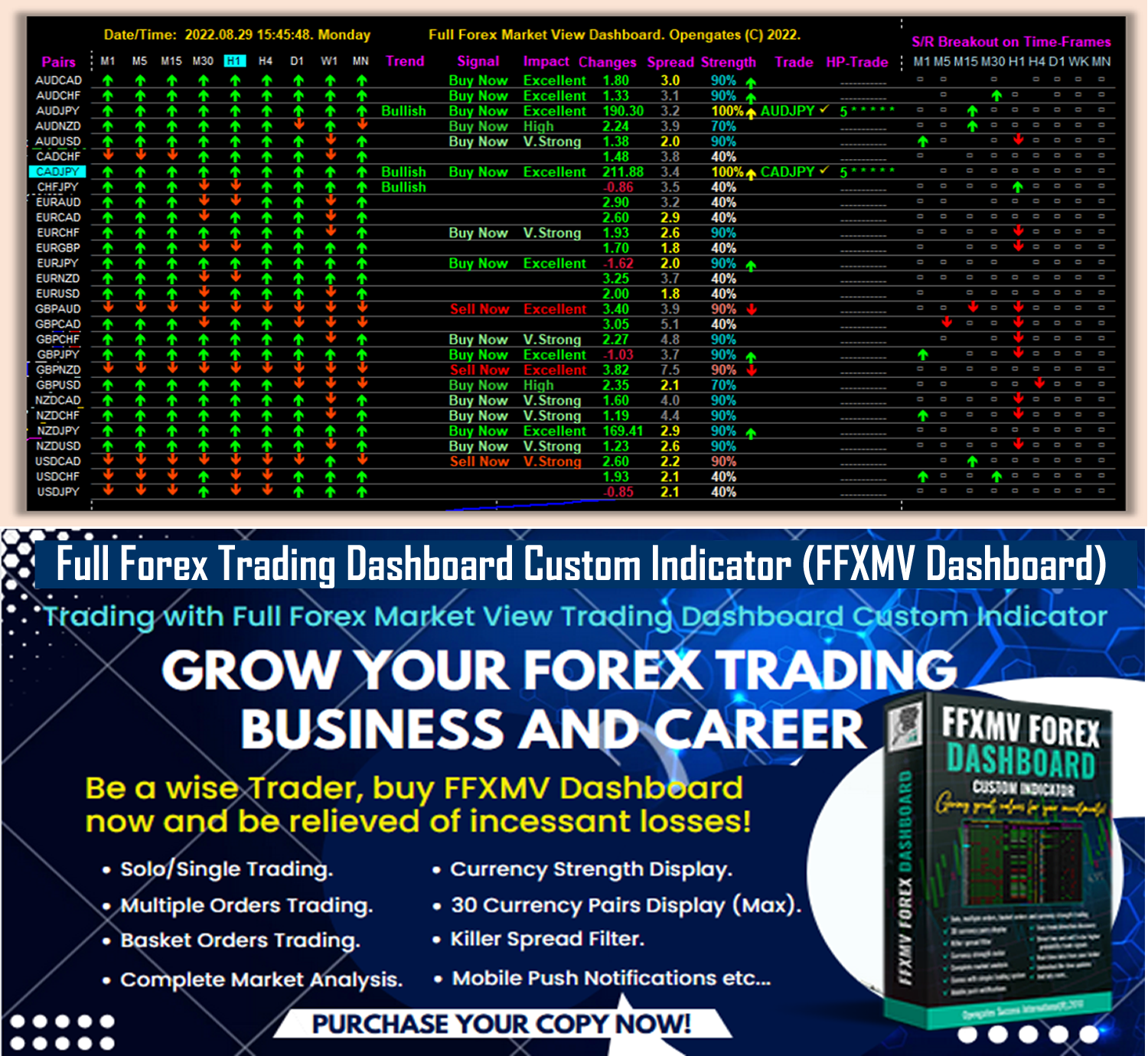
FFXMV FOREX DASHBOARD CUSTOM INDICATOR (5-STAR RATED PRODUCT) Is Now AVAILABLE in BOTH MT4 and MT5 Files (See the purchase link below):
Unlock financial success with the FFXMV Forex Trading Dashboard!
Seamlessly analyze markets and use its intuitive trading system to maximize your gains.
Wave goodbye to unnecessary losses and start thriving today!
* FFXMV Forex Trading Dashboard MT5:
https://www.mql5.com/en/market/product/144573
* FFXMV Dashboard MT4 only:
https://www.mql5.com/en/market/product/23156
* FFXMV Dashboard+CSM MT4:
https://www.mql5.com/en/market/product/40191
* FFXMV Dashboard PLUS MT4:
https://www.mql5.com/en/market/product/47406
What you stand to gain by purchasing any of the FFXMV Dashboards:
* FFXMV Dashboard custom indicator with a Life-time updates.
* Forex News calendar indicator - can set daily or weekly news ahead (with Installation Guide in PDF).
* Danger Zone indicator - To help the user avoid taking a trade that will most likely end in loss. (with Video tutorials).
* Zigzag Custom indicator - To help the user get accurate entry.
* Multiple-Orders Utility Expert advisor with ALL-IN-ONE trade managements features (For FFXMV Dashboard PLUS).
* Symbol/Time-frame Changer with In-built SUPPORT and RESISTANCE indicator and Candle timer/Spread calculator.
* Comprehensive Manual Guides in PDF on how to use FFXMV Dashboard.
* Another PDF manual on how to use Multiple Orders Utility Expert advisor (For FFXMV Dashboard PLUS).
* Its MT5 Version can be found here: https://www.mql5.com/en/market/product/144573
* You-tube Videos on how to use FFXMV Dashboard, Multiple Orders Utility EA and other forex trading tools are available on our Youtube Channel => https://www.youtube.com/@ffxmvdashboards
* YOU ARE NOT ALONE: You shall be added to our PAID Members Group where you can ask questions, 24/7 supports on technical and installation challenges if there is any.
GRAB IT NOW!!!
xxxxxxxxxxxxxxxxxxxxxxxxxxxxxxxxxxxxxxxxxxxxxxxxxxxxxxxxxxxxxxxxxxxxxxxxxxxxxxxxxxxxxxx
Russian:
FFXMV FOREX DASHBOARD CUSTOM INDICATOR (ПРОДУКТ С 5-ЗВЁЗДОЧНЫМ РЕЙТИНГОМ) ТЕПЕРЬ ДОСТУПЕН В ФАЙЛАХ MT4 и MT5 (См. ссылку для покупки ниже):
Откройте финансовый успех с FFXMV Forex Trading Dashboard!
Легко анализируйте рынки и используйте его интуитивную торговую систему, чтобы максимизировать свою прибыль.
Попрощайтесь с ненужными убытками и начните зарабатывать уже сегодня!
FFXMV Forex Trading Dashboard MT5:
https://www.mql5.com/en/market/product/144573
FFXMV Dashboard MT4 только:
https://www.mql5.com/en/market/product/23156
FFXMV Dashboard+CSM MT4:
https://www.mql5.com/en/market/product/40191
FFXMV Dashboard PLUS MT4:
https://www.mql5.com/en/market/product/47406
Что вы получите, приобретая любой из FFXMV Dashboard:
Индикатор FFXMV Dashboard с пожизненными обновлениями.
Индикатор календаря Forex News – можно устанавливать новости на день или неделю вперёд (с инструкцией в PDF).
Индикатор Danger Zone – помогает избежать сделок, которые скорее всего приведут к убыткам (с видео-уроками).
Индикатор Zigzag Custom – помогает находить точные точки входа.
Утилита Multiple-Orders Expert Advisor со всеми функциями управления сделками (для FFXMV Dashboard PLUS).
Переключатель символов/таймфреймов с встроенным индикатором SUPPORT и RESISTANCE, а также таймером свечей/калькулятором спреда.
Подробные руководства в PDF о том, как использовать FFXMV Dashboard.
Дополнительное руководство в PDF о том, как использовать Multiple Orders Utility Expert Advisor (для FFXMV Dashboard PLUS).
Версия для MT5 доступна здесь: https://www.mql5.com/en/market/product/144573
Обучающие видео о том, как пользоваться FFXMV Dashboard, Multiple Orders Utility EA и другими инструментами форекс-трейдинга, доступны на нашем YouTube-канале => https://www.youtube.com/@ffxmvdashboards
ВЫ НЕ ОДНИ: Вас добавят в нашу группу платных участников, где вы сможете задавать вопросы и получать поддержку 24/7 по техническим и установочным вопросам.
ЗАХВАТЫВАЙТЕ СЕЙЧАС!!!
xxxxxxxxxxxxxxxxxxxxxxxxxxxxxxxxxxxxxxxxxxxxxxxxxxxxxxxxxxxxxxxxxxxxxxxxxxxxxxxxxxxxxxx
Chinese (Simplified):
FFXMV 外汇仪表板自定义指标(五星级产品)现已同时提供 MT4 和 MT5 文件(请查看下面的购买链接):
通过 FFXMV 外汇交易仪表板解锁财务成功!
无缝分析市场,并使用其直观的交易系统来最大化您的收益。
告别不必要的亏损,从今天开始盈利!
FFXMV Forex Trading Dashboard MT5:
https://www.mql5.com/en/market/product/144573
FFXMV Dashboard 仅限 MT4:
https://www.mql5.com/en/market/product/23156
FFXMV Dashboard+CSM MT4:
https://www.mql5.com/en/market/product/40191
FFXMV Dashboard PLUS MT4:
https://www.mql5.com/en/market/product/47406
购买任何 FFXMV 仪表板,您将获得:
带有终身更新的 FFXMV Dashboard 自定义指标。
外汇新闻日历指标 —— 可设置每日或每周新闻提醒(附带 PDF 安装指南)。
危险区指标 —— 帮助用户避免进入极有可能导致亏损的交易(附带视频教程)。
Zigzag 自定义指标 —— 帮助用户找到精确的入场点。
多订单实用程序智能交易顾问,具备一体化的交易管理功能(适用于 FFXMV Dashboard PLUS)。
符号/时间框切换器,带内置支撑与阻力指标,以及蜡烛计时器/点差计算器。
全面的 PDF 使用手册,教您如何使用 FFXMV Dashboard。
另一份 PDF 手册,教您如何使用多订单实用程序智能交易顾问(适用于 FFXMV Dashboard PLUS)。
MT5 版本可在此找到: https://www.mql5.com/en/market/product/144573
关于如何使用 FFXMV Dashboard、多订单实用 EA 以及其他外汇交易工具的 YouTube 视频,已发布在我们的频道 => https://www.youtube.com/@ffxmvdashboards
您并不孤单:您将被加入我们的付费会员群组,在那里您可以提出问题,并获得 24/7 技术与安装支持。
立即获取!!!
xxxxxxxxxxxxxxxxxxxxxxxxxxxxxxxxxxxxxxxxxxxxxxxxxxxxxxxxxxxxxxxxxxxxxxxxxxxxxxxxx
Spanish:
FFXMV FOREX DASHBOARD CUSTOM INDICATOR (PRODUCTO CALIFICADO CON 5 ESTRELLAS) YA ESTÁ DISPONIBLE EN ARCHIVOS MT4 Y MT5 (Vea el enlace de compra a continuación):
¡Desbloquea el éxito financiero con el FFXMV Forex Trading Dashboard!
Analiza los mercados sin esfuerzo y utiliza su sistema de trading intuitivo para maximizar tus ganancias.
Despídete de las pérdidas innecesarias y comienza a prosperar hoy mismo.
FFXMV Forex Trading Dashboard MT5:
https://www.mql5.com/en/market/product/144573
FFXMV Dashboard solo MT4:
https://www.mql5.com/en/market/product/23156
FFXMV Dashboard+CSM MT4:
https://www.mql5.com/en/market/product/40191
FFXMV Dashboard PLUS MT4:
https://www.mql5.com/en/market/product/47406
Lo que obtendrás al comprar cualquiera de los Dashboards FFXMV:
Indicador personalizado FFXMV Dashboard con actualizaciones de por vida.
Indicador de calendario de noticias Forex – puedes configurar noticias diarias o semanales por adelantado (con guía de instalación en PDF).
Indicador Danger Zone – para ayudar al usuario a evitar operaciones que probablemente terminen en pérdida (con tutoriales en video).
Indicador Zigzag personalizado – para ayudar al usuario a encontrar entradas precisas.
Asesor experto de utilidad Multi-Órdenes con funciones completas de gestión de operaciones (para FFXMV Dashboard PLUS).
Cambiador de símbolo/marco temporal con indicador de SOPORTE y RESISTENCIA incorporado, además de temporizador de velas/calculadora de spread.
Manuales completos en PDF sobre cómo usar el FFXMV Dashboard.
Otro manual en PDF sobre cómo usar el Asesor Experto de Multi-Órdenes (para FFXMV Dashboard PLUS).
Su versión para MT5 se encuentra aquí: https://www.mql5.com/en/market/product/144573
Videos de YouTube sobre cómo usar el FFXMV Dashboard, el EA de Multi-Órdenes y otras herramientas de trading están disponibles en nuestro canal => https://www.youtube.com/@ffxmvdashboards
NO ESTÁS SOLO: Serás añadido a nuestro grupo de miembros de pago donde podrás hacer preguntas y recibir soporte técnico e instalación 24/7.
¡¡¡CÓMPRALO AHORA!!!
xxxxxxxxxxxxxxxxxxxxxxxxxxxxxxxxxxxxxxxxxxxxxxxxxxxxxxxxxxxxxxxxxxxxxxxxxxxxxxxxxxxxxxxx
Portuguese:
FFXMV FOREX DASHBOARD CUSTOM INDICATOR (PRODUTO CLASSIFICADO COM 5 ESTRELAS) JÁ ESTÁ DISPONÍVEL NOS ARQUIVOS MT4 E MT5 (Veja o link de compra abaixo):
Desbloqueie o sucesso financeiro com o FFXMV Forex Trading Dashboard!
Analise os mercados de forma simples e utilize o seu sistema de trading intuitivo para maximizar os seus lucros.
Diga adeus às perdas desnecessárias e comece a prosperar hoje mesmo!
FFXMV Forex Trading Dashboard MT5:
https://www.mql5.com/en/market/product/144573
FFXMV Dashboard apenas MT4:
https://www.mql5.com/en/market/product/23156
FFXMV Dashboard+CSM MT4:
https://www.mql5.com/en/market/product/40191
FFXMV Dashboard PLUS MT4:
https://www.mql5.com/en/market/product/47406
O que você ganha ao adquirir qualquer um dos FFXMV Dashboards:
Indicador personalizado FFXMV Dashboard com atualizações vitalícias.
Indicador de calendário de notícias Forex – pode configurar notícias diárias ou semanais antecipadamente (com guia de instalação em PDF).
Indicador Danger Zone – ajuda o usuário a evitar operações que provavelmente terminarão em prejuízo (com tutoriais em vídeo).
Indicador Zigzag personalizado – ajuda o usuário a obter entradas precisas.
Utilitário Expert Advisor de Múltiplas Ordens com recursos completos de gestão de negociações (para FFXMV Dashboard PLUS).
Alterador de símbolo/tempo gráfico com indicador embutido de SUPORTE e RESISTÊNCIA e temporizador de velas/calculadora de spread.
Manuais completos em PDF sobre como usar o FFXMV Dashboard.
Outro manual em PDF sobre como usar o Expert Advisor de Múltiplas Ordens (para FFXMV Dashboard PLUS).
A versão para MT5 pode ser encontrada aqui: https://www.mql5.com/en/market/product/144573
Vídeos no YouTube sobre como usar o FFXMV Dashboard, o EA de Múltiplas Ordens e outras ferramentas de trading estão disponíveis em nosso canal => https://www.youtube.com/@ffxmvdashboards
VOCÊ NÃO ESTÁ SOZINHO: Você será adicionado ao nosso grupo de membros pagos, onde poderá fazer perguntas e receber suporte técnico e de instalação 24/7.
APROVEITE AGORA!!!
xxxxxxxxxxxxxxxxxxxxxxxxxxxxxxxxxxxxxxxxxxxxxxxxxxxxxxxxxxxxxxxxxxxxxxxxxxxxxxxxx
Japanese:
FFXMV FOREX DASHBOARD CUSTOM INDICATOR(5つ星評価製品)が、MT4とMT5の両方のファイルで利用可能になりました(購入リンクは下記をご覧ください):
FFXMV Forex Trading Dashboardで経済的成功を手に入れましょう!
シームレスに市場を分析し、直感的なトレーディングシステムを活用して利益を最大化。
不要な損失に別れを告げ、今日から利益を生み出しましょう!
FFXMV Forex Trading Dashboard MT5:
https://www.mql5.com/en/market/product/144573
FFXMV Dashboard MT4のみ:
https://www.mql5.com/en/market/product/23156
FFXMV Dashboard+CSM MT4:
https://www.mql5.com/en/market/product/40191
FFXMV Dashboard PLUS MT4:
https://www.mql5.com/en/market/product/47406
FFXMV Dashboardを購入すると得られるもの:
生涯アップデート付きのFFXMV Dashboardカスタムインジケーター。
Forexニュースカレンダーインジケーター – 日次または週次のニュースを事前に設定可能(PDFインストールガイド付き)。
Danger Zoneインジケーター – 損失につながる可能性の高い取引を避けるために役立ちます(ビデオチュートリアル付き)。
Zigzagカスタムインジケーター – 正確なエントリーをサポート。
複数注文ユーティリティ・エキスパートアドバイザー、オールインワンの取引管理機能付き(FFXMV Dashboard PLUS用)。
シンボル/タイムフレーム切替ツール、内蔵のサポート&レジスタンスインジケーター、キャンドルタイマー/スプレッド計算機。
FFXMV Dashboardの使い方に関する包括的なPDFマニュアル。
複数注文ユーティリティEAの使用方法についてのPDFマニュアル(FFXMV Dashboard PLUS用)。
MT5バージョンはこちらで入手可能: https://www.mql5.com/en/market/product/144573
FFXMV Dashboard、複数注文ユーティリティEA、その他のFX取引ツールの使い方に関するYouTube動画は、当社のYouTubeチャンネルでご覧いただけます => https://www.youtube.com/@ffxmvdashboards
あなたは一人ではありません:有料メンバーグループに追加され、質問ができ、技術面・インストール面の24時間サポートを受けられます。
今すぐ手に入れましょう!!!
xxxxxxxxxxxxxxxxxxxxxxxxxxxxxxxxxxxxxxxxxxxxxxxxxxxxxxxxxxxxxxxxxxxxxxxxxxxxxxxxxx
German:
FFXMV FOREX DASHBOARD CUSTOM INDICATOR (5-STERNE-BEWERTETES PRODUKT) IST JETZT IN MT4- UND MT5-DATEIEN VERFÜGBAR (Siehe den untenstehenden Kauflink):
Entfesseln Sie finanziellen Erfolg mit dem FFXMV Forex Trading Dashboard!
Analysieren Sie die Märkte nahtlos und nutzen Sie das intuitive Handelssystem, um Ihre Gewinne zu maximieren.
Verabschieden Sie sich von unnötigen Verlusten und beginnen Sie noch heute erfolgreich zu handeln!
FFXMV Forex Trading Dashboard MT5:
https://www.mql5.com/en/market/product/144573
FFXMV Dashboard nur MT4:
https://www.mql5.com/en/market/product/23156
FFXMV Dashboard+CSM MT4:
https://www.mql5.com/en/market/product/40191
FFXMV Dashboard PLUS MT4:
https://www.mql5.com/en/market/product/47406
Was Sie durch den Kauf eines der FFXMV Dashboards erhalten:
FFXMV Dashboard Custom Indicator mit lebenslangen Updates.
Forex-News-Kalender-Indikator – tägliche oder wöchentliche Nachrichten im Voraus einstellbar (mit Installationsanleitung im PDF-Format).
Danger Zone Indikator – hilft dem Benutzer, Trades zu vermeiden, die höchstwahrscheinlich im Verlust enden (mit Video-Tutorials).
Zigzag Custom Indikator – unterstützt den Benutzer beim Finden präziser Einstiege.
Multi-Orders Utility Expert Advisor mit ALL-IN-ONE Handelsmanagement-Funktionen (für FFXMV Dashboard PLUS).
Symbol-/Zeitrahmen-Wechsler mit integriertem SUPPORT- und RESISTANCE-Indikator sowie Kerzen-Timer/Spread-Rechner.
Umfassende Handbücher im PDF-Format zur Verwendung des FFXMV Dashboards.
Ein weiteres PDF-Handbuch zur Nutzung des Multi-Orders Utility Expert Advisors (für FFXMV Dashboard PLUS).
Die MT5-Version finden Sie hier: https://www.mql5.com/en/market/product/144573
YouTube-Videos zur Nutzung des FFXMV Dashboards, des Multi-Orders Utility EA und anderer Forex-Handelstools sind auf unserem YouTube-Kanal verfügbar => https://www.youtube.com/@ffxmvdashboards
SIE SIND NICHT ALLEIN: Sie werden unserer kostenpflichtigen Mitgliedergruppe hinzugefügt, wo Sie Fragen stellen und 24/7 Unterstützung bei technischen und Installationsproblemen erhalten können.
JETZT ZUGREIFEN!!!
xxxxxxxxxxxxxxxxxxxxxxxxxxxxxxxxxxxxxxxxxxxxxxxxxxxxxxxxxxxxxxxxxxxxxxxxxxxxxxxxxxxxx
Korean:
FFXMV FOREX DASHBOARD CUSTOM INDICATOR (5성급 평가 제품)이 이제 MT4와 MT5 파일 모두에서 이용 가능합니다 (아래 구매 링크 참조):
FFXMV Forex Trading Dashboard로 금융 성공을 여십시오!
시장 분석을 원활하게 수행하고 직관적인 트레이딩 시스템을 활용하여 수익을 극대화하세요.
불필요한 손실은 이제 끝내고, 오늘부터 성공을 시작하십시오!
FFXMV Forex Trading Dashboard MT5:
https://www.mql5.com/en/market/product/144573
FFXMV Dashboard MT4 전용:
https://www.mql5.com/en/market/product/23156
FFXMV Dashboard+CSM MT4:
https://www.mql5.com/en/market/product/40191
FFXMV Dashboard PLUS MT4:
https://www.mql5.com/en/market/product/47406
FFXMV Dashboard를 구매하면 얻을 수 있는 혜택:
평생 업데이트가 제공되는 FFXMV Dashboard 커스텀 인디케이터.
외환 뉴스 캘린더 인디케이터 – 일간 또는 주간 뉴스를 미리 설정 가능 (PDF 설치 가이드 포함).
Danger Zone 인디케이터 – 손실로 끝날 가능성이 높은 거래를 피할 수 있도록 도움 (비디오 튜토리얼 포함).
Zigzag 커스텀 인디케이터 – 정확한 진입을 도와줌.
다중 주문 관리 유틸리티 EA, 올인원 거래 관리 기능 제공 (FFXMV Dashboard PLUS 전용).
종목/시간 프레임 전환기, 내장된 SUPPORT & RESISTANCE 인디케이터, 캔들 타이머/스프레드 계산기 포함.
FFXMV Dashboard 사용법에 대한 종합적인 PDF 매뉴얼.
다중 주문 관리 EA 사용법에 대한 별도의 PDF 매뉴얼 (FFXMV Dashboard PLUS 전용).
MT5 버전은 여기에서 확인 가능: https://www.mql5.com/en/market/product/144573
FFXMV Dashboard, 다중 주문 EA 및 기타 외환 거래 도구 사용법에 대한 유튜브 영상은 당사 유튜브 채널에서 확인 가능 => https://www.youtube.com/@ffxmvdashboards
당신은 혼자가 아닙니다: 유료 회원 그룹에 추가되어 질문을 할 수 있으며, 기술 및 설치 문제에 대해 24/7 지원을 받으실 수 있습니다.
지금 바로 확보하세요!!!
xxxxxxxxxxxxxxxxxxxxxxxxxxxxxxxxxxxxxxxxxxxxxxxxxxxxxxxxxxxxxxxxxxxxxxxx
French:
FFXMV FOREX DASHBOARD CUSTOM INDICATOR (PRODUIT ÉVALUÉ 5 ÉTOILES) EST MAINTENANT DISPONIBLE EN FICHIERS MT4 ET MT5 (voir le lien d’achat ci-dessous) :
Débloquez le succès financier avec le FFXMV Forex Trading Dashboard !
Analysez les marchés en toute simplicité et utilisez son système de trading intuitif pour maximiser vos gains.
Dites adieu aux pertes inutiles et commencez à prospérer dès aujourd’hui !
FFXMV Forex Trading Dashboard MT5 :
https://www.mql5.com/en/market/product/144573
FFXMV Dashboard uniquement MT4 :
https://www.mql5.com/en/market/product/23156
FFXMV Dashboard+CSM MT4 :
https://www.mql5.com/en/market/product/40191
FFXMV Dashboard PLUS MT4 :
https://www.mql5.com/en/market/product/47406
Ce que vous gagnez en achetant l’un des Dashboards FFXMV :
Indicateur personnalisé FFXMV Dashboard avec mises à jour à vie.
Indicateur de calendrier des nouvelles Forex – possibilité de planifier les nouvelles quotidiennes ou hebdomadaires (avec guide d’installation en PDF).
Indicateur Danger Zone – aide l’utilisateur à éviter des trades qui se termineront très probablement en perte (avec tutoriels vidéo).
Indicateur Zigzag personnalisé – aide l’utilisateur à obtenir des points d’entrée précis.
Utilitaire Expert Advisor Multi-Ordres avec fonctions complètes de gestion de trade (pour FFXMV Dashboard PLUS).
Changeur de symbole/unité de temps avec indicateur intégré de SUPPORT et RÉSISTANCE, ainsi que minuteur de bougie/calculateur de spread.
Guides complets en PDF sur l’utilisation du FFXMV Dashboard.
Un autre guide PDF sur l’utilisation de l’Expert Advisor Multi-Ordres (pour FFXMV Dashboard PLUS).
La version MT5 se trouve ici : https://www.mql5.com/en/market/product/144573
Des vidéos YouTube expliquant comment utiliser le FFXMV Dashboard, l’EA Multi-Ordres et d’autres outils de trading Forex sont disponibles sur notre chaîne YouTube => https://www.youtube.com/@ffxmvdashboards
VOUS N’ÊTES PAS SEUL : Vous serez ajouté à notre groupe de membres payants où vous pourrez poser vos questions et bénéficier d’une assistance technique et d’installation 24h/24 et 7j/7.
OBTENEZ-LE MAINTENANT !!!
xxxxxxxxxxxxxxxxxxxxxxxxxxxxxxxxxxxxxxxxxxxxxxxxxxxxxxxxxxxxxxxxxxxxxxxxxxxxxxxxx
Italian:
FFXMV FOREX DASHBOARD CUSTOM INDICATOR (PRODOTTO VALUTATO 5 STELLE) È ORA DISPONIBILE NEI FILE MT4 E MT5 (vedi il link per l’acquisto qui sotto):
Sblocca il successo finanziario con il FFXMV Forex Trading Dashboard!
Analizza i mercati senza sforzo e utilizza il suo sistema di trading intuitivo per massimizzare i tuoi guadagni.
Dì addio alle perdite inutili e inizia a prosperare oggi stesso!
FFXMV Forex Trading Dashboard MT5:
https://www.mql5.com/en/market/product/144573
FFXMV Dashboard solo MT4:
https://www.mql5.com/en/market/product/23156
FFXMV Dashboard+CSM MT4:
https://www.mql5.com/en/market/product/40191
FFXMV Dashboard PLUS MT4:
https://www.mql5.com/en/market/product/47406
Cosa ottieni acquistando uno qualsiasi dei Dashboards FFXMV:
Indicatore personalizzato FFXMV Dashboard con aggiornamenti a vita.
Indicatore calendario notizie Forex – possibilità di impostare notizie giornaliere o settimanali in anticipo (con guida all’installazione in PDF).
Indicatore Danger Zone – aiuta l’utente a evitare operazioni che molto probabilmente finiranno in perdita (con video tutorial).
Indicatore Zigzag personalizzato – aiuta l’utente a trovare ingressi precisi.
Utility Expert Advisor Multi-Ordini con funzioni di gestione del trade ALL-IN-ONE (per FFXMV Dashboard PLUS).
Cambia simbolo/time-frame con indicatore SUPPORTO e RESISTENZA integrato e timer delle candele/calcolatore di spread.
Manuali completi in PDF su come utilizzare FFXMV Dashboard.
Un altro manuale PDF su come utilizzare l’Expert Advisor Multi-Ordini (per FFXMV Dashboard PLUS).
La versione MT5 è disponibile qui: https://www.mql5.com/en/market/product/144573
Video YouTube su come utilizzare FFXMV Dashboard, l’EA Multi-Ordini e altri strumenti di trading Forex sono disponibili sul nostro canale YouTube => https://www.youtube.com/@ffxmvdashboards
NON SEI SOLO: sarai aggiunto al nostro gruppo membri a pagamento dove potrai fare domande e ricevere supporto tecnico e per l’installazione 24/7.
PRENDILO ORA!!!
xxxxxxxxxxxxxxxxxxxxxxxxxxxxxxxxxxxxxxxxxxxxxxxxxxxxxxxxxxxxxxxxxxxxxxxx
Turkish:
FFXMV FOREX DASHBOARD CUSTOM INDICATOR (5 YILDIZLI ÜRÜN) ARTIK HEM MT4 HEM DE MT5 DOSYALARINDA MEVCUT (Satın alma bağlantısını aşağıda görebilirsiniz):
FFXMV Forex Trading Dashboard ile finansal başarıya ulaşın!
Piyasaları zahmetsizce analiz edin ve kazancınızı en üst düzeye çıkarmak için sezgisel işlem sistemini kullanın.
Gereksiz kayıplara elveda deyin ve bugünden itibaren kazanmaya başlayın!
FFXMV Forex Trading Dashboard MT5:
https://www.mql5.com/en/market/product/144573
FFXMV Dashboard sadece MT4:
https://www.mql5.com/en/market/product/23156
FFXMV Dashboard+CSM MT4:
https://www.mql5.com/en/market/product/40191
FFXMV Dashboard PLUS MT4:
https://www.mql5.com/en/market/product/47406
FFXMV Dashboard’lardan herhangi birini satın aldığınızda elde edeceğiniz avantajlar:
Ömür boyu güncellemelerle birlikte FFXMV Dashboard özel indikatörü.
Forex Haber Takvimi indikatörü – günlük veya haftalık haberleri önceden ayarlayabilme (PDF kurulum kılavuzu ile birlikte).
Danger Zone indikatörü – büyük ihtimalle zararla sonuçlanacak işlemlerden kaçınmanıza yardımcı olur (video eğitimleri ile).
Zigzag özel indikatörü – doğru giriş noktalarını bulmanıza yardımcı olur.
Çoklu Emirler Yardımcı Expert Advisor – TÜM-İÇİNDE işlem yönetim özellikleriyle (FFXMV Dashboard PLUS için).
Sembol/Zaman dilimi değiştirici – yerleşik DESTEK ve DİRENÇ indikatörü, mum sayacı/spread hesaplayıcı ile.
FFXMV Dashboard’un nasıl kullanılacağını anlatan kapsamlı PDF kılavuzları.
Çoklu Emirler Yardımcı Expert Advisor’un nasıl kullanılacağını anlatan başka bir PDF kılavuzu (FFXMV Dashboard PLUS için).
MT5 versiyonu burada bulunabilir: https://www.mql5.com/en/market/product/144573
FFXMV Dashboard, Çoklu Emirler EA ve diğer forex işlem araçlarının kullanımına dair YouTube videoları kanalımızda mevcut => https://www.youtube.com/@ffxmvdashboards
YALNIZ DEĞİLSİNİZ: Sorularınızı sorabileceğiniz, teknik ve kurulum desteği alabileceğiniz 7/24 destekli ücretli üyeler grubumuza ekleneceksiniz.
ŞİMDİ SATIN ALIN!!!
Unlock financial success with the FFXMV Forex Trading Dashboard!
Seamlessly analyze markets and use its intuitive trading system to maximize your gains.
Wave goodbye to unnecessary losses and start thriving today!
* FFXMV Forex Trading Dashboard MT5:
https://www.mql5.com/en/market/product/144573
* FFXMV Dashboard MT4 only:
https://www.mql5.com/en/market/product/23156
* FFXMV Dashboard+CSM MT4:
https://www.mql5.com/en/market/product/40191
* FFXMV Dashboard PLUS MT4:
https://www.mql5.com/en/market/product/47406
What you stand to gain by purchasing any of the FFXMV Dashboards:
* FFXMV Dashboard custom indicator with a Life-time updates.
* Forex News calendar indicator - can set daily or weekly news ahead (with Installation Guide in PDF).
* Danger Zone indicator - To help the user avoid taking a trade that will most likely end in loss. (with Video tutorials).
* Zigzag Custom indicator - To help the user get accurate entry.
* Multiple-Orders Utility Expert advisor with ALL-IN-ONE trade managements features (For FFXMV Dashboard PLUS).
* Symbol/Time-frame Changer with In-built SUPPORT and RESISTANCE indicator and Candle timer/Spread calculator.
* Comprehensive Manual Guides in PDF on how to use FFXMV Dashboard.
* Another PDF manual on how to use Multiple Orders Utility Expert advisor (For FFXMV Dashboard PLUS).
* Its MT5 Version can be found here: https://www.mql5.com/en/market/product/144573
* You-tube Videos on how to use FFXMV Dashboard, Multiple Orders Utility EA and other forex trading tools are available on our Youtube Channel => https://www.youtube.com/@ffxmvdashboards
* YOU ARE NOT ALONE: You shall be added to our PAID Members Group where you can ask questions, 24/7 supports on technical and installation challenges if there is any.
GRAB IT NOW!!!
xxxxxxxxxxxxxxxxxxxxxxxxxxxxxxxxxxxxxxxxxxxxxxxxxxxxxxxxxxxxxxxxxxxxxxxxxxxxxxxxxxxxxxx
Russian:
FFXMV FOREX DASHBOARD CUSTOM INDICATOR (ПРОДУКТ С 5-ЗВЁЗДОЧНЫМ РЕЙТИНГОМ) ТЕПЕРЬ ДОСТУПЕН В ФАЙЛАХ MT4 и MT5 (См. ссылку для покупки ниже):
Откройте финансовый успех с FFXMV Forex Trading Dashboard!
Легко анализируйте рынки и используйте его интуитивную торговую систему, чтобы максимизировать свою прибыль.
Попрощайтесь с ненужными убытками и начните зарабатывать уже сегодня!
FFXMV Forex Trading Dashboard MT5:
https://www.mql5.com/en/market/product/144573
FFXMV Dashboard MT4 только:
https://www.mql5.com/en/market/product/23156
FFXMV Dashboard+CSM MT4:
https://www.mql5.com/en/market/product/40191
FFXMV Dashboard PLUS MT4:
https://www.mql5.com/en/market/product/47406
Что вы получите, приобретая любой из FFXMV Dashboard:
Индикатор FFXMV Dashboard с пожизненными обновлениями.
Индикатор календаря Forex News – можно устанавливать новости на день или неделю вперёд (с инструкцией в PDF).
Индикатор Danger Zone – помогает избежать сделок, которые скорее всего приведут к убыткам (с видео-уроками).
Индикатор Zigzag Custom – помогает находить точные точки входа.
Утилита Multiple-Orders Expert Advisor со всеми функциями управления сделками (для FFXMV Dashboard PLUS).
Переключатель символов/таймфреймов с встроенным индикатором SUPPORT и RESISTANCE, а также таймером свечей/калькулятором спреда.
Подробные руководства в PDF о том, как использовать FFXMV Dashboard.
Дополнительное руководство в PDF о том, как использовать Multiple Orders Utility Expert Advisor (для FFXMV Dashboard PLUS).
Версия для MT5 доступна здесь: https://www.mql5.com/en/market/product/144573
Обучающие видео о том, как пользоваться FFXMV Dashboard, Multiple Orders Utility EA и другими инструментами форекс-трейдинга, доступны на нашем YouTube-канале => https://www.youtube.com/@ffxmvdashboards
ВЫ НЕ ОДНИ: Вас добавят в нашу группу платных участников, где вы сможете задавать вопросы и получать поддержку 24/7 по техническим и установочным вопросам.
ЗАХВАТЫВАЙТЕ СЕЙЧАС!!!
xxxxxxxxxxxxxxxxxxxxxxxxxxxxxxxxxxxxxxxxxxxxxxxxxxxxxxxxxxxxxxxxxxxxxxxxxxxxxxxxxxxxxxx
Chinese (Simplified):
FFXMV 外汇仪表板自定义指标(五星级产品)现已同时提供 MT4 和 MT5 文件(请查看下面的购买链接):
通过 FFXMV 外汇交易仪表板解锁财务成功!
无缝分析市场,并使用其直观的交易系统来最大化您的收益。
告别不必要的亏损,从今天开始盈利!
FFXMV Forex Trading Dashboard MT5:
https://www.mql5.com/en/market/product/144573
FFXMV Dashboard 仅限 MT4:
https://www.mql5.com/en/market/product/23156
FFXMV Dashboard+CSM MT4:
https://www.mql5.com/en/market/product/40191
FFXMV Dashboard PLUS MT4:
https://www.mql5.com/en/market/product/47406
购买任何 FFXMV 仪表板,您将获得:
带有终身更新的 FFXMV Dashboard 自定义指标。
外汇新闻日历指标 —— 可设置每日或每周新闻提醒(附带 PDF 安装指南)。
危险区指标 —— 帮助用户避免进入极有可能导致亏损的交易(附带视频教程)。
Zigzag 自定义指标 —— 帮助用户找到精确的入场点。
多订单实用程序智能交易顾问,具备一体化的交易管理功能(适用于 FFXMV Dashboard PLUS)。
符号/时间框切换器,带内置支撑与阻力指标,以及蜡烛计时器/点差计算器。
全面的 PDF 使用手册,教您如何使用 FFXMV Dashboard。
另一份 PDF 手册,教您如何使用多订单实用程序智能交易顾问(适用于 FFXMV Dashboard PLUS)。
MT5 版本可在此找到: https://www.mql5.com/en/market/product/144573
关于如何使用 FFXMV Dashboard、多订单实用 EA 以及其他外汇交易工具的 YouTube 视频,已发布在我们的频道 => https://www.youtube.com/@ffxmvdashboards
您并不孤单:您将被加入我们的付费会员群组,在那里您可以提出问题,并获得 24/7 技术与安装支持。
立即获取!!!
xxxxxxxxxxxxxxxxxxxxxxxxxxxxxxxxxxxxxxxxxxxxxxxxxxxxxxxxxxxxxxxxxxxxxxxxxxxxxxxxx
Spanish:
FFXMV FOREX DASHBOARD CUSTOM INDICATOR (PRODUCTO CALIFICADO CON 5 ESTRELLAS) YA ESTÁ DISPONIBLE EN ARCHIVOS MT4 Y MT5 (Vea el enlace de compra a continuación):
¡Desbloquea el éxito financiero con el FFXMV Forex Trading Dashboard!
Analiza los mercados sin esfuerzo y utiliza su sistema de trading intuitivo para maximizar tus ganancias.
Despídete de las pérdidas innecesarias y comienza a prosperar hoy mismo.
FFXMV Forex Trading Dashboard MT5:
https://www.mql5.com/en/market/product/144573
FFXMV Dashboard solo MT4:
https://www.mql5.com/en/market/product/23156
FFXMV Dashboard+CSM MT4:
https://www.mql5.com/en/market/product/40191
FFXMV Dashboard PLUS MT4:
https://www.mql5.com/en/market/product/47406
Lo que obtendrás al comprar cualquiera de los Dashboards FFXMV:
Indicador personalizado FFXMV Dashboard con actualizaciones de por vida.
Indicador de calendario de noticias Forex – puedes configurar noticias diarias o semanales por adelantado (con guía de instalación en PDF).
Indicador Danger Zone – para ayudar al usuario a evitar operaciones que probablemente terminen en pérdida (con tutoriales en video).
Indicador Zigzag personalizado – para ayudar al usuario a encontrar entradas precisas.
Asesor experto de utilidad Multi-Órdenes con funciones completas de gestión de operaciones (para FFXMV Dashboard PLUS).
Cambiador de símbolo/marco temporal con indicador de SOPORTE y RESISTENCIA incorporado, además de temporizador de velas/calculadora de spread.
Manuales completos en PDF sobre cómo usar el FFXMV Dashboard.
Otro manual en PDF sobre cómo usar el Asesor Experto de Multi-Órdenes (para FFXMV Dashboard PLUS).
Su versión para MT5 se encuentra aquí: https://www.mql5.com/en/market/product/144573
Videos de YouTube sobre cómo usar el FFXMV Dashboard, el EA de Multi-Órdenes y otras herramientas de trading están disponibles en nuestro canal => https://www.youtube.com/@ffxmvdashboards
NO ESTÁS SOLO: Serás añadido a nuestro grupo de miembros de pago donde podrás hacer preguntas y recibir soporte técnico e instalación 24/7.
¡¡¡CÓMPRALO AHORA!!!
xxxxxxxxxxxxxxxxxxxxxxxxxxxxxxxxxxxxxxxxxxxxxxxxxxxxxxxxxxxxxxxxxxxxxxxxxxxxxxxxxxxxxxxx
Portuguese:
FFXMV FOREX DASHBOARD CUSTOM INDICATOR (PRODUTO CLASSIFICADO COM 5 ESTRELAS) JÁ ESTÁ DISPONÍVEL NOS ARQUIVOS MT4 E MT5 (Veja o link de compra abaixo):
Desbloqueie o sucesso financeiro com o FFXMV Forex Trading Dashboard!
Analise os mercados de forma simples e utilize o seu sistema de trading intuitivo para maximizar os seus lucros.
Diga adeus às perdas desnecessárias e comece a prosperar hoje mesmo!
FFXMV Forex Trading Dashboard MT5:
https://www.mql5.com/en/market/product/144573
FFXMV Dashboard apenas MT4:
https://www.mql5.com/en/market/product/23156
FFXMV Dashboard+CSM MT4:
https://www.mql5.com/en/market/product/40191
FFXMV Dashboard PLUS MT4:
https://www.mql5.com/en/market/product/47406
O que você ganha ao adquirir qualquer um dos FFXMV Dashboards:
Indicador personalizado FFXMV Dashboard com atualizações vitalícias.
Indicador de calendário de notícias Forex – pode configurar notícias diárias ou semanais antecipadamente (com guia de instalação em PDF).
Indicador Danger Zone – ajuda o usuário a evitar operações que provavelmente terminarão em prejuízo (com tutoriais em vídeo).
Indicador Zigzag personalizado – ajuda o usuário a obter entradas precisas.
Utilitário Expert Advisor de Múltiplas Ordens com recursos completos de gestão de negociações (para FFXMV Dashboard PLUS).
Alterador de símbolo/tempo gráfico com indicador embutido de SUPORTE e RESISTÊNCIA e temporizador de velas/calculadora de spread.
Manuais completos em PDF sobre como usar o FFXMV Dashboard.
Outro manual em PDF sobre como usar o Expert Advisor de Múltiplas Ordens (para FFXMV Dashboard PLUS).
A versão para MT5 pode ser encontrada aqui: https://www.mql5.com/en/market/product/144573
Vídeos no YouTube sobre como usar o FFXMV Dashboard, o EA de Múltiplas Ordens e outras ferramentas de trading estão disponíveis em nosso canal => https://www.youtube.com/@ffxmvdashboards
VOCÊ NÃO ESTÁ SOZINHO: Você será adicionado ao nosso grupo de membros pagos, onde poderá fazer perguntas e receber suporte técnico e de instalação 24/7.
APROVEITE AGORA!!!
xxxxxxxxxxxxxxxxxxxxxxxxxxxxxxxxxxxxxxxxxxxxxxxxxxxxxxxxxxxxxxxxxxxxxxxxxxxxxxxxx
Japanese:
FFXMV FOREX DASHBOARD CUSTOM INDICATOR(5つ星評価製品)が、MT4とMT5の両方のファイルで利用可能になりました(購入リンクは下記をご覧ください):
FFXMV Forex Trading Dashboardで経済的成功を手に入れましょう!
シームレスに市場を分析し、直感的なトレーディングシステムを活用して利益を最大化。
不要な損失に別れを告げ、今日から利益を生み出しましょう!
FFXMV Forex Trading Dashboard MT5:
https://www.mql5.com/en/market/product/144573
FFXMV Dashboard MT4のみ:
https://www.mql5.com/en/market/product/23156
FFXMV Dashboard+CSM MT4:
https://www.mql5.com/en/market/product/40191
FFXMV Dashboard PLUS MT4:
https://www.mql5.com/en/market/product/47406
FFXMV Dashboardを購入すると得られるもの:
生涯アップデート付きのFFXMV Dashboardカスタムインジケーター。
Forexニュースカレンダーインジケーター – 日次または週次のニュースを事前に設定可能(PDFインストールガイド付き)。
Danger Zoneインジケーター – 損失につながる可能性の高い取引を避けるために役立ちます(ビデオチュートリアル付き)。
Zigzagカスタムインジケーター – 正確なエントリーをサポート。
複数注文ユーティリティ・エキスパートアドバイザー、オールインワンの取引管理機能付き(FFXMV Dashboard PLUS用)。
シンボル/タイムフレーム切替ツール、内蔵のサポート&レジスタンスインジケーター、キャンドルタイマー/スプレッド計算機。
FFXMV Dashboardの使い方に関する包括的なPDFマニュアル。
複数注文ユーティリティEAの使用方法についてのPDFマニュアル(FFXMV Dashboard PLUS用)。
MT5バージョンはこちらで入手可能: https://www.mql5.com/en/market/product/144573
FFXMV Dashboard、複数注文ユーティリティEA、その他のFX取引ツールの使い方に関するYouTube動画は、当社のYouTubeチャンネルでご覧いただけます => https://www.youtube.com/@ffxmvdashboards
あなたは一人ではありません:有料メンバーグループに追加され、質問ができ、技術面・インストール面の24時間サポートを受けられます。
今すぐ手に入れましょう!!!
xxxxxxxxxxxxxxxxxxxxxxxxxxxxxxxxxxxxxxxxxxxxxxxxxxxxxxxxxxxxxxxxxxxxxxxxxxxxxxxxxx
German:
FFXMV FOREX DASHBOARD CUSTOM INDICATOR (5-STERNE-BEWERTETES PRODUKT) IST JETZT IN MT4- UND MT5-DATEIEN VERFÜGBAR (Siehe den untenstehenden Kauflink):
Entfesseln Sie finanziellen Erfolg mit dem FFXMV Forex Trading Dashboard!
Analysieren Sie die Märkte nahtlos und nutzen Sie das intuitive Handelssystem, um Ihre Gewinne zu maximieren.
Verabschieden Sie sich von unnötigen Verlusten und beginnen Sie noch heute erfolgreich zu handeln!
FFXMV Forex Trading Dashboard MT5:
https://www.mql5.com/en/market/product/144573
FFXMV Dashboard nur MT4:
https://www.mql5.com/en/market/product/23156
FFXMV Dashboard+CSM MT4:
https://www.mql5.com/en/market/product/40191
FFXMV Dashboard PLUS MT4:
https://www.mql5.com/en/market/product/47406
Was Sie durch den Kauf eines der FFXMV Dashboards erhalten:
FFXMV Dashboard Custom Indicator mit lebenslangen Updates.
Forex-News-Kalender-Indikator – tägliche oder wöchentliche Nachrichten im Voraus einstellbar (mit Installationsanleitung im PDF-Format).
Danger Zone Indikator – hilft dem Benutzer, Trades zu vermeiden, die höchstwahrscheinlich im Verlust enden (mit Video-Tutorials).
Zigzag Custom Indikator – unterstützt den Benutzer beim Finden präziser Einstiege.
Multi-Orders Utility Expert Advisor mit ALL-IN-ONE Handelsmanagement-Funktionen (für FFXMV Dashboard PLUS).
Symbol-/Zeitrahmen-Wechsler mit integriertem SUPPORT- und RESISTANCE-Indikator sowie Kerzen-Timer/Spread-Rechner.
Umfassende Handbücher im PDF-Format zur Verwendung des FFXMV Dashboards.
Ein weiteres PDF-Handbuch zur Nutzung des Multi-Orders Utility Expert Advisors (für FFXMV Dashboard PLUS).
Die MT5-Version finden Sie hier: https://www.mql5.com/en/market/product/144573
YouTube-Videos zur Nutzung des FFXMV Dashboards, des Multi-Orders Utility EA und anderer Forex-Handelstools sind auf unserem YouTube-Kanal verfügbar => https://www.youtube.com/@ffxmvdashboards
SIE SIND NICHT ALLEIN: Sie werden unserer kostenpflichtigen Mitgliedergruppe hinzugefügt, wo Sie Fragen stellen und 24/7 Unterstützung bei technischen und Installationsproblemen erhalten können.
JETZT ZUGREIFEN!!!
xxxxxxxxxxxxxxxxxxxxxxxxxxxxxxxxxxxxxxxxxxxxxxxxxxxxxxxxxxxxxxxxxxxxxxxxxxxxxxxxxxxxx
Korean:
FFXMV FOREX DASHBOARD CUSTOM INDICATOR (5성급 평가 제품)이 이제 MT4와 MT5 파일 모두에서 이용 가능합니다 (아래 구매 링크 참조):
FFXMV Forex Trading Dashboard로 금융 성공을 여십시오!
시장 분석을 원활하게 수행하고 직관적인 트레이딩 시스템을 활용하여 수익을 극대화하세요.
불필요한 손실은 이제 끝내고, 오늘부터 성공을 시작하십시오!
FFXMV Forex Trading Dashboard MT5:
https://www.mql5.com/en/market/product/144573
FFXMV Dashboard MT4 전용:
https://www.mql5.com/en/market/product/23156
FFXMV Dashboard+CSM MT4:
https://www.mql5.com/en/market/product/40191
FFXMV Dashboard PLUS MT4:
https://www.mql5.com/en/market/product/47406
FFXMV Dashboard를 구매하면 얻을 수 있는 혜택:
평생 업데이트가 제공되는 FFXMV Dashboard 커스텀 인디케이터.
외환 뉴스 캘린더 인디케이터 – 일간 또는 주간 뉴스를 미리 설정 가능 (PDF 설치 가이드 포함).
Danger Zone 인디케이터 – 손실로 끝날 가능성이 높은 거래를 피할 수 있도록 도움 (비디오 튜토리얼 포함).
Zigzag 커스텀 인디케이터 – 정확한 진입을 도와줌.
다중 주문 관리 유틸리티 EA, 올인원 거래 관리 기능 제공 (FFXMV Dashboard PLUS 전용).
종목/시간 프레임 전환기, 내장된 SUPPORT & RESISTANCE 인디케이터, 캔들 타이머/스프레드 계산기 포함.
FFXMV Dashboard 사용법에 대한 종합적인 PDF 매뉴얼.
다중 주문 관리 EA 사용법에 대한 별도의 PDF 매뉴얼 (FFXMV Dashboard PLUS 전용).
MT5 버전은 여기에서 확인 가능: https://www.mql5.com/en/market/product/144573
FFXMV Dashboard, 다중 주문 EA 및 기타 외환 거래 도구 사용법에 대한 유튜브 영상은 당사 유튜브 채널에서 확인 가능 => https://www.youtube.com/@ffxmvdashboards
당신은 혼자가 아닙니다: 유료 회원 그룹에 추가되어 질문을 할 수 있으며, 기술 및 설치 문제에 대해 24/7 지원을 받으실 수 있습니다.
지금 바로 확보하세요!!!
xxxxxxxxxxxxxxxxxxxxxxxxxxxxxxxxxxxxxxxxxxxxxxxxxxxxxxxxxxxxxxxxxxxxxxxx
French:
FFXMV FOREX DASHBOARD CUSTOM INDICATOR (PRODUIT ÉVALUÉ 5 ÉTOILES) EST MAINTENANT DISPONIBLE EN FICHIERS MT4 ET MT5 (voir le lien d’achat ci-dessous) :
Débloquez le succès financier avec le FFXMV Forex Trading Dashboard !
Analysez les marchés en toute simplicité et utilisez son système de trading intuitif pour maximiser vos gains.
Dites adieu aux pertes inutiles et commencez à prospérer dès aujourd’hui !
FFXMV Forex Trading Dashboard MT5 :
https://www.mql5.com/en/market/product/144573
FFXMV Dashboard uniquement MT4 :
https://www.mql5.com/en/market/product/23156
FFXMV Dashboard+CSM MT4 :
https://www.mql5.com/en/market/product/40191
FFXMV Dashboard PLUS MT4 :
https://www.mql5.com/en/market/product/47406
Ce que vous gagnez en achetant l’un des Dashboards FFXMV :
Indicateur personnalisé FFXMV Dashboard avec mises à jour à vie.
Indicateur de calendrier des nouvelles Forex – possibilité de planifier les nouvelles quotidiennes ou hebdomadaires (avec guide d’installation en PDF).
Indicateur Danger Zone – aide l’utilisateur à éviter des trades qui se termineront très probablement en perte (avec tutoriels vidéo).
Indicateur Zigzag personnalisé – aide l’utilisateur à obtenir des points d’entrée précis.
Utilitaire Expert Advisor Multi-Ordres avec fonctions complètes de gestion de trade (pour FFXMV Dashboard PLUS).
Changeur de symbole/unité de temps avec indicateur intégré de SUPPORT et RÉSISTANCE, ainsi que minuteur de bougie/calculateur de spread.
Guides complets en PDF sur l’utilisation du FFXMV Dashboard.
Un autre guide PDF sur l’utilisation de l’Expert Advisor Multi-Ordres (pour FFXMV Dashboard PLUS).
La version MT5 se trouve ici : https://www.mql5.com/en/market/product/144573
Des vidéos YouTube expliquant comment utiliser le FFXMV Dashboard, l’EA Multi-Ordres et d’autres outils de trading Forex sont disponibles sur notre chaîne YouTube => https://www.youtube.com/@ffxmvdashboards
VOUS N’ÊTES PAS SEUL : Vous serez ajouté à notre groupe de membres payants où vous pourrez poser vos questions et bénéficier d’une assistance technique et d’installation 24h/24 et 7j/7.
OBTENEZ-LE MAINTENANT !!!
xxxxxxxxxxxxxxxxxxxxxxxxxxxxxxxxxxxxxxxxxxxxxxxxxxxxxxxxxxxxxxxxxxxxxxxxxxxxxxxxx
Italian:
FFXMV FOREX DASHBOARD CUSTOM INDICATOR (PRODOTTO VALUTATO 5 STELLE) È ORA DISPONIBILE NEI FILE MT4 E MT5 (vedi il link per l’acquisto qui sotto):
Sblocca il successo finanziario con il FFXMV Forex Trading Dashboard!
Analizza i mercati senza sforzo e utilizza il suo sistema di trading intuitivo per massimizzare i tuoi guadagni.
Dì addio alle perdite inutili e inizia a prosperare oggi stesso!
FFXMV Forex Trading Dashboard MT5:
https://www.mql5.com/en/market/product/144573
FFXMV Dashboard solo MT4:
https://www.mql5.com/en/market/product/23156
FFXMV Dashboard+CSM MT4:
https://www.mql5.com/en/market/product/40191
FFXMV Dashboard PLUS MT4:
https://www.mql5.com/en/market/product/47406
Cosa ottieni acquistando uno qualsiasi dei Dashboards FFXMV:
Indicatore personalizzato FFXMV Dashboard con aggiornamenti a vita.
Indicatore calendario notizie Forex – possibilità di impostare notizie giornaliere o settimanali in anticipo (con guida all’installazione in PDF).
Indicatore Danger Zone – aiuta l’utente a evitare operazioni che molto probabilmente finiranno in perdita (con video tutorial).
Indicatore Zigzag personalizzato – aiuta l’utente a trovare ingressi precisi.
Utility Expert Advisor Multi-Ordini con funzioni di gestione del trade ALL-IN-ONE (per FFXMV Dashboard PLUS).
Cambia simbolo/time-frame con indicatore SUPPORTO e RESISTENZA integrato e timer delle candele/calcolatore di spread.
Manuali completi in PDF su come utilizzare FFXMV Dashboard.
Un altro manuale PDF su come utilizzare l’Expert Advisor Multi-Ordini (per FFXMV Dashboard PLUS).
La versione MT5 è disponibile qui: https://www.mql5.com/en/market/product/144573
Video YouTube su come utilizzare FFXMV Dashboard, l’EA Multi-Ordini e altri strumenti di trading Forex sono disponibili sul nostro canale YouTube => https://www.youtube.com/@ffxmvdashboards
NON SEI SOLO: sarai aggiunto al nostro gruppo membri a pagamento dove potrai fare domande e ricevere supporto tecnico e per l’installazione 24/7.
PRENDILO ORA!!!
xxxxxxxxxxxxxxxxxxxxxxxxxxxxxxxxxxxxxxxxxxxxxxxxxxxxxxxxxxxxxxxxxxxxxxxx
Turkish:
FFXMV FOREX DASHBOARD CUSTOM INDICATOR (5 YILDIZLI ÜRÜN) ARTIK HEM MT4 HEM DE MT5 DOSYALARINDA MEVCUT (Satın alma bağlantısını aşağıda görebilirsiniz):
FFXMV Forex Trading Dashboard ile finansal başarıya ulaşın!
Piyasaları zahmetsizce analiz edin ve kazancınızı en üst düzeye çıkarmak için sezgisel işlem sistemini kullanın.
Gereksiz kayıplara elveda deyin ve bugünden itibaren kazanmaya başlayın!
FFXMV Forex Trading Dashboard MT5:
https://www.mql5.com/en/market/product/144573
FFXMV Dashboard sadece MT4:
https://www.mql5.com/en/market/product/23156
FFXMV Dashboard+CSM MT4:
https://www.mql5.com/en/market/product/40191
FFXMV Dashboard PLUS MT4:
https://www.mql5.com/en/market/product/47406
FFXMV Dashboard’lardan herhangi birini satın aldığınızda elde edeceğiniz avantajlar:
Ömür boyu güncellemelerle birlikte FFXMV Dashboard özel indikatörü.
Forex Haber Takvimi indikatörü – günlük veya haftalık haberleri önceden ayarlayabilme (PDF kurulum kılavuzu ile birlikte).
Danger Zone indikatörü – büyük ihtimalle zararla sonuçlanacak işlemlerden kaçınmanıza yardımcı olur (video eğitimleri ile).
Zigzag özel indikatörü – doğru giriş noktalarını bulmanıza yardımcı olur.
Çoklu Emirler Yardımcı Expert Advisor – TÜM-İÇİNDE işlem yönetim özellikleriyle (FFXMV Dashboard PLUS için).
Sembol/Zaman dilimi değiştirici – yerleşik DESTEK ve DİRENÇ indikatörü, mum sayacı/spread hesaplayıcı ile.
FFXMV Dashboard’un nasıl kullanılacağını anlatan kapsamlı PDF kılavuzları.
Çoklu Emirler Yardımcı Expert Advisor’un nasıl kullanılacağını anlatan başka bir PDF kılavuzu (FFXMV Dashboard PLUS için).
MT5 versiyonu burada bulunabilir: https://www.mql5.com/en/market/product/144573
FFXMV Dashboard, Çoklu Emirler EA ve diğer forex işlem araçlarının kullanımına dair YouTube videoları kanalımızda mevcut => https://www.youtube.com/@ffxmvdashboards
YALNIZ DEĞİLSİNİZ: Sorularınızı sorabileceğiniz, teknik ve kurulum desteği alabileceğiniz 7/24 destekli ücretli üyeler grubumuza ekleneceksiniz.
ŞİMDİ SATIN ALIN!!!
Olufemi Adeyemo

FFXMV FOREX DASHBOARD CUSTOM INDICATOR (5-STAR RATED PRODUCT) Is Now AVAILABLE in BOTH MT4 and MT5 Files (See the purchase link below):
Unlock financial success with the FFXMV Forex Trading Dashboard!
Seamlessly analyze markets and use its intuitive trading system to maximize your gains.
Wave goodbye to unnecessary losses and start thriving today!
* FFXMV Forex Trading Dashboard MT5:
https://www.mql5.com/en/market/product/144573
* FFXMV Dashboard MT4 only:
https://www.mql5.com/en/market/product/23156
* FFXMV Dashboard+CSM MT4:
https://www.mql5.com/en/market/product/40191
* FFXMV Dashboard PLUS MT4:
https://www.mql5.com/en/market/product/47406
What you stand to gain by purchasing any of the FFXMV Dashboards:
* FFXMV Dashboard custom indicator with a Life-time updates.
* Forex News calendar indicator - can set daily or weekly news ahead (with Installation Guide in PDF).
* Danger Zone indicator - To help the user avoid taking a trade that will most likely end in loss. (with Video tutorials).
* Zigzag Custom indicator - To help the user get accurate entry.
* Multiple-Orders Utility Expert advisor with ALL-IN-ONE trade managements features (For FFXMV Dashboard PLUS).
* Symbol/Time-frame Changer with In-built SUPPORT and RESISTANCE indicator and Candle timer/Spread calculator.
* Comprehensive Manual Guides in PDF on how to use FFXMV Dashboard.
* Another PDF manual on how to use Multiple Orders Utility Expert advisor (For FFXMV Dashboard PLUS).
* Its MT5 Version can be found here: https://www.mql5.com/en/market/product/144573
* You-tube Videos on how to use FFXMV Dashboard, Multiple Orders Utility EA and other forex trading tools are available on our Youtube Channel => https://www.youtube.com/@ffxmvdashboards
* YOU ARE NOT ALONE: You shall be added to our PAID Members Group where you can ask questions, 24/7 supports on technical and installation challenges if there is any.
GRAB IT NOW!!!
xxxxxxxxxxxxxxxxxxxxxxxxxxxxxxxxxxxxxxxxxxxxxxxxxxxxxxxxxxxxxxxxxxxxxxxxxxxxxxxxxxxxxxx
Russian:
FFXMV FOREX DASHBOARD CUSTOM INDICATOR (ПРОДУКТ С 5-ЗВЁЗДОЧНЫМ РЕЙТИНГОМ) ТЕПЕРЬ ДОСТУПЕН В ФАЙЛАХ MT4 и MT5 (См. ссылку для покупки ниже):
Откройте финансовый успех с FFXMV Forex Trading Dashboard!
Легко анализируйте рынки и используйте его интуитивную торговую систему, чтобы максимизировать свою прибыль.
Попрощайтесь с ненужными убытками и начните зарабатывать уже сегодня!
FFXMV Forex Trading Dashboard MT5:
https://www.mql5.com/en/market/product/144573
FFXMV Dashboard MT4 только:
https://www.mql5.com/en/market/product/23156
FFXMV Dashboard+CSM MT4:
https://www.mql5.com/en/market/product/40191
FFXMV Dashboard PLUS MT4:
https://www.mql5.com/en/market/product/47406
Что вы получите, приобретая любой из FFXMV Dashboard:
Индикатор FFXMV Dashboard с пожизненными обновлениями.
Индикатор календаря Forex News – можно устанавливать новости на день или неделю вперёд (с инструкцией в PDF).
Индикатор Danger Zone – помогает избежать сделок, которые скорее всего приведут к убыткам (с видео-уроками).
Индикатор Zigzag Custom – помогает находить точные точки входа.
Утилита Multiple-Orders Expert Advisor со всеми функциями управления сделками (для FFXMV Dashboard PLUS).
Переключатель символов/таймфреймов с встроенным индикатором SUPPORT и RESISTANCE, а также таймером свечей/калькулятором спреда.
Подробные руководства в PDF о том, как использовать FFXMV Dashboard.
Дополнительное руководство в PDF о том, как использовать Multiple Orders Utility Expert Advisor (для FFXMV Dashboard PLUS).
Версия для MT5 доступна здесь: https://www.mql5.com/en/market/product/144573
Обучающие видео о том, как пользоваться FFXMV Dashboard, Multiple Orders Utility EA и другими инструментами форекс-трейдинга, доступны на нашем YouTube-канале => https://www.youtube.com/@ffxmvdashboards
ВЫ НЕ ОДНИ: Вас добавят в нашу группу платных участников, где вы сможете задавать вопросы и получать поддержку 24/7 по техническим и установочным вопросам.
ЗАХВАТЫВАЙТЕ СЕЙЧАС!!!
xxxxxxxxxxxxxxxxxxxxxxxxxxxxxxxxxxxxxxxxxxxxxxxxxxxxxxxxxxxxxxxxxxxxxxxxxxxxxxxxxxxxxxx
Chinese (Simplified):
FFXMV 外汇仪表板自定义指标(五星级产品)现已同时提供 MT4 和 MT5 文件(请查看下面的购买链接):
通过 FFXMV 外汇交易仪表板解锁财务成功!
无缝分析市场,并使用其直观的交易系统来最大化您的收益。
告别不必要的亏损,从今天开始盈利!
FFXMV Forex Trading Dashboard MT5:
https://www.mql5.com/en/market/product/144573
FFXMV Dashboard 仅限 MT4:
https://www.mql5.com/en/market/product/23156
FFXMV Dashboard+CSM MT4:
https://www.mql5.com/en/market/product/40191
FFXMV Dashboard PLUS MT4:
https://www.mql5.com/en/market/product/47406
购买任何 FFXMV 仪表板,您将获得:
带有终身更新的 FFXMV Dashboard 自定义指标。
外汇新闻日历指标 —— 可设置每日或每周新闻提醒(附带 PDF 安装指南)。
危险区指标 —— 帮助用户避免进入极有可能导致亏损的交易(附带视频教程)。
Zigzag 自定义指标 —— 帮助用户找到精确的入场点。
多订单实用程序智能交易顾问,具备一体化的交易管理功能(适用于 FFXMV Dashboard PLUS)。
符号/时间框切换器,带内置支撑与阻力指标,以及蜡烛计时器/点差计算器。
全面的 PDF 使用手册,教您如何使用 FFXMV Dashboard。
另一份 PDF 手册,教您如何使用多订单实用程序智能交易顾问(适用于 FFXMV Dashboard PLUS)。
MT5 版本可在此找到: https://www.mql5.com/en/market/product/144573
关于如何使用 FFXMV Dashboard、多订单实用 EA 以及其他外汇交易工具的 YouTube 视频,已发布在我们的频道 => https://www.youtube.com/@ffxmvdashboards
您并不孤单:您将被加入我们的付费会员群组,在那里您可以提出问题,并获得 24/7 技术与安装支持。
立即获取!!!
xxxxxxxxxxxxxxxxxxxxxxxxxxxxxxxxxxxxxxxxxxxxxxxxxxxxxxxxxxxxxxxxxxxxxxxxxxxxxxxxx
Spanish:
FFXMV FOREX DASHBOARD CUSTOM INDICATOR (PRODUCTO CALIFICADO CON 5 ESTRELLAS) YA ESTÁ DISPONIBLE EN ARCHIVOS MT4 Y MT5 (Vea el enlace de compra a continuación):
¡Desbloquea el éxito financiero con el FFXMV Forex Trading Dashboard!
Analiza los mercados sin esfuerzo y utiliza su sistema de trading intuitivo para maximizar tus ganancias.
Despídete de las pérdidas innecesarias y comienza a prosperar hoy mismo.
FFXMV Forex Trading Dashboard MT5:
https://www.mql5.com/en/market/product/144573
FFXMV Dashboard solo MT4:
https://www.mql5.com/en/market/product/23156
FFXMV Dashboard+CSM MT4:
https://www.mql5.com/en/market/product/40191
FFXMV Dashboard PLUS MT4:
https://www.mql5.com/en/market/product/47406
Lo que obtendrás al comprar cualquiera de los Dashboards FFXMV:
Indicador personalizado FFXMV Dashboard con actualizaciones de por vida.
Indicador de calendario de noticias Forex – puedes configurar noticias diarias o semanales por adelantado (con guía de instalación en PDF).
Indicador Danger Zone – para ayudar al usuario a evitar operaciones que probablemente terminen en pérdida (con tutoriales en video).
Indicador Zigzag personalizado – para ayudar al usuario a encontrar entradas precisas.
Asesor experto de utilidad Multi-Órdenes con funciones completas de gestión de operaciones (para FFXMV Dashboard PLUS).
Cambiador de símbolo/marco temporal con indicador de SOPORTE y RESISTENCIA incorporado, además de temporizador de velas/calculadora de spread.
Manuales completos en PDF sobre cómo usar el FFXMV Dashboard.
Otro manual en PDF sobre cómo usar el Asesor Experto de Multi-Órdenes (para FFXMV Dashboard PLUS).
Su versión para MT5 se encuentra aquí: https://www.mql5.com/en/market/product/144573
Videos de YouTube sobre cómo usar el FFXMV Dashboard, el EA de Multi-Órdenes y otras herramientas de trading están disponibles en nuestro canal => https://www.youtube.com/@ffxmvdashboards
NO ESTÁS SOLO: Serás añadido a nuestro grupo de miembros de pago donde podrás hacer preguntas y recibir soporte técnico e instalación 24/7.
¡¡¡CÓMPRALO AHORA!!!
xxxxxxxxxxxxxxxxxxxxxxxxxxxxxxxxxxxxxxxxxxxxxxxxxxxxxxxxxxxxxxxxxxxxxxxxxxxxxxxxxxxxxxxx
Portuguese:
FFXMV FOREX DASHBOARD CUSTOM INDICATOR (PRODUTO CLASSIFICADO COM 5 ESTRELAS) JÁ ESTÁ DISPONÍVEL NOS ARQUIVOS MT4 E MT5 (Veja o link de compra abaixo):
Desbloqueie o sucesso financeiro com o FFXMV Forex Trading Dashboard!
Analise os mercados de forma simples e utilize o seu sistema de trading intuitivo para maximizar os seus lucros.
Diga adeus às perdas desnecessárias e comece a prosperar hoje mesmo!
FFXMV Forex Trading Dashboard MT5:
https://www.mql5.com/en/market/product/144573
FFXMV Dashboard apenas MT4:
https://www.mql5.com/en/market/product/23156
FFXMV Dashboard+CSM MT4:
https://www.mql5.com/en/market/product/40191
FFXMV Dashboard PLUS MT4:
https://www.mql5.com/en/market/product/47406
O que você ganha ao adquirir qualquer um dos FFXMV Dashboards:
Indicador personalizado FFXMV Dashboard com atualizações vitalícias.
Indicador de calendário de notícias Forex – pode configurar notícias diárias ou semanais antecipadamente (com guia de instalação em PDF).
Indicador Danger Zone – ajuda o usuário a evitar operações que provavelmente terminarão em prejuízo (com tutoriais em vídeo).
Indicador Zigzag personalizado – ajuda o usuário a obter entradas precisas.
Utilitário Expert Advisor de Múltiplas Ordens com recursos completos de gestão de negociações (para FFXMV Dashboard PLUS).
Alterador de símbolo/tempo gráfico com indicador embutido de SUPORTE e RESISTÊNCIA e temporizador de velas/calculadora de spread.
Manuais completos em PDF sobre como usar o FFXMV Dashboard.
Outro manual em PDF sobre como usar o Expert Advisor de Múltiplas Ordens (para FFXMV Dashboard PLUS).
A versão para MT5 pode ser encontrada aqui: https://www.mql5.com/en/market/product/144573
Vídeos no YouTube sobre como usar o FFXMV Dashboard, o EA de Múltiplas Ordens e outras ferramentas de trading estão disponíveis em nosso canal => https://www.youtube.com/@ffxmvdashboards
VOCÊ NÃO ESTÁ SOZINHO: Você será adicionado ao nosso grupo de membros pagos, onde poderá fazer perguntas e receber suporte técnico e de instalação 24/7.
APROVEITE AGORA!!!
xxxxxxxxxxxxxxxxxxxxxxxxxxxxxxxxxxxxxxxxxxxxxxxxxxxxxxxxxxxxxxxxxxxxxxxxxxxxxxxxx
Japanese:
FFXMV FOREX DASHBOARD CUSTOM INDICATOR(5つ星評価製品)が、MT4とMT5の両方のファイルで利用可能になりました(購入リンクは下記をご覧ください):
FFXMV Forex Trading Dashboardで経済的成功を手に入れましょう!
シームレスに市場を分析し、直感的なトレーディングシステムを活用して利益を最大化。
不要な損失に別れを告げ、今日から利益を生み出しましょう!
FFXMV Forex Trading Dashboard MT5:
https://www.mql5.com/en/market/product/144573
FFXMV Dashboard MT4のみ:
https://www.mql5.com/en/market/product/23156
FFXMV Dashboard+CSM MT4:
https://www.mql5.com/en/market/product/40191
FFXMV Dashboard PLUS MT4:
https://www.mql5.com/en/market/product/47406
FFXMV Dashboardを購入すると得られるもの:
生涯アップデート付きのFFXMV Dashboardカスタムインジケーター。
Forexニュースカレンダーインジケーター – 日次または週次のニュースを事前に設定可能(PDFインストールガイド付き)。
Danger Zoneインジケーター – 損失につながる可能性の高い取引を避けるために役立ちます(ビデオチュートリアル付き)。
Zigzagカスタムインジケーター – 正確なエントリーをサポート。
複数注文ユーティリティ・エキスパートアドバイザー、オールインワンの取引管理機能付き(FFXMV Dashboard PLUS用)。
シンボル/タイムフレーム切替ツール、内蔵のサポート&レジスタンスインジケーター、キャンドルタイマー/スプレッド計算機。
FFXMV Dashboardの使い方に関する包括的なPDFマニュアル。
複数注文ユーティリティEAの使用方法についてのPDFマニュアル(FFXMV Dashboard PLUS用)。
MT5バージョンはこちらで入手可能: https://www.mql5.com/en/market/product/144573
FFXMV Dashboard、複数注文ユーティリティEA、その他のFX取引ツールの使い方に関するYouTube動画は、当社のYouTubeチャンネルでご覧いただけます => https://www.youtube.com/@ffxmvdashboards
あなたは一人ではありません:有料メンバーグループに追加され、質問ができ、技術面・インストール面の24時間サポートを受けられます。
今すぐ手に入れましょう!!!
xxxxxxxxxxxxxxxxxxxxxxxxxxxxxxxxxxxxxxxxxxxxxxxxxxxxxxxxxxxxxxxxxxxxxxxxxxxxxxxxxx
German:
FFXMV FOREX DASHBOARD CUSTOM INDICATOR (5-STERNE-BEWERTETES PRODUKT) IST JETZT IN MT4- UND MT5-DATEIEN VERFÜGBAR (Siehe den untenstehenden Kauflink):
Entfesseln Sie finanziellen Erfolg mit dem FFXMV Forex Trading Dashboard!
Analysieren Sie die Märkte nahtlos und nutzen Sie das intuitive Handelssystem, um Ihre Gewinne zu maximieren.
Verabschieden Sie sich von unnötigen Verlusten und beginnen Sie noch heute erfolgreich zu handeln!
FFXMV Forex Trading Dashboard MT5:
https://www.mql5.com/en/market/product/144573
FFXMV Dashboard nur MT4:
https://www.mql5.com/en/market/product/23156
FFXMV Dashboard+CSM MT4:
https://www.mql5.com/en/market/product/40191
FFXMV Dashboard PLUS MT4:
https://www.mql5.com/en/market/product/47406
Was Sie durch den Kauf eines der FFXMV Dashboards erhalten:
FFXMV Dashboard Custom Indicator mit lebenslangen Updates.
Forex-News-Kalender-Indikator – tägliche oder wöchentliche Nachrichten im Voraus einstellbar (mit Installationsanleitung im PDF-Format).
Danger Zone Indikator – hilft dem Benutzer, Trades zu vermeiden, die höchstwahrscheinlich im Verlust enden (mit Video-Tutorials).
Zigzag Custom Indikator – unterstützt den Benutzer beim Finden präziser Einstiege.
Multi-Orders Utility Expert Advisor mit ALL-IN-ONE Handelsmanagement-Funktionen (für FFXMV Dashboard PLUS).
Symbol-/Zeitrahmen-Wechsler mit integriertem SUPPORT- und RESISTANCE-Indikator sowie Kerzen-Timer/Spread-Rechner.
Umfassende Handbücher im PDF-Format zur Verwendung des FFXMV Dashboards.
Ein weiteres PDF-Handbuch zur Nutzung des Multi-Orders Utility Expert Advisors (für FFXMV Dashboard PLUS).
Die MT5-Version finden Sie hier: https://www.mql5.com/en/market/product/144573
YouTube-Videos zur Nutzung des FFXMV Dashboards, des Multi-Orders Utility EA und anderer Forex-Handelstools sind auf unserem YouTube-Kanal verfügbar => https://www.youtube.com/@ffxmvdashboards
SIE SIND NICHT ALLEIN: Sie werden unserer kostenpflichtigen Mitgliedergruppe hinzugefügt, wo Sie Fragen stellen und 24/7 Unterstützung bei technischen und Installationsproblemen erhalten können.
JETZT ZUGREIFEN!!!
xxxxxxxxxxxxxxxxxxxxxxxxxxxxxxxxxxxxxxxxxxxxxxxxxxxxxxxxxxxxxxxxxxxxxxxxxxxxxxxxxxxxx
Korean:
FFXMV FOREX DASHBOARD CUSTOM INDICATOR (5성급 평가 제품)이 이제 MT4와 MT5 파일 모두에서 이용 가능합니다 (아래 구매 링크 참조):
FFXMV Forex Trading Dashboard로 금융 성공을 여십시오!
시장 분석을 원활하게 수행하고 직관적인 트레이딩 시스템을 활용하여 수익을 극대화하세요.
불필요한 손실은 이제 끝내고, 오늘부터 성공을 시작하십시오!
FFXMV Forex Trading Dashboard MT5:
https://www.mql5.com/en/market/product/144573
FFXMV Dashboard MT4 전용:
https://www.mql5.com/en/market/product/23156
FFXMV Dashboard+CSM MT4:
https://www.mql5.com/en/market/product/40191
FFXMV Dashboard PLUS MT4:
https://www.mql5.com/en/market/product/47406
FFXMV Dashboard를 구매하면 얻을 수 있는 혜택:
평생 업데이트가 제공되는 FFXMV Dashboard 커스텀 인디케이터.
외환 뉴스 캘린더 인디케이터 – 일간 또는 주간 뉴스를 미리 설정 가능 (PDF 설치 가이드 포함).
Danger Zone 인디케이터 – 손실로 끝날 가능성이 높은 거래를 피할 수 있도록 도움 (비디오 튜토리얼 포함).
Zigzag 커스텀 인디케이터 – 정확한 진입을 도와줌.
다중 주문 관리 유틸리티 EA, 올인원 거래 관리 기능 제공 (FFXMV Dashboard PLUS 전용).
종목/시간 프레임 전환기, 내장된 SUPPORT & RESISTANCE 인디케이터, 캔들 타이머/스프레드 계산기 포함.
FFXMV Dashboard 사용법에 대한 종합적인 PDF 매뉴얼.
다중 주문 관리 EA 사용법에 대한 별도의 PDF 매뉴얼 (FFXMV Dashboard PLUS 전용).
MT5 버전은 여기에서 확인 가능: https://www.mql5.com/en/market/product/144573
FFXMV Dashboard, 다중 주문 EA 및 기타 외환 거래 도구 사용법에 대한 유튜브 영상은 당사 유튜브 채널에서 확인 가능 => https://www.youtube.com/@ffxmvdashboards
당신은 혼자가 아닙니다: 유료 회원 그룹에 추가되어 질문을 할 수 있으며, 기술 및 설치 문제에 대해 24/7 지원을 받으실 수 있습니다.
지금 바로 확보하세요!!!
xxxxxxxxxxxxxxxxxxxxxxxxxxxxxxxxxxxxxxxxxxxxxxxxxxxxxxxxxxxxxxxxxxxxxxxx
French:
FFXMV FOREX DASHBOARD CUSTOM INDICATOR (PRODUIT ÉVALUÉ 5 ÉTOILES) EST MAINTENANT DISPONIBLE EN FICHIERS MT4 ET MT5 (voir le lien d’achat ci-dessous) :
Débloquez le succès financier avec le FFXMV Forex Trading Dashboard !
Analysez les marchés en toute simplicité et utilisez son système de trading intuitif pour maximiser vos gains.
Dites adieu aux pertes inutiles et commencez à prospérer dès aujourd’hui !
FFXMV Forex Trading Dashboard MT5 :
https://www.mql5.com/en/market/product/144573
FFXMV Dashboard uniquement MT4 :
https://www.mql5.com/en/market/product/23156
FFXMV Dashboard+CSM MT4 :
https://www.mql5.com/en/market/product/40191
FFXMV Dashboard PLUS MT4 :
https://www.mql5.com/en/market/product/47406
Ce que vous gagnez en achetant l’un des Dashboards FFXMV :
Indicateur personnalisé FFXMV Dashboard avec mises à jour à vie.
Indicateur de calendrier des nouvelles Forex – possibilité de planifier les nouvelles quotidiennes ou hebdomadaires (avec guide d’installation en PDF).
Indicateur Danger Zone – aide l’utilisateur à éviter des trades qui se termineront très probablement en perte (avec tutoriels vidéo).
Indicateur Zigzag personnalisé – aide l’utilisateur à obtenir des points d’entrée précis.
Utilitaire Expert Advisor Multi-Ordres avec fonctions complètes de gestion de trade (pour FFXMV Dashboard PLUS).
Changeur de symbole/unité de temps avec indicateur intégré de SUPPORT et RÉSISTANCE, ainsi que minuteur de bougie/calculateur de spread.
Guides complets en PDF sur l’utilisation du FFXMV Dashboard.
Un autre guide PDF sur l’utilisation de l’Expert Advisor Multi-Ordres (pour FFXMV Dashboard PLUS).
La version MT5 se trouve ici : https://www.mql5.com/en/market/product/144573
Des vidéos YouTube expliquant comment utiliser le FFXMV Dashboard, l’EA Multi-Ordres et d’autres outils de trading Forex sont disponibles sur notre chaîne YouTube => https://www.youtube.com/@ffxmvdashboards
VOUS N’ÊTES PAS SEUL : Vous serez ajouté à notre groupe de membres payants où vous pourrez poser vos questions et bénéficier d’une assistance technique et d’installation 24h/24 et 7j/7.
OBTENEZ-LE MAINTENANT !!!
xxxxxxxxxxxxxxxxxxxxxxxxxxxxxxxxxxxxxxxxxxxxxxxxxxxxxxxxxxxxxxxxxxxxxxxxxxxxxxxxx
Italian:
FFXMV FOREX DASHBOARD CUSTOM INDICATOR (PRODOTTO VALUTATO 5 STELLE) È ORA DISPONIBILE NEI FILE MT4 E MT5 (vedi il link per l’acquisto qui sotto):
Sblocca il successo finanziario con il FFXMV Forex Trading Dashboard!
Analizza i mercati senza sforzo e utilizza il suo sistema di trading intuitivo per massimizzare i tuoi guadagni.
Dì addio alle perdite inutili e inizia a prosperare oggi stesso!
FFXMV Forex Trading Dashboard MT5:
https://www.mql5.com/en/market/product/144573
FFXMV Dashboard solo MT4:
https://www.mql5.com/en/market/product/23156
FFXMV Dashboard+CSM MT4:
https://www.mql5.com/en/market/product/40191
FFXMV Dashboard PLUS MT4:
https://www.mql5.com/en/market/product/47406
Cosa ottieni acquistando uno qualsiasi dei Dashboards FFXMV:
Indicatore personalizzato FFXMV Dashboard con aggiornamenti a vita.
Indicatore calendario notizie Forex – possibilità di impostare notizie giornaliere o settimanali in anticipo (con guida all’installazione in PDF).
Indicatore Danger Zone – aiuta l’utente a evitare operazioni che molto probabilmente finiranno in perdita (con video tutorial).
Indicatore Zigzag personalizzato – aiuta l’utente a trovare ingressi precisi.
Utility Expert Advisor Multi-Ordini con funzioni di gestione del trade ALL-IN-ONE (per FFXMV Dashboard PLUS).
Cambia simbolo/time-frame con indicatore SUPPORTO e RESISTENZA integrato e timer delle candele/calcolatore di spread.
Manuali completi in PDF su come utilizzare FFXMV Dashboard.
Un altro manuale PDF su come utilizzare l’Expert Advisor Multi-Ordini (per FFXMV Dashboard PLUS).
La versione MT5 è disponibile qui: https://www.mql5.com/en/market/product/144573
Video YouTube su come utilizzare FFXMV Dashboard, l’EA Multi-Ordini e altri strumenti di trading Forex sono disponibili sul nostro canale YouTube => https://www.youtube.com/@ffxmvdashboards
NON SEI SOLO: sarai aggiunto al nostro gruppo membri a pagamento dove potrai fare domande e ricevere supporto tecnico e per l’installazione 24/7.
PRENDILO ORA!!!
xxxxxxxxxxxxxxxxxxxxxxxxxxxxxxxxxxxxxxxxxxxxxxxxxxxxxxxxxxxxxxxxxxxxxxxx
Turkish:
FFXMV FOREX DASHBOARD CUSTOM INDICATOR (5 YILDIZLI ÜRÜN) ARTIK HEM MT4 HEM DE MT5 DOSYALARINDA MEVCUT (Satın alma bağlantısını aşağıda görebilirsiniz):
FFXMV Forex Trading Dashboard ile finansal başarıya ulaşın!
Piyasaları zahmetsizce analiz edin ve kazancınızı en üst düzeye çıkarmak için sezgisel işlem sistemini kullanın.
Gereksiz kayıplara elveda deyin ve bugünden itibaren kazanmaya başlayın!
FFXMV Forex Trading Dashboard MT5:
https://www.mql5.com/en/market/product/144573
FFXMV Dashboard sadece MT4:
https://www.mql5.com/en/market/product/23156
FFXMV Dashboard+CSM MT4:
https://www.mql5.com/en/market/product/40191
FFXMV Dashboard PLUS MT4:
https://www.mql5.com/en/market/product/47406
FFXMV Dashboard’lardan herhangi birini satın aldığınızda elde edeceğiniz avantajlar:
Ömür boyu güncellemelerle birlikte FFXMV Dashboard özel indikatörü.
Forex Haber Takvimi indikatörü – günlük veya haftalık haberleri önceden ayarlayabilme (PDF kurulum kılavuzu ile birlikte).
Danger Zone indikatörü – büyük ihtimalle zararla sonuçlanacak işlemlerden kaçınmanıza yardımcı olur (video eğitimleri ile).
Zigzag özel indikatörü – doğru giriş noktalarını bulmanıza yardımcı olur.
Çoklu Emirler Yardımcı Expert Advisor – TÜM-İÇİNDE işlem yönetim özellikleriyle (FFXMV Dashboard PLUS için).
Sembol/Zaman dilimi değiştirici – yerleşik DESTEK ve DİRENÇ indikatörü, mum sayacı/spread hesaplayıcı ile.
FFXMV Dashboard’un nasıl kullanılacağını anlatan kapsamlı PDF kılavuzları.
Çoklu Emirler Yardımcı Expert Advisor’un nasıl kullanılacağını anlatan başka bir PDF kılavuzu (FFXMV Dashboard PLUS için).
MT5 versiyonu burada bulunabilir: https://www.mql5.com/en/market/product/144573
FFXMV Dashboard, Çoklu Emirler EA ve diğer forex işlem araçlarının kullanımına dair YouTube videoları kanalımızda mevcut => https://www.youtube.com/@ffxmvdashboards
YALNIZ DEĞİLSİNİZ: Sorularınızı sorabileceğiniz, teknik ve kurulum desteği alabileceğiniz 7/24 destekli ücretli üyeler grubumuza ekleneceksiniz.
ŞİMDİ SATIN ALIN!!!
Unlock financial success with the FFXMV Forex Trading Dashboard!
Seamlessly analyze markets and use its intuitive trading system to maximize your gains.
Wave goodbye to unnecessary losses and start thriving today!
* FFXMV Forex Trading Dashboard MT5:
https://www.mql5.com/en/market/product/144573
* FFXMV Dashboard MT4 only:
https://www.mql5.com/en/market/product/23156
* FFXMV Dashboard+CSM MT4:
https://www.mql5.com/en/market/product/40191
* FFXMV Dashboard PLUS MT4:
https://www.mql5.com/en/market/product/47406
What you stand to gain by purchasing any of the FFXMV Dashboards:
* FFXMV Dashboard custom indicator with a Life-time updates.
* Forex News calendar indicator - can set daily or weekly news ahead (with Installation Guide in PDF).
* Danger Zone indicator - To help the user avoid taking a trade that will most likely end in loss. (with Video tutorials).
* Zigzag Custom indicator - To help the user get accurate entry.
* Multiple-Orders Utility Expert advisor with ALL-IN-ONE trade managements features (For FFXMV Dashboard PLUS).
* Symbol/Time-frame Changer with In-built SUPPORT and RESISTANCE indicator and Candle timer/Spread calculator.
* Comprehensive Manual Guides in PDF on how to use FFXMV Dashboard.
* Another PDF manual on how to use Multiple Orders Utility Expert advisor (For FFXMV Dashboard PLUS).
* Its MT5 Version can be found here: https://www.mql5.com/en/market/product/144573
* You-tube Videos on how to use FFXMV Dashboard, Multiple Orders Utility EA and other forex trading tools are available on our Youtube Channel => https://www.youtube.com/@ffxmvdashboards
* YOU ARE NOT ALONE: You shall be added to our PAID Members Group where you can ask questions, 24/7 supports on technical and installation challenges if there is any.
GRAB IT NOW!!!
xxxxxxxxxxxxxxxxxxxxxxxxxxxxxxxxxxxxxxxxxxxxxxxxxxxxxxxxxxxxxxxxxxxxxxxxxxxxxxxxxxxxxxx
Russian:
FFXMV FOREX DASHBOARD CUSTOM INDICATOR (ПРОДУКТ С 5-ЗВЁЗДОЧНЫМ РЕЙТИНГОМ) ТЕПЕРЬ ДОСТУПЕН В ФАЙЛАХ MT4 и MT5 (См. ссылку для покупки ниже):
Откройте финансовый успех с FFXMV Forex Trading Dashboard!
Легко анализируйте рынки и используйте его интуитивную торговую систему, чтобы максимизировать свою прибыль.
Попрощайтесь с ненужными убытками и начните зарабатывать уже сегодня!
FFXMV Forex Trading Dashboard MT5:
https://www.mql5.com/en/market/product/144573
FFXMV Dashboard MT4 только:
https://www.mql5.com/en/market/product/23156
FFXMV Dashboard+CSM MT4:
https://www.mql5.com/en/market/product/40191
FFXMV Dashboard PLUS MT4:
https://www.mql5.com/en/market/product/47406
Что вы получите, приобретая любой из FFXMV Dashboard:
Индикатор FFXMV Dashboard с пожизненными обновлениями.
Индикатор календаря Forex News – можно устанавливать новости на день или неделю вперёд (с инструкцией в PDF).
Индикатор Danger Zone – помогает избежать сделок, которые скорее всего приведут к убыткам (с видео-уроками).
Индикатор Zigzag Custom – помогает находить точные точки входа.
Утилита Multiple-Orders Expert Advisor со всеми функциями управления сделками (для FFXMV Dashboard PLUS).
Переключатель символов/таймфреймов с встроенным индикатором SUPPORT и RESISTANCE, а также таймером свечей/калькулятором спреда.
Подробные руководства в PDF о том, как использовать FFXMV Dashboard.
Дополнительное руководство в PDF о том, как использовать Multiple Orders Utility Expert Advisor (для FFXMV Dashboard PLUS).
Версия для MT5 доступна здесь: https://www.mql5.com/en/market/product/144573
Обучающие видео о том, как пользоваться FFXMV Dashboard, Multiple Orders Utility EA и другими инструментами форекс-трейдинга, доступны на нашем YouTube-канале => https://www.youtube.com/@ffxmvdashboards
ВЫ НЕ ОДНИ: Вас добавят в нашу группу платных участников, где вы сможете задавать вопросы и получать поддержку 24/7 по техническим и установочным вопросам.
ЗАХВАТЫВАЙТЕ СЕЙЧАС!!!
xxxxxxxxxxxxxxxxxxxxxxxxxxxxxxxxxxxxxxxxxxxxxxxxxxxxxxxxxxxxxxxxxxxxxxxxxxxxxxxxxxxxxxx
Chinese (Simplified):
FFXMV 外汇仪表板自定义指标(五星级产品)现已同时提供 MT4 和 MT5 文件(请查看下面的购买链接):
通过 FFXMV 外汇交易仪表板解锁财务成功!
无缝分析市场,并使用其直观的交易系统来最大化您的收益。
告别不必要的亏损,从今天开始盈利!
FFXMV Forex Trading Dashboard MT5:
https://www.mql5.com/en/market/product/144573
FFXMV Dashboard 仅限 MT4:
https://www.mql5.com/en/market/product/23156
FFXMV Dashboard+CSM MT4:
https://www.mql5.com/en/market/product/40191
FFXMV Dashboard PLUS MT4:
https://www.mql5.com/en/market/product/47406
购买任何 FFXMV 仪表板,您将获得:
带有终身更新的 FFXMV Dashboard 自定义指标。
外汇新闻日历指标 —— 可设置每日或每周新闻提醒(附带 PDF 安装指南)。
危险区指标 —— 帮助用户避免进入极有可能导致亏损的交易(附带视频教程)。
Zigzag 自定义指标 —— 帮助用户找到精确的入场点。
多订单实用程序智能交易顾问,具备一体化的交易管理功能(适用于 FFXMV Dashboard PLUS)。
符号/时间框切换器,带内置支撑与阻力指标,以及蜡烛计时器/点差计算器。
全面的 PDF 使用手册,教您如何使用 FFXMV Dashboard。
另一份 PDF 手册,教您如何使用多订单实用程序智能交易顾问(适用于 FFXMV Dashboard PLUS)。
MT5 版本可在此找到: https://www.mql5.com/en/market/product/144573
关于如何使用 FFXMV Dashboard、多订单实用 EA 以及其他外汇交易工具的 YouTube 视频,已发布在我们的频道 => https://www.youtube.com/@ffxmvdashboards
您并不孤单:您将被加入我们的付费会员群组,在那里您可以提出问题,并获得 24/7 技术与安装支持。
立即获取!!!
xxxxxxxxxxxxxxxxxxxxxxxxxxxxxxxxxxxxxxxxxxxxxxxxxxxxxxxxxxxxxxxxxxxxxxxxxxxxxxxxx
Spanish:
FFXMV FOREX DASHBOARD CUSTOM INDICATOR (PRODUCTO CALIFICADO CON 5 ESTRELLAS) YA ESTÁ DISPONIBLE EN ARCHIVOS MT4 Y MT5 (Vea el enlace de compra a continuación):
¡Desbloquea el éxito financiero con el FFXMV Forex Trading Dashboard!
Analiza los mercados sin esfuerzo y utiliza su sistema de trading intuitivo para maximizar tus ganancias.
Despídete de las pérdidas innecesarias y comienza a prosperar hoy mismo.
FFXMV Forex Trading Dashboard MT5:
https://www.mql5.com/en/market/product/144573
FFXMV Dashboard solo MT4:
https://www.mql5.com/en/market/product/23156
FFXMV Dashboard+CSM MT4:
https://www.mql5.com/en/market/product/40191
FFXMV Dashboard PLUS MT4:
https://www.mql5.com/en/market/product/47406
Lo que obtendrás al comprar cualquiera de los Dashboards FFXMV:
Indicador personalizado FFXMV Dashboard con actualizaciones de por vida.
Indicador de calendario de noticias Forex – puedes configurar noticias diarias o semanales por adelantado (con guía de instalación en PDF).
Indicador Danger Zone – para ayudar al usuario a evitar operaciones que probablemente terminen en pérdida (con tutoriales en video).
Indicador Zigzag personalizado – para ayudar al usuario a encontrar entradas precisas.
Asesor experto de utilidad Multi-Órdenes con funciones completas de gestión de operaciones (para FFXMV Dashboard PLUS).
Cambiador de símbolo/marco temporal con indicador de SOPORTE y RESISTENCIA incorporado, además de temporizador de velas/calculadora de spread.
Manuales completos en PDF sobre cómo usar el FFXMV Dashboard.
Otro manual en PDF sobre cómo usar el Asesor Experto de Multi-Órdenes (para FFXMV Dashboard PLUS).
Su versión para MT5 se encuentra aquí: https://www.mql5.com/en/market/product/144573
Videos de YouTube sobre cómo usar el FFXMV Dashboard, el EA de Multi-Órdenes y otras herramientas de trading están disponibles en nuestro canal => https://www.youtube.com/@ffxmvdashboards
NO ESTÁS SOLO: Serás añadido a nuestro grupo de miembros de pago donde podrás hacer preguntas y recibir soporte técnico e instalación 24/7.
¡¡¡CÓMPRALO AHORA!!!
xxxxxxxxxxxxxxxxxxxxxxxxxxxxxxxxxxxxxxxxxxxxxxxxxxxxxxxxxxxxxxxxxxxxxxxxxxxxxxxxxxxxxxxx
Portuguese:
FFXMV FOREX DASHBOARD CUSTOM INDICATOR (PRODUTO CLASSIFICADO COM 5 ESTRELAS) JÁ ESTÁ DISPONÍVEL NOS ARQUIVOS MT4 E MT5 (Veja o link de compra abaixo):
Desbloqueie o sucesso financeiro com o FFXMV Forex Trading Dashboard!
Analise os mercados de forma simples e utilize o seu sistema de trading intuitivo para maximizar os seus lucros.
Diga adeus às perdas desnecessárias e comece a prosperar hoje mesmo!
FFXMV Forex Trading Dashboard MT5:
https://www.mql5.com/en/market/product/144573
FFXMV Dashboard apenas MT4:
https://www.mql5.com/en/market/product/23156
FFXMV Dashboard+CSM MT4:
https://www.mql5.com/en/market/product/40191
FFXMV Dashboard PLUS MT4:
https://www.mql5.com/en/market/product/47406
O que você ganha ao adquirir qualquer um dos FFXMV Dashboards:
Indicador personalizado FFXMV Dashboard com atualizações vitalícias.
Indicador de calendário de notícias Forex – pode configurar notícias diárias ou semanais antecipadamente (com guia de instalação em PDF).
Indicador Danger Zone – ajuda o usuário a evitar operações que provavelmente terminarão em prejuízo (com tutoriais em vídeo).
Indicador Zigzag personalizado – ajuda o usuário a obter entradas precisas.
Utilitário Expert Advisor de Múltiplas Ordens com recursos completos de gestão de negociações (para FFXMV Dashboard PLUS).
Alterador de símbolo/tempo gráfico com indicador embutido de SUPORTE e RESISTÊNCIA e temporizador de velas/calculadora de spread.
Manuais completos em PDF sobre como usar o FFXMV Dashboard.
Outro manual em PDF sobre como usar o Expert Advisor de Múltiplas Ordens (para FFXMV Dashboard PLUS).
A versão para MT5 pode ser encontrada aqui: https://www.mql5.com/en/market/product/144573
Vídeos no YouTube sobre como usar o FFXMV Dashboard, o EA de Múltiplas Ordens e outras ferramentas de trading estão disponíveis em nosso canal => https://www.youtube.com/@ffxmvdashboards
VOCÊ NÃO ESTÁ SOZINHO: Você será adicionado ao nosso grupo de membros pagos, onde poderá fazer perguntas e receber suporte técnico e de instalação 24/7.
APROVEITE AGORA!!!
xxxxxxxxxxxxxxxxxxxxxxxxxxxxxxxxxxxxxxxxxxxxxxxxxxxxxxxxxxxxxxxxxxxxxxxxxxxxxxxxx
Japanese:
FFXMV FOREX DASHBOARD CUSTOM INDICATOR(5つ星評価製品)が、MT4とMT5の両方のファイルで利用可能になりました(購入リンクは下記をご覧ください):
FFXMV Forex Trading Dashboardで経済的成功を手に入れましょう!
シームレスに市場を分析し、直感的なトレーディングシステムを活用して利益を最大化。
不要な損失に別れを告げ、今日から利益を生み出しましょう!
FFXMV Forex Trading Dashboard MT5:
https://www.mql5.com/en/market/product/144573
FFXMV Dashboard MT4のみ:
https://www.mql5.com/en/market/product/23156
FFXMV Dashboard+CSM MT4:
https://www.mql5.com/en/market/product/40191
FFXMV Dashboard PLUS MT4:
https://www.mql5.com/en/market/product/47406
FFXMV Dashboardを購入すると得られるもの:
生涯アップデート付きのFFXMV Dashboardカスタムインジケーター。
Forexニュースカレンダーインジケーター – 日次または週次のニュースを事前に設定可能(PDFインストールガイド付き)。
Danger Zoneインジケーター – 損失につながる可能性の高い取引を避けるために役立ちます(ビデオチュートリアル付き)。
Zigzagカスタムインジケーター – 正確なエントリーをサポート。
複数注文ユーティリティ・エキスパートアドバイザー、オールインワンの取引管理機能付き(FFXMV Dashboard PLUS用)。
シンボル/タイムフレーム切替ツール、内蔵のサポート&レジスタンスインジケーター、キャンドルタイマー/スプレッド計算機。
FFXMV Dashboardの使い方に関する包括的なPDFマニュアル。
複数注文ユーティリティEAの使用方法についてのPDFマニュアル(FFXMV Dashboard PLUS用)。
MT5バージョンはこちらで入手可能: https://www.mql5.com/en/market/product/144573
FFXMV Dashboard、複数注文ユーティリティEA、その他のFX取引ツールの使い方に関するYouTube動画は、当社のYouTubeチャンネルでご覧いただけます => https://www.youtube.com/@ffxmvdashboards
あなたは一人ではありません:有料メンバーグループに追加され、質問ができ、技術面・インストール面の24時間サポートを受けられます。
今すぐ手に入れましょう!!!
xxxxxxxxxxxxxxxxxxxxxxxxxxxxxxxxxxxxxxxxxxxxxxxxxxxxxxxxxxxxxxxxxxxxxxxxxxxxxxxxxx
German:
FFXMV FOREX DASHBOARD CUSTOM INDICATOR (5-STERNE-BEWERTETES PRODUKT) IST JETZT IN MT4- UND MT5-DATEIEN VERFÜGBAR (Siehe den untenstehenden Kauflink):
Entfesseln Sie finanziellen Erfolg mit dem FFXMV Forex Trading Dashboard!
Analysieren Sie die Märkte nahtlos und nutzen Sie das intuitive Handelssystem, um Ihre Gewinne zu maximieren.
Verabschieden Sie sich von unnötigen Verlusten und beginnen Sie noch heute erfolgreich zu handeln!
FFXMV Forex Trading Dashboard MT5:
https://www.mql5.com/en/market/product/144573
FFXMV Dashboard nur MT4:
https://www.mql5.com/en/market/product/23156
FFXMV Dashboard+CSM MT4:
https://www.mql5.com/en/market/product/40191
FFXMV Dashboard PLUS MT4:
https://www.mql5.com/en/market/product/47406
Was Sie durch den Kauf eines der FFXMV Dashboards erhalten:
FFXMV Dashboard Custom Indicator mit lebenslangen Updates.
Forex-News-Kalender-Indikator – tägliche oder wöchentliche Nachrichten im Voraus einstellbar (mit Installationsanleitung im PDF-Format).
Danger Zone Indikator – hilft dem Benutzer, Trades zu vermeiden, die höchstwahrscheinlich im Verlust enden (mit Video-Tutorials).
Zigzag Custom Indikator – unterstützt den Benutzer beim Finden präziser Einstiege.
Multi-Orders Utility Expert Advisor mit ALL-IN-ONE Handelsmanagement-Funktionen (für FFXMV Dashboard PLUS).
Symbol-/Zeitrahmen-Wechsler mit integriertem SUPPORT- und RESISTANCE-Indikator sowie Kerzen-Timer/Spread-Rechner.
Umfassende Handbücher im PDF-Format zur Verwendung des FFXMV Dashboards.
Ein weiteres PDF-Handbuch zur Nutzung des Multi-Orders Utility Expert Advisors (für FFXMV Dashboard PLUS).
Die MT5-Version finden Sie hier: https://www.mql5.com/en/market/product/144573
YouTube-Videos zur Nutzung des FFXMV Dashboards, des Multi-Orders Utility EA und anderer Forex-Handelstools sind auf unserem YouTube-Kanal verfügbar => https://www.youtube.com/@ffxmvdashboards
SIE SIND NICHT ALLEIN: Sie werden unserer kostenpflichtigen Mitgliedergruppe hinzugefügt, wo Sie Fragen stellen und 24/7 Unterstützung bei technischen und Installationsproblemen erhalten können.
JETZT ZUGREIFEN!!!
xxxxxxxxxxxxxxxxxxxxxxxxxxxxxxxxxxxxxxxxxxxxxxxxxxxxxxxxxxxxxxxxxxxxxxxxxxxxxxxxxxxxx
Korean:
FFXMV FOREX DASHBOARD CUSTOM INDICATOR (5성급 평가 제품)이 이제 MT4와 MT5 파일 모두에서 이용 가능합니다 (아래 구매 링크 참조):
FFXMV Forex Trading Dashboard로 금융 성공을 여십시오!
시장 분석을 원활하게 수행하고 직관적인 트레이딩 시스템을 활용하여 수익을 극대화하세요.
불필요한 손실은 이제 끝내고, 오늘부터 성공을 시작하십시오!
FFXMV Forex Trading Dashboard MT5:
https://www.mql5.com/en/market/product/144573
FFXMV Dashboard MT4 전용:
https://www.mql5.com/en/market/product/23156
FFXMV Dashboard+CSM MT4:
https://www.mql5.com/en/market/product/40191
FFXMV Dashboard PLUS MT4:
https://www.mql5.com/en/market/product/47406
FFXMV Dashboard를 구매하면 얻을 수 있는 혜택:
평생 업데이트가 제공되는 FFXMV Dashboard 커스텀 인디케이터.
외환 뉴스 캘린더 인디케이터 – 일간 또는 주간 뉴스를 미리 설정 가능 (PDF 설치 가이드 포함).
Danger Zone 인디케이터 – 손실로 끝날 가능성이 높은 거래를 피할 수 있도록 도움 (비디오 튜토리얼 포함).
Zigzag 커스텀 인디케이터 – 정확한 진입을 도와줌.
다중 주문 관리 유틸리티 EA, 올인원 거래 관리 기능 제공 (FFXMV Dashboard PLUS 전용).
종목/시간 프레임 전환기, 내장된 SUPPORT & RESISTANCE 인디케이터, 캔들 타이머/스프레드 계산기 포함.
FFXMV Dashboard 사용법에 대한 종합적인 PDF 매뉴얼.
다중 주문 관리 EA 사용법에 대한 별도의 PDF 매뉴얼 (FFXMV Dashboard PLUS 전용).
MT5 버전은 여기에서 확인 가능: https://www.mql5.com/en/market/product/144573
FFXMV Dashboard, 다중 주문 EA 및 기타 외환 거래 도구 사용법에 대한 유튜브 영상은 당사 유튜브 채널에서 확인 가능 => https://www.youtube.com/@ffxmvdashboards
당신은 혼자가 아닙니다: 유료 회원 그룹에 추가되어 질문을 할 수 있으며, 기술 및 설치 문제에 대해 24/7 지원을 받으실 수 있습니다.
지금 바로 확보하세요!!!
xxxxxxxxxxxxxxxxxxxxxxxxxxxxxxxxxxxxxxxxxxxxxxxxxxxxxxxxxxxxxxxxxxxxxxxx
French:
FFXMV FOREX DASHBOARD CUSTOM INDICATOR (PRODUIT ÉVALUÉ 5 ÉTOILES) EST MAINTENANT DISPONIBLE EN FICHIERS MT4 ET MT5 (voir le lien d’achat ci-dessous) :
Débloquez le succès financier avec le FFXMV Forex Trading Dashboard !
Analysez les marchés en toute simplicité et utilisez son système de trading intuitif pour maximiser vos gains.
Dites adieu aux pertes inutiles et commencez à prospérer dès aujourd’hui !
FFXMV Forex Trading Dashboard MT5 :
https://www.mql5.com/en/market/product/144573
FFXMV Dashboard uniquement MT4 :
https://www.mql5.com/en/market/product/23156
FFXMV Dashboard+CSM MT4 :
https://www.mql5.com/en/market/product/40191
FFXMV Dashboard PLUS MT4 :
https://www.mql5.com/en/market/product/47406
Ce que vous gagnez en achetant l’un des Dashboards FFXMV :
Indicateur personnalisé FFXMV Dashboard avec mises à jour à vie.
Indicateur de calendrier des nouvelles Forex – possibilité de planifier les nouvelles quotidiennes ou hebdomadaires (avec guide d’installation en PDF).
Indicateur Danger Zone – aide l’utilisateur à éviter des trades qui se termineront très probablement en perte (avec tutoriels vidéo).
Indicateur Zigzag personnalisé – aide l’utilisateur à obtenir des points d’entrée précis.
Utilitaire Expert Advisor Multi-Ordres avec fonctions complètes de gestion de trade (pour FFXMV Dashboard PLUS).
Changeur de symbole/unité de temps avec indicateur intégré de SUPPORT et RÉSISTANCE, ainsi que minuteur de bougie/calculateur de spread.
Guides complets en PDF sur l’utilisation du FFXMV Dashboard.
Un autre guide PDF sur l’utilisation de l’Expert Advisor Multi-Ordres (pour FFXMV Dashboard PLUS).
La version MT5 se trouve ici : https://www.mql5.com/en/market/product/144573
Des vidéos YouTube expliquant comment utiliser le FFXMV Dashboard, l’EA Multi-Ordres et d’autres outils de trading Forex sont disponibles sur notre chaîne YouTube => https://www.youtube.com/@ffxmvdashboards
VOUS N’ÊTES PAS SEUL : Vous serez ajouté à notre groupe de membres payants où vous pourrez poser vos questions et bénéficier d’une assistance technique et d’installation 24h/24 et 7j/7.
OBTENEZ-LE MAINTENANT !!!
xxxxxxxxxxxxxxxxxxxxxxxxxxxxxxxxxxxxxxxxxxxxxxxxxxxxxxxxxxxxxxxxxxxxxxxxxxxxxxxxx
Italian:
FFXMV FOREX DASHBOARD CUSTOM INDICATOR (PRODOTTO VALUTATO 5 STELLE) È ORA DISPONIBILE NEI FILE MT4 E MT5 (vedi il link per l’acquisto qui sotto):
Sblocca il successo finanziario con il FFXMV Forex Trading Dashboard!
Analizza i mercati senza sforzo e utilizza il suo sistema di trading intuitivo per massimizzare i tuoi guadagni.
Dì addio alle perdite inutili e inizia a prosperare oggi stesso!
FFXMV Forex Trading Dashboard MT5:
https://www.mql5.com/en/market/product/144573
FFXMV Dashboard solo MT4:
https://www.mql5.com/en/market/product/23156
FFXMV Dashboard+CSM MT4:
https://www.mql5.com/en/market/product/40191
FFXMV Dashboard PLUS MT4:
https://www.mql5.com/en/market/product/47406
Cosa ottieni acquistando uno qualsiasi dei Dashboards FFXMV:
Indicatore personalizzato FFXMV Dashboard con aggiornamenti a vita.
Indicatore calendario notizie Forex – possibilità di impostare notizie giornaliere o settimanali in anticipo (con guida all’installazione in PDF).
Indicatore Danger Zone – aiuta l’utente a evitare operazioni che molto probabilmente finiranno in perdita (con video tutorial).
Indicatore Zigzag personalizzato – aiuta l’utente a trovare ingressi precisi.
Utility Expert Advisor Multi-Ordini con funzioni di gestione del trade ALL-IN-ONE (per FFXMV Dashboard PLUS).
Cambia simbolo/time-frame con indicatore SUPPORTO e RESISTENZA integrato e timer delle candele/calcolatore di spread.
Manuali completi in PDF su come utilizzare FFXMV Dashboard.
Un altro manuale PDF su come utilizzare l’Expert Advisor Multi-Ordini (per FFXMV Dashboard PLUS).
La versione MT5 è disponibile qui: https://www.mql5.com/en/market/product/144573
Video YouTube su come utilizzare FFXMV Dashboard, l’EA Multi-Ordini e altri strumenti di trading Forex sono disponibili sul nostro canale YouTube => https://www.youtube.com/@ffxmvdashboards
NON SEI SOLO: sarai aggiunto al nostro gruppo membri a pagamento dove potrai fare domande e ricevere supporto tecnico e per l’installazione 24/7.
PRENDILO ORA!!!
xxxxxxxxxxxxxxxxxxxxxxxxxxxxxxxxxxxxxxxxxxxxxxxxxxxxxxxxxxxxxxxxxxxxxxxx
Turkish:
FFXMV FOREX DASHBOARD CUSTOM INDICATOR (5 YILDIZLI ÜRÜN) ARTIK HEM MT4 HEM DE MT5 DOSYALARINDA MEVCUT (Satın alma bağlantısını aşağıda görebilirsiniz):
FFXMV Forex Trading Dashboard ile finansal başarıya ulaşın!
Piyasaları zahmetsizce analiz edin ve kazancınızı en üst düzeye çıkarmak için sezgisel işlem sistemini kullanın.
Gereksiz kayıplara elveda deyin ve bugünden itibaren kazanmaya başlayın!
FFXMV Forex Trading Dashboard MT5:
https://www.mql5.com/en/market/product/144573
FFXMV Dashboard sadece MT4:
https://www.mql5.com/en/market/product/23156
FFXMV Dashboard+CSM MT4:
https://www.mql5.com/en/market/product/40191
FFXMV Dashboard PLUS MT4:
https://www.mql5.com/en/market/product/47406
FFXMV Dashboard’lardan herhangi birini satın aldığınızda elde edeceğiniz avantajlar:
Ömür boyu güncellemelerle birlikte FFXMV Dashboard özel indikatörü.
Forex Haber Takvimi indikatörü – günlük veya haftalık haberleri önceden ayarlayabilme (PDF kurulum kılavuzu ile birlikte).
Danger Zone indikatörü – büyük ihtimalle zararla sonuçlanacak işlemlerden kaçınmanıza yardımcı olur (video eğitimleri ile).
Zigzag özel indikatörü – doğru giriş noktalarını bulmanıza yardımcı olur.
Çoklu Emirler Yardımcı Expert Advisor – TÜM-İÇİNDE işlem yönetim özellikleriyle (FFXMV Dashboard PLUS için).
Sembol/Zaman dilimi değiştirici – yerleşik DESTEK ve DİRENÇ indikatörü, mum sayacı/spread hesaplayıcı ile.
FFXMV Dashboard’un nasıl kullanılacağını anlatan kapsamlı PDF kılavuzları.
Çoklu Emirler Yardımcı Expert Advisor’un nasıl kullanılacağını anlatan başka bir PDF kılavuzu (FFXMV Dashboard PLUS için).
MT5 versiyonu burada bulunabilir: https://www.mql5.com/en/market/product/144573
FFXMV Dashboard, Çoklu Emirler EA ve diğer forex işlem araçlarının kullanımına dair YouTube videoları kanalımızda mevcut => https://www.youtube.com/@ffxmvdashboards
YALNIZ DEĞİLSİNİZ: Sorularınızı sorabileceğiniz, teknik ve kurulum desteği alabileceğiniz 7/24 destekli ücretli üyeler grubumuza ekleneceksiniz.
ŞİMDİ SATIN ALIN!!!
Olufemi Adeyemo

FFXMV FOREX DASHBOARD CUSTOM INDICATOR (5-STAR RATED PRODUCT) Is Now AVAILABLE in BOTH MT4 and MT5 Files (See the purchase link below):
Unlock financial success with the FFXMV Forex Trading Dashboard!
Seamlessly analyze markets and use its intuitive trading system to maximize your gains.
Wave goodbye to unnecessary losses and start thriving today!
* FFXMV Forex Trading Dashboard MT5:
https://www.mql5.com/en/market/product/144573
* FFXMV Dashboard MT4 only:
https://www.mql5.com/en/market/product/23156
* FFXMV Dashboard+CSM MT4:
https://www.mql5.com/en/market/product/40191
* FFXMV Dashboard PLUS MT4:
https://www.mql5.com/en/market/product/47406
What you stand to gain by purchasing any of the FFXMV Dashboards:
* FFXMV Dashboard custom indicator with a Life-time updates.
* Forex News calendar indicator - can set daily or weekly news ahead (with Installation Guide in PDF).
* Danger Zone indicator - To help the user avoid taking a trade that will most likely end in loss. (with Video tutorials).
* Zigzag Custom indicator - To help the user get accurate entry.
* Multiple-Orders Utility Expert advisor with ALL-IN-ONE trade managements features (For FFXMV Dashboard PLUS).
* Symbol/Time-frame Changer with In-built SUPPORT and RESISTANCE indicator and Candle timer/Spread calculator.
* Comprehensive Manual Guides in PDF on how to use FFXMV Dashboard.
* Another PDF manual on how to use Multiple Orders Utility Expert advisor (For FFXMV Dashboard PLUS).
* Its MT5 Version can be found here: https://www.mql5.com/en/market/product/144573
* You-tube Videos on how to use FFXMV Dashboard, Multiple Orders Utility EA and other forex trading tools are available on our Youtube Channel => https://www.youtube.com/@ffxmvdashboards
* YOU ARE NOT ALONE: You shall be added to our PAID Members Group where you can ask questions, 24/7 supports on technical and installation challenges if there is any.
GRAB IT NOW!!!
xxxxxxxxxxxxxxxxxxxxxxxxxxxxxxxxxxxxxxxxxxxxxxxxxxxxxxxxxxxxxxxxxxxxxxxxxxxxxxxxxxxxxxx
Russian:
FFXMV FOREX DASHBOARD CUSTOM INDICATOR (ПРОДУКТ С 5-ЗВЁЗДОЧНЫМ РЕЙТИНГОМ) ТЕПЕРЬ ДОСТУПЕН В ФАЙЛАХ MT4 и MT5 (См. ссылку для покупки ниже):
Откройте финансовый успех с FFXMV Forex Trading Dashboard!
Легко анализируйте рынки и используйте его интуитивную торговую систему, чтобы максимизировать свою прибыль.
Попрощайтесь с ненужными убытками и начните зарабатывать уже сегодня!
FFXMV Forex Trading Dashboard MT5:
https://www.mql5.com/en/market/product/144573
FFXMV Dashboard MT4 только:
https://www.mql5.com/en/market/product/23156
FFXMV Dashboard+CSM MT4:
https://www.mql5.com/en/market/product/40191
FFXMV Dashboard PLUS MT4:
https://www.mql5.com/en/market/product/47406
Что вы получите, приобретая любой из FFXMV Dashboard:
Индикатор FFXMV Dashboard с пожизненными обновлениями.
Индикатор календаря Forex News – можно устанавливать новости на день или неделю вперёд (с инструкцией в PDF).
Индикатор Danger Zone – помогает избежать сделок, которые скорее всего приведут к убыткам (с видео-уроками).
Индикатор Zigzag Custom – помогает находить точные точки входа.
Утилита Multiple-Orders Expert Advisor со всеми функциями управления сделками (для FFXMV Dashboard PLUS).
Переключатель символов/таймфреймов с встроенным индикатором SUPPORT и RESISTANCE, а также таймером свечей/калькулятором спреда.
Подробные руководства в PDF о том, как использовать FFXMV Dashboard.
Дополнительное руководство в PDF о том, как использовать Multiple Orders Utility Expert Advisor (для FFXMV Dashboard PLUS).
Версия для MT5 доступна здесь: https://www.mql5.com/en/market/product/144573
Обучающие видео о том, как пользоваться FFXMV Dashboard, Multiple Orders Utility EA и другими инструментами форекс-трейдинга, доступны на нашем YouTube-канале => https://www.youtube.com/@ffxmvdashboards
ВЫ НЕ ОДНИ: Вас добавят в нашу группу платных участников, где вы сможете задавать вопросы и получать поддержку 24/7 по техническим и установочным вопросам.
ЗАХВАТЫВАЙТЕ СЕЙЧАС!!!
xxxxxxxxxxxxxxxxxxxxxxxxxxxxxxxxxxxxxxxxxxxxxxxxxxxxxxxxxxxxxxxxxxxxxxxxxxxxxxxxxxxxxxx
Chinese (Simplified):
FFXMV 外汇仪表板自定义指标(五星级产品)现已同时提供 MT4 和 MT5 文件(请查看下面的购买链接):
通过 FFXMV 外汇交易仪表板解锁财务成功!
无缝分析市场,并使用其直观的交易系统来最大化您的收益。
告别不必要的亏损,从今天开始盈利!
FFXMV Forex Trading Dashboard MT5:
https://www.mql5.com/en/market/product/144573
FFXMV Dashboard 仅限 MT4:
https://www.mql5.com/en/market/product/23156
FFXMV Dashboard+CSM MT4:
https://www.mql5.com/en/market/product/40191
FFXMV Dashboard PLUS MT4:
https://www.mql5.com/en/market/product/47406
购买任何 FFXMV 仪表板,您将获得:
带有终身更新的 FFXMV Dashboard 自定义指标。
外汇新闻日历指标 —— 可设置每日或每周新闻提醒(附带 PDF 安装指南)。
危险区指标 —— 帮助用户避免进入极有可能导致亏损的交易(附带视频教程)。
Zigzag 自定义指标 —— 帮助用户找到精确的入场点。
多订单实用程序智能交易顾问,具备一体化的交易管理功能(适用于 FFXMV Dashboard PLUS)。
符号/时间框切换器,带内置支撑与阻力指标,以及蜡烛计时器/点差计算器。
全面的 PDF 使用手册,教您如何使用 FFXMV Dashboard。
另一份 PDF 手册,教您如何使用多订单实用程序智能交易顾问(适用于 FFXMV Dashboard PLUS)。
MT5 版本可在此找到: https://www.mql5.com/en/market/product/144573
关于如何使用 FFXMV Dashboard、多订单实用 EA 以及其他外汇交易工具的 YouTube 视频,已发布在我们的频道 => https://www.youtube.com/@ffxmvdashboards
您并不孤单:您将被加入我们的付费会员群组,在那里您可以提出问题,并获得 24/7 技术与安装支持。
立即获取!!!
xxxxxxxxxxxxxxxxxxxxxxxxxxxxxxxxxxxxxxxxxxxxxxxxxxxxxxxxxxxxxxxxxxxxxxxxxxxxxxxxx
Spanish:
FFXMV FOREX DASHBOARD CUSTOM INDICATOR (PRODUCTO CALIFICADO CON 5 ESTRELLAS) YA ESTÁ DISPONIBLE EN ARCHIVOS MT4 Y MT5 (Vea el enlace de compra a continuación):
¡Desbloquea el éxito financiero con el FFXMV Forex Trading Dashboard!
Analiza los mercados sin esfuerzo y utiliza su sistema de trading intuitivo para maximizar tus ganancias.
Despídete de las pérdidas innecesarias y comienza a prosperar hoy mismo.
FFXMV Forex Trading Dashboard MT5:
https://www.mql5.com/en/market/product/144573
FFXMV Dashboard solo MT4:
https://www.mql5.com/en/market/product/23156
FFXMV Dashboard+CSM MT4:
https://www.mql5.com/en/market/product/40191
FFXMV Dashboard PLUS MT4:
https://www.mql5.com/en/market/product/47406
Lo que obtendrás al comprar cualquiera de los Dashboards FFXMV:
Indicador personalizado FFXMV Dashboard con actualizaciones de por vida.
Indicador de calendario de noticias Forex – puedes configurar noticias diarias o semanales por adelantado (con guía de instalación en PDF).
Indicador Danger Zone – para ayudar al usuario a evitar operaciones que probablemente terminen en pérdida (con tutoriales en video).
Indicador Zigzag personalizado – para ayudar al usuario a encontrar entradas precisas.
Asesor experto de utilidad Multi-Órdenes con funciones completas de gestión de operaciones (para FFXMV Dashboard PLUS).
Cambiador de símbolo/marco temporal con indicador de SOPORTE y RESISTENCIA incorporado, además de temporizador de velas/calculadora de spread.
Manuales completos en PDF sobre cómo usar el FFXMV Dashboard.
Otro manual en PDF sobre cómo usar el Asesor Experto de Multi-Órdenes (para FFXMV Dashboard PLUS).
Su versión para MT5 se encuentra aquí: https://www.mql5.com/en/market/product/144573
Videos de YouTube sobre cómo usar el FFXMV Dashboard, el EA de Multi-Órdenes y otras herramientas de trading están disponibles en nuestro canal => https://www.youtube.com/@ffxmvdashboards
NO ESTÁS SOLO: Serás añadido a nuestro grupo de miembros de pago donde podrás hacer preguntas y recibir soporte técnico e instalación 24/7.
¡¡¡CÓMPRALO AHORA!!!
xxxxxxxxxxxxxxxxxxxxxxxxxxxxxxxxxxxxxxxxxxxxxxxxxxxxxxxxxxxxxxxxxxxxxxxxxxxxxxxxxxxxxxxx
Portuguese:
FFXMV FOREX DASHBOARD CUSTOM INDICATOR (PRODUTO CLASSIFICADO COM 5 ESTRELAS) JÁ ESTÁ DISPONÍVEL NOS ARQUIVOS MT4 E MT5 (Veja o link de compra abaixo):
Desbloqueie o sucesso financeiro com o FFXMV Forex Trading Dashboard!
Analise os mercados de forma simples e utilize o seu sistema de trading intuitivo para maximizar os seus lucros.
Diga adeus às perdas desnecessárias e comece a prosperar hoje mesmo!
FFXMV Forex Trading Dashboard MT5:
https://www.mql5.com/en/market/product/144573
FFXMV Dashboard apenas MT4:
https://www.mql5.com/en/market/product/23156
FFXMV Dashboard+CSM MT4:
https://www.mql5.com/en/market/product/40191
FFXMV Dashboard PLUS MT4:
https://www.mql5.com/en/market/product/47406
O que você ganha ao adquirir qualquer um dos FFXMV Dashboards:
Indicador personalizado FFXMV Dashboard com atualizações vitalícias.
Indicador de calendário de notícias Forex – pode configurar notícias diárias ou semanais antecipadamente (com guia de instalação em PDF).
Indicador Danger Zone – ajuda o usuário a evitar operações que provavelmente terminarão em prejuízo (com tutoriais em vídeo).
Indicador Zigzag personalizado – ajuda o usuário a obter entradas precisas.
Utilitário Expert Advisor de Múltiplas Ordens com recursos completos de gestão de negociações (para FFXMV Dashboard PLUS).
Alterador de símbolo/tempo gráfico com indicador embutido de SUPORTE e RESISTÊNCIA e temporizador de velas/calculadora de spread.
Manuais completos em PDF sobre como usar o FFXMV Dashboard.
Outro manual em PDF sobre como usar o Expert Advisor de Múltiplas Ordens (para FFXMV Dashboard PLUS).
A versão para MT5 pode ser encontrada aqui: https://www.mql5.com/en/market/product/144573
Vídeos no YouTube sobre como usar o FFXMV Dashboard, o EA de Múltiplas Ordens e outras ferramentas de trading estão disponíveis em nosso canal => https://www.youtube.com/@ffxmvdashboards
VOCÊ NÃO ESTÁ SOZINHO: Você será adicionado ao nosso grupo de membros pagos, onde poderá fazer perguntas e receber suporte técnico e de instalação 24/7.
APROVEITE AGORA!!!
xxxxxxxxxxxxxxxxxxxxxxxxxxxxxxxxxxxxxxxxxxxxxxxxxxxxxxxxxxxxxxxxxxxxxxxxxxxxxxxxx
Japanese:
FFXMV FOREX DASHBOARD CUSTOM INDICATOR(5つ星評価製品)が、MT4とMT5の両方のファイルで利用可能になりました(購入リンクは下記をご覧ください):
FFXMV Forex Trading Dashboardで経済的成功を手に入れましょう!
シームレスに市場を分析し、直感的なトレーディングシステムを活用して利益を最大化。
不要な損失に別れを告げ、今日から利益を生み出しましょう!
FFXMV Forex Trading Dashboard MT5:
https://www.mql5.com/en/market/product/144573
FFXMV Dashboard MT4のみ:
https://www.mql5.com/en/market/product/23156
FFXMV Dashboard+CSM MT4:
https://www.mql5.com/en/market/product/40191
FFXMV Dashboard PLUS MT4:
https://www.mql5.com/en/market/product/47406
FFXMV Dashboardを購入すると得られるもの:
生涯アップデート付きのFFXMV Dashboardカスタムインジケーター。
Forexニュースカレンダーインジケーター – 日次または週次のニュースを事前に設定可能(PDFインストールガイド付き)。
Danger Zoneインジケーター – 損失につながる可能性の高い取引を避けるために役立ちます(ビデオチュートリアル付き)。
Zigzagカスタムインジケーター – 正確なエントリーをサポート。
複数注文ユーティリティ・エキスパートアドバイザー、オールインワンの取引管理機能付き(FFXMV Dashboard PLUS用)。
シンボル/タイムフレーム切替ツール、内蔵のサポート&レジスタンスインジケーター、キャンドルタイマー/スプレッド計算機。
FFXMV Dashboardの使い方に関する包括的なPDFマニュアル。
複数注文ユーティリティEAの使用方法についてのPDFマニュアル(FFXMV Dashboard PLUS用)。
MT5バージョンはこちらで入手可能: https://www.mql5.com/en/market/product/144573
FFXMV Dashboard、複数注文ユーティリティEA、その他のFX取引ツールの使い方に関するYouTube動画は、当社のYouTubeチャンネルでご覧いただけます => https://www.youtube.com/@ffxmvdashboards
あなたは一人ではありません:有料メンバーグループに追加され、質問ができ、技術面・インストール面の24時間サポートを受けられます。
今すぐ手に入れましょう!!!
xxxxxxxxxxxxxxxxxxxxxxxxxxxxxxxxxxxxxxxxxxxxxxxxxxxxxxxxxxxxxxxxxxxxxxxxxxxxxxxxxx
German:
FFXMV FOREX DASHBOARD CUSTOM INDICATOR (5-STERNE-BEWERTETES PRODUKT) IST JETZT IN MT4- UND MT5-DATEIEN VERFÜGBAR (Siehe den untenstehenden Kauflink):
Entfesseln Sie finanziellen Erfolg mit dem FFXMV Forex Trading Dashboard!
Analysieren Sie die Märkte nahtlos und nutzen Sie das intuitive Handelssystem, um Ihre Gewinne zu maximieren.
Verabschieden Sie sich von unnötigen Verlusten und beginnen Sie noch heute erfolgreich zu handeln!
FFXMV Forex Trading Dashboard MT5:
https://www.mql5.com/en/market/product/144573
FFXMV Dashboard nur MT4:
https://www.mql5.com/en/market/product/23156
FFXMV Dashboard+CSM MT4:
https://www.mql5.com/en/market/product/40191
FFXMV Dashboard PLUS MT4:
https://www.mql5.com/en/market/product/47406
Was Sie durch den Kauf eines der FFXMV Dashboards erhalten:
FFXMV Dashboard Custom Indicator mit lebenslangen Updates.
Forex-News-Kalender-Indikator – tägliche oder wöchentliche Nachrichten im Voraus einstellbar (mit Installationsanleitung im PDF-Format).
Danger Zone Indikator – hilft dem Benutzer, Trades zu vermeiden, die höchstwahrscheinlich im Verlust enden (mit Video-Tutorials).
Zigzag Custom Indikator – unterstützt den Benutzer beim Finden präziser Einstiege.
Multi-Orders Utility Expert Advisor mit ALL-IN-ONE Handelsmanagement-Funktionen (für FFXMV Dashboard PLUS).
Symbol-/Zeitrahmen-Wechsler mit integriertem SUPPORT- und RESISTANCE-Indikator sowie Kerzen-Timer/Spread-Rechner.
Umfassende Handbücher im PDF-Format zur Verwendung des FFXMV Dashboards.
Ein weiteres PDF-Handbuch zur Nutzung des Multi-Orders Utility Expert Advisors (für FFXMV Dashboard PLUS).
Die MT5-Version finden Sie hier: https://www.mql5.com/en/market/product/144573
YouTube-Videos zur Nutzung des FFXMV Dashboards, des Multi-Orders Utility EA und anderer Forex-Handelstools sind auf unserem YouTube-Kanal verfügbar => https://www.youtube.com/@ffxmvdashboards
SIE SIND NICHT ALLEIN: Sie werden unserer kostenpflichtigen Mitgliedergruppe hinzugefügt, wo Sie Fragen stellen und 24/7 Unterstützung bei technischen und Installationsproblemen erhalten können.
JETZT ZUGREIFEN!!!
xxxxxxxxxxxxxxxxxxxxxxxxxxxxxxxxxxxxxxxxxxxxxxxxxxxxxxxxxxxxxxxxxxxxxxxxxxxxxxxxxxxxx
Korean:
FFXMV FOREX DASHBOARD CUSTOM INDICATOR (5성급 평가 제품)이 이제 MT4와 MT5 파일 모두에서 이용 가능합니다 (아래 구매 링크 참조):
FFXMV Forex Trading Dashboard로 금융 성공을 여십시오!
시장 분석을 원활하게 수행하고 직관적인 트레이딩 시스템을 활용하여 수익을 극대화하세요.
불필요한 손실은 이제 끝내고, 오늘부터 성공을 시작하십시오!
FFXMV Forex Trading Dashboard MT5:
https://www.mql5.com/en/market/product/144573
FFXMV Dashboard MT4 전용:
https://www.mql5.com/en/market/product/23156
FFXMV Dashboard+CSM MT4:
https://www.mql5.com/en/market/product/40191
FFXMV Dashboard PLUS MT4:
https://www.mql5.com/en/market/product/47406
FFXMV Dashboard를 구매하면 얻을 수 있는 혜택:
평생 업데이트가 제공되는 FFXMV Dashboard 커스텀 인디케이터.
외환 뉴스 캘린더 인디케이터 – 일간 또는 주간 뉴스를 미리 설정 가능 (PDF 설치 가이드 포함).
Danger Zone 인디케이터 – 손실로 끝날 가능성이 높은 거래를 피할 수 있도록 도움 (비디오 튜토리얼 포함).
Zigzag 커스텀 인디케이터 – 정확한 진입을 도와줌.
다중 주문 관리 유틸리티 EA, 올인원 거래 관리 기능 제공 (FFXMV Dashboard PLUS 전용).
종목/시간 프레임 전환기, 내장된 SUPPORT & RESISTANCE 인디케이터, 캔들 타이머/스프레드 계산기 포함.
FFXMV Dashboard 사용법에 대한 종합적인 PDF 매뉴얼.
다중 주문 관리 EA 사용법에 대한 별도의 PDF 매뉴얼 (FFXMV Dashboard PLUS 전용).
MT5 버전은 여기에서 확인 가능: https://www.mql5.com/en/market/product/144573
FFXMV Dashboard, 다중 주문 EA 및 기타 외환 거래 도구 사용법에 대한 유튜브 영상은 당사 유튜브 채널에서 확인 가능 => https://www.youtube.com/@ffxmvdashboards
당신은 혼자가 아닙니다: 유료 회원 그룹에 추가되어 질문을 할 수 있으며, 기술 및 설치 문제에 대해 24/7 지원을 받으실 수 있습니다.
지금 바로 확보하세요!!!
xxxxxxxxxxxxxxxxxxxxxxxxxxxxxxxxxxxxxxxxxxxxxxxxxxxxxxxxxxxxxxxxxxxxxxxx
French:
FFXMV FOREX DASHBOARD CUSTOM INDICATOR (PRODUIT ÉVALUÉ 5 ÉTOILES) EST MAINTENANT DISPONIBLE EN FICHIERS MT4 ET MT5 (voir le lien d’achat ci-dessous) :
Débloquez le succès financier avec le FFXMV Forex Trading Dashboard !
Analysez les marchés en toute simplicité et utilisez son système de trading intuitif pour maximiser vos gains.
Dites adieu aux pertes inutiles et commencez à prospérer dès aujourd’hui !
FFXMV Forex Trading Dashboard MT5 :
https://www.mql5.com/en/market/product/144573
FFXMV Dashboard uniquement MT4 :
https://www.mql5.com/en/market/product/23156
FFXMV Dashboard+CSM MT4 :
https://www.mql5.com/en/market/product/40191
FFXMV Dashboard PLUS MT4 :
https://www.mql5.com/en/market/product/47406
Ce que vous gagnez en achetant l’un des Dashboards FFXMV :
Indicateur personnalisé FFXMV Dashboard avec mises à jour à vie.
Indicateur de calendrier des nouvelles Forex – possibilité de planifier les nouvelles quotidiennes ou hebdomadaires (avec guide d’installation en PDF).
Indicateur Danger Zone – aide l’utilisateur à éviter des trades qui se termineront très probablement en perte (avec tutoriels vidéo).
Indicateur Zigzag personnalisé – aide l’utilisateur à obtenir des points d’entrée précis.
Utilitaire Expert Advisor Multi-Ordres avec fonctions complètes de gestion de trade (pour FFXMV Dashboard PLUS).
Changeur de symbole/unité de temps avec indicateur intégré de SUPPORT et RÉSISTANCE, ainsi que minuteur de bougie/calculateur de spread.
Guides complets en PDF sur l’utilisation du FFXMV Dashboard.
Un autre guide PDF sur l’utilisation de l’Expert Advisor Multi-Ordres (pour FFXMV Dashboard PLUS).
La version MT5 se trouve ici : https://www.mql5.com/en/market/product/144573
Des vidéos YouTube expliquant comment utiliser le FFXMV Dashboard, l’EA Multi-Ordres et d’autres outils de trading Forex sont disponibles sur notre chaîne YouTube => https://www.youtube.com/@ffxmvdashboards
VOUS N’ÊTES PAS SEUL : Vous serez ajouté à notre groupe de membres payants où vous pourrez poser vos questions et bénéficier d’une assistance technique et d’installation 24h/24 et 7j/7.
OBTENEZ-LE MAINTENANT !!!
xxxxxxxxxxxxxxxxxxxxxxxxxxxxxxxxxxxxxxxxxxxxxxxxxxxxxxxxxxxxxxxxxxxxxxxxxxxxxxxxx
Italian:
FFXMV FOREX DASHBOARD CUSTOM INDICATOR (PRODOTTO VALUTATO 5 STELLE) È ORA DISPONIBILE NEI FILE MT4 E MT5 (vedi il link per l’acquisto qui sotto):
Sblocca il successo finanziario con il FFXMV Forex Trading Dashboard!
Analizza i mercati senza sforzo e utilizza il suo sistema di trading intuitivo per massimizzare i tuoi guadagni.
Dì addio alle perdite inutili e inizia a prosperare oggi stesso!
FFXMV Forex Trading Dashboard MT5:
https://www.mql5.com/en/market/product/144573
FFXMV Dashboard solo MT4:
https://www.mql5.com/en/market/product/23156
FFXMV Dashboard+CSM MT4:
https://www.mql5.com/en/market/product/40191
FFXMV Dashboard PLUS MT4:
https://www.mql5.com/en/market/product/47406
Cosa ottieni acquistando uno qualsiasi dei Dashboards FFXMV:
Indicatore personalizzato FFXMV Dashboard con aggiornamenti a vita.
Indicatore calendario notizie Forex – possibilità di impostare notizie giornaliere o settimanali in anticipo (con guida all’installazione in PDF).
Indicatore Danger Zone – aiuta l’utente a evitare operazioni che molto probabilmente finiranno in perdita (con video tutorial).
Indicatore Zigzag personalizzato – aiuta l’utente a trovare ingressi precisi.
Utility Expert Advisor Multi-Ordini con funzioni di gestione del trade ALL-IN-ONE (per FFXMV Dashboard PLUS).
Cambia simbolo/time-frame con indicatore SUPPORTO e RESISTENZA integrato e timer delle candele/calcolatore di spread.
Manuali completi in PDF su come utilizzare FFXMV Dashboard.
Un altro manuale PDF su come utilizzare l’Expert Advisor Multi-Ordini (per FFXMV Dashboard PLUS).
La versione MT5 è disponibile qui: https://www.mql5.com/en/market/product/144573
Video YouTube su come utilizzare FFXMV Dashboard, l’EA Multi-Ordini e altri strumenti di trading Forex sono disponibili sul nostro canale YouTube => https://www.youtube.com/@ffxmvdashboards
NON SEI SOLO: sarai aggiunto al nostro gruppo membri a pagamento dove potrai fare domande e ricevere supporto tecnico e per l’installazione 24/7.
PRENDILO ORA!!!
xxxxxxxxxxxxxxxxxxxxxxxxxxxxxxxxxxxxxxxxxxxxxxxxxxxxxxxxxxxxxxxxxxxxxxxx
Turkish:
FFXMV FOREX DASHBOARD CUSTOM INDICATOR (5 YILDIZLI ÜRÜN) ARTIK HEM MT4 HEM DE MT5 DOSYALARINDA MEVCUT (Satın alma bağlantısını aşağıda görebilirsiniz):
FFXMV Forex Trading Dashboard ile finansal başarıya ulaşın!
Piyasaları zahmetsizce analiz edin ve kazancınızı en üst düzeye çıkarmak için sezgisel işlem sistemini kullanın.
Gereksiz kayıplara elveda deyin ve bugünden itibaren kazanmaya başlayın!
FFXMV Forex Trading Dashboard MT5:
https://www.mql5.com/en/market/product/144573
FFXMV Dashboard sadece MT4:
https://www.mql5.com/en/market/product/23156
FFXMV Dashboard+CSM MT4:
https://www.mql5.com/en/market/product/40191
FFXMV Dashboard PLUS MT4:
https://www.mql5.com/en/market/product/47406
FFXMV Dashboard’lardan herhangi birini satın aldığınızda elde edeceğiniz avantajlar:
Ömür boyu güncellemelerle birlikte FFXMV Dashboard özel indikatörü.
Forex Haber Takvimi indikatörü – günlük veya haftalık haberleri önceden ayarlayabilme (PDF kurulum kılavuzu ile birlikte).
Danger Zone indikatörü – büyük ihtimalle zararla sonuçlanacak işlemlerden kaçınmanıza yardımcı olur (video eğitimleri ile).
Zigzag özel indikatörü – doğru giriş noktalarını bulmanıza yardımcı olur.
Çoklu Emirler Yardımcı Expert Advisor – TÜM-İÇİNDE işlem yönetim özellikleriyle (FFXMV Dashboard PLUS için).
Sembol/Zaman dilimi değiştirici – yerleşik DESTEK ve DİRENÇ indikatörü, mum sayacı/spread hesaplayıcı ile.
FFXMV Dashboard’un nasıl kullanılacağını anlatan kapsamlı PDF kılavuzları.
Çoklu Emirler Yardımcı Expert Advisor’un nasıl kullanılacağını anlatan başka bir PDF kılavuzu (FFXMV Dashboard PLUS için).
MT5 versiyonu burada bulunabilir: https://www.mql5.com/en/market/product/144573
FFXMV Dashboard, Çoklu Emirler EA ve diğer forex işlem araçlarının kullanımına dair YouTube videoları kanalımızda mevcut => https://www.youtube.com/@ffxmvdashboards
YALNIZ DEĞİLSİNİZ: Sorularınızı sorabileceğiniz, teknik ve kurulum desteği alabileceğiniz 7/24 destekli ücretli üyeler grubumuza ekleneceksiniz.
ŞİMDİ SATIN ALIN!!!
Unlock financial success with the FFXMV Forex Trading Dashboard!
Seamlessly analyze markets and use its intuitive trading system to maximize your gains.
Wave goodbye to unnecessary losses and start thriving today!
* FFXMV Forex Trading Dashboard MT5:
https://www.mql5.com/en/market/product/144573
* FFXMV Dashboard MT4 only:
https://www.mql5.com/en/market/product/23156
* FFXMV Dashboard+CSM MT4:
https://www.mql5.com/en/market/product/40191
* FFXMV Dashboard PLUS MT4:
https://www.mql5.com/en/market/product/47406
What you stand to gain by purchasing any of the FFXMV Dashboards:
* FFXMV Dashboard custom indicator with a Life-time updates.
* Forex News calendar indicator - can set daily or weekly news ahead (with Installation Guide in PDF).
* Danger Zone indicator - To help the user avoid taking a trade that will most likely end in loss. (with Video tutorials).
* Zigzag Custom indicator - To help the user get accurate entry.
* Multiple-Orders Utility Expert advisor with ALL-IN-ONE trade managements features (For FFXMV Dashboard PLUS).
* Symbol/Time-frame Changer with In-built SUPPORT and RESISTANCE indicator and Candle timer/Spread calculator.
* Comprehensive Manual Guides in PDF on how to use FFXMV Dashboard.
* Another PDF manual on how to use Multiple Orders Utility Expert advisor (For FFXMV Dashboard PLUS).
* Its MT5 Version can be found here: https://www.mql5.com/en/market/product/144573
* You-tube Videos on how to use FFXMV Dashboard, Multiple Orders Utility EA and other forex trading tools are available on our Youtube Channel => https://www.youtube.com/@ffxmvdashboards
* YOU ARE NOT ALONE: You shall be added to our PAID Members Group where you can ask questions, 24/7 supports on technical and installation challenges if there is any.
GRAB IT NOW!!!
xxxxxxxxxxxxxxxxxxxxxxxxxxxxxxxxxxxxxxxxxxxxxxxxxxxxxxxxxxxxxxxxxxxxxxxxxxxxxxxxxxxxxxx
Russian:
FFXMV FOREX DASHBOARD CUSTOM INDICATOR (ПРОДУКТ С 5-ЗВЁЗДОЧНЫМ РЕЙТИНГОМ) ТЕПЕРЬ ДОСТУПЕН В ФАЙЛАХ MT4 и MT5 (См. ссылку для покупки ниже):
Откройте финансовый успех с FFXMV Forex Trading Dashboard!
Легко анализируйте рынки и используйте его интуитивную торговую систему, чтобы максимизировать свою прибыль.
Попрощайтесь с ненужными убытками и начните зарабатывать уже сегодня!
FFXMV Forex Trading Dashboard MT5:
https://www.mql5.com/en/market/product/144573
FFXMV Dashboard MT4 только:
https://www.mql5.com/en/market/product/23156
FFXMV Dashboard+CSM MT4:
https://www.mql5.com/en/market/product/40191
FFXMV Dashboard PLUS MT4:
https://www.mql5.com/en/market/product/47406
Что вы получите, приобретая любой из FFXMV Dashboard:
Индикатор FFXMV Dashboard с пожизненными обновлениями.
Индикатор календаря Forex News – можно устанавливать новости на день или неделю вперёд (с инструкцией в PDF).
Индикатор Danger Zone – помогает избежать сделок, которые скорее всего приведут к убыткам (с видео-уроками).
Индикатор Zigzag Custom – помогает находить точные точки входа.
Утилита Multiple-Orders Expert Advisor со всеми функциями управления сделками (для FFXMV Dashboard PLUS).
Переключатель символов/таймфреймов с встроенным индикатором SUPPORT и RESISTANCE, а также таймером свечей/калькулятором спреда.
Подробные руководства в PDF о том, как использовать FFXMV Dashboard.
Дополнительное руководство в PDF о том, как использовать Multiple Orders Utility Expert Advisor (для FFXMV Dashboard PLUS).
Версия для MT5 доступна здесь: https://www.mql5.com/en/market/product/144573
Обучающие видео о том, как пользоваться FFXMV Dashboard, Multiple Orders Utility EA и другими инструментами форекс-трейдинга, доступны на нашем YouTube-канале => https://www.youtube.com/@ffxmvdashboards
ВЫ НЕ ОДНИ: Вас добавят в нашу группу платных участников, где вы сможете задавать вопросы и получать поддержку 24/7 по техническим и установочным вопросам.
ЗАХВАТЫВАЙТЕ СЕЙЧАС!!!
xxxxxxxxxxxxxxxxxxxxxxxxxxxxxxxxxxxxxxxxxxxxxxxxxxxxxxxxxxxxxxxxxxxxxxxxxxxxxxxxxxxxxxx
Chinese (Simplified):
FFXMV 外汇仪表板自定义指标(五星级产品)现已同时提供 MT4 和 MT5 文件(请查看下面的购买链接):
通过 FFXMV 外汇交易仪表板解锁财务成功!
无缝分析市场,并使用其直观的交易系统来最大化您的收益。
告别不必要的亏损,从今天开始盈利!
FFXMV Forex Trading Dashboard MT5:
https://www.mql5.com/en/market/product/144573
FFXMV Dashboard 仅限 MT4:
https://www.mql5.com/en/market/product/23156
FFXMV Dashboard+CSM MT4:
https://www.mql5.com/en/market/product/40191
FFXMV Dashboard PLUS MT4:
https://www.mql5.com/en/market/product/47406
购买任何 FFXMV 仪表板,您将获得:
带有终身更新的 FFXMV Dashboard 自定义指标。
外汇新闻日历指标 —— 可设置每日或每周新闻提醒(附带 PDF 安装指南)。
危险区指标 —— 帮助用户避免进入极有可能导致亏损的交易(附带视频教程)。
Zigzag 自定义指标 —— 帮助用户找到精确的入场点。
多订单实用程序智能交易顾问,具备一体化的交易管理功能(适用于 FFXMV Dashboard PLUS)。
符号/时间框切换器,带内置支撑与阻力指标,以及蜡烛计时器/点差计算器。
全面的 PDF 使用手册,教您如何使用 FFXMV Dashboard。
另一份 PDF 手册,教您如何使用多订单实用程序智能交易顾问(适用于 FFXMV Dashboard PLUS)。
MT5 版本可在此找到: https://www.mql5.com/en/market/product/144573
关于如何使用 FFXMV Dashboard、多订单实用 EA 以及其他外汇交易工具的 YouTube 视频,已发布在我们的频道 => https://www.youtube.com/@ffxmvdashboards
您并不孤单:您将被加入我们的付费会员群组,在那里您可以提出问题,并获得 24/7 技术与安装支持。
立即获取!!!
xxxxxxxxxxxxxxxxxxxxxxxxxxxxxxxxxxxxxxxxxxxxxxxxxxxxxxxxxxxxxxxxxxxxxxxxxxxxxxxxx
Spanish:
FFXMV FOREX DASHBOARD CUSTOM INDICATOR (PRODUCTO CALIFICADO CON 5 ESTRELLAS) YA ESTÁ DISPONIBLE EN ARCHIVOS MT4 Y MT5 (Vea el enlace de compra a continuación):
¡Desbloquea el éxito financiero con el FFXMV Forex Trading Dashboard!
Analiza los mercados sin esfuerzo y utiliza su sistema de trading intuitivo para maximizar tus ganancias.
Despídete de las pérdidas innecesarias y comienza a prosperar hoy mismo.
FFXMV Forex Trading Dashboard MT5:
https://www.mql5.com/en/market/product/144573
FFXMV Dashboard solo MT4:
https://www.mql5.com/en/market/product/23156
FFXMV Dashboard+CSM MT4:
https://www.mql5.com/en/market/product/40191
FFXMV Dashboard PLUS MT4:
https://www.mql5.com/en/market/product/47406
Lo que obtendrás al comprar cualquiera de los Dashboards FFXMV:
Indicador personalizado FFXMV Dashboard con actualizaciones de por vida.
Indicador de calendario de noticias Forex – puedes configurar noticias diarias o semanales por adelantado (con guía de instalación en PDF).
Indicador Danger Zone – para ayudar al usuario a evitar operaciones que probablemente terminen en pérdida (con tutoriales en video).
Indicador Zigzag personalizado – para ayudar al usuario a encontrar entradas precisas.
Asesor experto de utilidad Multi-Órdenes con funciones completas de gestión de operaciones (para FFXMV Dashboard PLUS).
Cambiador de símbolo/marco temporal con indicador de SOPORTE y RESISTENCIA incorporado, además de temporizador de velas/calculadora de spread.
Manuales completos en PDF sobre cómo usar el FFXMV Dashboard.
Otro manual en PDF sobre cómo usar el Asesor Experto de Multi-Órdenes (para FFXMV Dashboard PLUS).
Su versión para MT5 se encuentra aquí: https://www.mql5.com/en/market/product/144573
Videos de YouTube sobre cómo usar el FFXMV Dashboard, el EA de Multi-Órdenes y otras herramientas de trading están disponibles en nuestro canal => https://www.youtube.com/@ffxmvdashboards
NO ESTÁS SOLO: Serás añadido a nuestro grupo de miembros de pago donde podrás hacer preguntas y recibir soporte técnico e instalación 24/7.
¡¡¡CÓMPRALO AHORA!!!
xxxxxxxxxxxxxxxxxxxxxxxxxxxxxxxxxxxxxxxxxxxxxxxxxxxxxxxxxxxxxxxxxxxxxxxxxxxxxxxxxxxxxxxx
Portuguese:
FFXMV FOREX DASHBOARD CUSTOM INDICATOR (PRODUTO CLASSIFICADO COM 5 ESTRELAS) JÁ ESTÁ DISPONÍVEL NOS ARQUIVOS MT4 E MT5 (Veja o link de compra abaixo):
Desbloqueie o sucesso financeiro com o FFXMV Forex Trading Dashboard!
Analise os mercados de forma simples e utilize o seu sistema de trading intuitivo para maximizar os seus lucros.
Diga adeus às perdas desnecessárias e comece a prosperar hoje mesmo!
FFXMV Forex Trading Dashboard MT5:
https://www.mql5.com/en/market/product/144573
FFXMV Dashboard apenas MT4:
https://www.mql5.com/en/market/product/23156
FFXMV Dashboard+CSM MT4:
https://www.mql5.com/en/market/product/40191
FFXMV Dashboard PLUS MT4:
https://www.mql5.com/en/market/product/47406
O que você ganha ao adquirir qualquer um dos FFXMV Dashboards:
Indicador personalizado FFXMV Dashboard com atualizações vitalícias.
Indicador de calendário de notícias Forex – pode configurar notícias diárias ou semanais antecipadamente (com guia de instalação em PDF).
Indicador Danger Zone – ajuda o usuário a evitar operações que provavelmente terminarão em prejuízo (com tutoriais em vídeo).
Indicador Zigzag personalizado – ajuda o usuário a obter entradas precisas.
Utilitário Expert Advisor de Múltiplas Ordens com recursos completos de gestão de negociações (para FFXMV Dashboard PLUS).
Alterador de símbolo/tempo gráfico com indicador embutido de SUPORTE e RESISTÊNCIA e temporizador de velas/calculadora de spread.
Manuais completos em PDF sobre como usar o FFXMV Dashboard.
Outro manual em PDF sobre como usar o Expert Advisor de Múltiplas Ordens (para FFXMV Dashboard PLUS).
A versão para MT5 pode ser encontrada aqui: https://www.mql5.com/en/market/product/144573
Vídeos no YouTube sobre como usar o FFXMV Dashboard, o EA de Múltiplas Ordens e outras ferramentas de trading estão disponíveis em nosso canal => https://www.youtube.com/@ffxmvdashboards
VOCÊ NÃO ESTÁ SOZINHO: Você será adicionado ao nosso grupo de membros pagos, onde poderá fazer perguntas e receber suporte técnico e de instalação 24/7.
APROVEITE AGORA!!!
xxxxxxxxxxxxxxxxxxxxxxxxxxxxxxxxxxxxxxxxxxxxxxxxxxxxxxxxxxxxxxxxxxxxxxxxxxxxxxxxx
Japanese:
FFXMV FOREX DASHBOARD CUSTOM INDICATOR(5つ星評価製品)が、MT4とMT5の両方のファイルで利用可能になりました(購入リンクは下記をご覧ください):
FFXMV Forex Trading Dashboardで経済的成功を手に入れましょう!
シームレスに市場を分析し、直感的なトレーディングシステムを活用して利益を最大化。
不要な損失に別れを告げ、今日から利益を生み出しましょう!
FFXMV Forex Trading Dashboard MT5:
https://www.mql5.com/en/market/product/144573
FFXMV Dashboard MT4のみ:
https://www.mql5.com/en/market/product/23156
FFXMV Dashboard+CSM MT4:
https://www.mql5.com/en/market/product/40191
FFXMV Dashboard PLUS MT4:
https://www.mql5.com/en/market/product/47406
FFXMV Dashboardを購入すると得られるもの:
生涯アップデート付きのFFXMV Dashboardカスタムインジケーター。
Forexニュースカレンダーインジケーター – 日次または週次のニュースを事前に設定可能(PDFインストールガイド付き)。
Danger Zoneインジケーター – 損失につながる可能性の高い取引を避けるために役立ちます(ビデオチュートリアル付き)。
Zigzagカスタムインジケーター – 正確なエントリーをサポート。
複数注文ユーティリティ・エキスパートアドバイザー、オールインワンの取引管理機能付き(FFXMV Dashboard PLUS用)。
シンボル/タイムフレーム切替ツール、内蔵のサポート&レジスタンスインジケーター、キャンドルタイマー/スプレッド計算機。
FFXMV Dashboardの使い方に関する包括的なPDFマニュアル。
複数注文ユーティリティEAの使用方法についてのPDFマニュアル(FFXMV Dashboard PLUS用)。
MT5バージョンはこちらで入手可能: https://www.mql5.com/en/market/product/144573
FFXMV Dashboard、複数注文ユーティリティEA、その他のFX取引ツールの使い方に関するYouTube動画は、当社のYouTubeチャンネルでご覧いただけます => https://www.youtube.com/@ffxmvdashboards
あなたは一人ではありません:有料メンバーグループに追加され、質問ができ、技術面・インストール面の24時間サポートを受けられます。
今すぐ手に入れましょう!!!
xxxxxxxxxxxxxxxxxxxxxxxxxxxxxxxxxxxxxxxxxxxxxxxxxxxxxxxxxxxxxxxxxxxxxxxxxxxxxxxxxx
German:
FFXMV FOREX DASHBOARD CUSTOM INDICATOR (5-STERNE-BEWERTETES PRODUKT) IST JETZT IN MT4- UND MT5-DATEIEN VERFÜGBAR (Siehe den untenstehenden Kauflink):
Entfesseln Sie finanziellen Erfolg mit dem FFXMV Forex Trading Dashboard!
Analysieren Sie die Märkte nahtlos und nutzen Sie das intuitive Handelssystem, um Ihre Gewinne zu maximieren.
Verabschieden Sie sich von unnötigen Verlusten und beginnen Sie noch heute erfolgreich zu handeln!
FFXMV Forex Trading Dashboard MT5:
https://www.mql5.com/en/market/product/144573
FFXMV Dashboard nur MT4:
https://www.mql5.com/en/market/product/23156
FFXMV Dashboard+CSM MT4:
https://www.mql5.com/en/market/product/40191
FFXMV Dashboard PLUS MT4:
https://www.mql5.com/en/market/product/47406
Was Sie durch den Kauf eines der FFXMV Dashboards erhalten:
FFXMV Dashboard Custom Indicator mit lebenslangen Updates.
Forex-News-Kalender-Indikator – tägliche oder wöchentliche Nachrichten im Voraus einstellbar (mit Installationsanleitung im PDF-Format).
Danger Zone Indikator – hilft dem Benutzer, Trades zu vermeiden, die höchstwahrscheinlich im Verlust enden (mit Video-Tutorials).
Zigzag Custom Indikator – unterstützt den Benutzer beim Finden präziser Einstiege.
Multi-Orders Utility Expert Advisor mit ALL-IN-ONE Handelsmanagement-Funktionen (für FFXMV Dashboard PLUS).
Symbol-/Zeitrahmen-Wechsler mit integriertem SUPPORT- und RESISTANCE-Indikator sowie Kerzen-Timer/Spread-Rechner.
Umfassende Handbücher im PDF-Format zur Verwendung des FFXMV Dashboards.
Ein weiteres PDF-Handbuch zur Nutzung des Multi-Orders Utility Expert Advisors (für FFXMV Dashboard PLUS).
Die MT5-Version finden Sie hier: https://www.mql5.com/en/market/product/144573
YouTube-Videos zur Nutzung des FFXMV Dashboards, des Multi-Orders Utility EA und anderer Forex-Handelstools sind auf unserem YouTube-Kanal verfügbar => https://www.youtube.com/@ffxmvdashboards
SIE SIND NICHT ALLEIN: Sie werden unserer kostenpflichtigen Mitgliedergruppe hinzugefügt, wo Sie Fragen stellen und 24/7 Unterstützung bei technischen und Installationsproblemen erhalten können.
JETZT ZUGREIFEN!!!
xxxxxxxxxxxxxxxxxxxxxxxxxxxxxxxxxxxxxxxxxxxxxxxxxxxxxxxxxxxxxxxxxxxxxxxxxxxxxxxxxxxxx
Korean:
FFXMV FOREX DASHBOARD CUSTOM INDICATOR (5성급 평가 제품)이 이제 MT4와 MT5 파일 모두에서 이용 가능합니다 (아래 구매 링크 참조):
FFXMV Forex Trading Dashboard로 금융 성공을 여십시오!
시장 분석을 원활하게 수행하고 직관적인 트레이딩 시스템을 활용하여 수익을 극대화하세요.
불필요한 손실은 이제 끝내고, 오늘부터 성공을 시작하십시오!
FFXMV Forex Trading Dashboard MT5:
https://www.mql5.com/en/market/product/144573
FFXMV Dashboard MT4 전용:
https://www.mql5.com/en/market/product/23156
FFXMV Dashboard+CSM MT4:
https://www.mql5.com/en/market/product/40191
FFXMV Dashboard PLUS MT4:
https://www.mql5.com/en/market/product/47406
FFXMV Dashboard를 구매하면 얻을 수 있는 혜택:
평생 업데이트가 제공되는 FFXMV Dashboard 커스텀 인디케이터.
외환 뉴스 캘린더 인디케이터 – 일간 또는 주간 뉴스를 미리 설정 가능 (PDF 설치 가이드 포함).
Danger Zone 인디케이터 – 손실로 끝날 가능성이 높은 거래를 피할 수 있도록 도움 (비디오 튜토리얼 포함).
Zigzag 커스텀 인디케이터 – 정확한 진입을 도와줌.
다중 주문 관리 유틸리티 EA, 올인원 거래 관리 기능 제공 (FFXMV Dashboard PLUS 전용).
종목/시간 프레임 전환기, 내장된 SUPPORT & RESISTANCE 인디케이터, 캔들 타이머/스프레드 계산기 포함.
FFXMV Dashboard 사용법에 대한 종합적인 PDF 매뉴얼.
다중 주문 관리 EA 사용법에 대한 별도의 PDF 매뉴얼 (FFXMV Dashboard PLUS 전용).
MT5 버전은 여기에서 확인 가능: https://www.mql5.com/en/market/product/144573
FFXMV Dashboard, 다중 주문 EA 및 기타 외환 거래 도구 사용법에 대한 유튜브 영상은 당사 유튜브 채널에서 확인 가능 => https://www.youtube.com/@ffxmvdashboards
당신은 혼자가 아닙니다: 유료 회원 그룹에 추가되어 질문을 할 수 있으며, 기술 및 설치 문제에 대해 24/7 지원을 받으실 수 있습니다.
지금 바로 확보하세요!!!
xxxxxxxxxxxxxxxxxxxxxxxxxxxxxxxxxxxxxxxxxxxxxxxxxxxxxxxxxxxxxxxxxxxxxxxx
French:
FFXMV FOREX DASHBOARD CUSTOM INDICATOR (PRODUIT ÉVALUÉ 5 ÉTOILES) EST MAINTENANT DISPONIBLE EN FICHIERS MT4 ET MT5 (voir le lien d’achat ci-dessous) :
Débloquez le succès financier avec le FFXMV Forex Trading Dashboard !
Analysez les marchés en toute simplicité et utilisez son système de trading intuitif pour maximiser vos gains.
Dites adieu aux pertes inutiles et commencez à prospérer dès aujourd’hui !
FFXMV Forex Trading Dashboard MT5 :
https://www.mql5.com/en/market/product/144573
FFXMV Dashboard uniquement MT4 :
https://www.mql5.com/en/market/product/23156
FFXMV Dashboard+CSM MT4 :
https://www.mql5.com/en/market/product/40191
FFXMV Dashboard PLUS MT4 :
https://www.mql5.com/en/market/product/47406
Ce que vous gagnez en achetant l’un des Dashboards FFXMV :
Indicateur personnalisé FFXMV Dashboard avec mises à jour à vie.
Indicateur de calendrier des nouvelles Forex – possibilité de planifier les nouvelles quotidiennes ou hebdomadaires (avec guide d’installation en PDF).
Indicateur Danger Zone – aide l’utilisateur à éviter des trades qui se termineront très probablement en perte (avec tutoriels vidéo).
Indicateur Zigzag personnalisé – aide l’utilisateur à obtenir des points d’entrée précis.
Utilitaire Expert Advisor Multi-Ordres avec fonctions complètes de gestion de trade (pour FFXMV Dashboard PLUS).
Changeur de symbole/unité de temps avec indicateur intégré de SUPPORT et RÉSISTANCE, ainsi que minuteur de bougie/calculateur de spread.
Guides complets en PDF sur l’utilisation du FFXMV Dashboard.
Un autre guide PDF sur l’utilisation de l’Expert Advisor Multi-Ordres (pour FFXMV Dashboard PLUS).
La version MT5 se trouve ici : https://www.mql5.com/en/market/product/144573
Des vidéos YouTube expliquant comment utiliser le FFXMV Dashboard, l’EA Multi-Ordres et d’autres outils de trading Forex sont disponibles sur notre chaîne YouTube => https://www.youtube.com/@ffxmvdashboards
VOUS N’ÊTES PAS SEUL : Vous serez ajouté à notre groupe de membres payants où vous pourrez poser vos questions et bénéficier d’une assistance technique et d’installation 24h/24 et 7j/7.
OBTENEZ-LE MAINTENANT !!!
xxxxxxxxxxxxxxxxxxxxxxxxxxxxxxxxxxxxxxxxxxxxxxxxxxxxxxxxxxxxxxxxxxxxxxxxxxxxxxxxx
Italian:
FFXMV FOREX DASHBOARD CUSTOM INDICATOR (PRODOTTO VALUTATO 5 STELLE) È ORA DISPONIBILE NEI FILE MT4 E MT5 (vedi il link per l’acquisto qui sotto):
Sblocca il successo finanziario con il FFXMV Forex Trading Dashboard!
Analizza i mercati senza sforzo e utilizza il suo sistema di trading intuitivo per massimizzare i tuoi guadagni.
Dì addio alle perdite inutili e inizia a prosperare oggi stesso!
FFXMV Forex Trading Dashboard MT5:
https://www.mql5.com/en/market/product/144573
FFXMV Dashboard solo MT4:
https://www.mql5.com/en/market/product/23156
FFXMV Dashboard+CSM MT4:
https://www.mql5.com/en/market/product/40191
FFXMV Dashboard PLUS MT4:
https://www.mql5.com/en/market/product/47406
Cosa ottieni acquistando uno qualsiasi dei Dashboards FFXMV:
Indicatore personalizzato FFXMV Dashboard con aggiornamenti a vita.
Indicatore calendario notizie Forex – possibilità di impostare notizie giornaliere o settimanali in anticipo (con guida all’installazione in PDF).
Indicatore Danger Zone – aiuta l’utente a evitare operazioni che molto probabilmente finiranno in perdita (con video tutorial).
Indicatore Zigzag personalizzato – aiuta l’utente a trovare ingressi precisi.
Utility Expert Advisor Multi-Ordini con funzioni di gestione del trade ALL-IN-ONE (per FFXMV Dashboard PLUS).
Cambia simbolo/time-frame con indicatore SUPPORTO e RESISTENZA integrato e timer delle candele/calcolatore di spread.
Manuali completi in PDF su come utilizzare FFXMV Dashboard.
Un altro manuale PDF su come utilizzare l’Expert Advisor Multi-Ordini (per FFXMV Dashboard PLUS).
La versione MT5 è disponibile qui: https://www.mql5.com/en/market/product/144573
Video YouTube su come utilizzare FFXMV Dashboard, l’EA Multi-Ordini e altri strumenti di trading Forex sono disponibili sul nostro canale YouTube => https://www.youtube.com/@ffxmvdashboards
NON SEI SOLO: sarai aggiunto al nostro gruppo membri a pagamento dove potrai fare domande e ricevere supporto tecnico e per l’installazione 24/7.
PRENDILO ORA!!!
xxxxxxxxxxxxxxxxxxxxxxxxxxxxxxxxxxxxxxxxxxxxxxxxxxxxxxxxxxxxxxxxxxxxxxxx
Turkish:
FFXMV FOREX DASHBOARD CUSTOM INDICATOR (5 YILDIZLI ÜRÜN) ARTIK HEM MT4 HEM DE MT5 DOSYALARINDA MEVCUT (Satın alma bağlantısını aşağıda görebilirsiniz):
FFXMV Forex Trading Dashboard ile finansal başarıya ulaşın!
Piyasaları zahmetsizce analiz edin ve kazancınızı en üst düzeye çıkarmak için sezgisel işlem sistemini kullanın.
Gereksiz kayıplara elveda deyin ve bugünden itibaren kazanmaya başlayın!
FFXMV Forex Trading Dashboard MT5:
https://www.mql5.com/en/market/product/144573
FFXMV Dashboard sadece MT4:
https://www.mql5.com/en/market/product/23156
FFXMV Dashboard+CSM MT4:
https://www.mql5.com/en/market/product/40191
FFXMV Dashboard PLUS MT4:
https://www.mql5.com/en/market/product/47406
FFXMV Dashboard’lardan herhangi birini satın aldığınızda elde edeceğiniz avantajlar:
Ömür boyu güncellemelerle birlikte FFXMV Dashboard özel indikatörü.
Forex Haber Takvimi indikatörü – günlük veya haftalık haberleri önceden ayarlayabilme (PDF kurulum kılavuzu ile birlikte).
Danger Zone indikatörü – büyük ihtimalle zararla sonuçlanacak işlemlerden kaçınmanıza yardımcı olur (video eğitimleri ile).
Zigzag özel indikatörü – doğru giriş noktalarını bulmanıza yardımcı olur.
Çoklu Emirler Yardımcı Expert Advisor – TÜM-İÇİNDE işlem yönetim özellikleriyle (FFXMV Dashboard PLUS için).
Sembol/Zaman dilimi değiştirici – yerleşik DESTEK ve DİRENÇ indikatörü, mum sayacı/spread hesaplayıcı ile.
FFXMV Dashboard’un nasıl kullanılacağını anlatan kapsamlı PDF kılavuzları.
Çoklu Emirler Yardımcı Expert Advisor’un nasıl kullanılacağını anlatan başka bir PDF kılavuzu (FFXMV Dashboard PLUS için).
MT5 versiyonu burada bulunabilir: https://www.mql5.com/en/market/product/144573
FFXMV Dashboard, Çoklu Emirler EA ve diğer forex işlem araçlarının kullanımına dair YouTube videoları kanalımızda mevcut => https://www.youtube.com/@ffxmvdashboards
YALNIZ DEĞİLSİNİZ: Sorularınızı sorabileceğiniz, teknik ve kurulum desteği alabileceğiniz 7/24 destekli ücretli üyeler grubumuza ekleneceksiniz.
ŞİMDİ SATIN ALIN!!!
Olufemi Adeyemo

FFXMV FOREX DASHBOARD CUSTOM INDICATOR (5-STAR RATED PRODUCT) Is Now AVAILABLE in BOTH MT4 and MT5 Files (See the purchase link below):
Unlock financial success with the FFXMV Forex Trading Dashboard!
Seamlessly analyze markets and use its intuitive trading system to maximize your gains.
Wave goodbye to unnecessary losses and start thriving today!
* FFXMV Forex Trading Dashboard MT5:
https://www.mql5.com/en/market/product/144573
* FFXMV Dashboard MT4 only:
https://www.mql5.com/en/market/product/23156
* FFXMV Dashboard+CSM MT4:
https://www.mql5.com/en/market/product/40191
* FFXMV Dashboard PLUS MT4:
https://www.mql5.com/en/market/product/47406
What you stand to gain by purchasing any of the FFXMV Dashboards:
* FFXMV Dashboard custom indicator with a Life-time updates.
* Forex News calendar indicator - can set daily or weekly news ahead (with Installation Guide in PDF).
* Danger Zone indicator - To help the user avoid taking a trade that will most likely end in loss. (with Video tutorials).
* Zigzag Custom indicator - To help the user get accurate entry.
* Multiple-Orders Utility Expert advisor with ALL-IN-ONE trade managements features (For FFXMV Dashboard PLUS).
* Symbol/Time-frame Changer with In-built SUPPORT and RESISTANCE indicator and Candle timer/Spread calculator.
* Comprehensive Manual Guides in PDF on how to use FFXMV Dashboard.
* Another PDF manual on how to use Multiple Orders Utility Expert advisor (For FFXMV Dashboard PLUS).
* Its MT5 Version can be found here: https://www.mql5.com/en/market/product/144573
* You-tube Videos on how to use FFXMV Dashboard, Multiple Orders Utility EA and other forex trading tools are available on our Youtube Channel => https://www.youtube.com/@ffxmvdashboards
* YOU ARE NOT ALONE: You shall be added to our PAID Members Group where you can ask questions, 24/7 supports on technical and installation challenges if there is any.
GRAB IT NOW!!!
xxxxxxxxxxxxxxxxxxxxxxxxxxxxxxxxxxxxxxxxxxxxxxxxxxxxxxxxxxxxxxxxxxxxxxxxxxxxxxxxxxxxxxx
Russian:
FFXMV FOREX DASHBOARD CUSTOM INDICATOR (ПРОДУКТ С 5-ЗВЁЗДОЧНЫМ РЕЙТИНГОМ) ТЕПЕРЬ ДОСТУПЕН В ФАЙЛАХ MT4 и MT5 (См. ссылку для покупки ниже):
Откройте финансовый успех с FFXMV Forex Trading Dashboard!
Легко анализируйте рынки и используйте его интуитивную торговую систему, чтобы максимизировать свою прибыль.
Попрощайтесь с ненужными убытками и начните зарабатывать уже сегодня!
FFXMV Forex Trading Dashboard MT5:
https://www.mql5.com/en/market/product/144573
FFXMV Dashboard MT4 только:
https://www.mql5.com/en/market/product/23156
FFXMV Dashboard+CSM MT4:
https://www.mql5.com/en/market/product/40191
FFXMV Dashboard PLUS MT4:
https://www.mql5.com/en/market/product/47406
Что вы получите, приобретая любой из FFXMV Dashboard:
Индикатор FFXMV Dashboard с пожизненными обновлениями.
Индикатор календаря Forex News – можно устанавливать новости на день или неделю вперёд (с инструкцией в PDF).
Индикатор Danger Zone – помогает избежать сделок, которые скорее всего приведут к убыткам (с видео-уроками).
Индикатор Zigzag Custom – помогает находить точные точки входа.
Утилита Multiple-Orders Expert Advisor со всеми функциями управления сделками (для FFXMV Dashboard PLUS).
Переключатель символов/таймфреймов с встроенным индикатором SUPPORT и RESISTANCE, а также таймером свечей/калькулятором спреда.
Подробные руководства в PDF о том, как использовать FFXMV Dashboard.
Дополнительное руководство в PDF о том, как использовать Multiple Orders Utility Expert Advisor (для FFXMV Dashboard PLUS).
Версия для MT5 доступна здесь: https://www.mql5.com/en/market/product/144573
Обучающие видео о том, как пользоваться FFXMV Dashboard, Multiple Orders Utility EA и другими инструментами форекс-трейдинга, доступны на нашем YouTube-канале => https://www.youtube.com/@ffxmvdashboards
ВЫ НЕ ОДНИ: Вас добавят в нашу группу платных участников, где вы сможете задавать вопросы и получать поддержку 24/7 по техническим и установочным вопросам.
ЗАХВАТЫВАЙТЕ СЕЙЧАС!!!
xxxxxxxxxxxxxxxxxxxxxxxxxxxxxxxxxxxxxxxxxxxxxxxxxxxxxxxxxxxxxxxxxxxxxxxxxxxxxxxxxxxxxxx
Chinese (Simplified):
FFXMV 外汇仪表板自定义指标(五星级产品)现已同时提供 MT4 和 MT5 文件(请查看下面的购买链接):
通过 FFXMV 外汇交易仪表板解锁财务成功!
无缝分析市场,并使用其直观的交易系统来最大化您的收益。
告别不必要的亏损,从今天开始盈利!
FFXMV Forex Trading Dashboard MT5:
https://www.mql5.com/en/market/product/144573
FFXMV Dashboard 仅限 MT4:
https://www.mql5.com/en/market/product/23156
FFXMV Dashboard+CSM MT4:
https://www.mql5.com/en/market/product/40191
FFXMV Dashboard PLUS MT4:
https://www.mql5.com/en/market/product/47406
购买任何 FFXMV 仪表板,您将获得:
带有终身更新的 FFXMV Dashboard 自定义指标。
外汇新闻日历指标 —— 可设置每日或每周新闻提醒(附带 PDF 安装指南)。
危险区指标 —— 帮助用户避免进入极有可能导致亏损的交易(附带视频教程)。
Zigzag 自定义指标 —— 帮助用户找到精确的入场点。
多订单实用程序智能交易顾问,具备一体化的交易管理功能(适用于 FFXMV Dashboard PLUS)。
符号/时间框切换器,带内置支撑与阻力指标,以及蜡烛计时器/点差计算器。
全面的 PDF 使用手册,教您如何使用 FFXMV Dashboard。
另一份 PDF 手册,教您如何使用多订单实用程序智能交易顾问(适用于 FFXMV Dashboard PLUS)。
MT5 版本可在此找到: https://www.mql5.com/en/market/product/144573
关于如何使用 FFXMV Dashboard、多订单实用 EA 以及其他外汇交易工具的 YouTube 视频,已发布在我们的频道 => https://www.youtube.com/@ffxmvdashboards
您并不孤单:您将被加入我们的付费会员群组,在那里您可以提出问题,并获得 24/7 技术与安装支持。
立即获取!!!
xxxxxxxxxxxxxxxxxxxxxxxxxxxxxxxxxxxxxxxxxxxxxxxxxxxxxxxxxxxxxxxxxxxxxxxxxxxxxxxxx
Spanish:
FFXMV FOREX DASHBOARD CUSTOM INDICATOR (PRODUCTO CALIFICADO CON 5 ESTRELLAS) YA ESTÁ DISPONIBLE EN ARCHIVOS MT4 Y MT5 (Vea el enlace de compra a continuación):
¡Desbloquea el éxito financiero con el FFXMV Forex Trading Dashboard!
Analiza los mercados sin esfuerzo y utiliza su sistema de trading intuitivo para maximizar tus ganancias.
Despídete de las pérdidas innecesarias y comienza a prosperar hoy mismo.
FFXMV Forex Trading Dashboard MT5:
https://www.mql5.com/en/market/product/144573
FFXMV Dashboard solo MT4:
https://www.mql5.com/en/market/product/23156
FFXMV Dashboard+CSM MT4:
https://www.mql5.com/en/market/product/40191
FFXMV Dashboard PLUS MT4:
https://www.mql5.com/en/market/product/47406
Lo que obtendrás al comprar cualquiera de los Dashboards FFXMV:
Indicador personalizado FFXMV Dashboard con actualizaciones de por vida.
Indicador de calendario de noticias Forex – puedes configurar noticias diarias o semanales por adelantado (con guía de instalación en PDF).
Indicador Danger Zone – para ayudar al usuario a evitar operaciones que probablemente terminen en pérdida (con tutoriales en video).
Indicador Zigzag personalizado – para ayudar al usuario a encontrar entradas precisas.
Asesor experto de utilidad Multi-Órdenes con funciones completas de gestión de operaciones (para FFXMV Dashboard PLUS).
Cambiador de símbolo/marco temporal con indicador de SOPORTE y RESISTENCIA incorporado, además de temporizador de velas/calculadora de spread.
Manuales completos en PDF sobre cómo usar el FFXMV Dashboard.
Otro manual en PDF sobre cómo usar el Asesor Experto de Multi-Órdenes (para FFXMV Dashboard PLUS).
Su versión para MT5 se encuentra aquí: https://www.mql5.com/en/market/product/144573
Videos de YouTube sobre cómo usar el FFXMV Dashboard, el EA de Multi-Órdenes y otras herramientas de trading están disponibles en nuestro canal => https://www.youtube.com/@ffxmvdashboards
NO ESTÁS SOLO: Serás añadido a nuestro grupo de miembros de pago donde podrás hacer preguntas y recibir soporte técnico e instalación 24/7.
¡¡¡CÓMPRALO AHORA!!!
xxxxxxxxxxxxxxxxxxxxxxxxxxxxxxxxxxxxxxxxxxxxxxxxxxxxxxxxxxxxxxxxxxxxxxxxxxxxxxxxxxxxxxxx
Portuguese:
FFXMV FOREX DASHBOARD CUSTOM INDICATOR (PRODUTO CLASSIFICADO COM 5 ESTRELAS) JÁ ESTÁ DISPONÍVEL NOS ARQUIVOS MT4 E MT5 (Veja o link de compra abaixo):
Desbloqueie o sucesso financeiro com o FFXMV Forex Trading Dashboard!
Analise os mercados de forma simples e utilize o seu sistema de trading intuitivo para maximizar os seus lucros.
Diga adeus às perdas desnecessárias e comece a prosperar hoje mesmo!
FFXMV Forex Trading Dashboard MT5:
https://www.mql5.com/en/market/product/144573
FFXMV Dashboard apenas MT4:
https://www.mql5.com/en/market/product/23156
FFXMV Dashboard+CSM MT4:
https://www.mql5.com/en/market/product/40191
FFXMV Dashboard PLUS MT4:
https://www.mql5.com/en/market/product/47406
O que você ganha ao adquirir qualquer um dos FFXMV Dashboards:
Indicador personalizado FFXMV Dashboard com atualizações vitalícias.
Indicador de calendário de notícias Forex – pode configurar notícias diárias ou semanais antecipadamente (com guia de instalação em PDF).
Indicador Danger Zone – ajuda o usuário a evitar operações que provavelmente terminarão em prejuízo (com tutoriais em vídeo).
Indicador Zigzag personalizado – ajuda o usuário a obter entradas precisas.
Utilitário Expert Advisor de Múltiplas Ordens com recursos completos de gestão de negociações (para FFXMV Dashboard PLUS).
Alterador de símbolo/tempo gráfico com indicador embutido de SUPORTE e RESISTÊNCIA e temporizador de velas/calculadora de spread.
Manuais completos em PDF sobre como usar o FFXMV Dashboard.
Outro manual em PDF sobre como usar o Expert Advisor de Múltiplas Ordens (para FFXMV Dashboard PLUS).
A versão para MT5 pode ser encontrada aqui: https://www.mql5.com/en/market/product/144573
Vídeos no YouTube sobre como usar o FFXMV Dashboard, o EA de Múltiplas Ordens e outras ferramentas de trading estão disponíveis em nosso canal => https://www.youtube.com/@ffxmvdashboards
VOCÊ NÃO ESTÁ SOZINHO: Você será adicionado ao nosso grupo de membros pagos, onde poderá fazer perguntas e receber suporte técnico e de instalação 24/7.
APROVEITE AGORA!!!
xxxxxxxxxxxxxxxxxxxxxxxxxxxxxxxxxxxxxxxxxxxxxxxxxxxxxxxxxxxxxxxxxxxxxxxxxxxxxxxxx
Japanese:
FFXMV FOREX DASHBOARD CUSTOM INDICATOR(5つ星評価製品)が、MT4とMT5の両方のファイルで利用可能になりました(購入リンクは下記をご覧ください):
FFXMV Forex Trading Dashboardで経済的成功を手に入れましょう!
シームレスに市場を分析し、直感的なトレーディングシステムを活用して利益を最大化。
不要な損失に別れを告げ、今日から利益を生み出しましょう!
FFXMV Forex Trading Dashboard MT5:
https://www.mql5.com/en/market/product/144573
FFXMV Dashboard MT4のみ:
https://www.mql5.com/en/market/product/23156
FFXMV Dashboard+CSM MT4:
https://www.mql5.com/en/market/product/40191
FFXMV Dashboard PLUS MT4:
https://www.mql5.com/en/market/product/47406
FFXMV Dashboardを購入すると得られるもの:
生涯アップデート付きのFFXMV Dashboardカスタムインジケーター。
Forexニュースカレンダーインジケーター – 日次または週次のニュースを事前に設定可能(PDFインストールガイド付き)。
Danger Zoneインジケーター – 損失につながる可能性の高い取引を避けるために役立ちます(ビデオチュートリアル付き)。
Zigzagカスタムインジケーター – 正確なエントリーをサポート。
複数注文ユーティリティ・エキスパートアドバイザー、オールインワンの取引管理機能付き(FFXMV Dashboard PLUS用)。
シンボル/タイムフレーム切替ツール、内蔵のサポート&レジスタンスインジケーター、キャンドルタイマー/スプレッド計算機。
FFXMV Dashboardの使い方に関する包括的なPDFマニュアル。
複数注文ユーティリティEAの使用方法についてのPDFマニュアル(FFXMV Dashboard PLUS用)。
MT5バージョンはこちらで入手可能: https://www.mql5.com/en/market/product/144573
FFXMV Dashboard、複数注文ユーティリティEA、その他のFX取引ツールの使い方に関するYouTube動画は、当社のYouTubeチャンネルでご覧いただけます => https://www.youtube.com/@ffxmvdashboards
あなたは一人ではありません:有料メンバーグループに追加され、質問ができ、技術面・インストール面の24時間サポートを受けられます。
今すぐ手に入れましょう!!!
xxxxxxxxxxxxxxxxxxxxxxxxxxxxxxxxxxxxxxxxxxxxxxxxxxxxxxxxxxxxxxxxxxxxxxxxxxxxxxxxxx
German:
FFXMV FOREX DASHBOARD CUSTOM INDICATOR (5-STERNE-BEWERTETES PRODUKT) IST JETZT IN MT4- UND MT5-DATEIEN VERFÜGBAR (Siehe den untenstehenden Kauflink):
Entfesseln Sie finanziellen Erfolg mit dem FFXMV Forex Trading Dashboard!
Analysieren Sie die Märkte nahtlos und nutzen Sie das intuitive Handelssystem, um Ihre Gewinne zu maximieren.
Verabschieden Sie sich von unnötigen Verlusten und beginnen Sie noch heute erfolgreich zu handeln!
FFXMV Forex Trading Dashboard MT5:
https://www.mql5.com/en/market/product/144573
FFXMV Dashboard nur MT4:
https://www.mql5.com/en/market/product/23156
FFXMV Dashboard+CSM MT4:
https://www.mql5.com/en/market/product/40191
FFXMV Dashboard PLUS MT4:
https://www.mql5.com/en/market/product/47406
Was Sie durch den Kauf eines der FFXMV Dashboards erhalten:
FFXMV Dashboard Custom Indicator mit lebenslangen Updates.
Forex-News-Kalender-Indikator – tägliche oder wöchentliche Nachrichten im Voraus einstellbar (mit Installationsanleitung im PDF-Format).
Danger Zone Indikator – hilft dem Benutzer, Trades zu vermeiden, die höchstwahrscheinlich im Verlust enden (mit Video-Tutorials).
Zigzag Custom Indikator – unterstützt den Benutzer beim Finden präziser Einstiege.
Multi-Orders Utility Expert Advisor mit ALL-IN-ONE Handelsmanagement-Funktionen (für FFXMV Dashboard PLUS).
Symbol-/Zeitrahmen-Wechsler mit integriertem SUPPORT- und RESISTANCE-Indikator sowie Kerzen-Timer/Spread-Rechner.
Umfassende Handbücher im PDF-Format zur Verwendung des FFXMV Dashboards.
Ein weiteres PDF-Handbuch zur Nutzung des Multi-Orders Utility Expert Advisors (für FFXMV Dashboard PLUS).
Die MT5-Version finden Sie hier: https://www.mql5.com/en/market/product/144573
YouTube-Videos zur Nutzung des FFXMV Dashboards, des Multi-Orders Utility EA und anderer Forex-Handelstools sind auf unserem YouTube-Kanal verfügbar => https://www.youtube.com/@ffxmvdashboards
SIE SIND NICHT ALLEIN: Sie werden unserer kostenpflichtigen Mitgliedergruppe hinzugefügt, wo Sie Fragen stellen und 24/7 Unterstützung bei technischen und Installationsproblemen erhalten können.
JETZT ZUGREIFEN!!!
xxxxxxxxxxxxxxxxxxxxxxxxxxxxxxxxxxxxxxxxxxxxxxxxxxxxxxxxxxxxxxxxxxxxxxxxxxxxxxxxxxxxx
Korean:
FFXMV FOREX DASHBOARD CUSTOM INDICATOR (5성급 평가 제품)이 이제 MT4와 MT5 파일 모두에서 이용 가능합니다 (아래 구매 링크 참조):
FFXMV Forex Trading Dashboard로 금융 성공을 여십시오!
시장 분석을 원활하게 수행하고 직관적인 트레이딩 시스템을 활용하여 수익을 극대화하세요.
불필요한 손실은 이제 끝내고, 오늘부터 성공을 시작하십시오!
FFXMV Forex Trading Dashboard MT5:
https://www.mql5.com/en/market/product/144573
FFXMV Dashboard MT4 전용:
https://www.mql5.com/en/market/product/23156
FFXMV Dashboard+CSM MT4:
https://www.mql5.com/en/market/product/40191
FFXMV Dashboard PLUS MT4:
https://www.mql5.com/en/market/product/47406
FFXMV Dashboard를 구매하면 얻을 수 있는 혜택:
평생 업데이트가 제공되는 FFXMV Dashboard 커스텀 인디케이터.
외환 뉴스 캘린더 인디케이터 – 일간 또는 주간 뉴스를 미리 설정 가능 (PDF 설치 가이드 포함).
Danger Zone 인디케이터 – 손실로 끝날 가능성이 높은 거래를 피할 수 있도록 도움 (비디오 튜토리얼 포함).
Zigzag 커스텀 인디케이터 – 정확한 진입을 도와줌.
다중 주문 관리 유틸리티 EA, 올인원 거래 관리 기능 제공 (FFXMV Dashboard PLUS 전용).
종목/시간 프레임 전환기, 내장된 SUPPORT & RESISTANCE 인디케이터, 캔들 타이머/스프레드 계산기 포함.
FFXMV Dashboard 사용법에 대한 종합적인 PDF 매뉴얼.
다중 주문 관리 EA 사용법에 대한 별도의 PDF 매뉴얼 (FFXMV Dashboard PLUS 전용).
MT5 버전은 여기에서 확인 가능: https://www.mql5.com/en/market/product/144573
FFXMV Dashboard, 다중 주문 EA 및 기타 외환 거래 도구 사용법에 대한 유튜브 영상은 당사 유튜브 채널에서 확인 가능 => https://www.youtube.com/@ffxmvdashboards
당신은 혼자가 아닙니다: 유료 회원 그룹에 추가되어 질문을 할 수 있으며, 기술 및 설치 문제에 대해 24/7 지원을 받으실 수 있습니다.
지금 바로 확보하세요!!!
xxxxxxxxxxxxxxxxxxxxxxxxxxxxxxxxxxxxxxxxxxxxxxxxxxxxxxxxxxxxxxxxxxxxxxxx
French:
FFXMV FOREX DASHBOARD CUSTOM INDICATOR (PRODUIT ÉVALUÉ 5 ÉTOILES) EST MAINTENANT DISPONIBLE EN FICHIERS MT4 ET MT5 (voir le lien d’achat ci-dessous) :
Débloquez le succès financier avec le FFXMV Forex Trading Dashboard !
Analysez les marchés en toute simplicité et utilisez son système de trading intuitif pour maximiser vos gains.
Dites adieu aux pertes inutiles et commencez à prospérer dès aujourd’hui !
FFXMV Forex Trading Dashboard MT5 :
https://www.mql5.com/en/market/product/144573
FFXMV Dashboard uniquement MT4 :
https://www.mql5.com/en/market/product/23156
FFXMV Dashboard+CSM MT4 :
https://www.mql5.com/en/market/product/40191
FFXMV Dashboard PLUS MT4 :
https://www.mql5.com/en/market/product/47406
Ce que vous gagnez en achetant l’un des Dashboards FFXMV :
Indicateur personnalisé FFXMV Dashboard avec mises à jour à vie.
Indicateur de calendrier des nouvelles Forex – possibilité de planifier les nouvelles quotidiennes ou hebdomadaires (avec guide d’installation en PDF).
Indicateur Danger Zone – aide l’utilisateur à éviter des trades qui se termineront très probablement en perte (avec tutoriels vidéo).
Indicateur Zigzag personnalisé – aide l’utilisateur à obtenir des points d’entrée précis.
Utilitaire Expert Advisor Multi-Ordres avec fonctions complètes de gestion de trade (pour FFXMV Dashboard PLUS).
Changeur de symbole/unité de temps avec indicateur intégré de SUPPORT et RÉSISTANCE, ainsi que minuteur de bougie/calculateur de spread.
Guides complets en PDF sur l’utilisation du FFXMV Dashboard.
Un autre guide PDF sur l’utilisation de l’Expert Advisor Multi-Ordres (pour FFXMV Dashboard PLUS).
La version MT5 se trouve ici : https://www.mql5.com/en/market/product/144573
Des vidéos YouTube expliquant comment utiliser le FFXMV Dashboard, l’EA Multi-Ordres et d’autres outils de trading Forex sont disponibles sur notre chaîne YouTube => https://www.youtube.com/@ffxmvdashboards
VOUS N’ÊTES PAS SEUL : Vous serez ajouté à notre groupe de membres payants où vous pourrez poser vos questions et bénéficier d’une assistance technique et d’installation 24h/24 et 7j/7.
OBTENEZ-LE MAINTENANT !!!
xxxxxxxxxxxxxxxxxxxxxxxxxxxxxxxxxxxxxxxxxxxxxxxxxxxxxxxxxxxxxxxxxxxxxxxxxxxxxxxxx
Italian:
FFXMV FOREX DASHBOARD CUSTOM INDICATOR (PRODOTTO VALUTATO 5 STELLE) È ORA DISPONIBILE NEI FILE MT4 E MT5 (vedi il link per l’acquisto qui sotto):
Sblocca il successo finanziario con il FFXMV Forex Trading Dashboard!
Analizza i mercati senza sforzo e utilizza il suo sistema di trading intuitivo per massimizzare i tuoi guadagni.
Dì addio alle perdite inutili e inizia a prosperare oggi stesso!
FFXMV Forex Trading Dashboard MT5:
https://www.mql5.com/en/market/product/144573
FFXMV Dashboard solo MT4:
https://www.mql5.com/en/market/product/23156
FFXMV Dashboard+CSM MT4:
https://www.mql5.com/en/market/product/40191
FFXMV Dashboard PLUS MT4:
https://www.mql5.com/en/market/product/47406
Cosa ottieni acquistando uno qualsiasi dei Dashboards FFXMV:
Indicatore personalizzato FFXMV Dashboard con aggiornamenti a vita.
Indicatore calendario notizie Forex – possibilità di impostare notizie giornaliere o settimanali in anticipo (con guida all’installazione in PDF).
Indicatore Danger Zone – aiuta l’utente a evitare operazioni che molto probabilmente finiranno in perdita (con video tutorial).
Indicatore Zigzag personalizzato – aiuta l’utente a trovare ingressi precisi.
Utility Expert Advisor Multi-Ordini con funzioni di gestione del trade ALL-IN-ONE (per FFXMV Dashboard PLUS).
Cambia simbolo/time-frame con indicatore SUPPORTO e RESISTENZA integrato e timer delle candele/calcolatore di spread.
Manuali completi in PDF su come utilizzare FFXMV Dashboard.
Un altro manuale PDF su come utilizzare l’Expert Advisor Multi-Ordini (per FFXMV Dashboard PLUS).
La versione MT5 è disponibile qui: https://www.mql5.com/en/market/product/144573
Video YouTube su come utilizzare FFXMV Dashboard, l’EA Multi-Ordini e altri strumenti di trading Forex sono disponibili sul nostro canale YouTube => https://www.youtube.com/@ffxmvdashboards
NON SEI SOLO: sarai aggiunto al nostro gruppo membri a pagamento dove potrai fare domande e ricevere supporto tecnico e per l’installazione 24/7.
PRENDILO ORA!!!
xxxxxxxxxxxxxxxxxxxxxxxxxxxxxxxxxxxxxxxxxxxxxxxxxxxxxxxxxxxxxxxxxxxxxxxx
Turkish:
FFXMV FOREX DASHBOARD CUSTOM INDICATOR (5 YILDIZLI ÜRÜN) ARTIK HEM MT4 HEM DE MT5 DOSYALARINDA MEVCUT (Satın alma bağlantısını aşağıda görebilirsiniz):
FFXMV Forex Trading Dashboard ile finansal başarıya ulaşın!
Piyasaları zahmetsizce analiz edin ve kazancınızı en üst düzeye çıkarmak için sezgisel işlem sistemini kullanın.
Gereksiz kayıplara elveda deyin ve bugünden itibaren kazanmaya başlayın!
FFXMV Forex Trading Dashboard MT5:
https://www.mql5.com/en/market/product/144573
FFXMV Dashboard sadece MT4:
https://www.mql5.com/en/market/product/23156
FFXMV Dashboard+CSM MT4:
https://www.mql5.com/en/market/product/40191
FFXMV Dashboard PLUS MT4:
https://www.mql5.com/en/market/product/47406
FFXMV Dashboard’lardan herhangi birini satın aldığınızda elde edeceğiniz avantajlar:
Ömür boyu güncellemelerle birlikte FFXMV Dashboard özel indikatörü.
Forex Haber Takvimi indikatörü – günlük veya haftalık haberleri önceden ayarlayabilme (PDF kurulum kılavuzu ile birlikte).
Danger Zone indikatörü – büyük ihtimalle zararla sonuçlanacak işlemlerden kaçınmanıza yardımcı olur (video eğitimleri ile).
Zigzag özel indikatörü – doğru giriş noktalarını bulmanıza yardımcı olur.
Çoklu Emirler Yardımcı Expert Advisor – TÜM-İÇİNDE işlem yönetim özellikleriyle (FFXMV Dashboard PLUS için).
Sembol/Zaman dilimi değiştirici – yerleşik DESTEK ve DİRENÇ indikatörü, mum sayacı/spread hesaplayıcı ile.
FFXMV Dashboard’un nasıl kullanılacağını anlatan kapsamlı PDF kılavuzları.
Çoklu Emirler Yardımcı Expert Advisor’un nasıl kullanılacağını anlatan başka bir PDF kılavuzu (FFXMV Dashboard PLUS için).
MT5 versiyonu burada bulunabilir: https://www.mql5.com/en/market/product/144573
FFXMV Dashboard, Çoklu Emirler EA ve diğer forex işlem araçlarının kullanımına dair YouTube videoları kanalımızda mevcut => https://www.youtube.com/@ffxmvdashboards
YALNIZ DEĞİLSİNİZ: Sorularınızı sorabileceğiniz, teknik ve kurulum desteği alabileceğiniz 7/24 destekli ücretli üyeler grubumuza ekleneceksiniz.
ŞİMDİ SATIN ALIN!!!
Unlock financial success with the FFXMV Forex Trading Dashboard!
Seamlessly analyze markets and use its intuitive trading system to maximize your gains.
Wave goodbye to unnecessary losses and start thriving today!
* FFXMV Forex Trading Dashboard MT5:
https://www.mql5.com/en/market/product/144573
* FFXMV Dashboard MT4 only:
https://www.mql5.com/en/market/product/23156
* FFXMV Dashboard+CSM MT4:
https://www.mql5.com/en/market/product/40191
* FFXMV Dashboard PLUS MT4:
https://www.mql5.com/en/market/product/47406
What you stand to gain by purchasing any of the FFXMV Dashboards:
* FFXMV Dashboard custom indicator with a Life-time updates.
* Forex News calendar indicator - can set daily or weekly news ahead (with Installation Guide in PDF).
* Danger Zone indicator - To help the user avoid taking a trade that will most likely end in loss. (with Video tutorials).
* Zigzag Custom indicator - To help the user get accurate entry.
* Multiple-Orders Utility Expert advisor with ALL-IN-ONE trade managements features (For FFXMV Dashboard PLUS).
* Symbol/Time-frame Changer with In-built SUPPORT and RESISTANCE indicator and Candle timer/Spread calculator.
* Comprehensive Manual Guides in PDF on how to use FFXMV Dashboard.
* Another PDF manual on how to use Multiple Orders Utility Expert advisor (For FFXMV Dashboard PLUS).
* Its MT5 Version can be found here: https://www.mql5.com/en/market/product/144573
* You-tube Videos on how to use FFXMV Dashboard, Multiple Orders Utility EA and other forex trading tools are available on our Youtube Channel => https://www.youtube.com/@ffxmvdashboards
* YOU ARE NOT ALONE: You shall be added to our PAID Members Group where you can ask questions, 24/7 supports on technical and installation challenges if there is any.
GRAB IT NOW!!!
xxxxxxxxxxxxxxxxxxxxxxxxxxxxxxxxxxxxxxxxxxxxxxxxxxxxxxxxxxxxxxxxxxxxxxxxxxxxxxxxxxxxxxx
Russian:
FFXMV FOREX DASHBOARD CUSTOM INDICATOR (ПРОДУКТ С 5-ЗВЁЗДОЧНЫМ РЕЙТИНГОМ) ТЕПЕРЬ ДОСТУПЕН В ФАЙЛАХ MT4 и MT5 (См. ссылку для покупки ниже):
Откройте финансовый успех с FFXMV Forex Trading Dashboard!
Легко анализируйте рынки и используйте его интуитивную торговую систему, чтобы максимизировать свою прибыль.
Попрощайтесь с ненужными убытками и начните зарабатывать уже сегодня!
FFXMV Forex Trading Dashboard MT5:
https://www.mql5.com/en/market/product/144573
FFXMV Dashboard MT4 только:
https://www.mql5.com/en/market/product/23156
FFXMV Dashboard+CSM MT4:
https://www.mql5.com/en/market/product/40191
FFXMV Dashboard PLUS MT4:
https://www.mql5.com/en/market/product/47406
Что вы получите, приобретая любой из FFXMV Dashboard:
Индикатор FFXMV Dashboard с пожизненными обновлениями.
Индикатор календаря Forex News – можно устанавливать новости на день или неделю вперёд (с инструкцией в PDF).
Индикатор Danger Zone – помогает избежать сделок, которые скорее всего приведут к убыткам (с видео-уроками).
Индикатор Zigzag Custom – помогает находить точные точки входа.
Утилита Multiple-Orders Expert Advisor со всеми функциями управления сделками (для FFXMV Dashboard PLUS).
Переключатель символов/таймфреймов с встроенным индикатором SUPPORT и RESISTANCE, а также таймером свечей/калькулятором спреда.
Подробные руководства в PDF о том, как использовать FFXMV Dashboard.
Дополнительное руководство в PDF о том, как использовать Multiple Orders Utility Expert Advisor (для FFXMV Dashboard PLUS).
Версия для MT5 доступна здесь: https://www.mql5.com/en/market/product/144573
Обучающие видео о том, как пользоваться FFXMV Dashboard, Multiple Orders Utility EA и другими инструментами форекс-трейдинга, доступны на нашем YouTube-канале => https://www.youtube.com/@ffxmvdashboards
ВЫ НЕ ОДНИ: Вас добавят в нашу группу платных участников, где вы сможете задавать вопросы и получать поддержку 24/7 по техническим и установочным вопросам.
ЗАХВАТЫВАЙТЕ СЕЙЧАС!!!
xxxxxxxxxxxxxxxxxxxxxxxxxxxxxxxxxxxxxxxxxxxxxxxxxxxxxxxxxxxxxxxxxxxxxxxxxxxxxxxxxxxxxxx
Chinese (Simplified):
FFXMV 外汇仪表板自定义指标(五星级产品)现已同时提供 MT4 和 MT5 文件(请查看下面的购买链接):
通过 FFXMV 外汇交易仪表板解锁财务成功!
无缝分析市场,并使用其直观的交易系统来最大化您的收益。
告别不必要的亏损,从今天开始盈利!
FFXMV Forex Trading Dashboard MT5:
https://www.mql5.com/en/market/product/144573
FFXMV Dashboard 仅限 MT4:
https://www.mql5.com/en/market/product/23156
FFXMV Dashboard+CSM MT4:
https://www.mql5.com/en/market/product/40191
FFXMV Dashboard PLUS MT4:
https://www.mql5.com/en/market/product/47406
购买任何 FFXMV 仪表板,您将获得:
带有终身更新的 FFXMV Dashboard 自定义指标。
外汇新闻日历指标 —— 可设置每日或每周新闻提醒(附带 PDF 安装指南)。
危险区指标 —— 帮助用户避免进入极有可能导致亏损的交易(附带视频教程)。
Zigzag 自定义指标 —— 帮助用户找到精确的入场点。
多订单实用程序智能交易顾问,具备一体化的交易管理功能(适用于 FFXMV Dashboard PLUS)。
符号/时间框切换器,带内置支撑与阻力指标,以及蜡烛计时器/点差计算器。
全面的 PDF 使用手册,教您如何使用 FFXMV Dashboard。
另一份 PDF 手册,教您如何使用多订单实用程序智能交易顾问(适用于 FFXMV Dashboard PLUS)。
MT5 版本可在此找到: https://www.mql5.com/en/market/product/144573
关于如何使用 FFXMV Dashboard、多订单实用 EA 以及其他外汇交易工具的 YouTube 视频,已发布在我们的频道 => https://www.youtube.com/@ffxmvdashboards
您并不孤单:您将被加入我们的付费会员群组,在那里您可以提出问题,并获得 24/7 技术与安装支持。
立即获取!!!
xxxxxxxxxxxxxxxxxxxxxxxxxxxxxxxxxxxxxxxxxxxxxxxxxxxxxxxxxxxxxxxxxxxxxxxxxxxxxxxxx
Spanish:
FFXMV FOREX DASHBOARD CUSTOM INDICATOR (PRODUCTO CALIFICADO CON 5 ESTRELLAS) YA ESTÁ DISPONIBLE EN ARCHIVOS MT4 Y MT5 (Vea el enlace de compra a continuación):
¡Desbloquea el éxito financiero con el FFXMV Forex Trading Dashboard!
Analiza los mercados sin esfuerzo y utiliza su sistema de trading intuitivo para maximizar tus ganancias.
Despídete de las pérdidas innecesarias y comienza a prosperar hoy mismo.
FFXMV Forex Trading Dashboard MT5:
https://www.mql5.com/en/market/product/144573
FFXMV Dashboard solo MT4:
https://www.mql5.com/en/market/product/23156
FFXMV Dashboard+CSM MT4:
https://www.mql5.com/en/market/product/40191
FFXMV Dashboard PLUS MT4:
https://www.mql5.com/en/market/product/47406
Lo que obtendrás al comprar cualquiera de los Dashboards FFXMV:
Indicador personalizado FFXMV Dashboard con actualizaciones de por vida.
Indicador de calendario de noticias Forex – puedes configurar noticias diarias o semanales por adelantado (con guía de instalación en PDF).
Indicador Danger Zone – para ayudar al usuario a evitar operaciones que probablemente terminen en pérdida (con tutoriales en video).
Indicador Zigzag personalizado – para ayudar al usuario a encontrar entradas precisas.
Asesor experto de utilidad Multi-Órdenes con funciones completas de gestión de operaciones (para FFXMV Dashboard PLUS).
Cambiador de símbolo/marco temporal con indicador de SOPORTE y RESISTENCIA incorporado, además de temporizador de velas/calculadora de spread.
Manuales completos en PDF sobre cómo usar el FFXMV Dashboard.
Otro manual en PDF sobre cómo usar el Asesor Experto de Multi-Órdenes (para FFXMV Dashboard PLUS).
Su versión para MT5 se encuentra aquí: https://www.mql5.com/en/market/product/144573
Videos de YouTube sobre cómo usar el FFXMV Dashboard, el EA de Multi-Órdenes y otras herramientas de trading están disponibles en nuestro canal => https://www.youtube.com/@ffxmvdashboards
NO ESTÁS SOLO: Serás añadido a nuestro grupo de miembros de pago donde podrás hacer preguntas y recibir soporte técnico e instalación 24/7.
¡¡¡CÓMPRALO AHORA!!!
xxxxxxxxxxxxxxxxxxxxxxxxxxxxxxxxxxxxxxxxxxxxxxxxxxxxxxxxxxxxxxxxxxxxxxxxxxxxxxxxxxxxxxxx
Portuguese:
FFXMV FOREX DASHBOARD CUSTOM INDICATOR (PRODUTO CLASSIFICADO COM 5 ESTRELAS) JÁ ESTÁ DISPONÍVEL NOS ARQUIVOS MT4 E MT5 (Veja o link de compra abaixo):
Desbloqueie o sucesso financeiro com o FFXMV Forex Trading Dashboard!
Analise os mercados de forma simples e utilize o seu sistema de trading intuitivo para maximizar os seus lucros.
Diga adeus às perdas desnecessárias e comece a prosperar hoje mesmo!
FFXMV Forex Trading Dashboard MT5:
https://www.mql5.com/en/market/product/144573
FFXMV Dashboard apenas MT4:
https://www.mql5.com/en/market/product/23156
FFXMV Dashboard+CSM MT4:
https://www.mql5.com/en/market/product/40191
FFXMV Dashboard PLUS MT4:
https://www.mql5.com/en/market/product/47406
O que você ganha ao adquirir qualquer um dos FFXMV Dashboards:
Indicador personalizado FFXMV Dashboard com atualizações vitalícias.
Indicador de calendário de notícias Forex – pode configurar notícias diárias ou semanais antecipadamente (com guia de instalação em PDF).
Indicador Danger Zone – ajuda o usuário a evitar operações que provavelmente terminarão em prejuízo (com tutoriais em vídeo).
Indicador Zigzag personalizado – ajuda o usuário a obter entradas precisas.
Utilitário Expert Advisor de Múltiplas Ordens com recursos completos de gestão de negociações (para FFXMV Dashboard PLUS).
Alterador de símbolo/tempo gráfico com indicador embutido de SUPORTE e RESISTÊNCIA e temporizador de velas/calculadora de spread.
Manuais completos em PDF sobre como usar o FFXMV Dashboard.
Outro manual em PDF sobre como usar o Expert Advisor de Múltiplas Ordens (para FFXMV Dashboard PLUS).
A versão para MT5 pode ser encontrada aqui: https://www.mql5.com/en/market/product/144573
Vídeos no YouTube sobre como usar o FFXMV Dashboard, o EA de Múltiplas Ordens e outras ferramentas de trading estão disponíveis em nosso canal => https://www.youtube.com/@ffxmvdashboards
VOCÊ NÃO ESTÁ SOZINHO: Você será adicionado ao nosso grupo de membros pagos, onde poderá fazer perguntas e receber suporte técnico e de instalação 24/7.
APROVEITE AGORA!!!
xxxxxxxxxxxxxxxxxxxxxxxxxxxxxxxxxxxxxxxxxxxxxxxxxxxxxxxxxxxxxxxxxxxxxxxxxxxxxxxxx
Japanese:
FFXMV FOREX DASHBOARD CUSTOM INDICATOR(5つ星評価製品)が、MT4とMT5の両方のファイルで利用可能になりました(購入リンクは下記をご覧ください):
FFXMV Forex Trading Dashboardで経済的成功を手に入れましょう!
シームレスに市場を分析し、直感的なトレーディングシステムを活用して利益を最大化。
不要な損失に別れを告げ、今日から利益を生み出しましょう!
FFXMV Forex Trading Dashboard MT5:
https://www.mql5.com/en/market/product/144573
FFXMV Dashboard MT4のみ:
https://www.mql5.com/en/market/product/23156
FFXMV Dashboard+CSM MT4:
https://www.mql5.com/en/market/product/40191
FFXMV Dashboard PLUS MT4:
https://www.mql5.com/en/market/product/47406
FFXMV Dashboardを購入すると得られるもの:
生涯アップデート付きのFFXMV Dashboardカスタムインジケーター。
Forexニュースカレンダーインジケーター – 日次または週次のニュースを事前に設定可能(PDFインストールガイド付き)。
Danger Zoneインジケーター – 損失につながる可能性の高い取引を避けるために役立ちます(ビデオチュートリアル付き)。
Zigzagカスタムインジケーター – 正確なエントリーをサポート。
複数注文ユーティリティ・エキスパートアドバイザー、オールインワンの取引管理機能付き(FFXMV Dashboard PLUS用)。
シンボル/タイムフレーム切替ツール、内蔵のサポート&レジスタンスインジケーター、キャンドルタイマー/スプレッド計算機。
FFXMV Dashboardの使い方に関する包括的なPDFマニュアル。
複数注文ユーティリティEAの使用方法についてのPDFマニュアル(FFXMV Dashboard PLUS用)。
MT5バージョンはこちらで入手可能: https://www.mql5.com/en/market/product/144573
FFXMV Dashboard、複数注文ユーティリティEA、その他のFX取引ツールの使い方に関するYouTube動画は、当社のYouTubeチャンネルでご覧いただけます => https://www.youtube.com/@ffxmvdashboards
あなたは一人ではありません:有料メンバーグループに追加され、質問ができ、技術面・インストール面の24時間サポートを受けられます。
今すぐ手に入れましょう!!!
xxxxxxxxxxxxxxxxxxxxxxxxxxxxxxxxxxxxxxxxxxxxxxxxxxxxxxxxxxxxxxxxxxxxxxxxxxxxxxxxxx
German:
FFXMV FOREX DASHBOARD CUSTOM INDICATOR (5-STERNE-BEWERTETES PRODUKT) IST JETZT IN MT4- UND MT5-DATEIEN VERFÜGBAR (Siehe den untenstehenden Kauflink):
Entfesseln Sie finanziellen Erfolg mit dem FFXMV Forex Trading Dashboard!
Analysieren Sie die Märkte nahtlos und nutzen Sie das intuitive Handelssystem, um Ihre Gewinne zu maximieren.
Verabschieden Sie sich von unnötigen Verlusten und beginnen Sie noch heute erfolgreich zu handeln!
FFXMV Forex Trading Dashboard MT5:
https://www.mql5.com/en/market/product/144573
FFXMV Dashboard nur MT4:
https://www.mql5.com/en/market/product/23156
FFXMV Dashboard+CSM MT4:
https://www.mql5.com/en/market/product/40191
FFXMV Dashboard PLUS MT4:
https://www.mql5.com/en/market/product/47406
Was Sie durch den Kauf eines der FFXMV Dashboards erhalten:
FFXMV Dashboard Custom Indicator mit lebenslangen Updates.
Forex-News-Kalender-Indikator – tägliche oder wöchentliche Nachrichten im Voraus einstellbar (mit Installationsanleitung im PDF-Format).
Danger Zone Indikator – hilft dem Benutzer, Trades zu vermeiden, die höchstwahrscheinlich im Verlust enden (mit Video-Tutorials).
Zigzag Custom Indikator – unterstützt den Benutzer beim Finden präziser Einstiege.
Multi-Orders Utility Expert Advisor mit ALL-IN-ONE Handelsmanagement-Funktionen (für FFXMV Dashboard PLUS).
Symbol-/Zeitrahmen-Wechsler mit integriertem SUPPORT- und RESISTANCE-Indikator sowie Kerzen-Timer/Spread-Rechner.
Umfassende Handbücher im PDF-Format zur Verwendung des FFXMV Dashboards.
Ein weiteres PDF-Handbuch zur Nutzung des Multi-Orders Utility Expert Advisors (für FFXMV Dashboard PLUS).
Die MT5-Version finden Sie hier: https://www.mql5.com/en/market/product/144573
YouTube-Videos zur Nutzung des FFXMV Dashboards, des Multi-Orders Utility EA und anderer Forex-Handelstools sind auf unserem YouTube-Kanal verfügbar => https://www.youtube.com/@ffxmvdashboards
SIE SIND NICHT ALLEIN: Sie werden unserer kostenpflichtigen Mitgliedergruppe hinzugefügt, wo Sie Fragen stellen und 24/7 Unterstützung bei technischen und Installationsproblemen erhalten können.
JETZT ZUGREIFEN!!!
xxxxxxxxxxxxxxxxxxxxxxxxxxxxxxxxxxxxxxxxxxxxxxxxxxxxxxxxxxxxxxxxxxxxxxxxxxxxxxxxxxxxx
Korean:
FFXMV FOREX DASHBOARD CUSTOM INDICATOR (5성급 평가 제품)이 이제 MT4와 MT5 파일 모두에서 이용 가능합니다 (아래 구매 링크 참조):
FFXMV Forex Trading Dashboard로 금융 성공을 여십시오!
시장 분석을 원활하게 수행하고 직관적인 트레이딩 시스템을 활용하여 수익을 극대화하세요.
불필요한 손실은 이제 끝내고, 오늘부터 성공을 시작하십시오!
FFXMV Forex Trading Dashboard MT5:
https://www.mql5.com/en/market/product/144573
FFXMV Dashboard MT4 전용:
https://www.mql5.com/en/market/product/23156
FFXMV Dashboard+CSM MT4:
https://www.mql5.com/en/market/product/40191
FFXMV Dashboard PLUS MT4:
https://www.mql5.com/en/market/product/47406
FFXMV Dashboard를 구매하면 얻을 수 있는 혜택:
평생 업데이트가 제공되는 FFXMV Dashboard 커스텀 인디케이터.
외환 뉴스 캘린더 인디케이터 – 일간 또는 주간 뉴스를 미리 설정 가능 (PDF 설치 가이드 포함).
Danger Zone 인디케이터 – 손실로 끝날 가능성이 높은 거래를 피할 수 있도록 도움 (비디오 튜토리얼 포함).
Zigzag 커스텀 인디케이터 – 정확한 진입을 도와줌.
다중 주문 관리 유틸리티 EA, 올인원 거래 관리 기능 제공 (FFXMV Dashboard PLUS 전용).
종목/시간 프레임 전환기, 내장된 SUPPORT & RESISTANCE 인디케이터, 캔들 타이머/스프레드 계산기 포함.
FFXMV Dashboard 사용법에 대한 종합적인 PDF 매뉴얼.
다중 주문 관리 EA 사용법에 대한 별도의 PDF 매뉴얼 (FFXMV Dashboard PLUS 전용).
MT5 버전은 여기에서 확인 가능: https://www.mql5.com/en/market/product/144573
FFXMV Dashboard, 다중 주문 EA 및 기타 외환 거래 도구 사용법에 대한 유튜브 영상은 당사 유튜브 채널에서 확인 가능 => https://www.youtube.com/@ffxmvdashboards
당신은 혼자가 아닙니다: 유료 회원 그룹에 추가되어 질문을 할 수 있으며, 기술 및 설치 문제에 대해 24/7 지원을 받으실 수 있습니다.
지금 바로 확보하세요!!!
xxxxxxxxxxxxxxxxxxxxxxxxxxxxxxxxxxxxxxxxxxxxxxxxxxxxxxxxxxxxxxxxxxxxxxxx
French:
FFXMV FOREX DASHBOARD CUSTOM INDICATOR (PRODUIT ÉVALUÉ 5 ÉTOILES) EST MAINTENANT DISPONIBLE EN FICHIERS MT4 ET MT5 (voir le lien d’achat ci-dessous) :
Débloquez le succès financier avec le FFXMV Forex Trading Dashboard !
Analysez les marchés en toute simplicité et utilisez son système de trading intuitif pour maximiser vos gains.
Dites adieu aux pertes inutiles et commencez à prospérer dès aujourd’hui !
FFXMV Forex Trading Dashboard MT5 :
https://www.mql5.com/en/market/product/144573
FFXMV Dashboard uniquement MT4 :
https://www.mql5.com/en/market/product/23156
FFXMV Dashboard+CSM MT4 :
https://www.mql5.com/en/market/product/40191
FFXMV Dashboard PLUS MT4 :
https://www.mql5.com/en/market/product/47406
Ce que vous gagnez en achetant l’un des Dashboards FFXMV :
Indicateur personnalisé FFXMV Dashboard avec mises à jour à vie.
Indicateur de calendrier des nouvelles Forex – possibilité de planifier les nouvelles quotidiennes ou hebdomadaires (avec guide d’installation en PDF).
Indicateur Danger Zone – aide l’utilisateur à éviter des trades qui se termineront très probablement en perte (avec tutoriels vidéo).
Indicateur Zigzag personnalisé – aide l’utilisateur à obtenir des points d’entrée précis.
Utilitaire Expert Advisor Multi-Ordres avec fonctions complètes de gestion de trade (pour FFXMV Dashboard PLUS).
Changeur de symbole/unité de temps avec indicateur intégré de SUPPORT et RÉSISTANCE, ainsi que minuteur de bougie/calculateur de spread.
Guides complets en PDF sur l’utilisation du FFXMV Dashboard.
Un autre guide PDF sur l’utilisation de l’Expert Advisor Multi-Ordres (pour FFXMV Dashboard PLUS).
La version MT5 se trouve ici : https://www.mql5.com/en/market/product/144573
Des vidéos YouTube expliquant comment utiliser le FFXMV Dashboard, l’EA Multi-Ordres et d’autres outils de trading Forex sont disponibles sur notre chaîne YouTube => https://www.youtube.com/@ffxmvdashboards
VOUS N’ÊTES PAS SEUL : Vous serez ajouté à notre groupe de membres payants où vous pourrez poser vos questions et bénéficier d’une assistance technique et d’installation 24h/24 et 7j/7.
OBTENEZ-LE MAINTENANT !!!
xxxxxxxxxxxxxxxxxxxxxxxxxxxxxxxxxxxxxxxxxxxxxxxxxxxxxxxxxxxxxxxxxxxxxxxxxxxxxxxxx
Italian:
FFXMV FOREX DASHBOARD CUSTOM INDICATOR (PRODOTTO VALUTATO 5 STELLE) È ORA DISPONIBILE NEI FILE MT4 E MT5 (vedi il link per l’acquisto qui sotto):
Sblocca il successo finanziario con il FFXMV Forex Trading Dashboard!
Analizza i mercati senza sforzo e utilizza il suo sistema di trading intuitivo per massimizzare i tuoi guadagni.
Dì addio alle perdite inutili e inizia a prosperare oggi stesso!
FFXMV Forex Trading Dashboard MT5:
https://www.mql5.com/en/market/product/144573
FFXMV Dashboard solo MT4:
https://www.mql5.com/en/market/product/23156
FFXMV Dashboard+CSM MT4:
https://www.mql5.com/en/market/product/40191
FFXMV Dashboard PLUS MT4:
https://www.mql5.com/en/market/product/47406
Cosa ottieni acquistando uno qualsiasi dei Dashboards FFXMV:
Indicatore personalizzato FFXMV Dashboard con aggiornamenti a vita.
Indicatore calendario notizie Forex – possibilità di impostare notizie giornaliere o settimanali in anticipo (con guida all’installazione in PDF).
Indicatore Danger Zone – aiuta l’utente a evitare operazioni che molto probabilmente finiranno in perdita (con video tutorial).
Indicatore Zigzag personalizzato – aiuta l’utente a trovare ingressi precisi.
Utility Expert Advisor Multi-Ordini con funzioni di gestione del trade ALL-IN-ONE (per FFXMV Dashboard PLUS).
Cambia simbolo/time-frame con indicatore SUPPORTO e RESISTENZA integrato e timer delle candele/calcolatore di spread.
Manuali completi in PDF su come utilizzare FFXMV Dashboard.
Un altro manuale PDF su come utilizzare l’Expert Advisor Multi-Ordini (per FFXMV Dashboard PLUS).
La versione MT5 è disponibile qui: https://www.mql5.com/en/market/product/144573
Video YouTube su come utilizzare FFXMV Dashboard, l’EA Multi-Ordini e altri strumenti di trading Forex sono disponibili sul nostro canale YouTube => https://www.youtube.com/@ffxmvdashboards
NON SEI SOLO: sarai aggiunto al nostro gruppo membri a pagamento dove potrai fare domande e ricevere supporto tecnico e per l’installazione 24/7.
PRENDILO ORA!!!
xxxxxxxxxxxxxxxxxxxxxxxxxxxxxxxxxxxxxxxxxxxxxxxxxxxxxxxxxxxxxxxxxxxxxxxx
Turkish:
FFXMV FOREX DASHBOARD CUSTOM INDICATOR (5 YILDIZLI ÜRÜN) ARTIK HEM MT4 HEM DE MT5 DOSYALARINDA MEVCUT (Satın alma bağlantısını aşağıda görebilirsiniz):
FFXMV Forex Trading Dashboard ile finansal başarıya ulaşın!
Piyasaları zahmetsizce analiz edin ve kazancınızı en üst düzeye çıkarmak için sezgisel işlem sistemini kullanın.
Gereksiz kayıplara elveda deyin ve bugünden itibaren kazanmaya başlayın!
FFXMV Forex Trading Dashboard MT5:
https://www.mql5.com/en/market/product/144573
FFXMV Dashboard sadece MT4:
https://www.mql5.com/en/market/product/23156
FFXMV Dashboard+CSM MT4:
https://www.mql5.com/en/market/product/40191
FFXMV Dashboard PLUS MT4:
https://www.mql5.com/en/market/product/47406
FFXMV Dashboard’lardan herhangi birini satın aldığınızda elde edeceğiniz avantajlar:
Ömür boyu güncellemelerle birlikte FFXMV Dashboard özel indikatörü.
Forex Haber Takvimi indikatörü – günlük veya haftalık haberleri önceden ayarlayabilme (PDF kurulum kılavuzu ile birlikte).
Danger Zone indikatörü – büyük ihtimalle zararla sonuçlanacak işlemlerden kaçınmanıza yardımcı olur (video eğitimleri ile).
Zigzag özel indikatörü – doğru giriş noktalarını bulmanıza yardımcı olur.
Çoklu Emirler Yardımcı Expert Advisor – TÜM-İÇİNDE işlem yönetim özellikleriyle (FFXMV Dashboard PLUS için).
Sembol/Zaman dilimi değiştirici – yerleşik DESTEK ve DİRENÇ indikatörü, mum sayacı/spread hesaplayıcı ile.
FFXMV Dashboard’un nasıl kullanılacağını anlatan kapsamlı PDF kılavuzları.
Çoklu Emirler Yardımcı Expert Advisor’un nasıl kullanılacağını anlatan başka bir PDF kılavuzu (FFXMV Dashboard PLUS için).
MT5 versiyonu burada bulunabilir: https://www.mql5.com/en/market/product/144573
FFXMV Dashboard, Çoklu Emirler EA ve diğer forex işlem araçlarının kullanımına dair YouTube videoları kanalımızda mevcut => https://www.youtube.com/@ffxmvdashboards
YALNIZ DEĞİLSİNİZ: Sorularınızı sorabileceğiniz, teknik ve kurulum desteği alabileceğiniz 7/24 destekli ücretli üyeler grubumuza ekleneceksiniz.
ŞİMDİ SATIN ALIN!!!
Olufemi Adeyemo
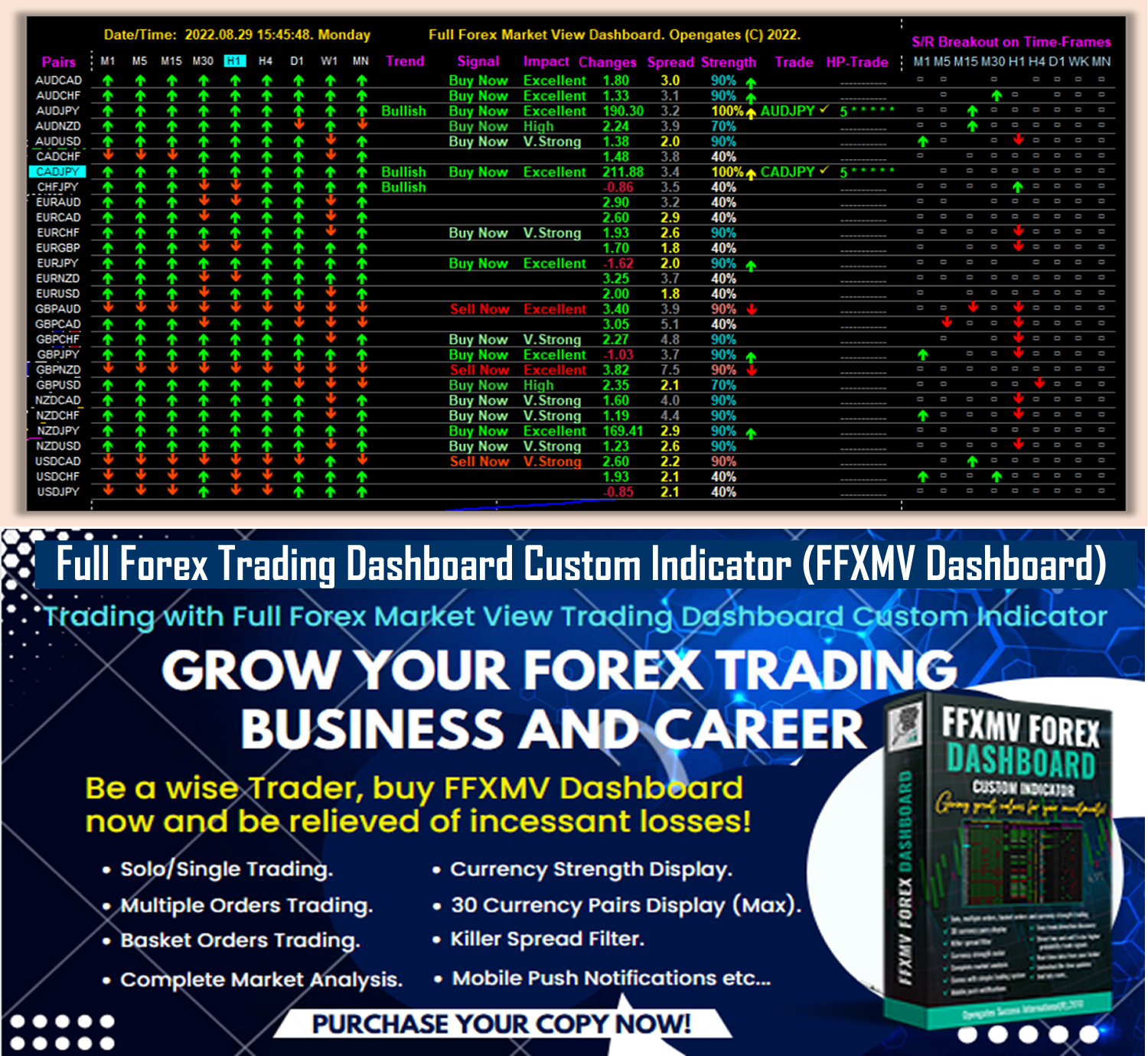
FFXMV FOREX DASHBOARD CUSTOM INDICATOR (5-STAR RATED PRODUCT) Is Now AVAILABLE in BOTH MT4 and MT5 Files (See the purchase link below):
Unlock financial success with the FFXMV Forex Trading Dashboard!
Seamlessly analyze markets and use its intuitive trading system to maximize your gains.
Wave goodbye to unnecessary losses and start thriving today!
* FFXMV Forex Trading Dashboard MT5:
https://www.mql5.com/en/market/product/144573
* FFXMV Dashboard MT4 only:
https://www.mql5.com/en/market/product/23156
* FFXMV Dashboard+CSM MT4:
https://www.mql5.com/en/market/product/40191
* FFXMV Dashboard PLUS MT4:
https://www.mql5.com/en/market/product/47406
What you stand to gain by purchasing any of the FFXMV Dashboards:
* FFXMV Dashboard custom indicator with a Life-time updates.
* Forex News calendar indicator - can set daily or weekly news ahead (with Installation Guide in PDF).
* Danger Zone indicator - To help the user avoid taking a trade that will most likely end in loss. (with Video tutorials).
* Zigzag Custom indicator - To help the user get accurate entry.
* Multiple-Orders Utility Expert advisor with ALL-IN-ONE trade managements features (For FFXMV Dashboard PLUS).
* Symbol/Time-frame Changer with In-built SUPPORT and RESISTANCE indicator and Candle timer/Spread calculator.
* Comprehensive Manual Guides in PDF on how to use FFXMV Dashboard.
* Another PDF manual on how to use Multiple Orders Utility Expert advisor (For FFXMV Dashboard PLUS).
* Its MT5 Version can be found here: https://www.mql5.com/en/market/product/144573
* You-tube Videos on how to use FFXMV Dashboard, Multiple Orders Utility EA and other forex trading tools are available on our Youtube Channel => https://www.youtube.com/@ffxmvdashboards
* YOU ARE NOT ALONE: You shall be added to our PAID Members Group where you can ask questions, 24/7 supports on technical and installation challenges if there is any.
GRAB IT NOW!!!
xxxxxxxxxxxxxxxxxxxxxxxxxxxxxxxxxxxxxxxxxxxxxxxxxxxxxxxxxxxxxxxxxxxxxxxxxxxxxxxxxxxxxxx
Russian:
FFXMV FOREX DASHBOARD CUSTOM INDICATOR (ПРОДУКТ С 5-ЗВЁЗДОЧНЫМ РЕЙТИНГОМ) ТЕПЕРЬ ДОСТУПЕН В ФАЙЛАХ MT4 и MT5 (См. ссылку для покупки ниже):
Откройте финансовый успех с FFXMV Forex Trading Dashboard!
Легко анализируйте рынки и используйте его интуитивную торговую систему, чтобы максимизировать свою прибыль.
Попрощайтесь с ненужными убытками и начните зарабатывать уже сегодня!
FFXMV Forex Trading Dashboard MT5:
https://www.mql5.com/en/market/product/144573
FFXMV Dashboard MT4 только:
https://www.mql5.com/en/market/product/23156
FFXMV Dashboard+CSM MT4:
https://www.mql5.com/en/market/product/40191
FFXMV Dashboard PLUS MT4:
https://www.mql5.com/en/market/product/47406
Что вы получите, приобретая любой из FFXMV Dashboard:
Индикатор FFXMV Dashboard с пожизненными обновлениями.
Индикатор календаря Forex News – можно устанавливать новости на день или неделю вперёд (с инструкцией в PDF).
Индикатор Danger Zone – помогает избежать сделок, которые скорее всего приведут к убыткам (с видео-уроками).
Индикатор Zigzag Custom – помогает находить точные точки входа.
Утилита Multiple-Orders Expert Advisor со всеми функциями управления сделками (для FFXMV Dashboard PLUS).
Переключатель символов/таймфреймов с встроенным индикатором SUPPORT и RESISTANCE, а также таймером свечей/калькулятором спреда.
Подробные руководства в PDF о том, как использовать FFXMV Dashboard.
Дополнительное руководство в PDF о том, как использовать Multiple Orders Utility Expert Advisor (для FFXMV Dashboard PLUS).
Версия для MT5 доступна здесь: https://www.mql5.com/en/market/product/144573
Обучающие видео о том, как пользоваться FFXMV Dashboard, Multiple Orders Utility EA и другими инструментами форекс-трейдинга, доступны на нашем YouTube-канале => https://www.youtube.com/@ffxmvdashboards
ВЫ НЕ ОДНИ: Вас добавят в нашу группу платных участников, где вы сможете задавать вопросы и получать поддержку 24/7 по техническим и установочным вопросам.
ЗАХВАТЫВАЙТЕ СЕЙЧАС!!!
xxxxxxxxxxxxxxxxxxxxxxxxxxxxxxxxxxxxxxxxxxxxxxxxxxxxxxxxxxxxxxxxxxxxxxxxxxxxxxxxxxxxxxx
Chinese (Simplified):
FFXMV 外汇仪表板自定义指标(五星级产品)现已同时提供 MT4 和 MT5 文件(请查看下面的购买链接):
通过 FFXMV 外汇交易仪表板解锁财务成功!
无缝分析市场,并使用其直观的交易系统来最大化您的收益。
告别不必要的亏损,从今天开始盈利!
FFXMV Forex Trading Dashboard MT5:
https://www.mql5.com/en/market/product/144573
FFXMV Dashboard 仅限 MT4:
https://www.mql5.com/en/market/product/23156
FFXMV Dashboard+CSM MT4:
https://www.mql5.com/en/market/product/40191
FFXMV Dashboard PLUS MT4:
https://www.mql5.com/en/market/product/47406
购买任何 FFXMV 仪表板,您将获得:
带有终身更新的 FFXMV Dashboard 自定义指标。
外汇新闻日历指标 —— 可设置每日或每周新闻提醒(附带 PDF 安装指南)。
危险区指标 —— 帮助用户避免进入极有可能导致亏损的交易(附带视频教程)。
Zigzag 自定义指标 —— 帮助用户找到精确的入场点。
多订单实用程序智能交易顾问,具备一体化的交易管理功能(适用于 FFXMV Dashboard PLUS)。
符号/时间框切换器,带内置支撑与阻力指标,以及蜡烛计时器/点差计算器。
全面的 PDF 使用手册,教您如何使用 FFXMV Dashboard。
另一份 PDF 手册,教您如何使用多订单实用程序智能交易顾问(适用于 FFXMV Dashboard PLUS)。
MT5 版本可在此找到: https://www.mql5.com/en/market/product/144573
关于如何使用 FFXMV Dashboard、多订单实用 EA 以及其他外汇交易工具的 YouTube 视频,已发布在我们的频道 => https://www.youtube.com/@ffxmvdashboards
您并不孤单:您将被加入我们的付费会员群组,在那里您可以提出问题,并获得 24/7 技术与安装支持。
立即获取!!!
xxxxxxxxxxxxxxxxxxxxxxxxxxxxxxxxxxxxxxxxxxxxxxxxxxxxxxxxxxxxxxxxxxxxxxxxxxxxxxxxx
Spanish:
FFXMV FOREX DASHBOARD CUSTOM INDICATOR (PRODUCTO CALIFICADO CON 5 ESTRELLAS) YA ESTÁ DISPONIBLE EN ARCHIVOS MT4 Y MT5 (Vea el enlace de compra a continuación):
¡Desbloquea el éxito financiero con el FFXMV Forex Trading Dashboard!
Analiza los mercados sin esfuerzo y utiliza su sistema de trading intuitivo para maximizar tus ganancias.
Despídete de las pérdidas innecesarias y comienza a prosperar hoy mismo.
FFXMV Forex Trading Dashboard MT5:
https://www.mql5.com/en/market/product/144573
FFXMV Dashboard solo MT4:
https://www.mql5.com/en/market/product/23156
FFXMV Dashboard+CSM MT4:
https://www.mql5.com/en/market/product/40191
FFXMV Dashboard PLUS MT4:
https://www.mql5.com/en/market/product/47406
Lo que obtendrás al comprar cualquiera de los Dashboards FFXMV:
Indicador personalizado FFXMV Dashboard con actualizaciones de por vida.
Indicador de calendario de noticias Forex – puedes configurar noticias diarias o semanales por adelantado (con guía de instalación en PDF).
Indicador Danger Zone – para ayudar al usuario a evitar operaciones que probablemente terminen en pérdida (con tutoriales en video).
Indicador Zigzag personalizado – para ayudar al usuario a encontrar entradas precisas.
Asesor experto de utilidad Multi-Órdenes con funciones completas de gestión de operaciones (para FFXMV Dashboard PLUS).
Cambiador de símbolo/marco temporal con indicador de SOPORTE y RESISTENCIA incorporado, además de temporizador de velas/calculadora de spread.
Manuales completos en PDF sobre cómo usar el FFXMV Dashboard.
Otro manual en PDF sobre cómo usar el Asesor Experto de Multi-Órdenes (para FFXMV Dashboard PLUS).
Su versión para MT5 se encuentra aquí: https://www.mql5.com/en/market/product/144573
Videos de YouTube sobre cómo usar el FFXMV Dashboard, el EA de Multi-Órdenes y otras herramientas de trading están disponibles en nuestro canal => https://www.youtube.com/@ffxmvdashboards
NO ESTÁS SOLO: Serás añadido a nuestro grupo de miembros de pago donde podrás hacer preguntas y recibir soporte técnico e instalación 24/7.
¡¡¡CÓMPRALO AHORA!!!
xxxxxxxxxxxxxxxxxxxxxxxxxxxxxxxxxxxxxxxxxxxxxxxxxxxxxxxxxxxxxxxxxxxxxxxxxxxxxxxxxxxxxxxx
Portuguese:
FFXMV FOREX DASHBOARD CUSTOM INDICATOR (PRODUTO CLASSIFICADO COM 5 ESTRELAS) JÁ ESTÁ DISPONÍVEL NOS ARQUIVOS MT4 E MT5 (Veja o link de compra abaixo):
Desbloqueie o sucesso financeiro com o FFXMV Forex Trading Dashboard!
Analise os mercados de forma simples e utilize o seu sistema de trading intuitivo para maximizar os seus lucros.
Diga adeus às perdas desnecessárias e comece a prosperar hoje mesmo!
FFXMV Forex Trading Dashboard MT5:
https://www.mql5.com/en/market/product/144573
FFXMV Dashboard apenas MT4:
https://www.mql5.com/en/market/product/23156
FFXMV Dashboard+CSM MT4:
https://www.mql5.com/en/market/product/40191
FFXMV Dashboard PLUS MT4:
https://www.mql5.com/en/market/product/47406
O que você ganha ao adquirir qualquer um dos FFXMV Dashboards:
Indicador personalizado FFXMV Dashboard com atualizações vitalícias.
Indicador de calendário de notícias Forex – pode configurar notícias diárias ou semanais antecipadamente (com guia de instalação em PDF).
Indicador Danger Zone – ajuda o usuário a evitar operações que provavelmente terminarão em prejuízo (com tutoriais em vídeo).
Indicador Zigzag personalizado – ajuda o usuário a obter entradas precisas.
Utilitário Expert Advisor de Múltiplas Ordens com recursos completos de gestão de negociações (para FFXMV Dashboard PLUS).
Alterador de símbolo/tempo gráfico com indicador embutido de SUPORTE e RESISTÊNCIA e temporizador de velas/calculadora de spread.
Manuais completos em PDF sobre como usar o FFXMV Dashboard.
Outro manual em PDF sobre como usar o Expert Advisor de Múltiplas Ordens (para FFXMV Dashboard PLUS).
A versão para MT5 pode ser encontrada aqui: https://www.mql5.com/en/market/product/144573
Vídeos no YouTube sobre como usar o FFXMV Dashboard, o EA de Múltiplas Ordens e outras ferramentas de trading estão disponíveis em nosso canal => https://www.youtube.com/@ffxmvdashboards
VOCÊ NÃO ESTÁ SOZINHO: Você será adicionado ao nosso grupo de membros pagos, onde poderá fazer perguntas e receber suporte técnico e de instalação 24/7.
APROVEITE AGORA!!!
xxxxxxxxxxxxxxxxxxxxxxxxxxxxxxxxxxxxxxxxxxxxxxxxxxxxxxxxxxxxxxxxxxxxxxxxxxxxxxxxx
Japanese:
FFXMV FOREX DASHBOARD CUSTOM INDICATOR(5つ星評価製品)が、MT4とMT5の両方のファイルで利用可能になりました(購入リンクは下記をご覧ください):
FFXMV Forex Trading Dashboardで経済的成功を手に入れましょう!
シームレスに市場を分析し、直感的なトレーディングシステムを活用して利益を最大化。
不要な損失に別れを告げ、今日から利益を生み出しましょう!
FFXMV Forex Trading Dashboard MT5:
https://www.mql5.com/en/market/product/144573
FFXMV Dashboard MT4のみ:
https://www.mql5.com/en/market/product/23156
FFXMV Dashboard+CSM MT4:
https://www.mql5.com/en/market/product/40191
FFXMV Dashboard PLUS MT4:
https://www.mql5.com/en/market/product/47406
FFXMV Dashboardを購入すると得られるもの:
生涯アップデート付きのFFXMV Dashboardカスタムインジケーター。
Forexニュースカレンダーインジケーター – 日次または週次のニュースを事前に設定可能(PDFインストールガイド付き)。
Danger Zoneインジケーター – 損失につながる可能性の高い取引を避けるために役立ちます(ビデオチュートリアル付き)。
Zigzagカスタムインジケーター – 正確なエントリーをサポート。
複数注文ユーティリティ・エキスパートアドバイザー、オールインワンの取引管理機能付き(FFXMV Dashboard PLUS用)。
シンボル/タイムフレーム切替ツール、内蔵のサポート&レジスタンスインジケーター、キャンドルタイマー/スプレッド計算機。
FFXMV Dashboardの使い方に関する包括的なPDFマニュアル。
複数注文ユーティリティEAの使用方法についてのPDFマニュアル(FFXMV Dashboard PLUS用)。
MT5バージョンはこちらで入手可能: https://www.mql5.com/en/market/product/144573
FFXMV Dashboard、複数注文ユーティリティEA、その他のFX取引ツールの使い方に関するYouTube動画は、当社のYouTubeチャンネルでご覧いただけます => https://www.youtube.com/@ffxmvdashboards
あなたは一人ではありません:有料メンバーグループに追加され、質問ができ、技術面・インストール面の24時間サポートを受けられます。
今すぐ手に入れましょう!!!
xxxxxxxxxxxxxxxxxxxxxxxxxxxxxxxxxxxxxxxxxxxxxxxxxxxxxxxxxxxxxxxxxxxxxxxxxxxxxxxxxx
German:
FFXMV FOREX DASHBOARD CUSTOM INDICATOR (5-STERNE-BEWERTETES PRODUKT) IST JETZT IN MT4- UND MT5-DATEIEN VERFÜGBAR (Siehe den untenstehenden Kauflink):
Entfesseln Sie finanziellen Erfolg mit dem FFXMV Forex Trading Dashboard!
Analysieren Sie die Märkte nahtlos und nutzen Sie das intuitive Handelssystem, um Ihre Gewinne zu maximieren.
Verabschieden Sie sich von unnötigen Verlusten und beginnen Sie noch heute erfolgreich zu handeln!
FFXMV Forex Trading Dashboard MT5:
https://www.mql5.com/en/market/product/144573
FFXMV Dashboard nur MT4:
https://www.mql5.com/en/market/product/23156
FFXMV Dashboard+CSM MT4:
https://www.mql5.com/en/market/product/40191
FFXMV Dashboard PLUS MT4:
https://www.mql5.com/en/market/product/47406
Was Sie durch den Kauf eines der FFXMV Dashboards erhalten:
FFXMV Dashboard Custom Indicator mit lebenslangen Updates.
Forex-News-Kalender-Indikator – tägliche oder wöchentliche Nachrichten im Voraus einstellbar (mit Installationsanleitung im PDF-Format).
Danger Zone Indikator – hilft dem Benutzer, Trades zu vermeiden, die höchstwahrscheinlich im Verlust enden (mit Video-Tutorials).
Zigzag Custom Indikator – unterstützt den Benutzer beim Finden präziser Einstiege.
Multi-Orders Utility Expert Advisor mit ALL-IN-ONE Handelsmanagement-Funktionen (für FFXMV Dashboard PLUS).
Symbol-/Zeitrahmen-Wechsler mit integriertem SUPPORT- und RESISTANCE-Indikator sowie Kerzen-Timer/Spread-Rechner.
Umfassende Handbücher im PDF-Format zur Verwendung des FFXMV Dashboards.
Ein weiteres PDF-Handbuch zur Nutzung des Multi-Orders Utility Expert Advisors (für FFXMV Dashboard PLUS).
Die MT5-Version finden Sie hier: https://www.mql5.com/en/market/product/144573
YouTube-Videos zur Nutzung des FFXMV Dashboards, des Multi-Orders Utility EA und anderer Forex-Handelstools sind auf unserem YouTube-Kanal verfügbar => https://www.youtube.com/@ffxmvdashboards
SIE SIND NICHT ALLEIN: Sie werden unserer kostenpflichtigen Mitgliedergruppe hinzugefügt, wo Sie Fragen stellen und 24/7 Unterstützung bei technischen und Installationsproblemen erhalten können.
JETZT ZUGREIFEN!!!
xxxxxxxxxxxxxxxxxxxxxxxxxxxxxxxxxxxxxxxxxxxxxxxxxxxxxxxxxxxxxxxxxxxxxxxxxxxxxxxxxxxxx
Korean:
FFXMV FOREX DASHBOARD CUSTOM INDICATOR (5성급 평가 제품)이 이제 MT4와 MT5 파일 모두에서 이용 가능합니다 (아래 구매 링크 참조):
FFXMV Forex Trading Dashboard로 금융 성공을 여십시오!
시장 분석을 원활하게 수행하고 직관적인 트레이딩 시스템을 활용하여 수익을 극대화하세요.
불필요한 손실은 이제 끝내고, 오늘부터 성공을 시작하십시오!
FFXMV Forex Trading Dashboard MT5:
https://www.mql5.com/en/market/product/144573
FFXMV Dashboard MT4 전용:
https://www.mql5.com/en/market/product/23156
FFXMV Dashboard+CSM MT4:
https://www.mql5.com/en/market/product/40191
FFXMV Dashboard PLUS MT4:
https://www.mql5.com/en/market/product/47406
FFXMV Dashboard를 구매하면 얻을 수 있는 혜택:
평생 업데이트가 제공되는 FFXMV Dashboard 커스텀 인디케이터.
외환 뉴스 캘린더 인디케이터 – 일간 또는 주간 뉴스를 미리 설정 가능 (PDF 설치 가이드 포함).
Danger Zone 인디케이터 – 손실로 끝날 가능성이 높은 거래를 피할 수 있도록 도움 (비디오 튜토리얼 포함).
Zigzag 커스텀 인디케이터 – 정확한 진입을 도와줌.
다중 주문 관리 유틸리티 EA, 올인원 거래 관리 기능 제공 (FFXMV Dashboard PLUS 전용).
종목/시간 프레임 전환기, 내장된 SUPPORT & RESISTANCE 인디케이터, 캔들 타이머/스프레드 계산기 포함.
FFXMV Dashboard 사용법에 대한 종합적인 PDF 매뉴얼.
다중 주문 관리 EA 사용법에 대한 별도의 PDF 매뉴얼 (FFXMV Dashboard PLUS 전용).
MT5 버전은 여기에서 확인 가능: https://www.mql5.com/en/market/product/144573
FFXMV Dashboard, 다중 주문 EA 및 기타 외환 거래 도구 사용법에 대한 유튜브 영상은 당사 유튜브 채널에서 확인 가능 => https://www.youtube.com/@ffxmvdashboards
당신은 혼자가 아닙니다: 유료 회원 그룹에 추가되어 질문을 할 수 있으며, 기술 및 설치 문제에 대해 24/7 지원을 받으실 수 있습니다.
지금 바로 확보하세요!!!
xxxxxxxxxxxxxxxxxxxxxxxxxxxxxxxxxxxxxxxxxxxxxxxxxxxxxxxxxxxxxxxxxxxxxxxx
French:
FFXMV FOREX DASHBOARD CUSTOM INDICATOR (PRODUIT ÉVALUÉ 5 ÉTOILES) EST MAINTENANT DISPONIBLE EN FICHIERS MT4 ET MT5 (voir le lien d’achat ci-dessous) :
Débloquez le succès financier avec le FFXMV Forex Trading Dashboard !
Analysez les marchés en toute simplicité et utilisez son système de trading intuitif pour maximiser vos gains.
Dites adieu aux pertes inutiles et commencez à prospérer dès aujourd’hui !
FFXMV Forex Trading Dashboard MT5 :
https://www.mql5.com/en/market/product/144573
FFXMV Dashboard uniquement MT4 :
https://www.mql5.com/en/market/product/23156
FFXMV Dashboard+CSM MT4 :
https://www.mql5.com/en/market/product/40191
FFXMV Dashboard PLUS MT4 :
https://www.mql5.com/en/market/product/47406
Ce que vous gagnez en achetant l’un des Dashboards FFXMV :
Indicateur personnalisé FFXMV Dashboard avec mises à jour à vie.
Indicateur de calendrier des nouvelles Forex – possibilité de planifier les nouvelles quotidiennes ou hebdomadaires (avec guide d’installation en PDF).
Indicateur Danger Zone – aide l’utilisateur à éviter des trades qui se termineront très probablement en perte (avec tutoriels vidéo).
Indicateur Zigzag personnalisé – aide l’utilisateur à obtenir des points d’entrée précis.
Utilitaire Expert Advisor Multi-Ordres avec fonctions complètes de gestion de trade (pour FFXMV Dashboard PLUS).
Changeur de symbole/unité de temps avec indicateur intégré de SUPPORT et RÉSISTANCE, ainsi que minuteur de bougie/calculateur de spread.
Guides complets en PDF sur l’utilisation du FFXMV Dashboard.
Un autre guide PDF sur l’utilisation de l’Expert Advisor Multi-Ordres (pour FFXMV Dashboard PLUS).
La version MT5 se trouve ici : https://www.mql5.com/en/market/product/144573
Des vidéos YouTube expliquant comment utiliser le FFXMV Dashboard, l’EA Multi-Ordres et d’autres outils de trading Forex sont disponibles sur notre chaîne YouTube => https://www.youtube.com/@ffxmvdashboards
VOUS N’ÊTES PAS SEUL : Vous serez ajouté à notre groupe de membres payants où vous pourrez poser vos questions et bénéficier d’une assistance technique et d’installation 24h/24 et 7j/7.
OBTENEZ-LE MAINTENANT !!!
xxxxxxxxxxxxxxxxxxxxxxxxxxxxxxxxxxxxxxxxxxxxxxxxxxxxxxxxxxxxxxxxxxxxxxxxxxxxxxxxx
Italian:
FFXMV FOREX DASHBOARD CUSTOM INDICATOR (PRODOTTO VALUTATO 5 STELLE) È ORA DISPONIBILE NEI FILE MT4 E MT5 (vedi il link per l’acquisto qui sotto):
Sblocca il successo finanziario con il FFXMV Forex Trading Dashboard!
Analizza i mercati senza sforzo e utilizza il suo sistema di trading intuitivo per massimizzare i tuoi guadagni.
Dì addio alle perdite inutili e inizia a prosperare oggi stesso!
FFXMV Forex Trading Dashboard MT5:
https://www.mql5.com/en/market/product/144573
FFXMV Dashboard solo MT4:
https://www.mql5.com/en/market/product/23156
FFXMV Dashboard+CSM MT4:
https://www.mql5.com/en/market/product/40191
FFXMV Dashboard PLUS MT4:
https://www.mql5.com/en/market/product/47406
Cosa ottieni acquistando uno qualsiasi dei Dashboards FFXMV:
Indicatore personalizzato FFXMV Dashboard con aggiornamenti a vita.
Indicatore calendario notizie Forex – possibilità di impostare notizie giornaliere o settimanali in anticipo (con guida all’installazione in PDF).
Indicatore Danger Zone – aiuta l’utente a evitare operazioni che molto probabilmente finiranno in perdita (con video tutorial).
Indicatore Zigzag personalizzato – aiuta l’utente a trovare ingressi precisi.
Utility Expert Advisor Multi-Ordini con funzioni di gestione del trade ALL-IN-ONE (per FFXMV Dashboard PLUS).
Cambia simbolo/time-frame con indicatore SUPPORTO e RESISTENZA integrato e timer delle candele/calcolatore di spread.
Manuali completi in PDF su come utilizzare FFXMV Dashboard.
Un altro manuale PDF su come utilizzare l’Expert Advisor Multi-Ordini (per FFXMV Dashboard PLUS).
La versione MT5 è disponibile qui: https://www.mql5.com/en/market/product/144573
Video YouTube su come utilizzare FFXMV Dashboard, l’EA Multi-Ordini e altri strumenti di trading Forex sono disponibili sul nostro canale YouTube => https://www.youtube.com/@ffxmvdashboards
NON SEI SOLO: sarai aggiunto al nostro gruppo membri a pagamento dove potrai fare domande e ricevere supporto tecnico e per l’installazione 24/7.
PRENDILO ORA!!!
xxxxxxxxxxxxxxxxxxxxxxxxxxxxxxxxxxxxxxxxxxxxxxxxxxxxxxxxxxxxxxxxxxxxxxxx
Turkish:
FFXMV FOREX DASHBOARD CUSTOM INDICATOR (5 YILDIZLI ÜRÜN) ARTIK HEM MT4 HEM DE MT5 DOSYALARINDA MEVCUT (Satın alma bağlantısını aşağıda görebilirsiniz):
FFXMV Forex Trading Dashboard ile finansal başarıya ulaşın!
Piyasaları zahmetsizce analiz edin ve kazancınızı en üst düzeye çıkarmak için sezgisel işlem sistemini kullanın.
Gereksiz kayıplara elveda deyin ve bugünden itibaren kazanmaya başlayın!
FFXMV Forex Trading Dashboard MT5:
https://www.mql5.com/en/market/product/144573
FFXMV Dashboard sadece MT4:
https://www.mql5.com/en/market/product/23156
FFXMV Dashboard+CSM MT4:
https://www.mql5.com/en/market/product/40191
FFXMV Dashboard PLUS MT4:
https://www.mql5.com/en/market/product/47406
FFXMV Dashboard’lardan herhangi birini satın aldığınızda elde edeceğiniz avantajlar:
Ömür boyu güncellemelerle birlikte FFXMV Dashboard özel indikatörü.
Forex Haber Takvimi indikatörü – günlük veya haftalık haberleri önceden ayarlayabilme (PDF kurulum kılavuzu ile birlikte).
Danger Zone indikatörü – büyük ihtimalle zararla sonuçlanacak işlemlerden kaçınmanıza yardımcı olur (video eğitimleri ile).
Zigzag özel indikatörü – doğru giriş noktalarını bulmanıza yardımcı olur.
Çoklu Emirler Yardımcı Expert Advisor – TÜM-İÇİNDE işlem yönetim özellikleriyle (FFXMV Dashboard PLUS için).
Sembol/Zaman dilimi değiştirici – yerleşik DESTEK ve DİRENÇ indikatörü, mum sayacı/spread hesaplayıcı ile.
FFXMV Dashboard’un nasıl kullanılacağını anlatan kapsamlı PDF kılavuzları.
Çoklu Emirler Yardımcı Expert Advisor’un nasıl kullanılacağını anlatan başka bir PDF kılavuzu (FFXMV Dashboard PLUS için).
MT5 versiyonu burada bulunabilir: https://www.mql5.com/en/market/product/144573
FFXMV Dashboard, Çoklu Emirler EA ve diğer forex işlem araçlarının kullanımına dair YouTube videoları kanalımızda mevcut => https://www.youtube.com/@ffxmvdashboards
YALNIZ DEĞİLSİNİZ: Sorularınızı sorabileceğiniz, teknik ve kurulum desteği alabileceğiniz 7/24 destekli ücretli üyeler grubumuza ekleneceksiniz.
ŞİMDİ SATIN ALIN!!!
Unlock financial success with the FFXMV Forex Trading Dashboard!
Seamlessly analyze markets and use its intuitive trading system to maximize your gains.
Wave goodbye to unnecessary losses and start thriving today!
* FFXMV Forex Trading Dashboard MT5:
https://www.mql5.com/en/market/product/144573
* FFXMV Dashboard MT4 only:
https://www.mql5.com/en/market/product/23156
* FFXMV Dashboard+CSM MT4:
https://www.mql5.com/en/market/product/40191
* FFXMV Dashboard PLUS MT4:
https://www.mql5.com/en/market/product/47406
What you stand to gain by purchasing any of the FFXMV Dashboards:
* FFXMV Dashboard custom indicator with a Life-time updates.
* Forex News calendar indicator - can set daily or weekly news ahead (with Installation Guide in PDF).
* Danger Zone indicator - To help the user avoid taking a trade that will most likely end in loss. (with Video tutorials).
* Zigzag Custom indicator - To help the user get accurate entry.
* Multiple-Orders Utility Expert advisor with ALL-IN-ONE trade managements features (For FFXMV Dashboard PLUS).
* Symbol/Time-frame Changer with In-built SUPPORT and RESISTANCE indicator and Candle timer/Spread calculator.
* Comprehensive Manual Guides in PDF on how to use FFXMV Dashboard.
* Another PDF manual on how to use Multiple Orders Utility Expert advisor (For FFXMV Dashboard PLUS).
* Its MT5 Version can be found here: https://www.mql5.com/en/market/product/144573
* You-tube Videos on how to use FFXMV Dashboard, Multiple Orders Utility EA and other forex trading tools are available on our Youtube Channel => https://www.youtube.com/@ffxmvdashboards
* YOU ARE NOT ALONE: You shall be added to our PAID Members Group where you can ask questions, 24/7 supports on technical and installation challenges if there is any.
GRAB IT NOW!!!
xxxxxxxxxxxxxxxxxxxxxxxxxxxxxxxxxxxxxxxxxxxxxxxxxxxxxxxxxxxxxxxxxxxxxxxxxxxxxxxxxxxxxxx
Russian:
FFXMV FOREX DASHBOARD CUSTOM INDICATOR (ПРОДУКТ С 5-ЗВЁЗДОЧНЫМ РЕЙТИНГОМ) ТЕПЕРЬ ДОСТУПЕН В ФАЙЛАХ MT4 и MT5 (См. ссылку для покупки ниже):
Откройте финансовый успех с FFXMV Forex Trading Dashboard!
Легко анализируйте рынки и используйте его интуитивную торговую систему, чтобы максимизировать свою прибыль.
Попрощайтесь с ненужными убытками и начните зарабатывать уже сегодня!
FFXMV Forex Trading Dashboard MT5:
https://www.mql5.com/en/market/product/144573
FFXMV Dashboard MT4 только:
https://www.mql5.com/en/market/product/23156
FFXMV Dashboard+CSM MT4:
https://www.mql5.com/en/market/product/40191
FFXMV Dashboard PLUS MT4:
https://www.mql5.com/en/market/product/47406
Что вы получите, приобретая любой из FFXMV Dashboard:
Индикатор FFXMV Dashboard с пожизненными обновлениями.
Индикатор календаря Forex News – можно устанавливать новости на день или неделю вперёд (с инструкцией в PDF).
Индикатор Danger Zone – помогает избежать сделок, которые скорее всего приведут к убыткам (с видео-уроками).
Индикатор Zigzag Custom – помогает находить точные точки входа.
Утилита Multiple-Orders Expert Advisor со всеми функциями управления сделками (для FFXMV Dashboard PLUS).
Переключатель символов/таймфреймов с встроенным индикатором SUPPORT и RESISTANCE, а также таймером свечей/калькулятором спреда.
Подробные руководства в PDF о том, как использовать FFXMV Dashboard.
Дополнительное руководство в PDF о том, как использовать Multiple Orders Utility Expert Advisor (для FFXMV Dashboard PLUS).
Версия для MT5 доступна здесь: https://www.mql5.com/en/market/product/144573
Обучающие видео о том, как пользоваться FFXMV Dashboard, Multiple Orders Utility EA и другими инструментами форекс-трейдинга, доступны на нашем YouTube-канале => https://www.youtube.com/@ffxmvdashboards
ВЫ НЕ ОДНИ: Вас добавят в нашу группу платных участников, где вы сможете задавать вопросы и получать поддержку 24/7 по техническим и установочным вопросам.
ЗАХВАТЫВАЙТЕ СЕЙЧАС!!!
xxxxxxxxxxxxxxxxxxxxxxxxxxxxxxxxxxxxxxxxxxxxxxxxxxxxxxxxxxxxxxxxxxxxxxxxxxxxxxxxxxxxxxx
Chinese (Simplified):
FFXMV 外汇仪表板自定义指标(五星级产品)现已同时提供 MT4 和 MT5 文件(请查看下面的购买链接):
通过 FFXMV 外汇交易仪表板解锁财务成功!
无缝分析市场,并使用其直观的交易系统来最大化您的收益。
告别不必要的亏损,从今天开始盈利!
FFXMV Forex Trading Dashboard MT5:
https://www.mql5.com/en/market/product/144573
FFXMV Dashboard 仅限 MT4:
https://www.mql5.com/en/market/product/23156
FFXMV Dashboard+CSM MT4:
https://www.mql5.com/en/market/product/40191
FFXMV Dashboard PLUS MT4:
https://www.mql5.com/en/market/product/47406
购买任何 FFXMV 仪表板,您将获得:
带有终身更新的 FFXMV Dashboard 自定义指标。
外汇新闻日历指标 —— 可设置每日或每周新闻提醒(附带 PDF 安装指南)。
危险区指标 —— 帮助用户避免进入极有可能导致亏损的交易(附带视频教程)。
Zigzag 自定义指标 —— 帮助用户找到精确的入场点。
多订单实用程序智能交易顾问,具备一体化的交易管理功能(适用于 FFXMV Dashboard PLUS)。
符号/时间框切换器,带内置支撑与阻力指标,以及蜡烛计时器/点差计算器。
全面的 PDF 使用手册,教您如何使用 FFXMV Dashboard。
另一份 PDF 手册,教您如何使用多订单实用程序智能交易顾问(适用于 FFXMV Dashboard PLUS)。
MT5 版本可在此找到: https://www.mql5.com/en/market/product/144573
关于如何使用 FFXMV Dashboard、多订单实用 EA 以及其他外汇交易工具的 YouTube 视频,已发布在我们的频道 => https://www.youtube.com/@ffxmvdashboards
您并不孤单:您将被加入我们的付费会员群组,在那里您可以提出问题,并获得 24/7 技术与安装支持。
立即获取!!!
xxxxxxxxxxxxxxxxxxxxxxxxxxxxxxxxxxxxxxxxxxxxxxxxxxxxxxxxxxxxxxxxxxxxxxxxxxxxxxxxx
Spanish:
FFXMV FOREX DASHBOARD CUSTOM INDICATOR (PRODUCTO CALIFICADO CON 5 ESTRELLAS) YA ESTÁ DISPONIBLE EN ARCHIVOS MT4 Y MT5 (Vea el enlace de compra a continuación):
¡Desbloquea el éxito financiero con el FFXMV Forex Trading Dashboard!
Analiza los mercados sin esfuerzo y utiliza su sistema de trading intuitivo para maximizar tus ganancias.
Despídete de las pérdidas innecesarias y comienza a prosperar hoy mismo.
FFXMV Forex Trading Dashboard MT5:
https://www.mql5.com/en/market/product/144573
FFXMV Dashboard solo MT4:
https://www.mql5.com/en/market/product/23156
FFXMV Dashboard+CSM MT4:
https://www.mql5.com/en/market/product/40191
FFXMV Dashboard PLUS MT4:
https://www.mql5.com/en/market/product/47406
Lo que obtendrás al comprar cualquiera de los Dashboards FFXMV:
Indicador personalizado FFXMV Dashboard con actualizaciones de por vida.
Indicador de calendario de noticias Forex – puedes configurar noticias diarias o semanales por adelantado (con guía de instalación en PDF).
Indicador Danger Zone – para ayudar al usuario a evitar operaciones que probablemente terminen en pérdida (con tutoriales en video).
Indicador Zigzag personalizado – para ayudar al usuario a encontrar entradas precisas.
Asesor experto de utilidad Multi-Órdenes con funciones completas de gestión de operaciones (para FFXMV Dashboard PLUS).
Cambiador de símbolo/marco temporal con indicador de SOPORTE y RESISTENCIA incorporado, además de temporizador de velas/calculadora de spread.
Manuales completos en PDF sobre cómo usar el FFXMV Dashboard.
Otro manual en PDF sobre cómo usar el Asesor Experto de Multi-Órdenes (para FFXMV Dashboard PLUS).
Su versión para MT5 se encuentra aquí: https://www.mql5.com/en/market/product/144573
Videos de YouTube sobre cómo usar el FFXMV Dashboard, el EA de Multi-Órdenes y otras herramientas de trading están disponibles en nuestro canal => https://www.youtube.com/@ffxmvdashboards
NO ESTÁS SOLO: Serás añadido a nuestro grupo de miembros de pago donde podrás hacer preguntas y recibir soporte técnico e instalación 24/7.
¡¡¡CÓMPRALO AHORA!!!
xxxxxxxxxxxxxxxxxxxxxxxxxxxxxxxxxxxxxxxxxxxxxxxxxxxxxxxxxxxxxxxxxxxxxxxxxxxxxxxxxxxxxxxx
Portuguese:
FFXMV FOREX DASHBOARD CUSTOM INDICATOR (PRODUTO CLASSIFICADO COM 5 ESTRELAS) JÁ ESTÁ DISPONÍVEL NOS ARQUIVOS MT4 E MT5 (Veja o link de compra abaixo):
Desbloqueie o sucesso financeiro com o FFXMV Forex Trading Dashboard!
Analise os mercados de forma simples e utilize o seu sistema de trading intuitivo para maximizar os seus lucros.
Diga adeus às perdas desnecessárias e comece a prosperar hoje mesmo!
FFXMV Forex Trading Dashboard MT5:
https://www.mql5.com/en/market/product/144573
FFXMV Dashboard apenas MT4:
https://www.mql5.com/en/market/product/23156
FFXMV Dashboard+CSM MT4:
https://www.mql5.com/en/market/product/40191
FFXMV Dashboard PLUS MT4:
https://www.mql5.com/en/market/product/47406
O que você ganha ao adquirir qualquer um dos FFXMV Dashboards:
Indicador personalizado FFXMV Dashboard com atualizações vitalícias.
Indicador de calendário de notícias Forex – pode configurar notícias diárias ou semanais antecipadamente (com guia de instalação em PDF).
Indicador Danger Zone – ajuda o usuário a evitar operações que provavelmente terminarão em prejuízo (com tutoriais em vídeo).
Indicador Zigzag personalizado – ajuda o usuário a obter entradas precisas.
Utilitário Expert Advisor de Múltiplas Ordens com recursos completos de gestão de negociações (para FFXMV Dashboard PLUS).
Alterador de símbolo/tempo gráfico com indicador embutido de SUPORTE e RESISTÊNCIA e temporizador de velas/calculadora de spread.
Manuais completos em PDF sobre como usar o FFXMV Dashboard.
Outro manual em PDF sobre como usar o Expert Advisor de Múltiplas Ordens (para FFXMV Dashboard PLUS).
A versão para MT5 pode ser encontrada aqui: https://www.mql5.com/en/market/product/144573
Vídeos no YouTube sobre como usar o FFXMV Dashboard, o EA de Múltiplas Ordens e outras ferramentas de trading estão disponíveis em nosso canal => https://www.youtube.com/@ffxmvdashboards
VOCÊ NÃO ESTÁ SOZINHO: Você será adicionado ao nosso grupo de membros pagos, onde poderá fazer perguntas e receber suporte técnico e de instalação 24/7.
APROVEITE AGORA!!!
xxxxxxxxxxxxxxxxxxxxxxxxxxxxxxxxxxxxxxxxxxxxxxxxxxxxxxxxxxxxxxxxxxxxxxxxxxxxxxxxx
Japanese:
FFXMV FOREX DASHBOARD CUSTOM INDICATOR(5つ星評価製品)が、MT4とMT5の両方のファイルで利用可能になりました(購入リンクは下記をご覧ください):
FFXMV Forex Trading Dashboardで経済的成功を手に入れましょう!
シームレスに市場を分析し、直感的なトレーディングシステムを活用して利益を最大化。
不要な損失に別れを告げ、今日から利益を生み出しましょう!
FFXMV Forex Trading Dashboard MT5:
https://www.mql5.com/en/market/product/144573
FFXMV Dashboard MT4のみ:
https://www.mql5.com/en/market/product/23156
FFXMV Dashboard+CSM MT4:
https://www.mql5.com/en/market/product/40191
FFXMV Dashboard PLUS MT4:
https://www.mql5.com/en/market/product/47406
FFXMV Dashboardを購入すると得られるもの:
生涯アップデート付きのFFXMV Dashboardカスタムインジケーター。
Forexニュースカレンダーインジケーター – 日次または週次のニュースを事前に設定可能(PDFインストールガイド付き)。
Danger Zoneインジケーター – 損失につながる可能性の高い取引を避けるために役立ちます(ビデオチュートリアル付き)。
Zigzagカスタムインジケーター – 正確なエントリーをサポート。
複数注文ユーティリティ・エキスパートアドバイザー、オールインワンの取引管理機能付き(FFXMV Dashboard PLUS用)。
シンボル/タイムフレーム切替ツール、内蔵のサポート&レジスタンスインジケーター、キャンドルタイマー/スプレッド計算機。
FFXMV Dashboardの使い方に関する包括的なPDFマニュアル。
複数注文ユーティリティEAの使用方法についてのPDFマニュアル(FFXMV Dashboard PLUS用)。
MT5バージョンはこちらで入手可能: https://www.mql5.com/en/market/product/144573
FFXMV Dashboard、複数注文ユーティリティEA、その他のFX取引ツールの使い方に関するYouTube動画は、当社のYouTubeチャンネルでご覧いただけます => https://www.youtube.com/@ffxmvdashboards
あなたは一人ではありません:有料メンバーグループに追加され、質問ができ、技術面・インストール面の24時間サポートを受けられます。
今すぐ手に入れましょう!!!
xxxxxxxxxxxxxxxxxxxxxxxxxxxxxxxxxxxxxxxxxxxxxxxxxxxxxxxxxxxxxxxxxxxxxxxxxxxxxxxxxx
German:
FFXMV FOREX DASHBOARD CUSTOM INDICATOR (5-STERNE-BEWERTETES PRODUKT) IST JETZT IN MT4- UND MT5-DATEIEN VERFÜGBAR (Siehe den untenstehenden Kauflink):
Entfesseln Sie finanziellen Erfolg mit dem FFXMV Forex Trading Dashboard!
Analysieren Sie die Märkte nahtlos und nutzen Sie das intuitive Handelssystem, um Ihre Gewinne zu maximieren.
Verabschieden Sie sich von unnötigen Verlusten und beginnen Sie noch heute erfolgreich zu handeln!
FFXMV Forex Trading Dashboard MT5:
https://www.mql5.com/en/market/product/144573
FFXMV Dashboard nur MT4:
https://www.mql5.com/en/market/product/23156
FFXMV Dashboard+CSM MT4:
https://www.mql5.com/en/market/product/40191
FFXMV Dashboard PLUS MT4:
https://www.mql5.com/en/market/product/47406
Was Sie durch den Kauf eines der FFXMV Dashboards erhalten:
FFXMV Dashboard Custom Indicator mit lebenslangen Updates.
Forex-News-Kalender-Indikator – tägliche oder wöchentliche Nachrichten im Voraus einstellbar (mit Installationsanleitung im PDF-Format).
Danger Zone Indikator – hilft dem Benutzer, Trades zu vermeiden, die höchstwahrscheinlich im Verlust enden (mit Video-Tutorials).
Zigzag Custom Indikator – unterstützt den Benutzer beim Finden präziser Einstiege.
Multi-Orders Utility Expert Advisor mit ALL-IN-ONE Handelsmanagement-Funktionen (für FFXMV Dashboard PLUS).
Symbol-/Zeitrahmen-Wechsler mit integriertem SUPPORT- und RESISTANCE-Indikator sowie Kerzen-Timer/Spread-Rechner.
Umfassende Handbücher im PDF-Format zur Verwendung des FFXMV Dashboards.
Ein weiteres PDF-Handbuch zur Nutzung des Multi-Orders Utility Expert Advisors (für FFXMV Dashboard PLUS).
Die MT5-Version finden Sie hier: https://www.mql5.com/en/market/product/144573
YouTube-Videos zur Nutzung des FFXMV Dashboards, des Multi-Orders Utility EA und anderer Forex-Handelstools sind auf unserem YouTube-Kanal verfügbar => https://www.youtube.com/@ffxmvdashboards
SIE SIND NICHT ALLEIN: Sie werden unserer kostenpflichtigen Mitgliedergruppe hinzugefügt, wo Sie Fragen stellen und 24/7 Unterstützung bei technischen und Installationsproblemen erhalten können.
JETZT ZUGREIFEN!!!
xxxxxxxxxxxxxxxxxxxxxxxxxxxxxxxxxxxxxxxxxxxxxxxxxxxxxxxxxxxxxxxxxxxxxxxxxxxxxxxxxxxxx
Korean:
FFXMV FOREX DASHBOARD CUSTOM INDICATOR (5성급 평가 제품)이 이제 MT4와 MT5 파일 모두에서 이용 가능합니다 (아래 구매 링크 참조):
FFXMV Forex Trading Dashboard로 금융 성공을 여십시오!
시장 분석을 원활하게 수행하고 직관적인 트레이딩 시스템을 활용하여 수익을 극대화하세요.
불필요한 손실은 이제 끝내고, 오늘부터 성공을 시작하십시오!
FFXMV Forex Trading Dashboard MT5:
https://www.mql5.com/en/market/product/144573
FFXMV Dashboard MT4 전용:
https://www.mql5.com/en/market/product/23156
FFXMV Dashboard+CSM MT4:
https://www.mql5.com/en/market/product/40191
FFXMV Dashboard PLUS MT4:
https://www.mql5.com/en/market/product/47406
FFXMV Dashboard를 구매하면 얻을 수 있는 혜택:
평생 업데이트가 제공되는 FFXMV Dashboard 커스텀 인디케이터.
외환 뉴스 캘린더 인디케이터 – 일간 또는 주간 뉴스를 미리 설정 가능 (PDF 설치 가이드 포함).
Danger Zone 인디케이터 – 손실로 끝날 가능성이 높은 거래를 피할 수 있도록 도움 (비디오 튜토리얼 포함).
Zigzag 커스텀 인디케이터 – 정확한 진입을 도와줌.
다중 주문 관리 유틸리티 EA, 올인원 거래 관리 기능 제공 (FFXMV Dashboard PLUS 전용).
종목/시간 프레임 전환기, 내장된 SUPPORT & RESISTANCE 인디케이터, 캔들 타이머/스프레드 계산기 포함.
FFXMV Dashboard 사용법에 대한 종합적인 PDF 매뉴얼.
다중 주문 관리 EA 사용법에 대한 별도의 PDF 매뉴얼 (FFXMV Dashboard PLUS 전용).
MT5 버전은 여기에서 확인 가능: https://www.mql5.com/en/market/product/144573
FFXMV Dashboard, 다중 주문 EA 및 기타 외환 거래 도구 사용법에 대한 유튜브 영상은 당사 유튜브 채널에서 확인 가능 => https://www.youtube.com/@ffxmvdashboards
당신은 혼자가 아닙니다: 유료 회원 그룹에 추가되어 질문을 할 수 있으며, 기술 및 설치 문제에 대해 24/7 지원을 받으실 수 있습니다.
지금 바로 확보하세요!!!
xxxxxxxxxxxxxxxxxxxxxxxxxxxxxxxxxxxxxxxxxxxxxxxxxxxxxxxxxxxxxxxxxxxxxxxx
French:
FFXMV FOREX DASHBOARD CUSTOM INDICATOR (PRODUIT ÉVALUÉ 5 ÉTOILES) EST MAINTENANT DISPONIBLE EN FICHIERS MT4 ET MT5 (voir le lien d’achat ci-dessous) :
Débloquez le succès financier avec le FFXMV Forex Trading Dashboard !
Analysez les marchés en toute simplicité et utilisez son système de trading intuitif pour maximiser vos gains.
Dites adieu aux pertes inutiles et commencez à prospérer dès aujourd’hui !
FFXMV Forex Trading Dashboard MT5 :
https://www.mql5.com/en/market/product/144573
FFXMV Dashboard uniquement MT4 :
https://www.mql5.com/en/market/product/23156
FFXMV Dashboard+CSM MT4 :
https://www.mql5.com/en/market/product/40191
FFXMV Dashboard PLUS MT4 :
https://www.mql5.com/en/market/product/47406
Ce que vous gagnez en achetant l’un des Dashboards FFXMV :
Indicateur personnalisé FFXMV Dashboard avec mises à jour à vie.
Indicateur de calendrier des nouvelles Forex – possibilité de planifier les nouvelles quotidiennes ou hebdomadaires (avec guide d’installation en PDF).
Indicateur Danger Zone – aide l’utilisateur à éviter des trades qui se termineront très probablement en perte (avec tutoriels vidéo).
Indicateur Zigzag personnalisé – aide l’utilisateur à obtenir des points d’entrée précis.
Utilitaire Expert Advisor Multi-Ordres avec fonctions complètes de gestion de trade (pour FFXMV Dashboard PLUS).
Changeur de symbole/unité de temps avec indicateur intégré de SUPPORT et RÉSISTANCE, ainsi que minuteur de bougie/calculateur de spread.
Guides complets en PDF sur l’utilisation du FFXMV Dashboard.
Un autre guide PDF sur l’utilisation de l’Expert Advisor Multi-Ordres (pour FFXMV Dashboard PLUS).
La version MT5 se trouve ici : https://www.mql5.com/en/market/product/144573
Des vidéos YouTube expliquant comment utiliser le FFXMV Dashboard, l’EA Multi-Ordres et d’autres outils de trading Forex sont disponibles sur notre chaîne YouTube => https://www.youtube.com/@ffxmvdashboards
VOUS N’ÊTES PAS SEUL : Vous serez ajouté à notre groupe de membres payants où vous pourrez poser vos questions et bénéficier d’une assistance technique et d’installation 24h/24 et 7j/7.
OBTENEZ-LE MAINTENANT !!!
xxxxxxxxxxxxxxxxxxxxxxxxxxxxxxxxxxxxxxxxxxxxxxxxxxxxxxxxxxxxxxxxxxxxxxxxxxxxxxxxx
Italian:
FFXMV FOREX DASHBOARD CUSTOM INDICATOR (PRODOTTO VALUTATO 5 STELLE) È ORA DISPONIBILE NEI FILE MT4 E MT5 (vedi il link per l’acquisto qui sotto):
Sblocca il successo finanziario con il FFXMV Forex Trading Dashboard!
Analizza i mercati senza sforzo e utilizza il suo sistema di trading intuitivo per massimizzare i tuoi guadagni.
Dì addio alle perdite inutili e inizia a prosperare oggi stesso!
FFXMV Forex Trading Dashboard MT5:
https://www.mql5.com/en/market/product/144573
FFXMV Dashboard solo MT4:
https://www.mql5.com/en/market/product/23156
FFXMV Dashboard+CSM MT4:
https://www.mql5.com/en/market/product/40191
FFXMV Dashboard PLUS MT4:
https://www.mql5.com/en/market/product/47406
Cosa ottieni acquistando uno qualsiasi dei Dashboards FFXMV:
Indicatore personalizzato FFXMV Dashboard con aggiornamenti a vita.
Indicatore calendario notizie Forex – possibilità di impostare notizie giornaliere o settimanali in anticipo (con guida all’installazione in PDF).
Indicatore Danger Zone – aiuta l’utente a evitare operazioni che molto probabilmente finiranno in perdita (con video tutorial).
Indicatore Zigzag personalizzato – aiuta l’utente a trovare ingressi precisi.
Utility Expert Advisor Multi-Ordini con funzioni di gestione del trade ALL-IN-ONE (per FFXMV Dashboard PLUS).
Cambia simbolo/time-frame con indicatore SUPPORTO e RESISTENZA integrato e timer delle candele/calcolatore di spread.
Manuali completi in PDF su come utilizzare FFXMV Dashboard.
Un altro manuale PDF su come utilizzare l’Expert Advisor Multi-Ordini (per FFXMV Dashboard PLUS).
La versione MT5 è disponibile qui: https://www.mql5.com/en/market/product/144573
Video YouTube su come utilizzare FFXMV Dashboard, l’EA Multi-Ordini e altri strumenti di trading Forex sono disponibili sul nostro canale YouTube => https://www.youtube.com/@ffxmvdashboards
NON SEI SOLO: sarai aggiunto al nostro gruppo membri a pagamento dove potrai fare domande e ricevere supporto tecnico e per l’installazione 24/7.
PRENDILO ORA!!!
xxxxxxxxxxxxxxxxxxxxxxxxxxxxxxxxxxxxxxxxxxxxxxxxxxxxxxxxxxxxxxxxxxxxxxxx
Turkish:
FFXMV FOREX DASHBOARD CUSTOM INDICATOR (5 YILDIZLI ÜRÜN) ARTIK HEM MT4 HEM DE MT5 DOSYALARINDA MEVCUT (Satın alma bağlantısını aşağıda görebilirsiniz):
FFXMV Forex Trading Dashboard ile finansal başarıya ulaşın!
Piyasaları zahmetsizce analiz edin ve kazancınızı en üst düzeye çıkarmak için sezgisel işlem sistemini kullanın.
Gereksiz kayıplara elveda deyin ve bugünden itibaren kazanmaya başlayın!
FFXMV Forex Trading Dashboard MT5:
https://www.mql5.com/en/market/product/144573
FFXMV Dashboard sadece MT4:
https://www.mql5.com/en/market/product/23156
FFXMV Dashboard+CSM MT4:
https://www.mql5.com/en/market/product/40191
FFXMV Dashboard PLUS MT4:
https://www.mql5.com/en/market/product/47406
FFXMV Dashboard’lardan herhangi birini satın aldığınızda elde edeceğiniz avantajlar:
Ömür boyu güncellemelerle birlikte FFXMV Dashboard özel indikatörü.
Forex Haber Takvimi indikatörü – günlük veya haftalık haberleri önceden ayarlayabilme (PDF kurulum kılavuzu ile birlikte).
Danger Zone indikatörü – büyük ihtimalle zararla sonuçlanacak işlemlerden kaçınmanıza yardımcı olur (video eğitimleri ile).
Zigzag özel indikatörü – doğru giriş noktalarını bulmanıza yardımcı olur.
Çoklu Emirler Yardımcı Expert Advisor – TÜM-İÇİNDE işlem yönetim özellikleriyle (FFXMV Dashboard PLUS için).
Sembol/Zaman dilimi değiştirici – yerleşik DESTEK ve DİRENÇ indikatörü, mum sayacı/spread hesaplayıcı ile.
FFXMV Dashboard’un nasıl kullanılacağını anlatan kapsamlı PDF kılavuzları.
Çoklu Emirler Yardımcı Expert Advisor’un nasıl kullanılacağını anlatan başka bir PDF kılavuzu (FFXMV Dashboard PLUS için).
MT5 versiyonu burada bulunabilir: https://www.mql5.com/en/market/product/144573
FFXMV Dashboard, Çoklu Emirler EA ve diğer forex işlem araçlarının kullanımına dair YouTube videoları kanalımızda mevcut => https://www.youtube.com/@ffxmvdashboards
YALNIZ DEĞİLSİNİZ: Sorularınızı sorabileceğiniz, teknik ve kurulum desteği alabileceğiniz 7/24 destekli ücretli üyeler grubumuza ekleneceksiniz.
ŞİMDİ SATIN ALIN!!!
Olufemi Adeyemo

FFXMV FOREX DASHBOARD CUSTOM INDICATOR (5-STAR RATED PRODUCT) Is Now AVAILABLE in BOTH MT4 and MT5 Files (See the purchase link below):
Unlock financial success with the FFXMV Forex Trading Dashboard!
Seamlessly analyze markets and use its intuitive trading system to maximize your gains.
Wave goodbye to unnecessary losses and start thriving today!
* FFXMV Forex Trading Dashboard MT5:
https://www.mql5.com/en/market/product/144573
* FFXMV Dashboard MT4 only:
https://www.mql5.com/en/market/product/23156
* FFXMV Dashboard+CSM MT4:
https://www.mql5.com/en/market/product/40191
* FFXMV Dashboard PLUS MT4:
https://www.mql5.com/en/market/product/47406
What you stand to gain by purchasing any of the FFXMV Dashboards:
* FFXMV Dashboard custom indicator with a Life-time updates.
* Forex News calendar indicator - can set daily or weekly news ahead (with Installation Guide in PDF).
* Danger Zone indicator - To help the user avoid taking a trade that will most likely end in loss. (with Video tutorials).
* Zigzag Custom indicator - To help the user get accurate entry.
* Multiple-Orders Utility Expert advisor with ALL-IN-ONE trade managements features (For FFXMV Dashboard PLUS).
* Symbol/Time-frame Changer with In-built SUPPORT and RESISTANCE indicator and Candle timer/Spread calculator.
* Comprehensive Manual Guides in PDF on how to use FFXMV Dashboard.
* Another PDF manual on how to use Multiple Orders Utility Expert advisor (For FFXMV Dashboard PLUS).
* Its MT5 Version can be found here: https://www.mql5.com/en/market/product/144573
* You-tube Videos on how to use FFXMV Dashboard, Multiple Orders Utility EA and other forex trading tools are available on our Youtube Channel => https://www.youtube.com/@ffxmvdashboards
* YOU ARE NOT ALONE: You shall be added to our PAID Members Group where you can ask questions, 24/7 supports on technical and installation challenges if there is any.
GRAB IT NOW!!!
xxxxxxxxxxxxxxxxxxxxxxxxxxxxxxxxxxxxxxxxxxxxxxxxxxxxxxxxxxxxxxxxxxxxxxxxxxxxxxxxxxxxxxx
Russian:
FFXMV FOREX DASHBOARD CUSTOM INDICATOR (ПРОДУКТ С 5-ЗВЁЗДОЧНЫМ РЕЙТИНГОМ) ТЕПЕРЬ ДОСТУПЕН В ФАЙЛАХ MT4 и MT5 (См. ссылку для покупки ниже):
Откройте финансовый успех с FFXMV Forex Trading Dashboard!
Легко анализируйте рынки и используйте его интуитивную торговую систему, чтобы максимизировать свою прибыль.
Попрощайтесь с ненужными убытками и начните зарабатывать уже сегодня!
FFXMV Forex Trading Dashboard MT5:
https://www.mql5.com/en/market/product/144573
FFXMV Dashboard MT4 только:
https://www.mql5.com/en/market/product/23156
FFXMV Dashboard+CSM MT4:
https://www.mql5.com/en/market/product/40191
FFXMV Dashboard PLUS MT4:
https://www.mql5.com/en/market/product/47406
Что вы получите, приобретая любой из FFXMV Dashboard:
Индикатор FFXMV Dashboard с пожизненными обновлениями.
Индикатор календаря Forex News – можно устанавливать новости на день или неделю вперёд (с инструкцией в PDF).
Индикатор Danger Zone – помогает избежать сделок, которые скорее всего приведут к убыткам (с видео-уроками).
Индикатор Zigzag Custom – помогает находить точные точки входа.
Утилита Multiple-Orders Expert Advisor со всеми функциями управления сделками (для FFXMV Dashboard PLUS).
Переключатель символов/таймфреймов с встроенным индикатором SUPPORT и RESISTANCE, а также таймером свечей/калькулятором спреда.
Подробные руководства в PDF о том, как использовать FFXMV Dashboard.
Дополнительное руководство в PDF о том, как использовать Multiple Orders Utility Expert Advisor (для FFXMV Dashboard PLUS).
Версия для MT5 доступна здесь: https://www.mql5.com/en/market/product/144573
Обучающие видео о том, как пользоваться FFXMV Dashboard, Multiple Orders Utility EA и другими инструментами форекс-трейдинга, доступны на нашем YouTube-канале => https://www.youtube.com/@ffxmvdashboards
ВЫ НЕ ОДНИ: Вас добавят в нашу группу платных участников, где вы сможете задавать вопросы и получать поддержку 24/7 по техническим и установочным вопросам.
ЗАХВАТЫВАЙТЕ СЕЙЧАС!!!
xxxxxxxxxxxxxxxxxxxxxxxxxxxxxxxxxxxxxxxxxxxxxxxxxxxxxxxxxxxxxxxxxxxxxxxxxxxxxxxxxxxxxxx
Chinese (Simplified):
FFXMV 外汇仪表板自定义指标(五星级产品)现已同时提供 MT4 和 MT5 文件(请查看下面的购买链接):
通过 FFXMV 外汇交易仪表板解锁财务成功!
无缝分析市场,并使用其直观的交易系统来最大化您的收益。
告别不必要的亏损,从今天开始盈利!
FFXMV Forex Trading Dashboard MT5:
https://www.mql5.com/en/market/product/144573
FFXMV Dashboard 仅限 MT4:
https://www.mql5.com/en/market/product/23156
FFXMV Dashboard+CSM MT4:
https://www.mql5.com/en/market/product/40191
FFXMV Dashboard PLUS MT4:
https://www.mql5.com/en/market/product/47406
购买任何 FFXMV 仪表板,您将获得:
带有终身更新的 FFXMV Dashboard 自定义指标。
外汇新闻日历指标 —— 可设置每日或每周新闻提醒(附带 PDF 安装指南)。
危险区指标 —— 帮助用户避免进入极有可能导致亏损的交易(附带视频教程)。
Zigzag 自定义指标 —— 帮助用户找到精确的入场点。
多订单实用程序智能交易顾问,具备一体化的交易管理功能(适用于 FFXMV Dashboard PLUS)。
符号/时间框切换器,带内置支撑与阻力指标,以及蜡烛计时器/点差计算器。
全面的 PDF 使用手册,教您如何使用 FFXMV Dashboard。
另一份 PDF 手册,教您如何使用多订单实用程序智能交易顾问(适用于 FFXMV Dashboard PLUS)。
MT5 版本可在此找到: https://www.mql5.com/en/market/product/144573
关于如何使用 FFXMV Dashboard、多订单实用 EA 以及其他外汇交易工具的 YouTube 视频,已发布在我们的频道 => https://www.youtube.com/@ffxmvdashboards
您并不孤单:您将被加入我们的付费会员群组,在那里您可以提出问题,并获得 24/7 技术与安装支持。
立即获取!!!
xxxxxxxxxxxxxxxxxxxxxxxxxxxxxxxxxxxxxxxxxxxxxxxxxxxxxxxxxxxxxxxxxxxxxxxxxxxxxxxxx
Spanish:
FFXMV FOREX DASHBOARD CUSTOM INDICATOR (PRODUCTO CALIFICADO CON 5 ESTRELLAS) YA ESTÁ DISPONIBLE EN ARCHIVOS MT4 Y MT5 (Vea el enlace de compra a continuación):
¡Desbloquea el éxito financiero con el FFXMV Forex Trading Dashboard!
Analiza los mercados sin esfuerzo y utiliza su sistema de trading intuitivo para maximizar tus ganancias.
Despídete de las pérdidas innecesarias y comienza a prosperar hoy mismo.
FFXMV Forex Trading Dashboard MT5:
https://www.mql5.com/en/market/product/144573
FFXMV Dashboard solo MT4:
https://www.mql5.com/en/market/product/23156
FFXMV Dashboard+CSM MT4:
https://www.mql5.com/en/market/product/40191
FFXMV Dashboard PLUS MT4:
https://www.mql5.com/en/market/product/47406
Lo que obtendrás al comprar cualquiera de los Dashboards FFXMV:
Indicador personalizado FFXMV Dashboard con actualizaciones de por vida.
Indicador de calendario de noticias Forex – puedes configurar noticias diarias o semanales por adelantado (con guía de instalación en PDF).
Indicador Danger Zone – para ayudar al usuario a evitar operaciones que probablemente terminen en pérdida (con tutoriales en video).
Indicador Zigzag personalizado – para ayudar al usuario a encontrar entradas precisas.
Asesor experto de utilidad Multi-Órdenes con funciones completas de gestión de operaciones (para FFXMV Dashboard PLUS).
Cambiador de símbolo/marco temporal con indicador de SOPORTE y RESISTENCIA incorporado, además de temporizador de velas/calculadora de spread.
Manuales completos en PDF sobre cómo usar el FFXMV Dashboard.
Otro manual en PDF sobre cómo usar el Asesor Experto de Multi-Órdenes (para FFXMV Dashboard PLUS).
Su versión para MT5 se encuentra aquí: https://www.mql5.com/en/market/product/144573
Videos de YouTube sobre cómo usar el FFXMV Dashboard, el EA de Multi-Órdenes y otras herramientas de trading están disponibles en nuestro canal => https://www.youtube.com/@ffxmvdashboards
NO ESTÁS SOLO: Serás añadido a nuestro grupo de miembros de pago donde podrás hacer preguntas y recibir soporte técnico e instalación 24/7.
¡¡¡CÓMPRALO AHORA!!!
xxxxxxxxxxxxxxxxxxxxxxxxxxxxxxxxxxxxxxxxxxxxxxxxxxxxxxxxxxxxxxxxxxxxxxxxxxxxxxxxxxxxxxxx
Portuguese:
FFXMV FOREX DASHBOARD CUSTOM INDICATOR (PRODUTO CLASSIFICADO COM 5 ESTRELAS) JÁ ESTÁ DISPONÍVEL NOS ARQUIVOS MT4 E MT5 (Veja o link de compra abaixo):
Desbloqueie o sucesso financeiro com o FFXMV Forex Trading Dashboard!
Analise os mercados de forma simples e utilize o seu sistema de trading intuitivo para maximizar os seus lucros.
Diga adeus às perdas desnecessárias e comece a prosperar hoje mesmo!
FFXMV Forex Trading Dashboard MT5:
https://www.mql5.com/en/market/product/144573
FFXMV Dashboard apenas MT4:
https://www.mql5.com/en/market/product/23156
FFXMV Dashboard+CSM MT4:
https://www.mql5.com/en/market/product/40191
FFXMV Dashboard PLUS MT4:
https://www.mql5.com/en/market/product/47406
O que você ganha ao adquirir qualquer um dos FFXMV Dashboards:
Indicador personalizado FFXMV Dashboard com atualizações vitalícias.
Indicador de calendário de notícias Forex – pode configurar notícias diárias ou semanais antecipadamente (com guia de instalação em PDF).
Indicador Danger Zone – ajuda o usuário a evitar operações que provavelmente terminarão em prejuízo (com tutoriais em vídeo).
Indicador Zigzag personalizado – ajuda o usuário a obter entradas precisas.
Utilitário Expert Advisor de Múltiplas Ordens com recursos completos de gestão de negociações (para FFXMV Dashboard PLUS).
Alterador de símbolo/tempo gráfico com indicador embutido de SUPORTE e RESISTÊNCIA e temporizador de velas/calculadora de spread.
Manuais completos em PDF sobre como usar o FFXMV Dashboard.
Outro manual em PDF sobre como usar o Expert Advisor de Múltiplas Ordens (para FFXMV Dashboard PLUS).
A versão para MT5 pode ser encontrada aqui: https://www.mql5.com/en/market/product/144573
Vídeos no YouTube sobre como usar o FFXMV Dashboard, o EA de Múltiplas Ordens e outras ferramentas de trading estão disponíveis em nosso canal => https://www.youtube.com/@ffxmvdashboards
VOCÊ NÃO ESTÁ SOZINHO: Você será adicionado ao nosso grupo de membros pagos, onde poderá fazer perguntas e receber suporte técnico e de instalação 24/7.
APROVEITE AGORA!!!
xxxxxxxxxxxxxxxxxxxxxxxxxxxxxxxxxxxxxxxxxxxxxxxxxxxxxxxxxxxxxxxxxxxxxxxxxxxxxxxxx
Japanese:
FFXMV FOREX DASHBOARD CUSTOM INDICATOR(5つ星評価製品)が、MT4とMT5の両方のファイルで利用可能になりました(購入リンクは下記をご覧ください):
FFXMV Forex Trading Dashboardで経済的成功を手に入れましょう!
シームレスに市場を分析し、直感的なトレーディングシステムを活用して利益を最大化。
不要な損失に別れを告げ、今日から利益を生み出しましょう!
FFXMV Forex Trading Dashboard MT5:
https://www.mql5.com/en/market/product/144573
FFXMV Dashboard MT4のみ:
https://www.mql5.com/en/market/product/23156
FFXMV Dashboard+CSM MT4:
https://www.mql5.com/en/market/product/40191
FFXMV Dashboard PLUS MT4:
https://www.mql5.com/en/market/product/47406
FFXMV Dashboardを購入すると得られるもの:
生涯アップデート付きのFFXMV Dashboardカスタムインジケーター。
Forexニュースカレンダーインジケーター – 日次または週次のニュースを事前に設定可能(PDFインストールガイド付き)。
Danger Zoneインジケーター – 損失につながる可能性の高い取引を避けるために役立ちます(ビデオチュートリアル付き)。
Zigzagカスタムインジケーター – 正確なエントリーをサポート。
複数注文ユーティリティ・エキスパートアドバイザー、オールインワンの取引管理機能付き(FFXMV Dashboard PLUS用)。
シンボル/タイムフレーム切替ツール、内蔵のサポート&レジスタンスインジケーター、キャンドルタイマー/スプレッド計算機。
FFXMV Dashboardの使い方に関する包括的なPDFマニュアル。
複数注文ユーティリティEAの使用方法についてのPDFマニュアル(FFXMV Dashboard PLUS用)。
MT5バージョンはこちらで入手可能: https://www.mql5.com/en/market/product/144573
FFXMV Dashboard、複数注文ユーティリティEA、その他のFX取引ツールの使い方に関するYouTube動画は、当社のYouTubeチャンネルでご覧いただけます => https://www.youtube.com/@ffxmvdashboards
あなたは一人ではありません:有料メンバーグループに追加され、質問ができ、技術面・インストール面の24時間サポートを受けられます。
今すぐ手に入れましょう!!!
xxxxxxxxxxxxxxxxxxxxxxxxxxxxxxxxxxxxxxxxxxxxxxxxxxxxxxxxxxxxxxxxxxxxxxxxxxxxxxxxxx
German:
FFXMV FOREX DASHBOARD CUSTOM INDICATOR (5-STERNE-BEWERTETES PRODUKT) IST JETZT IN MT4- UND MT5-DATEIEN VERFÜGBAR (Siehe den untenstehenden Kauflink):
Entfesseln Sie finanziellen Erfolg mit dem FFXMV Forex Trading Dashboard!
Analysieren Sie die Märkte nahtlos und nutzen Sie das intuitive Handelssystem, um Ihre Gewinne zu maximieren.
Verabschieden Sie sich von unnötigen Verlusten und beginnen Sie noch heute erfolgreich zu handeln!
FFXMV Forex Trading Dashboard MT5:
https://www.mql5.com/en/market/product/144573
FFXMV Dashboard nur MT4:
https://www.mql5.com/en/market/product/23156
FFXMV Dashboard+CSM MT4:
https://www.mql5.com/en/market/product/40191
FFXMV Dashboard PLUS MT4:
https://www.mql5.com/en/market/product/47406
Was Sie durch den Kauf eines der FFXMV Dashboards erhalten:
FFXMV Dashboard Custom Indicator mit lebenslangen Updates.
Forex-News-Kalender-Indikator – tägliche oder wöchentliche Nachrichten im Voraus einstellbar (mit Installationsanleitung im PDF-Format).
Danger Zone Indikator – hilft dem Benutzer, Trades zu vermeiden, die höchstwahrscheinlich im Verlust enden (mit Video-Tutorials).
Zigzag Custom Indikator – unterstützt den Benutzer beim Finden präziser Einstiege.
Multi-Orders Utility Expert Advisor mit ALL-IN-ONE Handelsmanagement-Funktionen (für FFXMV Dashboard PLUS).
Symbol-/Zeitrahmen-Wechsler mit integriertem SUPPORT- und RESISTANCE-Indikator sowie Kerzen-Timer/Spread-Rechner.
Umfassende Handbücher im PDF-Format zur Verwendung des FFXMV Dashboards.
Ein weiteres PDF-Handbuch zur Nutzung des Multi-Orders Utility Expert Advisors (für FFXMV Dashboard PLUS).
Die MT5-Version finden Sie hier: https://www.mql5.com/en/market/product/144573
YouTube-Videos zur Nutzung des FFXMV Dashboards, des Multi-Orders Utility EA und anderer Forex-Handelstools sind auf unserem YouTube-Kanal verfügbar => https://www.youtube.com/@ffxmvdashboards
SIE SIND NICHT ALLEIN: Sie werden unserer kostenpflichtigen Mitgliedergruppe hinzugefügt, wo Sie Fragen stellen und 24/7 Unterstützung bei technischen und Installationsproblemen erhalten können.
JETZT ZUGREIFEN!!!
xxxxxxxxxxxxxxxxxxxxxxxxxxxxxxxxxxxxxxxxxxxxxxxxxxxxxxxxxxxxxxxxxxxxxxxxxxxxxxxxxxxxx
Korean:
FFXMV FOREX DASHBOARD CUSTOM INDICATOR (5성급 평가 제품)이 이제 MT4와 MT5 파일 모두에서 이용 가능합니다 (아래 구매 링크 참조):
FFXMV Forex Trading Dashboard로 금융 성공을 여십시오!
시장 분석을 원활하게 수행하고 직관적인 트레이딩 시스템을 활용하여 수익을 극대화하세요.
불필요한 손실은 이제 끝내고, 오늘부터 성공을 시작하십시오!
FFXMV Forex Trading Dashboard MT5:
https://www.mql5.com/en/market/product/144573
FFXMV Dashboard MT4 전용:
https://www.mql5.com/en/market/product/23156
FFXMV Dashboard+CSM MT4:
https://www.mql5.com/en/market/product/40191
FFXMV Dashboard PLUS MT4:
https://www.mql5.com/en/market/product/47406
FFXMV Dashboard를 구매하면 얻을 수 있는 혜택:
평생 업데이트가 제공되는 FFXMV Dashboard 커스텀 인디케이터.
외환 뉴스 캘린더 인디케이터 – 일간 또는 주간 뉴스를 미리 설정 가능 (PDF 설치 가이드 포함).
Danger Zone 인디케이터 – 손실로 끝날 가능성이 높은 거래를 피할 수 있도록 도움 (비디오 튜토리얼 포함).
Zigzag 커스텀 인디케이터 – 정확한 진입을 도와줌.
다중 주문 관리 유틸리티 EA, 올인원 거래 관리 기능 제공 (FFXMV Dashboard PLUS 전용).
종목/시간 프레임 전환기, 내장된 SUPPORT & RESISTANCE 인디케이터, 캔들 타이머/스프레드 계산기 포함.
FFXMV Dashboard 사용법에 대한 종합적인 PDF 매뉴얼.
다중 주문 관리 EA 사용법에 대한 별도의 PDF 매뉴얼 (FFXMV Dashboard PLUS 전용).
MT5 버전은 여기에서 확인 가능: https://www.mql5.com/en/market/product/144573
FFXMV Dashboard, 다중 주문 EA 및 기타 외환 거래 도구 사용법에 대한 유튜브 영상은 당사 유튜브 채널에서 확인 가능 => https://www.youtube.com/@ffxmvdashboards
당신은 혼자가 아닙니다: 유료 회원 그룹에 추가되어 질문을 할 수 있으며, 기술 및 설치 문제에 대해 24/7 지원을 받으실 수 있습니다.
지금 바로 확보하세요!!!
xxxxxxxxxxxxxxxxxxxxxxxxxxxxxxxxxxxxxxxxxxxxxxxxxxxxxxxxxxxxxxxxxxxxxxxx
French:
FFXMV FOREX DASHBOARD CUSTOM INDICATOR (PRODUIT ÉVALUÉ 5 ÉTOILES) EST MAINTENANT DISPONIBLE EN FICHIERS MT4 ET MT5 (voir le lien d’achat ci-dessous) :
Débloquez le succès financier avec le FFXMV Forex Trading Dashboard !
Analysez les marchés en toute simplicité et utilisez son système de trading intuitif pour maximiser vos gains.
Dites adieu aux pertes inutiles et commencez à prospérer dès aujourd’hui !
FFXMV Forex Trading Dashboard MT5 :
https://www.mql5.com/en/market/product/144573
FFXMV Dashboard uniquement MT4 :
https://www.mql5.com/en/market/product/23156
FFXMV Dashboard+CSM MT4 :
https://www.mql5.com/en/market/product/40191
FFXMV Dashboard PLUS MT4 :
https://www.mql5.com/en/market/product/47406
Ce que vous gagnez en achetant l’un des Dashboards FFXMV :
Indicateur personnalisé FFXMV Dashboard avec mises à jour à vie.
Indicateur de calendrier des nouvelles Forex – possibilité de planifier les nouvelles quotidiennes ou hebdomadaires (avec guide d’installation en PDF).
Indicateur Danger Zone – aide l’utilisateur à éviter des trades qui se termineront très probablement en perte (avec tutoriels vidéo).
Indicateur Zigzag personnalisé – aide l’utilisateur à obtenir des points d’entrée précis.
Utilitaire Expert Advisor Multi-Ordres avec fonctions complètes de gestion de trade (pour FFXMV Dashboard PLUS).
Changeur de symbole/unité de temps avec indicateur intégré de SUPPORT et RÉSISTANCE, ainsi que minuteur de bougie/calculateur de spread.
Guides complets en PDF sur l’utilisation du FFXMV Dashboard.
Un autre guide PDF sur l’utilisation de l’Expert Advisor Multi-Ordres (pour FFXMV Dashboard PLUS).
La version MT5 se trouve ici : https://www.mql5.com/en/market/product/144573
Des vidéos YouTube expliquant comment utiliser le FFXMV Dashboard, l’EA Multi-Ordres et d’autres outils de trading Forex sont disponibles sur notre chaîne YouTube => https://www.youtube.com/@ffxmvdashboards
VOUS N’ÊTES PAS SEUL : Vous serez ajouté à notre groupe de membres payants où vous pourrez poser vos questions et bénéficier d’une assistance technique et d’installation 24h/24 et 7j/7.
OBTENEZ-LE MAINTENANT !!!
xxxxxxxxxxxxxxxxxxxxxxxxxxxxxxxxxxxxxxxxxxxxxxxxxxxxxxxxxxxxxxxxxxxxxxxxxxxxxxxxx
Italian:
FFXMV FOREX DASHBOARD CUSTOM INDICATOR (PRODOTTO VALUTATO 5 STELLE) È ORA DISPONIBILE NEI FILE MT4 E MT5 (vedi il link per l’acquisto qui sotto):
Sblocca il successo finanziario con il FFXMV Forex Trading Dashboard!
Analizza i mercati senza sforzo e utilizza il suo sistema di trading intuitivo per massimizzare i tuoi guadagni.
Dì addio alle perdite inutili e inizia a prosperare oggi stesso!
FFXMV Forex Trading Dashboard MT5:
https://www.mql5.com/en/market/product/144573
FFXMV Dashboard solo MT4:
https://www.mql5.com/en/market/product/23156
FFXMV Dashboard+CSM MT4:
https://www.mql5.com/en/market/product/40191
FFXMV Dashboard PLUS MT4:
https://www.mql5.com/en/market/product/47406
Cosa ottieni acquistando uno qualsiasi dei Dashboards FFXMV:
Indicatore personalizzato FFXMV Dashboard con aggiornamenti a vita.
Indicatore calendario notizie Forex – possibilità di impostare notizie giornaliere o settimanali in anticipo (con guida all’installazione in PDF).
Indicatore Danger Zone – aiuta l’utente a evitare operazioni che molto probabilmente finiranno in perdita (con video tutorial).
Indicatore Zigzag personalizzato – aiuta l’utente a trovare ingressi precisi.
Utility Expert Advisor Multi-Ordini con funzioni di gestione del trade ALL-IN-ONE (per FFXMV Dashboard PLUS).
Cambia simbolo/time-frame con indicatore SUPPORTO e RESISTENZA integrato e timer delle candele/calcolatore di spread.
Manuali completi in PDF su come utilizzare FFXMV Dashboard.
Un altro manuale PDF su come utilizzare l’Expert Advisor Multi-Ordini (per FFXMV Dashboard PLUS).
La versione MT5 è disponibile qui: https://www.mql5.com/en/market/product/144573
Video YouTube su come utilizzare FFXMV Dashboard, l’EA Multi-Ordini e altri strumenti di trading Forex sono disponibili sul nostro canale YouTube => https://www.youtube.com/@ffxmvdashboards
NON SEI SOLO: sarai aggiunto al nostro gruppo membri a pagamento dove potrai fare domande e ricevere supporto tecnico e per l’installazione 24/7.
PRENDILO ORA!!!
xxxxxxxxxxxxxxxxxxxxxxxxxxxxxxxxxxxxxxxxxxxxxxxxxxxxxxxxxxxxxxxxxxxxxxxx
Turkish:
FFXMV FOREX DASHBOARD CUSTOM INDICATOR (5 YILDIZLI ÜRÜN) ARTIK HEM MT4 HEM DE MT5 DOSYALARINDA MEVCUT (Satın alma bağlantısını aşağıda görebilirsiniz):
FFXMV Forex Trading Dashboard ile finansal başarıya ulaşın!
Piyasaları zahmetsizce analiz edin ve kazancınızı en üst düzeye çıkarmak için sezgisel işlem sistemini kullanın.
Gereksiz kayıplara elveda deyin ve bugünden itibaren kazanmaya başlayın!
FFXMV Forex Trading Dashboard MT5:
https://www.mql5.com/en/market/product/144573
FFXMV Dashboard sadece MT4:
https://www.mql5.com/en/market/product/23156
FFXMV Dashboard+CSM MT4:
https://www.mql5.com/en/market/product/40191
FFXMV Dashboard PLUS MT4:
https://www.mql5.com/en/market/product/47406
FFXMV Dashboard’lardan herhangi birini satın aldığınızda elde edeceğiniz avantajlar:
Ömür boyu güncellemelerle birlikte FFXMV Dashboard özel indikatörü.
Forex Haber Takvimi indikatörü – günlük veya haftalık haberleri önceden ayarlayabilme (PDF kurulum kılavuzu ile birlikte).
Danger Zone indikatörü – büyük ihtimalle zararla sonuçlanacak işlemlerden kaçınmanıza yardımcı olur (video eğitimleri ile).
Zigzag özel indikatörü – doğru giriş noktalarını bulmanıza yardımcı olur.
Çoklu Emirler Yardımcı Expert Advisor – TÜM-İÇİNDE işlem yönetim özellikleriyle (FFXMV Dashboard PLUS için).
Sembol/Zaman dilimi değiştirici – yerleşik DESTEK ve DİRENÇ indikatörü, mum sayacı/spread hesaplayıcı ile.
FFXMV Dashboard’un nasıl kullanılacağını anlatan kapsamlı PDF kılavuzları.
Çoklu Emirler Yardımcı Expert Advisor’un nasıl kullanılacağını anlatan başka bir PDF kılavuzu (FFXMV Dashboard PLUS için).
MT5 versiyonu burada bulunabilir: https://www.mql5.com/en/market/product/144573
FFXMV Dashboard, Çoklu Emirler EA ve diğer forex işlem araçlarının kullanımına dair YouTube videoları kanalımızda mevcut => https://www.youtube.com/@ffxmvdashboards
YALNIZ DEĞİLSİNİZ: Sorularınızı sorabileceğiniz, teknik ve kurulum desteği alabileceğiniz 7/24 destekli ücretli üyeler grubumuza ekleneceksiniz.
ŞİMDİ SATIN ALIN!!!
Unlock financial success with the FFXMV Forex Trading Dashboard!
Seamlessly analyze markets and use its intuitive trading system to maximize your gains.
Wave goodbye to unnecessary losses and start thriving today!
* FFXMV Forex Trading Dashboard MT5:
https://www.mql5.com/en/market/product/144573
* FFXMV Dashboard MT4 only:
https://www.mql5.com/en/market/product/23156
* FFXMV Dashboard+CSM MT4:
https://www.mql5.com/en/market/product/40191
* FFXMV Dashboard PLUS MT4:
https://www.mql5.com/en/market/product/47406
What you stand to gain by purchasing any of the FFXMV Dashboards:
* FFXMV Dashboard custom indicator with a Life-time updates.
* Forex News calendar indicator - can set daily or weekly news ahead (with Installation Guide in PDF).
* Danger Zone indicator - To help the user avoid taking a trade that will most likely end in loss. (with Video tutorials).
* Zigzag Custom indicator - To help the user get accurate entry.
* Multiple-Orders Utility Expert advisor with ALL-IN-ONE trade managements features (For FFXMV Dashboard PLUS).
* Symbol/Time-frame Changer with In-built SUPPORT and RESISTANCE indicator and Candle timer/Spread calculator.
* Comprehensive Manual Guides in PDF on how to use FFXMV Dashboard.
* Another PDF manual on how to use Multiple Orders Utility Expert advisor (For FFXMV Dashboard PLUS).
* Its MT5 Version can be found here: https://www.mql5.com/en/market/product/144573
* You-tube Videos on how to use FFXMV Dashboard, Multiple Orders Utility EA and other forex trading tools are available on our Youtube Channel => https://www.youtube.com/@ffxmvdashboards
* YOU ARE NOT ALONE: You shall be added to our PAID Members Group where you can ask questions, 24/7 supports on technical and installation challenges if there is any.
GRAB IT NOW!!!
xxxxxxxxxxxxxxxxxxxxxxxxxxxxxxxxxxxxxxxxxxxxxxxxxxxxxxxxxxxxxxxxxxxxxxxxxxxxxxxxxxxxxxx
Russian:
FFXMV FOREX DASHBOARD CUSTOM INDICATOR (ПРОДУКТ С 5-ЗВЁЗДОЧНЫМ РЕЙТИНГОМ) ТЕПЕРЬ ДОСТУПЕН В ФАЙЛАХ MT4 и MT5 (См. ссылку для покупки ниже):
Откройте финансовый успех с FFXMV Forex Trading Dashboard!
Легко анализируйте рынки и используйте его интуитивную торговую систему, чтобы максимизировать свою прибыль.
Попрощайтесь с ненужными убытками и начните зарабатывать уже сегодня!
FFXMV Forex Trading Dashboard MT5:
https://www.mql5.com/en/market/product/144573
FFXMV Dashboard MT4 только:
https://www.mql5.com/en/market/product/23156
FFXMV Dashboard+CSM MT4:
https://www.mql5.com/en/market/product/40191
FFXMV Dashboard PLUS MT4:
https://www.mql5.com/en/market/product/47406
Что вы получите, приобретая любой из FFXMV Dashboard:
Индикатор FFXMV Dashboard с пожизненными обновлениями.
Индикатор календаря Forex News – можно устанавливать новости на день или неделю вперёд (с инструкцией в PDF).
Индикатор Danger Zone – помогает избежать сделок, которые скорее всего приведут к убыткам (с видео-уроками).
Индикатор Zigzag Custom – помогает находить точные точки входа.
Утилита Multiple-Orders Expert Advisor со всеми функциями управления сделками (для FFXMV Dashboard PLUS).
Переключатель символов/таймфреймов с встроенным индикатором SUPPORT и RESISTANCE, а также таймером свечей/калькулятором спреда.
Подробные руководства в PDF о том, как использовать FFXMV Dashboard.
Дополнительное руководство в PDF о том, как использовать Multiple Orders Utility Expert Advisor (для FFXMV Dashboard PLUS).
Версия для MT5 доступна здесь: https://www.mql5.com/en/market/product/144573
Обучающие видео о том, как пользоваться FFXMV Dashboard, Multiple Orders Utility EA и другими инструментами форекс-трейдинга, доступны на нашем YouTube-канале => https://www.youtube.com/@ffxmvdashboards
ВЫ НЕ ОДНИ: Вас добавят в нашу группу платных участников, где вы сможете задавать вопросы и получать поддержку 24/7 по техническим и установочным вопросам.
ЗАХВАТЫВАЙТЕ СЕЙЧАС!!!
xxxxxxxxxxxxxxxxxxxxxxxxxxxxxxxxxxxxxxxxxxxxxxxxxxxxxxxxxxxxxxxxxxxxxxxxxxxxxxxxxxxxxxx
Chinese (Simplified):
FFXMV 外汇仪表板自定义指标(五星级产品)现已同时提供 MT4 和 MT5 文件(请查看下面的购买链接):
通过 FFXMV 外汇交易仪表板解锁财务成功!
无缝分析市场,并使用其直观的交易系统来最大化您的收益。
告别不必要的亏损,从今天开始盈利!
FFXMV Forex Trading Dashboard MT5:
https://www.mql5.com/en/market/product/144573
FFXMV Dashboard 仅限 MT4:
https://www.mql5.com/en/market/product/23156
FFXMV Dashboard+CSM MT4:
https://www.mql5.com/en/market/product/40191
FFXMV Dashboard PLUS MT4:
https://www.mql5.com/en/market/product/47406
购买任何 FFXMV 仪表板,您将获得:
带有终身更新的 FFXMV Dashboard 自定义指标。
外汇新闻日历指标 —— 可设置每日或每周新闻提醒(附带 PDF 安装指南)。
危险区指标 —— 帮助用户避免进入极有可能导致亏损的交易(附带视频教程)。
Zigzag 自定义指标 —— 帮助用户找到精确的入场点。
多订单实用程序智能交易顾问,具备一体化的交易管理功能(适用于 FFXMV Dashboard PLUS)。
符号/时间框切换器,带内置支撑与阻力指标,以及蜡烛计时器/点差计算器。
全面的 PDF 使用手册,教您如何使用 FFXMV Dashboard。
另一份 PDF 手册,教您如何使用多订单实用程序智能交易顾问(适用于 FFXMV Dashboard PLUS)。
MT5 版本可在此找到: https://www.mql5.com/en/market/product/144573
关于如何使用 FFXMV Dashboard、多订单实用 EA 以及其他外汇交易工具的 YouTube 视频,已发布在我们的频道 => https://www.youtube.com/@ffxmvdashboards
您并不孤单:您将被加入我们的付费会员群组,在那里您可以提出问题,并获得 24/7 技术与安装支持。
立即获取!!!
xxxxxxxxxxxxxxxxxxxxxxxxxxxxxxxxxxxxxxxxxxxxxxxxxxxxxxxxxxxxxxxxxxxxxxxxxxxxxxxxx
Spanish:
FFXMV FOREX DASHBOARD CUSTOM INDICATOR (PRODUCTO CALIFICADO CON 5 ESTRELLAS) YA ESTÁ DISPONIBLE EN ARCHIVOS MT4 Y MT5 (Vea el enlace de compra a continuación):
¡Desbloquea el éxito financiero con el FFXMV Forex Trading Dashboard!
Analiza los mercados sin esfuerzo y utiliza su sistema de trading intuitivo para maximizar tus ganancias.
Despídete de las pérdidas innecesarias y comienza a prosperar hoy mismo.
FFXMV Forex Trading Dashboard MT5:
https://www.mql5.com/en/market/product/144573
FFXMV Dashboard solo MT4:
https://www.mql5.com/en/market/product/23156
FFXMV Dashboard+CSM MT4:
https://www.mql5.com/en/market/product/40191
FFXMV Dashboard PLUS MT4:
https://www.mql5.com/en/market/product/47406
Lo que obtendrás al comprar cualquiera de los Dashboards FFXMV:
Indicador personalizado FFXMV Dashboard con actualizaciones de por vida.
Indicador de calendario de noticias Forex – puedes configurar noticias diarias o semanales por adelantado (con guía de instalación en PDF).
Indicador Danger Zone – para ayudar al usuario a evitar operaciones que probablemente terminen en pérdida (con tutoriales en video).
Indicador Zigzag personalizado – para ayudar al usuario a encontrar entradas precisas.
Asesor experto de utilidad Multi-Órdenes con funciones completas de gestión de operaciones (para FFXMV Dashboard PLUS).
Cambiador de símbolo/marco temporal con indicador de SOPORTE y RESISTENCIA incorporado, además de temporizador de velas/calculadora de spread.
Manuales completos en PDF sobre cómo usar el FFXMV Dashboard.
Otro manual en PDF sobre cómo usar el Asesor Experto de Multi-Órdenes (para FFXMV Dashboard PLUS).
Su versión para MT5 se encuentra aquí: https://www.mql5.com/en/market/product/144573
Videos de YouTube sobre cómo usar el FFXMV Dashboard, el EA de Multi-Órdenes y otras herramientas de trading están disponibles en nuestro canal => https://www.youtube.com/@ffxmvdashboards
NO ESTÁS SOLO: Serás añadido a nuestro grupo de miembros de pago donde podrás hacer preguntas y recibir soporte técnico e instalación 24/7.
¡¡¡CÓMPRALO AHORA!!!
xxxxxxxxxxxxxxxxxxxxxxxxxxxxxxxxxxxxxxxxxxxxxxxxxxxxxxxxxxxxxxxxxxxxxxxxxxxxxxxxxxxxxxxx
Portuguese:
FFXMV FOREX DASHBOARD CUSTOM INDICATOR (PRODUTO CLASSIFICADO COM 5 ESTRELAS) JÁ ESTÁ DISPONÍVEL NOS ARQUIVOS MT4 E MT5 (Veja o link de compra abaixo):
Desbloqueie o sucesso financeiro com o FFXMV Forex Trading Dashboard!
Analise os mercados de forma simples e utilize o seu sistema de trading intuitivo para maximizar os seus lucros.
Diga adeus às perdas desnecessárias e comece a prosperar hoje mesmo!
FFXMV Forex Trading Dashboard MT5:
https://www.mql5.com/en/market/product/144573
FFXMV Dashboard apenas MT4:
https://www.mql5.com/en/market/product/23156
FFXMV Dashboard+CSM MT4:
https://www.mql5.com/en/market/product/40191
FFXMV Dashboard PLUS MT4:
https://www.mql5.com/en/market/product/47406
O que você ganha ao adquirir qualquer um dos FFXMV Dashboards:
Indicador personalizado FFXMV Dashboard com atualizações vitalícias.
Indicador de calendário de notícias Forex – pode configurar notícias diárias ou semanais antecipadamente (com guia de instalação em PDF).
Indicador Danger Zone – ajuda o usuário a evitar operações que provavelmente terminarão em prejuízo (com tutoriais em vídeo).
Indicador Zigzag personalizado – ajuda o usuário a obter entradas precisas.
Utilitário Expert Advisor de Múltiplas Ordens com recursos completos de gestão de negociações (para FFXMV Dashboard PLUS).
Alterador de símbolo/tempo gráfico com indicador embutido de SUPORTE e RESISTÊNCIA e temporizador de velas/calculadora de spread.
Manuais completos em PDF sobre como usar o FFXMV Dashboard.
Outro manual em PDF sobre como usar o Expert Advisor de Múltiplas Ordens (para FFXMV Dashboard PLUS).
A versão para MT5 pode ser encontrada aqui: https://www.mql5.com/en/market/product/144573
Vídeos no YouTube sobre como usar o FFXMV Dashboard, o EA de Múltiplas Ordens e outras ferramentas de trading estão disponíveis em nosso canal => https://www.youtube.com/@ffxmvdashboards
VOCÊ NÃO ESTÁ SOZINHO: Você será adicionado ao nosso grupo de membros pagos, onde poderá fazer perguntas e receber suporte técnico e de instalação 24/7.
APROVEITE AGORA!!!
xxxxxxxxxxxxxxxxxxxxxxxxxxxxxxxxxxxxxxxxxxxxxxxxxxxxxxxxxxxxxxxxxxxxxxxxxxxxxxxxx
Japanese:
FFXMV FOREX DASHBOARD CUSTOM INDICATOR(5つ星評価製品)が、MT4とMT5の両方のファイルで利用可能になりました(購入リンクは下記をご覧ください):
FFXMV Forex Trading Dashboardで経済的成功を手に入れましょう!
シームレスに市場を分析し、直感的なトレーディングシステムを活用して利益を最大化。
不要な損失に別れを告げ、今日から利益を生み出しましょう!
FFXMV Forex Trading Dashboard MT5:
https://www.mql5.com/en/market/product/144573
FFXMV Dashboard MT4のみ:
https://www.mql5.com/en/market/product/23156
FFXMV Dashboard+CSM MT4:
https://www.mql5.com/en/market/product/40191
FFXMV Dashboard PLUS MT4:
https://www.mql5.com/en/market/product/47406
FFXMV Dashboardを購入すると得られるもの:
生涯アップデート付きのFFXMV Dashboardカスタムインジケーター。
Forexニュースカレンダーインジケーター – 日次または週次のニュースを事前に設定可能(PDFインストールガイド付き)。
Danger Zoneインジケーター – 損失につながる可能性の高い取引を避けるために役立ちます(ビデオチュートリアル付き)。
Zigzagカスタムインジケーター – 正確なエントリーをサポート。
複数注文ユーティリティ・エキスパートアドバイザー、オールインワンの取引管理機能付き(FFXMV Dashboard PLUS用)。
シンボル/タイムフレーム切替ツール、内蔵のサポート&レジスタンスインジケーター、キャンドルタイマー/スプレッド計算機。
FFXMV Dashboardの使い方に関する包括的なPDFマニュアル。
複数注文ユーティリティEAの使用方法についてのPDFマニュアル(FFXMV Dashboard PLUS用)。
MT5バージョンはこちらで入手可能: https://www.mql5.com/en/market/product/144573
FFXMV Dashboard、複数注文ユーティリティEA、その他のFX取引ツールの使い方に関するYouTube動画は、当社のYouTubeチャンネルでご覧いただけます => https://www.youtube.com/@ffxmvdashboards
あなたは一人ではありません:有料メンバーグループに追加され、質問ができ、技術面・インストール面の24時間サポートを受けられます。
今すぐ手に入れましょう!!!
xxxxxxxxxxxxxxxxxxxxxxxxxxxxxxxxxxxxxxxxxxxxxxxxxxxxxxxxxxxxxxxxxxxxxxxxxxxxxxxxxx
German:
FFXMV FOREX DASHBOARD CUSTOM INDICATOR (5-STERNE-BEWERTETES PRODUKT) IST JETZT IN MT4- UND MT5-DATEIEN VERFÜGBAR (Siehe den untenstehenden Kauflink):
Entfesseln Sie finanziellen Erfolg mit dem FFXMV Forex Trading Dashboard!
Analysieren Sie die Märkte nahtlos und nutzen Sie das intuitive Handelssystem, um Ihre Gewinne zu maximieren.
Verabschieden Sie sich von unnötigen Verlusten und beginnen Sie noch heute erfolgreich zu handeln!
FFXMV Forex Trading Dashboard MT5:
https://www.mql5.com/en/market/product/144573
FFXMV Dashboard nur MT4:
https://www.mql5.com/en/market/product/23156
FFXMV Dashboard+CSM MT4:
https://www.mql5.com/en/market/product/40191
FFXMV Dashboard PLUS MT4:
https://www.mql5.com/en/market/product/47406
Was Sie durch den Kauf eines der FFXMV Dashboards erhalten:
FFXMV Dashboard Custom Indicator mit lebenslangen Updates.
Forex-News-Kalender-Indikator – tägliche oder wöchentliche Nachrichten im Voraus einstellbar (mit Installationsanleitung im PDF-Format).
Danger Zone Indikator – hilft dem Benutzer, Trades zu vermeiden, die höchstwahrscheinlich im Verlust enden (mit Video-Tutorials).
Zigzag Custom Indikator – unterstützt den Benutzer beim Finden präziser Einstiege.
Multi-Orders Utility Expert Advisor mit ALL-IN-ONE Handelsmanagement-Funktionen (für FFXMV Dashboard PLUS).
Symbol-/Zeitrahmen-Wechsler mit integriertem SUPPORT- und RESISTANCE-Indikator sowie Kerzen-Timer/Spread-Rechner.
Umfassende Handbücher im PDF-Format zur Verwendung des FFXMV Dashboards.
Ein weiteres PDF-Handbuch zur Nutzung des Multi-Orders Utility Expert Advisors (für FFXMV Dashboard PLUS).
Die MT5-Version finden Sie hier: https://www.mql5.com/en/market/product/144573
YouTube-Videos zur Nutzung des FFXMV Dashboards, des Multi-Orders Utility EA und anderer Forex-Handelstools sind auf unserem YouTube-Kanal verfügbar => https://www.youtube.com/@ffxmvdashboards
SIE SIND NICHT ALLEIN: Sie werden unserer kostenpflichtigen Mitgliedergruppe hinzugefügt, wo Sie Fragen stellen und 24/7 Unterstützung bei technischen und Installationsproblemen erhalten können.
JETZT ZUGREIFEN!!!
xxxxxxxxxxxxxxxxxxxxxxxxxxxxxxxxxxxxxxxxxxxxxxxxxxxxxxxxxxxxxxxxxxxxxxxxxxxxxxxxxxxxx
Korean:
FFXMV FOREX DASHBOARD CUSTOM INDICATOR (5성급 평가 제품)이 이제 MT4와 MT5 파일 모두에서 이용 가능합니다 (아래 구매 링크 참조):
FFXMV Forex Trading Dashboard로 금융 성공을 여십시오!
시장 분석을 원활하게 수행하고 직관적인 트레이딩 시스템을 활용하여 수익을 극대화하세요.
불필요한 손실은 이제 끝내고, 오늘부터 성공을 시작하십시오!
FFXMV Forex Trading Dashboard MT5:
https://www.mql5.com/en/market/product/144573
FFXMV Dashboard MT4 전용:
https://www.mql5.com/en/market/product/23156
FFXMV Dashboard+CSM MT4:
https://www.mql5.com/en/market/product/40191
FFXMV Dashboard PLUS MT4:
https://www.mql5.com/en/market/product/47406
FFXMV Dashboard를 구매하면 얻을 수 있는 혜택:
평생 업데이트가 제공되는 FFXMV Dashboard 커스텀 인디케이터.
외환 뉴스 캘린더 인디케이터 – 일간 또는 주간 뉴스를 미리 설정 가능 (PDF 설치 가이드 포함).
Danger Zone 인디케이터 – 손실로 끝날 가능성이 높은 거래를 피할 수 있도록 도움 (비디오 튜토리얼 포함).
Zigzag 커스텀 인디케이터 – 정확한 진입을 도와줌.
다중 주문 관리 유틸리티 EA, 올인원 거래 관리 기능 제공 (FFXMV Dashboard PLUS 전용).
종목/시간 프레임 전환기, 내장된 SUPPORT & RESISTANCE 인디케이터, 캔들 타이머/스프레드 계산기 포함.
FFXMV Dashboard 사용법에 대한 종합적인 PDF 매뉴얼.
다중 주문 관리 EA 사용법에 대한 별도의 PDF 매뉴얼 (FFXMV Dashboard PLUS 전용).
MT5 버전은 여기에서 확인 가능: https://www.mql5.com/en/market/product/144573
FFXMV Dashboard, 다중 주문 EA 및 기타 외환 거래 도구 사용법에 대한 유튜브 영상은 당사 유튜브 채널에서 확인 가능 => https://www.youtube.com/@ffxmvdashboards
당신은 혼자가 아닙니다: 유료 회원 그룹에 추가되어 질문을 할 수 있으며, 기술 및 설치 문제에 대해 24/7 지원을 받으실 수 있습니다.
지금 바로 확보하세요!!!
xxxxxxxxxxxxxxxxxxxxxxxxxxxxxxxxxxxxxxxxxxxxxxxxxxxxxxxxxxxxxxxxxxxxxxxx
French:
FFXMV FOREX DASHBOARD CUSTOM INDICATOR (PRODUIT ÉVALUÉ 5 ÉTOILES) EST MAINTENANT DISPONIBLE EN FICHIERS MT4 ET MT5 (voir le lien d’achat ci-dessous) :
Débloquez le succès financier avec le FFXMV Forex Trading Dashboard !
Analysez les marchés en toute simplicité et utilisez son système de trading intuitif pour maximiser vos gains.
Dites adieu aux pertes inutiles et commencez à prospérer dès aujourd’hui !
FFXMV Forex Trading Dashboard MT5 :
https://www.mql5.com/en/market/product/144573
FFXMV Dashboard uniquement MT4 :
https://www.mql5.com/en/market/product/23156
FFXMV Dashboard+CSM MT4 :
https://www.mql5.com/en/market/product/40191
FFXMV Dashboard PLUS MT4 :
https://www.mql5.com/en/market/product/47406
Ce que vous gagnez en achetant l’un des Dashboards FFXMV :
Indicateur personnalisé FFXMV Dashboard avec mises à jour à vie.
Indicateur de calendrier des nouvelles Forex – possibilité de planifier les nouvelles quotidiennes ou hebdomadaires (avec guide d’installation en PDF).
Indicateur Danger Zone – aide l’utilisateur à éviter des trades qui se termineront très probablement en perte (avec tutoriels vidéo).
Indicateur Zigzag personnalisé – aide l’utilisateur à obtenir des points d’entrée précis.
Utilitaire Expert Advisor Multi-Ordres avec fonctions complètes de gestion de trade (pour FFXMV Dashboard PLUS).
Changeur de symbole/unité de temps avec indicateur intégré de SUPPORT et RÉSISTANCE, ainsi que minuteur de bougie/calculateur de spread.
Guides complets en PDF sur l’utilisation du FFXMV Dashboard.
Un autre guide PDF sur l’utilisation de l’Expert Advisor Multi-Ordres (pour FFXMV Dashboard PLUS).
La version MT5 se trouve ici : https://www.mql5.com/en/market/product/144573
Des vidéos YouTube expliquant comment utiliser le FFXMV Dashboard, l’EA Multi-Ordres et d’autres outils de trading Forex sont disponibles sur notre chaîne YouTube => https://www.youtube.com/@ffxmvdashboards
VOUS N’ÊTES PAS SEUL : Vous serez ajouté à notre groupe de membres payants où vous pourrez poser vos questions et bénéficier d’une assistance technique et d’installation 24h/24 et 7j/7.
OBTENEZ-LE MAINTENANT !!!
xxxxxxxxxxxxxxxxxxxxxxxxxxxxxxxxxxxxxxxxxxxxxxxxxxxxxxxxxxxxxxxxxxxxxxxxxxxxxxxxx
Italian:
FFXMV FOREX DASHBOARD CUSTOM INDICATOR (PRODOTTO VALUTATO 5 STELLE) È ORA DISPONIBILE NEI FILE MT4 E MT5 (vedi il link per l’acquisto qui sotto):
Sblocca il successo finanziario con il FFXMV Forex Trading Dashboard!
Analizza i mercati senza sforzo e utilizza il suo sistema di trading intuitivo per massimizzare i tuoi guadagni.
Dì addio alle perdite inutili e inizia a prosperare oggi stesso!
FFXMV Forex Trading Dashboard MT5:
https://www.mql5.com/en/market/product/144573
FFXMV Dashboard solo MT4:
https://www.mql5.com/en/market/product/23156
FFXMV Dashboard+CSM MT4:
https://www.mql5.com/en/market/product/40191
FFXMV Dashboard PLUS MT4:
https://www.mql5.com/en/market/product/47406
Cosa ottieni acquistando uno qualsiasi dei Dashboards FFXMV:
Indicatore personalizzato FFXMV Dashboard con aggiornamenti a vita.
Indicatore calendario notizie Forex – possibilità di impostare notizie giornaliere o settimanali in anticipo (con guida all’installazione in PDF).
Indicatore Danger Zone – aiuta l’utente a evitare operazioni che molto probabilmente finiranno in perdita (con video tutorial).
Indicatore Zigzag personalizzato – aiuta l’utente a trovare ingressi precisi.
Utility Expert Advisor Multi-Ordini con funzioni di gestione del trade ALL-IN-ONE (per FFXMV Dashboard PLUS).
Cambia simbolo/time-frame con indicatore SUPPORTO e RESISTENZA integrato e timer delle candele/calcolatore di spread.
Manuali completi in PDF su come utilizzare FFXMV Dashboard.
Un altro manuale PDF su come utilizzare l’Expert Advisor Multi-Ordini (per FFXMV Dashboard PLUS).
La versione MT5 è disponibile qui: https://www.mql5.com/en/market/product/144573
Video YouTube su come utilizzare FFXMV Dashboard, l’EA Multi-Ordini e altri strumenti di trading Forex sono disponibili sul nostro canale YouTube => https://www.youtube.com/@ffxmvdashboards
NON SEI SOLO: sarai aggiunto al nostro gruppo membri a pagamento dove potrai fare domande e ricevere supporto tecnico e per l’installazione 24/7.
PRENDILO ORA!!!
xxxxxxxxxxxxxxxxxxxxxxxxxxxxxxxxxxxxxxxxxxxxxxxxxxxxxxxxxxxxxxxxxxxxxxxx
Turkish:
FFXMV FOREX DASHBOARD CUSTOM INDICATOR (5 YILDIZLI ÜRÜN) ARTIK HEM MT4 HEM DE MT5 DOSYALARINDA MEVCUT (Satın alma bağlantısını aşağıda görebilirsiniz):
FFXMV Forex Trading Dashboard ile finansal başarıya ulaşın!
Piyasaları zahmetsizce analiz edin ve kazancınızı en üst düzeye çıkarmak için sezgisel işlem sistemini kullanın.
Gereksiz kayıplara elveda deyin ve bugünden itibaren kazanmaya başlayın!
FFXMV Forex Trading Dashboard MT5:
https://www.mql5.com/en/market/product/144573
FFXMV Dashboard sadece MT4:
https://www.mql5.com/en/market/product/23156
FFXMV Dashboard+CSM MT4:
https://www.mql5.com/en/market/product/40191
FFXMV Dashboard PLUS MT4:
https://www.mql5.com/en/market/product/47406
FFXMV Dashboard’lardan herhangi birini satın aldığınızda elde edeceğiniz avantajlar:
Ömür boyu güncellemelerle birlikte FFXMV Dashboard özel indikatörü.
Forex Haber Takvimi indikatörü – günlük veya haftalık haberleri önceden ayarlayabilme (PDF kurulum kılavuzu ile birlikte).
Danger Zone indikatörü – büyük ihtimalle zararla sonuçlanacak işlemlerden kaçınmanıza yardımcı olur (video eğitimleri ile).
Zigzag özel indikatörü – doğru giriş noktalarını bulmanıza yardımcı olur.
Çoklu Emirler Yardımcı Expert Advisor – TÜM-İÇİNDE işlem yönetim özellikleriyle (FFXMV Dashboard PLUS için).
Sembol/Zaman dilimi değiştirici – yerleşik DESTEK ve DİRENÇ indikatörü, mum sayacı/spread hesaplayıcı ile.
FFXMV Dashboard’un nasıl kullanılacağını anlatan kapsamlı PDF kılavuzları.
Çoklu Emirler Yardımcı Expert Advisor’un nasıl kullanılacağını anlatan başka bir PDF kılavuzu (FFXMV Dashboard PLUS için).
MT5 versiyonu burada bulunabilir: https://www.mql5.com/en/market/product/144573
FFXMV Dashboard, Çoklu Emirler EA ve diğer forex işlem araçlarının kullanımına dair YouTube videoları kanalımızda mevcut => https://www.youtube.com/@ffxmvdashboards
YALNIZ DEĞİLSİNİZ: Sorularınızı sorabileceğiniz, teknik ve kurulum desteği alabileceğiniz 7/24 destekli ücretli üyeler grubumuza ekleneceksiniz.
ŞİMDİ SATIN ALIN!!!
: