Position Sizing Indicator
- Indicators
- Version: 1.9
- Activations: 5

Position Sizing Indicator is a chart calculator for MetaTrader 5. It tells you how many lots to trade so that a stop loss costs exactly the amount you want to risk, and it shows the reward to risk ratio of the setup. It does not open, modify or close trades.
How it works
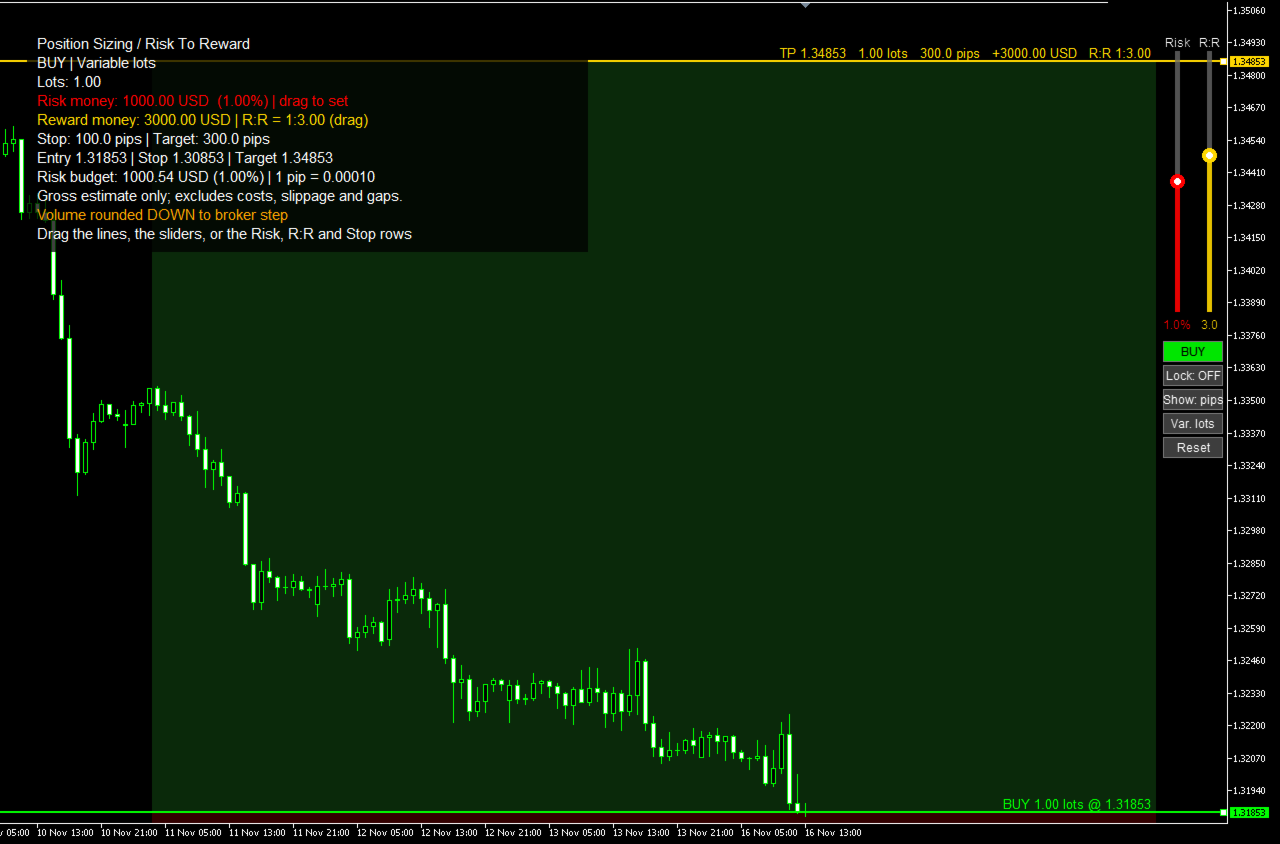
- Three lines appear on the chart: Entry, Stop and Target. Press and drag any of them with the mouse, no double-click needed.
- Dragging Entry moves the whole setup. Dragging Stop changes the stop distance. Dragging Target changes the reward multiple.
- The direction follows the lines: drag the Stop or the Target to the other side of the entry and the setup turns from buy to sell (or back); the other line moves across with it.
- Each line carries its numbers: direction and lots on the entry; price, lots, pips, money and percent on the stop; price, lots, pips, money and R:R on the target.
- Two sliders at the right edge set the risk (0.1 % to 10 % of the account) and the R:R (0.5 to 10) with one drag.
- Under the sliders, buttons switch Buy/Sell, Lock R:R, pips or money, fixed or variable lots, and reset the lines.
- Green and red zones show the reward and the risk on the chart.
Two size modes, switched with one button
- Variable lots: you set the risk as a percentage of the balance, the equity or a manual account size, and the lot size follows from the stop.
- Fixed lots: the size stays as it is (drag the Lots row to change it); the Risk slider then moves the stop, so the risk zone grows or shrinks, and the target keeps the R:R.
The panel
- Lots, risk money and its percentage of the account, reward money and the R:R ratio.
- Stop and target in pips or in account currency (Show button).
- Drag the Risk row up or down to set the risk in money, the R:R row to change the target, and the Stop row to change the stop distance in pips.
- Lock R:R button: when it is on, moving the stop also moves the target, so the ratio stays the same.
- Buy/Sell button turns the setup around (the stop and target are mirrored around the entry). Reset puts the three lines back at the current price.
- With the default transparent panel only the text of the panel reacts to the mouse, so the chart behind it stays fully usable.
Accuracy
- Lot sizes are rounded down to the broker's lot step and capped at the maximum lot, so the result never risks more than you set. If even the minimum lot would risk too much, the panel shows 0 lots and says why.
- Money values come from the broker's own symbol settings, so they work for forex, metals, indices and other symbols, in any account currency.
- The figures are gross estimates. They do not include commission, swap, slippage or price gaps.
Other details
- Optional ATR stop: the first stop distance can come from the ATR instead of a fixed number of pips. On symbols other than currency pairs (gold, indices, crypto), a fixed pip stop that is far smaller than the normal bar range is replaced by the ATR when the lines are first placed.
- The lines and panel settings are kept when you change inputs, switch timeframe or restart the terminal. After a symbol change the setup starts fresh.
- One copy per chart. Colours, fonts, line width, panel position and transparency are adjustable.
Inputs
- Calculation mode, account basis (balance, equity, manual), manual account size, risk percent, fixed lots.
- Initial direction, stop distance in pips, reward multiple, ATR stop and ATR period, Lock R:R, reset lines, pip size override.
- Colours of the lines, zones and panel; font, font size, line width, zone and panel transparency, panel position; sliders and buttons on or off and their position.