OmniTrend EURUSD only
- Experts
-
Iurii Cherepanov
 I have been active in the financial markets since 2008. The core of my work involves Forex trading as a signal provider on ZuluTrade, where I have successfully operated and weathered three corporate reorganizations. I have accumulated extensive experience in manual trading. I have incorporated years
- Version: 2.0
- Activations: 5
🔥 OMNITREND (EURUSD ONLY)
RSI + STOCHASTIC + MACD + ZIGZAG • SEQUENTIAL TRADING • PROFIT MANAGEMENT • MT5
OmniTrend (EURUSD only) is an automated trading advisor (Expert Advisor) for MetaTrader 5. It is designed for trading the EURUSD currency pair with a minimum deposit of $50; however, the trading instrument can easily be changed within the code to create a new version of the advisor. The system employs a sequential signal-generation algorithm based on four technical indicators: RSI, Stochastic, MACD, and ZigZag. It uses a step-by-step confirmation process: first the RSI, followed by the Stochastic, then the MACD, and finally a directional check via the ZigZag indicator on a higher timeframe (set to H1 by default).
The advisor also features a sequential position management system (handling 2 positions), a "ProfitLock" function, individual and total loss controls, and manual control buttons for entry modes.
⚡ RSI → STOCHASTIC → MACD + ZIGZAG — SEQUENTIAL SIGNAL MODE
Trading signals are generated in stages, with each subsequent indicator confirming the previous step.
BUY
The RSI crosses a specified level from bottom to top.
The advisor registers the start of a potential signal.
Following the RSI, the Stochastic must cross a specified level from bottom to top.
Once the Stochastic provides confirmation, the advisor looks for a specific MACD pattern.
The final condition is a directional confirmation from the ZigZag indicator on a higher timeframe.
If all conditions are met within the designated timeframe, a BUY signal is generated.
SELL
The RSI crosses a specified level from top to bottom.
The advisor registers the start of a potential signal.
Following the RSI, the Stochastic must cross a specified level from top to bottom.
Once the Stochastic provides confirmation, the advisor looks for a specific MACD pattern.
The final condition is a directional confirmation from the ZigZag indicator on a higher timeframe. If all conditions are met within the specified time frame, a SELL signal is generated.
An important feature: the indicators do not need to confirm the signal simultaneously. The algorithm requires the conditions to be met in a specific sequence: RSI → Stochastic → MACD.
The ZigZag indicator is used as an additional filter for trend direction. When performing checks, the Expert Advisor ignores the most recent ZigZag extremum that has not yet been confirmed.
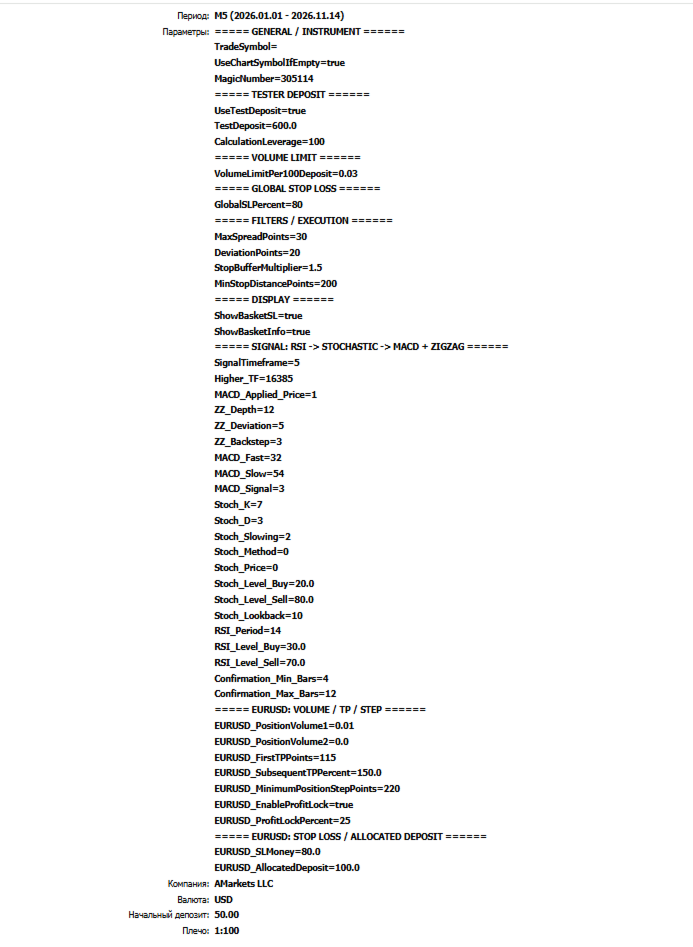
Signal Generation Settings
The user can adjust the following:
ZigZag timeframe (Higher_TF).
ZigZag parameters: Depth, Deviation, and Backstep.
RSI period and BUY/SELL levels.
MACD periods and the signal line.
Stochastic parameters.
Stochastic crossover levels.
The number of bars to scan for a Stochastic crossover.
The minimum and maximum time interval for signal confirmation.
The primary signal timeframe is set to M5. The ZigZag timeframe is configured separately, allowing for an analysis of how a higher timeframe influences signal filtering.
If the required confirmations do not appear within the designated number of bars, the pending sequence is reset.
🔧 FLEXIBLE INDICATOR SETTINGS
OmniTrend (for EURUSD) allows for experimentation with the settings of all four tools used for signal generation.
Particular attention can be paid to the combination of timeframes:
the primary signal is generated on the M5 timeframe;
the direction is determined by the ZigZag indicator on a selected higher timeframe.
This enables the user to explore how filtering by a higher timeframe affects the number of trade entries and the overall test results.
Users can test various configurations for the RSI, Stochastic, MACD, and ZigZag indicators, compare results using historical data, and tailor the setup to their specific trading approach.
Changing parameters does not guarantee better results. Each configuration must be tested individually. 🎛️ TRADING CONTROL BUTTONS — MANUAL TRADING CONTROL
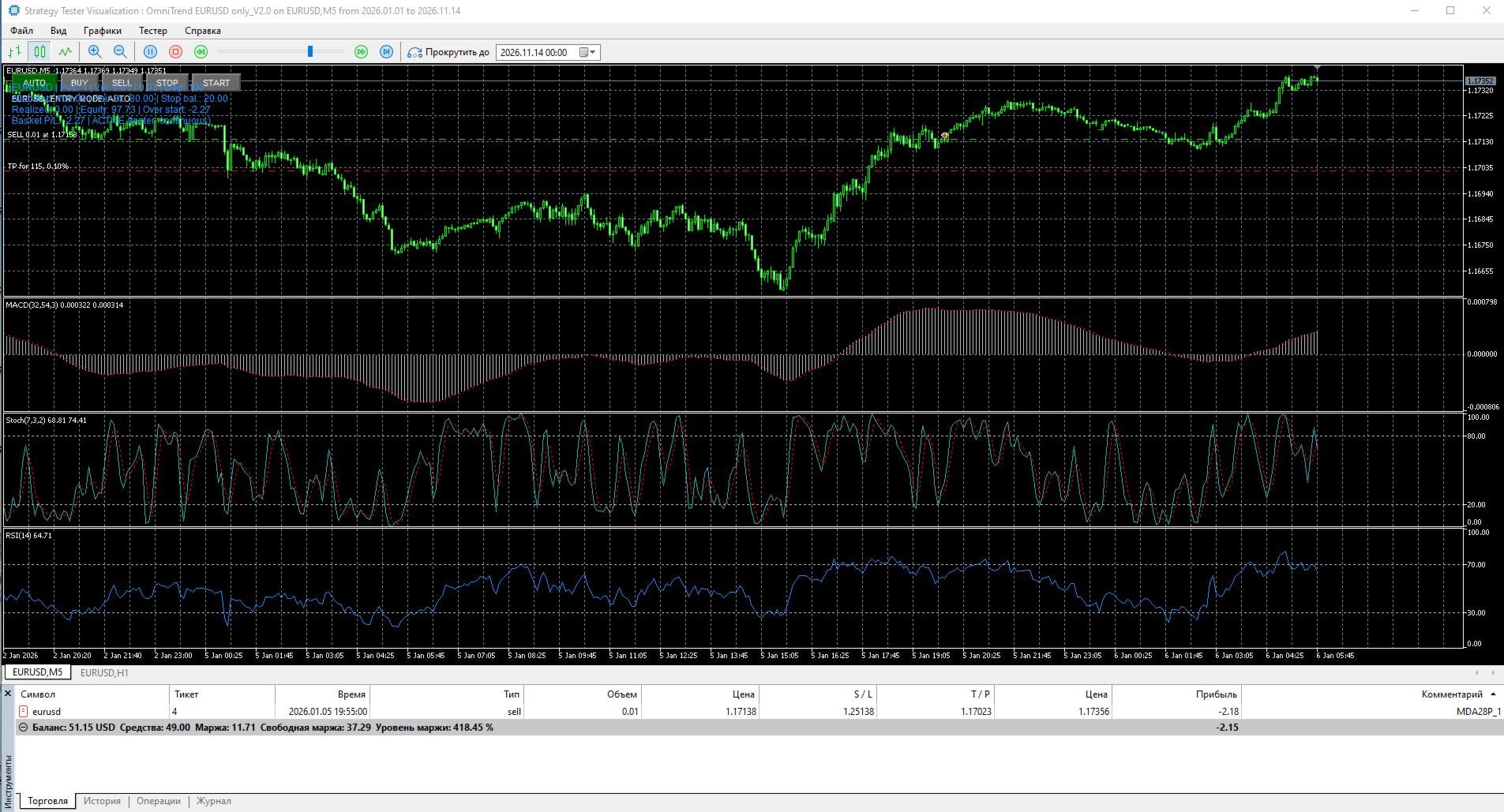
The Expert Advisor (EA) features five on-screen buttons for controlling the mode for opening new positions.
AUTO
AUTO
Allows opening both BUY and SELL positions in accordance with the signal algorithm.
BUY
BUY
Allows opening only new BUY positions.
SELL
SELL
Allows opening only new SELL positions.
STOP
STOP
Prevents the opening of any new positions.
START
START
Resumes operation in the previously selected mode.
The selected mode is saved in the terminal's global variables, allowing the EA to restore its last control state after a restart.
Important: Switching modes does not close existing positions. The buttons specifically control whether new entries are permitted.
🔄 SEQUENTIAL TRADING — SEQUENTIAL POSITION MANAGEMENT
Upon the generation of a trading signal, the EA opens the first position.
If the market situation develops against the open position—and the algorithm's conditions allow for the sequence to continue—the EA may open a second position in the same direction.
The following settings are available:
Volume of the first position;
Volume of the second position;
Option to disable the second position by setting its volume to 0.00;
Minimum distance between positions;
Take Profit for the first position;
Take Profit for subsequent positions, calculated based on the distance between the positions. ...and a specified percentage.
The Expert Advisor (EA) allows for a maximum of two consecutive positions within a single trading sequence.
New positions are opened only when the criteria for direction, distance, available volume, and trading account requirements are met.
The EA requires a MetaTrader 5 account set to "Hedging" mode.
💰 PROFIT MANAGEMENT
OmniTrend (EURUSD only) utilizes individual Take Profit levels for each position, along with a "ProfitLock" mechanism.
Take Profit
For the first position, a fixed distance (in points) is set.
For the second position, the Take Profit level is calculated based on the minimum distance between positions and a user-defined percentage value.
ProfitLock
The ProfitLock mechanism is designed to secure a portion of the price movement already achieved.
Once the price has covered 50% of the distance toward a position's Take Profit level, the EA calculates a protective Stop Loss based on the specified ProfitLock percentage.
Users can:
Enable or disable the ProfitLock feature.
Adjust the protection percentage within the available settings range.
Please note that ProfitLock does not guarantee a profit; the final outcome depends on market movements and order execution conditions.
🛡️ RISK CONTROL
The EA includes several layers of loss control.
1. Individual Monetary Stop Loss
For the EURUSD pair, a specific monetary loss limit can be set. If this limit is reached, the EA closes the entire trading sequence.
In both live and demo trading, triggering this individual Stop Loss will block any further entries. To resume trading, use the "RESET STOPPED PAIRS" button.
2. Testing Mode
When running a backtest, if the individual loss limit is reached, the EA will close the positions but continue trading, maintaining the same defined limit.
This allows for the observation of the algorithm's performance throughout the entire testing period. 3. Global Stop Loss
A global Stop Loss is implemented, calculated as a percentage of a designated base amount.
In the strategy tester, this base amount can be defined using the `TestDeposit` parameter. In live trading, the `AllocatedDeposit` amount is used.
Once the global threshold is reached, the Expert Advisor (EA) closes all open trading positions and halts any further trading activity.
4. Trading Volume Limitation
A limit is applied to the total volume of open positions relative to the allocated deposit.
This allows for the control of the aggregate volume of a trading sequence.
5. Execution Condition Monitoring
The EA monitors factors such as the allowable spread, available margin, minimum required distances for Stop Loss and Take Profit levels, and price slippage during order execution.
While these mechanisms help manage trading risk, they do not eliminate the possibility of incurring losses.
⚙️ EXPERIMENTAL SETTINGS
"OmniTrend EURUSD only" is designed for independent exploration of a sequential algorithm—combining RSI, Stochastic, and MACD—with confirmation provided by the ZigZag indicator.
Users can investigate the impact of the following:
RSI period and levels;
Stochastic parameters and crossover levels;
MACD parameters;
MACD confirmation patterns;
Minimum and maximum intervals for signal formation;
The number of bars used to detect Stochastic crossovers;
ZigZag timeframe and parameters;
Volume for the first and second positions;
Minimum distance between positions;
Take Profit and Stop Loss levels;
ProfitLock settings;
Individual and global loss limits.
An especially compelling area for research is adjusting the ZigZag timeframe while keeping the primary M5 (5-minute) timeframe constant.
It is recommended to evaluate not only the final profit but also the maximum drawdown, the total number of trades, the ratio of profitable to losing trades, and the consistency of results across different historical periods. 🚀 MAIN ADVANTAGES
EURUSD Only — specialized for trading the EURUSD currency pair.
RSI + Stochastic + MACD — sequential generation of trading signals.
ZigZag Confirmation — trend direction confirmation based on a higher timeframe.
Multi-Stage Signal — a multi-step confirmation process.
AUTO / BUY / SELL / STOP / START — manual control over position-opening modes.
Sequential Trading — systematic management of two consecutive positions.
ProfitLock — a mechanism to secure a portion of the price movement as profit.
Individual Stop Loss — a specific monetary loss limit per trade.
Global Stop Loss — an overall loss control mechanism.
Volume Limit — a cap on the total trading volume.
Flexible Parameters — customizable settings for indicators and trading parameters.
MetaTrader 5 — designed for the MT5 trading environment.
🎯 WHO IS IT FOR?
OmniTrend (EURUSD only) is suitable for traders who:
want to automate EURUSD trading in MetaTrader 5;
prefer a sequential signal confirmation system;
wish to explore the combination of RSI, Stochastic, MACD, and ZigZag;
want to experiment with different timeframes and indicator settings;
use manual control to enable or disable BUY and SELL entries;
are interested in sequential position management;
want to test various configurations using historical data.
⚠️ IMPORTANT IMPORTANT
OmniTrend EURUSD Only does not guarantee profit and does not rule out the possibility of losing funds.
Automated trading results depend on market conditions, indicator settings, volatility, spreads, commissions, slippage, and the quality of order execution.
It is highly recommended to test various ZigZag timeframes, as selecting a longer timeframe can influence trend confirmation and the total number of trading signals generated.
Before using real funds, it is advised to conduct testing via the MetaTrader 5 Strategy Tester, examine different historical periods, and further evaluate the Expert Advisor using a demo account.
🔥 OMNITREND EURUSD ONLY
RSI + STOCHASTIC + MACD + ZIGZAG
SEQUENTIAL SIGNALS • SEQUENTIAL TRADING • PROFIT MANAGEMENT • MT5