PFX Workspace
- Utilities
-
Daniel Freeman
 I'm Dan, a UK trader, a disabled veteran, and the builder behind PrecisionFX.
My mission is simple: help people get started in trading without paying a penny. - Version: 1.42
There are plenty of updates coming, so bear with me as I continue building and refining it. I’ve got big plans for this one!
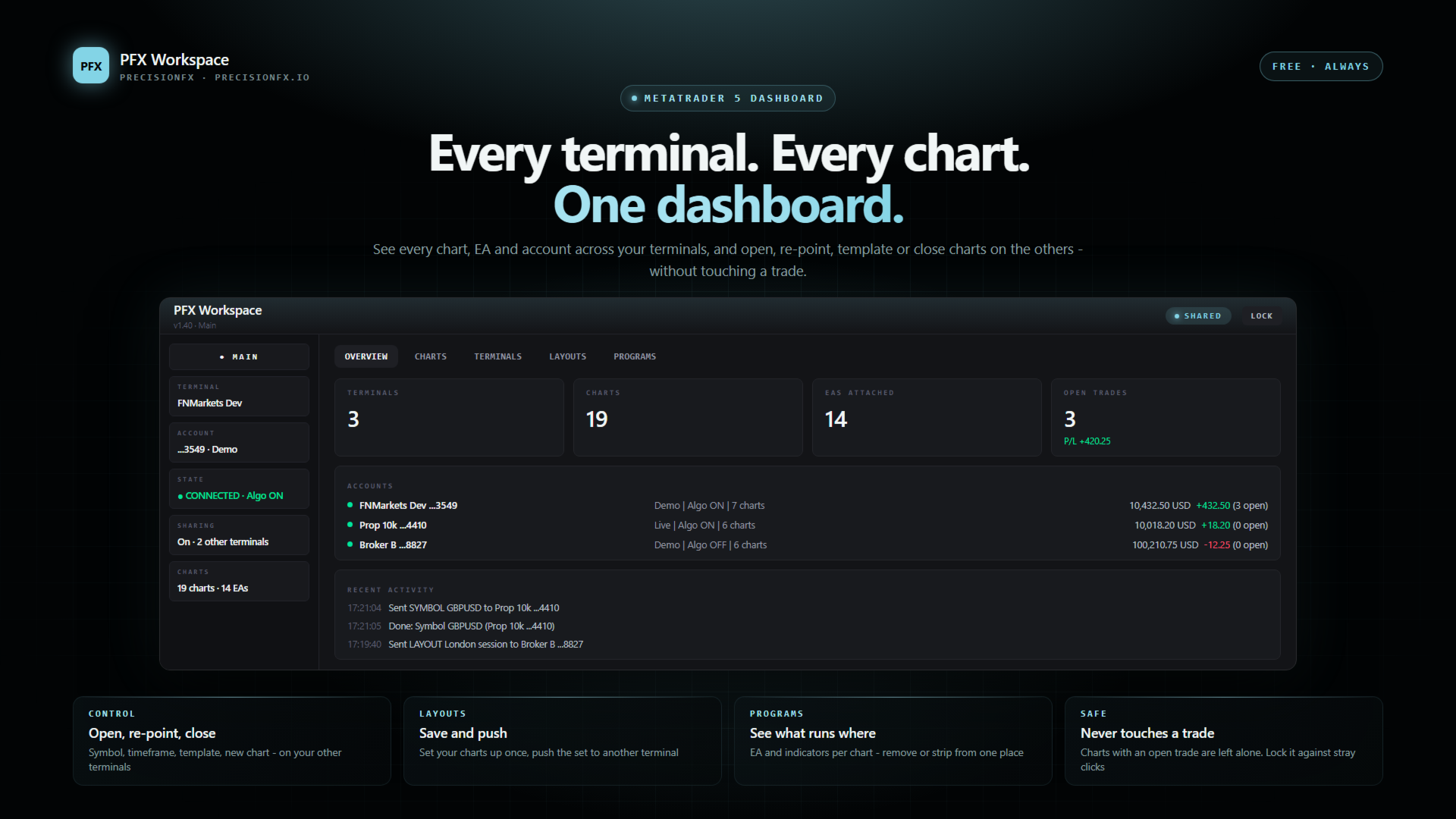
Your whole trading setup on ONE screen. Every terminal. Every broker. Every prop account. Every chart. See it all, name it all, and run it all from one dashboard. Free - no DLL, no internet, no subscription.
If you are like me and trade across multiple terminals, multiple brokers and prop firms, with multiple charts on every terminal - this one is for you.
You know the feeling. Which terminal was that EA on? Is the prop account connected? What is the equity over there? Which chart is the gold one again? You click through windows and tabs hunting for it, and the more you trade the worse it gets. PFX Workspace ends that. One indicator, one dashboard, and the whole lot is in front of you - and you can act on it, not just look at it.
THE DASHBOARD
A full-chart dashboard in the same style as the other PFX panels, with five tabs:
A status strip with every terminal sits in the header on every tab, a LOCK button makes the dashboard read-only so a stray click can change nothing, and a minus button shrinks it to a small pill. Prefer a small panel? Choose the compact corner panel in the inputs.
A full-chart dashboard in the same style as the other PFX panels, with five tabs:
- Overview - every terminal at a glance: connection, Algo on or off, equity, open trades and P/L, and a log of the commands you sent and received
- Charts - every chart on every terminal, with its EA and indicators. Give charts readable names, sort them into Your EAs / Market / Tools / Other EAs / Analysis, pin the ones you use, search, and put them in your own order with one click
- Terminals - one card per terminal; click one to see only its charts
- Layouts - save the set of charts you have open under a name and push it to another terminal
- Programs - the EA and indicators on each chart; remove an indicator, strip a chart, or apply a template
A status strip with every terminal sits in the header on every tab, a LOCK button makes the dashboard read-only so a stray click can change nothing, and a minus button shrinks it to a small pill. Prefer a small panel? Choose the compact corner panel in the inputs.
CONTROL YOUR OTHER TERMINALS
Terminals on the same PC see each other (you switch sharing on, it is off by default). From one main terminal you can, on another terminal:
Each terminal is either Main (sends commands) or Satellite (only receives), and each one has an Accept setting - Off, Charts only, or Everything - so you decide what can be done to it.
Terminals on the same PC see each other (you switch sharing on, it is off by default). From one main terminal you can, on another terminal:
- open a chart (it is selected there)
- change a chart's symbol or timeframe
- open a new chart
- apply a template
- close a chart
- push a whole layout, and optionally close the plain extra charts
Each terminal is either Main (sends commands) or Satellite (only receives), and each one has an Accept setting - Off, Charts only, or Everything - so you decide what can be done to it.
BUILT TO LEAVE YOUR TRADES ALONE
- It never opens, modifies or closes a trade and never changes an EA's inputs
- A chart whose EA has an open trade or a pending order on its symbol is never changed or closed
- The chart that holds Workspace is never touched
- Every command expires after 10 seconds and cannot be replayed
- Close and strip need a second click to confirm
SETUP IN A MINUTE
- Attach PFX Workspace to one chart on each terminal
- To see the other terminals, switch on "Share inventory" in each of them
- Open the dashboard and click through the tabs
- Optional: set one terminal to Main and the others to Satellite
HONEST ABOUT THE LIMITS
- MetaTrader does not let a program raise another terminal's window. A command selects the chart inside that terminal; you click over to the window yourself
- An EA cannot be attached by name - only through a template. Templates are files on each terminal, so the template you apply must already exist there
- AutoTrading cannot be switched by any indicator, so Workspace does not touch it
- It works between terminals on the same Windows user. Linking terminals on different PCs is planned as a separate free companion
- Being attached does not prove an EA is healthy: Workspace shows what is attached, not how it is performing
THIS IS JUST THE START
I have really big plans for PFX Workspace, so expect updates very regularly - this is where most of my time is going. It is the last piece of software I want in place before I turn to finishing and releasing the rest of my EAs, because everything I build after this gets easier to run once all my terminals are under one roof. If there is something you would love it to do, tell me.
I have really big plans for PFX Workspace, so expect updates very regularly - this is where most of my time is going. It is the last piece of software I want in place before I turn to finishing and releasing the rest of my EAs, because everything I build after this gets easier to run once all my terminals are under one roof. If there is something you would love it to do, tell me.
FREE, PERMANENTLY
No subscription, no licence check, no account limit, no trial.
No subscription, no licence check, no account limit, no trial.
ABOUT
I am a disabled veteran and a retail trader, not a software house. I run several terminals and the charts got away from me, so I built this to see and steer them from one place.
I am a disabled veteran and a retail trader, not a software house. I run several terminals and the charts got away from me, so I built this to see and steer them from one place.
WHY IT IS FREE
When I started, most of the tools I wanted cost more than my whole account, and on a fixed income that is not a small thing. That never sat right with me. So there is no trial, no locked features and no upsell. If it saves you time or a subscription, that is the whole point.
When I started, most of the tools I wanted cost more than my whole account, and on a fixed income that is not a small thing. That never sat right with me. So there is no trial, no locked features and no upsell. If it saves you time or a subscription, that is the whole point.
If you hit a bug or something here is unclear, tell me and I will fix it.
BUY ME A COFFEE
If this saved you some hassle and you fancy sending a coffee back, there is a link on precisionfx.io. It is entirely optional, it unlocks nothing, and the tool is identical either way.
If this saved you some hassle and you fancy sending a coffee back, there is a link on precisionfx.io. It is entirely optional, it unlocks nothing, and the tool is identical either way.
Genuinely, no pressure. Use it and get on with your trading - that is what it is for.