IX Power MT5

40 USD
Demo downloaded:
436
Published:
1 December 2023
Current version:
1.41
Didn't find a suitable robot?
Order your own one
on Freelance
Go to Freelance
Order your own one
on Freelance
How to buy а trading robot or an indicator
Run your EA on
virtual hosting
virtual hosting
Test аn indicator/trading robot before buying
Want to earn in the Market?
How to present a product for a sell-through

You are missing trading opportunities:
- Free trading apps
- Over 8,000 signals for copying
- Economic news for exploring financial markets
Registration
Log in
You agree to website policy and terms of use
If you do not have an account, please register
If you want to configure a triple instance setup like seen in the product screenshots,
have a look at these FX Power tutorial videos. The handling and inputs are identical to IX Power.
Read about our latest strategic development - Easy scalping with IX Power
Q: What's the difference between FX Power NG and IX Power?
A: IX Power provides precise strength analysis for indices, cryptos, oil, etc. based on the same algorithm as FX Power but using only the underlying symbols' data.
FX Power NG provides precise strength analysis for currencies and Gold, which is more complex than all other trading symbols.
I.e. For the USD strength, it analyses EURUSD, GBPUSD, AUDUSD, NZDUSD, USDCAD, USDCHF, USDJPY, and even XAUUSD.
FX Power NG is available
for MT4 at https://www.mql5.com/en/market/product/102732
for MT5 at https://www.mql5.com/en/market/product/102576
Hi Daniel,
I just purchased this indicator and trying to configure it. But its not showing the desired history lines at all. It is also not showing multiple instances of the same indicator even if the ID is different.
Hi Daniel,
I just purchased this indicator and trying to configure it. But its not showing the desired history lines at all. It is also not showing multiple instances of the same indicator even if the ID is different.
Please read Comment #1, which is exactly about how to configure a multi-instance setup.
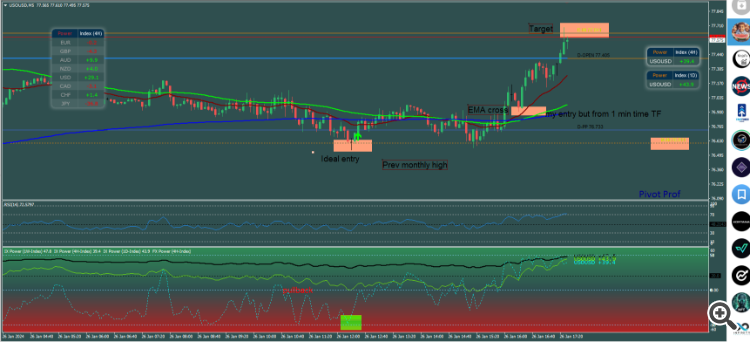
Hi Daniel, i just wanted to let you know that I appreciate your work. I was having a hard time figuring out how to trade he NY session, cause I live in the East coast . Now that I only trade crude oil, with you IX power, it has helped me improve my trade significantly. I do have my trading strategy with some critical areas for entry ( i dont enter when 4hr drops -50 for long) cause it can drop further. once all the criterias are aligned with your IX power being the most significant, I take the trade and man for the first time, I have 5 winning trades in a row. I only take 1 trade a day unless i get stopped out because of my tight stop. Your tools along with my other tools has been great for me personally. Now I dont have to worry about how prev day closed or prev week closed. Your IX power helps me figure that out along with my other tools and my knowledge as well. SO I am really grateful to you . I wanted to post it in the review but it was going to be too long. Once again Thank you !!!! and have a great weekend. Now I might not have to move to Europe anymore !!!I recently puchased software but when im trying to install this is as far as i get.
I recently puchased software but when im trying to install this is as far as i get.
Click once more on "My Purchases" in your MT5 Navigator, and then they should appear as a list with different buttons.
Hallo. Ich haben IX Power für MT5 gekauft und bin begeistert. Und jeden Tag mehr :-) Mir ist ein kleiner Bug aufgefallen. Wenn ich mehrere IX Power Session mit unterschiedlicher ID im Chart habe und bei einer die Parameter für die Ebene ändere (50+0 gelöscht) in dem ich den Wert 20 und -20 mit gelber Farbe einfüge, dann ändert sich das ständig selber auf 20 un 50. Die -20 wird also ersetzt. Anbei ein Screenshot. Mache ich etwas falsch oder ist es ein Bug? Gruß Thomas
Hello. I bought IX Power for MT5 and am thrilled. And more every day :-) I noticed a small bug. If I have several IX Power Sessions with different IDs in the chart and change the parameters for the level in one (50+0 deleted) by inserting the value 20 and -20 with yellow color, then it constantly changes itself to 20 un 50. So the -20 is replaced. Attached is a screenshot. Am I doing something wrong or is it a bug? Greetings Thomas
Hallo Thomas,
es freut mich sehr, dass du so zufrieden bist. Fragen zu Produkten sind grundsätzlich am besten in der Comment Section der jeweiligen Produktseite aufgehoben. Dann haben alle User was davon.
Zu deiner Frage: Die Standardlevel sind hard-coded und nicht änderbar, aber du kannst natürlich eigene Level nach Belieben hinzufügen.
Hello Thomas,
I am very pleased that you are so satisfied. Questions about products are generally best answered in the comment section of the respective product page. Then all users can benefit.
Regarding your question: The default levels are hard-coded and cannot be changed, but you can of course add your own levels as you wish.
Beste Grüße /best regards
Daniel
Hi,
I set the index to 1D and I see an up and down as a graph, which also changes when you change the time frames in MT5.
Hi,
I set the index to 1D and I see an up and down as a graph, which also changes when you change the time frames in MT5.
IX Power operates independently of the underlying chart time frame, and the analysis periods indicate the volume of data considered by FX Power for strength analysis.
Choosing a 10-minute period means it will analyse the most recent 10 minutes of data to assess the current symbol strength. Selecting a larger analysis period, such as 1 week, will incorporate a week's worth of data for the strength determination.
Lines vary across different chart time frames, functioning similarly to a zoom feature. The M1 provides the most granular view, offering detailed strength values for each minute.
I hope this explanation clarifies the distinction between chart time frames and the selectable analysis periods.
In case of questions, just drop a line, and I'll assist.
Best regards,
Daniel
IX Power operates independently of the underlying chart time frame, and the analysis periods indicate the volume of data considered by FX Power for strength analysis.
Choosing a 10-minute period means it will analyse the most recent 10 minutes of data to assess the current symbol strength. Selecting a larger analysis period, such as 1 week, will incorporate a week's worth of data for the strength determination.
Lines vary across different chart time frames, functioning similarly to a zoom feature. The M1 provides the most granular view, offering detailed strength values for each minute.
I hope this explanation clarifies the distinction between chart time frames and the selectable analysis periods.
In case of questions, just drop a line, and I'll assist.
Best regards,
Daniel
Hi Daniel,
Thank you very much for your excellent explanation!
Please allow me to ask one more question about the notifications. I activated them in H4 as shown in the settings but do not receive any notifications (no pop-up, email, sound, or mobile notification) even after the last candle closed +40 in attached example..
Push notifications in the terminal are activated and work as test message normal.
Could you please advise how I can solve this?
Thank you! :)
Hi Daniel,
Thank you very much for your excellent explanation!
Please allow me to ask one more question about the notifications. I activated them in H4 as shown in the settings but do not receive any notifications (no pop-up, email, sound, or mobile notification) even after the last candle closed +40 in attached example..
Push notifications in the terminal are activated and work as test message normal.
Could you please advise how I can solve this?
Thank you! :)
Hi Andreas,
I use these alerts myself. Hence, I know they work as expected as you can see below.
So there might be two reasons why you don't get an alert.
1. The value of the previous candle was already above your trigger value (+40). The alert is only sent when the strength reaches your defined level from a value that has been lower before.
As you can see in my example above. The previous value has been below 40 and when it crosses this limit I get the alert.
2. The alerts have been disabled via the alert button of the IXP panel. The bell button is greyed out when deactivated, and white when the alerts are enabled. You can change the state with one click on the button.
Best regards
Daniel
Here are two examples of trades using the Easy Scalping strategy on WTI Crude.
The first entry didn't work and hit the stop loss (-1R) but the second attempt worked perfectly and brought us some nice profits (+3R).
And another example on US30 adding another 2R to our profits.
So all in all, we are currently up +4R in less than two hours.😎
You can find a detailed description of the Easy Scalping System at https://www.mql5.com/en/blogs/post/755288
IX Power is simply outstanding 🤩
IX Power's standard alert options are sufficient for the Easy Scalping strategy.
If 1W, as in the example chart, indicates the BUY trend, I want to know first when the 4H reaches its lowest level. So I use the Drop Alert with a trigger of -45.
When this goes off, I can deactivate it and activate the rise alert with a value of 0, which will be activated when the 4H line rises above 0 again.
Client screenshots are the best reference we can get.