Indicators: Digital_CCI_Woodies
Could you please tell me how to adjust the display of lines in the indicator as it was in mq4, just important to see the "heavy" and "light" line relative to each other. thank you
tabar:
Could you please tell me how to adjust the display of lines in the indicator as it was in mq4, it is just important to see the "heavy" and "light" line relative to each other. thank you
Judging by the oscillator, the "heavy" line is the lower boundary in the green fill and the upper boundary in the red fill, because there is a smaller amplitude compared to the opposite boundary.
Could you please tell me how to adjust the display of lines in the indicator as it was in mq4, it is just important to see the "heavy" and "light" line relative to each other. thank you
Yury Reshetov:
According to the oscillator, the "heavy" line is the lower boundary in the green fill and the upper boundary in the red fill, because there is a smaller amplitude compared to the opposite boundary.
No. This oscillator does not show divergence of lines, advance/deceleration of "heavy" and "light" lines, they both just change colours after crossing and that's it.
According to the oscillator, the "heavy" line is the lower boundary in the green fill and the upper boundary in the red fill, because there is a smaller amplitude compared to the opposite boundary.
tabar:
No. This oscillator does not show divergence of lines, advance/deceleration of "heavy" and "light" lines, they both just change colours after crossing and that's it.
No. This oscillator does not show divergence of lines, advance/deceleration of "heavy" and "light" lines, they both just change colours after crossing and that's it.
I only get one line:( I'm still a coder))))
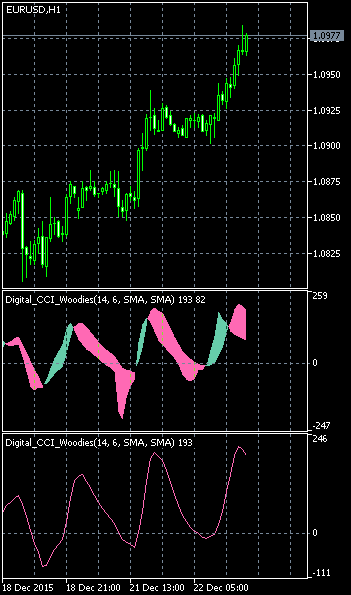
It's like this:
//---- number of indicator buffers 2
#property indicator_buffers 2
//---- used only 2 graphical constructions
#property indicator_plots   2
//+----------------------------------------------+
//| Parameters of indicator drawing 1 |
//+----------------------------------------------+
//---- drawing of indicator 1 as a line
#property  indicator_type1   DRAW_LINE
//---- Orange colour is used as indicator line colour
#property  indicator_color1  clrOrange
//---- indicator line 1 - continuous curve
#property  indicator_style1  STYLE_SOLID
//---- indicator 1 line thickness is 1
#property  indicator_width1  1
//+----------------------------------------------+
//| Parameters of indicator drawing 2 |
//+----------------------------------------------+
//---- drawing of indicator 2 as a line
#property  indicator_type2   DRAW_LINE
//---- the colour Blue is used as the colour of the indicator line
#property  indicator_color2  clrBlue
//---- indicator line 2 - continuous curve
#property  indicator_style2  STYLE_SOLID
//---- indicator 2 line thickness is 1
#property  indicator_width2  1
Nikolay Kositsin:
Got it))) Thank you!
Somehow that's it:

You are missing trading opportunities:
- Free trading apps
- Over 8,000 signals for copying
- Economic news for exploring financial markets
Registration
Log in
You agree to website policy and terms of use
If you do not have an account, please register
Digital_CCI_Woodies:
The CCI indicator using a digital filtering.
Author: Nikolay Kositsin