Technical Limitation: Running >6 simultaneous MetaTrader instances per Windows user session (Registry adjustments & Multi-user workaround)
It is nothing to do with MetaQuotes Support Team. Because this issue was extensively discussed many times, and It is mostly related to the Windows (not to Metatrader).
For example (the forum threads):
- I want to open 30 mt5 at the same time
- Metatrader 4 - maximum platforms on one system ?
- MT5 Cant open and My PC Freezes when i try to open more then 21 Terminals
- and more and more (check it in search here).
i have 7 instances of mt5 running in "portable mode"; however i am sure that the number of instances that windows will allow to be opened, depends on the hardware and total system specs. But search the site for "portable mode", and you can try that to increase your number too. But again, i am sure that the number that you will be limited to -- will depend on your computers resources.
Note that even windows "own" programs, have the same limit, but that can also differ from system to system depending on its hardware's specs. but normally 5 - 8, unless you have an option to install to custom folders like you can with mt5 "portable".
Hardware Capacity: The machine has high-end specifications (CPU, RAM, and NVMe I/O) running well below threshold limits, fully capable of handling 20–30+ instances without performance bottlenecks.
Post your specs, from the Journal tab.
so nothing is fixing this only through sandbox
you were already told that it is a windows limitation.
search the site for "portable mode"; you can use several more instances in this mode. How many more? That depends on your systems resources, no once can tell you how many because that number is system specific.
EDIT: after reading your OP again, i see that you already use portable mode, but you still modified windows registry. I think that this could be your problem. i recommend that you revert your registry entries to defaults and then see if your issues persist after a reboot; however, modifying those entries might not be reversable. You may have broken windows. If the issue persists, then, the only way to fix it might be to reinstall wind blows.
EDIT2: in your OP message you said that you use portable mode, but then in the image the data folder a default location. You can not use portable mode AND source a Users profile without breaking security rules. This might work sometimes, but sooner or later windows security will "find you out". This could be what has happened. try portable mode in the proper fashion -- without relocating the data folders to a users profile.so nothing is fixing this only through sandbox
if you fix your issue, then please give report of what you did so this thread may serve to help others.
@Bhaʾ Ahmd ʿBas ʿBdalmtlb
if you fix your issue, then please give report of what you did so this thread may serve to help others.
I am running multiple independent MT5 terminals on the same Windows Server.
Server specifications:
- 100 physical CPU cores
- 64 GB RAM
- Windows Server 2025
- MT5 x64 build 6182
- Each MT5 installation is in a completely separate folder with its own independent data folder.
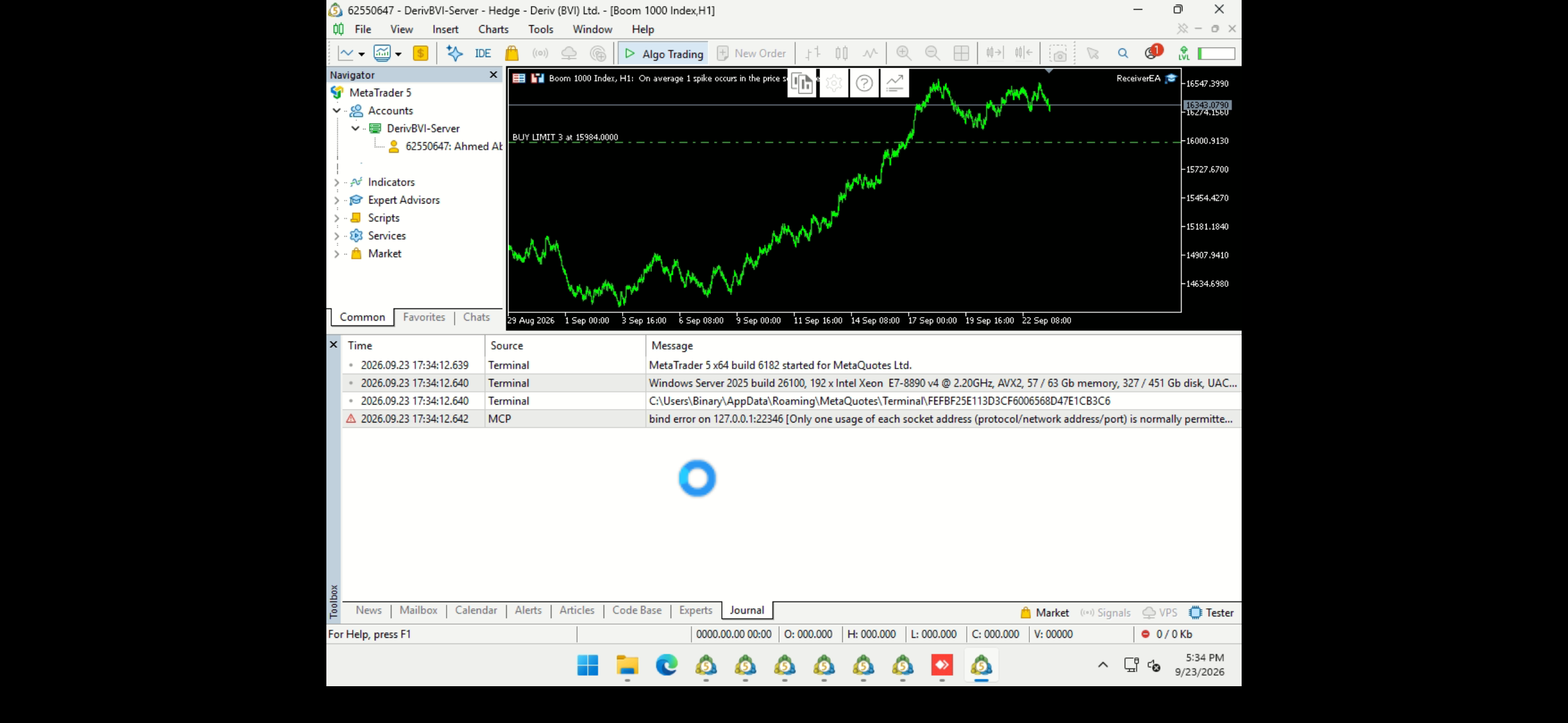
I can run 6 MT5 instances normally. When I try to start the 7th instance, it hangs during initialization. If I close one of the existing instances (for example #6), the 7th instance starts normally.
The MT5 Journal shows the following error:
MCP bind error on 127.0.0.1:22346
Only one usage of each socket address (protocol/network address/port) is normally permitted.
This strongly suggests that the internal MCP server is attempting to bind all MT5 instances to the same localhost port (22346).
Please confirm:
- Is the MCP server designed to use a unique port for each MT5 terminal instance?
- If multiple independent MT5 terminals are running on the same Windows user/session, how should the MCP port be configured per instance?
- Is there a supported command-line parameter, configuration file, or setting to assign a different MCP port to each terminal?
- Why does the MCP bind failure cause the terminal initialization to hang instead of allowing MT5 to start without MCP?
- Is this a known limitation/bug in build 6182 regarding multiple MT5 instances?
I need to run more than 6 independent MT5 terminals simultaneously on the same server, and each terminal must maintain its own separate data folder and trading session.
Please provide the official supported configuration for running multiple MT5 instances simultaneously, including how to avoid MCP port conflicts.

- Free trading apps
- Over 8,000 signals for copying
- Economic news for exploring financial markets
You agree to website policy and terms of use
Dear MetaQuotes Support Team,
I am reaching out regarding a persistent limitation encountered when running multiple concurrent terminal instances on the same machine, and to request technical clarification or a potential update in upcoming builds.
Setup & Environment:
Hardware Capacity: The machine has high-end specifications (CPU, RAM, and NVMe I/O) running well below threshold limits, fully capable of handling 20–30+ instances without performance bottlenecks.
Independent Installations: Each terminal was cleanly installed via its own separate setup into an isolated folder directory (configured with dedicated data paths / portable mode), rather than copying and pasting existing folders.
Troubleshooting & Registry Adjustments Attempted:
Suspecting an OS-level session resource ceiling, we extensively modified Windows Registry settings to expand user session resources, yet none resolved the issue:
1. Desktop Heap Allocation (SharedSection):
Increased the interactive and non-interactive desktop heap allocations under:
HKLM\SYSTEM\CurrentControlSet\Control\Session Manager\SubSystems\Windows (modifying SharedSection=xxxx,yyyy,zzzz).
2. GDI & USER Object Limits:
Increased both GDIProcessHandleQuota and USERProcessHandleQuota under:
HKLM\SOFTWARE\Microsoft\Windows NT\CurrentVersion\Windows.
3. Application & Process Quotas:
Verified handle counts, thread pools, and memory quotas to ensure the OS was not running out of session handles.
Despite all these OS-level optimizations, no more than 6 instances can be launched simultaneously under a single Windows user account. Launching a 7th terminal fails silently or terminates immediately.
Current Workaround:
Currently, our only working solution is splitting the instances across multiple Windows user accounts (running 5 to 6 terminals per Windows profile and switching/logging between them). While this proves the machine and OS can host dozens of terminals concurrently across the entire system, managing multiple user sessions is inefficient, cumbersome, and impractical for unified monitoring and maintenance.
Questions & Requests:
1. Is there an embedded hard ceiling (mutex naming, internal inter-process messaging, IPC, or local socket/pipe constraints) within the terminal architecture restricting it to 6 active instances per interactive desktop/session?
2. Is there a command-line switch, terminal configuration parameter, or specific registry setting that allows scaling beyond 6 instances under a single user session (targeting 15 to 30 instances)?
3. If this is hardcoded, we strongly request lifting or providing an option to configure this limit in future builds to allow running an unrestricted number of instances per user on high-capacity servers.
Looking forward to your technical feedback.