Technical Limitation: Running >6 simultaneous MetaTrader instances per Windows user session (Registry adjustments & Multi-user workaround) - page 2

You are missing trading opportunities:
- Free trading apps
- Over 8,000 signals for copying
- Economic news for exploring financial markets
Registration
Log in
You agree to website policy and terms of use
If you do not have an account, please register
Independent Installations: Each terminal was cleanly installed via its own separate setup into an isolated folder directory (configured with dedicated data paths / portable mode), rather than copying and pasting existing folders.
you said that you were using portable mode in the yellow, but also said you "setup into an isolated folder". which is it? it can not be both.
i have 7X portable instances of mt5, all show same error as yours, but after few seconds, the system continues normally. ie no crashes.
good luck to you.
you said that you were using portable mode in the yellow, but also said you "setup into an isolated folder". which is it? it can not be both.
i have 7X portable instances of mt5, all show same error as yours, but after few seconds, the system continues normally. ie no crashes.
good luck to you.
Please, correct me, if I'm wrong, but you can open Options -> MCP and choose specific port (under Enable internal server option) in every MT5 instance. 22346 is just a default value - one can use many others at once.
for whom was asking for the journal anyways that's related to mt itself
Thanks.
Server specifications:
I can run 6 MT5 instances normally.
So it's actually 96 physical cores.
And your log doesn't seems from a real instance, is it ? Why I am asking : 6 instances is very low number (on my workstation with a lot of other apps, I can open 10 instances by default). So I would firstly like to understand why it's so low :
1. Are you using other applications on this server ?
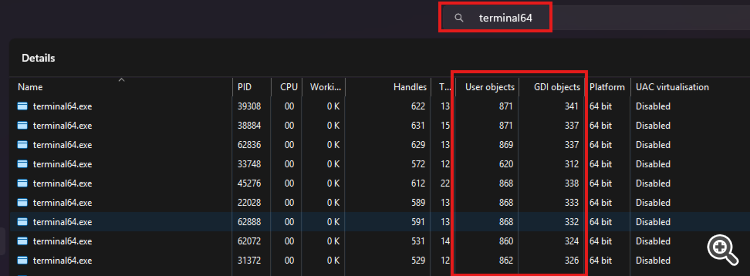
2. Are your 6 running MT5 instances using a lot of Windows (charts) and graphics ?
Please provide a screenshot with information similar to this one :
An actual log file (Journal) from one of your 6 running instances would be useful.
Increased the interactive and non-interactive desktop heap allocations under:
HKLM\SYSTEM\CurrentControlSet\Control\Session Manager\SubSystems\Windows (modifying SharedSection=xxxx,yyyy,zzzz).
What values did you try ?
When did the issue start?
Thanks.
So it's actually 96 physical cores.
And your log doesn't seems from a real instance, is it ? Why I am asking : 6 instances is very low number (on my workstation with a lot of other apps, I can open 10 instances by default). So I would firstly like to understand why it's so low :
1. Are you using other applications on this server ?
What are you default values ?2. Are your 6 running MT5 instances using a lot of Windows (charts) and graphics ?
Please provide a screenshot with information similar to this one :
An actual log file (Journal) from one of your 6 running instances would be useful.
What values did you try ?
1024,20480,768
issue started since beginning
ill try to disable MCP and see also