Algo Forge authentication issue
Hello,
I’m unable to use the forge.mql5.io repository through MetaEditor. It was working without any problems until recently — push, pull, fetch, and all other Git operations were successful.
Now MetaEditor shows:
2026.09.11 19:50:18.766 Git MQL5 Algo Forge activation failed [401]
When I try to use Git from the terminal, I get:
git fetch --prune --all
remote: Credentials are incorrect or have expired. Retry your command or see https://codeberg.org/forgejo/forgejo/issues/2809 for more information
fatal: Authentication failed for 'https://forge.mql5.io/Toh4iem9/mql5.git/'
I also installed a completely new MetaTrader client to rule out a local configuration issue. Even the initial activation fails there:
2026.09.11 20:12:57.408 Git MQL5 Algo Forge activation failed [401]
2026.09.11 20:12:58.205 Git 250 public projects found
So it looks like the problem is related to authentication on the Algo Forge side. Could you please check what might be causing this?
Thank you!

bug: `git push` fails the first time with git-credential-manager
- forgejo
- codeberg.org
### Description Whenever I do `git push` or something that requires authentication, it fails the first time. Repeating the same command makes it work, and it keeps working for a while after that. Attached below is a screenshot of how it looks. I'm using `git-credential-manager` for `https` auth....
- MetaEditor, Open AI and ChatGPT
- How to Start with Metatrader 5
- How to start with MQL5
Toh4iem9:
Now MetaEditor shows:
2026.09.11 19:50:18.766 Git MQL5 Algo Forge activation failed [401]
Make sure that your mql5.com login and password are entered in the community tab of the options.

Toh4iem9:
When I try to use Git from the terminal, I get:
git fetch --prune --all
remote: Credentials are incorrect or have expired. Retry your command or see https://codeberg.org/forgejo/forgejo/issues/2809 for more information
fatal: Authentication failed for 'https://forge.mql5.io/Toh4iem9/mql5.git/'
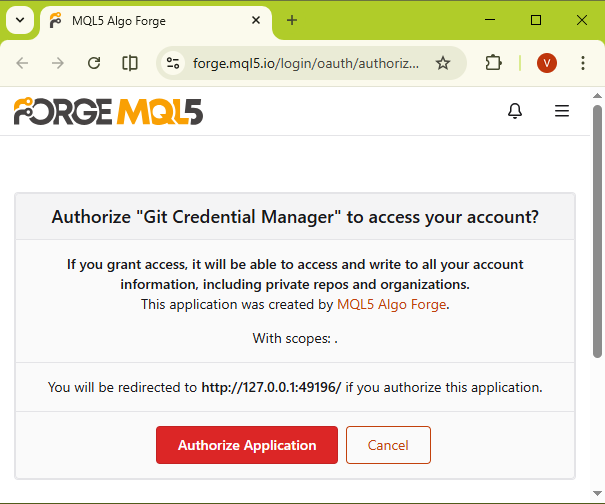
If you don't mind working with Git solely via the terminal, you can authorize the application by re-entering the command.
Forum on trading, automated trading systems and testing trading strategies
Vladislav Boyko, 2026.05.09 17:50

On the second or third attempt, a browser window should open, allowing you to authorize by clicking the "Authorize Application" button.
Vladislav Boyko #:
Make sure that your mql5.com login and password are entered in the community tab of the options.
I am logged into my MetaEditor Community account, but activating MQL5 Algo Forge still fails.
Here is the relevant output from the MetaEditor log:
2026.09.12 00:14:00.481 MCP started on 127.0.0.1:22345
2026.09.12 00:15:07.427 Git MQL5 Algo Forge activation failed [401]
2026.09.12 00:15:08.130 Git 250 public projects found
My MetaEditor version is:
Version: 5.00 build 6182
I can also successfully log in to both mql5.com and forge.mql5.io using the same username/password combination.
I found the following forum post, which seems to describe a very similar issue:

Need help with https://forge.mql5.io/
- 2025.12.21
- www.mql5.com
The user is unable to log in to AlgoForge using their MQL5.com credentials, suspecting a password synchronization issue or account registration conflict. They have tried password resets and confirm they can log in to the MQL5.com Community tab. They request assistance from AlgoForge support to resolve the login problem.
Transmitted to MetaQuotes, don't expect an answer before Monday.
Alain Verleyen #:
Please check you are using the same password to connect to mql5.com and forge.mql5.io as you are using with MT5/MetaEditor.
I am using the same username/password combination on all three platforms:
- mql5.com
- forge.mql5.io
- MT5 / MetaEditor
I believe MT5 is properly connected to my MQL5 account, as the account messages are displayed there.
However, MetaEditor is still unable to connect to Algo Forge. I am getting the following error message:
2026.09.14 17:29:42.082 Git MQL5 Algo Forge activation failed [401]
2026.09.14 17:29:42.923 Git 250 public projects found
I use two-factor authentication on Algo Forge, but this has not caused any problems with MetaEditor in the past.
At the moment, I am manually uploading and downloading the files using Git.
Toh4iem9 #:
2026.09.14 17:29:42.082 Git MQL5 Algo Forge activation failed [401]
2026.09.14 17:29:42.923 Git 250 public projects found
Did you happen to change your account password?
I had a similar situation about a year ago after changing my password. But as far as I know, that was fixed a long time ago.
Toh4iem9 #:
A MetaQuotes developer reported it as fixed, please confirm.
I am using the same username/password combination on all three platforms:
- mql5.com
- forge.mql5.io
- MT5 / MetaEditor
I believe MT5 is properly connected to my MQL5 account, as the account messages are displayed there.
However, MetaEditor is still unable to connect to Algo Forge. I am getting the following error message:
2026.09.14 17:29:42.082 Git MQL5 Algo Forge activation failed [401]
2026.09.14 17:29:42.923 Git 250 public projects found
I use two-factor authentication on Algo Forge, but this has not caused any problems with MetaEditor in the past.
At the moment, I am manually uploading and downloading the files using Git.

You are missing trading opportunities:
- Free trading apps
- Over 8,000 signals for copying
- Economic news for exploring financial markets
Registration
Log in
You agree to website policy and terms of use
If you do not have an account, please register