Are there any people here using MT5 on an old PC?
“Even with this low spec, MT5 runs just fine!”
I make sure my indicators or utility are best programmed, I am not running multi-chart setup, in this condition even when I use on WINE on Android using official version of Winlator, it runs smooth, does not lag. Never faced issue on Windows PC, but it totatlly depends on what indicator of EA you are using and how well its programmed and managing system resources.
I am both a trader and a developer of EAs, indicators, and utilities. I frequently run reverse engineering tests and simultaneously test multiple EAs and indicators on my machines, but everything has worked smoothly.
“Even with this low spec, MT5 runs just fine!”
I make sure my indicators or utility are best programmed, I am not running multi-chart setup, in this condition even when I use on WINE on Android using official version of Winlator, it runs smooth, does not lag. Never faced issue on Windows PC, but it totatlly depends on what indicator of EA you are using and how well its programmed and managing system resources.
Thanks for sharing your experience! Indeed, how well an indicator or EA is optimized makes a huge difference in performance. My old PC ran MT5 much better than I expected, so it made me curious about how much code quality actually affects overall performance.
Also, the fact that MT5 runs without issues on WINE + Winlator on Android is really interesting.
I am both a trader and a developer of EAs, indicators, and utilities. I frequently run reverse engineering tests and simultaneously test multiple EAs and indicators on my machines, but everything has worked smoothly.
So you mean the lag is caused by poorly coded indicators rather than the PC itself, right?
Conversely, if it's running smoothly, that means the indicators are properly optimized. lol
And you're spot on about that point!
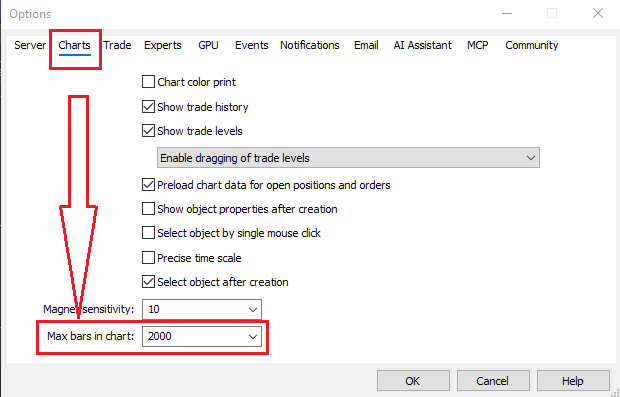
When I run it on an old PC, the first thing I do is set that value to 5000 too. lol
So you mean the lag is caused by poorly coded indicators rather than the PC itself, right?
Conversely, if it's running smoothly, that means the indicators are properly optimized. lol
And you're spot on about that point!
When I run it on an old PC, the first thing I do is set that value to 5000 too. lol
What do you mean by old pc, windows Vista? Or 10, if the ram and CPU on the machine is up to mt5 requirements, ofcourse it will run , but not on unsupported windows version.

- Free trading apps
- Over 8,000 signals for copying
- Economic news for exploring financial markets
You agree to website policy and terms of use
My main PC recently broke down, so I tried running MT5 on a 10‑year‑old machine I had lying around… and surprisingly, it works pretty normally lol.
I’m curious what kind of setups everyone else is using.
Like:
“This tool is heavy on my PC!”
“Even with this low spec, MT5 runs just fine!”
If you have any experiences like that, I’d love to hear them lol.