MT5 Trendline and Andrew's Pitchfork shift after dragging or extending — possible issue with price coordinate precision limited to symbol digits
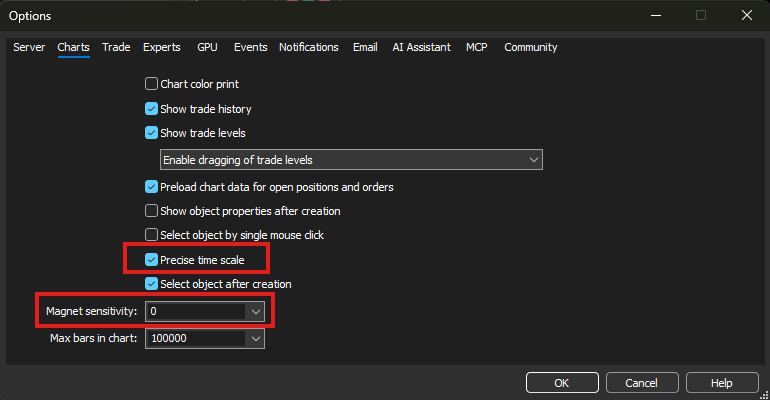
Thank you for your reply. This setting is indeed useful. MT5 converts the precision issue into a time-based adjustment rather than a price-based one.
The only problem is that this setting only works when Magnet Sensitivity is set to 0. As soon as the value is greater than 0, the offset issue still occurs.
Thank you for your reply. This setting is indeed useful. MT5 converts the precision issue into a time-based adjustment rather than a price-based one.
The only problem is that this setting only works when Magnet Sensitivity is set to 0. As soon as the value is greater than 0, the offset issue still occurs.
Precise time scale doesn't fix price scale. When you extend e.g. a trendline by dragging anchor point with shift key it should hold the line's slope, but because price (Y-axix) is limited to price digits it will get skewed. Try this by extending back and forth a few times and it will gradually change slope each time.
The magnet issue as I see it, the problem is that it snaps other anchors to OHLC, i.e. not only the one I want to drag but the other ones that I do not want to move get snapped too. It may be convenient for elliot wave, but nothing else and there is no convenient way to switch the magnet on and off.
It would also be great if ray left/right were adjustable instead of infinite length. At some point trend lines don't line up anymore because of the price digits precision, and the problem is compounded with fixed scale. They just don't line up with the price when you change zoom or price scale. Makes them useless for trading.
Precise time scale doesn't fix price scale. When you extend e.g. a trendline by dragging anchor point with shift key it should hold the line's slope, but because price (Y-axix) is limited to price digits it will get skewed. Try this by extending back and forth a few times and it will gradually change slope each time.
The magnet issue as I see it, the problem is that it snaps other anchors to OHLC, i.e. not only the one I want to drag but the other ones that I do not want to move get snapped too. It may be convenient for elliot wave, but nothing else and there is no convenient way to switch the magnet on and off.
It would also be great if ray left/right were adjustable instead of infinite length. At some point trend lines don't line up anymore because of the price digits precision, and the problem is compounded with fixed scale. They just don't line up with the price when you change zoom or price scale. Makes them useless for trading.
Yes, exactly, brother. That’s why I’ve switched back to MT4 for now.
If I understand this thread correctly, custom code may be the solution for MT5 (as usual):

- www.mql5.com

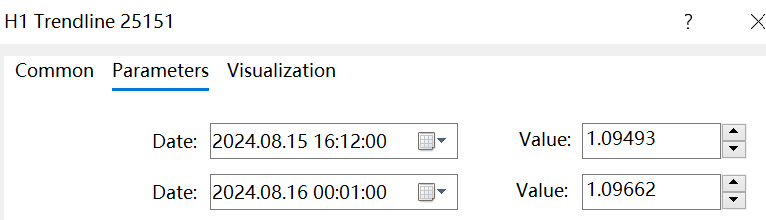
In MetaTrader 5, Trendline, Andrews' Pitchfork and other graphical objects do not remain exactly at the mouse release position after dragging or using Shift to extend. The final position is slightly offset, possibly because the anchor price coordinates are rounded according to the symbol's Digits.Manual input in the object properties also cannot change the number of decimal places.
As shown in Figure 1,2, this issue occurs in MetaTrader 5.
In MetaTrader 4, this problem does not occur, as shown in Figure 3. The price coordinates of graphical objects are not restricted by the number of digits of the symbol,When manually editing the coordinates in the object properties, users can enter values with more decimal places freely ,which provides higher precision compared with MetaTrader 5.
Additionally, I noticed another difference between MT5 and MT4:
In MT5, when extending objects such as trendlines with the Shift key, or moving the entire object by dragging its middle point, the object may automatically snap to nearby OHLC values of a candle.
However, in MT4, this snapping behavior only occurs when dragging the object's anchor points (endpoints). Moving the entire object does not trigger snapping.
The tests were performed on the EURUSD symbol, but the same behavior can be observed on other symbols as well.
I hope MetaQuotes can improve this behavior in future versions of MetaTrader 5, especially by allowing higher precision for graphical object coordinates and providing more consistent behavior with MetaTrader 4.