Purchased an EA and its no longer available in Market Place.


Hello Team 

I have purchased an EA from the market place and its no longer available.

I have 04 licenses left to be used and i need to use the rest of the licenses as well.

I have also attached the purchase of the bot details

Request you to please guide me on the same at the earliest.

Regards

Harsh Solanki
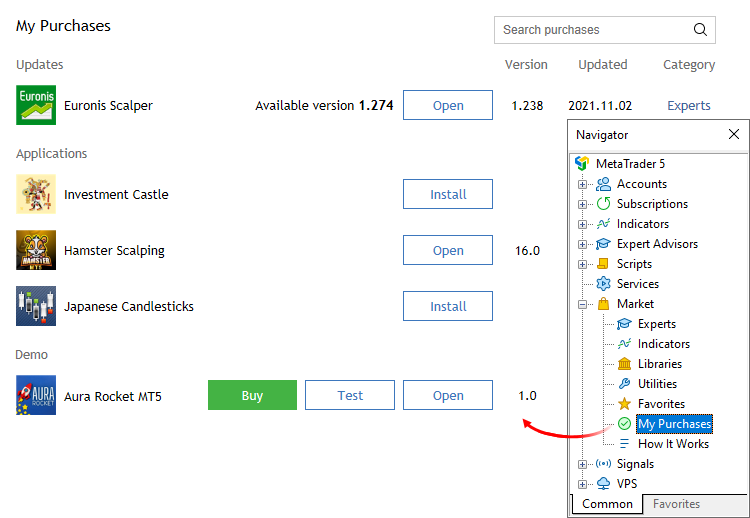
 
You can still install and use your purchased EA, open your MT5 terminal, login into your MQL5 account in Tools >> Options >> Community and then go to the Navigator window >> Market >> My Puchases to install it.
 

Forum on trading, automated trading systems and testing trading strategies

The purchased tab is only showing the last two purchases

Alexey Petrov, 2021.01.19 11:17

Even if a Market product is removed from the showcase, those who already purchased it, can install it anytime from their MetaTrader terminal (Market \ Purchased section).

In case you don't see the product on the list of your purchases in the terminal, try the following:

  1. Close all your MetaTrader terminals
  2. Go to C:\Users\{user name}\AppData\Roaming\MetaQuotes\Terminal\Community
  3. Delete all files starting from mql4.market.* and mql5.market.*
  4. Open MetaTrader terminal
  5. Try to install product again

 
Eleni Anna Branou #:
You can still install and use your purchased EA, open your MT5 terminal, login into your MQL5 account in Tools >> Options >> Community and then go to the Navigator window >> Market >> My Puchases to install it.
Does that remain true after the Seller has terminated her/his Seller status/registration?
 
Ryan L Johnson #:
Does that remain true after the Seller has terminated her/his Seller status/registration?
That I don't know Ryan, maybe someone else can enlighten us.
 
Eleni Anna Branou #:
That I don't know Ryan, maybe someone else can enlighten us.

No idea either.

But we can experiment, you cancel your Seller status and I will check if I can still install one of your product 😁

 
Alain Verleyen #:

No idea either.

But we can experiment, you cancel your Seller status and I will check if I can still install one of your product 😁

Ha ha, I wouldn't ever do that Alain! 😊
 
Eleni Anna Branou #:
Ha ha, I wouldn't ever do that Alain! 😊
We will remain ignorant then 😉
 
Alain Verleyen #:

No idea either.

But we can experiment, you cancel your Seller status and I will check if I can still install one of your product 😁

I cancelled it many months ago.😁

Thank you for offering to do a test. I look forward to your reply with your test result.

 
Ryan L Johnson #:

I cancelled it many months ago.😁

Thank you for offering to do a test. I look forward to your reply with your test result.

I can't test as I had not bought one of your product. But maybe one of you buyer could enlighten us.
 
borntobetrader:

Hello Team 

I have purchased an EA from the market place and its no longer available.

I have 04 licenses left to be used and i need to use the rest of the licenses as well.

I have also attached the purchase of the bot details

Request you to please guide me on the same at the earliest.

Regards

Harsh Solanki

Don't panic. Even if the product has been removed from the Marketplace, you can still access any remaining activations through your "My Purchases" section, provided you're logged into the same MQL5 account that originally purchased the EA.

To locate your purchased products:

1. Open your MetaTrader 5 terminal 
2. In the "Navigator" panel, expand "Market" -) "My Purchases".
3. You'll find all your purchased and downloaded products organized into three categories:

"Updates" Products with newer versions available.
"Applications" - All purchased or downloaded products.
"Demo" - Products for which you've downloaded demo versions.

Each entry displays the product name, installed version, last update date, category, and purchase information.

Simply click "Open" to locate the EA in the Navigator, then drag and drop it onto your chart to use it.

If the EA does "not" appear under "Market -) My Purchases", please make sure you're logged into the correct MQL5 account via "Tools -) Options -) Community", as purchases are tied to the account used to buy the product.