Indicator instalation from market
You can install the indicator directly from MT5 (not from webpage).
For example:
Forum on trading, automated trading systems and testing trading strategies
I can't login to MQL5 community on MT5
Sergey Golubev, 2023.04.20 12:35
The people are buying on the following way:
1. go to showcase of the Market to select the product (free one or paid/commercial one) - https://www.mql5.com/en/market (use browser)
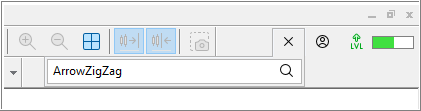
2. after that - go to the search on the top right corner of Metatrader and type the name of the product which was pre-selected in the browser (and click "search"):
3. the search tab will be opened, so click on "Products" and select the pre-selected product in this search results
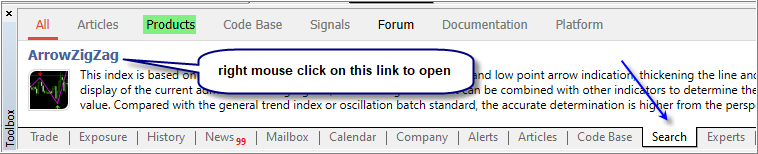
4. after that - click on the link and install.
More -
Where can I see my purchases?
https://www.mql5.com/en/forum/9950/page70#comment_2564931
How to Install an Earlier Purchased Application
https://www.metatrader5.com/en/terminal/help/market/market_buy

- www.metatrader5.com
hello
In my PC, I have two MT5 accounts with different brokers. The market indicator I install is currently applied to the MT5 account of the most recently installed broker. How can I make it apply to the previous one?
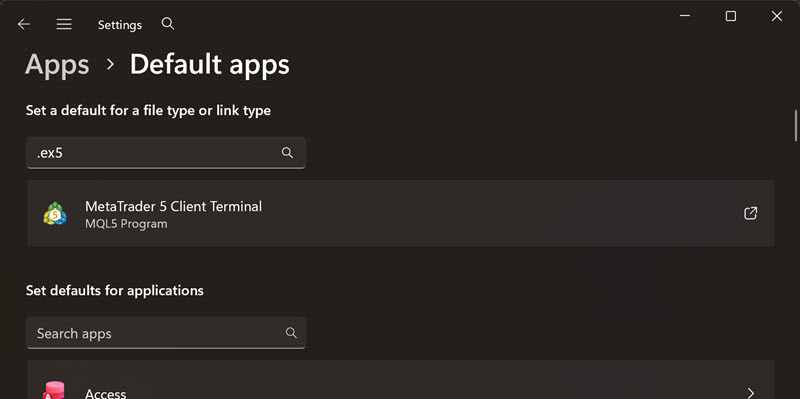
Go to Windows Settings -> Default Apps
Search for .ex5 and it will find your Metatrader 5 which ever is default.
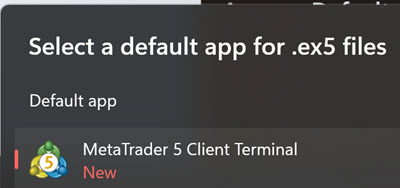
Then click on it and find your other MT5 and select and click Set Default there.
It doesn't let me attach screenshot.
hello
In my PC, I have two MT5 accounts with different brokers. The market indicator I install is currently applied to the MT5 account of the most recently installed broker. How can I make it apply to the previous one?
Yes — easy to fix, and on the same PC you've got two ways to do it.
The cleanest way (works for any Market product):
Open the MT5 you want it on (the "previous" one), then log into your MQL5 account inside that terminal — Tools → Options → Community tab, enter the same MQL5 login and password you used to download the indicator. Now open the Market tab in that same terminal, go to your Purchased products, and install the indicator straight from there. Since it's tied to your MQL5 account, it activates on that terminal too.
The quick way (since both terminals are on the same computer):
In the terminal that already has it: File → Open Data Folder → MQL5 → Indicators, and copy the indicator's .ex5 file.
In the other terminal: File → Open Data Folder → MQL5 → Indicators, and paste it in.
Then right-click in that terminal's Navigator and choose Refresh — the indicator will appear. On the same PC this runs fine, because a Market product's activation is tied to your hardware, not to one specific terminal.
One heads-up: Market products allow a limited number of activations, but two terminals on a single machine normally count without trouble.
Yes — easy to fix, and on the same PC you've got two ways to do it.
The cleanest way (works for any Market product):
Open the MT5 you want it on (the "previous" one), then log into your MQL5 account inside that terminal — Tools → Options → Community tab, enter the same MQL5 login and password you used to download the indicator. Now open the Market tab in that same terminal, go to your Purchased products, and install the indicator straight from there. Since it's tied to your MQL5 account, it activates on that terminal too.
The quick way (since both terminals are on the same computer):
In the terminal that already has it: File → Open Data Folder → MQL5 → Indicators, and copy the indicator's .ex5 file.
In the other terminal: File → Open Data Folder → MQL5 → Indicators, and paste it in.
Then right-click in that terminal's Navigator and choose Refresh — the indicator will appear. On the same PC this runs fine, because a Market product's activation is tied to your hardware, not to one specific terminal.
One heads-up: Market products allow a limited number of activations, but two terminals on a single machine normally count without trouble.
Are you sure copy paste ex5 files works for indis from market?
For me it somehow broke. I think mql5 wants you to re-install everything so it can re-validate your HWID, mql5 account etc.
And yes, it will not cost extra activations because same HWID. But direct copy of ex4/5 might not work. I could be wrong.
thank you everyone

- Free trading apps
- Over 8,000 signals for copying
- Economic news for exploring financial markets
You agree to website policy and terms of use
hello
In my PC, I have two MT5 accounts with different brokers. The market indicator I install is currently applied to the MT5 account of the most recently installed broker. How can I make it apply to the previous one?