Perfect Backtest or False Positive? How to force realistic Commissions and Slippage in your expert advisor.
I could program a fixed commission directly into the EA code, emulating the broker I am going to use, but I would prefer to know if there is a native and robust way to do it through the custom symbol properties so as not to alter the code logic.
Have a look at:

- 2021.12.18
- www.mql5.com
I don't know if it is enough to set a ping delay in the Strategy Tester...
Forum on trading, automated trading systems and testing trading strategies
Strategy Tester Slippage Inquiry
Dominik Egert, 2022.08.16 11:07
I would say, "big slippage" is very relative, as it is depending on your strategy.
Example: If your TP is around 100 points of price change, a slippage of 5 points would be a 5% slippage. - Is that much?
Slippage will occur, you will not be able to avoid it, though, depending on the liwuidity of your broker.
To set your strategy tester to emulate some "real world" scenarios, use the input dialog to change the behaviour:
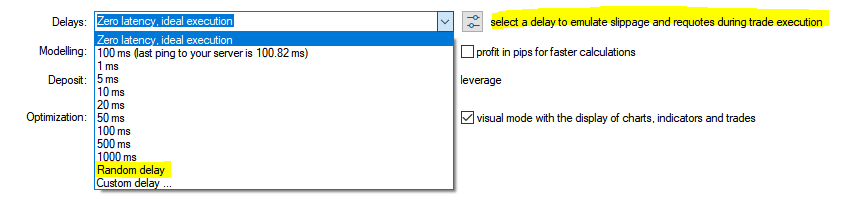
Also set the modelling to "based on real ticks".
Thanks, both were really useful!
btw, is the are feature in the Strategy Tester that can emulate spread?
Or is this already in the data provided by the broker?
To the best of my knowledge, testing on real ticks uses real spreads while testing on OHLC only uses the first spread amount detected by the Tester.
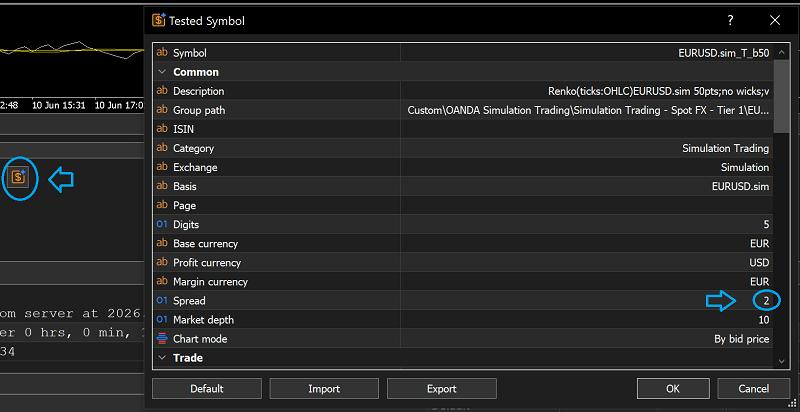
You can also set a fixed spread amount as an override in the Tested Symbol window. In the case of OHLC testing, I prefer to set that fixed spread slightly above the average spread for my EA's trading times─because using a randomly detected first spread is a bit illogical.
Rather than coding commissions into the EA logic, I’d keep the strategy separate and model execution costs in the tester/settings layer. A useful check is to run the same system under a few spread, commission, and slippage bands, then compare out-of-sample results. If a small cost change flips the edge, the backtest is probably too dependent on ideal fills. What matters most is whether the broker’s real costs stay inside the envelope you tested.
How do you do this?
As a I understand you use something like this:

- 2021.12.18
- www.mql5.com

- Free trading apps
- Over 8,000 signals for copying
- Economic news for exploring financial markets
You agree to website policy and terms of use
Hello community.
I am validating an Expert Advisor in MetaTrader 5 and I am looking to maximize backtest realism before moving to a live account. First of all, I am using real tick data obtained externally to MT5. With this, I assume the real spread is already covered, but I still need to robustly implement the two most critical costs: commissions and slippage.
I have two questions:
1. Commission Configuration. Is it a good idea to simulate these commissions within the EA code itself so that they are reflected when backtesting? What is the most reliable method in MT5 to fill in these commissions? To solve this, it occurs to me that I could program a fixed commission directly into the EA code, emulating the broker I am going to use, but I would prefer to know if there is a native and robust way to do it through the custom symbol properties so as not to alter the code logic.
2. Slippage Simulation in the EA Code. I don't know if it is enough to set a ping delay in the Strategy Tester or if I have to add it somehow to the EA code. Also, it would be very helpful if you could explain what the "Commercial Settings" section right next to "Delay" is used for.
I would appreciate any suggestions, documentation, or forum threads that can guide me to avoid false positives due to the perfect execution of the tester.
Best regards!