MT5 Strategy Tester Optimization Interruptions
Hi,
I’m currently facing a challenge with the MT5 Strategy Tester during heavy optimization runs, and I’m looking for a more efficient way to handle "invalid" parameter combinations.
However, I’ve noticed that if the tester encounters too many consecutive invalid passes, it simply stops the entire optimization process. It seems there is a built-in threshold that triggers a full interrupt if the "failure rate" is too high.
- Using return at the very start of OnTick().
"The TesterStop() function is designed for a routine early shutdown of an EA on a test agent – for example, when reaching a specified number of losing trades or a preset drawdown level.
TesterStop() call is considered a normal completion of a test, therefore the OnTester() function is called, and the entire accumulated trading statistics and optimization criterion value are submitted to the strategy tester."

- www.mql5.com
"The TesterStop() function is designed for a routine early shutdown of an EA on a test agent – for example, when reaching a specified number of losing trades or a preset drawdown level.
TesterStop() call is considered a normal completion of a test, therefore the OnTester() function is called, and the entire accumulated trading statistics and optimization criterion value are submitted to the strategy tester."
When used in oninit it does the same error, as well as ExpertRemove().
After doing more research, I've found that your specific problem is not new and there is no retroactive solution. As they say, an ounce of prevention is worth a pound of cure:
Forum on trading, automated trading systems and testing trading strategies
FYMD, 2021.03.29 04:42
This is how I got around the issue you are having without using INIT_PARAMETERS_INCORRECT and potentially affecting the outcome of my Genetic backtest or by resorting to creating a set file for every possible viable combination of my input parameters and writing another program to run backtesting on each of those set files individually as previously reported as potential viable solutions to the issue at hand.
1) separate your input parameters which you'd like to apply a kill pass to into different groups. Lets say in one of those groups you have 5 or 6 variables, each of which can have two potential inputs in one of those groups.
2) enter each of those variables and their potential inputs in an excel column as shown below:
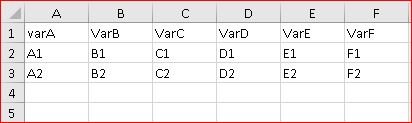
3) Modify and use the following excel visual basic and run it on the data you just entered to create every combination of those 5 or 6 variables.
Sub ListAllCombinations()
'Updateby Extendoffice
Dim xDRg1, xDRg2, xDRg3, xDRg4, xDRg5, xDRg6 As Range
Dim xRg As Range
Dim xStr As String
Dim xFN1, xFN2, xFN3, xFN4, xFN5, xFN6 As Integer
Dim xSV1, xSV2, xSV3, xSV4, xSV5, xSV6 As String
Set xDRg1 = Range("A2:A3") 'First column data
Set xDRg2 = Range("B2:B3") 'Second column data
Set xDRg3 = Range("C2:C3") 'Third column data
Set xDRg4 = Range("D2:D3") 'Fourth column data
Set xDRg5 = Range("E2:E3") 'Fifth column data
Set xDRg6 = Range("F2:F3") 'Sixth column data
xStr = "-" 'Separator
Set xRg = Range("H2") 'Output cell
For xFN1 = 1 To xDRg1.Count
xSV1 = xDRg1.Item(xFN1).Text
For xFN2 = 1 To xDRg2.Count
xSV2 = xDRg2.Item(xFN2).Text
For xFN3 = 1 To xDRg3.Count
xSV3 = xDRg3.Item(xFN3).Text
For xFN4 = 1 To xDRg4.Count
xSV4 = xDRg4.Item(xFN4).Text
For xFN5 = 1 To xDRg5.Count
xSV5 = xDRg5.Item(xFN5).Text
For xFN6 = 1 To xDRg6.Count
xSV6 = xDRg6.Item(xFN6).Text
xRg.Value = xSV1 & xStr & xSV2 & xStr & xSV3 & xStr & xSV4 & xStr & xSV5 & xStr & xSV6
Set xRg = xRg.Offset(1, 0)
Next
Next
Next
Next
Next
Next
End Sub
You should have a column of all possible combinations of your variables created as shown below.
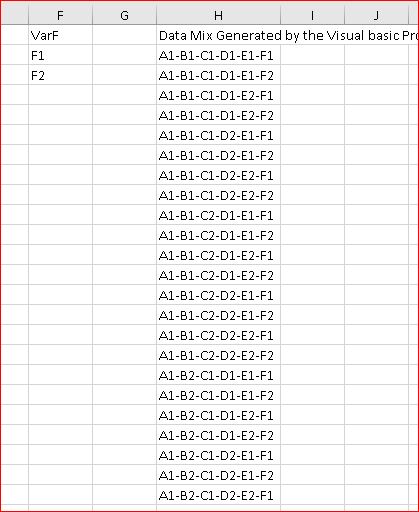
4) Now using the Text to Columns function of your excel under Data tab, separate all the combinations into individual columns.
5) Using If statements, apply whatever rules you want to eliminate the rows with variables you do not want to run a backtest on (I use formulas such as =If(D2>C2,1,"") on a new column next to my combination of data to place a 1 in front of every combination that is not suitable to my backtest and then using the Data/Filter show every row which has the number 1 in front of it and tehn delete those rows)
6) Merge the columns again using & into a new column. (example, =A2 & B2 & C2 & D2 & E2 & F2 )
7) Run Data/ Remove Duplicates to remove all the duplicates of combined variables and again separate the data into each individual columns.
8) Introduce a new variable in metaeditor for each of your groups of codependent variables, each input of which will correspond to one of the combinations of the 5 or 6 variables in the excel sheet (For example, in my code, I named that variable AutoTrailVar as such:
input int AutoTrailVar = 1; whereas case of Autovariable = 1 would correspond to the combination of my 5 or 6 variables each having a specific input value and case = 2 would correspond to the 6 variables having another set of inputs.
9) to facilitate the metaeditor programing, I combined all the variations of the code in my excel (see column AE and how the "= G & H & I & ... has combined to write the code i would be cutting and pasting into my metaeditor below:
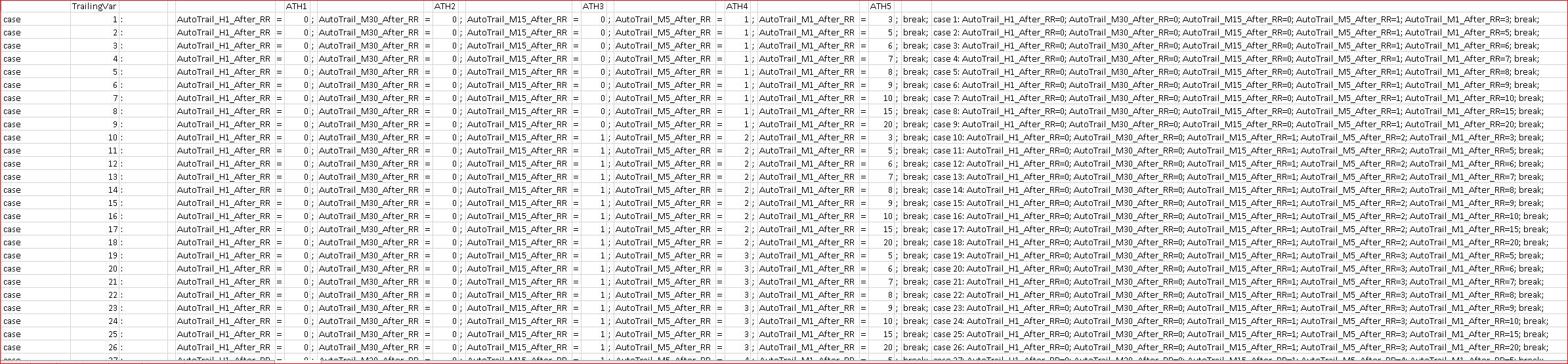
10) add a function to be read on the int Oninit() as shown below:
int OnInit()
{
//---
AdjustTrailParameters();
And the function of AdjustTrailParameters(); in my program's case is simply a combination of cases for my single variable which has been cut and pasted into metaeditor from my excel sheet as shown above:
void AdjustTrailParameters()
{
//---
switch(AutoTrailVar)
{
case 1: AutoTrail_H1_After_RR=0; AutoTrail_M30_After_RR=0; AutoTrail_M15_After_RR=0; AutoTrail_M5_After_RR=1; AutoTrail_M1_After_RR=3; break;
case 2: AutoTrail_H1_After_RR=0; AutoTrail_M30_After_RR=0; AutoTrail_M15_After_RR=0; AutoTrail_M5_After_RR=1; AutoTrail_M1_After_RR=5; break;
case 3: AutoTrail_H1_After_RR=0; AutoTrail_M30_After_RR=0; AutoTrail_M15_After_RR=0; AutoTrail_M5_After_RR=1; AutoTrail_M1_After_RR=6; break;
case 4: AutoTrail_H1_After_RR=0; AutoTrail_M30_After_RR=0; AutoTrail_M15_After_RR=0; AutoTrail_M5_After_RR=1; AutoTrail_M1_After_RR=7; break;
case 5: AutoTrail_H1_After_RR=0; AutoTrail_M30_After_RR=0; AutoTrail_M15_After_RR=0; AutoTrail_M5_After_RR=1; AutoTrail_M1_After_RR=8; break;
...
11) now when I run a backtest and use different variable input for my Single input "AutoTrailVar' (instead of 5 different inputs for each of my codependent variables), I will only have the combination of variables which result in a meaningful backtest outcome as preselected in my excel sheet without the use of Kill pass.
12) you can do the same for any number of codependent groups of variables within your program for which you'd like to filter out a number of passes as per the guidelines described above.
Hope that helps and good luck.
I’m currently facing a challenge with the MT5 Strategy Tester during heavy optimization runs, and I’m looking for a more efficient way to handle "invalid" parameter combinations.

- www.mql5.com
Yes, this is a known flaw in the tester, still. You may find a kind of workaround in the algobook.

- Free trading apps
- Over 8,000 signals for copying
- Economic news for exploring financial markets
You agree to website policy and terms of use
Hi,
I’m currently facing a challenge with the MT5 Strategy Tester during heavy optimization runs, and I’m looking for a more efficient way to handle "invalid" parameter combinations.
However, I’ve noticed that if the tester encounters too many consecutive invalid passes, it simply stops the entire optimization process. It seems there is a built-in threshold that triggers a full interrupt if the "failure rate" is too high.
- Using return at the very start of OnTick().