Multiple Instances Problem
Eleni Anna Branou # : Parece ter algo errado na sua configuração ou VPS, não podemos dizer o que a partir daqui.
What I find strange is that Windows works normally. I can open any application or use any function without any problem. The issue only happens in MT5, as if it were some kind of optimization problem. But I have already reduced the graphics and removed options such as Market Depth.
ell c0saki #:
What I find strange is that Windows works normally. I can open any application or use any function without any problem. The issue only happens in MT5, as if it were some kind of optimization problem. But I have already reduced the graphics and removed options such as Market Depth.
What I find strange is that Windows works normally. I can open any application or use any function without any problem. The issue only happens in MT5, as if it were some kind of optimization problem. But I have already reduced the graphics and removed options such as Market Depth.
is mt5 from a broker? i see the icon is not a custom one.
if it is not, then, it is probably beta versions. issues always happen on betas, whereas releases have very few.
Michael Charles Schefe #:
yeah its from broker. fbs
is mt5 from a broker? i see the icon is not a custom one.
if it is not, then, it is probably beta versions. issues always happen on betas, whereas releases have very few.
Files:
Sem_t0tulo.png
6 kb
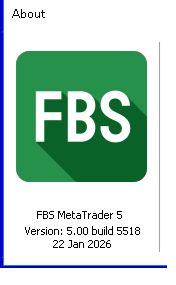
ell c0saki #:
How can I update it and remove this beta version?
How can I update it and remove this beta version?
Backup your MT5 Data Folder by copying and pasting it to your desktop or wherever, uninstall Beta MT5, and install your desired Release MT5 from Releases - angevoyageur/MT5-Last-Official-Release - MQL5 Algo Forge.
Then copy and paste your Data Folder to the Data Folder directory of Release MT5, and restart MT5.
MT5-Last-Official-Release
- angevoyageur
- forge.mql5.io
Provide the executable files to downgrade to the last official release of MT5. Useful after an unexpected update to a beta.

You are missing trading opportunities:
- Free trading apps
- Over 8,000 signals for copying
- Economic news for exploring financial markets
Registration
Log in
You agree to website policy and terms of use
If you do not have an account, please register
Hello, how are you? I have some copy trading bots running. Currently, I have 5 instances of MT5 running: one main account and 4 receiving accounts.
I have noticed that when I try to display the MT5 window, it appears to be frozen. However, it is still working and executing everything normally. The only issue is that I cannot visualize or interact with the platform window.
The rest of Windows works normally. I also still have available resources on the server, including memory and CPU.
can anyone help?