Indicators: TimerClosingPeriod
It remains to "nail" the piercing mesh breaking the grace of the drawing....
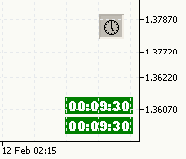
It remains to "nail" the piercing mesh breaking the grace of the drawing....
This is the developers' concern, the grid should be on the very last layer. Although I always have it switched off ;)))
The problem of drawing cleanliness can be solved by unchecking the "Graph on top" checkbox.
(in the graph settings)
The problem of drawing cleanliness can be solved if you uncheck the "Graph on top" checkbox.
(in the graph settings)
This is certainly good, but I think that in any case the grid should be displayed on the lowest layer. Although this is my subjective opinion.
This is good, of course, but I think the grid should be displayed on the lowest layer anyway. That's my subjective opinion though.
I agree wholeheartedly!
/number/signature/print/
;)
Glitches, requires reinstallation the next day, which is not good.
Please describe in detail.
I've had the following problems so far:
Deinit() function does not delete objects from the screen for some reason when the terminal is switched off;
and the timer does not start at restart (solved by switching to another TF and back), unfortunately this problem cannot be solved yet, but it is not related to the programming logic.
Describe it in detail, please.
Well... it doesn't require reinstallation, but when:
- long term disconnection
- after a weekend
requires reinitialisation, which is achieved by a double timeframe transition.
hi Dmitry,
i already try your indicator and compile it (ver 5.00 build 250 23 feb 2010), but this message appear
cannot open include file "C:\Program Files\MetaTrader 5\MQL5\include\StdLibErr.mqh" Object.mqh
please help me

- Free trading apps
- Over 8,000 signals for copying
- Economic news for exploring financial markets
You agree to website policy and terms of use
TimerClosingPeriod:
An indicator can be useful for traders who are working on opening of the new candle, it prints the time to close of the current timeframe.
If the timeframe is lower than H1, it also prints the time to close of the current hourly candle.
Author: Dmitry