MT5 Strategy Tester: Local Agents Not Working - Error 1053 & History Sync
-
Journal Logs: The logs show that synchronization starts but is immediately killed:
Forum on trading, automated trading systems and testing trading strategies
Metatrader 5 Build 5505 MetaTester is broken. Will not test - Confirmed
Alain Verleyen, 2026.01.18 15:43
Unfortunately I can't reproduce this issue on my side.
Thank you for the response!
I have upgraded to Windows 11 Pro and performed further tests. I am attaching the latest log file. Here are the key findings from my journal:
-
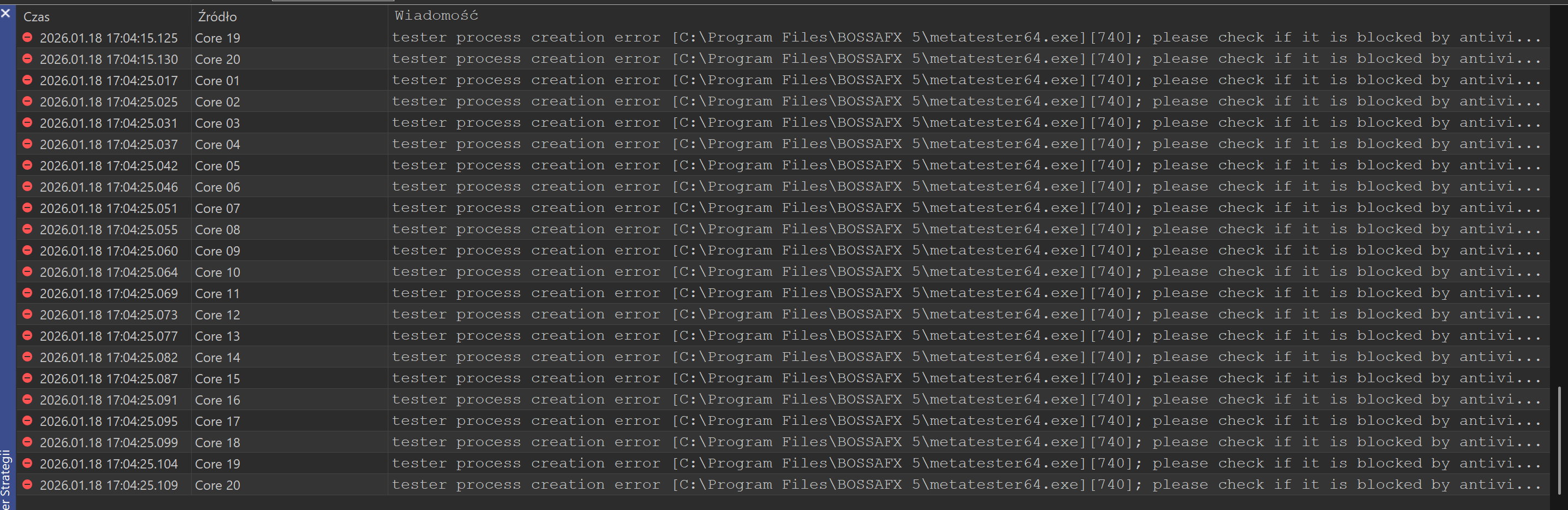
Process Creation Error: I am getting a persistent tester process creation error [740] . I understand this is an elevation issue (UAC).
-
Antivirus/Security: The log explicitly suggests checking if the process is blocked by antivirus software. I have added exclusions, but the error persists.
-
Sync Issues: Even when agents authorize, I see US100: history synchronization interrupted followed by connection closed .
-
Location: The platform is installed in C:\Program Files\BOSSAFX 5\ .
Do you recommend moving the entire installation folder out of Program Files to a custom directory like C:\MT5\ to bypass these Windows 11 Pro security restrictions, or is there a specific registry fix for error 740 in this context?
Looking forward to your advice!
Thank you for the response!
I have upgraded to Windows 11 Pro and performed further tests. I am attaching the latest log file. Here are the key findings from my journal:
-
Process Creation Error: I am getting a persistent tester process creation error [740] . I understand this is an elevation issue (UAC).
-
Antivirus/Security: The log explicitly suggests checking if the process is blocked by antivirus software. I have added exclusions, but the error persists.
-
Sync Issues: Even when agents authorize, I see US100: history synchronization interrupted followed by connection closed .
-
Location: The platform is installed in C:\Program Files\BOSSAFX 5\ .
Do you recommend moving the entire installation folder out of Program Files to a custom directory like C:\MT5\ to bypass these Windows 11 Pro security restrictions, or is there a specific registry fix for error 740 in this context?
Looking forward to your advice!
If you feel able to do it, I would recommend to uninstall all, clean up the registry then start from scratch. Then report here what happened.
And please post log FILE, not screenshot, not excerpt.
I have had issues with the newer releases for Strategy Tester that affected the Agents and Also Back-testing and Forward-testing is flawed and does not work. The agents run multiple Tasks with 0 passed.
I can pinpoint that anything after 5.00 5478 12 Dec 2025 does not work with EA Back & Forward Testing, the local farm is now not operational as the updates for Terminal and Strategy Tester have cycled through to 5.00 5512 20 Jan 2026.
My workflow has my time wasted for over 5 days and it seems like a permission issue that I could fix with a directory of the 5478 version working for Strategy Tester, Agents Registered properly and resources shared correctly.
What Pieter has reported I have replicated the same issues he has experiences on 3 different hosts. If the setup is stripped with no local user data, APPDATA directory and registry entries with a clean install the problem does not work on Agent or Back Test Forward Test on the following brokers/signals for clarity:
- MetaQuote Demo
- Pepperstone Demo
- Coinexx Demo
- PuPrime Demo
If I copy HCS files it assists to start the tester but seems like manual work arounds that doesn't fix agent issues running. Then you need to add C:\Program Files\MetaTrader 5\Tester\Bases directory to get the Agents in Strategy Tester to go from the 1053 error for services failed to start issues.
It is broken and multiple workarounds don't constitute a functional release.
HCS files get the same error 4, Services MetaTester-1-xx gets the 1053 error.
Below is a link which relates to Agent problems from another user which these problems are linked as the same issue(s)
https://www.mql5.com/en/forum/503526/page2#comment_58987776
What is in the changelog that has changed from 5478? Can I receive a previous version that does not auto update to MQL 5 severs to the latest release until the above has been fixed?
Moderators/Developers please help?

- 2026.01.21
- www.mql5.com
Please don't double post.
Forum on trading, automated trading systems and testing trading strategies
Metatrader 5 Build 5505 MetaTester is broken. Will not test - Confirmed
Alain Verleyen, 2026.01.21 14:04
Do no use beta versions if you don't want to be a beta-tester.
Last official release is still 5430.
This maybe a stupid question, but i will ask anyway...
Have you tried downgrading to release version 5430?
and then there is a thread on the forum where the discussion on on a workaround or hack to block automatic updates.

- Free trading apps
- Over 8,000 signals for copying
- Economic news for exploring financial markets
You agree to website policy and terms of use
Hi everyone,
I am struggling with a persistent issue where local agents in the MT5 Strategy Tester are completely non-functional, despite several troubleshooting attempts.
System Specs:
CPU: Intel Core i9-13900H (20 threads)
OS: Windows 11
The Problem:
Service Failure: The Windows Event Viewer consistently reports Error 1053: "The service did not respond to the start or control request in a timely fashion" for the MetaTester-1 service.
Registry Tweak Ignored: I added the ServicesPipeTimeout DWORD (value 180000 ) to the registry, but Windows still times out after 30 seconds.
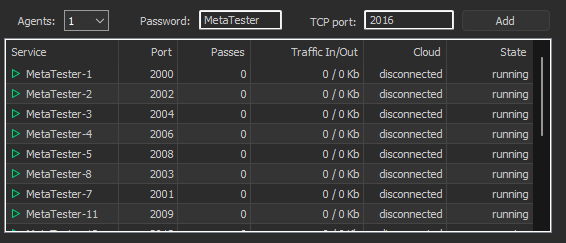
Agents Not Working: In the MT5 Strategy Tester "Agents" tab, the cores often stay "Disabled" or "Stopped". When manually enabled, they switch between ready and failed but never actually process any tasks.
Journal Logs: The logs show that synchronization starts but is immediately killed:
connecting to 127.0.0.1:30xx
authorized (agent build 5505)
US100: history synchronization interrupted
connection closed
What I’ve Tried So Far:
Running MT5 and metatester64.exe as Administrator.
Using /portable mode to bypass Windows services.
Adding full exclusions to Antivirus/Firewall.
Deleting and re-installing agents via the MetaTester interface.
Manually clearing the bases/server/history folder.
Even when some cores show as ready , they fail immediately upon starting a backtest. It seems like a deep conflict between the MetaTester services and Windows 11 permissions or the Intel hybrid architecture.
Has anyone found a definitive fix for local agents refusing to work on 13th Gen Intel CPUs or bypassing this Error 1053 permanently?
Any help would be greatly appreciated!