Making a RECTANGLE object NON transparent
I have been struggling to make my rectangle object 'solid color' such that the contents are not obscured by other text on screen behind the rectangle. Tried several variations and always appears to be transparent. The code is below. I include a Toggle switch / button to display the rectangle or not. I use it to display key data which doesn't change much - i.e. like today's opening balance. The EA is used to display my trades ONLY - not do the trading - so I just need to verify I have the correct data. Works well and have my 'ways around' the problem but now determined to resolve - if I can
Any help/ suggestions appreciated
Read this short thread:

- 2025.01.17
- www.mql5.com
Took a look and appeared to suggest a couple of things but didn't work. See the code for the commented out options. Adding these lines of code then made the rectangle 'non draggable'. To make the rectangle appear in the FOREGROUND appears to require the
OBJPROP_BACKto be false - i.e. no Foreground specific instruction int Initialsie_Create_Rectangle() { if(!ObjectCreate(ChartNumber, rectName, OBJ_RECTANGLE_LABEL, 0, 0, 0)) // Create rectangle using OBJ_RECTANGLE_LABEL (must be selected to drag) //if(!ObjectCreate(ChartNumber, rectName, OBJ_RECTANGLE, 0, 0, 0)) // Create rectangle using OBJ_RECTANGLE_LABEL (must be selected to drag) { Print("110010 ICR Error creating rectangle: ", GetLastError()); return(INIT_FAILED); } // Set rectangle properties ObjectSetInteger (ChartNumber, rectName, OBJPROP_XDISTANCE, RectX); ObjectSetInteger (ChartNumber, rectName, OBJPROP_YDISTANCE, RectY); ObjectSetInteger (ChartNumber, rectName, OBJPROP_XSIZE, RectWidth); ObjectSetInteger (ChartNumber, rectName, OBJPROP_YSIZE, RectHeight); ObjectSetInteger (ChartNumber, rectName, OBJPROP_CORNER, CORNER_LEFT_UPPER); ObjectSetInteger (ChartNumber, rectName, OBJPROP_BORDER_TYPE, BORDER_FLAT); ObjectSetInteger (ChartNumber, rectName, OBJPROP_WIDTH, 3); ObjectSetInteger (ChartNumber, rectName, OBJPROP_COLOR, clrPowderBlue); ObjectSetInteger (ChartNumber, rectName, OBJPROP_BGCOLOR, clrLightCyan); ObjectSetInteger (ChartNumber, rectName, OBJPROP_SELECTABLE, true); ObjectSetInteger (ChartNumber, rectName, OBJPROP_SELECTED, true); ObjectSetInteger (ChartNumber, rectName, OBJPROP_TIMEFRAMES, OBJ_ALL_PERIODS); ObjectSetInteger (ChartNumber, rectName, OBJPROP_FILL, true); ObjectSetInteger (ChartNumber, rectName, OBJPROP_BACK, false); // Foreground ObjectSetInteger (ChartNumber, rectName, OBJPROP_BGCOLOR, clrLightCyan); ObjectSetInteger (ChartNumber, rectName, OBJPROP_ZORDER, 1); // Low Z-order but not 0 //ObjectSetInteger (ChartNumber, rectName, OBJPROP_STYLE,STYLE_SOLID); // Tried these and no change - still transparent //ObjectSetInteger (ChartNumber, rectName, OBJPROP_TIMEFRAMES,OBJ_NO_PERIODS); // Tried these and no change - still transparent //ObjectSetInteger (ChartNumber, rectName, OBJPROP_TIMEFRAMES,OBJ_ALL_PERIODS); // Tried these and no change - still transparent //DiagnosticRectangleProperties("200 in Initialsie_Create_Rectangle"); return(INIT_SUCCEEDED); }
Your problem is unclear. Please post a screenshot to visualize it.
Running your code I got :
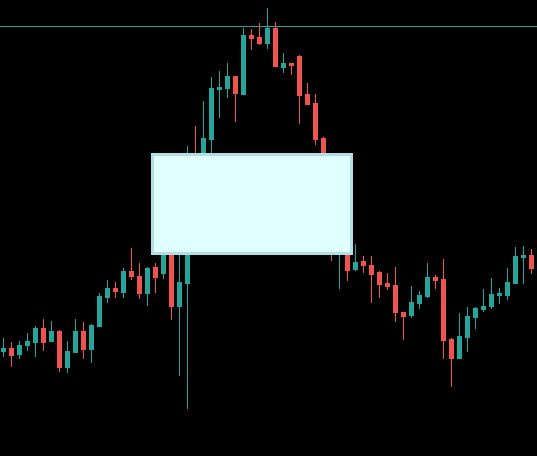
Thanks for the response. I also note on your screenshot the Rectangle doesn't look as if it is 'draggable' (i.e. no handle)
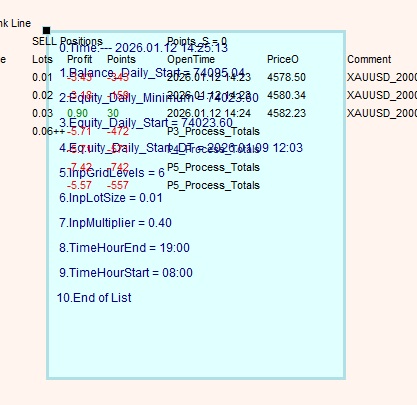
I'd like to get to the bottom of this problem - i.e. personal determination. I really have tried almost every combination I can think of, or ideas I see elsewhere.
I originally tried using a Panel but that was a worse than useless - charts got deleted etc.
I turned to using a rectangle and there are two Objects - OBJ_RECTANGLE_LABEL and OBJ_RECTANGLE. The first, which I use, allows me to create th 'draggable' rectangle and didn't manage that with the second option
I'd like to get to the bottom of this problem - i.e. personal determination. I really have tried almost every combination I can think of, or ideas I see elsewhere.
I originally tried using a Panel but that was a worse than useless - charts got deleted etc.
I turned to using a rectangle and there are two Objects - OBJ_RECTANGLE_LABEL and OBJ_RECTANGLE. The first, which I use, allows me to create th 'draggable' rectangle and didn't manage that with the second option
Your rectangle is not transparent, it is BEHIND the other (text) objects. You need to draw your rectangle AFTER these objects, for it to be display in the foreground.
Or alternatively you can draw your text objects in the background.
Thanks for the reponse. I'll have a think about this one.
I control the ability to 'show' th rectaagle via a Toggle button.
So I could have the background display present, then hit the Toggle Button and the rectangle appears - i.e. it would suggest it is drawn AFTER the back ground screen.
The rectangle doesn't look solid then go transparent when the screen refreshes with the next update.
Each of my items on the screen is a label - all generated by the same sub. Are you suggesting that maybe I could add some parameter to the label generation to ensure it remains a background item?
Like I say it won't hurt anything (other than my pride perhaps) not to resolve this issue or understand why it can not be achieved - I have some easy work arounds

- Free trading apps
- Over 8,000 signals for copying
- Economic news for exploring financial markets
You agree to website policy and terms of use
I have been struggling to make my rectangle object 'solid color' such that the contents are not obscured by other text on screen behind the rectangle. Tried several variations and always appears to be transparent. The code is below. I include a Toggle switch / button to display the rectangle or not. I use it to display key data which doesn't change much - i.e. like today's opening balance. The EA is used to display my trades ONLY - not do the trading - so I just need to verify I have the correct data. Works well and have my 'ways around' the problem but now determined to resolve - if I can
Any help/ suggestions appreciated