how to draw trendline on rsi window?
hi
i'm trying to draw a trendline on rsi indicator window but i couldnt
i tried subwindow and subID and ind values in objectCreate function in subwindow param.
can someone help me?
Have a look at Alain Verleyen's MACD Divergence indicator code. It contains a custom trendlines function that uses inputs to control indicator window selection:
//+------------------------------------------------------------------+
//| Draw a trend line on main chart or on indicator                  |
//+------------------------------------------------------------------+
void DrawTrendLine(ENUM_TRENDLINE_TYPE window,datetime x1,datetime x2,double y1,double y2,color lineColor,ENUM_LINE_STYLE style)
  {
   string label=OBJECT_PREFIX+"#"+IntegerToString(window)+DoubleToString(x1,0);
   int subwindow=(window==TRENDLINE_MAIN) ? 0 : ChartWindowFind();
   ObjectDelete(0,label);
   ObjectCreate(0,label,OBJ_TREND,subwindow,x1,y1,x2,y2,0,0);
   ObjectSetInteger(0,label,OBJPROP_RAY,false);
   ObjectSetInteger(0,label,OBJPROP_COLOR,lineColor);
   ObjectSetInteger(0,label,OBJPROP_STYLE,style);
  }
Have a look at Alain Verleyen's MACD Divergence indicator code. It contains a custom trendlines function that uses inputs to control indicator window selection:
subwindow = ChartWindowFind(chartID, "RSI(6)");
In my code, chartWindowFind returns a value of 1 and when I use the this value in the ObjectCreate function in the subwindow parameter, nothing happens.
It seems that Alain Verleyen also used the same method.
In my code, chartWindowFind returns a value of 1 and when I use the this value in the ObjectCreate function in the subwindow parameter, nothing happens.
It seems that Alain Verleyen also used the same method.
I loaded up the RSI indicator from my MT5 Indicators==>Examples folder and if you're using that indicator, you appear to have inserted a space in the indicator short name that the indicator does not have. The exact short name string is required. Try removing the space.
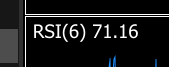
I loaded up the RSI indicator from my MT5 Indicators==>Examples folder and if you're using that indicator, you appear to have inserted a space in the indicator short name that the indicator does not have. The exact short name string is required. Try removing the space.
this is my code
Thanks for posting your complete file. Unfortunately, you're mixing indicator code with EA code.
Did you download and inspect Alain Verleyen's complete indicator code in my Post #1?
For an introduction to indicator coding, see:
Kelvin Muturi Muigua, 2024.05.02 13:26
Learn how to create custom indicators using MQL5. This introductory article will guide you through the fundamentals of building simple custom indicators and demonstrate a hands-on approach to coding different custom indicators for any MQL5 programmer new to this interesting topic.For an introduction to EA coding, see:
Step-By-Step Guide to writing an Expert Advisor in MQL5 for Beginners
Samuel Olowoyo, 2010.06.09 11:37
The Expert Advisors programming in MQL5 is simple, and you can learn it easy. In this step by step guide, you will see the basic steps required in writing a simple Expert Advisor based on a developed trading strategy. The structure of an Expert Advisor, the use of built-in technical indicators and trading functions, the details of the Debug mode and use of the Strategy Tester are presented.Thanks for posting your complete file. Unfortunately, you're mixing indicator code with EA code.
Did you download and inspect Alain Verleyen's complete indicator code in my Post #1?
For an introduction to indicator coding, see:
For an introduction to EA coding, see:
Using the links you provided and mixing the indicator with the ea and a little debugging I was able to achieve what I wanted

- Free trading apps
- Over 8,000 signals for copying
- Economic news for exploring financial markets
You agree to website policy and terms of use
hi
i'm trying to draw a trendline on rsi indicator window but i couldnt
i tried subwindow and subID and ind values in objectCreate function in subwindow param.
can someone help me?