Urgent: Copy Trading Sync Loop Error – Need Subscription Cache Reset
You should check log files - about what was written there.
Because sygnal provider is making the trades in scalping way (and if you use "Copy Stop Loss and Take Profit" levels in the settings) so some trades may be closed for you and do not close for signal provider, and those trades may be opened once again.
It should be written in the logs.
So, do not tick "Copy Stop Loss and Take Profit" levels in the settings, and your trades will be closed together with the signal provider (in the same time).
And there is warning on this instruction - https://www.mql5.com/en/forum/336422
WARNING!
After you finished with the synchronization of the signal subscription to the MQL5 VPS, DO NOT TICK AGAIN the: Enable realtime signal subscription option in your local computer’s MT5 platform, because that way you will copy the signal twice and this is extremely dangerous !!!
When you use a MQL5 VPS in order to copy a signal, you IGNORE the MT5 Journal tab, down in the terminal window and you only check the MQL5 VPS (right click) Journals, for useful information about your smooth signal copying.
So after the synchronization of your signal subscription with your MQL5 VPS, the MT5 >> Tools >> Options >> Signals, tab must look like below:
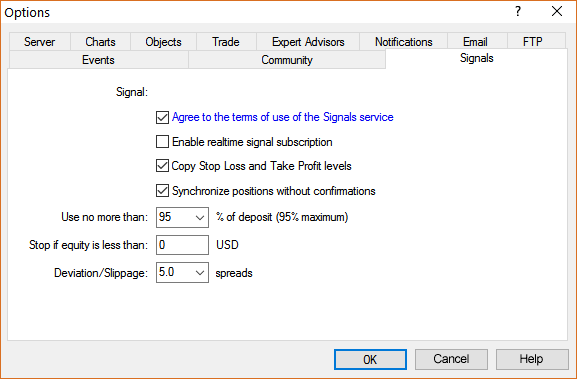

- 2020.04.01
- www.mql5.com

- Free trading apps
- Over 8,000 signals for copying
- Economic news for exploring financial markets
You agree to website policy and terms of use
Hello,
I am having a serious technical issue with the Copy Trading system on my account.
I subscribed to the signal TULIP, but the system keeps opening 20–30 identical positions repeatedly (0.01 lot GBPUSD) as you see in the attached copy, even though the signal provider has no such positions open.
I tested with two different brokers (FXPro MT5 and XMGlobal MT5) and the same issue happens on both accounts, even after:
Reinstalling MT5
Disabling all signals
Resetting VPS
Migrating VPS environment multiple times
Clearing all positions
Reconnecting the signal
Creating a new MT5 account
The signal provider also confirmed that his robot did NOT open those trades and he has no such positions.
Please reset my Signal Subscription Cache / Copy Trading Cache on your server side, as the system appears to be stuck in a sync loop and is repeatedly opening ghost positions.
Please help resolve this ASAP as it is dangerous.
My accounts:
MQL5 Login: Yoonhee Park
Brokers: FXPro MT5, XM Global MT5
Subscribed Signal: TULIP
Reply Email: <deleted by moderator>
Thank you.