Doing a Git Commit on multiple files
I have multiple source files that I would like to do a Git Commit at the same time as a group. How can I Commit multiple files at the same time? How it that done?
Right click the main/parent folder for the project, and run a commit and it will commit all the necessary files,
It doesn't seem to work as you say in the MTLE.
I have a parent mq5 file that includes several mqh files.
If I right click the mq5 parent file and select Git Commit, it only list the mq5 file and none of the mqh files.
I have to run the Git Commit on each of the mqh files individually. This takes more time then it should.
What would you suggest to do better?
It doesn't seem to work as you say in the MTLE.
I have a parent mq5 file that includes several mqh files.
If I right click the mq5 parent file and select Git Commit, it only list the mq5 file and none of the mqh files.
I have to run the Git Commit on each of the mqh files individually. This takes more time then it should.
What would you suggest to do better?
Are they not all together under a parent folder? Or do you mean that they are scattered? Show a screenshot of the folder structure.
Here is an example ... If I right-click the "FMIC" parent folder, and then click on "Git Commit", all the files under it will commit if they have updates pending.

Also, when you committed did you select and enable any pending files from the list the dialogue window?
Here is an exampled ...


One more thing, make sure your source files are in Unicode (UTF16 LE) format, or else they will remain marked with the red warning symbol ...
Forum on trading, automated trading systems and testing trading strategies
New MetaTrader 5 Platform Build 5200: Extended OpenBLAS support and enhanced control in MQL5
Fernando Carreiro, 2025.08.26 19:41
Has anyone noticed that the MQL5 Forge Git functionality, only considers Unicode/UTF16 files as valid (green check-mark after a commit)?
Other file formats, such as ASCII, UTF-8 (with or without a BOM) are successfully committed, but remain marked with a red warning bubble, even though on the forge they are all correctly updated and displayed.
Reference: Build 5200 ...
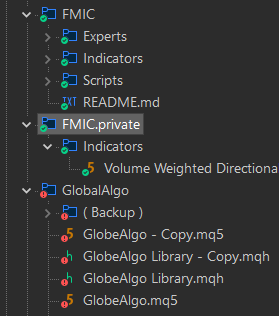
Are they not all together under a parent folder? Or do you mean that they are scattered? Show a screenshot of the folder structure.
Here is an example ... If I right-click the "FMIC" parent folder, and then click on "Git Commit", all the files under it will commit if they have updates pending.
The parent mq5 file for my EA is under the MQ5/Experts directory.
The mqh files that go along with it are under the MQ5/Include directory.
Is this not proper? If they go together, how should they be arranged?
Shouldn't they all be under the MQ5 folder?
Should I make a new parent folder under or parallel to the MQ5 folder to hold all of the files?
Should this new parent folder have folders: Experts and Include or not? Does it matter how the files are organized?
I have not seen MQ5 documentation that describes the proper folder layout.
Is your primary "MQL5" folder part of a Git Repository? If yes, then simply "Git Commit" the "MQL5" folder.
If not, then instead consider creating a project under the "Shared Projects" folder and setting that as a repository. Then, under that repository, create subfolder for "Experts", "Indicator", "Include", etc. After that when you compile a files, it will automatically place the executable files ender the main "Experts" or "Indicator" folder.
For example ...


- Free trading apps
- Over 8,000 signals for copying
- Economic news for exploring financial markets
You agree to website policy and terms of use
Is there an easier way to do a Git Commit on multiple source files at the same time than to select each file individually and then doing a single file Git Commit?
I have multiple source files that I would like to do a Git Commit at the same time as a group.
How can I Commit multiple files at the same time? How it that done?
Thanks.