Archive that stores the alerts
Is laptop Windows?
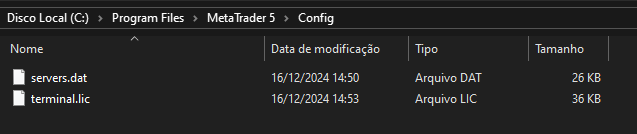
The config folder holds machine-specific settings, including Alerts, so it can't be synced directly - you'll need to set them up manually on your laptop.
Fernando Corrêa #:
Well, yes, the configurations are stored in files, but like I said, they’re tied to the specific machine and setup. Copying them directly to another PC usually doesn’t work as expected. It’s easier to just recreate the settings manually.
But the configurations are stored in some file right? Cant i pick up this file and put in the other pc?
Oleksandr Medviediev #:
Well, yes, the configurations are stored in files, but like I said, they’re tied to the specific machine and setup. Copying them directly to another PC usually doesn’t work as expected. It’s easier to just recreate the settings manually.
Could say me ehich files are those? I think it is worth trying
Well, yes, the configurations are stored in files, but like I said, they’re tied to the specific machine and setup. Copying them directly to another PC usually doesn’t work as expected. It’s easier to just recreate the settings manually.
Fernando Corrêa #: Could say me ehich files are those? I think it is worth trying
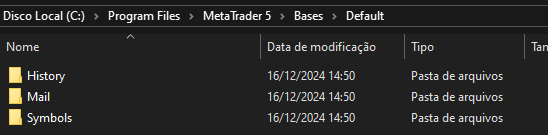
This is the file to copy for the alerts → ".\Bases\alerts.dat"
On the same computer, it works for me, but I don't know if it will work from one computer to another.
EDIT: The file is binary, but seems unencrypted, so it should work between different computers.
@Oleksandr Medviediev #: "config" folder.
See my previous post. The alerts are in the "Bases" folder, and seems unencrypted.


You are missing trading opportunities:
- Free trading apps
- Over 8,000 signals for copying
- Economic news for exploring financial markets
Registration
Log in
You agree to website policy and terms of use
If you do not have an account, please register
Hi, I configurated my alerts in my desktop computer, but i also have a laptop, I wanted that my configurations in MQL5 of the desktop would be transfered to laptop mainly the alerts. Someone knows which archive do i get in the desktop and past on the laptop?
I tryed copying the whole archive to onedrive (that is shared between the 2 computers) but when i run the program from onedrive, it is like a new one, so the configurations werent copyied.