
You are missing trading opportunities:
- Free trading apps
- Over 8,000 signals for copying
- Economic news for exploring financial markets
Registration
Log in
You agree to website policy and terms of use
If you do not have an account, please register
The easiest way is to use the function OrdersHistoryTotal: go through the history and see if the order with the necessary magician is in the history, it means that it was closed or deleted.
You can also add some sorting condition in the history order loop. For example, if the time of order closing is less than the opening time of today, then such an order will be ignored. As a result, the Expert Advisor will sort out only the orders closed/deleted today.
Tell me, for a remote order, is it possible to know if it was closed at takeprofit or otherwise?
Can you use the function
The order must be pre-selected using the OrderSelect() function.
Can we create a condition like this
Will this function return more than zero for any order if it was closed, i.e. what would be the profit?
1)
2) OrderTakeProfit( ) returns the take profit price of the order, not the profit.
if
is equal to OrderTakeProfit( ), then it is closed at TakeProfit
ilunga:
1)
2) OrderTakeProfit( ) returns the take profit price of the order, not its profit.
If
is equal to OrderTakeProfit( ) then it is closed by TakeProfit
Thank you!
Yes, that's right! Cool!!!
Good day to you all!
Please clarify 1 question. I have written an EA. I want to transfer it to another... I do not know how to say: from forex to insta forex). I went to the Expert Advisor, but the file does not exist! Where is it? It is only visible within the forex forex
Good day to you all!
Please clarify 1 question. I have written an EA. I want to transfer it to another... I do not know how to say: from forex to insta forex). I went to the Expert Advisor, but the file does not exist! Where is it? It is only visible within the forex forex
What is your operating system?
What is the operating system?
7 Vinda
https://www.mql5.com/ru/forum/133664
https://www.mql5.com/ru/forum/133664
Thank you, one more question: C:\Users\<User Name>\AppData\Local\VirtualStore\Program Files\.
C:\Users<Username><AppData<Local\VirtualStore\Program Files
Good day to you all!
Please clarify 1 question. I have written an EA. I want to transfer it to another... I do not know how to say: from forex to insta forex). I went to the Expert Advisor, but the file does not exist! Where is it? only visible within the forex forex
There is another option: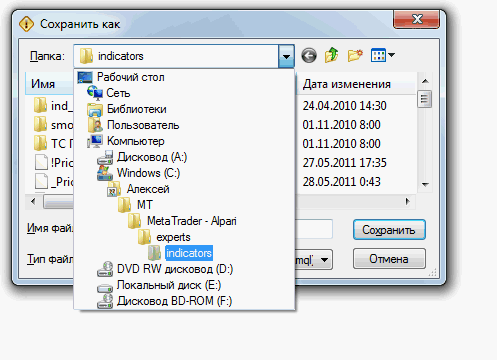
In the MetaEditor, in the File tab, select "save as ... ...", usually all programs in this case use the default folder to save the file.