How to enable "Algo Trading" option automatically?
I know this is old, but for anyone looking for the answer, you can go to Tools -> options and on the dialog, go to the Expert Advisors Tab.
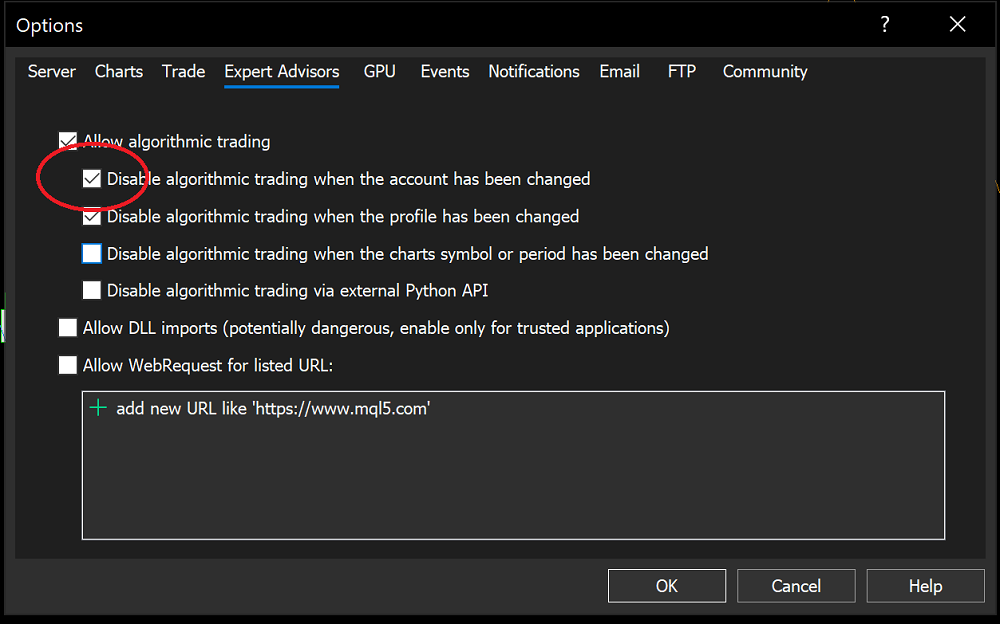
Tick allow ''Algorithm Trading' and untick the four options below it.
Hope this helps.
I know this is old, but for anyone looking for the answer, you can go to Tools -> options and on the dialog, go to the Expert Advisors Tab.
Tick allow ''Algorithm Trading' and untick the four options below it.
Hope this helps.
My MT5 has multiple accounts and I would like to control them simultaneously with my Python/MetaTrade5 program. In order to do so, "Algo Trading" option must be enabled. However, it is automatically disabled whenever account is switched in my Python program. How to enable it automatically?
Thanks.
[I]t is automatically disabled whenever account is switched in my Python program. How to enable it automatically?
Uncheck this checkbox:
hey bergen did you get any solution?
you are asking for a response from a thread that is 4 years old. open your own thread and you may get some responses.
I recommend that you search this site for answers also. I know that it could be done, but be aware that even if you do disable the eas, they will stop opening and closing trades, but you will probably get lot of errors when the ea make the attempts. You may consider using ExpertRemove(), instead. or maybe via code, loading a clean template, and when you want to start trading again, then, load another template with all your trading charts and eas. or maybe via code, closing the terminal down. and before it closes, send yourself a notification so that you know when it is closing down, so then, you can open the terminal again when trading is allowed.

- Free trading apps
- Over 8,000 signals for copying
- Economic news for exploring financial markets
You agree to website policy and terms of use
My MT5 has multiple accounts and I would like to control them simultaneously with my Python/MetaTrade5 program. In order to do so, "Algo Trading" option must be enabled. However, it is automatically disabled whenever account is switched in my Python program. How to enable it automatically?
Thanks.