I can't migrate my EA to MQL5 VPS
Hi,
im trying to migrate an EA file on VPS on my live account and it doesnt let me
its write that its an old EX4 file version, what shoul i do?
Do as you are told, right click on your EA in the Experts folder (Navigator window) and select >> Modify and then on the MetaEditor click on the Compile option on the top menu.
Then migrate your EA to MQL5 VPS again.i just did that but it still dosnt want to migrate the ea
what do i do worng?
this ea is based on an indicator, could that be the poblem?
this ea is based on an indicator, could that be the poblem?
If your EA is very old, it may need updating its code.
i want to migrate my 2 EA but it says migration successful but doesent include the EA and theres no expert tab next to journal tab . can i get some help ?thx
i want to migrate my 2 EA but it says migration successful but doesent include the EA and theres no expert tab next to journal tab . can i get some help ?thx
Attach each EA on the appropriate symbol/timeframe chart in your local terminal and then migrate them to your MQL5 VPS.
After the migration you can check the Terminal and Experts Journals of the MQL5 VPS to check what has been migrated.
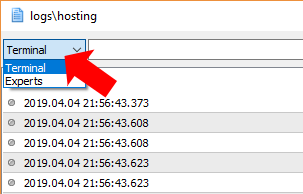
Attach each EA on the appropriate symbol/timeframe chart in your local terminal and then migrate them to your MQL5 VPS.
After the migration you can check the Terminal and Experts Journals of the MQL5 VPS to check what has been migrated.


- Free trading apps
- Over 8,000 signals for copying
- Economic news for exploring financial markets
You agree to website policy and terms of use
Hi,
im trying to migrate an EA file on VPS on my live account and it doesnt let me
its write that its an old EX4 file version, what shoul i do?