
You are missing trading opportunities:
- Free trading apps
- Over 8,000 signals for copying
- Economic news for exploring financial markets
Registration
Log in
You agree to website policy and terms of use
If you do not have an account, please register
Broker's version and direct from MQL5.com
But the problem is the same on both.
I did create a request for Service Desk. Waiting now.
If you will have some idea, please post here.
I find it impossible for a professional platform not to have a downgrade option to be able to reuse the previous version. Problems can happen, now being in an update, have to have a way of rolling back while waiting for a fix.
The VPS tab shows nothing due to the error.
Could you please confirm that it is a Metatrader bug?It's not a matter of using it wrong, it's a real problem.
Update (or install, or re-install) Internet Explorer to the version 11 (see link below).
I personally fixed it for my computer by this way.
Forum on trading, automated trading systems and testing trading strategies
How to Start with Metatrader 5
Sergey Golubev, 2019.10.10 10:48
I just discovered about how to fix it:
go to the Journal in Metatrader to see the recommendation:
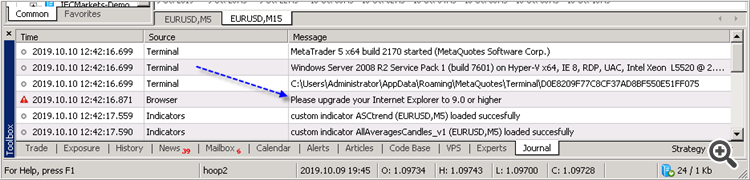
And I use this link to install the latest Internet Explorer:
https://www.microsoft.com/en-us/download/internet-explorer-11-for-windows-7-details.aspx
and I got the Market tab -
----------------
So, if you do not see the Market tab on the latest build of Metatrader (or if you are having the error with this Market tab for example) - install (or re-install) Internet Explorer to the latest version (to the version 11 for example).
C: \ Users \ user \ AppData \ Roaming \ MetaQuotes
There was some corrupted file in these folders in AppData because it had already reinstalled and it didn't resolve.
Then I installed it again. I synchronized the VPS and gave no error. I will wait to see if the robot operates normally.
Put my MT4 on VPs, it hangs worst than my laptop!!
It works but why would it hang?