Discussion of article "Optimization management (Part II): Creating key objects and add-on logic"
Before writing my solution, I looked at third party options with command line launching. Like in this good article.
And barely scratched out the advantages of this method over a single terminal solution.
It would be good to spell out useful usage scenarios.
Before writing my solution, I looked at third party options with command line launching. Like in this good article.
And hardly scratched out the advantages of this method over the single terminal solution.
It would be good to spell out useful usage scenarios.
I have another article planned, which will be a continuation and extension of this one. It will cover the method of creating a rolling optimisation, but I will put my personal projects in order and continue writing.
Incidentally, the author has not checked the code he has included.
The compiler already complains when loading...
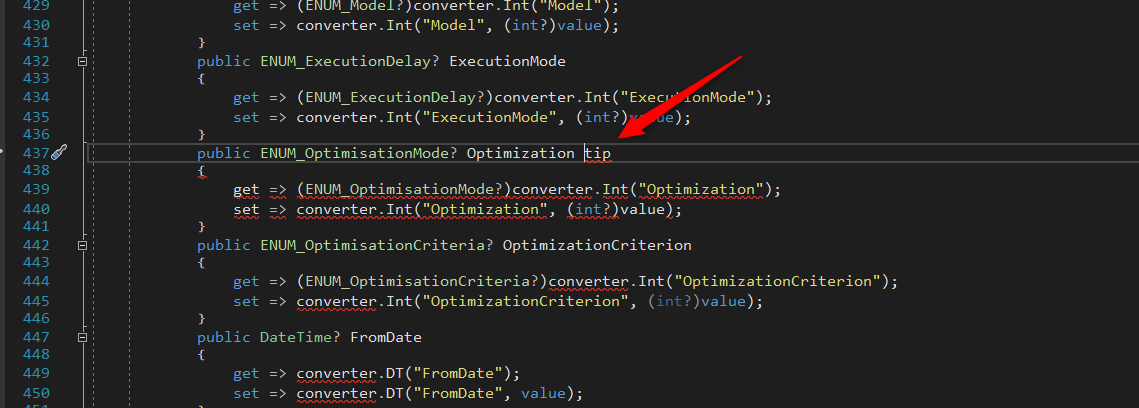
"tip" seems to be too much here.
I tried to realise the project.
Created the DLL OptimisationManagerExtention and compiled the EA.
After starting the EA, the MT5 crashes and is gone.
Build 2408
Solutions ?
Sure ... start the MT with admin rights :-)
Thank you
I did not have any problems with compiling and using this program. In attechments is the last variant of my code. This progect is not supported anymore becouse now I am doing auto optimiser that hase some parts of this code.
Problems are solved.
Metatrader5 needs admin rights to load the DLL.
Everything is ok

- Free trading apps
- Over 8,000 signals for copying
- Economic news for exploring financial markets
You agree to website policy and terms of use
New article Optimization management (Part II): Creating key objects and add-on logic has been published:
This article is a continuation of the previous publication related to the creation of a graphical interface for optimization management. The article considers the logic of the add-on. A wrapper for the MetaTrader 5 terminal will be created: it will enable the running of the add-on as a managed process via C#. In addition, operation with configuration files and setup files is considered in this article. The application logic is divided into two parts: the first one describes the methods called after pressing a particular key, while the second part covers optimization launch and management.
This article provides a further description of a convenient GUI creation process intended for managing optimizations in multiple terminals simultaneously. The previous article considered a method of launching a terminal from the console and contained a description of the configuration file. In this we proceed to the creation of a C# wrapper for the terminal, which will enable optimization management as a third-party process. The earlier considered GUI had no logic and could not perform any actions. It could only respond to keystrokes which output text of the pressed key to console (from which it is launched). In this part, a logic will be added, which will process GUI events and will implemented the embedded logic. A number of objects working with files will be created, which will enable the implementation of the logic part of program operation through this object, instead of working with files — this will simplify operation and will make the code more informative. Within this article, the application will finally takes on the form demonstrated in the video.
Author: Andrey Azatskiy