Experts: TST
Rollback rate in pips or as a percentage of the previous bar?
In pips from the High price of the zero (rightmost) bar:
//--- tuning for 3 or 5 digits
   int digits_adjust=1;
   if(m_symbol.Digits()==3 || m_symbol.Digits()==5)
      digits_adjust=10;
   m_adjusted_point=m_symbol.Point()*digits_adjust;

   ExtStopLoss       = InpStopLoss     * m_adjusted_point;
   ExtTakeProfit     = InpTakeProfit   * m_adjusted_point;
   ExtTrailingStop   = InpTrailingStop * m_adjusted_point;
   ExtTrailingStep   = InpTrailingStep * m_adjusted_point;
   ExtRollbackRate   = InpRollbackRate * m_adjusted_point;
//---
   return(INIT_SUCCEEDED);
  }
и
   MqlRates rates[1];
   if(CopyRates(m_symbol.Name(),InpTimeframe,0,1,rates)!=1)
      return;

   if(rates[0].open-m_symbol.Bid()>0 && rates[0].high-m_symbol.Bid()>ExtRollbackRate)
Vladimir Karputov, thank you for the clarification.
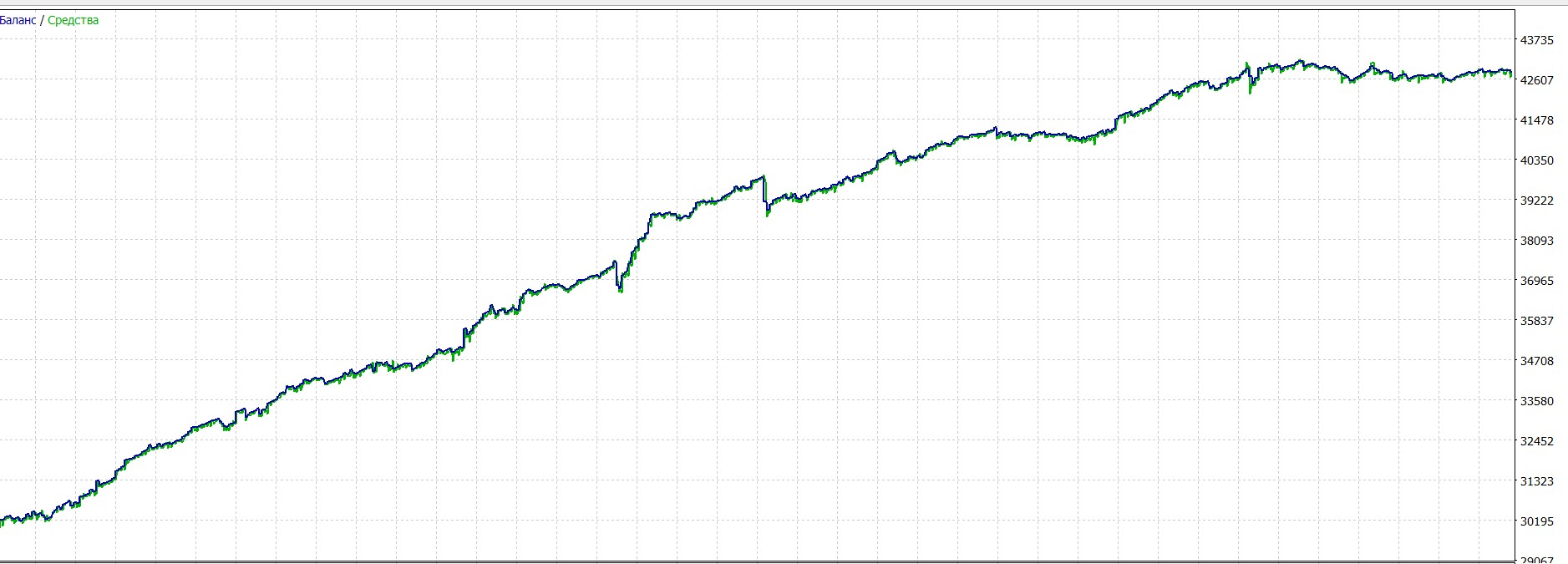
All ticks:
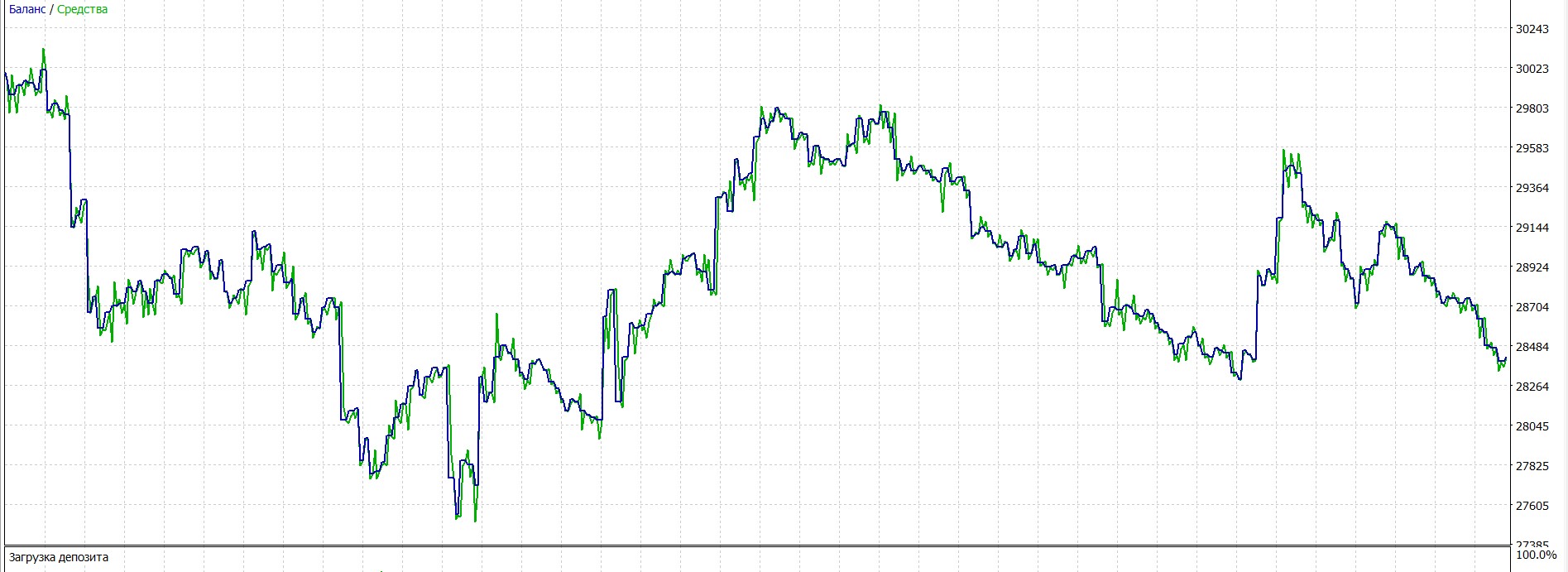
Each tick based on real ticks:
OHLC on M1
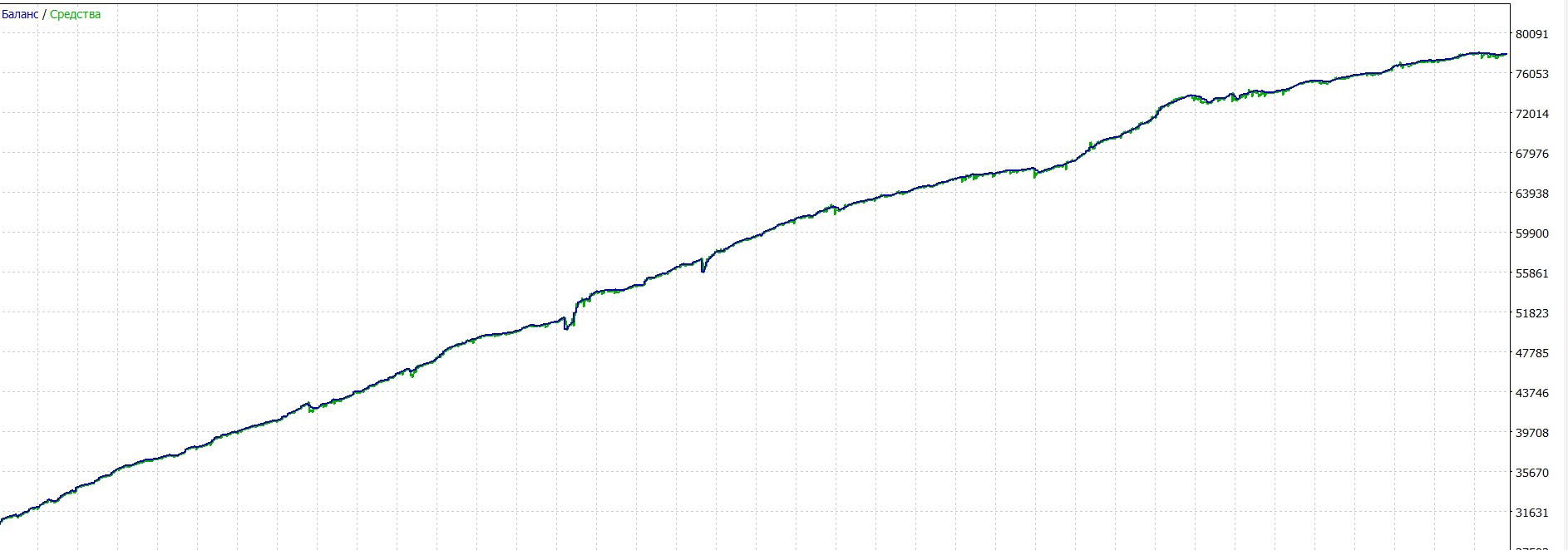
Why such a difference in results depending on the choice above?
Is there any possibility to make a modification for further research.
In the parameters prohibit to open the first Sell or Buy trade. The point is to test the Expert Advisor in unidirectional trading on a period of either growth or decline.
***
Why such a difference in results depending on the choice above?
***
Because the most real mode that corresponds 100% to reality is the test mode "Every tick based on real ticks".
The other modes are artificial modes of tick generation. How artificial modes are generated:
Algorithm of tick generation in the strategy tester of the MetaTrader 5 terminal
 Creating Expert Advisors - Automatic Trading Systems in MQL5 The MetaTrader 5 client terminal has a built-in programming environment for developing fully automatic strategies (trading robots) that can trade without human intervention. Another name for trading robots is Expert Advisors. Expert Advisors and technical indicators for MetaTrader 5 are written in the MQL5 language, which offers all the advantages of modern programming languages: speed of execution, support for object-oriented programming (OOP) and debugging. The ability to debug programs in MQL5 allows you to write the safest code from the programming point of view, but it is only a necessary, but not sufficient condition for developing a profitable stable trading system. Trading systems that can show good results over a large period of historical data are called robust, from the word robust - resistant to failures, errors.....
Articles | 2010.05.21 15:58 | MetaQuotes Software Corp. | Tester | MetaTrader 5
Vladimir Karputov, then it turns out that the Expert Advisor should open trades by analysing the generated bars on the basis of a real formed candle in real time. Generation of ticks simplifies the real picture, the same should be done by real time Expert Advisor. Generate a tick chart based on current quotes and make entries. Is it possible to realise this in an Expert Advisor in theory?
Here is an example of what is wrong with real time entries and on tick generation.
"If a candle is a doji, i.e. Close==Open, then the previous candles are analysed, if the previous candle was an ascending candle, then this doji is considered a descending candle."
From here the entries will be very different. Maybe there is a grail.
Vladimir Karputov, then it turns out that the Expert Advisor should open trades by analysing the generated bars on the basis of a real formed candle in real time. Generation of ticks simplifies the real picture, the same should be done by real time EA. Generate a tick chart based on current quotes and make entries. Is it possible to realise this in an Expert Advisor in theory?
Sorry, I see familiar letters, but I can not read into a coherent thought. I don't understand the gibberish language.
Sorry, I see familiar letters, but I can't read them into a coherent thought. I don't understand gibberish.
Well, I will try to formulate it differently.
Here is the work of the Expert Advisor in the tick generation mode based on real ticks. Number 1 with an arrow indicates a zero candle. According to the terms of the strategy, as soon as the price has rolled down from High to the distance of Rollback rate and we are in a new bar - this is a signal to open a BUY position. The Expert Advisor opened a Buy position (shown by arrow #2). The next candlestick was bearish, according to the strategy, after the formation of candlestick number 3, a Sell position should be opened. But it does not happen. Further white lines indicate candlesticks on which no trades took place. Why does this happen?
At the same time, in the generation mode "All ticks", the Expert Advisor opens positions in this place.
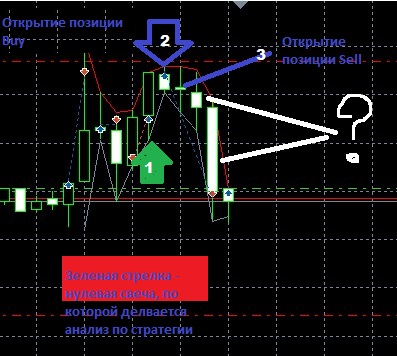
Okay, I'll try to phrase it differently.
Here is the work of the Expert Advisor in the tick generation mode based on real ticks. Number 1 with an arrow indicates a zero candle. According to the terms of the strategy, as soon as the price has rolled down from High to the distance of Rollback rate and we are in a new bar - this is a signal to open a BUY position. The Expert Advisor opened a Buy position (shown by arrow #2). The next candlestick was bearish, according to the strategy, after the formation of candlestick number 3, a Sell position should be opened. But it does not happen. Further white lines indicate candlesticks on which no trades took place. Why does this happen?
At the same time, in the generation mode "All ticks", the Expert Advisor opens positions in this place.
This Expert Advisor does not work on my netting Alpari account. I use forts quotes for testing where the Expert Advisor is tested in the tester.
Symbol RTS 6.18, time M5, 26.04.18-11.05.18.
"mode of tick generation based on real ticks" does not do what is specified in the descriptions of the EA. At the same time, the candles themselves look the same in the "All ticks" generation mode as in the "Tick generation mode based on real ticks". But in the "All ticks" mode the Expert Advisor sometimes opens Buy after the formation of a bearish bar, while in the "Tick generation mode based on real ticks" mode the Expert Advisor opens a sell position in this place.
This also greatly changes the picture in the results.
If necessary, I can make a screen of work in different modes of tick generation.
This Expert Advisor does not work on my netting Alpari account. I use forts quotes for testing, where the Expert Advisor is tested in the tester.
Symbol RTS 6.18, time M5, 26.04.18-11.05.18
p.s. I also noticed why the data is so different.
There is no difference on which symbols to test. I tested on different symbols and everywhere the EA in the"mode of tick generation based on real ticks" does not do what is specified in the descriptions of the EA. At the same time, the candles themselves look the same in the "All ticks" generation mode as in the "Tick generation mode based on real ticks". But in the "All ticks" mode the Expert Advisor sometimes opens Buy after a bearish bar is formed, while in the "Tick generation mode based on real ticks" mode the Expert Advisor opens a sell position in this place.
This also changes the picture in the results.
If necessary, I can make a screen of work in different modes of tick generation.
If you are not working with a forex symbol - I do not comment on the work of the code. Please check it on forex symbols.

- Free trading apps
- Over 8,000 signals for copying
- Economic news for exploring financial markets
You agree to website policy and terms of use
TST:
The Expert Advisor does not use any indicators. It only uses the current price and the OHLC of zero bar.
Author: Vladimir Karputov