Experts: Expert_RSI_Stochastic_MA
Hi Vladimir,
Excuse me for my english.I like this strategy.I tested it in strategy tester,but it doesn't open order.What is the problem ? I don't know MQL5 language.
Thank you
Hi Vladimir,
Excuse me for my english.I like this strategy.I tested it in strategy tester ,but it doesn't open order.What is the problem ? I don't know MQL5 language.
Thank you
Check in the terminal tab "Experts" - there should be information.
You can also provide:
- Account Login
- Password of INVESTOR (ATTENTION: INVESTOR PASSWORD, trade password is not needed)
- The name of the trading server to which you are connecting
- Balance of trading account (amount and currency)
- Leverage
Hi Vladimir,
First of all:thank you for this expert advisor.I like it so much,i optimized it for M15,it's good enough.I want to ask you to modify this strategy.At the moment the EA opens a sell position when indicators enter the overbought range. I suggest the EA should open a sell position when indicators exit the overbought range ,and the EA should open a buy position when indicators exit the oversell range. Another suggestion:two MA's work better,maybe.
Hi Vladimir,
First of all:thank you for this expert advisor.I like it so much,i optimized it for M15,it's good enough.I want to ask you to modify this strategy.At the moment the EA opens a sell position when indicators enter the overbought range. I suggest the EA should open a sell position when indicators exit the overbought range ,and the EA should open a buy position when indicators exit the oversell range. Another suggestion:two MA's work better,maybe.
At the moment, this adviser I do not plan to remodel.
OK,understood.Thank you,again.
https://www.mql5.com/en/code/18671 doesn't work on standart aplari, on esp it works, but it warns "Wrong allow Loss!", apparently it can't get the m_symbol.StopsLevel() variable from the chart.
The question is this, if I comment out these lines will it be OK? Or how can I change them to work on a standard alpari forex chart?
Thank you!
// if(ExtAllowLoss!=0 && ExtAllowLoss<m_symbol.StopsLevel())
// {
// Print("Wrong Allow Loss!");
// return(INIT_FAILED);
// }
// if(ExtTrailingStop!=0 && ExtTrailingStop<m_symbol.StopsLevel())
// {
// Print("Wrong Trailing Stop!");
// return(INIT_FAILED);
// }

- votes: 27
- 2017.08.10
- Vladimir Karputov
- www.mql5.com
https://www.mql5.com/en/code/18671 doesn't work on standart aplari, on esp it works, but it warns "Wrong allow Loss!", apparently it can't get the m_symbol.StopsLevel() variable from the chart.
The question is this, if I comment out these lines will it be OK? Or how can I change them to work on a standard alpari forex chart?
Thank you!
1. The code should be inserted in the following way: Inserting the code correctly on the forum.
2. "... cannot get the m_symbol.StopsLevel() variable from the chart ... " is an incorrect statement. Just print it out before checking it:
- what you set as Stop Loss
- what m_symbol.StopsLevel() produces
1. I'll correct myself, next time I'll put the code in correctly.
2. As a stop loss we set the parameter 30. In the debugger m_symbol.stoplevel() I insert into the variables window to see the value, I get an error.
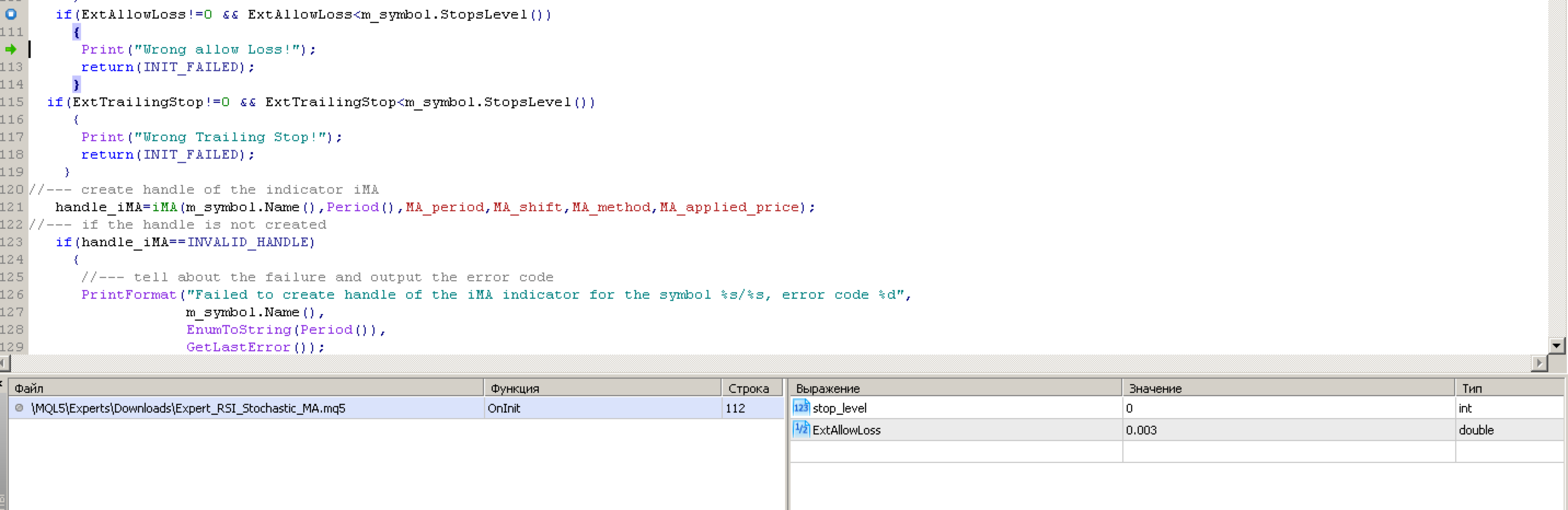
Enter a new variable (only for debugging purposes) and observe its value:
int stop_level=m_symbol.StopsLevel();ds
Done:

- Free trading apps
- Over 8,000 signals for copying
- Economic news for exploring financial markets
You agree to website policy and terms of use
Expert_RSI_Stochastic_MA:
The Expert Advisor uses three indicators: MA(150), RSI(3) with levels 80 and 20, Stochastic(6, 3, 3) with levels 70 and 30.
Author: Vladimir Karputov